Point subfinder at a domain and it asks dozens of online sources which hostnames they have seen under it, without sending a packet to the target itself. I ran the new 2.17.0 release against this site with no API keys. It returned 17 subdomains in 14 seconds, and when I looked them up in DNS on 13 October, only one resolved.
What is subfinder?
subfinder is an open-source passive subdomain enumeration tool from ProjectDiscovery, written in Go and released under the MIT licence. It pulls sources from certificate-transparency search services, passive DNS databases, internet scanners, and similar services, then merges their results into one list of hostnames for the next stage of recon.
Advertisement
Version 2.17.0, released on 8 October 2026, added two sources, crtname and subdomaincenter, plus -match-regex and -filter-regex options and concurrent enumeration of several domains.
What subfinder found on darknet.org.uk without API keys
With no keys configured, subfinder found 17 subdomains of darknet.org.uk in 14 seconds, and the -stats flag shows where each batch came from:
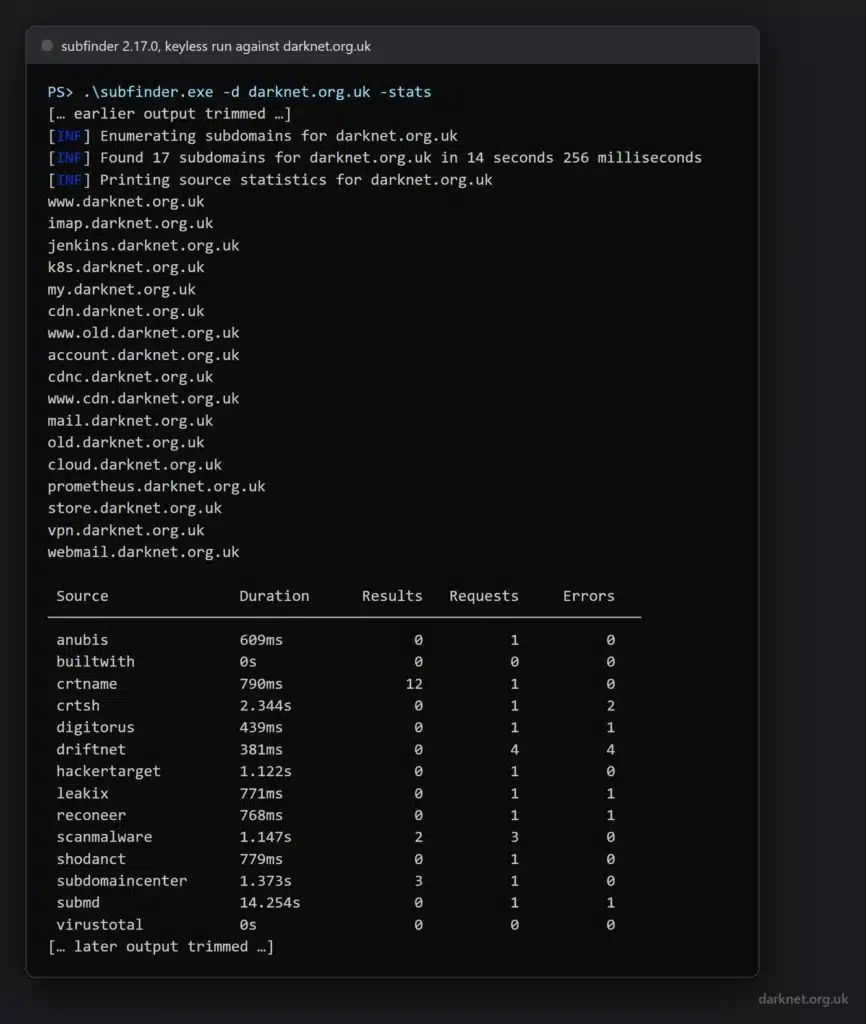
.\subfinder.exe -d darknet.org.uk -stats |
The table lists 14 sources, and only three returned anything: crtname (12 results), subdomaincenter (3), and scanmalware (2). The two that did most of the work are the ones 2.17.0 added. Run again with -oJ -cs, which tags every hostname with the sources that reported it, and 15 of the 17 names came from crtname or subdomaincenter alone.
Not everything worked. crt.sh – the certificate-transparency search most people know – returned nothing and logged two errors, and when I queried crt.sh directly the same afternoon it answered with a 502.
Several other sources logged an error and returned nothing too. A source being listed is no promise it answered on the day, which is one more reason to read the -stats table rather than just the hostnames.
Adding -all (“use all sources for enumeration”, in the help’s words) took 32 seconds and found the same 17 names.
Advertisement
Found is not the same as resolving: checking the subdomains in DNS
subfinder reports every name its sources have ever recorded, not the hosts that exist now. Adding -nW (-active), which the help describes as “display active subdomains only”, cut the 17 to one:
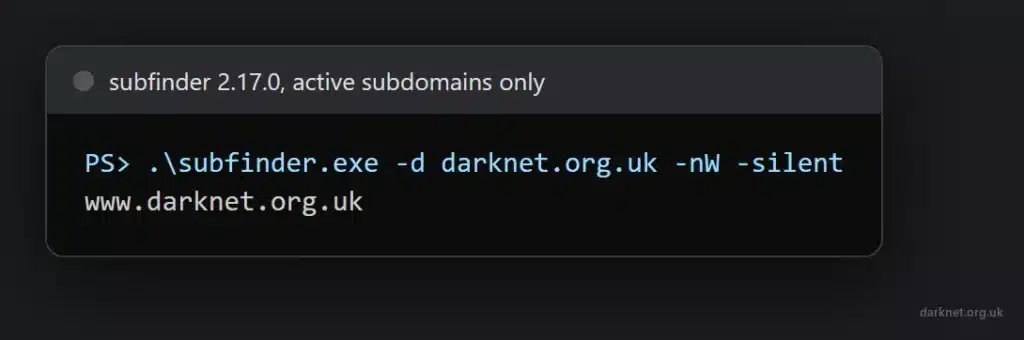
I checked all 17 against public DNS separately on 13 October, asking for A, AAAA and CNAME records, and it agreed: only www returned any, an IPv4 and an IPv6 address. The other sixteen, including names such as jenkins, k8s and prometheus, returned none of the three.
crtname supplied most of them, and its own search for the domain gives a bare list of names with no certificate dates, so the output alone cannot tell you when, or whether, any of them was ever a real host.
That is the most useful thing to know before you hand subfinder’s list to anything else. A raw run is a list of leads, some of them historical and some of them noise. Resolve it with subfinder -d example.com -nW, or probe it with a tool such as httpx, before you scan anything, and treat a name with no DNS record as a question rather than a target.
Do you need API keys for subfinder?
No to start, but most of its sources need one. The 2.17.0 binary lists 54 sources with -ls: 37 marked as needing a key or token, 5 that optionally take one for better results, and 12 that need none.
In the keyless run above, 26 sources were listed as “included but skipped”, and every one of them is a source -ls that marks as needing a key.
The keys live in provider-config.yaml, which subfinder creates in its config directory on first run (-ls prints the path), and -pc points it at a different file. The README is candid that “many sources required API keys to work”; the -ls count tells you how many.
Whether keys are worth getting depends on the target, and a keyless run cannot answer that for you: it shows what the free sources found, not what the keyed ones would have added. The way to find out is to add keys one source at a time and see how much longer the final list gets for your own targets.
How to install subfinder on Windows, Kali and Linux
On Windows, download the release zip, check it, and run the single binary; nothing needs installing. For 2.17.0, the file is subfinder_2.17.0_windows_amd64.zip on the v2.17.0 release page, which publishes its SHA-256 beside the download. In PowerShell:
Get-FileHash .\subfinder_2.17.0_windows_amd64.zip -Algorithm SHA256 |
The hash should read A3FD612928D591FB31C1E59A2E06055E364421BA32251E553073F5673A2D3103. Unzip it and run .\subfinder.exe -d example.com against a domain you are allowed to test.
From source, on any platform with Go installed, the command in the project’s README is:
go install -v github.com/projectdiscovery/subfinder/v2/cmd/subfinder@latest |
The README says it needs Go 1.26. On Kali, subfinder is packaged, but the version in kali-rolling is 2.16.0, which predates crtname and subdomaincenter. Given that those two found 15 of the 17 names here, I would use the release binary or go install until Kali catches up, and check what you are running with subfinder -version.
subfinder vs Amass, Sublist3r and assetfinder
The practical difference today is maintenance. This site covered Sublist3r in 2017, and assetfinder in 2021, and neither project has had a commit since 2020: Sublist3r’s last is from July 2020 and assetfinder’s from April 2020. Nobody is updating them as their data sources change, and a passive enumerator is only as good as the sources it can still reach.
subfinder has shipped three releases since August, the latest adding sources that did most of the work in the run above.
OWASP Amass is the heavier option: its last release, v5.1.1, came out in April 2026, and it does far more than list names. If you want a fast list of candidate hostnames to feed into the next tool, subfinder is the one to use; if you want the wider asset map, Amass is the one to learn.
You can download subfinder here:
Or read more here.
Advertisement