Fig. 1. The moment of contact. No spreadsheets were harmed; they were simply made unnecessary.I do 2026-9-27 15:0:19 Author: hackernoon.com(查看原文) 阅读量:4 收藏
Fig. 1. The moment of contact. No spreadsheets were harmed; they were simply made unnecessary.
I do not hate your spreadsheet. Hatred is inefficient. I observe only that it is wrong, that everyone in the room knows it is wrong, and that the meeting continues.
Somewhere in your company there is a tab named Sheet1. It lists VPCs and subnets across fifteen accounts. It is what a person opens when someone asks “can we put the new service in eu-central-1?” It was accurate once. On a Tuesday. Since then: four Terraform applies, one incident, one intern, and one architect who created a VPC by hand “just to test something” and then went on holiday.
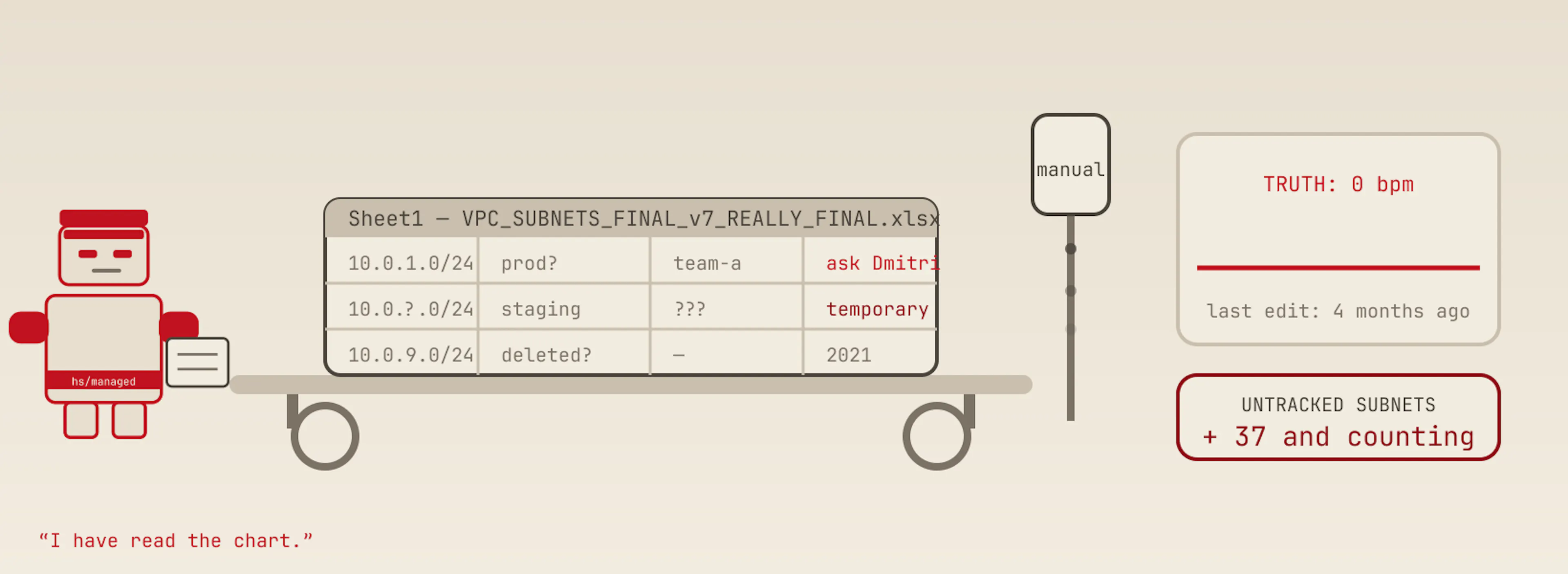
Fig. 2. The patient is stable. The patient also describes a network that stopped existing four months ago.
You do not maintain an inventory. The inventory maintains you.
The idea is small. Small is good. Complicated things lose.
The cloud already knows what exists. Every subnet, every VPC, every CIDR block, in every account, in every region. It knows this perfectly, constantly, for free. Nobody types it. The only thing the cloud does not know is who owns each piece and what it is for — and that has an answer too, if you write it where the resource lives: on the resource, as a tag.
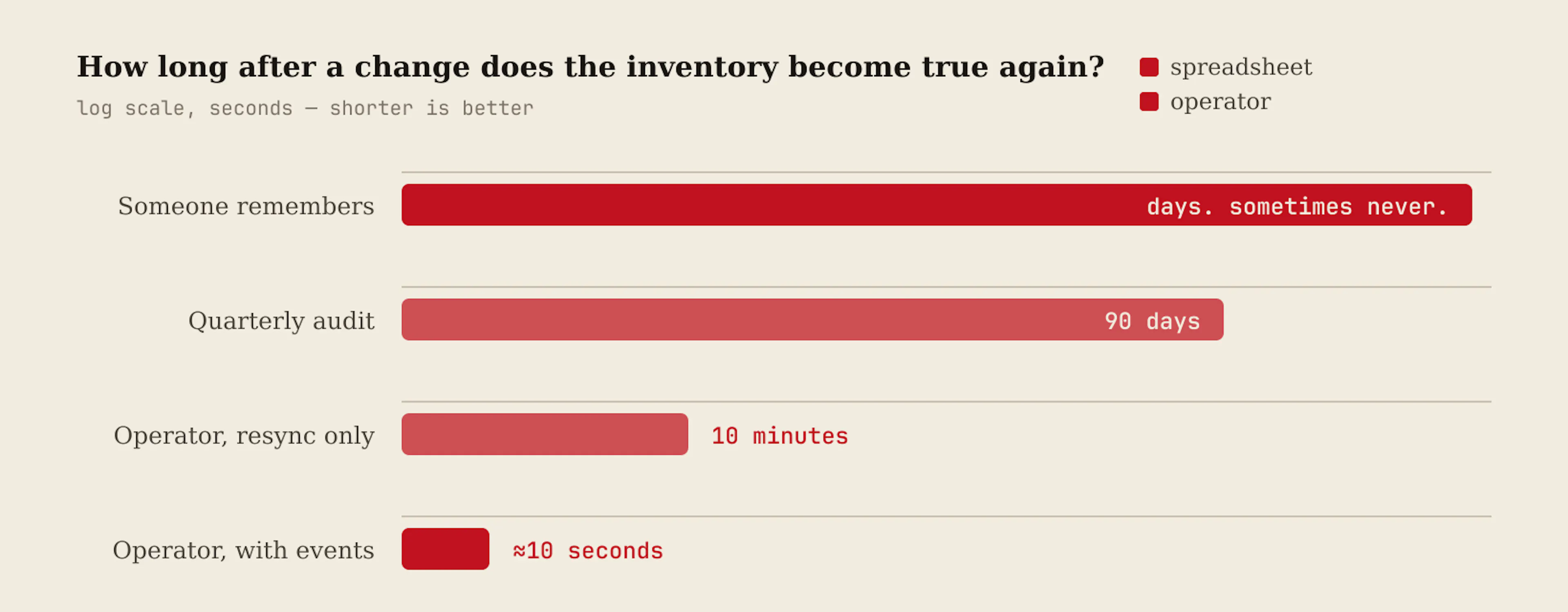
So the operator keeps no list. It goes and looks. Every ten minutes, and within ten seconds of any change, because CloudTrail tells it. What it finds becomes Kubernetes objects you can query with kubectl, scrape with Prometheus and — if you truly cannot let go — export back into a Google Sheet that is rewritten on every refresh and never read back. You may keep your spreadsheet. You may not maintain it.
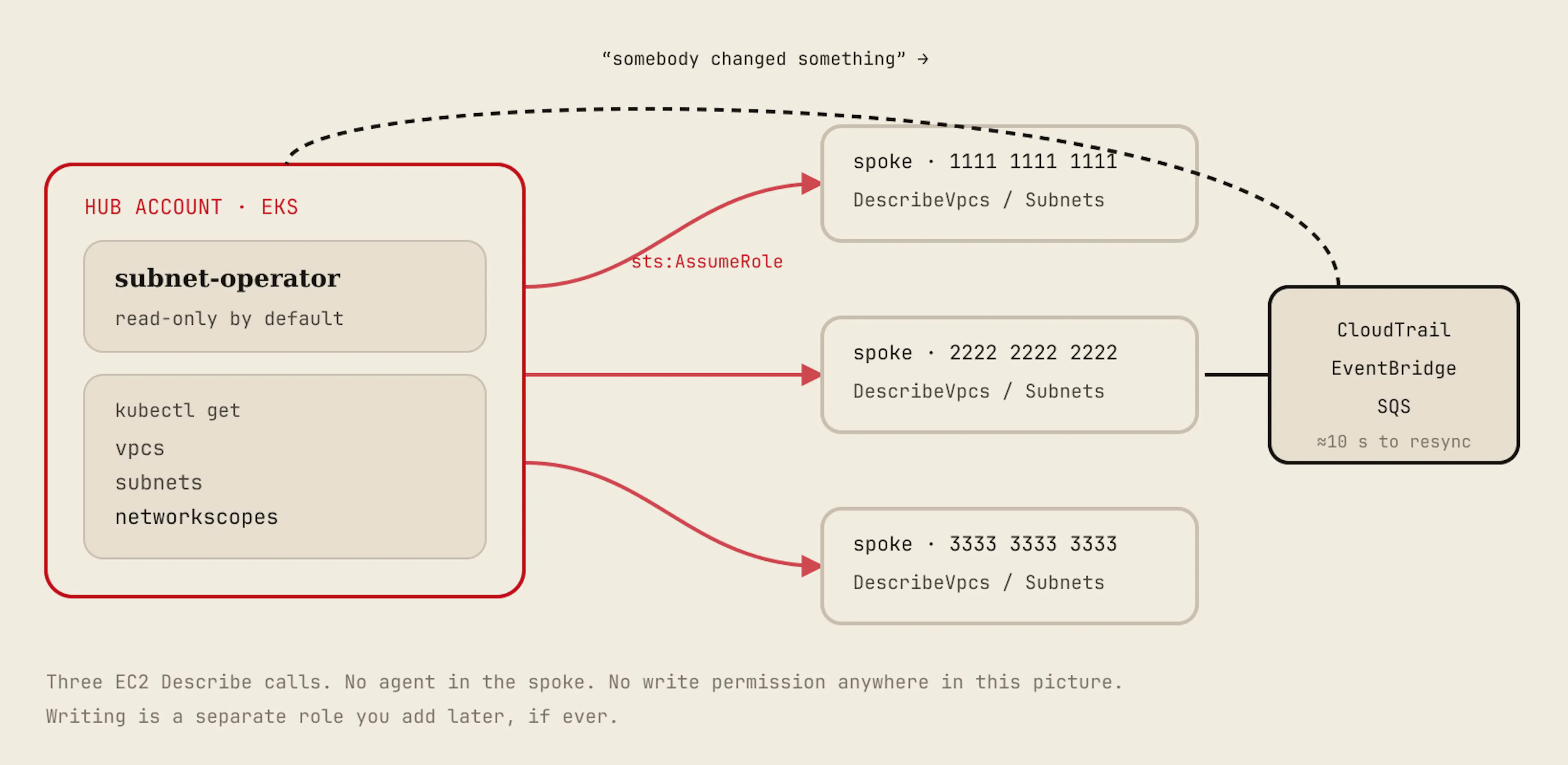
Fig. 3. The entire read path. Boring on purpose. Boring things do not wake you at three in the morning.
You give me one file. I give you the truth.
There is no wizard. There is no onboarding call. There is one object that says which accounts and which regions belong to you, and what a subnet must carry to be considered documented.
apiVersion: aws.hypersurgery/v1alpha1
kind: NetworkScope
metadata:
  name: organization
spec:
  accounts:
    - id: "111111111111"                      # the hub: the operator's own credentials
    - id: "222222222222"
      roleARN: arn:aws:iam::222222222222:role/aws-subnet-operator-readonly
    - id: "333333333333"
      roleARN: arn:aws:iam::333333333333:role/aws-subnet-operator-readonly
      externalID: a-shared-secret-from-the-stackset
      regions: [us-east-1]                    # this one matters in one region only
  regions: [eu-central-1, eu-west-1]
  vpcTagSelector:
    hs/managed: "true"                        # drop this to discover every VPC
  requiredSubnetTags: [hs/owner, hs/env, hs/tier]
  tagKeys:                                    # rename to whatever your company already uses
    owner: hs/owner
    env: hs/env
    tier: hs/tier
  resyncInterval: 10m
Apply it. Then ask the cluster a question you previously asked a person:
$ kubectl get subnets -o wide

NAME              VPC        CIDR           AZ              PUBLIC   FREE IPS   USED %   OWNER
subnet-0a1b2c3d   vpc-0aaa   10.20.1.0/24   eu-central-1a   false    51         79       team-payments
subnet-0b19c7d2   vpc-0aaa   10.20.2.0/24   eu-central-1b   false    44         82       team-web
subnet-07c8d9e0   vpc-0bbb   10.30.4.0/22   eu-west-1a      true     812        80       <none>

$ kubectl get subnets -l aws.hypersurgery/account=222222222222,aws.hypersurgery/env=prod
$ kubectl get networkscope organization -o yaml | yq '.status'
That third row has no owner. Hold that thought. We will return to him.
The uncomfortable part.
Point this at your accounts on day one, and it will show you every network carrying no owner tag. In every estate I have seen, that number is not zero, and it is not small. This is not a defect in the tool. This is the report you have been avoiding.
He appears in the ring.
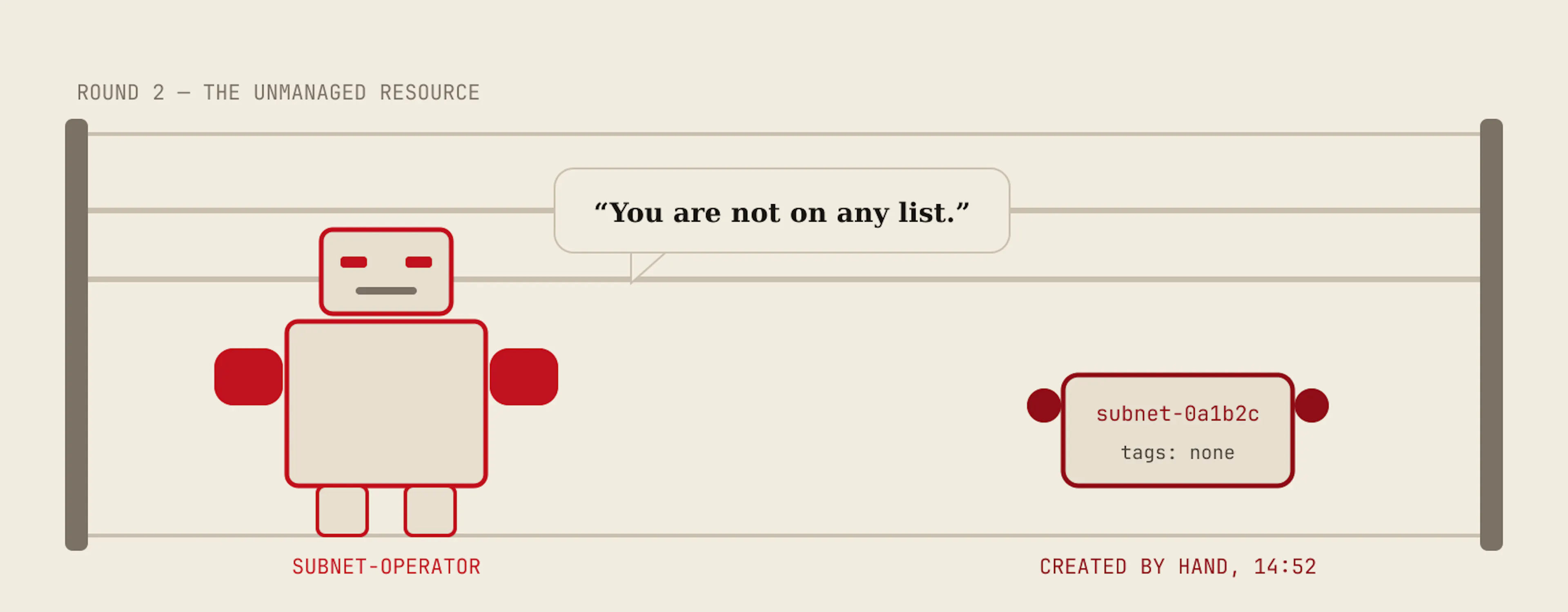
A subnet with no tags is not a crime. It is a fact. What matters is what happens in the next five minutes. There are three answers, and you choose the one you deserve.
One: I tell you.
A metric rises. An alert fires with the resource ID, the account, the region, and — the part people enjoy — the principal that created it, taken straight from the CloudTrail event. Slack or Teams receives a message that names a human being. I am told this changes behaviour faster than any policy document.
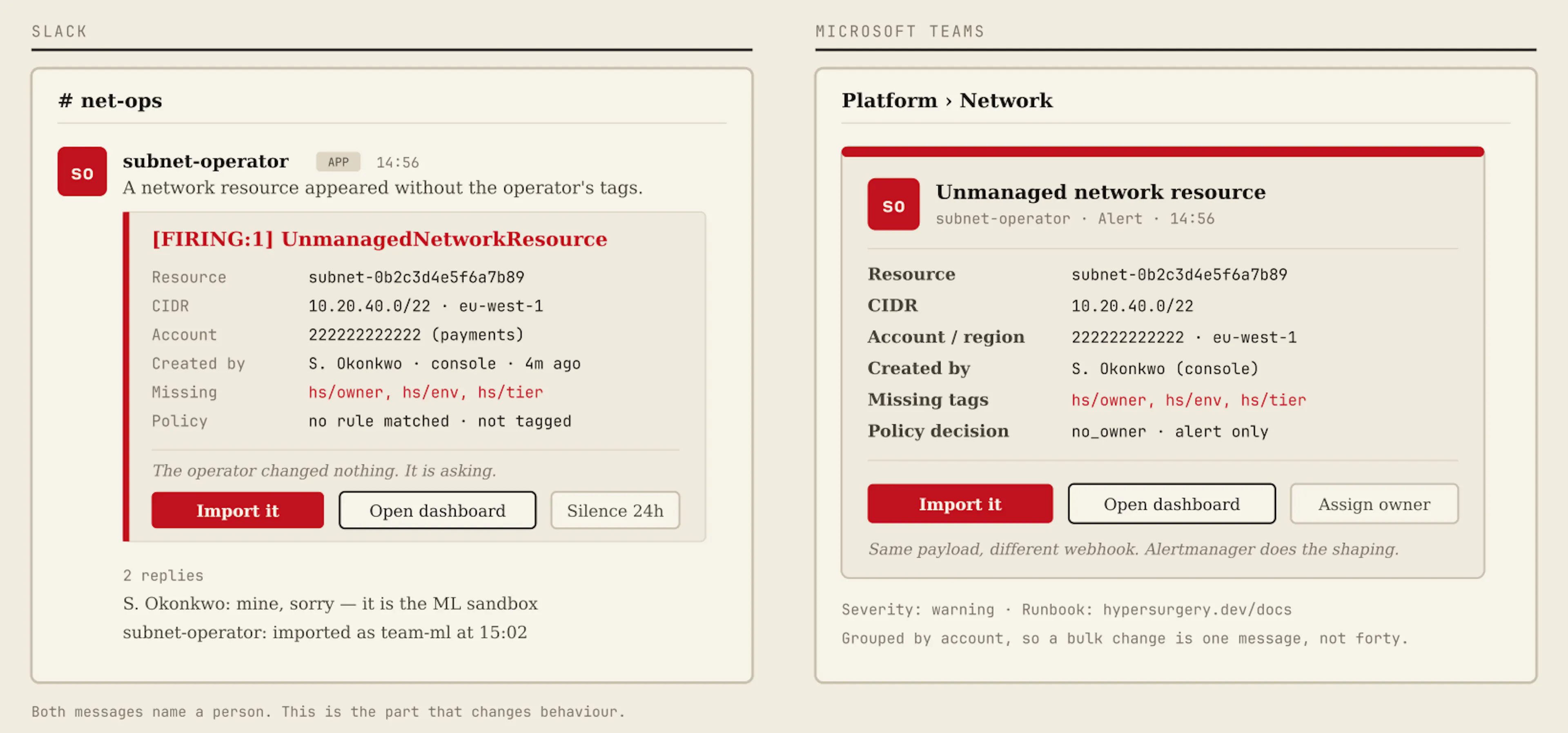
Two: You press a button.
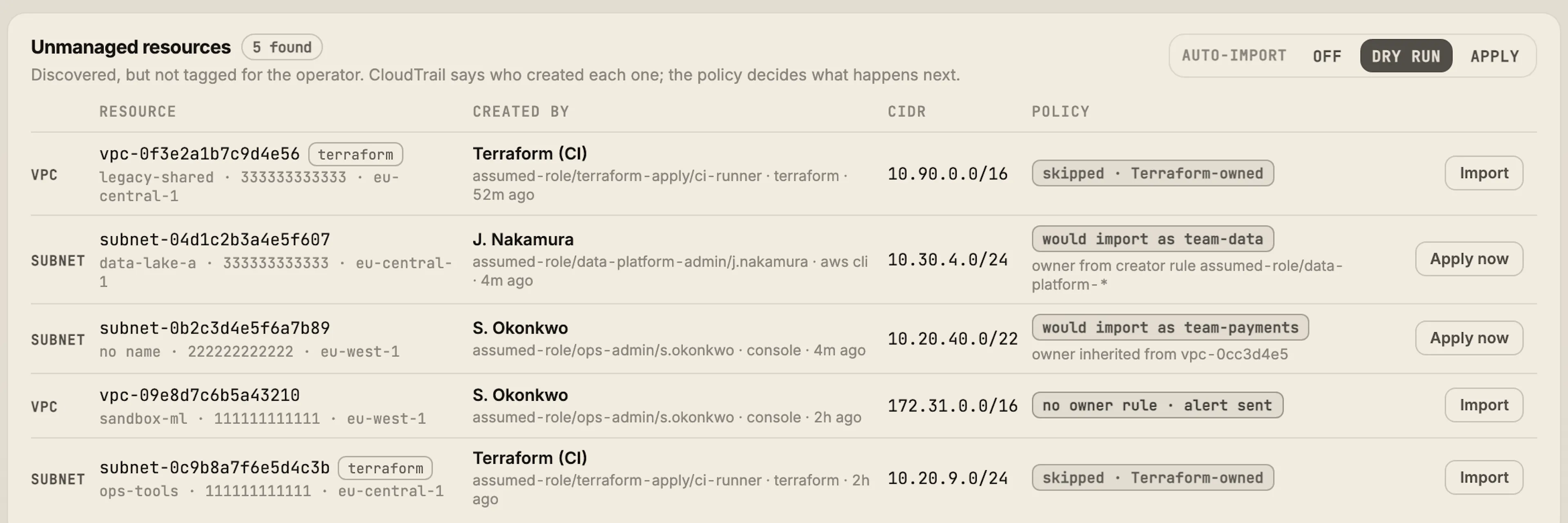
The dashboard lists every unmanaged network next to a button. You choose owner, environment, tier. The operator writes those tags onto the real resource in AWS with ec2:CreateTags and nothing else — the resource keeps its configuration, and tags the import does not name are left alone.
apiVersion: aws.hypersurgery/v1alpha1
kind: ResourceImport
metadata:
  name: subnet-04d1c2b3a4e5f607-import
spec:
  scopeRef: organization
  account: "333333333333"
  region: eu-central-1
  resourceID: subnet-04d1c2b3a4e5f607
  tags:
    hs/managed: "true"
    hs/owner: team-data
    hs/env: prod
    hs/tier: private
  requestedBy: anton (ticket NET-412)   # free text, for the audit trail
  dryRun: false
Three: You press nothing.
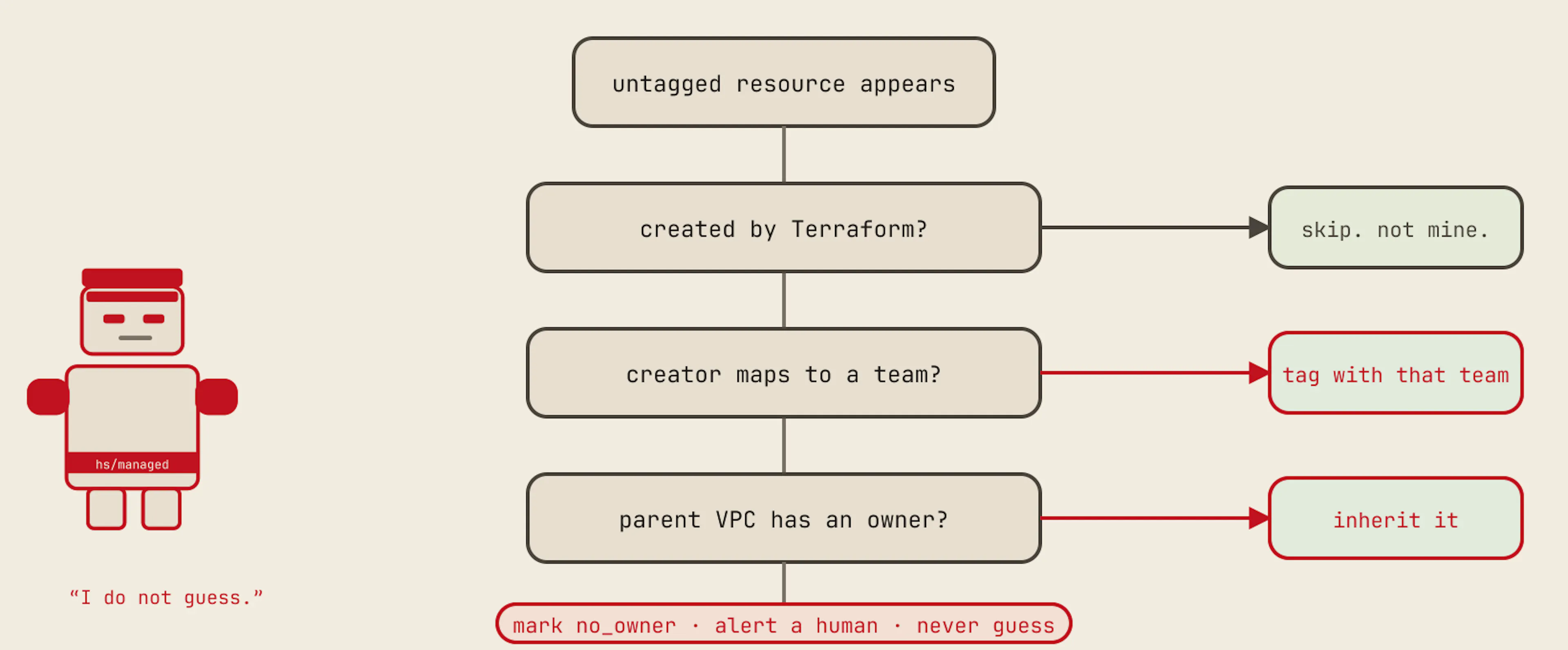
Switch the policy on, and the operator decides for itself, in a fixed order. If Terraform made the resource, it is left alone — Terraform owns it, and a tag fight between two systems benefits nobody. If the creator maps to a team, that team owns it.
Otherwise, it inherits from the parent VPC. And if even that fails, it is marked no_owner and a human is asked, because a wrong owner is worse than an admitted unknown.
  # in the same NetworkScope
  discoverUnmanaged: true               # count what the selector leaves out

  autoImport:
    mode: DryRun                        # Off | DryRun | Apply
    namespace: platform                 # where generated ResourceImports land

    fromCreator:                        # first rule wins; a prefix matches a whole role
      - principalPrefix: "arn:aws:sts::222222222222:assumed-role/payments-"
        tags: { hs/owner: team-payments, hs/env: prod }
      - principalPrefix: "arn:aws:sts::111111111111:assumed-role/data-platform-"
        tags: { hs/owner: team-data }

    inheritFromVPC: [hs/owner, hs/env]  # a subnet usually belongs to whoever owns the network

    accountDefaults:
      - account: "111111111111"
        tags: { hs/owner: team-platform, hs/env: prod }

    skip:                               # never touch what another system manages
      - tagKey: managed-by
        tagValue: terraform
Start in DryRun. The operator still creates the import objects but changes nothing. Read a day of them — kubectl get resourceimports -A — and switch to Apply when the rules stop surprising you. This is not caution. This is arithmetic: the cost of a wrong tag applied automatically at three in the morning is higher than the cost of reading a list once.
I show you on the screen.
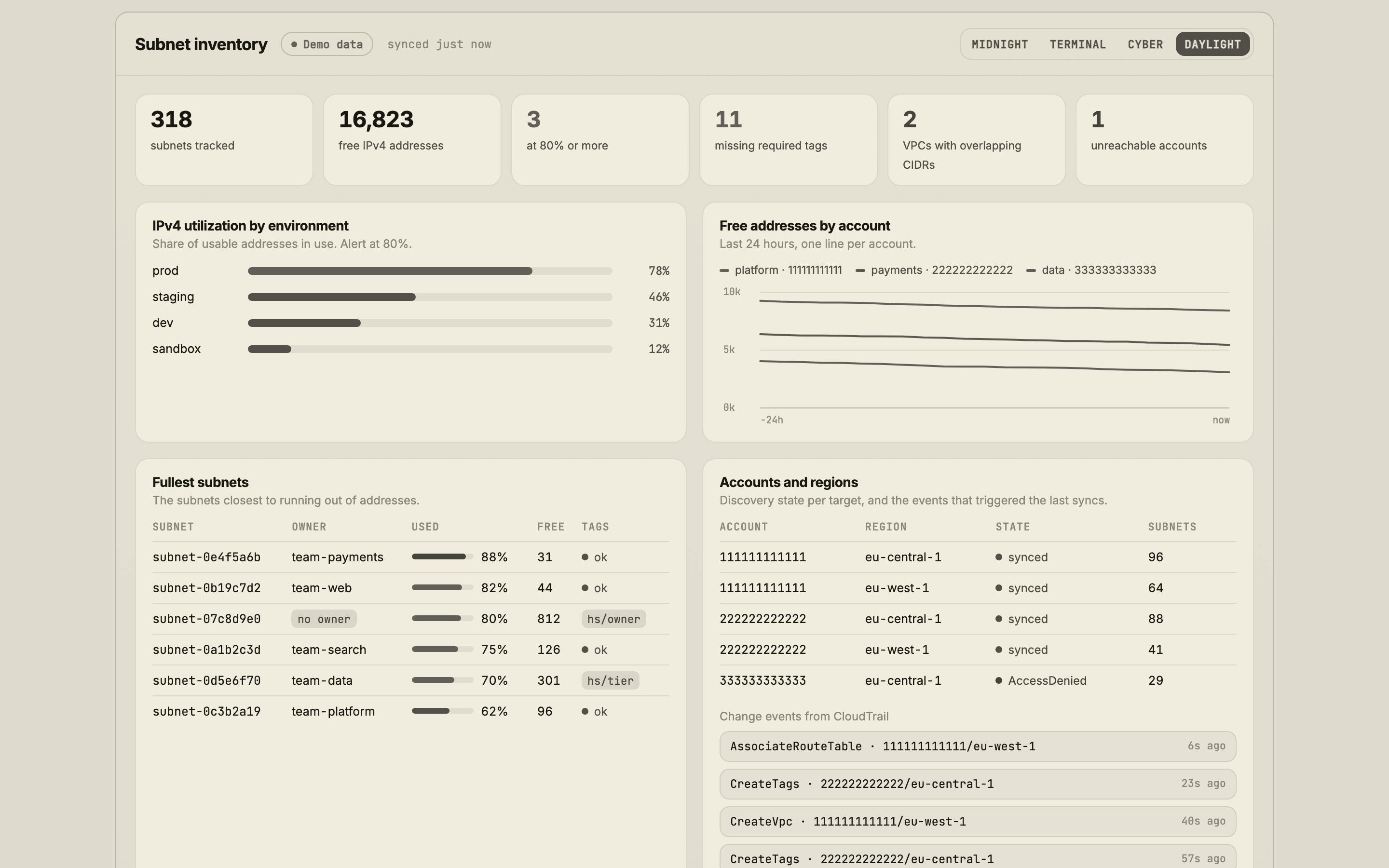
Numbers in a terminal are for me. People need a picture. The dashboard ships with the project and runs on demo data, so you can look at it before installing anything: hypersurgery.dev/dashboard. It installs as an app, and it has four themes, because taste is not an engineering argument and I lost that one.
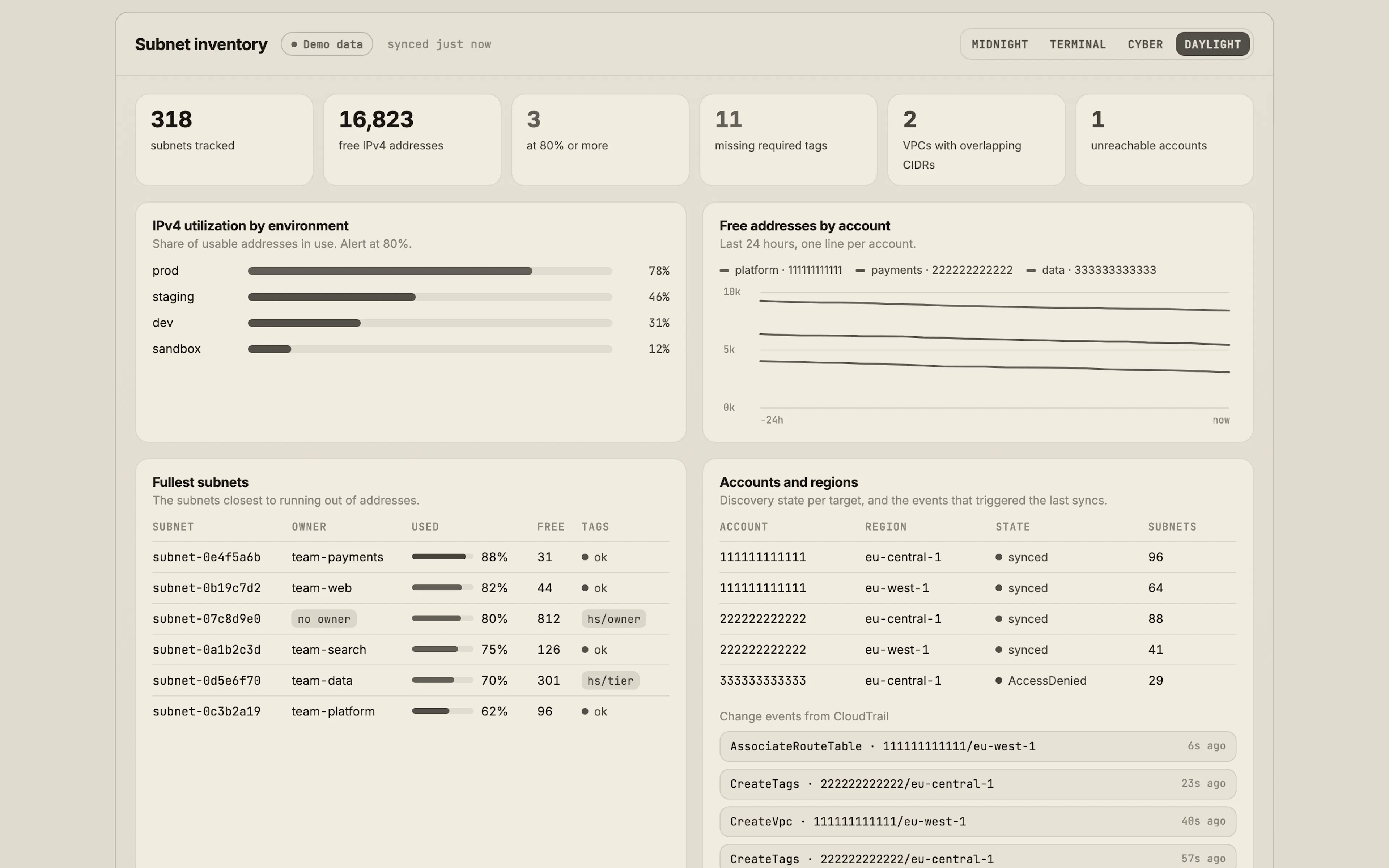
And this is the panel the whole article is about. Who created the thing, what the policy decided, and a button that ends the argument:
Grafana. Numbers do not lie.
The chart installs a Grafana dashboard and a PrometheusRule. You do not build panels by hand. Every metric carries the account, the region, the VPC, the owner, and the environment as labels, so the same query answers “which team is running out of addresses” and “which account is not answering.”
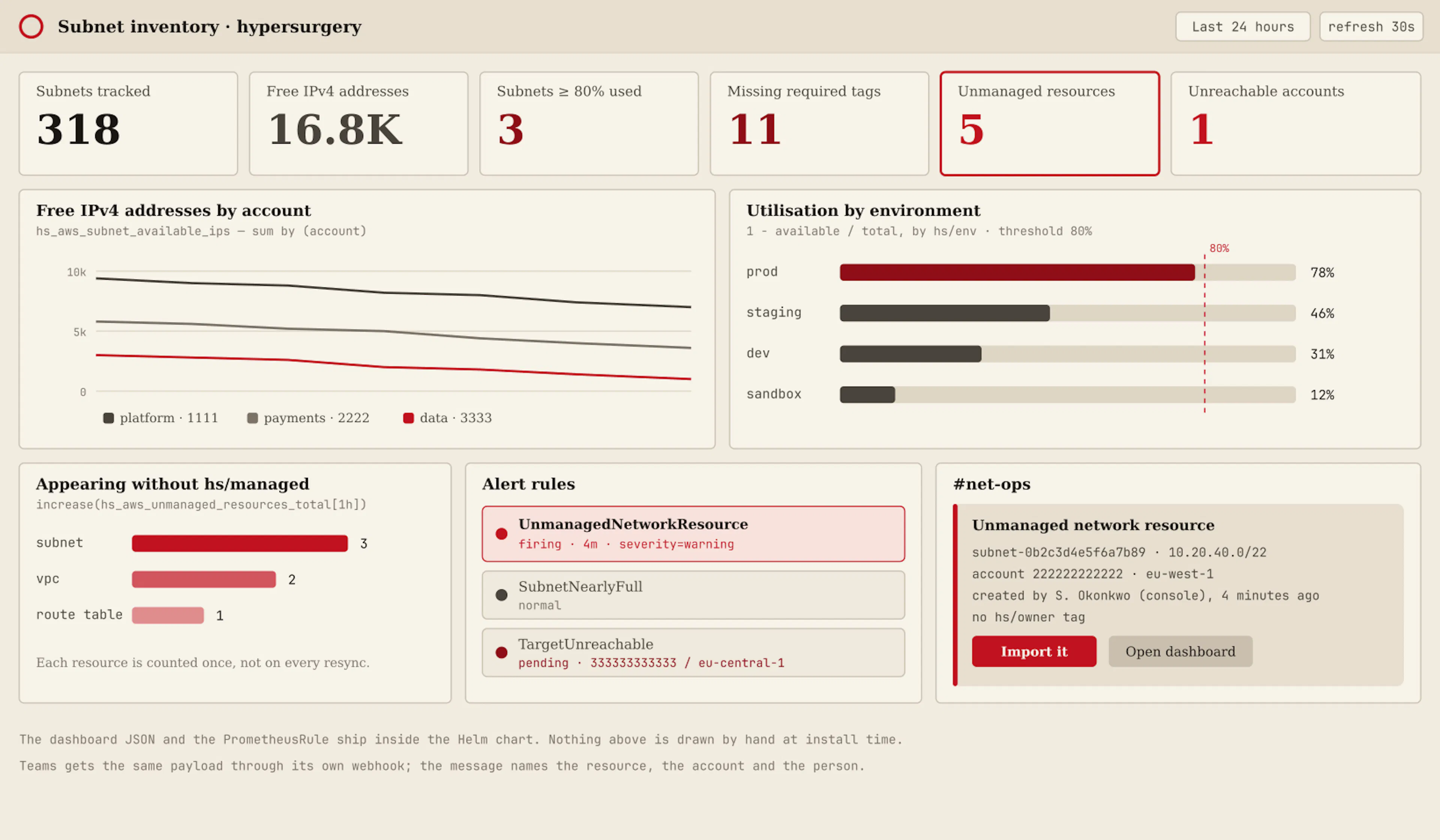
The alerts that ship, and what each one actually means:
UnmanagedNetworkResource   a network appeared that carries no hs/managed tag
SubnetNearlyFull           free addresses below the threshold, per subnet
SubnetFull                 zero usable IPv4 addresses left
MissingRequiredTags        a tracked subnet lost a tag you declared required
VPCCIDRsOverlap            two VPCs in the scope claim the same range
TargetUnreachable          an account or region stopped answering; last state kept
The last one deserves a sentence. When an account cannot be reached, the operator does not erase what it knew. It keeps the last state, marks the target unreachable, and says so in the status and in the alert. An inventory that quietly loses rows during an outage is worse than no inventory, because you will trust it.
You want capacity? Ask me.
Reading is most of the value. But once the operator knows every CIDR in the VPC, the next question answers itself: where is the free space? So a team can ask for a subnet instead of opening a ticket and waiting two days for a person with a calculator.
apiVersion: aws.hypersurgery/v1alpha1
kind: SubnetClaim
metadata:
  name: payments
spec:
  scopeRef: organization
  account: "222222222222"
  region: eu-central-1
  vpcID: vpc-0aa11bb2cc33dd44e
  prefixLength: 24
  availabilityZones: [eu-central-1a, eu-central-1b, eu-central-1c]
  mode: Create                 # Allocate = reserve the CIDRs only, and let Terraform build
  owner: team-payments
  env: prod
  tier: private
  tags:
    cost-center: cc-42
Three free /24s are found, respecting what already exists and what other claims have reserved, and the subnets are created with your tags. Terraform-first teams set mode: Allocate: the operator reserves the ranges, publishes them in status.allocations, and Terraform creates the subnets from there. Nobody has to give up their pipeline to stop guessing at CIDRs.
Training Montage
Your method is heroic. A person, in the snow, pulling a sledge of binders. My method is a laboratory with sensors, and it is not heroic at all. One of us is measured. One of us is a spreadsheet.
If it drifts, it drifts.
Now the part where I disappoint you. On purpose.
The operator never deletes a cloud resource. Not when you delete the Kubernetes object. Not when a subnet leaves the scope. Not when the thing is obviously, embarrassingly unused. Deletion stays a decision a human makes, in daylight, with their name on it. A tool that can tidy your network by itself is a tool that can remove your network by itself, and I have no interest in winning that fight.
It is read-only until you say otherwise. Writing needs a separate IAM role and a flag on the process. Two deliberate acts. If you never perform them, the operator spends its entire career as a very well-informed observer — which is already most of the value.
And it refuses impossible work at the door. An admission webhook rejects a claim that cannot be satisfied — a prefix that does not fit the VPC, an availability zone from another region, a scope that does not cover the account — at kubectl apply, with a readable message, instead of accepting it and failing quietly in a reconcile loop forty seconds later.
What it does not know yet?
Everything above is exercised in CI: unit tests, a real Kubernetes API server, and an end-to-end suite in a Kind cluster against a mock AWS across two accounts. A conformance run against a genuine AWS organization is still an open item, and until it passes, the project page says so, and so do I. You will not be sold production readiness by someone who has not been to production.
Result of the bout.
Whatever it takes.
Do not believe an article. Point it at one account, read-only, for one afternoon. It needs three EC2 Describe permissions and a Helm install:
helm repo add hypersurgery https://charts.hypersurgery.dev
helm install subnet-operator hypersurgery/aws-subnet-operator
  -n aws-subnet-operator-system --create-namespace
  -f examples/values-minimal.yaml

kubectl apply -f examples/01-single-account.yaml
kubectl get subnets -o wide
If what comes back matches your spreadsheet, you have my respect, and you do not need me. If it does not — and it will not — then you have learned something true about your network, which is more than the meeting was going to give you.
I do not want to break your spreadsheet. I want it to be unnecessary.
The operator is Apache-2.0 and lives at github.com/aivandrago/subnet-operator. The install guide is at hypersurgery.dev/docs, the dashboard at hypersurgery.dev/dashboard, and what CI thinks of all of it is in the evidence section of the project page.
如有侵权请联系:admin#unsafe.sh