As elaborated in a prior post, sites and services often try to use an IP address as an input int 2026-9-24 18:39:26 Author: textslashplain.com(查看原文) 阅读量:3 收藏
As elaborated in a prior post, sites and services often try to use an IP address as an input into protection (e.g. blocking a spammer) or customization (providing local weather info) algorithms.
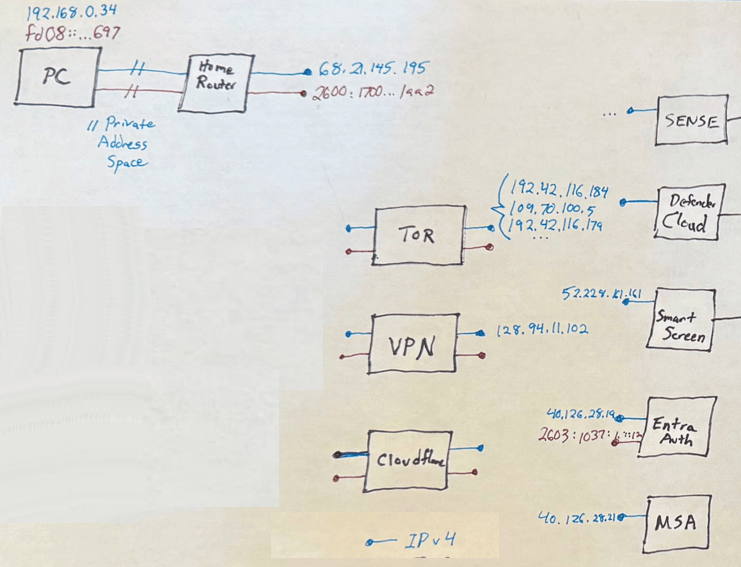
Commonly, software would like to know “What is this device’s IP address?” Unfortunately, this is not a trivial question to answer, because it makes several incorrect assumptions:
- That the client device only has one IP address
- That network packets received by a service from the client device will have that IP address as the
remote_addr.
Both of these assumptions are incorrect, in several ways.
Devices may have multiple network adapters, each with their own address. Those adapters may be “physical” (e.g. a network card) or “virtual” (e.g. a VPN adapter). Each network adapter may itself have multiple addresses, which is almost universally true for modern devices that support both IPv4 and IPv6.
It is commonly the case that client requests are sent from networks that change the source address as the traffic flows (e.g. “Network Address Translation”). For example, many home users connect to the Internet from behind a WiFi router linked to their Internet Service Provider over a fiberoptic connection. In such cases, the web server will commonly see the IP address of the router, not the “private” address of the user’s PC.
Similarly, users may use VPNs, Tor, proxies, iCloud Private Relay, Oblivious HTTP, or other networking features that result in the server having a different perspective of the client’s network address.
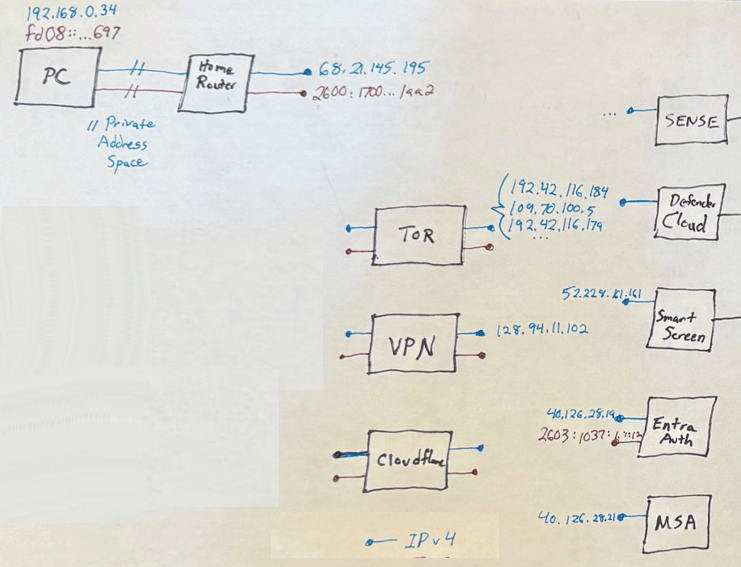
In cases where a scenario requires a client to understand the “Internet’s perspective” of the client’s IP address, technologies like STUN may be used.
IPv6 Background
The vast majority of relevant internet traffic reaches its destination by way of Internet Protocol addresses. These numeric addresses exist in one of two families: IPv4 addresses are 32-bits in length and can reference around 3.7 billion routable endpoints, while IPv6 addresses are 128 bits long and can reference approximately 42 undecillion endpoints.
To accommodate the public internet which uses both IPv4 and IPv6 addresses, most clients and servers support both IPv4 and IPv6 simultaneously (“Dual Stack”), such that a given client device will have multiple addresses, at least one from each family. Web servers that offer support for both families will register both addresses in DNS. An A query for the fully-qualified domain name will return the IPv4 address, while an AAAA query will return the IPv6 address.
For example, sending both A and AAAA queries to DNS for example.com returns 104.18.27.120 and 2606:4700::6812:1a78 respectively.
Address family choice applies to the connection: when connecting to an IPv4 server address, the client uses its IPv4 client address, and when an IPv6 server is connected, the connection originates from a client’s IPv6 address.
There is usually no direct relationship between a client’s IPv4 and IPv6 addresses.
A given client may be configured to support both address families or only one. It may be designed to prefer a given family, or “race” parallel connections to both families to prefer whichever works more quickly. On Windows, the decision about whether IPv6 or IPv4 is used varies based on:
- Device Configuration (RFC 6724, prefix table, adapters)
- DNS results (RFC 3596, A, AAAA records)
- Happy Eyeballs (RFC 8305, which is timing and blocked connection fallback)
- Network QOS fallback (latency, packet loss, etc)
For example, when navigating a browser to Bing.com, a Microsoft service that supports both IPv4 and IPv6:
- The browser DNS query returns records for both AAAA (IPv6) and A (IPv4) queries
- Windows TCP/IP “prefers” IPv6 and that’s what Windows will try first
- The TCP/IP stack starts IPv6 connection attempt
- The TCP/IP stack waits ~300 ms, and will then try establishing an IPv4 connection
- Whichever connection succeeds first wins, the other is abandoned
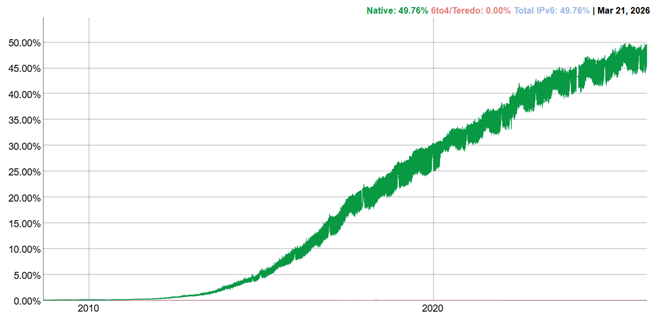
Today, approximately half of Internet traffic occurs over IPv6:
Understanding Address Family Preference
The command netsh interface ipv6 show prefixpolicies displays the IPv6 Prefix Policy Table, which determines the order in which a computer selects IP addresses when multiple options are available (e.g., deciding whether to prefer IPv6 over IPv4). The table is a set of rules to rank destination and source addresses.
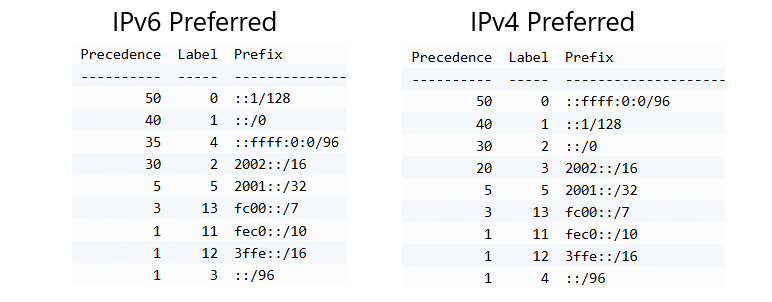
By default, Windows prefers IPv6 (::/0 at precedence 40) over IPv4-mapped (::ffff:0:0/96 at precedence 35).
- Precedence: The “weight” or priority. A higher number means a higher priority. For example,
::1/128(Loopback) has a precedence of 50. - Label: A value used to match source addresses with destination addresses. If a source and destination have the same label, they are preferred for each other.
- Prefix: The specific IP range the rule applies to.
::1/128: The local machine (Loopback).
::/0: Default IPv6 unicast.
::ffff:0:0/96: This represents IPv4 addresses mapped into IPv6.
To change the priority of IPv4 so that it is preferred over IPv6, adjust the precedence of the IPv4-mapped IPv6 prefix (::ffff:0:0/96).
Preventing Tracking
When looking at your IPv6 address in Windows, you might find something surprising: there are several described as Temporary IPv6 Address, and they change.
The Temporary IPv6 Address feature in Windows (technically known as Privacy Extensions for SLAAC) is a security mechanism designed to prevent third parties from tracking your device’s activity across the internet as you move between networks or over long periods of time.
1. The Problem: The “EUI-64” Privacy Leak
In the early days of IPv6, addresses were typically generated using Stateless Address Autoconfiguration (SLAAC). To ensure every device on a network had a unique address, SLAAC often used the device’s MAC address to fill in the second half (the Interface Identifier) of the 128-bit IPv6 address.
This method, called EUI-64, created two major privacy risks:
- Device Fingerprinting: Since your MAC address is globally unique and burnt into your hardware, your device could be identified regardless of which network you joined (home, coffee shop, or office).
- Activity Tracking: Websites could correlate your traffic over days or weeks because your IPv6 address remained constant.
2. The Solution: RFC 4941 (Privacy Extensions)
To solve this, the IETF introduced RFC 4941, which Windows implements as the “Temporary IPv6 Address.” Instead of using your hardware’s MAC address, Windows generates a random 64-bit number for the interface identifier.
How Windows Generates the Address
- Randomization: Windows uses a pseudo-random algorithm to create the interface ID.
- Uniqueness Check: Before using it, Windows sends a “Neighbor Solicitation” message to ensure no one else on the local network is using that specific random ID.
- Hiding the MAC: Your actual MAC address is never exposed to the outside world in these packets.
3. The Lifecycle of a Temporary Address
Windows doesn’t just create one temporary address; it manages a rotating pool of them based on specific timers. This ensures that even if one temporary address is tracked, it will soon “expire” and be replaced.
| State | Description |
| Preferred | The address is active and will be used for all new outgoing connections (e.g., opening a new website). |
| Deprecated | The address is no longer used for new connections, but existing connections (e.g., a file download in progress) can continue using it until they finish. |
| Expired/Invalid | The address is deleted from the system entirely. |
By default, Windows follows these intervals:
- New Temporary Address: Generated every 24 hours.
- Preferred Lifetime: 24 hours (after which it becomes Deprecated).
- Valid Lifetime: 7 days (after which it is Deleted).
4. Temporary vs. Public (Stable) Addresses
When you run ipconfig, you will often see both a Temporary IPv6 Address and a Link-local IPv6 Address. You might also see a “Public” or “Stable” IPv6 address.
- Temporary Address: Used for outgoing traffic (web browsing, streaming). This is your “privacy mask.”
- Public/Stable Address: Used for incoming traffic. If you are hosting a service (like a local web server) and need a consistent address that doesn’t change every 24 hours, this is the address you would point a DNS record toward. In modern Windows, even this “Stable” address is randomized (RFC 7217) so it doesn’t reveal your MAC address, but it remains constant as long as you are on the same network.
You can view and manage these settings using PowerShell or the Command Prompt.
View current addresses:
ipconfig /all
Look for the line labeled Temporary IPv6 Address. Alternatively, from PowerShell, Get-NetIPAddress -AddressFamily IPv6 will show the PreferredLifetime and ValidLifetime for every IPv6 address on your interface.
netsh interface ipv6 show privacy
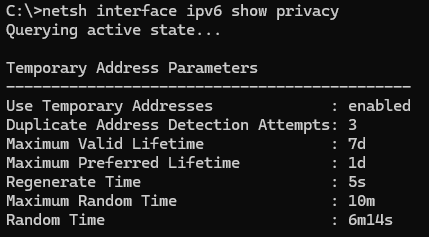
If for some reason you need to disable this feature (e.g., for strict network troubleshooting), you can use: Set-NetIPv6Protocol -UseTemporaryAddresses Disabled
Today, many Microsoft services are exposed over IPv4 only. This is broadly true for the internet as well, where only 19% (71M of 370M) domains support IPv6 connectivity and the remaining 81% are exposed over IPv4 only.
This configuration is generally not problematic because “pure” IPv6 environments (which cannot reach IPv4 services) are rare on the public internet. Virtually all IPv6 capable clients can still connect over IPv4 as needed (“Dual Stack”). Only a tiny fraction of one percent of Windows devices have IPv4 disabled.
Numerous Microsoft cloud services, including Defender’s Cloud Services are currently exposed only over IPv4, meaning that they cannot be reached from pure IPv6 environments.
Defender Cloud Services
- SmartScreen (Web Protection & AppRep): The URL and application reputation checks in Windows, which contact cloud services (e.g. “check if this website or downloaded file is malicious”).
- Defender “Cloud Protection“: Cloud-based file and threat lookups.
- Defender Antivirus Telemetry: Data sent from Windows endpoints (e.g. passive sensor data, heartbeats, inspection results)
如有侵权请联系:admin#unsafe.sh