Home > Declarative Device Management, macOS > App Settings declarative management may block 2026-9-24 18:17:11 Author: derflounder.wordpress.com(查看原文) 阅读量:3 收藏
Home > Declarative Device Management, macOS > App Settings declarative management may block unsigned apps on macOS Golden Gate
App Settings declarative management may block unsigned apps on macOS Golden Gate
One of the new management options available for Apple devices running OS 27 is the App Settings declaration. This new declaration provides the ability to control the following:
- Allowing only specified apps and binaries to run.
- Preventing specified apps and binaries from running.
- Setting default privacy permissions for specified apps.
When creating an App Settings configuration to allow or deny specified apps or binaries, there is something to keep in mind. The current way App Settings works is the following:
- No allow or deny policy: All apps and binaries (signed and unsigned) are allowed to run.
- Any allow or deny policy: All unsigned apps and binaries are blocked, even if the configuration isn’t specifying any apps or binaries to allow or deny.
For more details, please see below the jump.
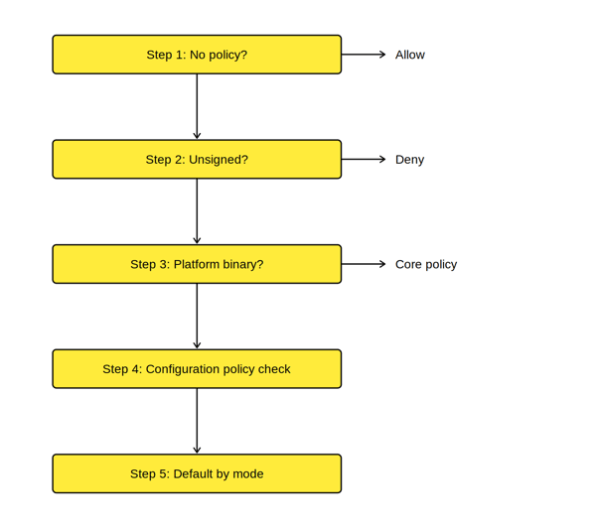
Apple has this behavior documented with the following description of the workflow:
- If the device has no policy applied, the Endpoint Security client isn’t running and doesn’t restrict binaries from running. Otherwise, the Endpoint Security client reads the binary’s identifying attributes.
- The Endpoint Security client denies unsigned, ad hoc-signed, and development-signed binaries even if the configuration only provides an empty allow or deny list.
- The Endpoint Security client applies the core policy. Protected binaries and protected locations decide the outcome, unless the core policy marks the binary as deferred. In that case the configured policy overrides the decision.
- The Endpoint Security client consults the rule set provided by the configuration. A match against the deny list results in a deny decision. A match against the allow list results in an allow decision.
- If no rule matches, the Endpoint Security client applies the default behavior for the configured mode. In allow mode, the Endpoint Security client denies the binary. In deny mode, the Endpoint Security client allows the binary.

The workflow looks like this:

What this means is that when you set any policy for allowing or denying apps and binaries, any apps or binaries which are not signed by either a Developer ID (Application) code signing certificate or a code signing certificate owned by Apple get blocked automatically as part of Step #2 of the workflow.
Where this behavior may show up are with apps and binaries provided by solutions like Homebrew or MacPorts, where apps and binaries may be compiled from source code and not code signed.
In a situation like this, where there is an App Settings declaration applied to the Mac which has a configured allow or deny list (even when the allow and/or deny list is empty), apps and binaries which don’t have Developer ID or Apple code signing will be automatically blocked and not allowed to run.
As of this time, it appears the only way to allow apps or binaries in that situation would be to code sign the apps or binaries using a Developer ID (Application) or Apple-owned code signing certificate.
如有侵权请联系:admin#unsafe.sh