Description
The analyzed archive contains a toolkit built to steal VPN credentials from enterprise endpoints. It covers twelve VPN products including Cisco AnyConnect, FortiClient, Palo Alto GlobalProtect, and Sophos. The attacker does not use custom malware - the toolkit is built entirely from legitimate or signed software: an open-source tunneling tool (Xray/XTLS), a Sysinternals utility (AD Explorer), and native Windows binaries. Both standalone executables in the archive are signed with a valid, previously unreported code-signing certificate and are not detected by any antivirus engine on VirusTotal. Network traffic from the tunnel uses REALITY TLS, which makes it look like normal HTTPS traffic to dl.google.com.
Campaign Context
Region / Sector
DACH region, no sector-specific targeting identified. The toolkit targets German-speaking environments, evidenced by German-language UI in the credential harvester. The operator’s initial access method - E-Mail bombing followed by Teams-based social engineering to obtain Quick Assist remote control - matches a documented Storm-1811 access vector. Microsoft Defender blocked the toolkit delivery in this case before deployment. The analysis is a reconstruction based on the archive contents, not an observation of a live incident.
Threat Actor
The initial access method and the use of SSL.com code-signing certificates registered to shell companies are consistent with Storm-1811 / Black Basta operations. However, these techniques are widely shared across the criminal ecosystem, and significant parts of the tooling do not appear in publicly documented Black Basta operations. Activity is assessed with Moderate confidence to be consistent with TTPs of Storm-1811 / Black Basta access broker operations. Initial access method and code-signing procurement match documented patterns, but tooling diverges from public reporting.
Technical Details
Source and Decryption
Origin
The archive (systemchk.zip) was obtained from an attacker-operated Dropbox share link, downloaded on 04.09.2026. The link points to a single file. The initial access vector is known from case context: The attacker uses E-Mail bombing followed by a phone call or Microsoft Teams message impersonating IT support. The victim is convinced to open Quick Assist (quickassist.exe), which gives the attacker remote control of the endpoint. Through this session the attacker delivers and unpacks the toolkit.
Decryption
The archive was encrypted with ZipCrypto. Unlike AES-encrypted ZIPs, ZipCrypto is vulnerable to known-plaintext attacks - if you have the original version of any file in the archive, you can recover the encryption keys without knowing the password. We saved the download locally as attacker.zip and started by listing the archive contents without decrypting:
7z l -slt attacker.zip | grep -E 'Path|Method|CRC'
This showed all filenames, compression methods, and CRC32 checksums. ZipCrypto leaves these in the clear. Among the files were ADExplorer.exe and Eula.txt - the standard contents of the Sysinternals AD Explorer download. We downloaded the official package from Microsoft and compared the CRC32 values:
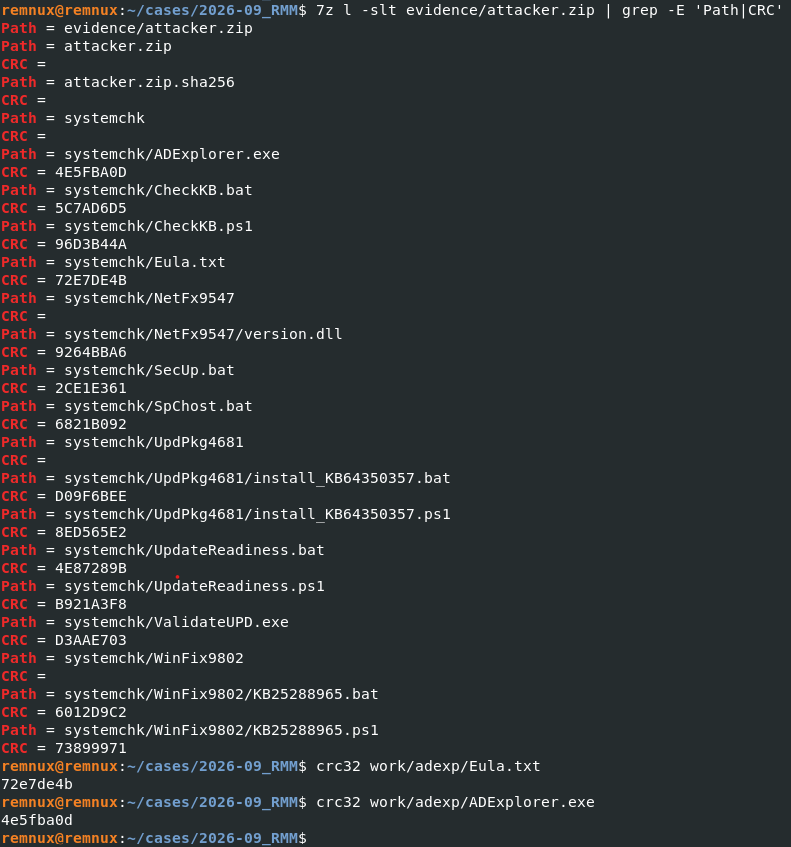
Figure 1 - CRC32 match between encrypted archive and official Sysinternals download, confirming unmodified binaries and enabling known-plaintext attack.
We packed our copy of Eula.txt into a reference ZIP and ran bkcrack:
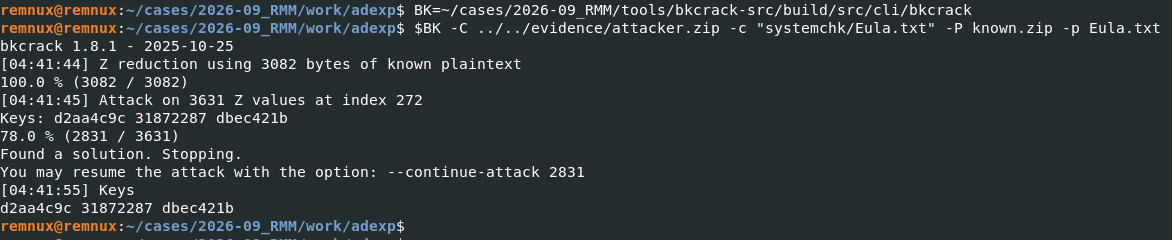
Figure 2 - bkcrack recovering the three internal ZipCrypto encryption keys in 12 seconds.
bkcrack recovered three internal encryption keys (d2aa4c9c 31872287 dbec421b). These keys apply to the entire archive because ZipCrypto derives all entry keys from a single password. We used them to produce a decrypted copy and then recovered the original password:
bkcrack -k d2aa4c9c 31872287 dbec421b -r 12 ?p
The password is 2026. Useful as an indicator when encountering other archives from the same or similar campaigns. The choice of ZipCrypto over AES is an operational security mistake by the attacker. It gave us full access to tooling and insights about their TTPs - the top of the Pyramid of Pain.
Toolkit Overview
The archive contains 14 files with three subdirectories. Each serves a role in a six-phase operation that moves from distraction through credential theft to persistent tunneling and exfiltration.
| File | SHA-256 | Role |
|---|---|---|
| SecUp.bat | 6352b042f41b6a844108ffd0dca279eaeff6dffe1928d4a3380005a632d152c9 | Fake update screen (distraction) |
| ValidateUPD.exe | 88fce5bc260870ef6296c4c5967449d0dc38e83b3fcfea5a971446e8dfd1f5ff | GUI credential harvester (German) |
| UpdateReadiness.bat | 43080aba3f771b71b0c57ad6103eb2a882a6baf7e808bb938dee5a3d8a4e414e | VPN config harvester (basic) |
| UpdateReadiness.ps1 | 135cfc43fe6428bad794462f2d34b43984700787477fc6ee79c359d54f616ee2 | VPN config harvester (extended) |
| WinFix9802/KB25288965.bat | 241d1719367a3100c37564a8ad386c385aa66c1a4ec4597db2826fb8fb2200b5 | Xray tunnel installer (sideloading) |
| WinFix9802/KB25288965.ps1 | 7df0d6a35b291b37f52c067bea6818b7b23199bef78899634cd7a349f767c514 | Xray tunnel installer (sideloading) |
| UpdPkg4681/install_KB64350357.bat | b4aa16e4d82cf18ec25464514d7f5c3e1f2096a799cdbaf958a487811cc7eca3 | Xray tunnel installer (download) |
| UpdPkg4681/install_KB64350357.ps1 | 554f9808620c000c0459f23207dfc3a83dfda6c0720d88eb7e1d07dbd90df571 | Xray tunnel installer (download) |
| NetFx9547/version.dll | 80bad186c66038aa972f1f31df23b1461dada71a8ad32c7d3aa785c4624f3544 | Xray client as Go shared library |
| CheckKB.bat | e69a99d4a9254d0d8e863e1b7fbedaefc147e75da3cbfc06e4c49cffcb2b4bd9 | Exfiltration |
| CheckKB.ps1 | 1b998dbf377874777608f6fad726a461e051352f1a7f94b426b3a017484f23dd | Exfiltration |
| ADExplorer.exe | c5c5363d675d1bd6797081b8b7afd7fb209960a45fe18202d64d36b72a013866 | Sysinternals AD Explorer |
| Eula.txt | 8329bcbadc7f81539a4969ca13f0be5b8eb7652b912324a1926fc9bfb6ec005a | Sysinternals EULA |
| SpChost.bat | 7a75d7b0c49322bf1aa9ef3824c1e4ed63d589819bd7cb3cb02404331f37c1d5 | not part of active chain |
File timestamps range from 17.08.2026 to 02.09.2026. The naming convention mimics Windows updates: Fake KB numbers, process names resembling system services and directory names that look like framework components. SpChost.bat references a directory (WinCore1615) and binary (scvhost.exe) that don’t exist in the archive and are not mentioned by other scripts - likely a leftover from an earlier version of the toolkit.
Attack Sequence
Phase 1 - Initial Access
The victim is flooded with spam E-Mails. Shortly after, the attacker contacts the victim by phone or Microsoft Teams, impersonating IT support. The victim is guided to open Quick Assist (quickassist.exe), giving the attacker remote control. Through this session the attacker downloads the archive, enters the password, and unpacks the toolkit for further actions on objective.
Phase 2 - Distraction
SecUp.bat runs in the foreground. It shows an ASCII-art “SECURITY UPDATE” banner, prompts for credentials, plays a 34-second spinner (“Applying security patches…”), and pings real Microsoft domains under the label “Connecting to update servers.” The script does not contain any network call or file write for the entered credentials - they appear to be discarded.
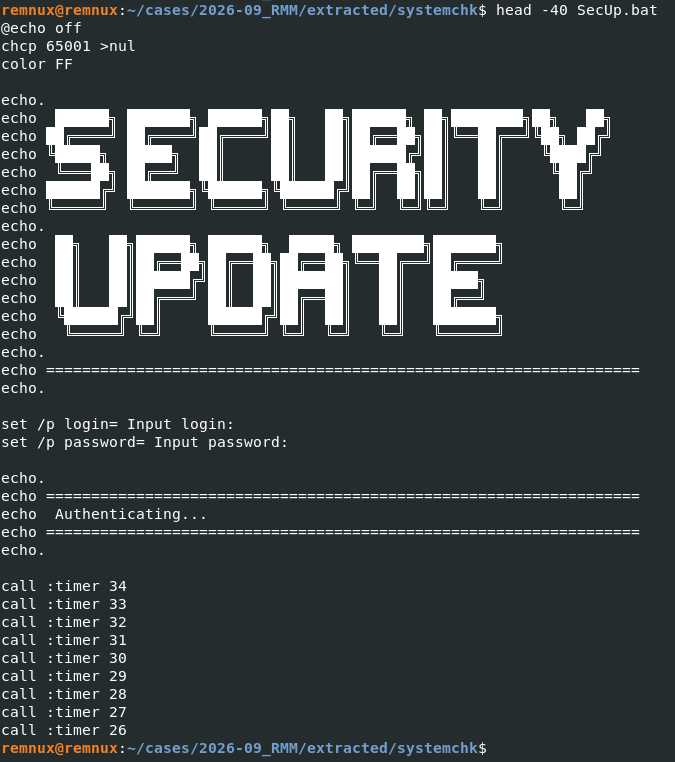
Figure 3 - SecUp.bat source: ASCII “SECURITY UPDATE” banner, credential prompt, and fake connection spinner.
Phase 3 - Credential Harvesting
Two tools target different credential sources and may run in parallel or serve as alternatives depending on the target environment: ValidateUPD.exe shows a fake Windows login dialog with German UI text. Based on string fragments in the binary (“\PolicyM”, “policyM”, and a German error message about invalid credentials), it appears to write captured credentials to %APPDATA%\PolicyMgr. This would target the user’s Windows or domain password directly. UpdateReadiness.bat / .ps1 silently scans the disk for VPN configuration files and cached credentials. Output goes to %APPDATA%\PolicyMgr\policyMgr.bkp - the same directory, which serves as the central collection point.
Phase 4 - Persistent Reverse Tunnel
An Xray/V2Ray reverse tunnel with REALITY TLS is installed. Two variants cover different target environments - both connect to the same VPS:
- Variant A (WinFix9802) works offline using files from the archive. It copies
wkspbroker.exefrom System32 and places the Xray DLL next to it for sideloading. - Variant B (UpdPkg4681) downloads Xray from the internet when sideloading is not an option, using a cascade of six sources.
ADExplorer.exe (unmodified Sysinternals binary) can create Active Directory snapshots as .dat files for offline analysis. Since the download was blocked we didn’t observe any of this activity. The AD enumeration can just be assumed based on the presence of the ADExplorer.exe application.
Phase 6 - Exfiltration
CheckKB.bat / .ps1 upload the collected files from %APPDATA%\PolicyMgr\ via HTTPS POST to a Microsoft Dev Tunnels endpoint: hxxps://sdj4mqcf-8443.use.devtunnels[.]ms/
Toolkit deep dive
VPN Credential Harvester
The harvester scans the system for VPN configuration files and cached credentials. The batch version covers nine products - the PowerShell version adds Zscaler, Ivanti and Windows built-in VPN.
| Product | Data Sources |
|---|---|
| Cisco AnyConnect / Secure Client | preferences.xml, profile XMLs |
| SonicWall NetExtender | connection.json |
| WatchGuard Mobile VPN | wgsslvpnc.log |
| OpenVPN / OpenVPN Connect | .ovpn profiles |
| Sophos SSL VPN | scgui.log, openvpn.log, scvpn.log |
| FortiClient SSL-VPN | fortivpn.exe_sslvpnlib.log, sslvpndaemon.log, FortiVPN*.log |
| F5 BIG-IP | client.f5c, config.f5c |
| Palo Alto GlobalProtect | PanGPA.log, PanGPS.log |
| Windows RAS/VPN | rasphone.pbk |
| Pulse Secure / Ivanti | .pulsepreconfig files (only available as ps1 version) |
| Zscaler | Client Connector logs, registry/configuration state (only available as ps1 version) |
| Windows Built-in VPN | Get-VpnConnection cmdlet (only available as ps1 version) |
What it extracts: Hostnames, server addresses, usernames, groups, gateways, and connection strings. Some products store credentials in config or log files (WatchGuard logs, rasphone.pbk, OpenVPN auth-user-pass references), so passwords may be included. The PS1 version also follows OpenVPN auth-user-pass file references and reads usernames from the referenced credential files.
The PS1 version validates extracted strings as real IPs or FQDNs before recording them, deduplicates results, and filters out RFC-1918 addresses unless a username is attached. Output is a sorted four-column table (VPN, Endpoint, Login, Info).
Xray Reverse Tunnel
Both installation variants establish the same tunnel:
IP:           74.0.42.157
Port:         443
Protocol:     VLESS Reverse Bridge
TLS:          REALITY
SNI:          dl.google.com
Fingerprint:  chrome
UUID:         cdf277b5-aae8-415f-b637-1ae3b0aadcdc
Public Key:   l1GkwsaYrZyZat4pvImzq8BI0xxb3s2RxH7imf5mDEo
Short ID:     a1eeb9b9eb
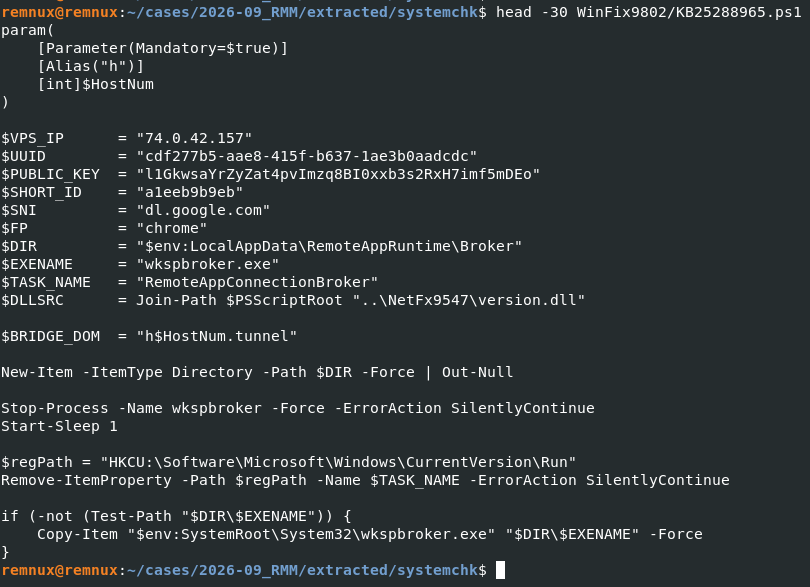
Figure 4 - Xray tunnel installer script: VPS address, UUID, REALITY parameters, sideloading paths, and persistence setup.
REALITY disguises a connection as a TLS connection to a legitimate target such as dl.google.com. Unlike domain fronting, REALITY operates at the TLS layer: It emulates a normal browser ClientHello and reproduces characteristics of the target’s TLS handshake. Passive inspection has limited visibility. However, TLS fingerprints, SNI and the destination IP/ASN can still provide useful indicators. In this case, the strongest indicator is the inconsistency between SNI=dl.google.com and destination 74.0.42.157.
Each victim gets a unique bridge domain passed as a script parameter (e.g. h5.tunnel, h12.tunnel), so the attacker can manage multiple hosts through one VPS.
Variant A - DLL Sideloading (offline):
The 31.5 MB version.dll in the archive is not a real Windows version DLL (~30 KB). It is the Xray client compiled as a Go shared library. Go module strings in the binary confirm xray-core v1.260327.0 with REALITY v0.0.0-20260322, built from the GitHub repository VanyaKrotov/xray_cshare, which has since been deleted. This wrapper was maybe built to make xray-core loadable as a DLL for sideloading.
Persistence: HKCU Run key "RemoteAppConnectionBroker" pointing to the copied wkspbroker.exe. The directory is hidden (attrib +h) and the batch file deletes itself after execution.
The sideloading pair: wkspbroker.exe (Windows Remote Desktop Connection Broker, copied from System32) loads radcui.dll (the renamed version.dll). The script places the DLL next to wkspbroker.exe, indicating that the binary imports radcui.dll - this has not been verified against the PE import table.

Figure 5 - version.dll file properties showing 31.5 MB PE32+ DLL – several times larger than a legitimate Windows version DLL.
Variant B - Direct Download (online):
When sideloading is not an option, the scripts download Xray from a cascade of six sources. Each is tried with both curl and certutil as a fallback:
- GitHub - XTLS/Xray-core official release v26.3.27 (tried twice)
- Dropbox - share link with original filename
- Dropbox - share link with the file renamed to
z.zip - Azure Container Apps - file-node-neu (North Europe)
- Azure Web Apps - file-node-us (US)
After downloading, xray.exe is renamed to a legitimate looking ConnectivityHost.exe and placed in %LocalAppData%\ConnectivityService\Agent. The two Azure instances appear to be attacker-operated: They follow a consistent naming pattern (file-node-*) and share an authentication token. The PS1 version adds string-level obfuscation: path strings are fragmented (‘Connect’ + ‘ivityService’), download URLs are Base64-encoded, and the filename xray.exe is assembled from character codes. Persistence uses a hidden svchost.dat file containing the start script, with the Run key pointing to powershell.exe -W Hidden -EP Bypass loading it.
Credential Harvester - ValidateUPD.exe
A 32-bit Windows GUI application (314 KB). String analysis shows German UI text and references to %APPDATA%\PolicyMgr. It appears to present a fake login dialog and write captured credentials to the PolicyMgr directory. About 250 KB of the binary is padding: generic XML paragraphs about “configuration profiles”, “backup operations” and “logging subsystems” repeated in varying order. This inflates the file size, lowers entropy, and buries the interesting strings in noise. The binary is signed with a valid code-signing certificate (see below) and has a few detections on VirusTotal.
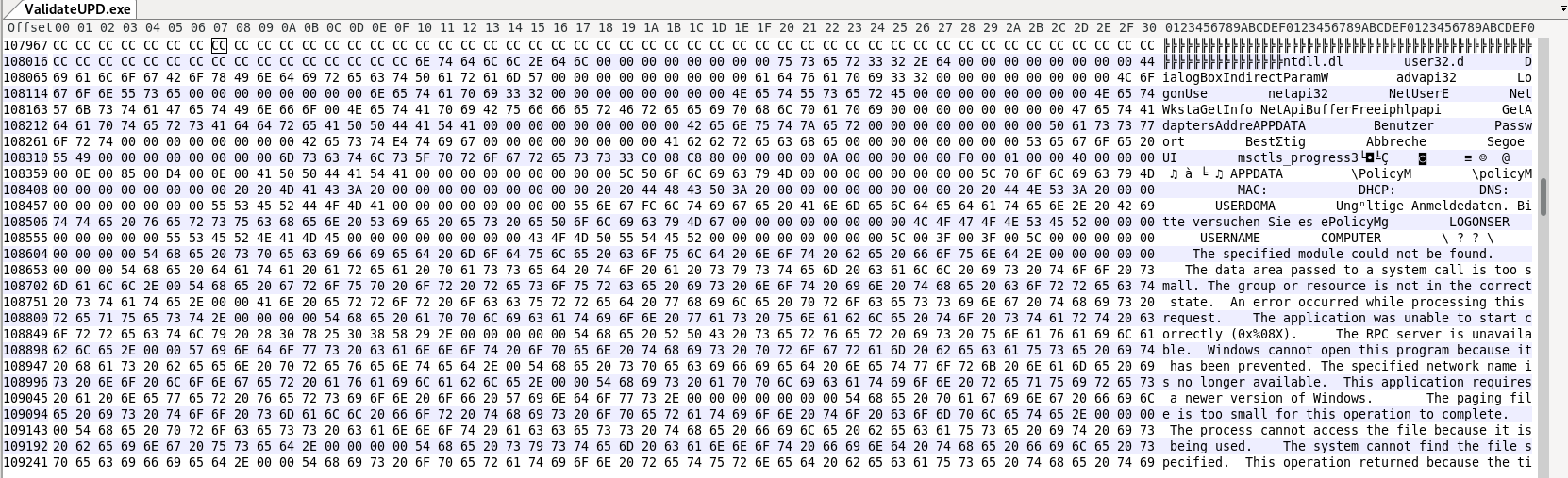
Figure 6 - Embedded German UI strings in ValidateUPD.exe: login dialog labels, PolicyMgr output path, and invalid-credentials error message.
Code-Signing Certificate
Both binaries (ValidateUPD.exe and version.dll) are signed with the same certificate. SSL.com code-signing certificates registered to shell companies are a documented path in the criminal ecosystem. Code-signing certificates come in two validation tiers: OV verifies that the applying organization exists, EV adds stricter identity checks and requires a hardware token.
Subject:    YOUR CHANCE j.d.o.o (Zagreb, Croatia)
Issuer:     SSL.com Code Signing Intermediate CA RSA R1
Serial:     66096FE6AAB808036B840F230F5606A5
Signed:     2026-08-31 17:06 UTC
Status:     Valid, not revoked (as of 2026-09-05)
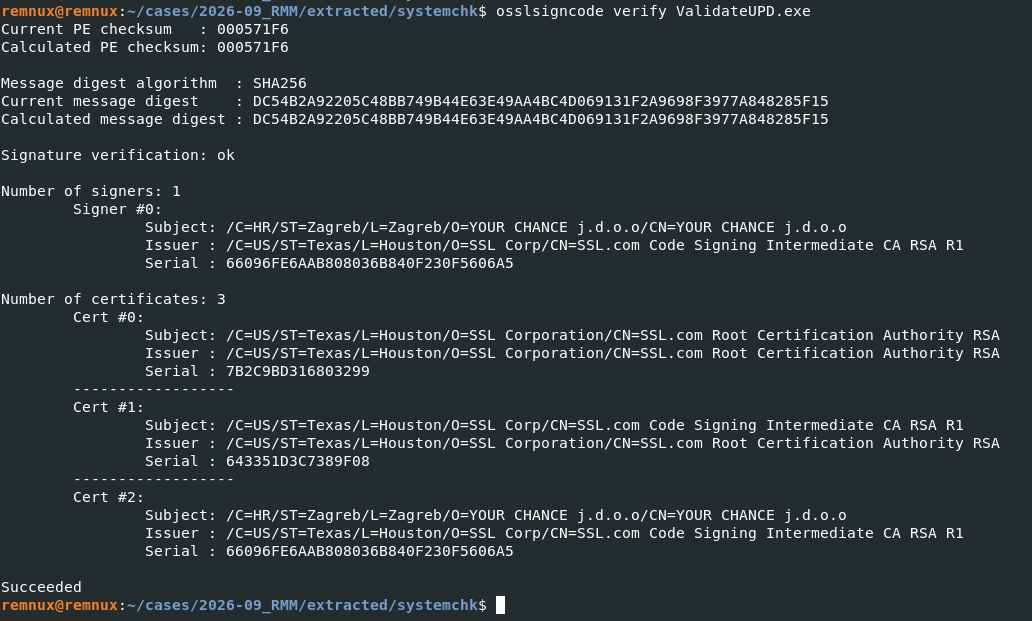
Figure 7 - Valid code signature on ValidateUPD.exe, issued to YOUR CHANCE j.d.o.o (Zagreb) via SSL.com.
Indicator of Compromise
Malware / Tools
| Tool | Filename | HashType | Hash |
|---|---|---|---|
| credential harvester | ValidateUPD.exe | SHA-256 | 88fce5bc260870ef6296c4c5967449d0dc38e83b3fcfea5a971446e8dfd1f5ff |
| Xray client | version.dll / radcui.dll | SHA-256 | 80bad186c66038aa972f1f31df23b1461dada71a8ad32c7d3aa785c4624f3544 |
Network
| Technique | ArtifactType | Value |
|---|---|---|
| C2 | IP | 74.0.42.157 (Xray VPS, VLESS port 443) |
| Exfiltration | Domain | sdj4mqcf-8443.use.devtunnels[.]ms |
| Staging | Domain | file-node-neu.ambitioussand-8c67ee96.northeurope.azurecontainerapps[.]io |
| Staging | Domain | file-node-us.azurewebsites[.]net |
| Delivery | URL | hxxps://dropbox[.]com/scl/fi/982pwmfxt04hkfk8yy6i2/systemchk.zip |
| Delivery | URL | hxxps://dropbox[.]com/scl/fi/2x5vw0md8h2mlj116k5w3/Xray-windows-64.zip |
| Delivery | URL | hxxps://dropbox[.]com/scl/fi/y0unoesteryu5ah2j7cpr/z.zip |
Host
| Technique | ArtifactType | Value |
|---|---|---|
| Persistence | File (path) | %LocalAppData%\RemoteAppRuntime\Broker\ (wkspbroker.exe, radcui.dll, config.json) |
| Persistence | File (path) | %LocalAppData%\ConnectivityService\Agent\ (ConnectivityHost.exe, config.json, svchost.dat) |
| Collection | File (path) | %APPDATA%\PolicyMgr\ (policyMgr.log, policyMgr.cfg, policyMgr.bkp) |
| Persistence | Registry key | HKCU\Software\Microsoft\Windows\CurrentVersion\Run - RemoteAppConnectionBroker |
| Persistence | Registry key | HKCU\Software\Microsoft\Windows\CurrentVersion\Run - ConnectivityServiceAgent |
| Defense Evasion | File | scvhost.exe (typosquat of svchost.exe - legacy) |
| Defense Evasion | File | ConnectivityHost.exe (renamed xray.exe) |
MITRE ATT&CK Mapping
| Tactic (MITRE) | Technique | ID | Campaign Mapping | Behavioral Indicator |
|---|---|---|---|---|
| Initial Access | Phishing: Spearphishing via Service | T1566.003 | Fake IT support via Teams | |
| Impact | Email Bombing | T1667 | Email bombing as preparation for initial access | |
| Persistence | Boot or Logon Autostart Execution: Run Keys | T1547.001 | HKCU Run keys (two variants) | HKCU Run key pointing to a hidden directory under %LocalAppData% containing non-Microsoft binaries |
| Defense Evasion | Masquerading: Match Legitimate Name | T1036.005 | Fake KB numbers, scvhost, ConnectivityHost | Process execution from %LocalAppData%\RemoteAppRuntime\ or %LocalAppData%\ConnectivityService\ |
| Defense Evasion | Hijack Execution Flow: DLL Side-Loading | T1574.002 | wkspbroker.exe loading radcui.dll | wkspbroker.exe executing from outside C:\Windows\System32\ |
| Defense Evasion | Subvert Trust Controls: Code Signing | T1553.002 | SSL.com certificate on both binaries | |
| Credential Access | Credentials from Password Stores | T1555 | VPN configs, logs, auth-user-pass files | cmd.exe or powershell.exe reading VPN configuration files |
| Credential Access | Input Capture: GUI Input Capture | T1056.002 | ValidateUPD.exe fake login dialog | |
| Discovery | Account Discovery | T1087 | AD Explorer snapshots | |
| Command and Control | Remote Access Tools: Remote Desktop Software | T1219.002 | Quick Assist (quickassist.exe) | |
| Command and Control | Web Service | T1102 | Dev Tunnels as C2 | |
| Command and Control | Ingress Tool Transfer | T1105 | certutil / curl downloading Xray (Variant B fallback) | certutil.exe invoked with -urlcache -split -f downloading ZIP files |
| Command and Control | Protocol Tunneling | T1572 | Xray VLESS Reverse Bridge | TLS connection with SNI dl.google.com to a destination IP outside Google’s published ranges |
| Command and Control | Encrypted Channel: Asymmetric Crypto | T1573.002 | REALITY TLS (SNI dl.google.com) | |
| Exfiltration | Exfiltration Over C2 Channel | T1041 | CheckKB over Dev Tunnels |
Recommendation / Learning
- If artifacts from this toolkit are found in an environment, rotate VPN credentials for all affected users - not just local passwords. The attacker’s goal is not the compromised endpoint but the VPN gateway into the corporate network.
- Block or alert on connections to
74.0.42.157(the Xray VPS) and the Dev Tunnels endpoint (sdj4mqcf-8443.use.devtunnels.ms). The two Azure staging domains (file-node-neu...azurecontainerapps.ioandfile-node-us.azurewebsites.net) can be blocked at the domain level. - For broader REALITY TLS detection beyond this specific campaign, alert on any TLS connection where the SNI is dl.google.com but the destination IP is not in Google’s published ranges.
- If
*.devtunnels.msis not used by development teams, consider blocking it entirely. Dev Tunnels as an exfiltration channel is not unique to this operator. - The code-signing certificate (
66096FE6AAB808036B840F230F5606A5, issued to YOUR CHANCE j.d.o.o via SSL.com) is assessed with Moderate confidence to be the strongest cross-campaign correlation indicator available. - Both standalone executables in the archive are validly signed and undetected by any antivirus engine. Signature-based detection alone does not cover this toolkit.
Conclusion
Overall, the findings show a specialized toolkit that combines credential theft, persistent tunneling, and reconnaissance while blending into normal enterprise activity. The focus on VPN credentials and AD reconnaissance suggests that the compromised endpoint is primarily used to enable initial access into the broader corporate environment. This provides a foundation for follow-on activity, whether conducted by the same operator or handed off to another actor. The case highlights the importance of detecting suspicious behavior across otherwise legitimate tools, signed binaries, and trusted services rather than relying on individual artifacts alone.
This report was produced with AI assistance.