Table of Contents
When analysing AV alerts, always look left and right of the alert. If you’ve been following me for a while, you probably know that I’m a big fan of analysing the MFT (Master File Table) during incident response. This case is a good example of why.
When starting a new IR case, one of the first things I collect is AV/EDR telemetry. Why? Because attackers very often trigger at least one alert somewhere along the way. Even when the alert itself is not particularly exciting, it gives you something extremely valuable: a timestamp and a system to pivot from.
From there, you can start answering questions such as:
- Which hosts were touched?
- Which users were involved?
- What tooling was used?
- Where were files staged?
- What happened immediately before and after the alert?
In this case, Microsoft Defender reported:
Behavior:Win32/RegDump.SA- User:
SYSTEM - Process:
C:\Windows\System32\svchost.exe
At first glance, that does not give us much.
MFT Analysis
We checked the MFT entries around the time of the Defender alert. Besides the expected Defender quarantine artefacts, one file immediately stood out: C:\Windows\Temp\ASOWCIKI.tmp

This is exactly why I like using the MFT as a pivot: an AV alert might tell you what Windows detected, while filesystem metadata can show you the artefacts created around the same time.
Analysing the Temporary File
Looking at the file preview gives us another useful clue: regf

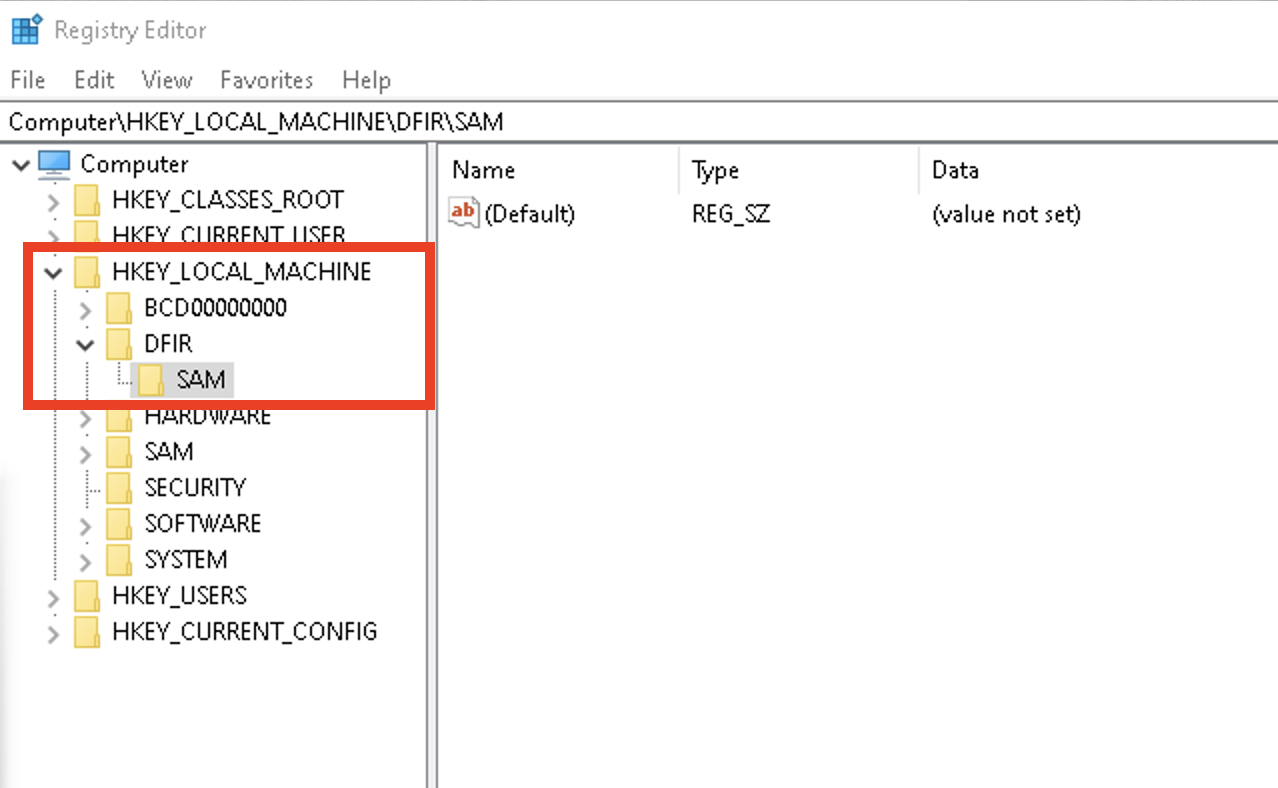
regf is the signature of a Windows Registry hive. Loading the file into regedit confirmed that we were dealing with a SAM hive, although only part of the hive was available.

The incomplete hive suggests that the save operation may not have completed successfully. One possible explanation is that Defender interrupted the operation, although the artefact alone is not enough to prove that. The filename was also interesting: ASOWCIKI.tmp
Eight random-looking ASCII characters followed by .tmp.
Impacket’s secretsdump.py
Impacket’s secretsdump.py uses exactly this naming pattern when remotely saving registry hives. The current implementation generates a temporary filename using eight randomly selected ASCII letters followed by .tmp:
tmpFileName = ''.join(
    [random.choice(string.ascii_letters) for _ in range(8)]
) + '.tmp'
So a file such as: C:\Windows\Temp\ASOWCIKI.tmp is highly consistent with the artefact produced by Impacket’s RemoteOperations implementation. Importantly, this does not prove that the attacker executed the standalone secretsdump.py script. Numerous offensive tools reuse or embed Impacket code. However, the artefact is consistent with Impacket’s RemoteOperations registry-dumping workflow.
Why Does Defender Show svchost.exe?
The Defender alert did not point to python.exe, secretsdump.py, or some obvious attacker binary. Instead, it showed: C:\Windows\System32\svchost.exe. Impacket performs the registry operation remotely through the Windows Remote Registry service using the MS-RRP protocol. It connects to the winreg RPC interface over SMB (\pipe\winreg]).
From the endpoint’s perspective, the registry hive is therefore being accessed and saved by a legitimate Windows service. That is why the local telemetry can show svchost.exe running as SYSTEM instead of an obvious attacker-controlled process. As an analyst, keep in mind that the process generating the alert is not necessarily the process or tool used by the attacker on the source system.
Cleanup and Residual Artefacts
After retrieving the temporary file, Impacket normally attempts to delete it again. Its RemoteFile.close() implementation removes the remote file. Why was ASOWCIKI.tmp still present?
There are several possibilities. One plausible explanation is that Defender interrupted the registry dump, leaving only a partial SAM hive on disk.Whatever the reason, the leftover file gave us an excellent forensic artefact.
A Similar Huntress Case
Huntress published a case in April 2026 showing essentially the same combination of telemetry:
- Behavior:Win32/RegDump.SA
- svchost.exe
They also observed a temporary file under: C:\Windows\Temp\aRhRnnHI.tmp. Again: eight random ASCII characters followed by .tmp. In that case, Huntress also observed Service Control Manager Event ID 7040, showing the Remote Registry service being changed from disabled to demand start. That makes SCM (Service Control Manager.) Event ID 7040 another useful artefact to hunt for when you encounter this Defender detection.They linked the activity to an - surprise - Impacket-style registry dumping workflow.
Conclusion
The Defender alert by itself was useful, but it did not tell the full story. The interesting part came from looking around the timestamp and correlating the MFT, the leftover SAM hive and the filename pattern, and the Remote Registry behaviour. Sometimes an AV alert is not the answer, it is simply the best place to start digging.
Field Notes: Short blog posts about interesting techniques we encounter in the wild.