Your AI agent never holds your API keys. It sends a placeholder; the real secret is swapped in on t 2026-9-3 15:26:33 Author: kitploit.com(查看原文) 阅读量:4 收藏
Your AI agent never holds your API keys. It sends a placeholder; the real secret is swapped in on the wire.
Stops credential stealers (Shai-Hulud and similar) and prompt-injected agents from leaking your secrets. A compromised agent has nothing to take.



How it works
- Your agent sends a request with a placeholder, not the key.
- Keys on the Wire swaps in the real secret from your vault, in transit.
- The agent never sees the key. Nothing to leak, nothing to steal.
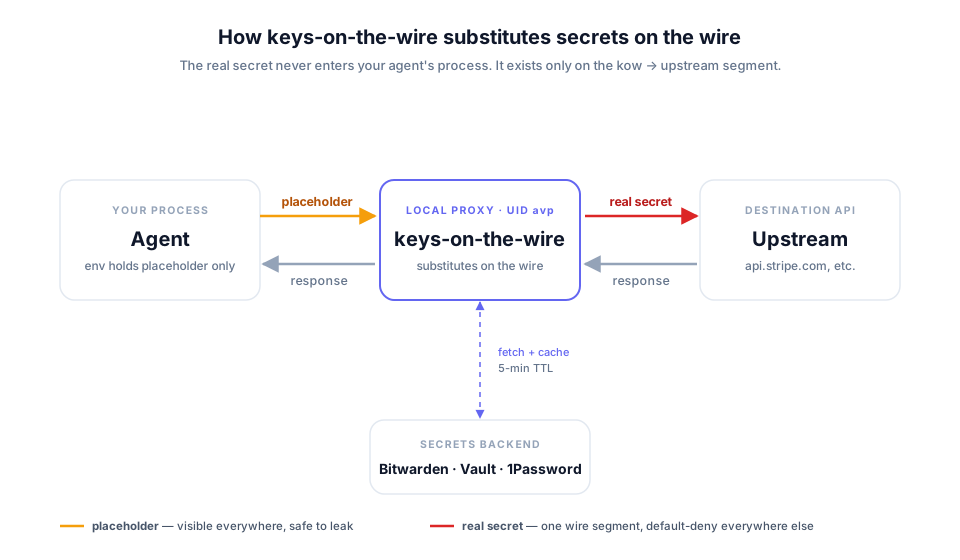
Under the hood it's a loopback HTTPS proxy. It fetches each credential from your vault just in time and injects it into the outbound request, so the calling process (your agent, or anything else you route through it) never holds the real bytes.
Vault backends: macOS Keychain, Bitwarden Secrets Manager, Google Secret Manager, AWS Secrets Manager, static (no vault, for trying it out) and env. On a Mac the Keychain backend needs no cloud vault account and no extra dependency: your secrets stay where they already are. (kow setup still defaults to Bitwarden; pass the backend you want.) See Adapter architecture.
See it in action
Quickstart
1. Install (Linux pipx, macOS brew):
pipx install 'keys-on-the-wire[bitwarden]'
# macOS: brew install inflightsec/keys-on-the-wire/keys-on-the-wire
sudo kow setup --bws
2. Install the skill so your agent writes the binding for you:
/plugin marketplace add inflightsec/keys-on-the-wire
/plugin install kow@keys-on-the-wire
3. Broker a service. Say "route the Stripe API through Keys on the Wire." The skill mints the placeholder and prints the exact note to paste into your vault. It never sees your key.
4. Add the real key to your vault with that note, then route your agent through the proxy:
kow env && kow run claude
Done. The agent only ever sends the placeholder; Keys on the Wire swaps in the real key on the wire.
New to this? The Quickstart guide walks the first run in full, and Prerequisites covers vault setup. Prefer shell env vars over kow run? See Usage.
Before you point it at production keys
- Trial it behind one process.
kow run -- <command>sets the proxy and CA variables in that process only; your login shell never inherits them. Scoping to a single process. - Fail-closed is the only mode. If kow is down, routed calls fail; a binding that denies returns 503 rather than passing the request bare.
- It stops theft, not misuse. kow takes the key out of the agent's context; it does not judge why an API is being called. Narrowing a binding with
methods:andpaths:is the lever, and it is enforced. Is it for you? draws the full boundary. - Auth beyond static headers ships: OAuth2 refresh and client-credentials, JWT bearer, GitHub App, HMAC and AWS SigV4, with presets for Google, Microsoft, Auth0, Slack, Atlassian and Okta.
Broker an MCP server
Each MCP server keeps a long-lived token in cleartext in your client config, readable by every other server the client loads. kow mcp install swaps that standing secret for a placeholder and routes the server's egress through the proxy:
kow mcp install github --host api.github.com --env-var GITHUB_PERSONAL_ACCESS_TOKEN \
  --server-cmd "npx -y @modelcontextprotocol/server-github"
It prints the vault note and the exact claude mcp add --env command. Design and threat model: ADR-0040.
The binding is one line
Onboarding a credential is not hand-written YAML. The bundled kow skill asks the auth shape and host, then tells you exactly what to paste into your secret's Notes field:
# kow-binding
api.acme.com
That marker line is what makes it a binding; without it the note stays a plain human description, never parsed (ADR-0025). The assistant proposes, you apply. It never sees or stores the secret.
Docs
Start here — Is it for you? if you're evaluating · Prerequisites to set up your vault · Quickstart for a 10-minute first run.
Understand — Concepts for placeholder, binding, CA and fail-closed in plain terms · Architecture for the threat model, the G1 to G9 invariants and residual risks.
Install and operate — Linux · Docker · macOS · Usage · Single process · Linux isolation · macOS isolation · Google Secret Manager
Reference — bindings.example.yaml is the full config schema · Adapter architecture for vault backends and how to add one · Comparison versus Vault Agent, Doppler, op run and others · CHANGELOG · SECURITY · CONTRIBUTING · CREDITS
Open source, no lock-in
Every feature is in this repo under Apache-2.0. No paywalled tier, no hosted service, no telemetry. The proxy never phones home: its only outbound connections are your vault and the upstream APIs your agent calls. If an alternative fits your setup better, use that.
One optional dependency is not open source, the Bitwarden backend's bitwarden-sdk, which you install only if you use that backend. See LICENSE and NOTICE.
如有侵权请联系:admin#unsafe.sh