Most companies designed their resource permissions with a human user in mind. A senior engineer may 2026-8-14 13:12:12 Author: blog.cloudflare.com(查看原文) 阅读量:51 收藏
Most companies designed their resource permissions with a human user in mind. A senior engineer may be able to deploy to production, query a sensitive database, or revoke another user's access. Those privileges come with risk, but that risk has traditionally been bounded by two assumptions: the engineer will use human judgment, and the engineer can only act at human speed.
An engineer who sees an unexpected result will usually stop and reconsider their actions. Any human being can only click, type, and review so much in a single day. The introduction of AI agents changes both thresholds. Their decisions are nondeterministic, and they can take the same action (or invoke the same tool) indefinitely, without getting tired or stopping for lunch. A plausible — but incorrect — decision can become thousands of incorrect actions before a human notices.
Today, we're announcing new Cloudflare One capabilities to identify inspected MCP traffic, show which users and servers are generating it, and control direct connections on managed network paths. Combined with MCP Server Portals, these controls help administrators see whether agents are using an approved path, or somehow bypassing it.
Model Context Protocol (MCP) servers give agents a common way to discover and invoke tools backed by third-party SaaS products, internal applications, and APIs. The underlying permissions are likely familiar; what changes is who makes each decision, and how quickly a bad decision can spread.
Connecting an agent to one of these tools can take a single line of configuration. An employee can point Claude Code, Codex, Cursor, OpenCode, VS Code, or any AI harness at an MCP server without checking whether it is approved. The resulting traffic has no obvious shape. The Model Context Protocol does not use a guaranteed hostname or require /mcp in the path, so a direct connection can look like any other HTTPS API call.
To explain how these controls fit together, we'll start with the anatomy of a tool call and the information it exposes. We'll then compare the three places a security team can act: inside the client, on the network, and at the MCP server. From there, we'll show how Cloudflare Gateway uses protocol signals to find shadow MCP traffic and enforce MCP Portal-only access to trusted MCP servers.
The anatomy of an MCP tool call
The same MCP tool call has three forms as it moves through a system. Inside the client it is a decision to invoke a tool with a set of arguments. On the network it is an HTTP transaction carrying a JSON-RPC message. At the server it becomes a call to a tool handler that may read data, change state, or complete some other action.
Consider an agent that wants to know the weather in Austin. A remote MCP request can look like this:
POST /mcp HTTP/1.1
Host: tools.example.com
Authorization: Bearer <access-token>
Content-Type: application/json
MCP-Protocol-Version: 2026-07-28
Mcp-Method: tools/call
Mcp-Name: get_weather

{
  "jsonrpc": "2.0",
  "id": 42,
  "method": "tools/call",
  "params": {
    "name": "get_weather",
    "arguments": {
      "city": "Austin"
    }
  }
}
There are several useful signals packed into this request. The hostname and path identify the destination. The authorization header carries the credential used to authenticate the caller when the server requires one. The header: MCP-Protocol-Version identifies the protocol version, while Mcp-Method and Mcp-Name expose the operation and tool in the new stateless protocol. The JSON-RPC envelope repeats the method, gives the request an id that the client can match with a response, and carries the tool arguments in params.
The arguments are the most sensitive part. They can contain a search query, source code, customer data, or instructions for an action such as creating a ticket or changing infrastructure. The tool name says what the agent intends to call; the arguments say what data it will send and what action it wants the server to perform.
If the call succeeds, the server returns a JSON-RPC response with the same id and the tool result. That response may also contain sensitive data. Request inspection can stop an unsafe action before execution, while response inspection and logging show what the tool returned to the agent.
Three places to control an MCP request
The request gives security teams three places to observe or control the call.
Inside the MCP client
A client hook can run after the model selects a tool but before the client serializes the request. From there, it can see the destination server, tool name, and arguments without decrypting network traffic.
This is the earliest stage in the request chain to exercise control. The client can deny a server that is not on an allowlist, ask the user to confirm a sensitive operation, or remove data from the arguments before it leaves the device. It can also cover local stdio (aka local) MCP servers, which never generate network traffic.
This presents a standardization challenge. In order for a security team to benefit from this, they would need to reproduce their controls across every client that their employees use. Client-side controls work best when the organization manages both the client and the device, but telemetry from one client is never a complete inventory of MCP use.
At the device's network boundary
A secure web gateway can observe the HTTP request after it leaves the client. With TLS decryption, it can associate the request with a user and device, inspect the destination and protocol headers, and apply policy without depending on a particular MCP client.
The network layer has the widest lens to detect remote MCP traffic on managed paths. It can identify direct connections to servers outside an approved Portal and block them before the request reaches the destination. Where data loss prevention scanning is supported, a proxy can also examine the JSON-RPC method and arguments for sensitive data. However, proxies cannot see local stdio calls or off-network traffic.
Before the MCP server invokes the tool
The server has the richest execution context. It has authenticated the caller, parsed the MCP message, resolved get_weather to a handler, and validated the supplied arguments against the tool's input schema. This is the last point where the request can be denied before the tool runs.
An Agents SDK handler or similar server middleware can authorize the caller for the specific tool, apply rate limits, inspect arguments, and record the outcome. A server should perform these checks before invoking the handler, especially for tools that write data or trigger external actions. Logging only after execution can explain what happened, but it cannot prevent it.
Cloudflare's WriteGuard uses this pattern across our internal MCP servers. Each tool has a risk tier and an enabled or disabled state. WriteGuard can pass a read through unchanged, add agent attribution and an audit event to an allowed write, or block a critical action before its handler runs. Because the control lives at the server, an end user cannot bypass it by switching clients or disabling a local hook.
While server-side controls only protect servers that implement them, the client and server have the best request depth. The network sees the widest set of remote connections. Used together, these controls can stop sensitive data before it leaves a device, find unmanaged MCP traffic, and deny an unauthorized operation before a tool executes.
The network control point has the broadest coverage, but it first has to distinguish MCP from ordinary HTTPS traffic, a user must be running a proxy, and the MCP Server (or Portal) must verify that the proxy was used in the connection.
Cloudflare One provides the networking pieces of that chain. The Cloudflare One Client sends traffic from managed devices through Gateway. Gateway can classify MCP requests at the protocol layer, and distinguish whether traffic is initiated from an MCP Portal, or is going outside approved controls. Administrators can then report on, or block connections that do not follow the approved path. That process starts with identifying the request reliably.
A URL does not tell you that a request uses MCP
Our first approach to finding MCP traffic used the GraphQL Analytics API to search Gateway HTTP logs for hostnames containing mcp and common paths like /mcp or /sse. Our MCP traffic detection tutorial includes the query. It also explains how to create data loss prevention patterns for MCP JSON-RPC methods like initialize, tools/call, and resources/read in request bodies.
Those signals are still useful for finding traffic from older clients and providing historical visibility, but they're very basic. They miss an MCP server at an ordinary URL like https://tools.example.com/api, which is not uncommon.
And they can match an unrelated service that happens to use mcp in a hostname or path (unlikely, but we have seen it). For conforming Streamable HTTP clients, the protocol header is a more specific signal. The MCP 2025-11-25 specification says clients MUST include MCP-Protocol-Version on every HTTP request after initialization. The MCP 2026-07-28 specification goes further and requires it on every POST request.
That does not make the header a complete detector. The initial request from a legacy client may not contain it, protocol versions earlier than 2025-06-18 did not define it, and local stdio, custom transport, or nonconforming traffic may never carry it. Its presence is a strong positive indicator of MCP; its absence does not prove that a request is not MCP.
The protocol is becoming easier to identify on the wire
The legacy MCP flow begins with an initialize request that does not contain the MCP-Protocol-Version HTTP header, so a network control may not classify the first request to a previously unknown endpoint from the header alone. The signal appears after the client and server finish initialization.
A later tool call looks like this:
POST /api HTTP/1.1
Host: tools.example.com
Content-Type: application/json
MCP-Protocol-Version: 2025-11-25

{"jsonrpc":"2.0","id":2,"method":"tools/call","params":{"name":"get_weather"}}
The MCP 2026-07-28 specification changes this model considerably. The core protocol is stateless; it removes the initialize handshake entirely and places the protocol version and operation on each request:
POST /mcp HTTP/1.1
Host: tools.example.com
Content-Type: application/json
MCP-Protocol-Version: 2026-07-28
Mcp-Method: tools/call
Mcp-Name: get_weather

{"jsonrpc":"2.0","id":1,"method":"tools/call","params":{"name":"get_weather"}}
The Mcp-Method and Mcp-Name headers let ordinary HTTP infrastructure identify the operation without parsing the body. Load balancers can route requests, rate limiters can separate tools/list from tools/call, and security products get more information on every request.
These protocol signals give Cloudflare Gateway something concrete to evaluate without relying on a list of MCP-looking URLs.
Shadow MCP and approved-path bypass are separate problems
Once Gateway can identify MCP traffic, you can then evaluate what a given connection means for your security posture.
Shadow MCP is a connection to a server the organization has not approved. An employee finds the server in a repository, a product guide, or a message from a colleague and adds it directly to their MCP client. The security team has no idea which tools it exposes or what data employees send to it.
Portal bypass is different: it starts with an approved server that the organization has placed in an MCP Portal, but an employee connects to its upstream URL directly and skips the Portal's Access policy, curated tool catalog, data loss prevention, and tool-level audit trail.
Gateway is the primary control for shadow MCP on managed network paths; it identifies TLS-inspected MCP traffic, shows the destination and user, and can apply policy. Portal bypass needs that network control plus an origin that can reject direct requests, whether that means an Access policy, a source IP restriction, or an enterprise authorization mechanism initiated by the MCP server itself.
Detecting MCP traffic in Gateway
For customers who have already adopted Cloudflare Gateway with TLS inspection, we are adding a detection heuristic that answers a simple question for every inspected request: Is this MCP traffic?
For session-based Streamable HTTP connections, MCP clients send an MCP-Protocol-Version header after initialization. Gateway inspects that header on every TLS-inspected request and classifies the traffic accordingly, using detection built from patterns we observe across the millions of requests that traverse the Cloudflare network every day. The classification identifies MCP negotiation and proxying to a hostname without relying on knowing the specific host or URL ahead of time.
Starting today, all Cloudflare Zero Trust customers see indications of MCP traffic in their Gateway HTTP logs and can explicitly block or allow that traffic with a new Gateway selector:
experimental.is_mcp == true
The selector is a boolean. If Gateway detects the MCP-Protocol-Version header on a TLS-inspected request, the value is true, and an administrator can use it in an Allow or Block policy without maintaining their own list of MCP-looking domains.
Direct encrypted traffic must pass through TLS decryption before Gateway can inspect these headers, and local stdio servers, off-network connections, Do Not Inspect traffic, and requests that never traverse Gateway remain outside this view.
Visibility into MCP traffic across your network
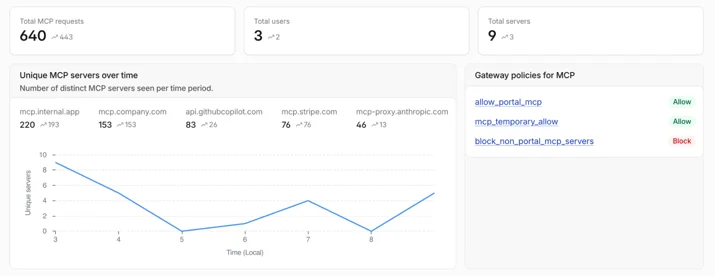
Today, we're introducing a dedicated MCP traffic dashboard that shows which hosts are serving MCP traffic within your network, which users are generating that traffic, and whether requests are going through your Cloudflare MCP Portals or bypassing them entirely.

The dashboard shows:
- Total MCP requests, unique users, and unique servers over a configurable time window
- MCP servers over time with per-server request counts
- Traffic breakdown by on-ramp, separating MCP Portal traffic from direct device client connections
- Top MCP servers seen outside your Portals, which is the shadow MCP traffic that matters most
- Top users by MCP request volume

Administrators can filter by specific servers, users, or on-ramp types, and navigate directly to Gateway HTTP logs filtered by the relevant host or user for deeper investigation.

Bring discovered servers into an MCP Portal
MCP discovery turns unknown traffic into a list an administrator can investigate. When an organization approves one of those servers, it can place the server behind a Cloudflare MCP server portal. The Portal gives employees one managed endpoint and puts Access identity, a curated tool catalog, and logging in front of the upstream server. Administrators can route compatible upstream calls through Gateway for HTTP policy, predictable egress, and data loss prevention, either across the Portal or for an individual server. Tool activity can also be exported through Logpush. The discovery dashboard can then distinguish requests that use the Portal from direct connections to the same server.
This creates a path from discovery to governance: find the server, decide whether to approve it, move approved use behind the Portal, and investigate traffic that continues to go around it. That last step matters because unapproved servers and bypasses of approved servers are different problems.
Enforcing Portal-only access
We are adding Traffic Source selectors to Gateway Network and HTTP policies to give administrators the fidelity to write rules to control MCP traffic based on whether or not originated from your MCP Portals.
When MCP Portal traffic routes through Gateway it carries an mcp_portal Traffic Source, which lets policy distinguish Portal-proxied requests from direct employee connections. A baseline enforcement rule looks like this:
experimental.is_mcp == true and not traffic.onramp in ("mcp_portal")
Action: Block
Any detected MCP traffic that did not arrive through a Portal gets blocked; traffic that came through the Portal is unaffected. For organizations that want to observe before enforcing, Traffic Source and MCP detection now exist in HTTP logs for traffic that has been decrypted, so you can monitor behavior for proxied traffic without the need for a policy.
More MCP servers can now use the governed path
An approved path is only useful if it can connect to a critical mass of the servers employees actually need.
Earlier MCP specifications recommended Dynamic Client Registration, where the client registers itself with an authorization server without an OAuth application. Many common OAuth providers use a different model: they require an administrator to register an application with a fixed client ID, client secret, callback URL, and set of scopes. MCP 2026-07-28 also recently deprecated dynamic registration.
To help alleviate this, MCP Portals now support pre-registered OAuth clients. An administrator can configure manual OAuth credentials, register the callback URL shown in the dashboard with the upstream provider, and enter the client credentials. The Portal discovers standard OAuth metadata when available, and the administrator can provide the authorization, token, revocation, and issuer endpoints when discovery is not possible.
Each user still authorizes access to their own upstream data sources, and the stored client secret is used only to fetch updated tool and prompt lists.
Manual OAuth support now helps to cover the many permutations of OAuth implementations. Some providers require custom headers, personal access tokens, or an explicit client allowlist, and those are separate compatibility problems. We will continue to expand the OAuth support of MCP portals in the coming months.
Bringing private MCP servers into the same Portal
Public SaaS tools are only part of an enterprise's MCP catalog. Most secure information that businesses rely on is not available from the public Internet; it exists in public or private cloud infrastructure, or is hosted on-premise, and is only reachable through connectivity to private networks.
Today, an MCP Portal must be able to resolve and reach an upstream server over the public Internet. This means that servers that are only available on private networks — via private DNS or inside private IP space — can’t be reached by Portals. We are working to let MCP Portals connect to private servers through Cloudflare Gateway routing and the same Cloudflare One network that is already used for other private applications.
The private server keeps its private hostname; the Portal reaches it through Cloudflare's private routing and presents its tools beside the public upstream servers; and Access policy, Portal logging, and tool controls continue to apply at the same front door.
Routing Portal traffic through Gateway also stamps it with the mcp_portal Traffic Source, so Gateway policy can distinguish a Portal request from a direct employee connection. Private connectivity for MCP servers is in active development; keep an eye on the Changelog for more information.
Agents SDK supports the new stateless model
A few weeks ago, the MCP project published the 2026-07-28 specification, a major revision that replaces connection-scoped initialization with a stateless, per-request model. We covered the protocol changes and migration path in The next generation of MCP.
Cloudflare Agents SDK v0.20.0 supports MCP 2026-07-28 as both a client and a server. For each connection the client first probes for the new stateless protocol with server/discover; if the server does not support it, the client continues with the legacy initialize handshake on the same connection. Existing addMcpServer calls do not need separate protocol settings or separate clients.
On the server side, createMcpHandler can serve stateless tools, prompts, resources, and elicitation from a Worker without creating a transport session or Durable Object:
import { McpServer } from "@modelcontextprotocol/server";
import { createMcpHandler } from "agents/mcp/server";

function createServer() {
  return new McpServer({ name: "example", version: "1.0.0" });
}

export default {
  fetch(request, env, ctx) {
    return createMcpHandler(createServer)(request, env, ctx);
  },
} satisfies ExportedHandler;
The fallback matters because protocol migrations rarely happen all at once. A new client still needs to reach an existing server, and a new server still needs to handle clients that have not moved yet. The Agents SDK supports both paths while the ecosystem transitions.
Start with visibility, then close the paths that should not exist
A workable MCP security program starts with understanding your users’ traffic profiles, MCP usage, and aligning on an approved set of tools and access methodologies.
First, inspect the MCP traffic that traverses Gateway and compare its destinations with the servers your organization has approved. Move more approved servers behind MCP Portals.
Then, enforce the boundary you can control. Compose Gateway policies which use the MCP detection conditions together with the Traffic Source and Destination conditions to block direct MCP connections from managed devices and sites, and restrict self-hosted upstream servers to Portal traffic where possible.
We will soon be adding more granular functionality for visibility and control of MCP traffic, including control over specific tool use and new reporting on tool usage across all MCP servers within your environment — whether they are known or unknown to your security organization.
Our MCP traffic detection tutorial covers the hostname, path, and JSON-RPC heuristics available for Gateway logs today. We will update the documentation with the protocol selector details as the new signal reaches general availability.
如有侵权请联系:admin#unsafe.sh