
If you’ve cleaned a support ticket export manually before, you’ll probably know that only a few rows 2026-8-11 15:7:49 Author: hackernoon.com(查看原文) 阅读量:1 收藏
If you’ve cleaned a support ticket export manually before, you’ll probably know that only a few rows are bothersome. A complaint by one person stated as "Can't get into my account again ugh", and another as "authentication failed after password reset" are technically the same but there is no signal for duplication in your spreadsheet. Ultimately, you scroll through two thousand entries, and find the ones that are in the ballpark of about a hundred that need attention.
The following guide fixes that scrolling using a Python script that reads a real CSV of tickets, cleans up the inconsistencies, and asks Claude about the rest. Anything Claude isn't sure about gets flagged for a human review.
You only need Python, a Claude API key, and about twenty minutes. I will even generate the messy test file for you, so you don't have to go find one. Plenty of AI automation tools promise, but don’t deliver an on-spot run, and check solution.
The Need For AI
Many of the ideas for the use of AI are unnecessary, and need several lines of standard code that nobody wants to write. Paying Claude to remove additional spaces from a sentence is useless, as Python can do it for free. To know that “can’t log in again, ugh”, and “can’t authenticate after password reset” are two ways of saying the same complaint is a complex task, and needs a model that understands language.
|
What you need |
Plain code |
Claude |
|---|---|---|
|
Count how many tickets came per day |
Yes |
Waste of money |
|
Fix dates, trim whitespace |
Yes |
Waste of money |
|
Categorization of variety of large data |
No |
Yes |
All tasks marked Yes in the plain code column will be done using pandas, and a similar case is for the Claude column. The division is the whole design, and keeps the bills small.
Step 1: Make the Test Data
A lot of tutorials skip this step, and ask you to bring your own data. It’s frustrating because of the difficulty in knowing whether a bad result is from the script or the data. Generating a file means we already know the results, and can easily skip data to pinpoint faults in the script. Install these three libraries before running the code below: anthropic to call Claude, pandas to read from, and write to the CSV, and python-dotenv to load your API key from a file instead of hardcoding it. To install them, run pip install anthropic pandas python-dotenv in the terminal of your IDE. Save the following code in a separate python file, and run it once:
"""Build a realistic messy tickets.CSV to test the classifier against."""
import random
import pandas as pd
random.seed(42)
TEMPLATES = [
    # login problems, worded the way people actually word them
    "cant login again ugh",
    "Unable to authenticate after password reset",
    "Login page just spins forever and never loads",
    "Two-factor authentication code never arrives",
    "It says my account doesn't exist but I've had it for years",
    # billing
    "charged $49 twice this month??",
    "I was billed for the annual plan instead of monthly",
    "Invoice #1092 shows the wrong amount",
    "Still being charged after I cancelled",
    # bugs
    "Getting a 500 error when I try to export my report",
    "Dashboard shows stale data even after refreshing",
    "export button does nothing on Safari",
    "app crashes when I upload a photo over 10mb",
    "Search results are missing items that clearly exist",
    # feature requests
    "can you add bulk delete to the dashboard",
    "Would love a keyboard shortcut for creating new tasks",
    "Please add support for exporting to PDF, not just CSV",
    "would be great to have dark mode",
    # the genuinely vague ones
    "Not sure this is the right place, but the site feels slow today",
    "Is there a status page for outages",
    "Just wanted to say the new update looks great",
]


# Unique IDs, so any duplicate in the file is one we put there on purpose.
ids = random.sample(range(3000, 5000), 2000)
rows = [
    {"ticket_id": f"T{i}", "description": random.choice(TEMPLATES)}
    for i in ids
]
**Step 2: Setting Up Claude
\
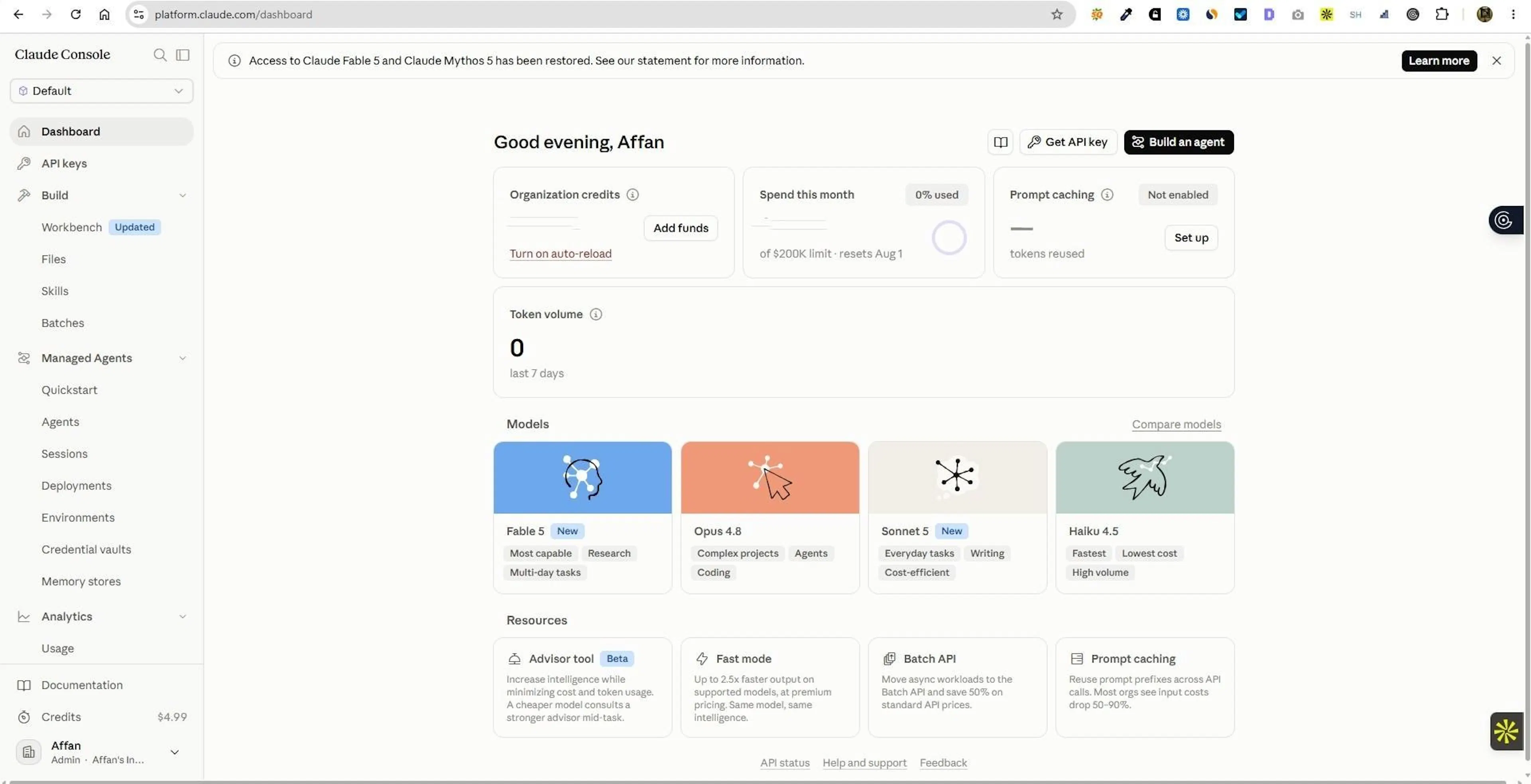 Logging Onto Claude Console
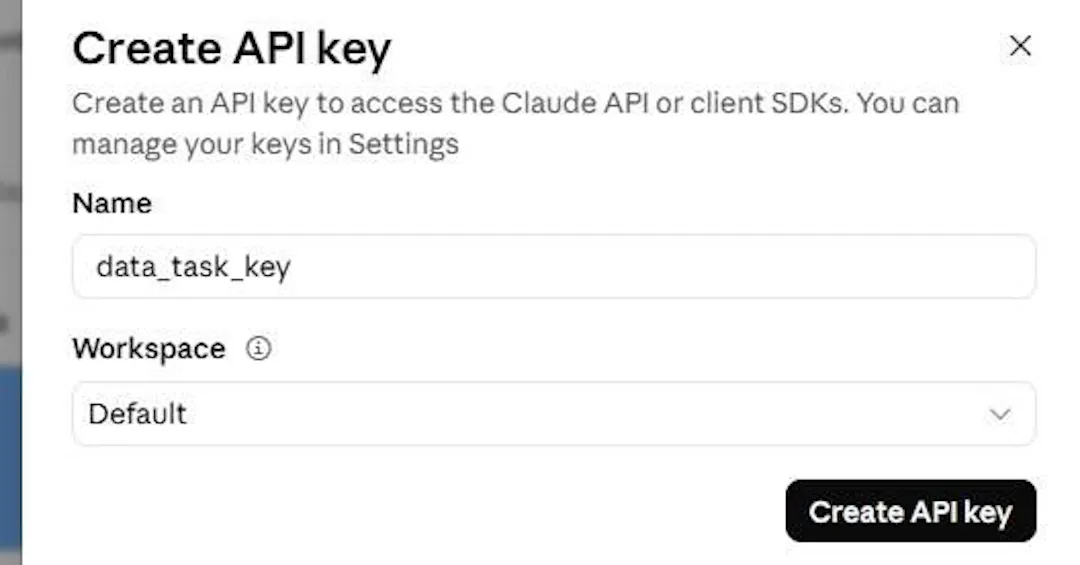 Creating An API Key
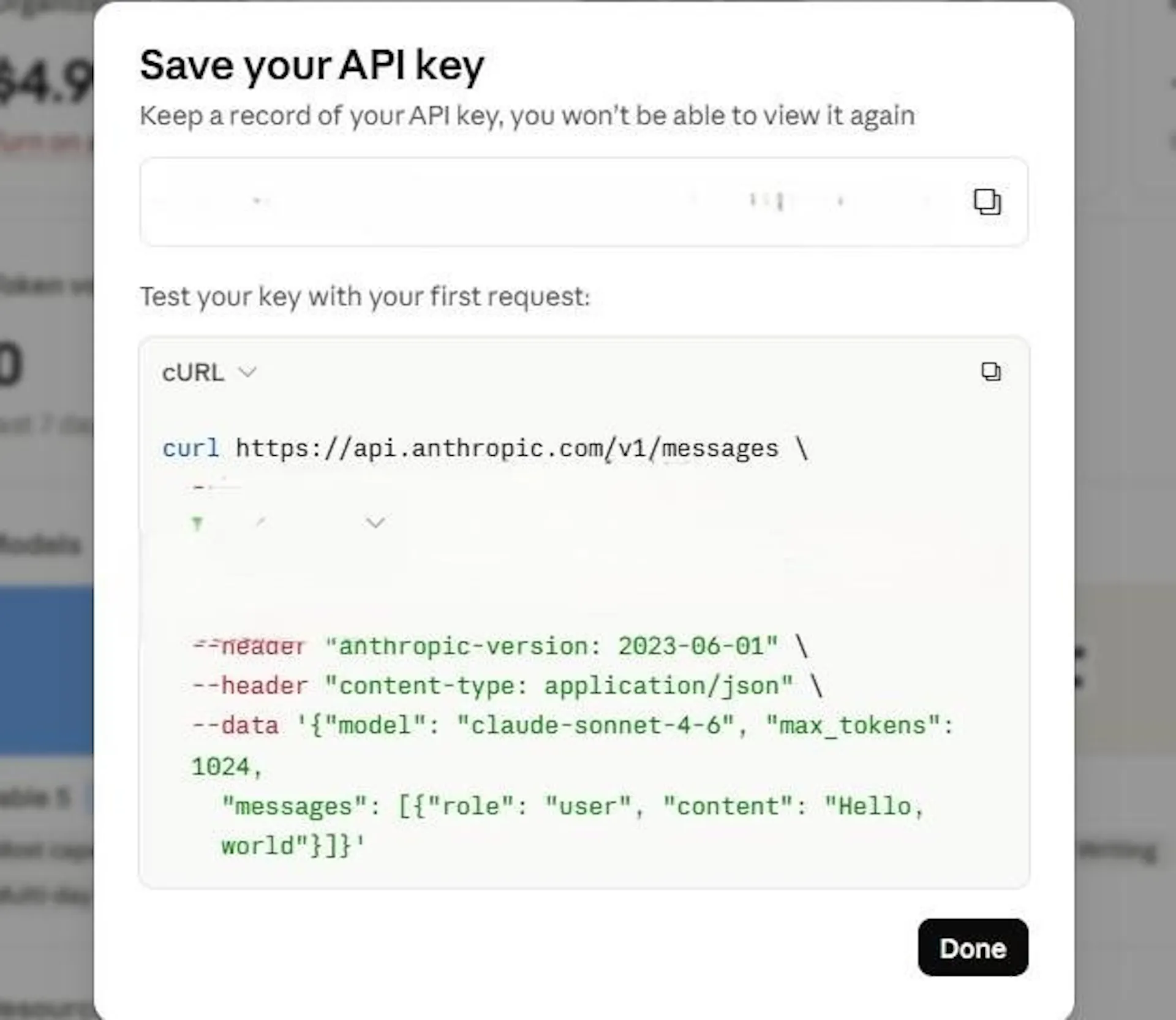 Saving API Key
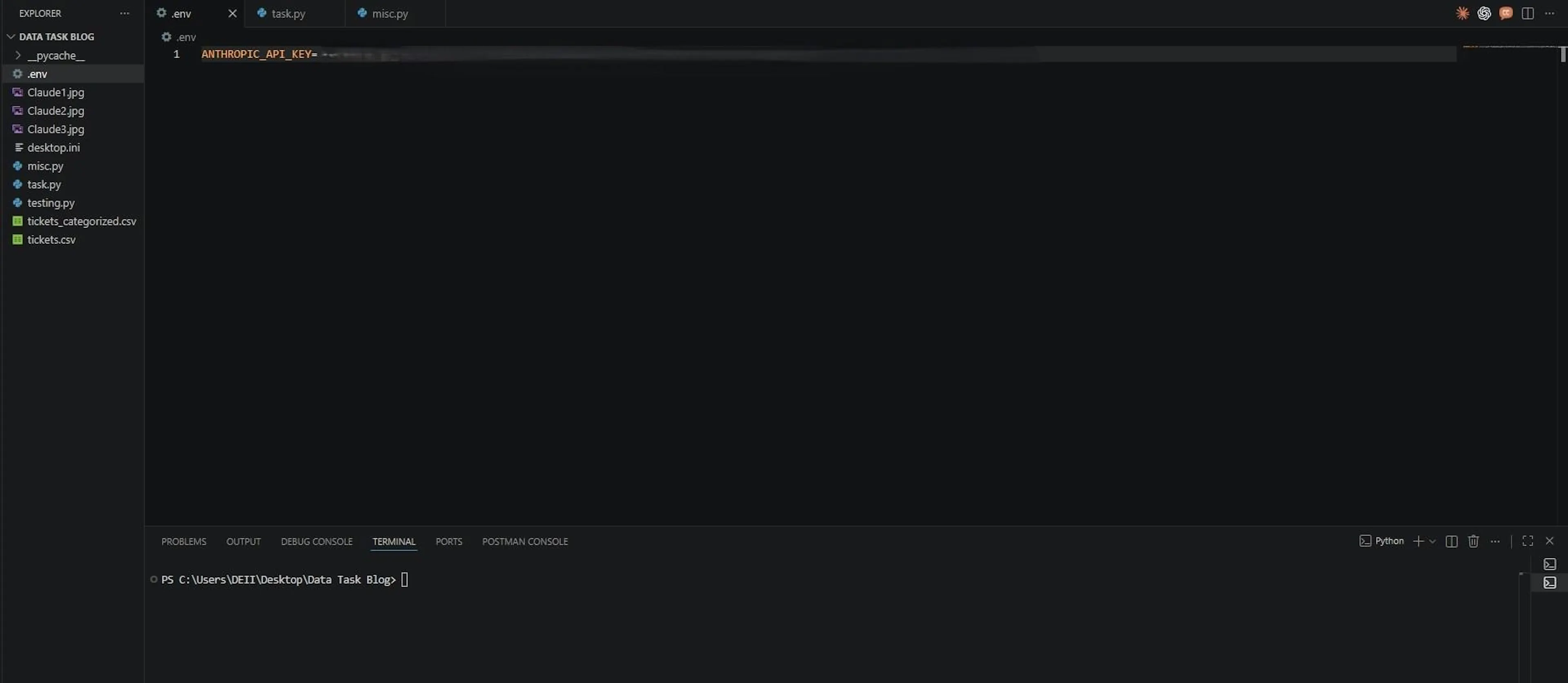 Save API Key Inside .env
# Real exports contain accidental repeats (a webhook fires twice, someone
# re-runs the export). Add four, so the dedup step has something to catch.
rows += random.sample(rows, 4)
df = pd.DataFrame(rows)
df.to_CSV("tickets.CSV", index=False)
print(f"Wrote {len(df)} rows to tickets.CSV")
print(f"  {df.ticket_id.nunique()} unique ticket_ids "
      f"({len(df) - df.ticket_id.nunique()} duplicates)")
print(f"  {df.description.nunique()} unique descriptions")
**It prints the following output: \
 Terminal After Running Step 1 Code
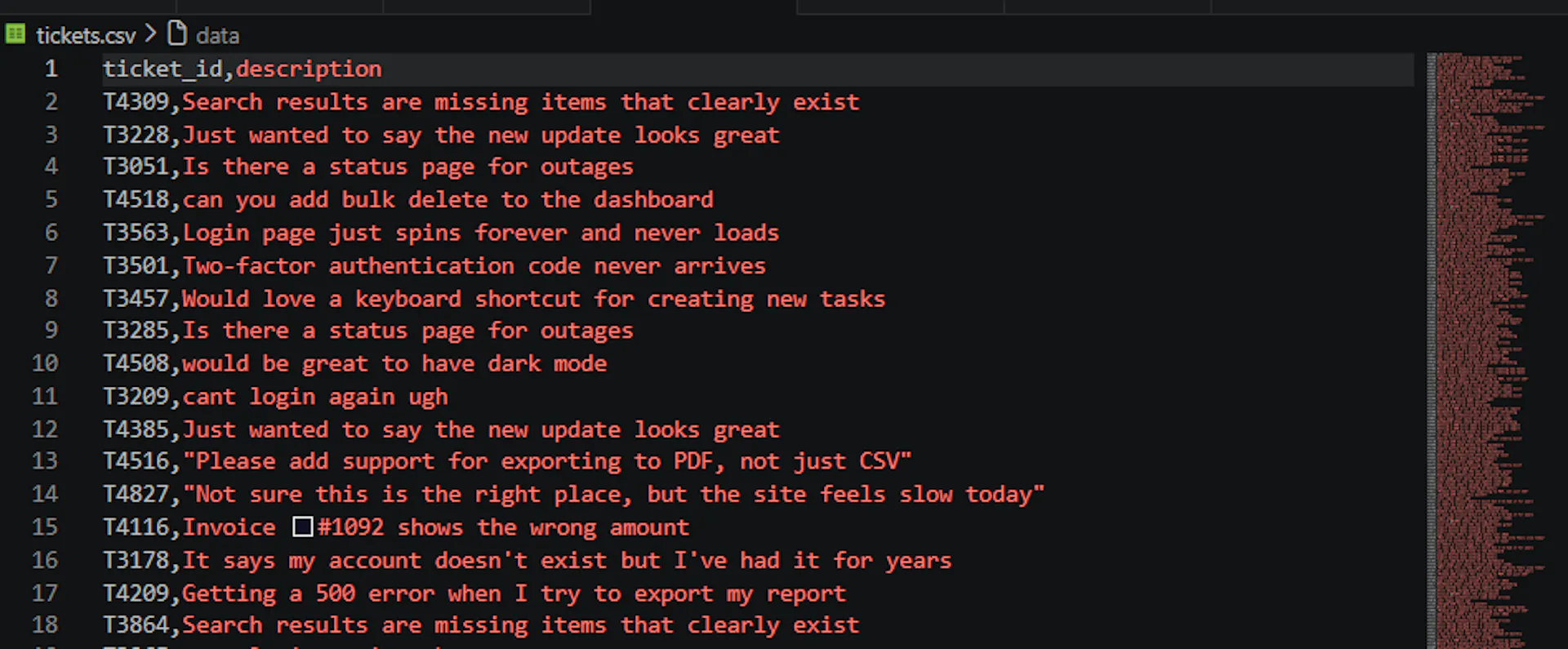
Read those three numbers again because they form the basis for the remainder of this article. Two thousand and four rows out of which four are duplicates that we planted, so a working script should drop all four. Only twenty-one of the descriptions differ from one another. The remaining 1,983 rows are repeats of previous examples. The last number is particularly interesting. If you write the obvious version of this script, which loops through the rows and calls Claude on each, you will send 2,004 requests to classify 21 different sentences. You'd be paying to ask the same question 100 times over. Here's the first few lines of what you get in a CSV file:**
 CSV file for tickets
Real exports look like this. Same complaints, over and over, with the occasional weird ones.
The images above show the process of creating an API key from the
ANTHROPIC_API_KEY=sk-ant-your-key-here
If you've never called Claude before, the
Step 3: Deciding Role Of Claude
Decide the role, and the output of the agent’s script before running the code. For the code in this blog, Claude does a simple task to sort each ticket into one of the five categories, and to flag anything that falls beneath the confidence threshold for human review.
Claude has no need to make judgement calls on support queues. Its only job is to sort, and classify based on its understanding of queues. People skip the small jobs, and then wonder why the agent behaves strangely. Hackernoon's guide to create an AI agent skill emphasises the same point: a skill works when it does one thing well, not because it attempts to do everything.
Step 4: Clean Out Junk First
Read from the tickets CSV file that was created in Step 1, and filter out by removing obvious junk present. It uses
import pandas as pd
df = pd.read_CSV("tickets.CSV")
df["description"] = df["description"].str.strip()
before = len(df)
df = df.drop_duplicates(subset="ticket_id").reset_index(drop=True)
print(f"Dropped {before - len(df)} duplicate(s), {len(df)} tickets left.")
After running the code, you will see the following output which is similar to duplicate numbers in Step 1. By skipping this step, you end up spending money on Claude to classify these four duplicates. It becomes a serious issue if the number is four hundred instead of four.
 Terminal Output For Step 4
Step 5: Ask Claude In An Efficient Manner
Two decisions save the most amount of money. First is the grouping of tickets which is the core of Step 5. Every API call has an overhead, and sending multiple tickets (twenty here) per request reduces the cost to a minimal value. Second is deduplication which is done via caching in Step 6. Caching an answer the first time for later dictionary lookups for the copies reduces the need to ask for non-unique entries.
import os
from anthropic import Anthropic
from dotenv import load_dotenv
load_dotenv()
client = Anthropic(api_key=os.getenv("ANTHROPIC_API_KEY"))
CATEGORIES = ["Billing", "Login Issue", "Bug Report", "Feature Request", "Other"]
MODEL = "claude-haiku-4-5-20251001"
SYSTEM_PROMPT = (
    "You are a classifier for support tickets. You will receive a numbered "
    "list of tickets. Classify each ticket into exactly one of these "
    f"categories: {', '.join(CATEGORIES)}. "
    "Respond with one line per ticket in the form "
    "'<number>. <category>, <confidence>', where confidence is a score from "
    "0 to 1. Match the input numbering exactly. No other text."
)
def categorize_tickets(client, descriptions):
    ticket_list = "\n".join(
        f'{i}. "{d}"' for i, d in enumerate(descriptions, start=1)
    )
    response = client.messages.create(
        model=MODEL,
        max_tokens=25 * len(descriptions),
        temperature=0,
        system=SYSTEM_PROMPT,
        messages=[{"role": "user", "content": f"Tickets:\n{ticket_list}"}],
    )
    lines = [l.strip() for l in response.content[0].text.strip().splitlines() if l.strip()]
    if len(lines) != len(descriptions):
        raise ValueError(f"Asked about {len(descriptions)}, got {len(lines)} answers back")
    results = []
    for i, line in enumerate(lines, start=1):
        number, dot, rest = line.partition(".")
        if not dot or number.strip() != str(i):
            raise ValueError(f"Line {i} is misnumbered: {line!r}")
        category, comma, confidence = rest.partition(",")
        if not comma:
            raise ValueError(f"Line {i} has no confidence score: {line!r}")
        category = category.strip()
        confidence = float(confidence.strip())
        if category not in CATEGORIES:
            raise ValueError(f"Made-up category: {category!r}")
        if not 0.0 <= confidence <= 1.0:
            raise ValueError(f"Confidence out of range: {confidence!r}")
        results.append((category, confidence))
    return results
The majority of the function is spent checking the response from Claude, rather than sending an API request. That's on purpose because Claude, although being great at classification, can still make mistakes in response, e.g, it might drop a support queue or get one of the labels wrong. If that happens, you would want a loud error, not a quietly mislabeled entry in your CSV that looks as trustworthy as the right one.
The Haiku model is used instead of Sonnet or Opus because sorting a sentence into five buckets does not need the expensive model. Model choice is the biggest lever on your bill out of all the AI automation tools decisions in this article, and it costs you nothing to get right. Hackernoon's
Step 6: Run the Groups, and Cache the Answers
Step 6 involves decisions for which tickets to send, removal of repetitions within chunks, and avoiding batch failure because of one failed request. Step 6 need Step 5 to function as it calls Step 5’s categorize_tickets()function, but the reverse is not true, although Step 5 would be inefficient, and expensive without Step 6. In the following code, I have faked the categorize_tickets()function for this code to run standalone.
"""
The code shows the grouping-and-caching logic without needing a Claude API key.You can watch the cache collapse 2,000 rows into a handful of requests. Swap in the real Step 5 version to classify for real.
"""
from concurrent.futures import ThreadPoolExecutor, as_completed
import pandas as pd
def categorize_tickets(client, descriptions):
    # Stand-in for the Step 5 function. The real one calls Claude; this just
    # labels everything so the rest of the pipeline has something to run on.
    return [("Billing", 0.95) for _ in descriptions]
def classify_group(client, descriptions):
    # Try the group in one request. If that fails, ask about each ticket
    # separately, so one bad response doesn't condemn the whole group.
    try:
        return categorize_tickets(client, descriptions), 0
    except Exception as exc:
        print(f"  Group of {len(descriptions)} failed ({exc}), retrying one by one")
    results, failed = [], 0
    for d in descriptions:
        try:
            results.append(categorize_tickets(client, [d])[0])
        except Exception:
            results.append(("Needs Review", 0.0))
            failed += 1
    return results, failed
def classify_dataframe(df, client, cache, max_workers=5, group_size=20):
    descriptions = df["description"].tolist()
    # This is the whole trick: only ask about sentences we haven't seen.
    unseen = [d for d in dict.fromkeys(descriptions) if d not in cache]
    groups = [unseen[i:i + group_size] for i in range(0, len(unseen), group_size)]
    print(f"  {len(df)} rows, but only {len(unseen)} new sentences "
          f"= {len(groups)} request(s)")
    failed = 0
    with ThreadPoolExecutor(max_workers=max_workers) as pool:
        futures = {pool.submit(classify_group, client, g): g for g in groups}
        for future in as_completed(futures):
            group = futures[future]
            results, group_failed = future.result()
            cache.update(zip(group, results))
            failed += group_failed
    df[["predicted_category", "confidence"]] = pd.DataFrame(
        [cache[d] for d in descriptions], index=df.index
    )
    return df, failed
if __name__ == "__main__":
    # Same first steps main() does: load, trim, drop duplicate ticket_ids.
    df = pd.read_CSV("tickets.CSV")
    df["description"] = df["description"].str.strip()
    df = df.drop_duplicates(subset="ticket_id").reset_index(drop=True)
    cache = {}
    classify_dataframe(df, client=None, cache=cache)
Run this against our 2,000 tickets, and it prints:
 Terminal Output For Step 6
Two requests, not two thousand, yielded the exact same result. Once a sentence has been classified, each subsequent copy simply reuses the answer rather than paying for it again.
Step 7: Flagging Unsure Items
CONFIDENCE_THRESHOLD = 0.9
df["category"] = df["predicted_category"]
low = df["confidence"] < CONFIDENCE_THRESHOLD
df.loc[low, "category"] = "Needs Review"
print(f"{low.sum()} of {len(df)} flagged for a human.")
df.to_CSV("tickets_categorized.CSV", index=False)
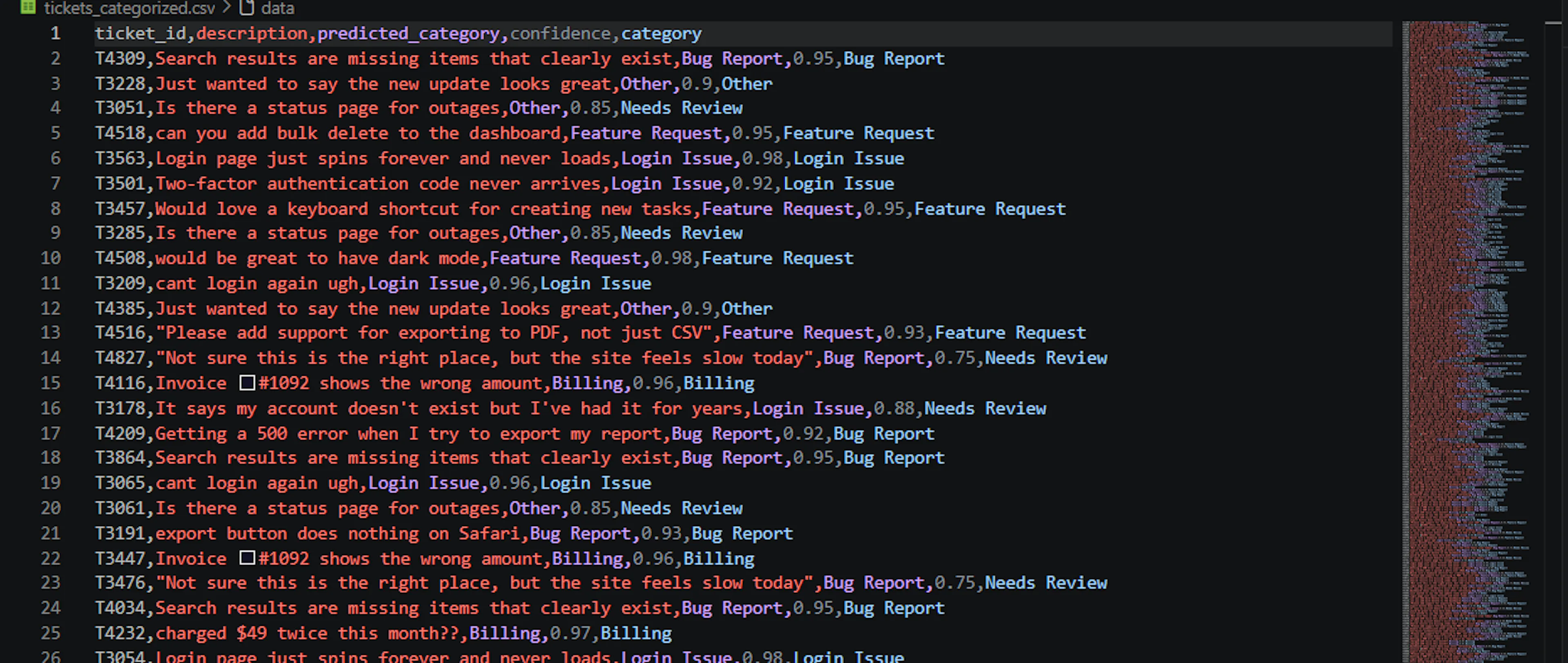
The code maintains two columns i.e., predicted_category contains Claude's original guess, while category contains the final label. When a row's confidence is too low, we only change the category to "Needs Review", leaving predicted_category unchanged.
The threshold is intentionally set at 0.9. Sending some extra rows for human review costs nothing whereas wrongly classified rows in the final report is costly. Run it to see what gets flagged, and then adjust the threshold as per your own data, and code. Threshold setting decides the trust of people in output, and a greater confidence is always good.
When you open the results file, the genuinely unclear tickets will be sitting in the "Needs Review" pile, waiting for a person. "Not sure if this is the right place, but the site feels slow today" is a perfect example: too vague to file confidently, exactly what a human should read. Claude flags it rather than making a guess.
The script runs, but this is still a demonstration, and the file name is hard-coded. Any file that exceeds the memory capacity will cause the program to crash. Some minor changes are required to bridge that gap, and enable it to operate on real files.
Accept arguments rather than hard coding: Currently, the filename is stored within the code itself. Python’s
Catch Duplicates Across Chunks: Do a quick read of the ticket_id column before the main loop to filter out repeated IDs. It helps in checking across chunks, and not just within chunks. In this way, chunking will act on purely unique non-repeated ticket IDs. The following code helps in implementing this check:
id_col = pd.read_csv(args.input, usecols=["ticket_id"])
dupe_ids = set(id_col[id_col.duplicated(keep="first")]["ticket_id"])
kept = set()
# inside the chunk loop, replace the single-line dedup with:
before = len(chunk)
is_dupe = chunk["ticket_id"].isin(dupe_ids)
already_kept = chunk["ticket_id"].isin(kept)
chunk = chunk[~(is_dupe & already_kept)]
kept.update(chunk.loc[chunk["ticket_id"].isin(dupe_ids), "ticket_id"])
dropped = before - len(chunk)
Process the file in chunks: If you load a big CSV data file at the same time, you can run out of memory resources. pd.read_CSV(chunksize=500) loads the data in chunks of 500 rows, and prints out the results of each chunk before moving on with the script so if it crashes at 40,000 rows, the previous 39,999 are saved, not lost.
Let the SDK handle transient failures: You can pass in a max_retries setting for the client from Anthropic. A short pause due to rate limiting is automatically retried, and is not marked failure, and labelled as “Needs Review.”
The Complete Picture
The following code is everything above all put together in one file. Save it in some Python file, e.g., task.py, and make sure your .env, and tickets.CSV are in the same folder, and run it in the terminal as python task.py --input tickets.CSV.
import argparse, os, time
from collections import Counter
from concurrent.futures import ThreadPoolExecutor, as_completed
import pandas as pd
from anthropic import Anthropic
from dotenv import load_dotenv
load_dotenv()
API_KEY = os.getenv("ANTHROPIC_API_KEY")
if not API_KEY:
    raise RuntimeError("ANTHROPIC_API_KEY is not set. Check your .env file.")
CATEGORIES = ["Billing", "Login Issue", "Bug Report", "Feature Request", "Other"]
MODEL = "claude-haiku-4-5-20251001"
CONFIDENCE_THRESHOLD = 0.9
REQUIRED_COLUMNS = {"ticket_id", "description"}
SYSTEM_PROMPT = (
    "You are a classifier for support tickets. You will receive a numbered "
    "list of tickets. Classify each ticket into exactly one of these "
    f"categories: {', '.join(CATEGORIES)}. "
    "Respond with one line per ticket in the form "
    "'<number>. <category>, <confidence>', where confidence is a score from "
    "0 to 1. Match the input numbering exactly. No other text."
)
def categorize_tickets(client, descriptions):
    ticket_list = "\n".join(f'{i}. "{d}"' for i, d in enumerate(descriptions, start=1))
    response = client.messages.create(
        model=MODEL,
        max_tokens=25 * len(descriptions),
        temperature=0,
        system=SYSTEM_PROMPT,
        messages=[{"role": "user", "content": f"Tickets:\n{ticket_list}"}],
    )
    lines = [l.strip() for l in response.content[0].text.strip().splitlines() if l.strip()]
    if len(lines) != len(descriptions):
        raise ValueError(f"Asked about {len(descriptions)}, got {len(lines)} back")
    results = []
    for i, line in enumerate(lines, start=1):
        number, dot, rest = line.partition(".")
        if not dot or number.strip() != str(i):
            raise ValueError(f"Line {i} is misnumbered: {line!r}")
        category, comma, confidence = rest.partition(",")
        if not comma:
            raise ValueError(f"Line {i} has no confidence score: {line!r}")
        category = category.strip()
        confidence = float(confidence.strip())
        if category not in CATEGORIES:
            raise ValueError(f"Made-up category: {category!r}")
        if not 0.0 <= confidence <= 1.0:
            raise ValueError(f"Confidence out of range: {confidence!r}")
        results.append((category, confidence))
    return results
def classify_group(client, descriptions):
    try:
        return categorize_tickets(client, descriptions), 0
    except Exception as exc:
        print(f"  Group of {len(descriptions)} failed ({exc}), retrying one by one")
    results, failed = [], 0
    for d in descriptions:
        try:
            results.append(categorize_tickets(client, [d])[0])
        except Exception as exc:
            print(f"  Ticket {d[:40]!r} failed: {exc}")
            results.append(("Needs Review", 0.0))
            failed += 1
    return results, failed
def classify_dataframe(df, client, cache, max_workers=5, group_size=20):
    descriptions = df["description"].tolist()
    unseen = [d for d in dict.fromkeys(descriptions) if d not in cache]
    groups = [unseen[i:i + group_size] for i in range(0, len(unseen), group_size)]
    print(f"  {len(df)} rows, {len(unseen)} new sentence(s) = {len(groups)} request(s)")
    failed = 0
    with ThreadPoolExecutor(max_workers=max_workers) as pool:
        futures = {pool.submit(classify_group, client, g): g for g in groups}
        for future in as_completed(futures):
            group = futures[future]
            results, group_failed = future.result()
            cache.update(zip(group, results))
            failed += group_failed
    df[["predicted_category", "confidence"]] = pd.DataFrame(
        [cache[d] for d in descriptions], index=df.index
    )
    return df, failed
def find_duplicate_ids(path):
    # Cheap first pass: only the ticket_id column, no descriptions loaded.
    # This is what lets dedup work across chunks instead of just within one.
    id_col = pd.read_csv(path, usecols=["ticket_id"])
    return set(id_col[id_col.duplicated(keep="first")]["ticket_id"])
def load_chunks(path, chunk_size):
    for i, chunk in enumerate(pd.read_csv(path, chunksize=chunk_size)):
        if i == 0:
            missing = REQUIRED_COLUMNS - set(chunk.columns)
            if missing:
                raise ValueError(f"CSV is missing column(s): {', '.join(sorted(missing))}")
        yield chunk.reset_index(drop=True)
def parse_args():
    p = argparse.ArgumentParser(description="Sort support tickets with Claude.")
    p.add_argument("--input", default="tickets.csv")
    p.add_argument("--output", default="tickets_categorized.csv")
    p.add_argument("--workers", type=int, default=5)
    p.add_argument("--group-size", type=int, default=20)
    p.add_argument("--chunk-size", type=int, default=500)
    p.add_argument("--max-retries", type=int, default=2)
    return p.parse_args()
def main():
    args = parse_args()
    client = Anthropic(api_key=API_KEY, max_retries=args.max_retries)
    # Pass 1: find every ticket_id that repeats anywhere in the file, before
    # we've loaded a single description. This is what catches a duplicate
    # even when its twin lands in a different chunk.
    dupe_ids = find_duplicate_ids(args.input)
    kept_dupe_ids = set()
    start = time.time()
    cache = {}          # shared across chunks: sentence -> (category, confidence)
    counts = Counter()
    total = dropped = flagged = failed = 0
    first = True
    for n, chunk in enumerate(load_chunks(args.input, args.chunk_size), start=1):
        print(f"--- Chunk {n} ({len(chunk)} rows) ---")
        chunk["description"] = chunk["description"].str.strip()
        # Pass 2: drop anything that's an exact repeat within this chunk,
        # and anything whose ticket_id we already kept in an earlier chunk.
        before = len(chunk)
        chunk = chunk.drop_duplicates(subset="ticket_id").reset_index(drop=True)
        is_dupe = chunk["ticket_id"].isin(dupe_ids)
        already_kept = chunk["ticket_id"].isin(kept_dupe_ids)
        chunk = chunk[~(is_dupe & already_kept)].reset_index(drop=True)
        kept_dupe_ids.update(chunk.loc[chunk["ticket_id"].isin(dupe_ids), "ticket_id"])
        dropped += before - len(chunk)
        if len(chunk) == 0:
            # Every row in this chunk was a duplicate already handled
            # earlier. Nothing to classify or write for this chunk.
            print(f"  0 rows left after dedup, skipping this chunk")
            continue
        chunk, chunk_failed = classify_dataframe(
            chunk, client, cache,
            max_workers=args.workers, group_size=args.group_size,
        )
        chunk["category"] = chunk["predicted_category"]
        low = chunk["confidence"] < CONFIDENCE_THRESHOLD
        chunk.loc[low, "category"] = "Needs Review"
        chunk.to_csv(args.output, mode="w" if first else "a",
                     header=first, index=False)
        first = False
        counts.update(chunk["category"])
        total += len(chunk)
        flagged += int(low.sum())
        failed += chunk_failed
    print(f"\nDone in {time.time() - start:.1f}s.")
    print(f"{total} tickets, {dropped} duplicate(s) dropped, "
          f"{flagged} flagged for review ({failed} of those were errors).")
    print(f"Only {len(cache)} unique sentences were ever sent to Claude.")
    for category, count in counts.most_common():
        print(f"  {category}: {count}")
if __name__ == "__main__":
    main()
You run it, and the terminal shows the chunk size, number of unique sentences for sending request, the duplicates dropped(missed), and a final category breakdown. The important part is the cache, only 21 unique sentences were ever sent to Claude to label 2,004 rows, and the whole run took about 2 seconds.
The results are saved to tickets_categorized.CSV. Applying a filter for "Needs Review" gives exactly the tickets that need review from a human.
 CSV For Categorized Tickets
What Can Go Wrong?
Each one of the following is a mistake specific to the script above, not a generic piece of advice you could have figured out on your own by looking at it:
- One request per row API. To get just 21 different questions you would have made 2,000 enquiries. Grouping, and caching reduce this number.
- Taking the answer literally. If you save a line to your CSV with the wrong number or an invented category, it looks just like a correct line. Without validating the response, you will not be able to find the erroneous ones.
- Crossing the threshold of confidence. Leave it out, and the tickets Claude doubted are just like the tickets he was sure of. You lose the only hint that tells you to check specific rows.
- Choosing the biggest model. The haiku classify these sentences well. Opus can do it, too, but it will cost considerably more for the same results.
- Increasing workers without verifying your rate limit. Exceeding your tier's limit results in throttling, not increased speed.
If One Script Is Not Enough
Our script performs classification on a file. Once you are at an advanced stage, each step requires a different tool. Following is the list of tools in order of their usage.
- Claude Agent SDK, in case you want the agent to do things, read files, run tools, and make changes instead of just answering questions, and handing the work back to you.
- Model Context Protocol (MCP) is useful when your tickets are stored in a helpdesk or a database, instead of a CSV. MCP enables Claude to query the source directly, without the necessity of manual export.
- Message Batches API for large volumes, where time is not an issue. It costs roughly half as much, in exchange for the delayed results. Note that this is a separate feature from the request-grouping done in Step 5, although they are often both referred to as "batching.
- LangChain when you need to chain together multiple steps, or pull in more context before Claude makes its decision, because a single prompt just isn't enough.
- n8n when the person responsible for maintenance doesn't know Python, it has a visual drag-and-drop interface with a built-in node for Claude.
If your bottleneck isn't a file at all but a browser, someone clicking through pages by hand, that's a different problem to this one, and hackernoon's blog is the better starting point.
Building It Yourself vs. Bringing in Help
We have put together a good weekend project in the script. Performing multiple classification steps in a sequence, where the output of one agent is used as input to the next agent, and extract tickets in parallel from different sources (database, helpdesk, CSV) are the advanced stages of this project which take time to build, and test. Advanced cases are usually solved by any AI automation services company. Besides promptness, infrastructure is really important when we talk about upscaling automation tools using AI for dealing with customer data on a daily basis.
如有侵权请联系:admin#unsafe.sh