Home > Jamf Pro, Jamf Pro API > Creating Jamf Pro API roles with privileges equivalent to Audit 2026-8-1 18:22:44 Author: derflounder.wordpress.com(查看原文) 阅读量:51 收藏
Home > Jamf Pro, Jamf Pro API > Creating Jamf Pro API roles with privileges equivalent to Auditor and Administrator account privilege sets
Creating Jamf Pro API roles with privileges equivalent to Auditor and Administrator account privilege sets
To follow up on my earlier post about creating API roles with all available privileges, I’ve developed a script which will create API Roles with API privileges that are roughly equivalent to the API privileges for Jamf Pro accounts which have been assigned the following Jamf Pro account privilege sets:
- Administrator: Grants all account privileges
- Auditor: Grants all account read privileges
For more details, please below the jump.
The script is named create_jamf_pro_api_role_with_auditor_or_administrator_privileges.sh and is available via the link below:
This script performs the following actions:
- Create a new API role on a Jamf Pro server.
- Assign all necessary API privileges to that newly-created API role.
Three items are required to use this script:
- The URL of the appropriate Jamf Pro server.
- The Client ID for a Jamf Pro API client with all necessary API privileges assigned to it.
- The Client Secret for that Client ID.
As mentioned in my previous post, Jamf Pro enforces a privilege-escalation guard, where an API Client can’t be used to authenticate an API call which creates a API Role and assigns API privileges to that API Role which the API Client does not already hold itself. What this means is that the API clients used to authenticate must have the following minimum API privileges associated with them:
Creating an Auditor-equivalent API Role
- All API privileges whose name starts with Read
- Create API Roles
- Update API Roles
Creating an Administrator-equivalent API Role
- All available API privileges
Note: API privileges starting with View (for example, the View Disk Encryption Recovery Key API privilege) are intentionally excluded from being assigned to the Auditor-equivalent API Role, even though they are also read-only in nature. This is because the View permissions may provide access to information not available to Jamf Pro user accounts which have been assigned the Auditor account privileges set. If View privileges are needed for the API Role being created, you will need to add them following the creation of the new API role by this script.
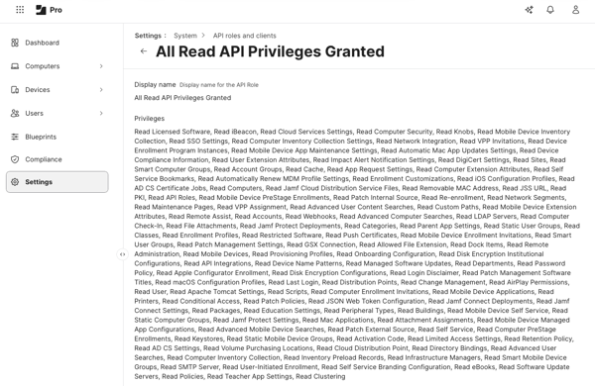
For this example, I want to create a new API role named All Read API Privileges Granted. To do so, I’m using an API Client which has been assigned the following permissions:
- All API privileges whose name starts with Read
- Create API Roles
- Update API Roles
When the script is run, I’m selecting the Auditor choice when prompted for the privilege set.
With the example conditions, you should see similar output to what’s shown below when using the script to create the new All Read API Privileges Granted API Role:
This file contains hidden or bidirectional Unicode text that may be interpreted or compiled differently than what appears below. To review, open the file in an editor that reveals hidden Unicode characters.
Learn more about bidirectional Unicode characters
| username@computername ~ % /Users/Shared/create_jamf_pro_api_role_with_auditor_or_administrator_privileges.sh | |
| Please enter your Jamf Pro server URL : https://jamfpro.server.here | |
| Please enter your Jamf Pro API client ID : 6ecde06f-6983-4916-a774-629560acf76c | |
| Please enter the API client secret for the 6ecde06f-6983-4916-a774-629560acf76c API ID client: | |
| Retrieving the list of available API Role privileges … | |
| Found 524 total API Role privileges on this server. | |
| Name for the new API Role: All Read API Privileges Granted | |
| Which privilege set should the new API Role approximate? | |
| 1) Administrator – all API Role privileges | |
| 2) Auditor – all 'Read' API Role privileges | |
| Enter 1 or 2: 2 | |
| Selected 130 privileges for the 'Auditor' role. | |
| Verifying the API Client holds the privileges required to create a 'Auditor' role … | |
| API Client holds the required privileges. Proceeding … | |
| Creating API Role 'All Read API Privileges Granted' … | |
| API Role created successfully: | |
| ID: 24 | |
| Display Name: All Read API Privileges Granted | |
| Privilege set: Auditor (130 privileges assigned) | |
| Note: 'Administrator'/'Auditor' are an appromiximation of the Jamf Pro account privilege sets with the same names. | |
| API Roles have no built-in privilege sets of their own. | |
| username@computername ~ % |
You should then be able to check on the Jamf Pro server and verify that the All Read API Privileges Granted API Role has been created and that it has all API privileges whose name starts with Read assigned to it.

As part of its run, the script will verify if the API Client being used to create the API Role itself has all relevant API privileges assigned to it. If the API Client does not have all of the necessary API privileges assigned to it, it will stop and display warnings similar to what is shown below:
This file contains hidden or bidirectional Unicode text that may be interpreted or compiled differently than what appears below. To review, open the file in an editor that reveals hidden Unicode characters.
Learn more about bidirectional Unicode characters
| username@computername ~ % /Users/Shared/create_jamf_pro_api_role_with_auditor_or_administrator_privileges.sh | |
| Please enter your Jamf Pro server URL : https://jamfpro.server.here | |
| Please enter your Jamf Pro API client ID : 6ecde06f-6983-4916-a774-629560acf76c | |
| Please enter the API client secret for the 6ecde06f-6983-4916-a774-629560acf76c API ID client: | |
| Retrieving the list of available API Role privileges … | |
| ERROR: Failed to retrieve API Role privileges. Please try again with an API Client which includes the following privilege: 'Read API Roles'. Response from Jamf Pro server: { | |
| "httpStatus" : 403, | |
| "errors" : [ { | |
| "code" : "INVALID_PRIVILEGE", | |
| "description" : "Forbidden", | |
| "id" : "0", | |
| "field" : null | |
| } ] | |
| } | |
| username@computername ~ % |
This file contains hidden or bidirectional Unicode text that may be interpreted or compiled differently than what appears below. To review, open the file in an editor that reveals hidden Unicode characters.
Learn more about bidirectional Unicode characters
| username@computername ~ % /Users/Shared/create_jamf_pro_api_role_with_auditor_or_administrator_privileges.sh | |
| Please enter your Jamf Pro server URL : https://jamfpro.server.here | |
| Please enter your Jamf Pro API client ID : 6ecde06f-6983-4916-a774-629560acf76c | |
| Please enter the API client secret for the 6ecde06f-6983-4916-a774-629560acf76c API ID client: | |
| Retrieving the list of available API Role privileges … | |
| Found 524 total API Role privileges on this server. | |
| Name for the new API Role: All Read API Privileges Granted | |
| Which privilege set should the new API Role approximate? | |
| 1) Administrator – all API Role privileges | |
| 2) Auditor – all 'Read' API Role privileges | |
| Enter 1 or 2: 2 | |
| Selected 130 privileges for the 'Auditor' role. | |
| Verifying the API Client holds the privileges required to create a 'Auditor' role … | |
| The API Client '6ecde06f-6983-4916-a774-629560acf76c' is missing 2 of the 132 privileges required to create a 'Auditor' role: | |
| – Create API Roles | |
| – Update API Roles | |
| ERROR: Assign an API Role to the API Client that includes all of the privileges listed above, then try again. | |
| username@computername ~ % |
如有侵权请联系:admin#unsafe.sh