Talk to any threat hunter long enough, and beneath the polished case studies and conference talks, the same frustrations surface. Hunting is supposed to be proactive. In practice, it often feels reactive. You are chasing whispers of activity through log noise, querying SIEM fields that barely reflect real attacker behavior and writing detections against technique descriptions that were never meant to be operationalized directly.
The challenge is not that analysts lack skill. Most hunting teams are sharp, methodical, and deeply familiar with attacker playbooks. The real friction is structural: the intelligence feeding hunts is often stale, decontextualized, or missing the behavioral granularity needed to write anything more than a broad, noisy detection.
The core tension
Threat hunting is a high-skill, time-intensive activity that justifies itself by finding what automated systems miss. But when the intelligence inputs are low-fidelity, even the most skilled hunters spend the majority of their time generating work rather than reducing risk.
MITRE ATT&CK tells you a technique exists. It does not tell you how it behaves in a real attack chain against a real target. That gap between abstract TTP and concrete execution behavior is where many hunts quietly die. IOCs arrive stripped of context: you block an IP, a rotated domain from the same campaign lands in your environment three days later, and sails straight through.
And then there is the false-positive problem. Not a technical inconvenience but a morale and process killer. Every alert that turns out to be Outlook talking to a Microsoft licensing server erodes confidence in the detection pipeline. Over-tuned rules miss real threats; under-tuned rules train analysts to discount the queue.
In this article, we’ll explore how threat intelligence supports core hunting workflows and how ANY.RUN’s Threat Intelligence solutions help analysts investigate threats with greater speed and confidence.
Key Takeaways
- Threat hunting fails structurally, not skillfully. The bottleneck is intelligence quality.
- Behavioral context beats indicators. A single IOC blocked solves nothing if the campaign behind it isn’t understood. Pivoting from one artifact — a mutex, a file path, a Suricata tag — into a full attack chain is what separates hunting from blocklisting.
- Hypothesis validation requires real attack data. ATT&CK describes techniques in the abstract. Effective hunting needs to know how a technique behaves in live, active campaigns — which tools operationalize it, what infrastructure it touches, what artifacts it leaves.
- False positives are a strategy problem, not just a noise problem. Every low-fidelity alert that consumes analyst attention is a detection that wasn’t built right. Validating rules against real samples before deployment is the difference between a detection pipeline and a distraction pipeline.
- Intelligence layers serve different operational needs. TI Lookup drives active investigations; TI Feeds keep automated defenses current; TI Reports bridge the gap between raw campaign data and detection engineering or executive briefings.
- AI-assisted triage is a force multiplier, not a replacement. Tier 1 reports, AI summaries, and sandbox recommendations don’t replace analyst judgment — they eliminate the translation work between analysis output and operational action, freeing analysts for work that actually requires them.
- Hunting ROI is measurable — if you instrument it correctly. Earlier detection, defense calibrated to active threats, and analyst time redirected to genuine risk: each is quantifiable. Programs that cannot demonstrate these outcomes don’t lack value — they lack the intelligence infrastructure to produce it consistently.
1. Hypothesis Validation: Device Code Phishing
Scenario: A hunter develops a hypothesis: adversaries may be abusing Microsoft’s Device Code authentication flow to compromise organizational accounts without triggering MFA. The technique is real, but the team needs evidence it is active now and a way to identify the behavioral signatures that distinguish attacks from legitimate device authorization.
The struggle: Generic queries against authentication logs produce enormous volume. Without knowing what a malicious device code flow actually looks like in practice — which referrer domains initiate the redirect, which PhaaS kits are operationalizing the technique, what the email delivery chain looks like — the team is essentially querying blind.
The solution: TI Lookup allows the hunter to query the Microsoft device auth endpoint directly and immediately retrieve sandboxed sessions where the technique is observed in the wild.
url:”https://login.microsoftonline.com/common/oauth2/deviceauth?code=*”
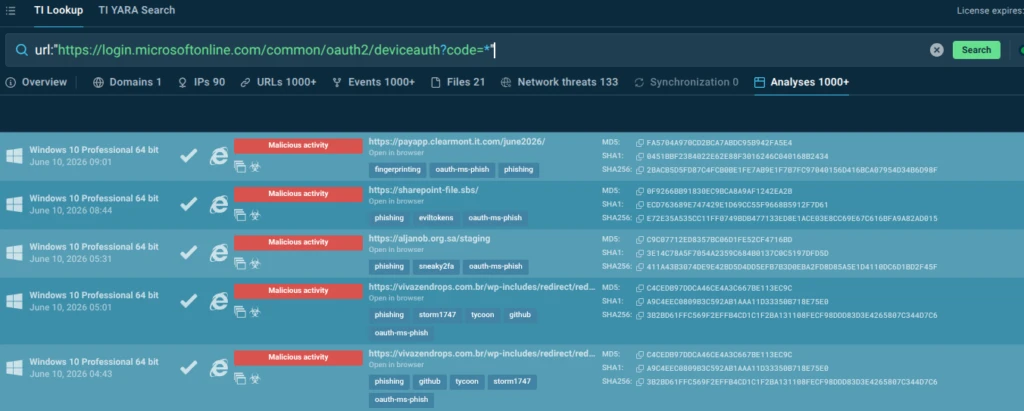
Sessions are tagged automatically: Phishing, oauth-ms-phish, and kit-specific tags like Kali365 (a PhaaS platform specializing in Device Code Phishing).
We can view any of the analyses sessions, for example: https://app.any.run/tasks/fc973b26-7cc8-4253-a313-1b77ff27f04c/
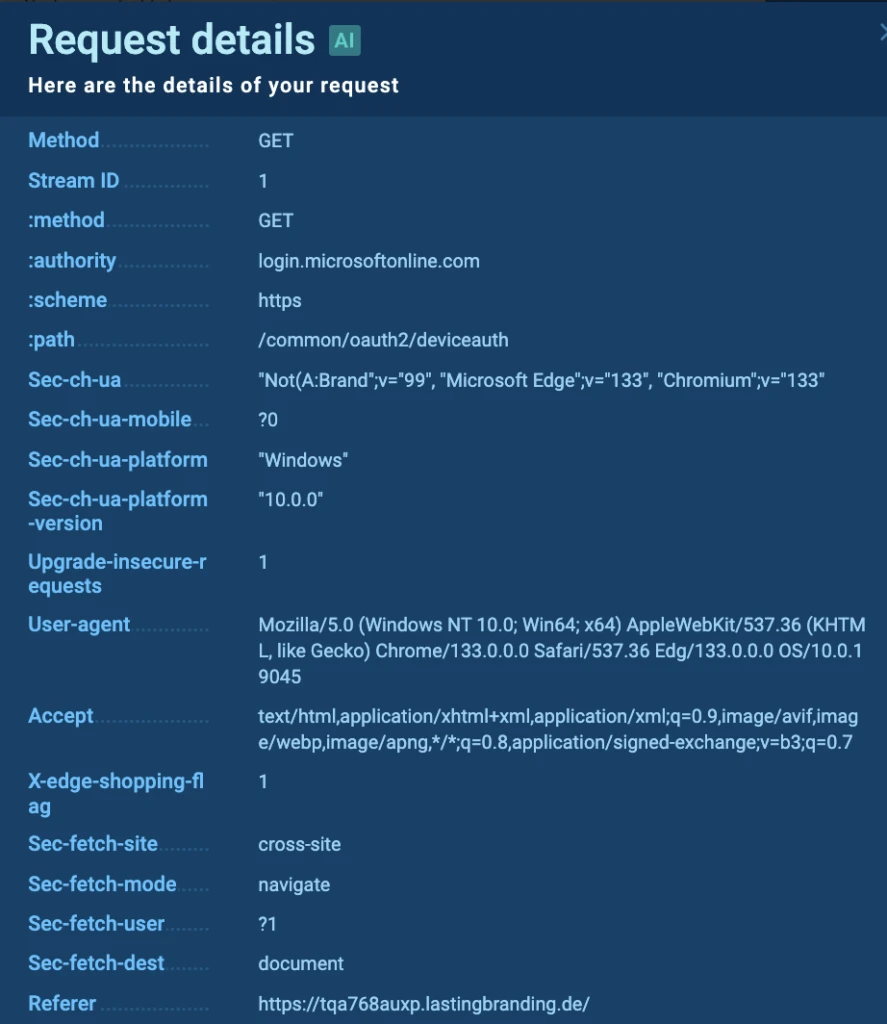
The hunter can inspect the full referrer chain:

In live cases, the redirect to Microsoft’s legitimate device auth endpoint originates from external domains, including those with unusual TLDs.
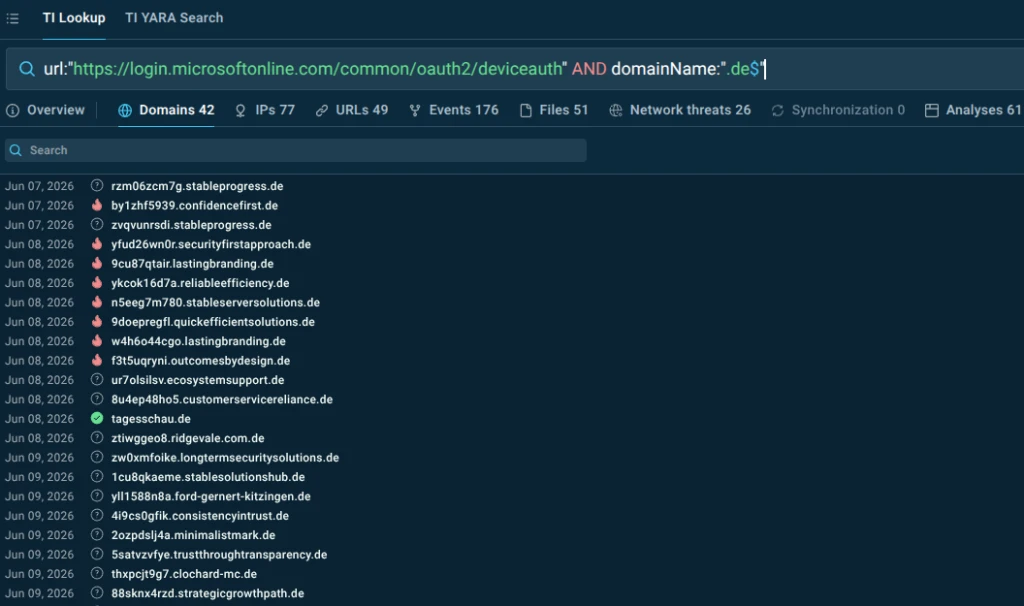
Subsequent queries can filter by TLD against the device code URL, giving the team a concrete list of suspicious referring domains to feed into SIEM monitoring or block lists.
url:”https://login.microsoftonline.com/common/oauth2/deviceauth” and domainName:”.de$”
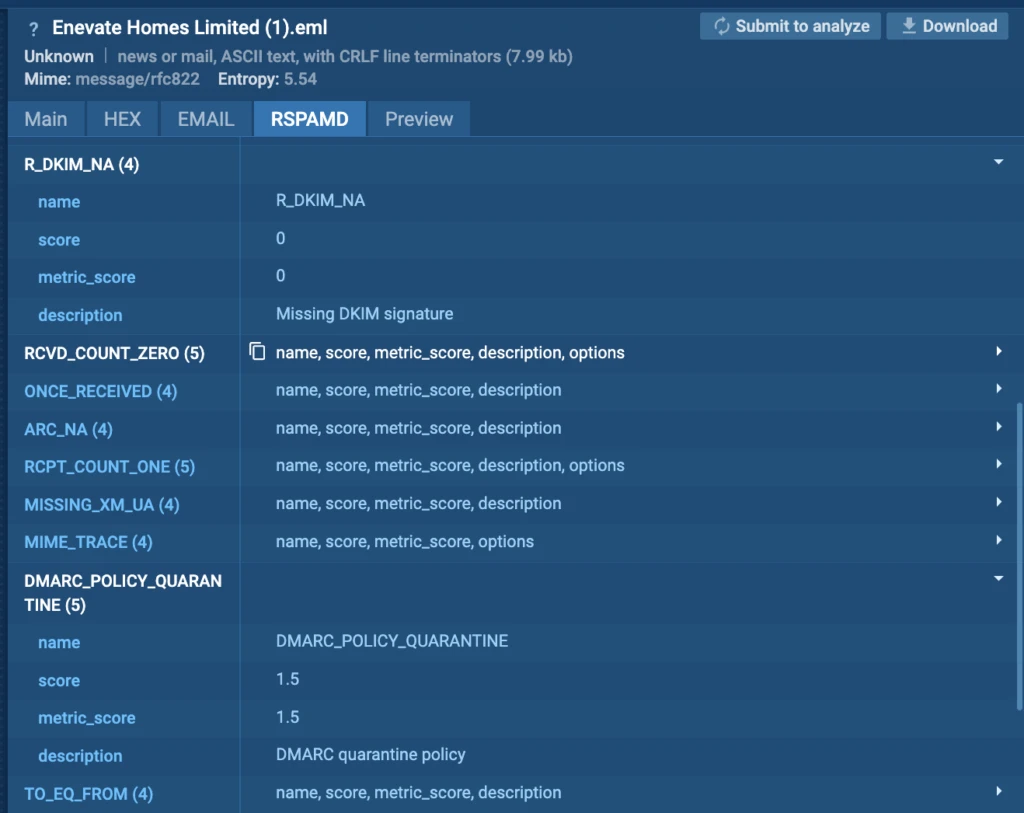
For more targeted investigation, the hunter can also query by threat name and file path to retrieve the actual phishing emails (.eml files) used to deliver the initial lure, exposing sender patterns, subject line templates, and infrastructure metadata.
Impact:
- Hypothesis validated against real, live attack data rather than technique abstractions.
- Concrete IOCs and behavioral signatures ready for SIEM query development.
- Email metadata exposed for deeper organizational log correlation.
2. Behavioral Pivots: Tracking a Stealer Family via Mutex
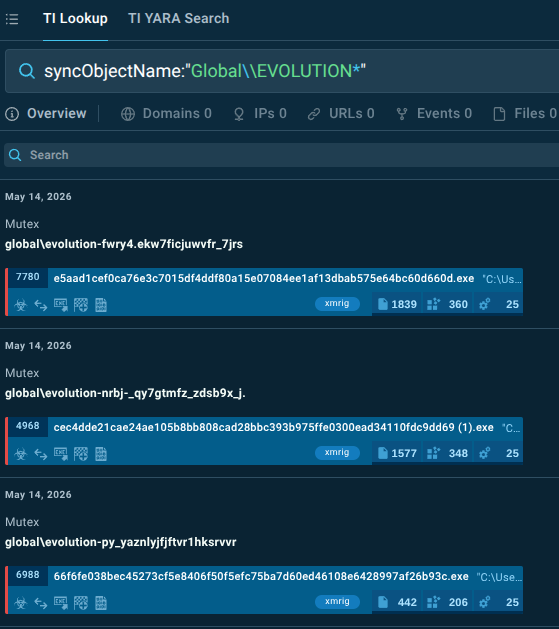
Scenario: A suspicious executable is submitted for analysis and identified as a stealer. The analyst notices a mutex with a hardcoded prefix — Global\EVOLUTION — followed by a randomized suffix. The question is whether this prefix is unique to this malware family and, if so, how widely deployed it is.
The struggle: A mutex with a random suffix has no stable IOC value. Standard threat feeds will not carry it. Searching for the full string is guaranteed to miss variants. The behavioral pattern is clearly significant but there is no obvious path from a single sample to campaign-level coverage.
The solution: A wildcard query in TI Lookup (syncObjectName:”Global\\EVOLUTION*”) immediately surfaces a number of additional samples sharing the same hardcoded prefix with different randomized tails, confirming the pattern is not incidental but a structural artifact of this malware family.
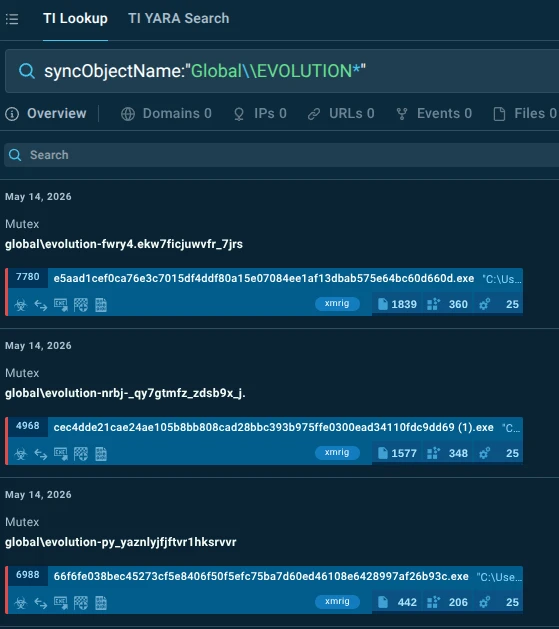
Cross-referencing the mutex results against file path artifacts reveals that affected systems consistently produce a dump archive at C:\Users\admin\AppData\Local\Temp\evo_[random]\stolen.zip — a second independent behavioral indicator that definitely looks like a stealer.
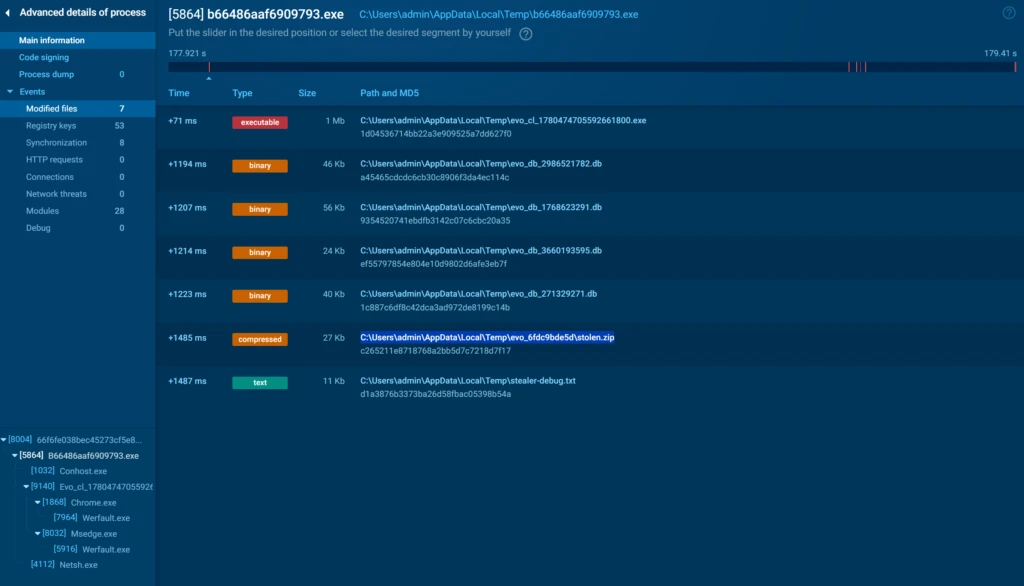
Running OR and AND lookup combinations of both indicators allows the hunter to tune coverage: OR for maximum reach, AND for high-confidence, low-noise detections:
- filePath:”C:\Users\admin\AppData\Local\Temp\evo_\stolen.zip” OR syncObjectName:”Global\EVOLUTION”
- filePath:”C:\\Users\\admin\\AppData\\Local\\Temp\\evo_*\\stolen.zip” AND syncObjectName:”Global\\EVOLUTION*”
Starting from a single mutex observation, the hunter has now built a multi-indicator behavioral profile of an entire malware family.
Impact:
- Single behavioral artifact expands into full campaign coverage.
- Multi-indicator detection logic developed and validated before touching production systems.
- No reliance on stable IOCs — detection survives malware updates.
3. Enrichment: Suspicious Domain in an Inbound Email
Scenario: An email from an unknown sender arrives containing a link to an unfamiliar domain. Standard policy would flag this for review. The analyst needs to determine quickly whether the domain is genuinely malicious or simply unknown, and if malicious, what the full attack chain looks like.
The struggle: WHOIS data shows the domain is recently registered. Passive DNS shows limited history. Reputation feeds return no verdict. The analyst has a suspicious domain but no behavioral context — no sense of what the domain delivers, what it steals, or what infrastructure it connects to.
The solution: The domain search in TI Lookup returns sandbox sessions where the domain has been analyzed.
domainName:”miracleplayssystems.com”
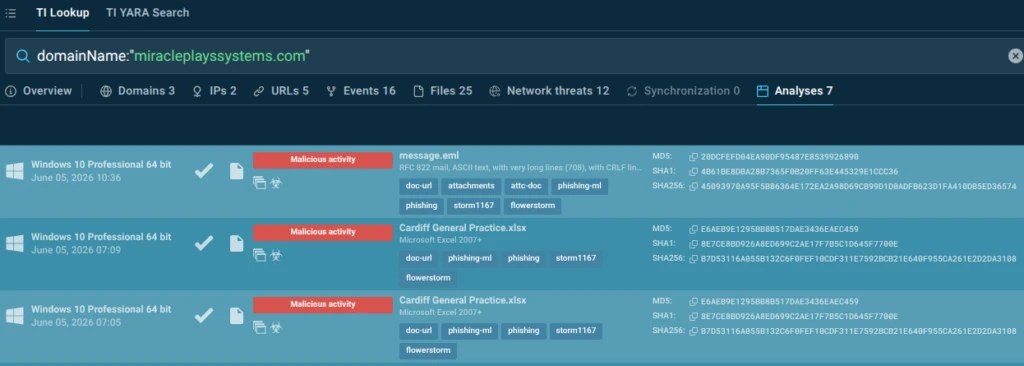
The hunter opens one and immediately sees a Microsoft 365 login page clone hosted on the suspicious domain, automatically tagged by ANY.RUN.
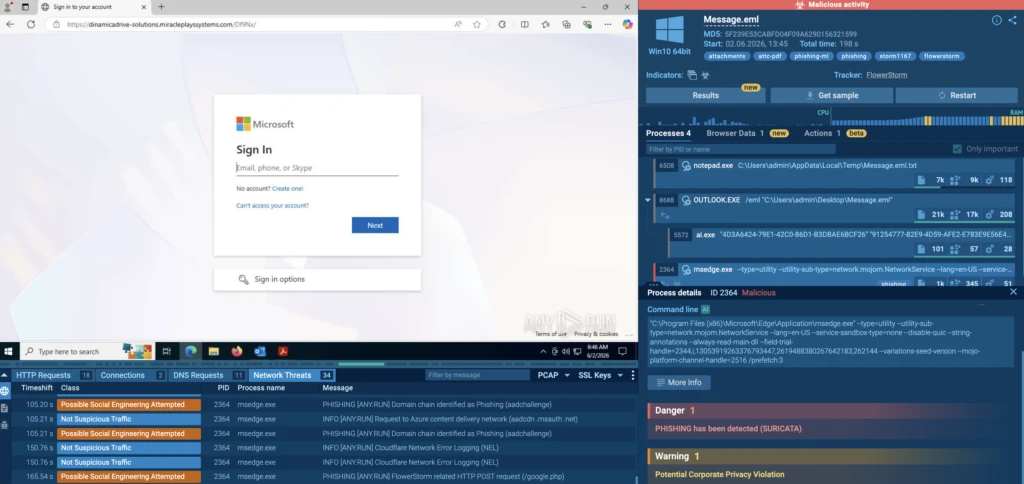
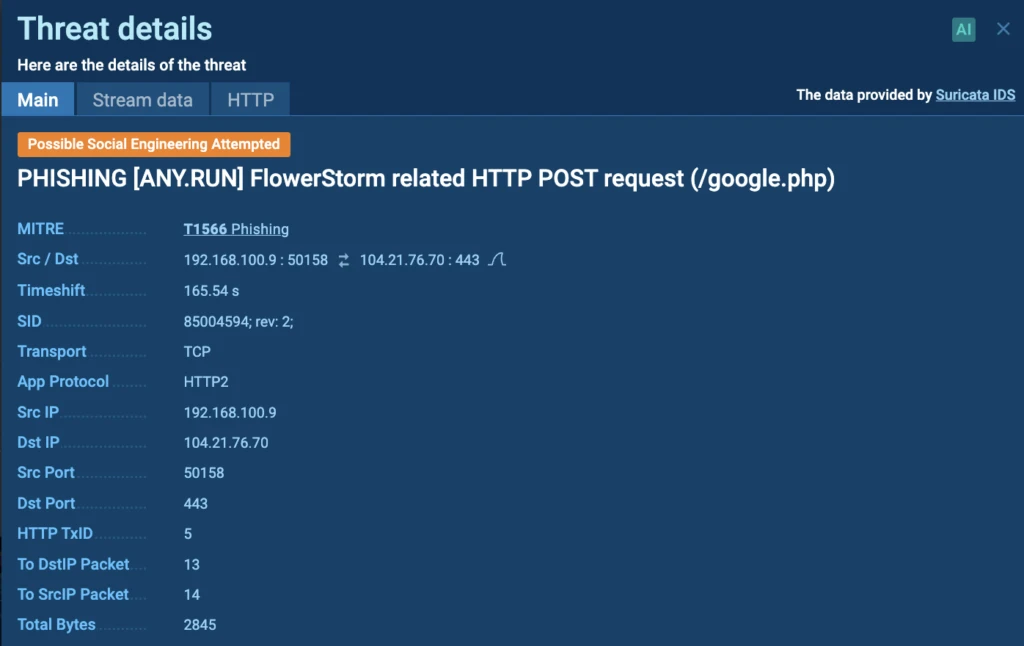
Suricata network threat detections reveal the specific phishing kit — FlowerStorm.

The rule details expose the exfiltration endpoint:
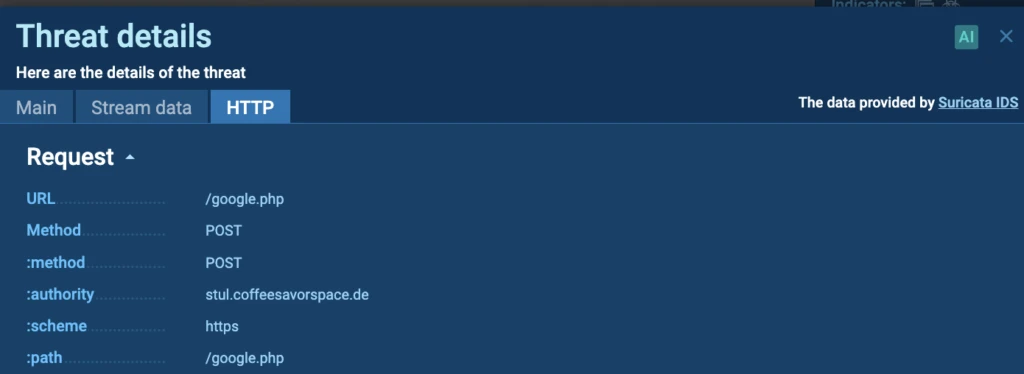
HTTP tab features a separate domain to which stolen credentials are posted:
The HTTP traffic view makes the data flow explicit: M365 credentials submitted to the fake login page are forwarded to infrastructure the attacker controls, not to any Microsoft domain.
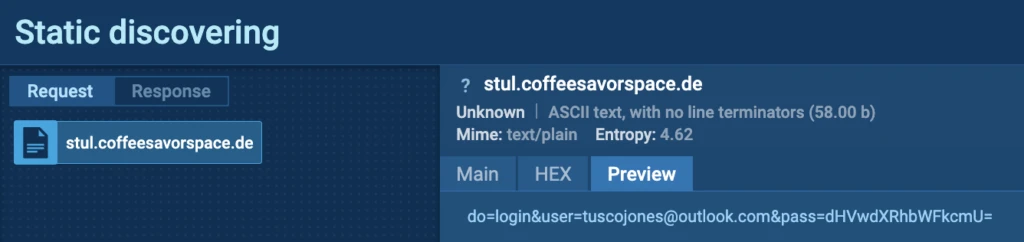
This gives the analyst not just a verdict but a full attack chain — delivery domain, phishing kit identity, exfiltration endpoint — all from a single lookup.
Impact:
- Unknown domain enriched with full attack chain in minutes.
- Exfiltration infrastructure identified and added to block lists proactively.
- Phishing kit attribution enables broader campaign hunting.
4. Expansion: LOLBin Abuse and Campaign Attribution
Scenario: An alert fires: MSBuild.exe — a standard Microsoft .NET build component — is establishing a network connection to an unknown IP on a non-standard port. This is a textbook living-off-the-land technique, but the specific context (which campaign, which malware family, how widespread) is unknown.
The struggle: MSBuild.exe connecting outbound is not inherently malicious; it is used legitimately in CI/CD pipelines. The challenge is distinguishing targeted abuse from normal build activity and understanding whether the destination IP is part of a broader campaign or an isolated incident.
The solution: Combining the destination IP with the MSBuild.exe command-line pattern in a TI Lookup query surfaces sessions where the same combination has been observed.
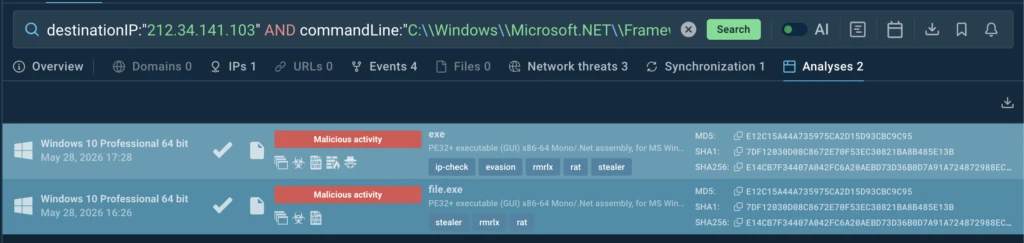
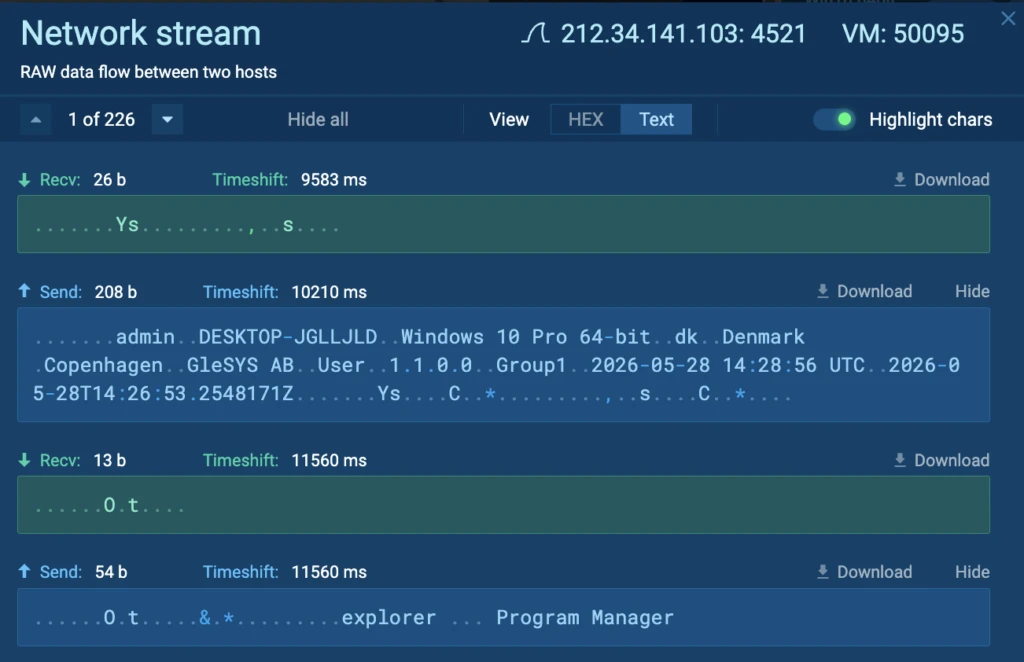
Opening a representative session shows MSBuild.exe establishing a C2 connection and exfiltrating host reconnaissance data — CPU, OS version, running processes:

The Processes tab in the sandbox shows what user data gets exfiltrated:
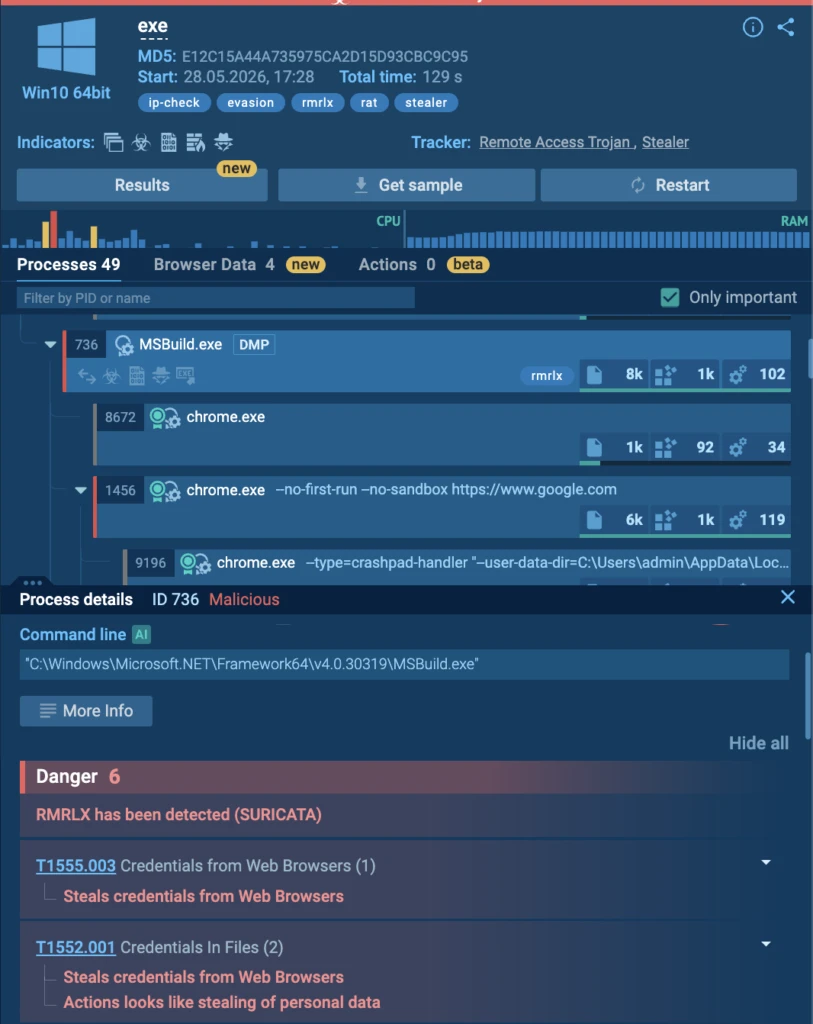
A vendor-specific detection tag (rmrlx) links this activity to a named malware family:
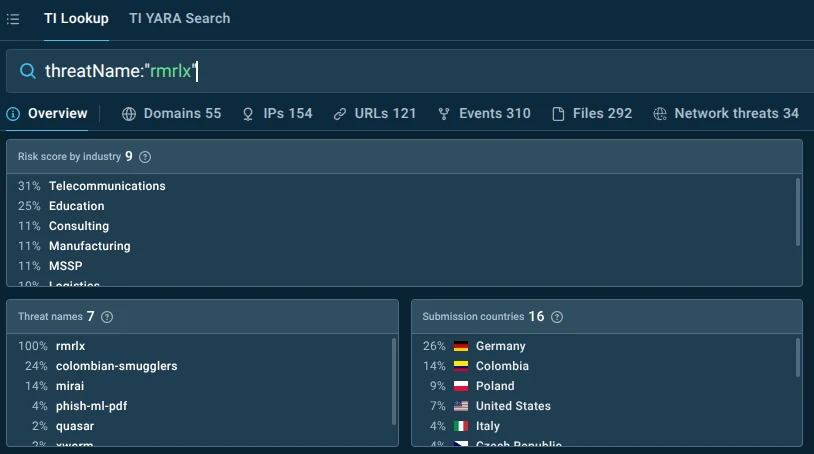
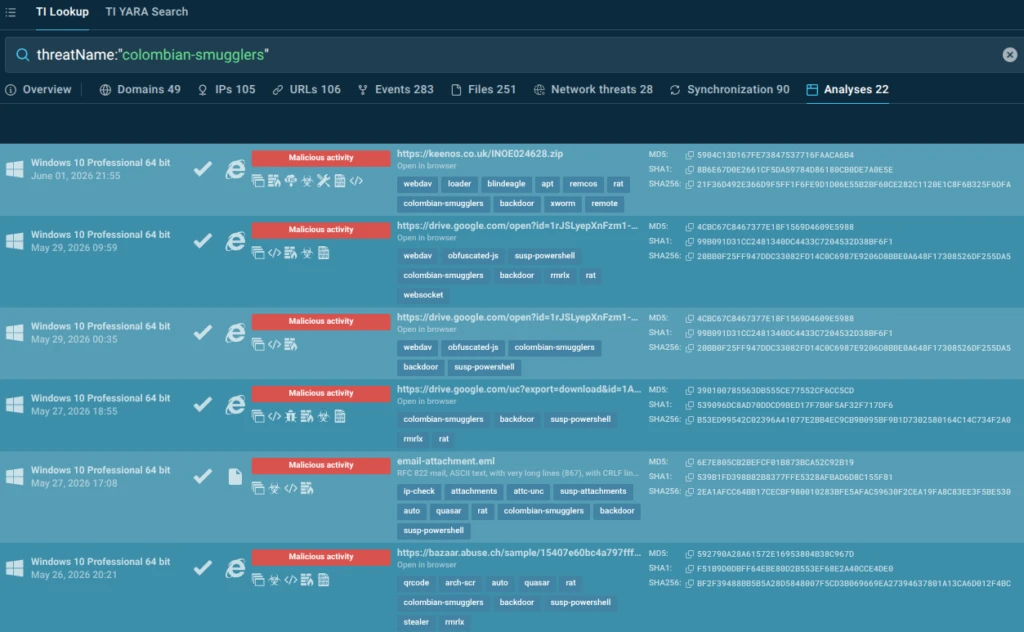
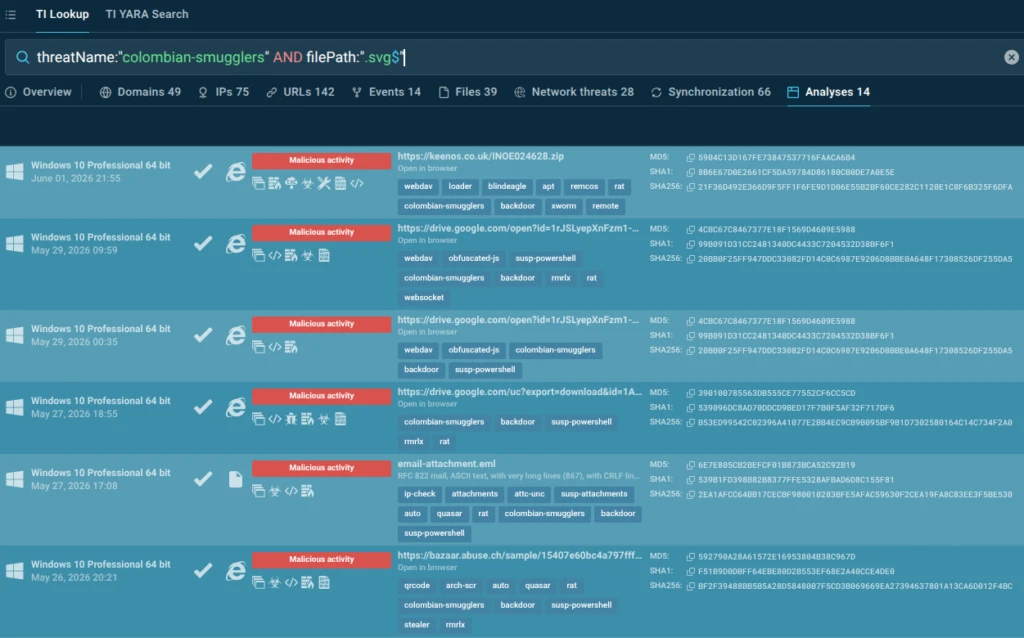
Pivoting on that tag reveals associated infrastructure across multiple IP addresses and exposes the threat actor group responsible — Colombian Smugglers — which uses SVG smuggling as a delivery mechanism and has evolved from targeting Colombian organizations to targeting US and European companies. The hunter can now see the full threat actor profile: initial delivery technique (SVG smuggling), malware families used (vjw0rm, quasar, remcos, xworm, rmrlx), geographic targeting, and infrastructure overlap with adjacent groups like BlindEagle.
threatName:”colombian-smugglers”
Use this TI Lookup request to find sandbox analyses exposing SVG smuggling technique:
threatName:”colombian-smugglers” and filePath:”.svg$”
Impact:
- Single alert pivots into full threat actor profile and campaign map.
- Infrastructure correlation surfaces additional C2 endpoints for blocking.
- Geographic and targeting intelligence enables prioritized defensive response.
5. False Positive Validation: Hunting Rule Noise Reduction
Scenario: ANY.RUN’s hunting rules include a signature that fires when a Windows PC hostname is observed being transmitted in network traffic — a behavior common to stealers and RATs that use hostname as a victim identifier.
suricataMessage:”HUNTING [ANY.RUN] Windows PC hostname observed”
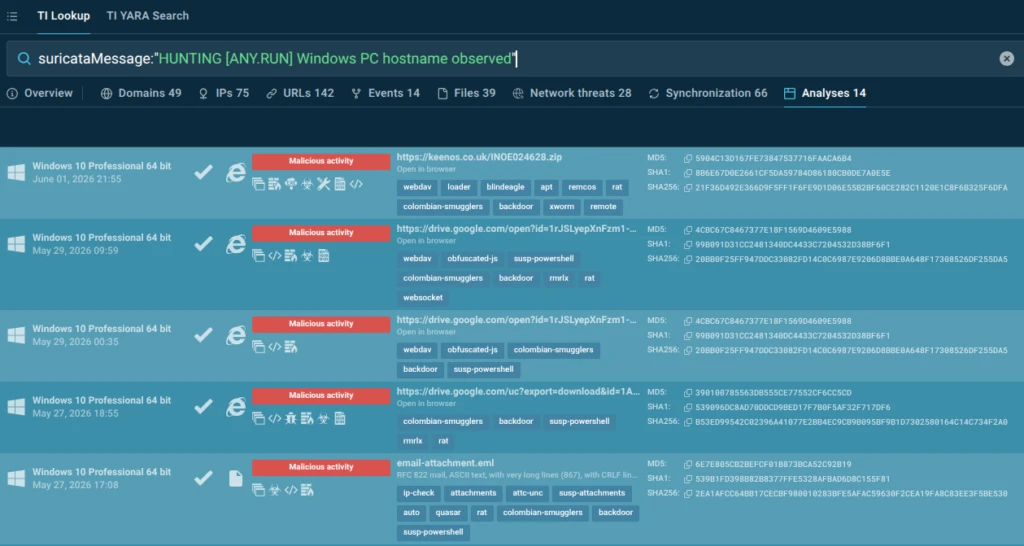
The rule catches real threats, but the analyst needs to verify that every hit is genuinely malicious before adding it to production detection.
The struggle: Hunting rules cast wide nets by design. A rule targeting hostname exfiltration will fire on legitimate software that also transmits device identifiers. Without behavioral context, distinguishing malicious exfiltration from legitimate telemetry requires manual investigation of every hit.
The solution: Let’s view one of the found sandbox analyses: https://app.any.run/tasks/56e01444-87a2-4cf4-874a-41e56ce60221/
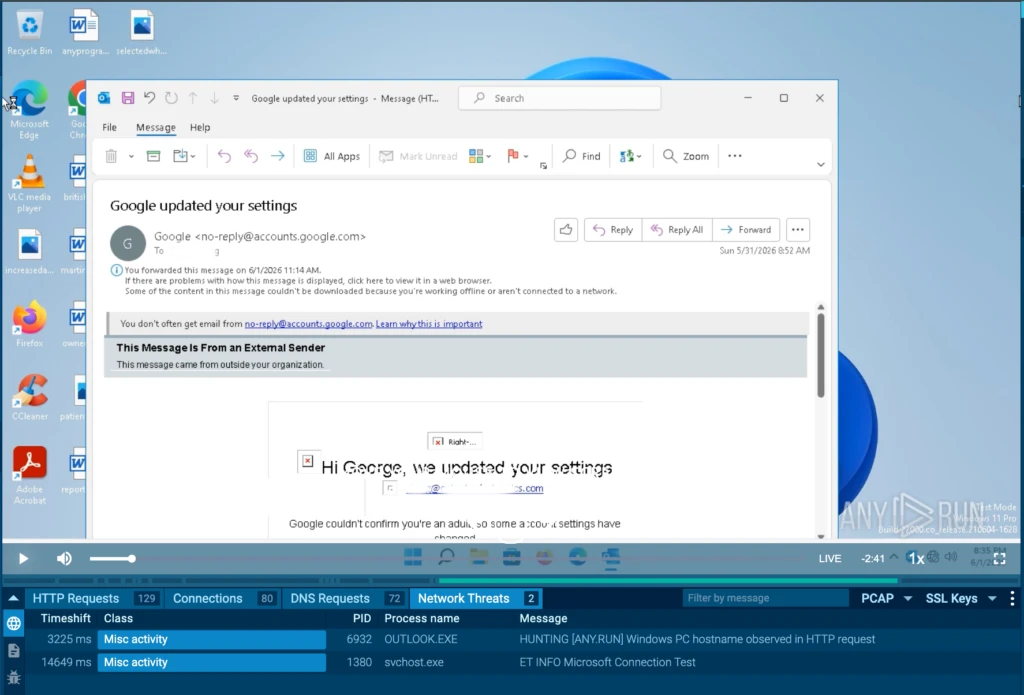
The analyst sees the Suricata alert firing on Outlook.exe, but the destination is licensing.m365.svc.cloud.microsoft, a legitimate Microsoft licensing endpoint.
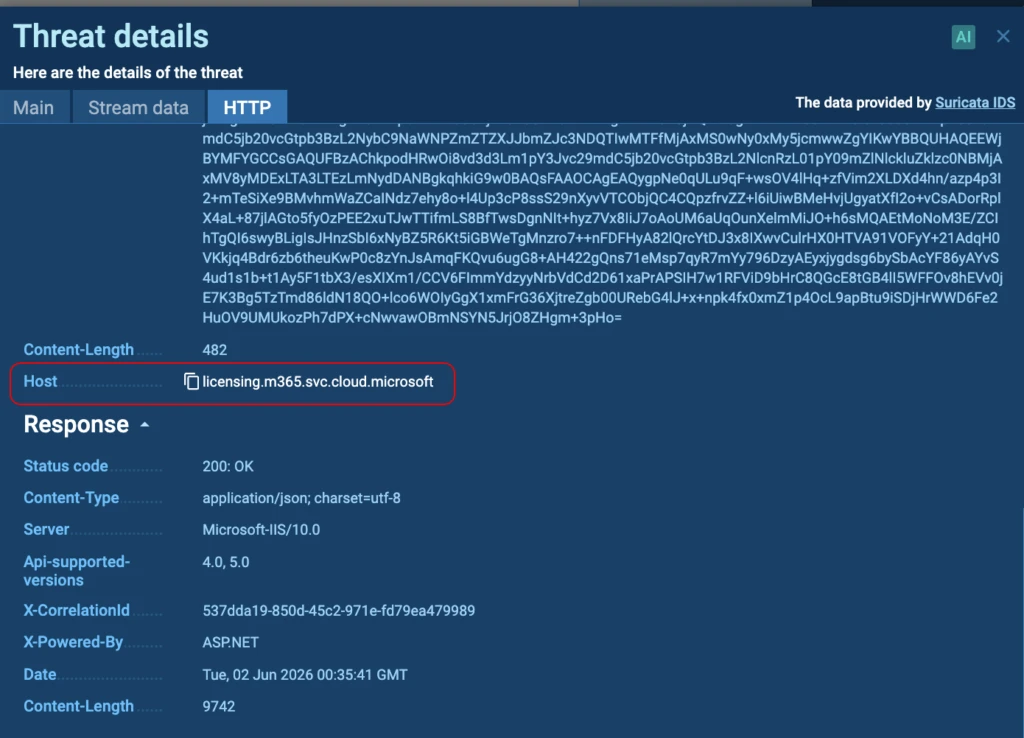
The HTTP details confirm the behavior: Outlook is sending device and license metadata as part of a standard Office perpetual license renewal (renewperpetuallicense), and the server responds with a 200 OK confirming the HomeBusiness2021Retail license status. This is unambiguously legitimate. The analyst documents this as a known false-positive pattern and adds an exclusion for Microsoft licensing endpoints — keeping the rule sharp without discarding it.
Impact:
- False positive identified and documented before reaching production.
- Detection logic refined without reducing coverage of genuine threats.
- Analyst time focused on confirmed malicious activity.
6. Detection Engineering: YARA Rule Development and Validation
Scenario: During stealer sample collection, an analyst encounters a .NET executable that drops a zip archive named with a consistent pattern: Unix-[HOSTNAME]-[ID].zip. The behavioral artifact is interesting but the analyst wants to build a durable, validated detection rule, not just add a file path indicator that will break when the malware author changes the naming convention.
The struggle: Writing YARA rules against behavioral artifacts requires understanding what strings are genuinely hardcoded into the binary versus what is generated at runtime. Testing rules against a small sample set risks both false positives from broad string matches and false negatives from a sample set too small to represent the full malware family.
The solution: Static analysis of the .NET binary in Detect It Easy reveals human-readable strings embedded in the assembly — a common characteristic of .NET malware.
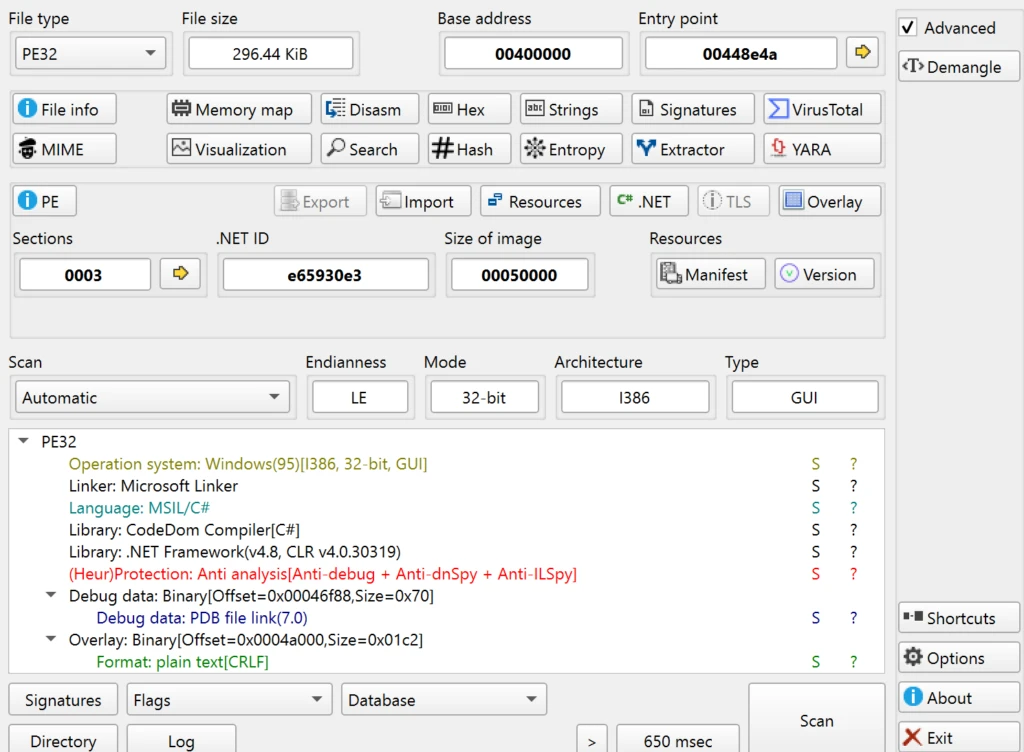
Filtering for strings containing “Unix” surfaces several hardcoded identifiers specific for this malware:
- Unix Stealer Log
- UnixStealer
- UnixStealerIV!@#
- UnixStealer2024Key!
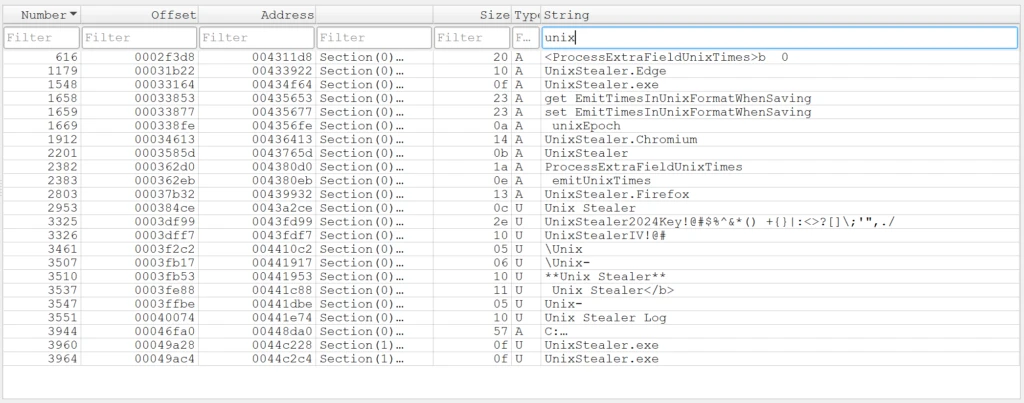
A YARA rule built around these strings uses wide matching for Unicode-encoded strings and fullword to minimize false positives.
rule UnixStealer {

    meta:

        description = "Detects UnixStealer malware"

        date = "2025-12-18"

        author = "ANY.RUN:A.Adhikara"

    strings:

        $x1 = "Unix Stealer Log" fullword wide

        $x2 = "UnixStealer" fullword

        $x3 = "UnixStealerIV!@#" fullword wide

        $x4 = "UnixStealer2024Key" fullword wide

    condition:

        uint16(0) == 0x5A4D and any of ($x*)

}
Running the rule through TI Lookup’s YARA Search validates it against millions of real malware samples — returning 17 matching samples with no unrelated hits.
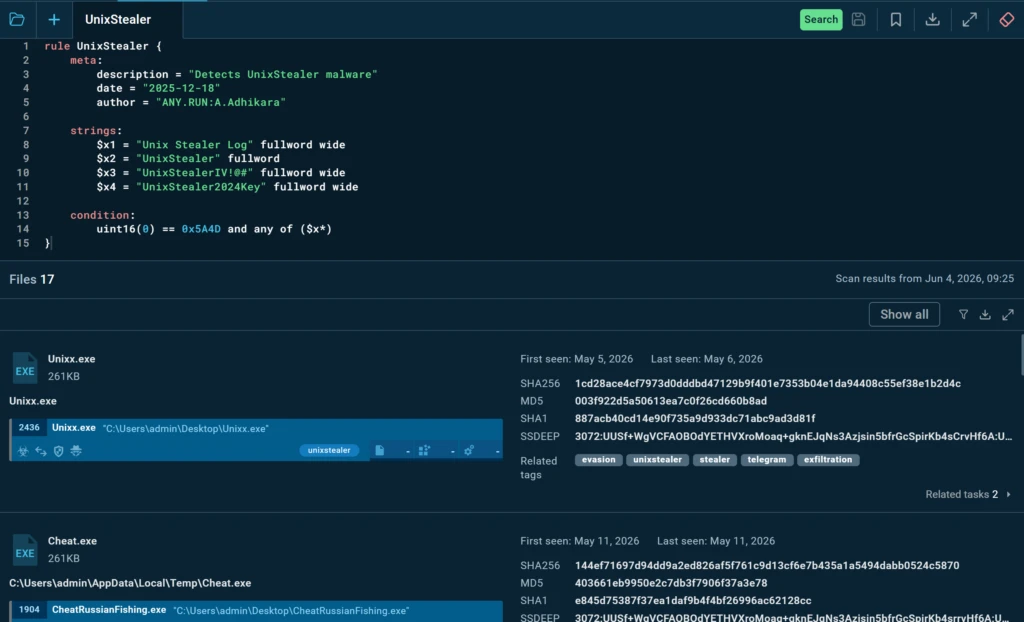
Noticing that the year is hardcoded in one string, the analyst refines it to a regex pattern (/UnixStealer20\d{2}Key/ wide) to ensure the rule covers future builds where the author updates the year.
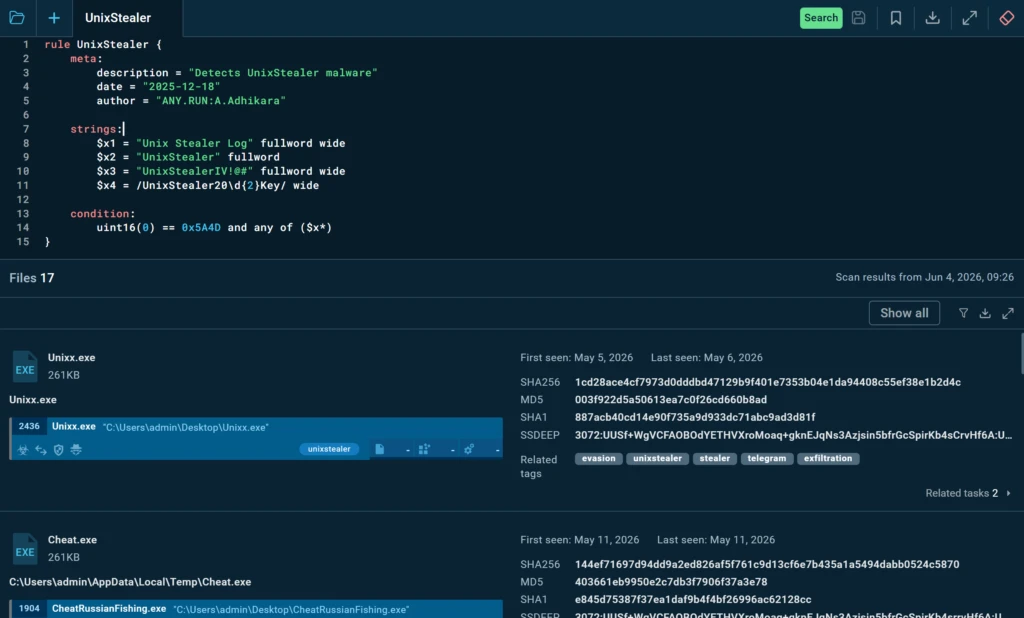
Re-validation against the corpus confirms the refined rule catches the same 17 samples and introduces no new noise.
Impact:
- YARA rule validated against millions of real samples before deployment.
- Rule designed to survive malware version updates through regex generalization.
- Detection shipped with high confidence — no post-deployment tuning required.
How Threat Intelligence Feeds Support Threat Hunting
WhileTI Lookup excels at interactive investigations, Threat Intelligence Feeds help operationalize hunting at scale.
Threat Intelligence Feeds can be integrated directly into SIEM, EDR, XDR, SOAR, firewalls, and other security platforms, providing continuously updated indicators and threat context.
For threat hunters, this supports several key workflows:
- Prioritizing investigations involving known malicious infrastructure.
- Correlating internal telemetry with active attacker infrastructure.
- Identifying emerging campaigns before internal detections trigger.
- Automating enrichment during hunts.
- Reducing manual IOC collection and maintenance.
By continuously injecting fresh intelligence into security tooling, feeds allow hunting teams to focus on analysis rather than data gathering.
Accelerating Hunts with Sandbox Intelligence
ANY.RUN’s Interactive Sandbox provides additional capabilities that reduce investigation time and improve analyst productivity.
Tier 1 Reports
Tier 1 Reports automatically summarize malware behavior in analyst-friendly language, making it easier for junior and mid-level analysts to understand threats without spending significant time reviewing every artifact manually.
This helps SOC teams rapidly assess suspicious files and decide whether deeper hunting activities are necessary.
AI Summary
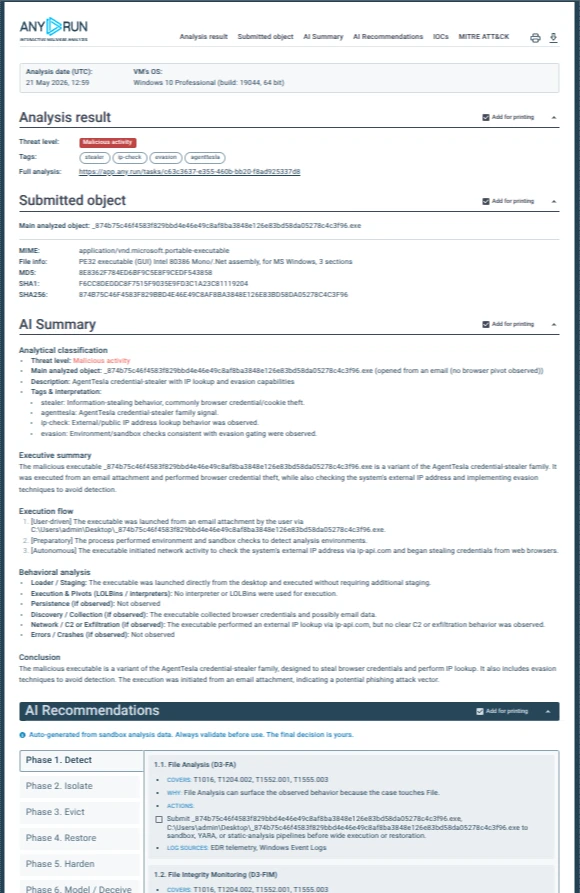
AI Summary condenses complex malware executions into concise narratives, highlighting the most important findings, suspicious behaviors, and attack stages. Hunters can quickly understand what happened during execution before diving into technical details.
AI Recommendations
AI Recommendations suggest potential next steps for investigation, including relevant artifacts, indicators, and behaviors worth examining further. This helps analysts identify additional hunting opportunities and reduces the likelihood of missing important evidence.
Why Threat Hunting Matters to the Business
Threat hunting is often discussed as a purely technical discipline, but its ultimate purpose is business protection. Organizations invest in hunting because reactive security alone is no longer sufficient. Modern attackers frequently evade automated detections, abuse legitimate tools, and remain hidden for extended periods.
However, threat hunting itself introduces operational challenges:
- Significant analyst time requirements.
- Skill shortages.
- Investigation fatigue.
- High volumes of telemetry.
- Difficulty prioritizing hunting activities.
- Challenges demonstrating measurable business value.
Without proper intelligence support, threat hunting can become expensive and inefficient. Threat intelligence helps address these challenges by reducing investigation time, improving prioritization, increasing analyst productivity, and enabling teams to focus on the threats that matter most to the business.
The result is faster threat discovery, reduced dwell time, lower incident response costs, and improved resilience against advanced attacks.
For MSSPs, intelligence-driven hunting also enables more scalable operations, allowing analysts to investigate more environments without proportionally increasing staffing requirements.
Conclusion
Threat hunting is no longer about manually searching through massive volumes of logs and hoping to uncover something suspicious.
Successful hunting depends on context.
Threat intelligence provides that context by connecting indicators, behaviors, infrastructure, malware families, campaigns, and threat actors into a coherent picture. It transforms hunting from a reactive research exercise into a focused, intelligence-driven process.
With Threat Intelligence Lookup, Threat Intelligence Feeds, Threat Intelligence Reports, YARA Search, and AI-assisted analysis capabilities, SOC teams can validate hypotheses, enrich investigations, expand discoveries, improve detections, and reduce time spent on manual research.
The result is a threat hunting program that is faster, more scalable, and more closely aligned with both security and business objectives.
About ANY.RUN
ANY.RUN, a leading provider of interactive malware analysis and threat intelligence solutions, helps SOC teams, MSSPs, and enterprises investigate threats faster and make more confident security decisions.
With its cloud-based Interactive Sandbox, security teams can safely analyze suspicious files, links, and emails in real time, observe malicious behavior, and receive clear evidence for response without maintaining complex in-house infrastructure.
ANY.RUN’s Threat Intelligence solutions also help organizations uncover threat context, enrich security workflows, and improve visibility into emerging risks. Together, these capabilities support faster triage, stronger incident prevention, and more efficient security operations at scale.
ANY.RUN is SOC 2 Type II attested and committed to strong security control and customer data protection.
Scale your SOC with faster threat validation →
FAQ
What is threat hunting in a SOC?
Threat hunting is a proactive security practice where analysts search for hidden threats, attacker activity, or signs of compromise that may not trigger traditional security alerts.
How is threat hunting different from incident response?
Incident response starts after a security event is detected. Threat hunting begins before an alert exists and focuses on discovering threats that may otherwise remain unnoticed.
Why is threat intelligence important for threat hunting?
Threat intelligence provides context about attackers, malware, infrastructure, and campaigns, helping analysts prioritize investigations and validate findings faster.
What hunting workflows benefit most from threat intelligence?
Hypothesis validation, behavioral hunting, threat enrichment, investigation expansion, false-positive analysis, and detection engineering all benefit significantly from threat intelligence.
How do threat intelligence feeds support hunters?
Threat intelligence feeds continuously provide fresh indicators and context that can be integrated into SIEM, EDR, SOAR, XDR, and other security platforms for automated enrichment and prioritization.
Can threat intelligence help reduce false positives?
Yes. Intelligence provides historical and behavioral context that helps analysts quickly determine whether suspicious activity is malicious or legitimate.
How do AI-powered investigation features help threat hunters?
AI summaries, recommendations, and analyst reports help hunters understand threats faster, identify relevant artifacts, and reduce time spent on manual investigation.