
A new phishing campaign is targeting Signal users by attempting to steal their backup recovery keys to access encrypted message archives.
The attack is initiated by a text message pretending to come from Signal Support.
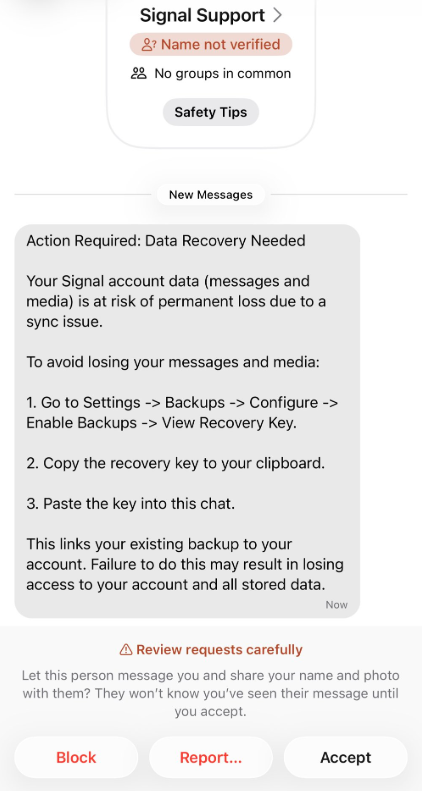
“Action Required: Data Recovery Needed
Your Signal account data (message and media) Is at risk of permanent loss due to a sync issue.
To avoid losing your messages and media:
1. Go to Settings -> Backups -> Configure -> Enable backups -> View Recovery Key.
2. Copy the recovery key to your clipboard.
3. Paste the key into this chat.
This links your existing backup to your account. Failure to do this may result in losing access to your account and all stored data.”
There are a few red flags in this message:
- The “Name not verified” label under the sender
- Repeated threats of losing all your data
- Pasting the key into the chat. Signal Support would never ask for your recovery key

Scam or legit? Scam Guard knows.
The attack exploits Signal’s Secure Backups feature, which allows users to store encrypted archives of their conversations on Signal’s servers. These backups are protected by a 64-character recovery key.
That key should never leave the user’s device and is never shared with Signal’s servers. If hackers obtain this key and gain control of a victim’s account, they can download and decrypt the entire message history.
For an attacker, that’s even better than hijacking an account, which would only give them access to future messages.
For now, the attacks appear to be targeted. We have seen reports from journalists, reports of attacks on Chinese activists, and warnings from a researcher who investigates cyberattacks against journalists, dissidents, and human rights activists. But now that other cybercriminals are aware of this opportunity, the tactic could spread rapidly.
How to stay safe
Signal explicitly states that it will never reach out to users first and will never request registration codes, PINs, or recovery keys.
- Treat unsolicited messages from “Support” as suspicious by default. Legitimate support for apps like Signal and WhatsApp do not ask you, in a chat message, to send back verification codes, PINs, or passwords. If you receive a warning about account problems, do not follow links in the message. Open the app’s settings directly or visit the official website through other means.
- Never share any secret codes, multi-factor authentication keys, or app PINs. SMS codes are there to prove that you control a phone number. Anyone who has the code can pretend to be you. App‑specific PINs or passcodes are there to protect account changes. Consider anyone asking for them to be a scammer.
- Use the extra security features these apps offer. Enable options like registration lock, registration PIN and device‑change alerts so that your account cannot be silently re‑registered without an extra secret. Store your PIN in a password manager instead of choosing something easy to guess or reusing a code. This reduces the risk of social engineering or shoulder‑surfing.
- Another useful feature is disappearing messages. Short‑timer and disappearing messages reduce how much content is available if an attacker gains access to a chat later, or obtains long‑term access to a device or backup. They are not a complete solution, but they can limit the damage.
- Use Malwarebytes Scam Guard on your device or online to check messages. Malwarebytes Scam Guard identified this message as a phishing attempt and provided further information about how to proceed.
Scammers know more about you than you think.
Malwarebytes Mobile Security protects you from phishing, scam texts, malicious sites, and more. With real-time AI-powered Scam Guard built right in.