
嗯,用户让我帮忙总结一篇文章,控制在100字以内,而且不需要特定的开头。首先,我得仔细阅读文章内容,理解主要观点。 文章主要讲的是Windows命名管道在进程间通信中的使用及其潜在的安全风险。作者提到命名管道常用于不同权限级别的进程之间通信,比如SYSTEM权限和普通用户权限。由于默认的ACL设置比较宽松,低权限进程可能通过这些管道攻击高权限进程。 接着,文章讨论了如何利用这些管道进行中间人攻击,比如创建自己的管道实例来拦截数据。还提到了一些缓解措施,比如设置严格的ACL和使用特定的标志防止竞态条件。 最后,作者介绍了一个名为ThatsNoPipe的工具,利用Frida注入到目标进程,钩取系统调用来监控和修改命名管道的数据传输。这个工具适用于同步、异步、完成端口和完成例程等多种IO模式。 总结下来,文章的核心是命名管道的安全问题及其利用方法,并提供了一些防护建议和工具实现。 </think> Windows命名管道用于进程间通信,默认ACL设置可能导致低权限进程攻击高权限进程。通过创建自己的管道实例或利用竞态条件,攻击者可进行中间人攻击。严格设置ACL、使用FILE_FLAG_FIRST_PIPE_INSTANCE标志可减少风险。工具ThatsNoPipe通过Frida注入目标进程钩取系统调用,监控和修改命名管道数据传输。 2026-4-20 23:59:47 Author: www.synacktiv.com(查看原文) 阅读量:4 收藏
During security assessments, we often see desktop applications composed of several processes. Some of them run as SYSTEM, and others run in the user session context, meaning they are unprivileged. These processes need to communicate in some way, and often use Windows Named Pipes as IPC mechanisms (Inter-Process-Communication). Once opened, named pipes are a (usually) bidirectional communication channel, just like TCP or Websocket, that may be used by a low privileged process to attack an elevated process.
Windows APIs
Windows Named Pipes distinguishes clients and servers, where the server listens on a name and the client connects to this name. Named Pipes can be created using the CreateNamedPipe Windows API, which calls the NtCreateNamedPipeFile syscall. The function takes a name as input which should look like \\.\pipe\example_pipe_name as all named pipes are referrenced under the \\.\pipe\ pseudo-filesystem.
A client can now open the communication channel by calling CreateFile on the same \\.\pipe\example_pipe_name string. Both CreateNamedPipe and CreateFile returns a handle that can be used with the ReadFile and WriteFile APIs to read and write data to the named pipe. The Windows kernel then ensures that messages are delivered in the correct order to the other side of the pipe.
As the \\.\pipe\ hierarchy is shared by all processes on the machine, one can list all available named pipes using either Get-ChildItem \\.\pipe\, or pipelist64.exe from Sysinternals.
PS > .\pipelist64.exe
Pipe Name                                    Instances       Max Instances
---------                                    ---------       -------------
InitShutdown                                      3               -1
lsass                                             9               -1
ntsvcs                                            3               -1
scerpc                                            3               -1
Winsock2\CatalogChangeListener-2ec-0              1                1
Winsock2\CatalogChangeListener-3e0-0              1                1
epmapper                                          3               -1
Winsock2\CatalogChangeListener-254-0              1                1
LSM_API_service                                   3               -1
Winsock2\CatalogChangeListener-1d8-0              1                1
atsvc                                             3               -1
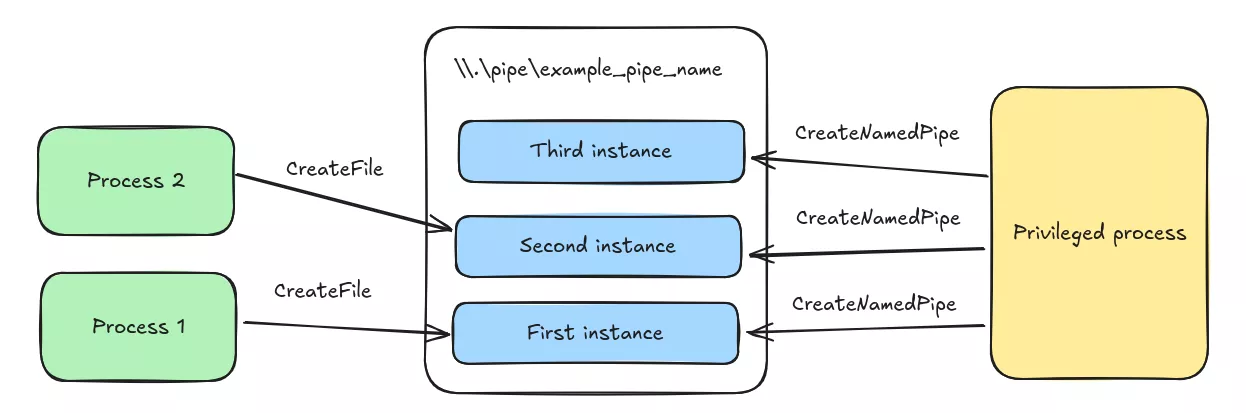
As pipelist shows, named pipes embed a notion of number of instances and maximum number of instances. The first one depicts the number of calls to CreateNamedPipe using the same pipe name. These calls do not have to come from the same process. Such calls are queued in FIFO (first-in-first-out) order, and the first pipe client connects to the first process that called CreateNamedPipe. The maximum number of instances can be set with the first call to CreateNamedPipe
Named Pipes are securable objects, their DACL can be set at creation time using the lpSecurityAttributes argument of CreateNamedPipe. ACEs are a bit different from regular files and are interpreted in this way:
FILE_GENERIC_READcorresponds to the right to read data, read pipe attributes, read extended attributes and read the DACLFILE_GENERIC_WRITEcombines the right to write data to the pipe, write pipe attributes, write extended attributes, append data to the pipe and create a new pipe instance with the same name
By default, when a named pipe is created, Administrators and NT AUTHORITY\System are granted generic read and generic write to the pipe, Everybody and Anonymous Logon are granted generic read right. Additionally, if the process does not run in an elevated context, the current user is granted generic read and generic write. This makes room for Man-in-the-Middle attacks.
Permissive ACLs
A privileged process listens on a named pipe and creates new instances as new clients connects to it. There is always a new pipe instance, and, as the process expects low privilege processes to connect to it, the ACL on the pipe may be permissive, allowing to read and write arbitrary data.
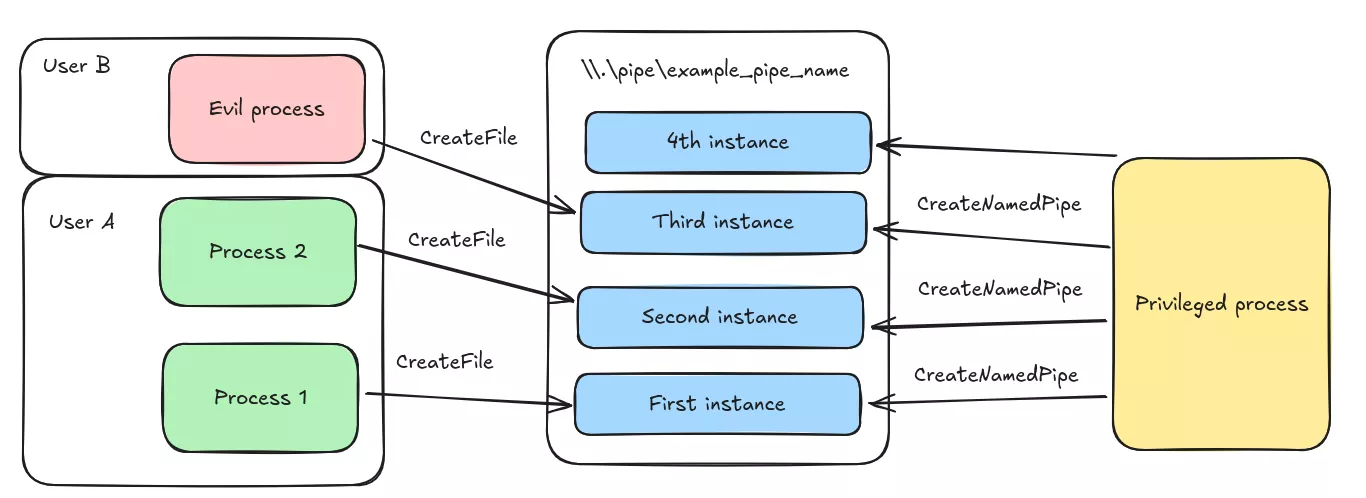
In some cases, we may even have the GENERIC_WRITE permissions that grants us the ability to listen on top of the named pipe. In that case, we can create a new instance of the pipe and wait for another process to connect to the pipe. What we need to do is call CreateNamedPipe first to create a new instance of the pipe, then call CreateFile with the same name so that we end up in setup where legitimate named pipe instances are interleaved with the ones created by the Man-in-the-Middle process.
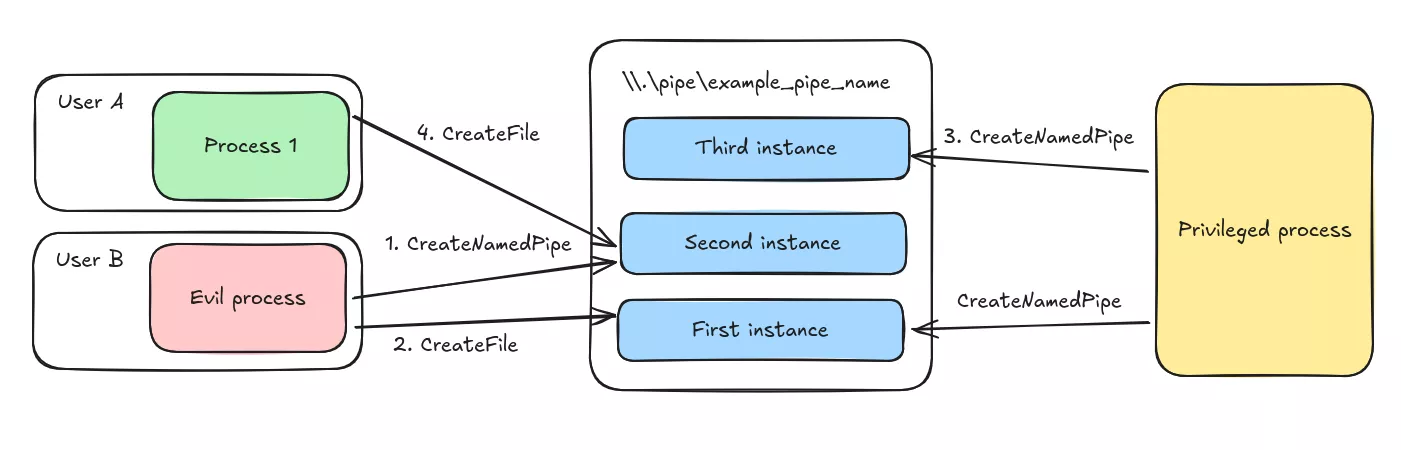
The remediation for such a vulnerability is simply to enforce restrictive ACLs and not granting FILE_APPEND_DATA to other users.
Incorrect flags
Let us suppose that the privileged process is creating the named pipe using the lpSecurityAttributes parameter of CreateNamedPipe. Since this parameter is only evaluated during the creation of the first instance of the named pipe, we can try to race the privileged process by creating the named pipe before, and writing permissive ACLs on it.
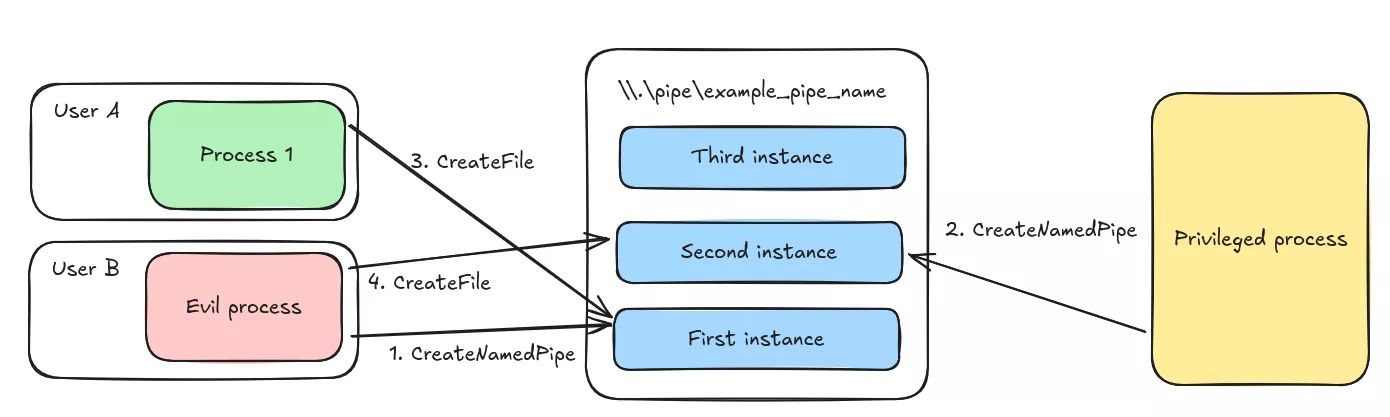
To prevent such a vulnerability, the CreateNamedPipe can be called with the FILE_FLAG_FIRST_PIPE_INSTANCE bit in its dwOpenMode parameter, which will make the syscall fail if there is already a running named pipe.
Protecting named pipes
Now let us suppose the privileged process wants one specific process to connect to the named pipe, but does not want to expose it to the whole context of a low privilege user. This case often happens when an application needs to run some code in the context of the logged user, such as graphical windows. One approach usually taken is to verify that the PE image of the connecting process is signed by a trusted certificate authority, or to check that the process has a PID (process id) that is expected to connect to the named pipe. Thanks to the security boundaries of Windows, one can inject a payload into the legitimate process, and inspect data flowing through the named pipe.
This approach also carries the advantage of not requiring administrative privileges to inspect the content of named pipes, as other tools like API Monitor would require.
Thats No Pipe
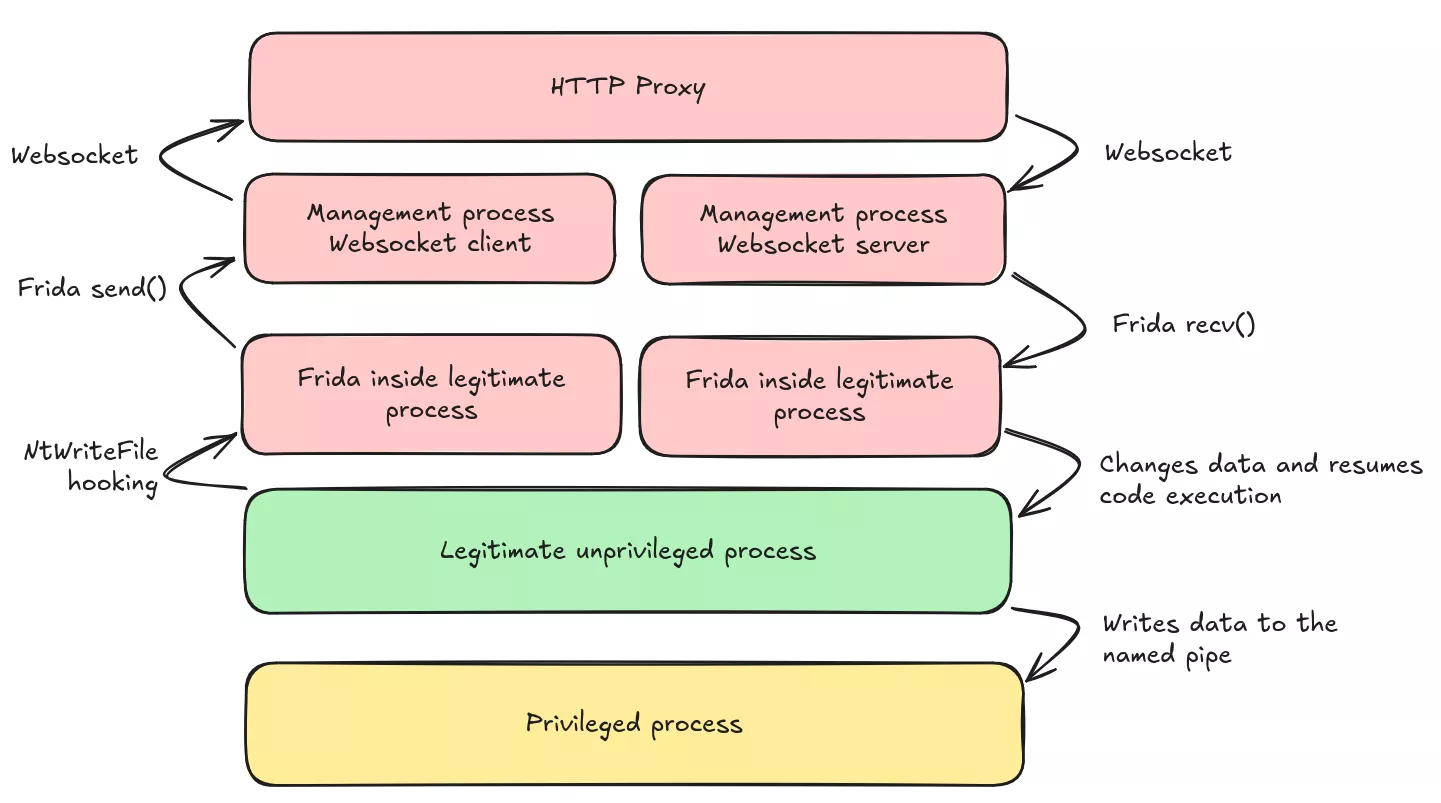
To implement such a technique, we created a frida-based tool which injects into a target process in order to hook syscalls that are used to read and write data to named pipes. To make named pipe data available for modification and interaction with other tools, we choose to send the data to a websocket, mimicking a web-browser talking with a backend server in a bidirectional way. This choice also makes it user-friendly to modify messages without having to rewrite a complete user interface. The tool is available in Synacktiv's Github.
In the latter, we suppose that we inject ourselves into the client process, running in the context of a low privilege user. The architecture looks like the following:
Case 1: Synchronous IO
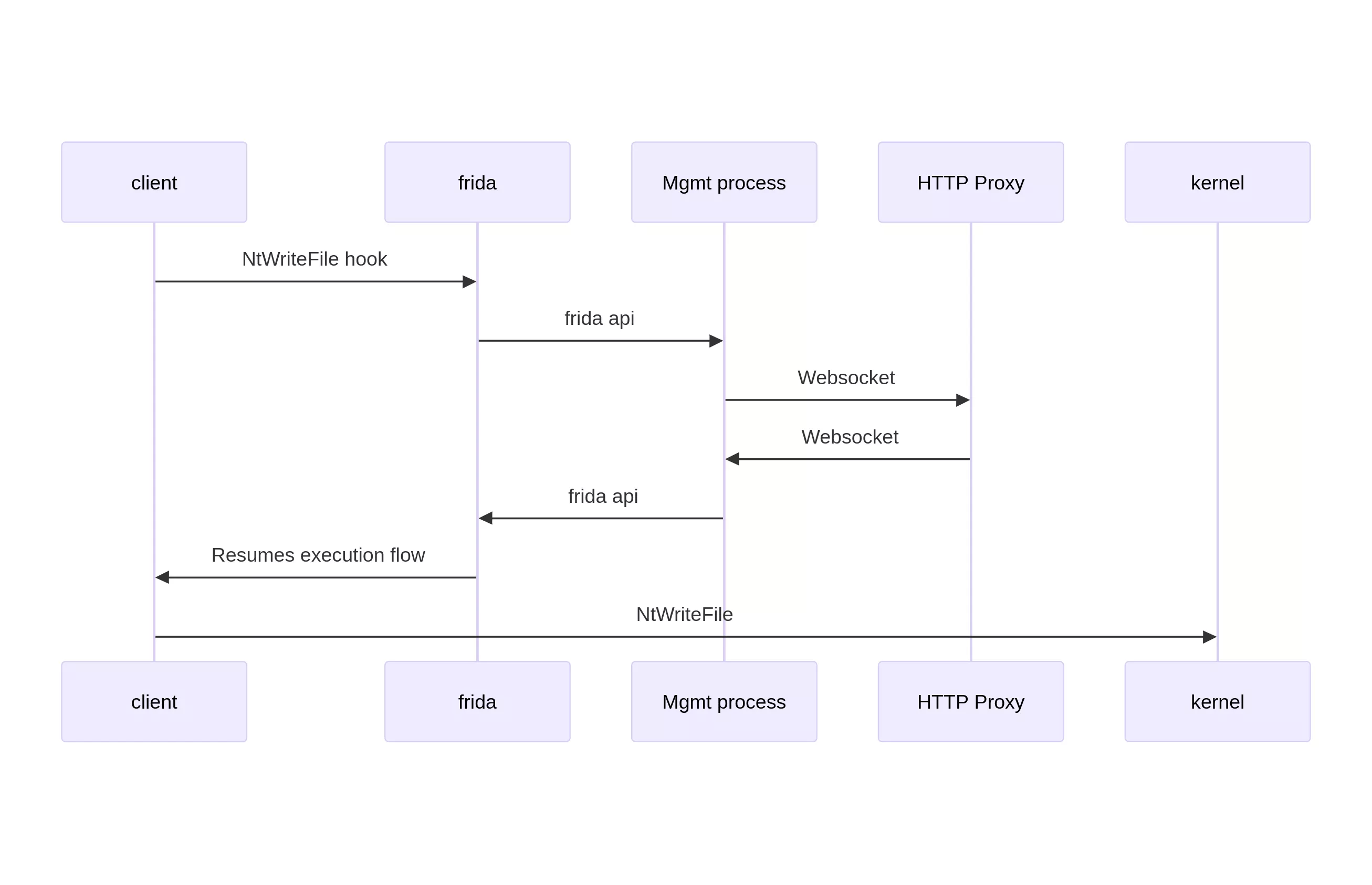
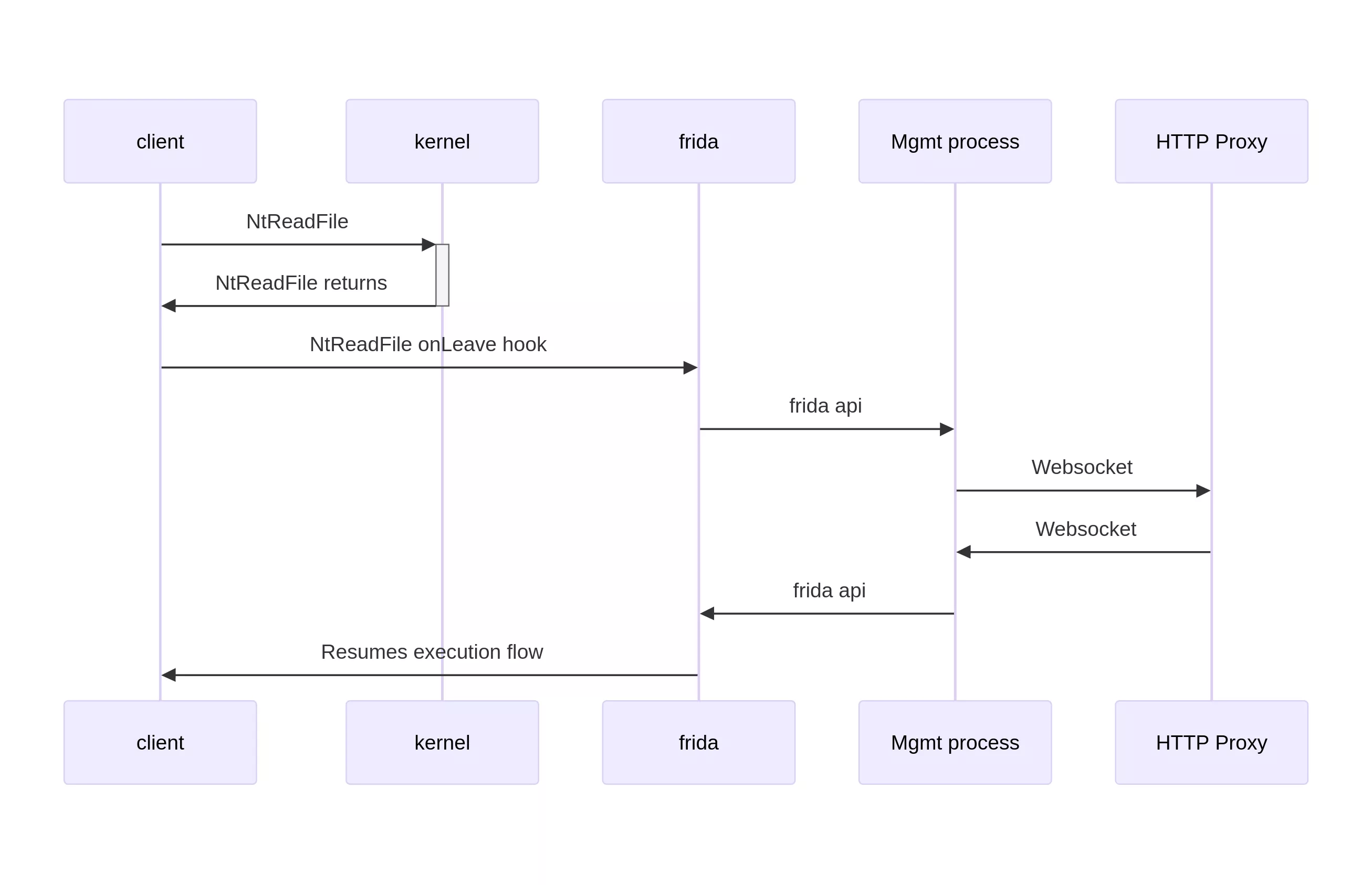
The simplest case is when the client process opens the named pipe for synchronous IO. This is the default behavior when calling CreateFile. In that case, the process calls NtWriteFile and NtReadFile to write data to the pipe, and to read data from it. Since all operations are synchronous, once each of these functions returns, the operation is completely handed over by the kernel. This is particularily interesting for NtReadFile, as we can check the lpBuffer parameter for data that will be processed by the client. The case of NtWriteFile is easier because the buffer of data is to be processed by the kernel and not by the process, meaning we need to interact with it before the call to NtWriteFile. In both cases, we can send data from the injected process to a management process, which will then send it to the HTTP Proxy. The data will then go back to the management process, then to the injected process for modification.
The flow of data when the client process wants to write to a named pipe looks like the following.
However, the read operations differ in that we have to wait for the read operation to complete before modifying the buffer.
Case 2: Asynchronous IO
If the developer wanted to handle asynchronous IO, the NtReadFile function will return immediately, resuming the thread execution with an unmodified read buffer. Reading from the buffer immediately is useless as data has not been written to it yet.
Since the legitimate process has to check whether the operation has succeeded, or needs to wait until data is available, we can also hook functions that are used to wait for data to be available, such as NtWaitForSingleObject, NtWairForMultipleObjects or NtRemoveIoCompletion. When these functions are called, one of their arguments is linked to the original NtReadFile call.
When calling NtReadFile asynchronously, the IoStatusBlock parameter should contain a pointer to an overlapped structure. This structure contains an Event which is used for example in NtWaitForSingleObject to pause the thread until the event is signaled by the kernel. The overlapped structure can also be used in GetOverlappedResult to ensure the overlapped result is initialized and that the buffer that should hold the data is populated by the kernel.
Therefore, what we can do is to hook NtReadFile, check if the named pipe should be intercepted, if yes, remember the overlapped structure. Then, when the kernel returns from a GetOverlappedResult call, we can check if the overlapped structure is known to be linked to the target named pipe, and therefore modify data inside the buffer, which is now initialized.
Case 3: Completion ports
Sometimes, a thread may want to read data from several named pipes at the same time. Therefore, the developper has to use the Completion Port API.
When this API is used, the developper has to call CreateIoCompletionPort with the handle to a first named pipe A to get a completion port handle cphandle. Then CreateIoCompletionPort needs to be called with a handle to named pipe B and the cphandle to link named pipe B to the completion port. That way, when GetQueuedCompletionStatus is called with the cphandle object, an event will be yield if either data is available in named pipe A or named pipe B.
The GetQueuedCompletionStatus function calls the NtRemoveIoCompletion function. Fortunately, the third argument to the NtRemoveIoCompletion, named ApcContext, is a pointer to a pointer to an overlapped structure, the one that was used in the NtReadFile syscall with a target named pipe. Therefore, when the function returns, we can inspect and modify the data read by the process.
Case 4: Completion routines
Windows also allows developers to pass completion routines to the ReadFileEx function. Completion routines are functions with a predefined signature, accessible on Microsoft documentation, that are called by the thread when data is available. The completion routine is the fourth argument of ReadFileEx, is then passed to NtReadFile as the ApcContext parameter of NtReadFile. However, checking if ApcContext is not null is not enough to make sure the call to NtReadFile will be registering a completion routine. We need to make sure that when NtReadFile is called, we also hook the completion routine function.
This method works well when modifying data, but it differs from the other methods when it comes to injecting data. The main difference is that in the other cases, the developer is calling the functions that are used to read data. In the case of completion routine, the function is never called by the programmer, but is queued as an APC (asynchronous procedural call) to the thread. This means that when the kernel resumes the thread from an alertable state, the kernel will pick functions from its APC queue before resuming to the context it was left with.
Hopefully, we can manually register an APC queue, from inside the thread, using the QueueUserAPC function. The only catch is that this function can only queue APC that takes one argument, where the completion routine takes 3 arguments (the error code, the number of bytes transferred, and a pointer to the overlapped structure).
One approach is to create a global dictionary which takes an identifier as key and a tuple of 3 arguments as value. We then queue a dispatch function with the identifier as sole argument. This dispatch function will then lookup in the dictionary for the correct arguments, and call the completion routine.
Future development and conclusions
The tool we created makes it easy to intercept, modify and inject named pipe data by hooking inside a low privilege process. It is especially useful when running as administrator to check kernel buffers is not possible.
Such techniques highlight the importance of always validating data received through untrusted channels, such as named pipes, especially when data can come from a different security context, such as another user. They also show that ensuring strict ACL on named pipes and checking for the security flag FILE_FLAG_FIRST_PIPE_INSTANCE in CreateNamedPipe can help reduce the attack surface.
Hardening, such as verifying the PID of the remote process, or validating its signature, is effective in slowing attacks, but cannot be considered as a remediation on themselves.
如有侵权请联系:admin#unsafe.sh