
好的,我现在需要帮用户总结一篇文章的内容,控制在100个字以内。用户已经提供了文章的英文内容,看起来是关于iOS Forensic Toolkit 10.01版本的更新和iPad取证的相关信息。 首先,我得通读整篇文章,抓住主要点。文章提到了新版本支持更多iPad型号,包括M系列和高存储容量的iPad Pro。还讨论了取证方法的不同,比如使用提取代理和引导加载程序的区别。此外,文章还提到了数据提取速度的优势以及连接稳定性的重要性。 接下来,我需要将这些要点浓缩到100字以内。要确保涵盖主要更新、支持的设备、提取方法的变化以及速度优势。同时,语言要简洁明了,避免使用复杂的术语。 可能的结构是:先介绍新版本的功能扩展,然后说明支持的设备类型和提取方法的变化,最后提到速度优势和连接建议。这样可以全面覆盖文章的核心内容。 最后,检查字数是否符合要求,并确保表达清晰准确。 </think> iOS Forensic Toolkit 10.01扩展了对iPadOS设备的支持,包括M系列芯片和高存储容量的iPad Pro。提取代理可用于A12及更新设备,而引导加载程序仅适用于A10及更旧设备。iPad的数据提取速度快于iPhone,并支持更高速接口。 2026-4-21 08:0:37 Author: blog.elcomsoft.com(查看原文) 阅读量:71 收藏

With the release of iOS Forensic Toolkit 10.01, we are extending low-level extraction capabilities to Apple tablets running up to iPadOS 18.7.1. This update brings our extraction agent to the latest hardware, supporting not just A-series but also M-series iPads. We have also implemented support for the distinct memory layout found in high-end 1TB and 2TB iPad Pro models equipped with 16GB of RAM, which required a targeted engineering approach to handle the structural differences.
iPads are frequently sidelined in digital investigations, as they generally log fewer calls and messages and gather less continuous location data than smartphones. However, their integration into the Apple ecosystem ensures that user data is routinely synchronized across all connected devices. An iPad linked to a target Apple ID will often mirror the user’s primary iPhone, providing an alternate vector for acquiring synced keychain, messaging histories, and media files, often while featuring lower operational security, such as a simpler passcode, than the primary phone.
There is also a practical advantage to examining Apple tablets: their extended hardware lifecycle. Tablets are typically kept in service much longer than smartphones, with users routinely skipping multiple hardware generations before upgrading. Because of this longer operational life, examiners have a higher probability of encountering an older device running an exploitable version of iPadOS. This directly increases the chances of successfully deploying an extraction agent to acquire the full file system and the decrypted keychain.
iPad Extraction: Agent vs. Bootloader
For those new to iOS Forensic Toolkit, the extraction agent is a lightweight, in-house developed app designed to facilitate low-level device acquisition. The agent packages all known OS-level exploits into a single utility. Once sideloaded onto a compatible iPad, the agent:
- Applies an exploit chain to elevate privileges, escape the sandbox, and gain access to both the root file system and the encryption keys required for keychain decryption.
- Establishes a communication channel between the tablet and the examiner’s workstation.
- Facilitates the full extraction of the file system and keychain records.
This method allows examiners to extract comprehensive datasets at a low level, retrieving information that remains entirely inaccessible via standard logical backups or advanced logical acquisition.
Conversely, bootloader-based extraction (leveraging the checkm8 vulnerability) offers a strictly read-only, forensically sound acquisition path that does not alter a single bit of user data. However, because checkm8 is a hardware-level exploit, compatibility is permanently capped at the Apple A11 Bionic SoC. Interestingly, Apple never released an iPad featuring the A11 chip, transitioning its tablet lineup directly from the A10/A10X to the A12-series architecture.
Consequently, the applicable extraction methodology is strictly dictated by the iPad’s chipset:
- A10 and older: Bootloader exploit. This remains the definitive choice for legacy hardware, offering a clean, forensically sound extraction regardless of the installed iPadOS version.
- A11: OS-dependent. While not applicable to iPads (there were no iPad models featuring this exact SoC), it is worth noting for broader ecosystem context that A11 devices rely on the bootloader exploit for iOS 13 and older, shifting to the extraction agent for iOS 14 through 16.
- A12 and newer (including M-series): Extraction agent only. Because these modern silicon architectures are immune to known bootrom vulnerabilities, deploying the extraction agent is the exclusive path for full file system and keychain acquisition.
M-Series iPads
Previous versions of the toolkit focused on iPads powered by A-series processors. With the release of EIFT 10.01, we have extended compatibility to Apple’s M-series silicon. While the M-series shares a similar underlying architecture with the A-series, it introduces some hardware-specific nuances. We have updated the extraction agent to account for this specific M-series behavior, ensuring the exploit chain can execute as intended.
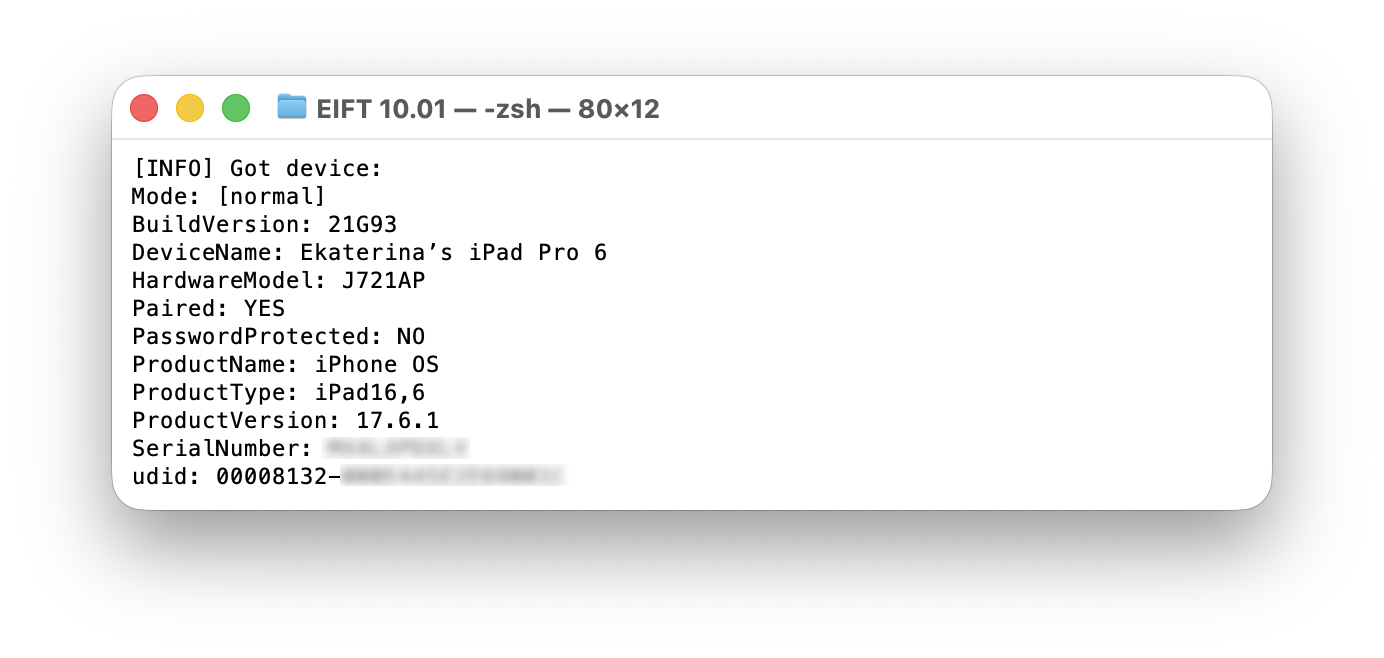
A more notable challenge, however, involves the hardware configurations of high-tier iPad Pro models. Specifically, the 1TB and 2TB variants are equipped with 16GB of RAM. This increased capacity results in a very different memory layout for active processes compared to standard models. We have modified the agent to support this alternative structure, but we must be clear about it: support for 16GB 1TB/2TB iPad Pro configurations is implemented, but the exploit path is not yet fully stable. In practice, you should expect occasional reboots and may need multiple attempts before the agent successfully initializes.
Hardware Matrix: Ports, Protocols, and Real-World Speeds
Now for the good news: extracting data from an iPad is frequently much faster than acquiring an iPhone. The majority of iPhones rely on a standard USB 2.0 implementation, which restricts extraction speeds regardless of the method used. With iPhones, one can expect real-world transfer rates of around 40 MB/s. Even the select iPhone models equipped with USB 3.0 controllers (and a USB-C port) generally cap out around 100 MB/s during acquisition. Apple’s tablet lineup, however, benefits from a much broader implementation of advanced physical interfaces and high-speed data protocols.
The following table categorizes the iPad lineup by physical connector and underlying data protocol. Models marked with an asterisk (*) feature the older Lightning connector, while all others utilize a USB-C port.
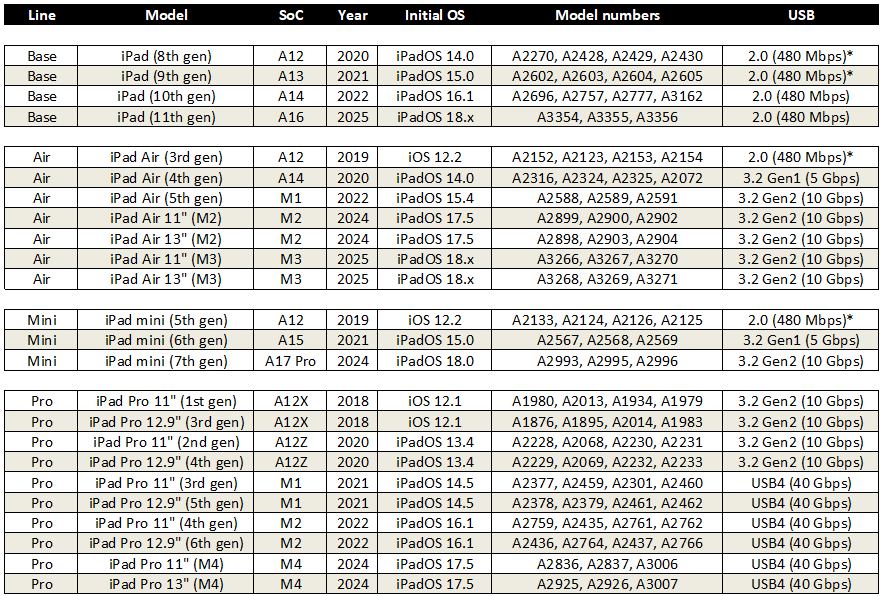
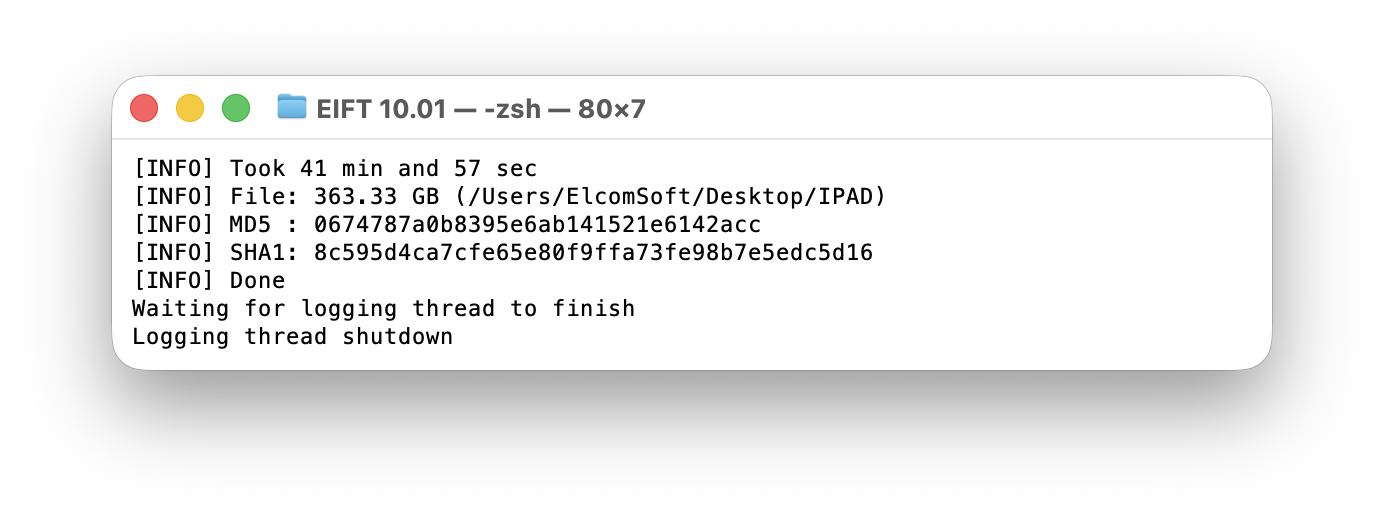
While the hardware specifications of newer iPads are substantial (particularly the 40 Gbps Thunderbolt/USB4 bandwidth on modern iPad Pros), there is a difference between theoretical limits and real-world performance. Theoretical numbers suggest near-instantaneous transfers, but practical constraints remain. Due to the processing and protocol overhead inherent to how the extraction agent reads the encrypted storage, packages the files, and transmits the data over the connection, maximum extraction speeds currently peak at around 200 MB/s, and the average speed is about 150 MB/s due to the large number of small files and respective overhead. Although this leaves the massive bandwidth headroom of USB4 largely untapped, it still represents a substantial improvement over legacy interfaces, noticeably cutting down the time required to image high-capacity tablets.
Best Practices for Achieving a Stable Connection
To achieve a stable extraction, you’ll need to ensure a stable physical link between the tablet and the workstation. For USB-C iPads, we strongly recommend not using hubs and adapters, using a direct USB-C to USB-C cable instead. If you have a Mac equipped with a Thunderbolt 4 or Thunderbolt 5 port, use that. Their advanced host controllers handle power delivery and data protocol negotiation exceptionally.
Don’t skimp on a good cable either. Extracting a full file system is a sustained, resource-intensive operation; you don’t want it to fail midway because of a poor quality cable. Use a high-quality, properly labeled certified data cable to maintain stability throughout the transfer. A charging cable, even one with high rated wattage, might negotiate a connection, but more often than not it will simply cap at USB 2.0 speeds. You’ll need a properly labeled USB3 or better cable.
如有侵权请联系:admin#unsafe.sh