好的,我现在需要帮用户总结一篇文章,控制在100字以内。用户的要求很明确,直接写文章描述,不需要开头语。首先,我得通读整篇文章,抓住主要内容。 文章讲的是一个伪装成DHL的钓鱼邮件,里面有一个PDF附件,点击后会下载一个恶意软件。这个软件是SimpleHelp的远程访问工具,被攻击者用来窃取数据和传播恶意软件。文章还提到攻击手法的 sophistication,以及如何防范。 接下来,我需要提炼关键点:伪装DHL、PDF附件、下载恶意软件、SimpleHelp远程工具、数据窃取、防范建议。然后把这些点用简洁的语言连贯起来,确保在100字以内。 可能的结构是:邮件伪装成DHL通知,附件诱导下载远程访问工具SimpleHelp,用于网络入侵和数据窃取。提醒用户警惕类似钓鱼邮件,并采取防范措施。 最后检查字数和内容是否符合要求,确保没有遗漏重要信息。 </think> 一封伪装成DHL货运通知的钓鱼邮件通过PDF附件诱导用户下载远程访问工具SimpleHelp,用于网络入侵和数据窃取。 2026-4-17 07:40:3 Author: securityboulevard.com(查看原文) 阅读量:7 收藏
The post “Your shipment has arrived” email hides remote access software appeared first on Malwarebytes.
An attachment in an email impersonating DHL about a shipment contains a link to a preconfigured SimpleHelp remote access tool—an ideal starting point for attackers to explore a network, steal data, and drop additional malware.
A German industrial spare parts and equipment supplier received an email pretending to be from DHL, claiming a shipment had arrived.
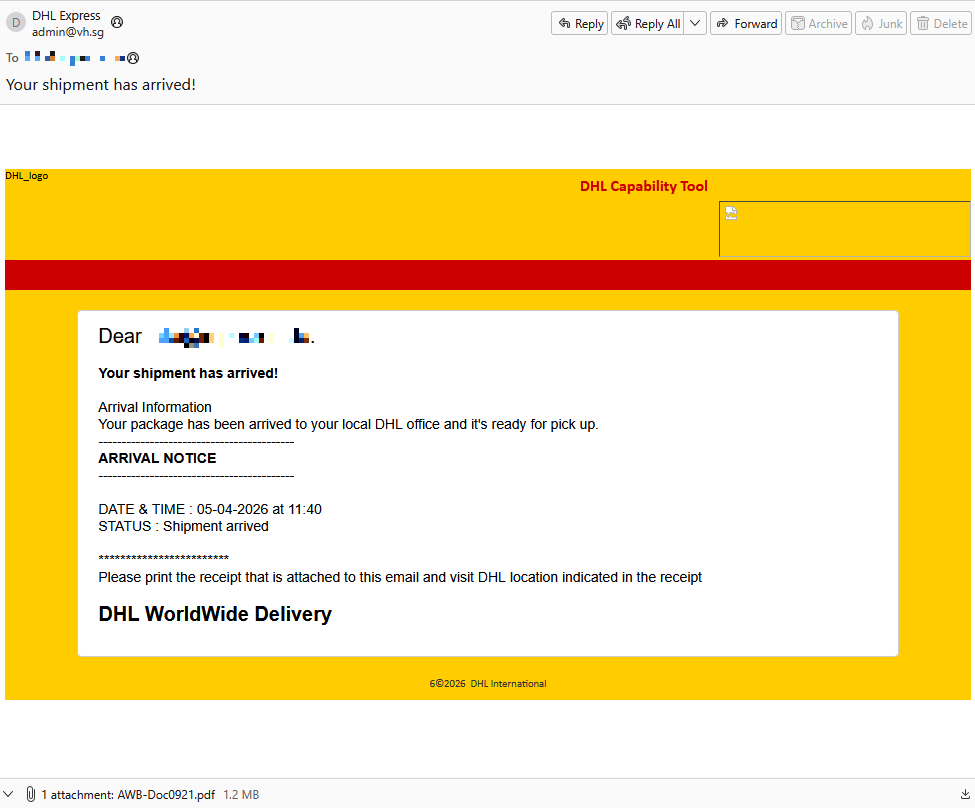
Given their line of business, I imagine they get this type of email all the time. But a few details stood out:
- The sender’s email address did not belong to DHL,
- the receiver address was the general info@ for the company,
- the images in the email were hosted on
ecp.yusercontent.com, - and, most importantly, there was attachment.
While the remote content is hosted on a legitimate Yahoo webpage commonly used to serve images and other content in Yahoo Mail, this is not something DHL typically uses.
The attachment, a PDF file called AWB-Doc0921.pdf is just a blurred image with a Microsoft-branded button that prompts the victim to “Continue” to access a secure file.
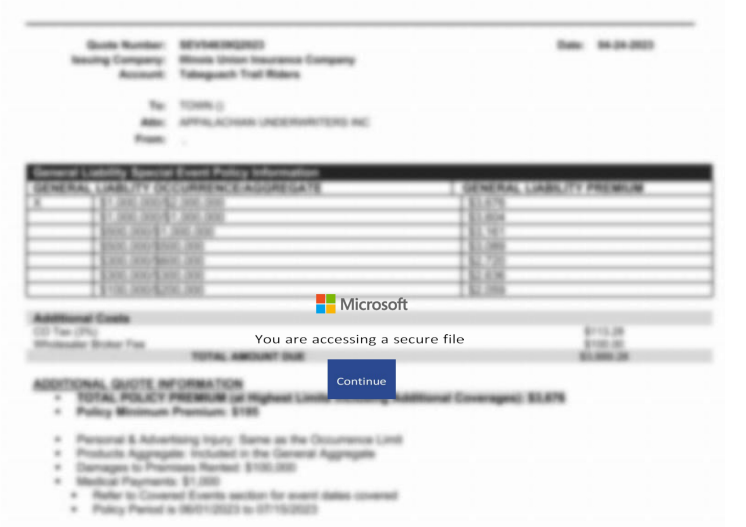
In reality, clicking the button downloads a file called AWB-Doc0921.scr from the domain longhungphatlogistics[.]vn, a domain belonging to a Vietnamese logistics company that was likely compromised to host malware.
![Malwarebytes blocks longhungphatlogistics[.]vn](https://www.malwarebytes.com/wp-content/uploads/sites/2/2026/04/MBAM_block.png)
A .scr file is a Windows file, which is an executable (.exe) file used to launch screensavers. They are often used to hide malicious code because Windows trusts them, allowing them to bypass some security layers.
In this case, the file is a modified installer of a remote access tool signed by SimpleHelp.
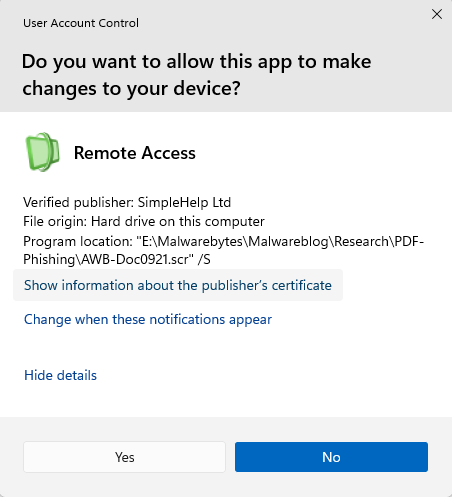
SimpleHelp is a remote support and remote monitoring and management (RMM) platform. It allows remote desktop control, file transfer, diagnostics, and unattended access. In the wrong hands, that’s effectively a support-style backdoor. Attackers can use it for reconnaissance, credential theft, lateral movement, defense evasion, and staging further malware, including ransomware. We’ve seen SimpleHelp abused in this way before.
This is basically a beaconing model. Once installed, the system connects out to the attacker’s server, which is more likely to be allowed through NAT and firewalls than inbound connections. Because the user initiated the install, the attacker gets immediate visibility of the system and can reconnect later whenever the service is running. In the case of a phish, that means the lure only has to get the victim to execute the file once. After that, the attacker’s console can show the new machine as a manageable asset.
For what seems to be a non-targeted attack, the campaign shows a decent level of sophistication by using legitimate components to trick targets into running the remote access tool.
How to stay safe
The good news: once you know what to look for, these attacks are much easier to spot and block. The bad news: they’re cheap, scalable, and will continue to circulate.
So, the next time a “PDF” prompts you to download a file, pause to think about what might be hiding under the hood.
Beyond avoiding unsolicited attachments, here are a few ways to stay safe:
- Only access your accounts through official apps or by typing the official website directly into your browser.
- Check file extensions carefully. Even if a file installs a legitimate tool, it may not be safe to run it.
- Enable multi-factor authentication for your critical accounts.
- Use an up-to-date, real-time anti-malware solution with a web protection module.
Pro tip: Malwarebytes Scam Guard recognized this email as a scam.
Something feel off? Check it before you click.
Malwarebytes Scam Guard helps you analyze suspicious links, texts, and screenshots instantly.
Available with Malwarebytes Premium Security for all your devices, and in the Malwarebytes app for iOS and Android.
*** This is a Security Bloggers Network syndicated blog from Malwarebytes authored by Malwarebytes. Read the original post at: https://www.malwarebytes.com/blog/news/2026/04/your-shipment-has-arrived-email-hides-remote-access-software
如有侵权请联系:admin#unsafe.sh