
好的,我现在需要帮用户总结这篇文章的内容,控制在100字以内。首先,我得通读整篇文章,抓住主要信息。 文章主要讲的是微软四月份的补丁星期二更新,修复了167个安全漏洞,其中包括两个零日漏洞。其中一个漏洞CVE-2026-32201已经被积极利用,另一个CVE-2026-33825是公开披露的。这两个漏洞分别影响SharePoint和Microsoft Defender,可能导致信息泄露和权限提升。此外,还提到了Office中的远程代码执行漏洞,建议用户尽快更新。 接下来,我需要将这些信息浓缩到100字以内。要确保涵盖关键点:补丁数量、零日漏洞的数量、每个漏洞的影响以及建议的行动。 可能的结构是:微软四月修复了167个漏洞,包括两个零日。其中一个被利用,另一个公开披露。涉及SharePoint和Defender的问题,以及Office的安全问题。建议用户立即更新。 最后检查字数是否在限制内,并确保表达清晰简洁。 </think> 微软四月修复了167个安全漏洞,包括两个零日漏洞(CVE-2026-32201和CVE-2026-33825),其中一个是被积极利用的 SharePoint 输入验证问题,另一个是 Microsoft Defender 的权限提升漏洞。此外还修复了 Office 中的远程代码执行问题。建议用户尽快更新以防范风险。 2026-4-15 09:57:15 Author: securityboulevard.com(查看原文) 阅读量:7 收藏
The post April Patch Tuesday fixes two zero-days, including one under active attack appeared first on Malwarebytes.
This month’s patch Tuesday looks to remediate 167 security vulnerabilities including two zero-day vulnerabilities, one of which is known to be actively exploited in the wild.
This makes April one of those months where “Patch Tuesday” looks more like “patch the entire stack,” from servers and endpoints to network gear, browsers, and mobile devices. But the alternative is leaving a long list of well‑documented doors open for attackers to walk through.
Microsoft defines a zero-day as “a flaw in software for which no official patch or security update is available yet.” In this case, one being actively exploited and the other is publicly disclosed, which makes both high priorities on your to-do list.
So, let’s have a look at those two zero-days.
The vulnerability tracked as CVE-2026-32201 (CVSS score 6.5 out of 10) is an improper input validation issue in Microsoft Office SharePoint that allows an unauthorized attacker to perform spoofing over a network.
An attacker who successfully exploited this vulnerability could view some sensitive information, and make changes to disclosed information, but cannot limit access to the resource. In simple terms, it could be used to spread false information in a trusted SharePoint environment. This vulnerability is being exploited in the wild.
The second zero-day this month, tracked as CVE-2026-33825 with a CVSS score of 7.8 out of 10, is an elevation of privilege (EoP) vulnerability in Microsoft Defender’s anti-malware platform. It allows a local attacker to escalate their privileges to SYSTEM, effectively giving them the keys to the kingdom on the affected system. Once at that level, an attacker can disable security tools, install persistent malware, harvest credentials, and move laterally to other systems in the same network. This vulnerability is publicly disclosed, which often lowers the barrier for cybercriminals to start exploiting it.
In addition, BleepingComputer warns:
“Microsoft has also fixed multiple remote code execution bugs in Microsoft Office (Word and Excel) that can be executed via the preview pane or by opening malicious documents. Therefore, users should prioritize updating Microsoft Office as soon as possible, especially if they commonly receive attachments.”
How to apply fixes and check if you’re protected
These updates fix security problems and keep your Windows PC protected. Here’s how to make sure you’re up to date:
1. Open Settings
- Click the Start button (the Windows logo at the bottom left of your screen).
- Click on Settings (it looks like a little gear).
2. Go to Windows Update
- In the Settings window, select Windows Update (usually at the bottom of the menu on the left).
3. Check for updates
- Click the button that says Check for updates.
- Windows will search for the latest Patch Tuesday updates.
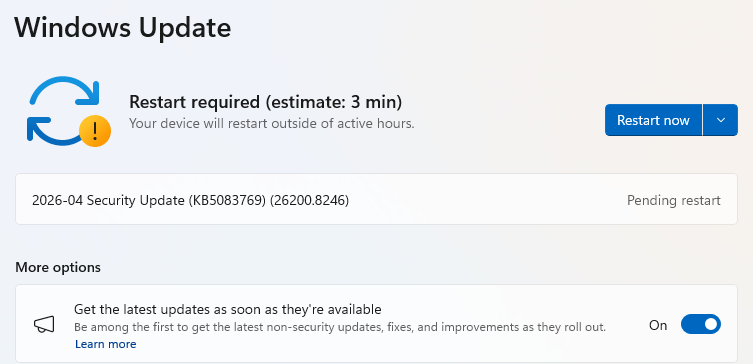
- If you have selected to get the latest updates as soon as they’re available, you may see this under More options.
- In which case you may see a Restart required message. Restart your system and the update will complete.
- If not, continue with the steps below.
4. Download and Install If updates are found, they’ll start downloading automatically. Once complete, you’ll see a button that says Install or Restart now.
- Click Install if needed and follow any prompts. Your computer will usually need a restart to finish the update. If it does, click Restart now.
5. Double-check you’re up to date
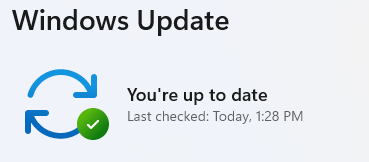
- After restarting, go back to Windows Update and check again. If it says You’re up to date, you’re all set!
We don’t just report on threats—we remove them
Cybersecurity risks should never spread beyond a headline. Keep threats off your devices by downloading Malwarebytes today.
*** This is a Security Bloggers Network syndicated blog from Malwarebytes authored by Malwarebytes. Read the original post at: https://www.malwarebytes.com/blog/news/2026/04/april-patch-tuesday-fixes-two-zero-days-including-one-under-active-attack
如有侵权请联系:admin#unsafe.sh