
好的,我现在需要帮用户总结一篇文章的内容,控制在100个字以内。首先,我得仔细阅读用户提供的文章内容,了解其主要观点和关键信息。 文章主要讨论了APK恶意变形技术,这是一种通过故意创建技术上受损或非标准的APK文件来绕过静态分析工具的方法。这种方法在现代安卓恶意软件中越来越普遍,已经出现在超过3000个恶意样本中。文章还介绍了一个名为Malfixer的开源工具,用于检测和修复这些变形的APK文件,帮助安全研究人员更好地分析恶意软件。 接下来,我需要将这些关键点浓缩到100字以内。首先,明确APK恶意变形的定义及其目的;然后提到Malfixer工具的作用;最后总结其重要性。 可能的结构是:APK恶意变形技术通过创建非标准APK文件绕过分析工具,在安卓恶意软件中广泛应用。Malfixer作为开源工具检测并修复这些文件,帮助研究人员分析威胁。 现在检查字数是否在限制内,并确保信息准确无误。 </think> 文章探讨了安卓恶意软件中APK恶意变形技术的兴起及其对安全分析工具的影响,并介绍了Malfixer这一开源工具用于检测和修复此类问题。 2026-4-15 10:12:58 Author: www.cleafy.com(查看原文) 阅读量:7 收藏
Key Points
- APK malformation is the intentional creation of technically broken or non-standard APK files that still install and run on Android, but confuse or break analysis tools.
- The use of APK malformation is rapidly becoming a standard tactic in modern Android malware campaigns. More and more malicious apps are being discovered with intentionally malformed structures—suggesting that threat actors now see this as a reliable and effective method to bypass static analysis tools and delay detection.
- Malfixer is a newly developed open-source tool from the Cleafy Threat Intelligence Team, designed to detect and fix malformed APKs, enabling analysts to properly examine them.
- Malfixer is publicly available as an open-source project on GitHub, allowing security researchers and malware analysts worldwide to freely download, use, and contribute to the tool.
Overview
As Android malware continues to evolve, APK malformation has emerged as a key anti-analysis technique, now seen in over 3,000 Android malware samples and increasingly employed across a broad range of malicious campaigns. By deliberately crafting broken or non-standard APK structures, attackers can evade static analysis tools, conceal malicious payloads, and delay detection. This tactic has already been observed in advanced malware families such as Teabot, TrickMo, and SpyNote, underlining its effectiveness in circumventing traditional defenses.
As APK malformation becomes a standard feature of mobile threats, there is a growing need for tools that can reliably detect and correct these structural evasions. This article explores how the technique works, why it is gaining attention, and introduces Malfixer—a powerful open-source utility designed to identify and repair malformed APKs, enabling more effective malware analysis and response.
Why Malformations Work
The use of malformation as an anti-analysis technique was previously discussed in an earlier article, where it initially prevented the classification of a sample that was later associated with TrickMo. This initial failure to classify the sample was directly linked to the APK’s use of malformation techniques, which hindered standard static analysis tools from correctly processing the file.
Malformations involve different aspects of an Android application, like the APK file format, its Android Manifest and internal files. To understand the first one, we must consider that an APK (Android Package) is essentially a ZIP archive that contains all the components needed for an Android app to install and run—such as the code, resources, and manifest file. This archive is expected to follow a well-defined structure, enabling analysis tools and security scanners to easily extract and inspect its contents.

However, attackers have discovered ways to intentionally corrupt or manipulate this internal structure without breaking the app's ability to function. By exploiting the leniency of the Android installation system, which tolerates certain structural inconsistencies, they can craft malformed APKs that are perfectly valid from the device's point of view but confuse or crash analysis tools (e.g. JADX, ZIP extraction utilities, etc.).
This allows malicious apps to install and run normally while making reverse engineering and detection significantly more difficult for researchers and security products. To understand how this is possible, we need to look more closely at the internal structure of ZIP files, which we will explore in the next section.
ZIP Structure 101
Inside this ZIP file, each file is stored with a small header (called the Local File Header) right before it, which contains important details about that file. Near the end of the APK, there is a special index called the Central Directory. This acts like a table of contents, listing information such as the names of the files, where they are located inside the archive, and how they were compressed.
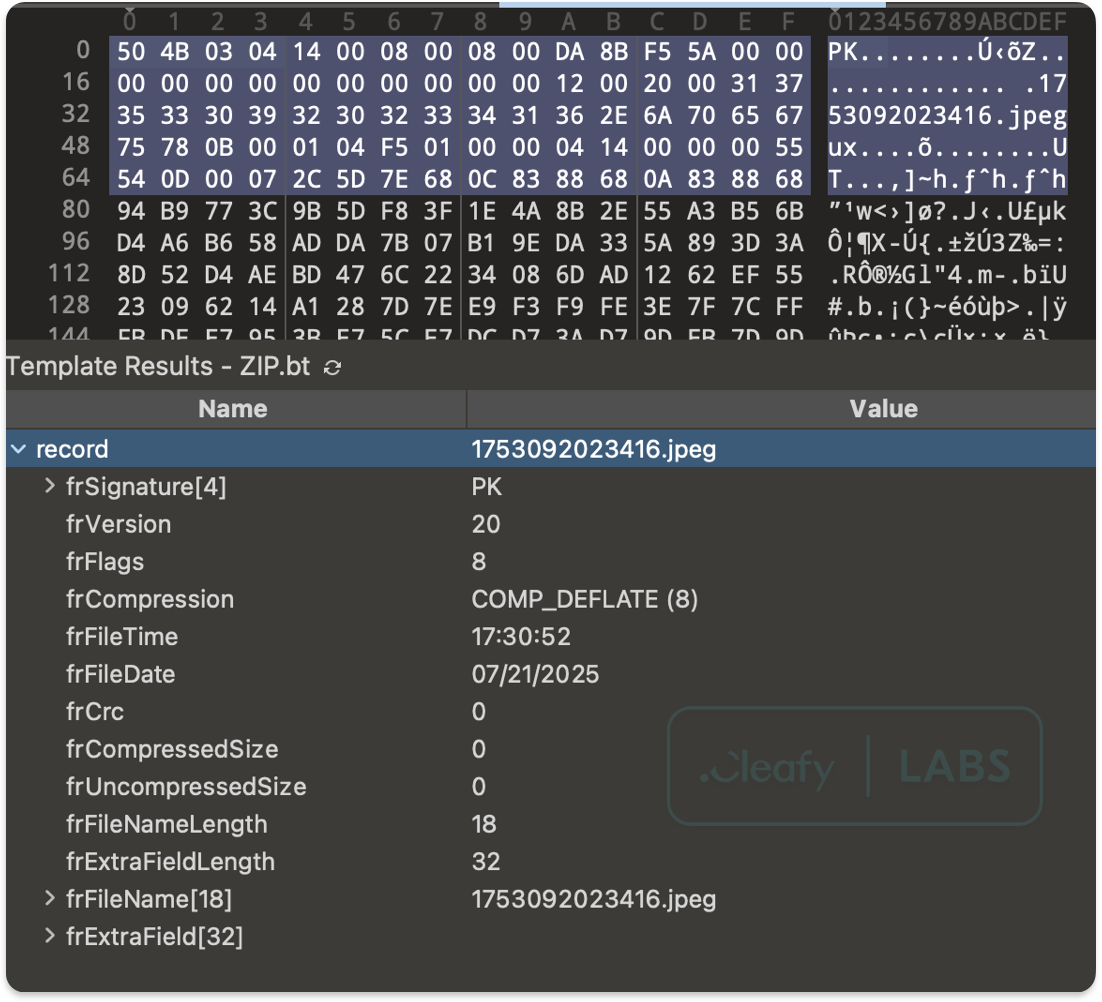
For the latter, most APKs use a common compression method called Deflate, which reduces file size without losing any data; however, files are sometimes stored without compression (using the Stored method).
When attackers deliberately introduce errors in these structures—such as conflicting information in the Local File Headers and the Central Directory—it can confuse or crash tools that try to open and analyze the APK.
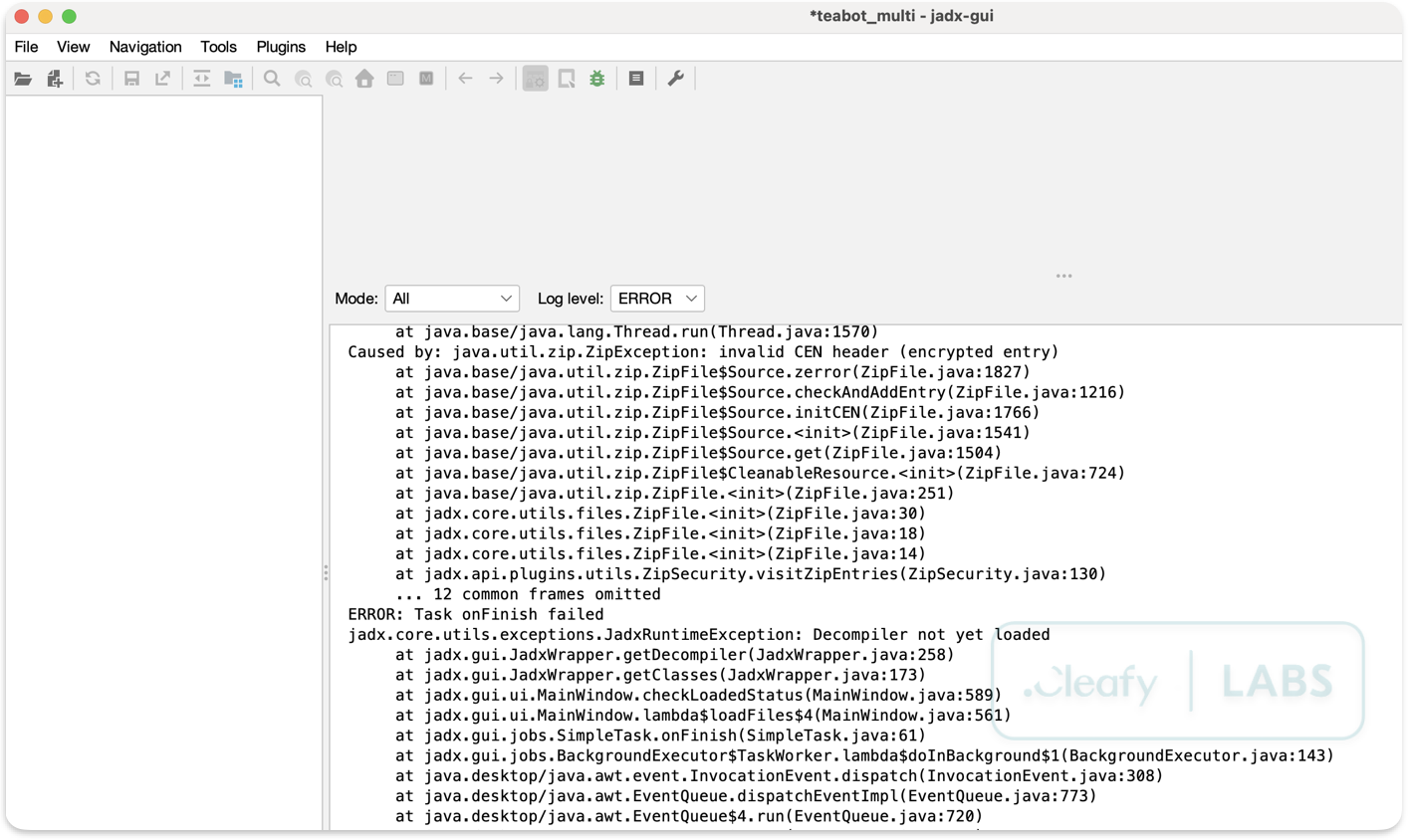
Despite these structural errors, Android devices are usually quite forgiving when it comes to installing apps. Unlike many analysis tools that expect files to be perfectly organized, the Android system’s installer is designed to be flexible and tolerant of minor irregularities in the APK’s structure. For example, Android can avoid checking whether there is a match between the Local File Headers and the Central Directory and proceed with the installation, considering only the value contained in one of these structures.
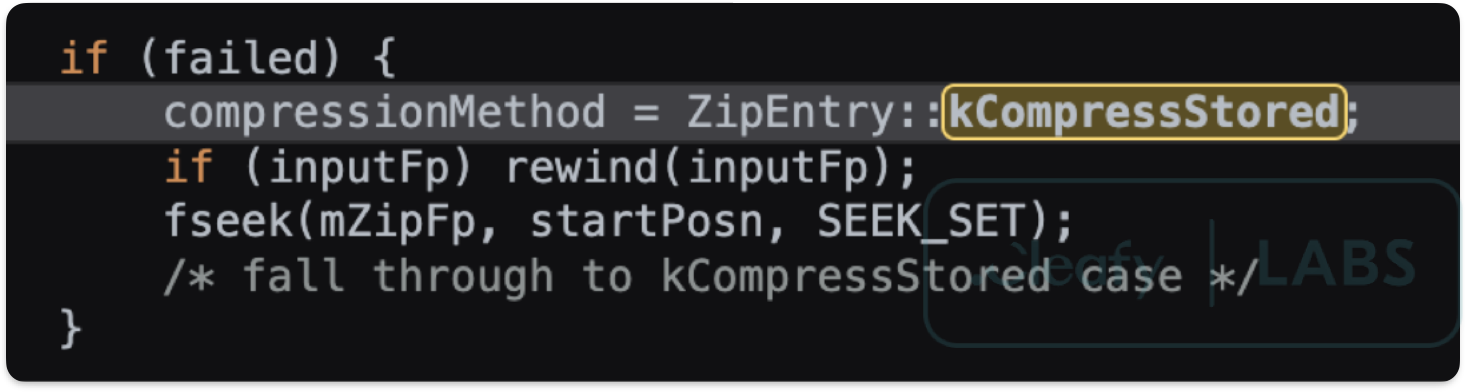
This means that even if the archive contains mistakes—such as incorrect file locations or confusing metadata—the device can still correctly find and load the components needed to install and run the app. Another example can regard the compression methods stored in the ZIP headers: if a file within the APK has an unrecognized compression method, the Android system will automatically treat it as STORED (that is, without compression), allowing the file to be accessed without issue. In contrast, analysis tools will often fail when attempting to retrieve such a file due to the unexpected compression value.
Malformation Techniques in the Wild
Having explored how APK malformations exploit the ZIP structure to evade detection, it is important to examine how these techniques are actually employed by real-world malware. Moreover, malformations involve not only the ZIP structure but also other files present in the APK, such as the Android Manifest file and the files in the assets directory.
In this section, we will analyse several common malformation methods observed in the wild, highlighting how attackers manipulate APK files to frustrate analysis tools while ensuring their malicious apps remain fully functional on Android devices. Understanding these practical examples sheds light on the evolving tactics used by threat actors and underscores the challenges faced by security researchers.
ZIP Malformation Techniques
Directory-File Name Conflicts
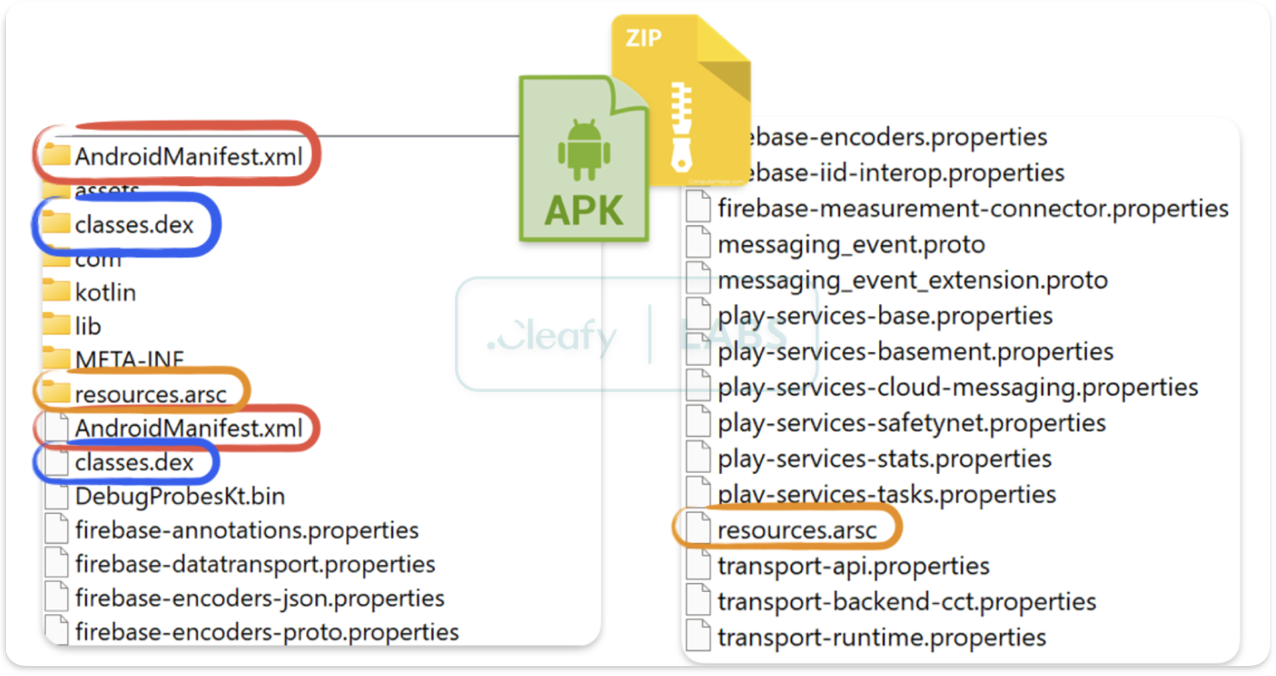
One of the most prevalent techniques involves creating directories with identical names to critical files. Attackers commonly target:
- AndroidManifest.xml/ (directory) vs AndroidManifest.xml (file)
- classes.dex/ (directory) vs classes.dex (file)
- resources.arsc/ (directory) vs resources.arsc (file)
This naming collision confuses parsing engines, causing them to misinterpret the archive structure and potentially skip analysis of critical components.
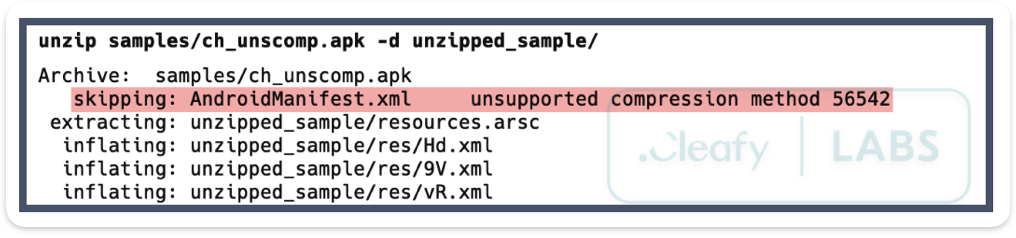
Unsupported Compression Methods
As mentioned in the previous section, Android devices recognize only two compression methods during APK installation:
- DEFLATED (0x0008)
- STORED (0x0000 - no compression)
Malware authors manipulate the compression method header field (located at offsets 8 and 10 in Local File Headers and Central Directory Headers, respectively) to specify unsupported compression types. Whilst Android defaults to STORED during installation, allowing the malware to execute normally, analysis tools may fail to process these non-standard compression methods.
False Password Protection
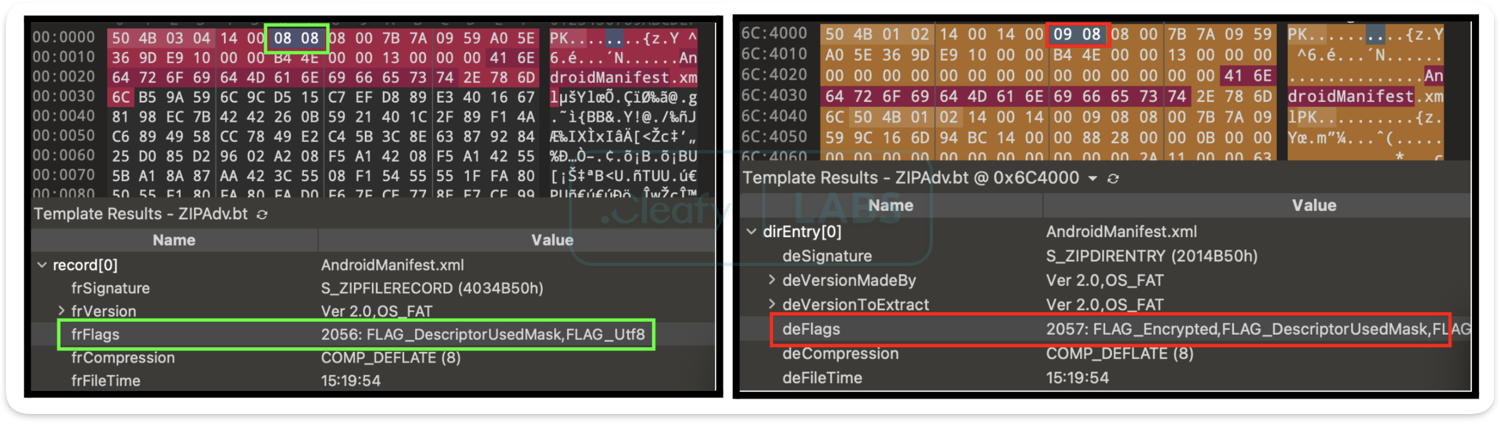
This technique creates the illusion of password-protected files during extraction, whilst maintaining normal functionality during installation. The attack works by manipulating the General Purpose Bit Flag:
- Central Directory Header: Set to even values (indicating no password protection)
- Local File Header: Set to odd values (suggesting password protection)
Analysis tools checking only the Central Directory may attempt to extract password-protected content, whilst those examining Local File Headers will require passwords that don't actually exist.
Header Discrepancies
More sophisticated attacks involve creating deliberate mismatches between Local File Headers and Central Directory entries. These discrepancies can include:
- Incorrect CRC-32 checksums
- Mismatched file sizes
- Invalid offset references
Android Manifest Obfuscation
The Android Manifest malformation technique exploits the binary XML format (AXML) structure to confound analysis tools whilst maintaining compatibility with Android's PackageManager.
AndroidManifest.xml serves as the blueprint for every Android application, defining crucial metadata including permissions, components, and system requirements. By corrupting this critical file's binary representation, malware authors can prevent proper decompilation, hinder reverse engineering efforts, and evade automated analysis systems.
Our research reveals five primary manifest corruption techniques currently employed in the wild, each targeting different aspects of the AXML format structure to achieve maximum disruption of security analysis workflows.
Header Manipulation
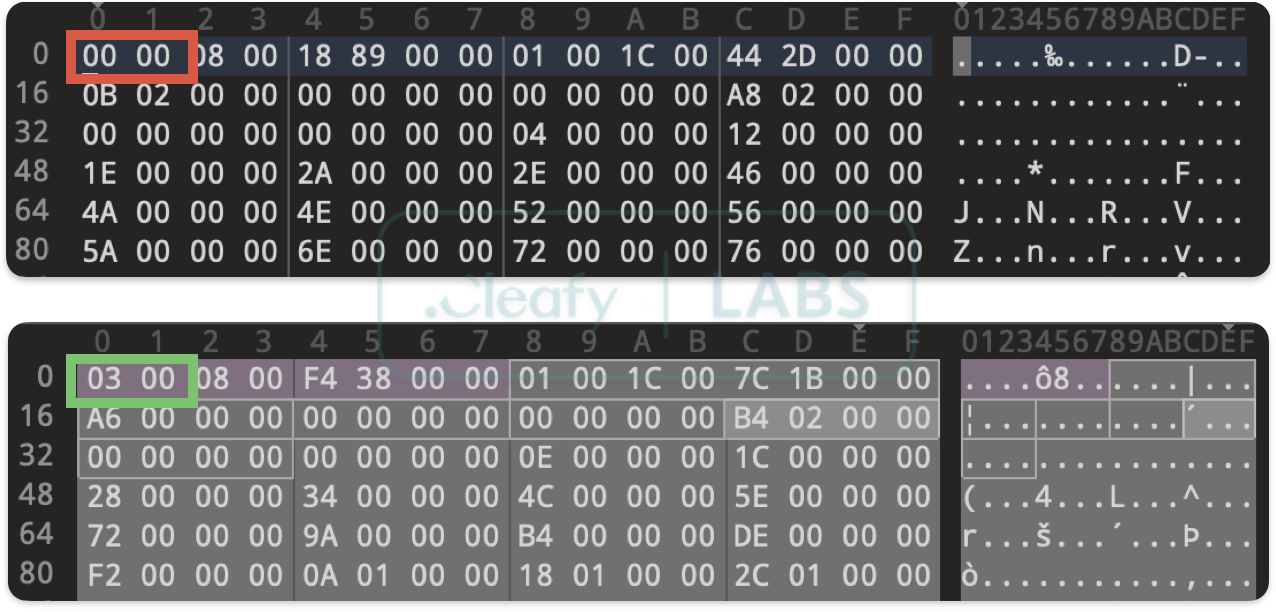
The most straightforward technique involves corrupting the magic header that identifies the AXML format. By changing the first byte from the expected 0x03 to an alternative value, attackers can immediately cause parsing failures in tools that perform strict format validation. What's particularly clever about this approach is its simplicity—a single byte change that can completely derail analysis workflows.
String Pool Corruption
The string pool represents a more sophisticated target, as it underpins the entire AXML structure. We've observed two primary variants of this attack. The first involves manipulating the string count value to exceed the actual number of strings present, causing parsing tools to attempt to access memory beyond the file boundaries.
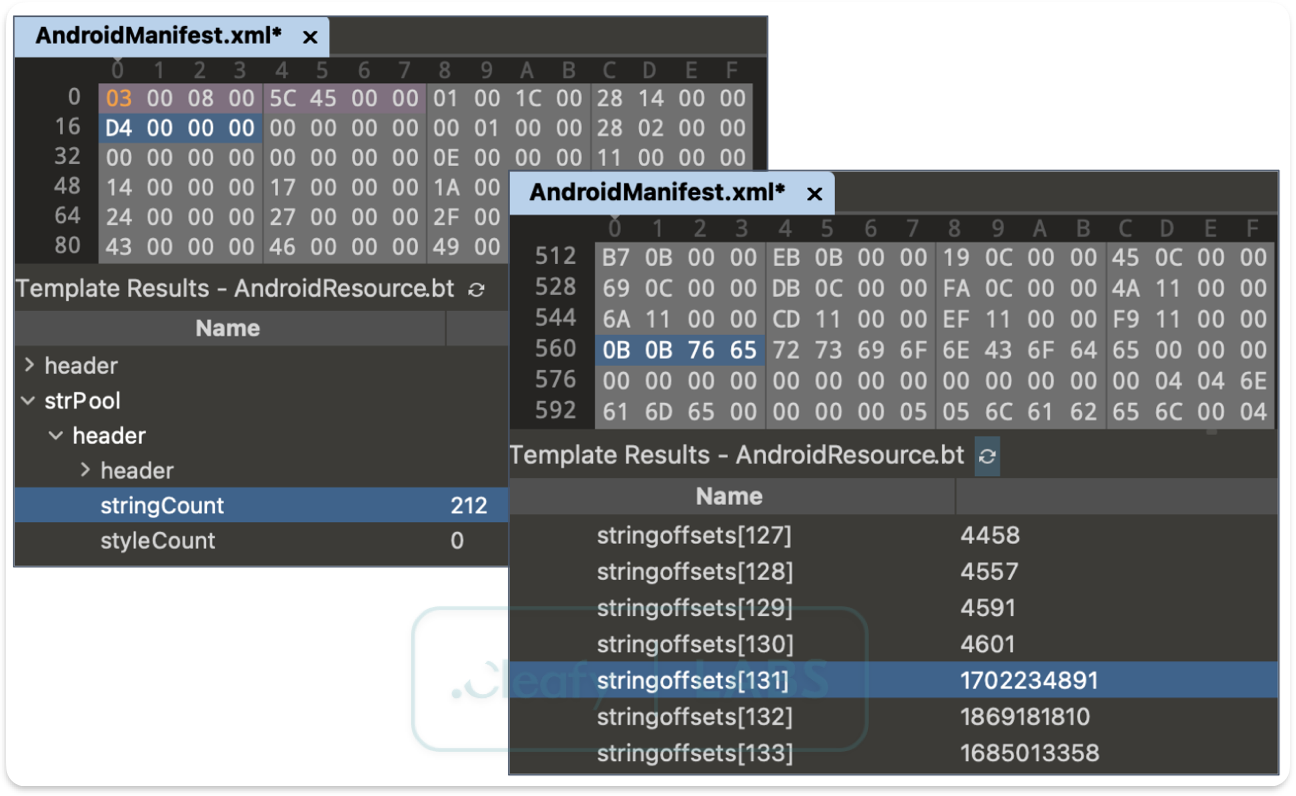
The second creates duplicate entries in the string offset table, corrupting the deduplication that makes the format efficient.
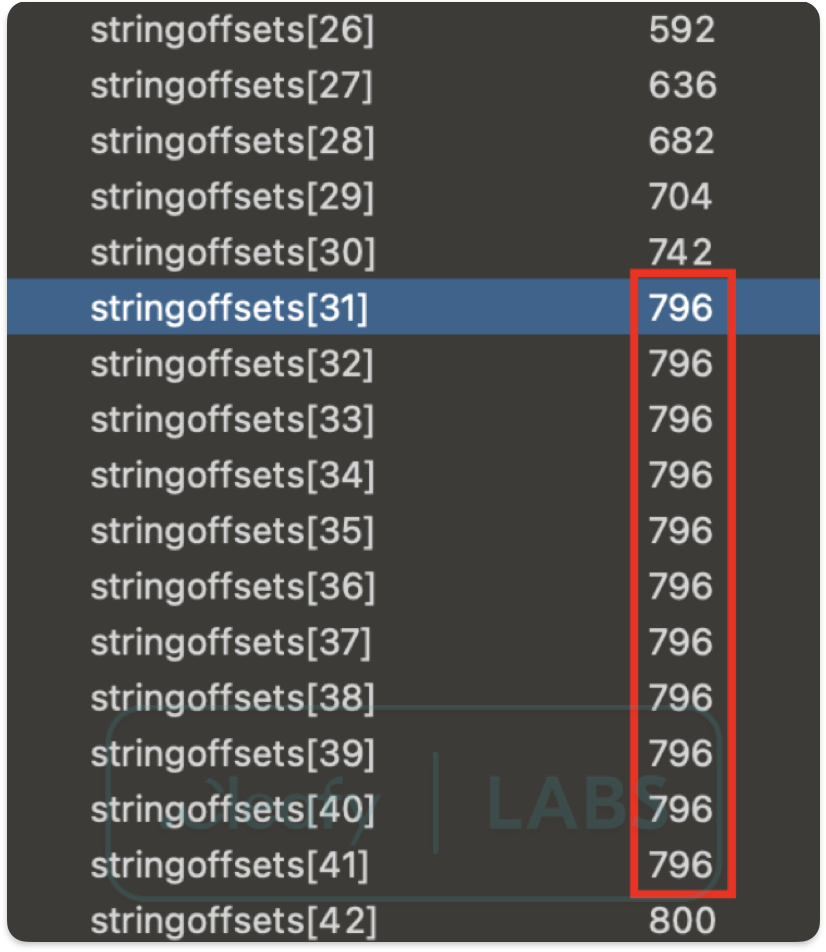
These attacks are particularly effective because they strike at the heart of how AXML files store and reference textual data. When the string pool is corrupted, analysis tools lose the ability to resolve attribute names, values, and element content—effectively rendering the entire manifest unreadable.
Chunk Size Manipulation
The AXML format organizes data into chunks that must maintain 4-byte alignment boundaries. Malware authors exploit this requirement by inserting invalid size values in chunk headers or adding junk data within chunk boundaries. This creates a situation where parsing tools, expecting well-formed structures, encounter data that violates their assumptions about file organization.
Attribute Size Violations
Perhaps the most targeted approach we've observed involves manipulating attribute size values. Standard parsers like Jadx expect attribute sizes to be precisely 20 bytes (0x14). By using alternative values such as 0x18, attackers can create parsing ambiguity that triggers tool-specific vulnerabilities. This technique demonstrates the sophisticated understanding that modern malware authors possess about the tools used to analyze their creations.
Attribute Start Violations
A comparable, albeit much less frequently observed, technique centers on the attribute start value. As with the attribute size, standard parsing tools often assume this value is 0x14, reflecting the expected header offset. Attackers, however, can assign this field an arbitrary value, deviating significantly from the specification. Whilst not as prevalent as size manipulation, this method similarly seeks to exploit rigid parser assumptions, aiming to induce anomalous behavior, crash the analyzer, or bypass detection logic entirely.
Malicious Offset Injection
The final technique involves corrupting the offset values that allow the AXML format to efficiently reference strings and attributes. By introducing negative offsets or values that point beyond file boundaries, attackers can cause memory corruption, infinite loops, or complete parser failure. This approach is particularly insidious because it can cause analysis tools to crash entirely, preventing any analysis from occurring.
Asset Directory Abuse
One increasingly observed anti-analysis technique in Android malware involves the deliberate use of obfuscated filenames containing non-ASCII or control characters within the assets/ directory. This method exploits inconsistencies in how tools like JADX handle file paths, often resulting in path traversal errors or outright failure during decompilation.

By embedding payloads or critical resources under names with malformed Unicode sequences or invisible characters, adversaries effectively disrupt static analysis workflows, forcing analysts to manually extract and inspect archive contents.
Introducing Malfixer: A Python-Based Normalizer
To assist analysts and defenders in overcoming the increasingly sophisticated challenge of malformed APKs, the Cleafy Threat Intelligence and Incident Response (TIR) team has developed Malfixer, a powerful and open-source Python-based tool. The tool aims to identify and meticulously reconstruct malformed APKs, thereby restoring their integrity and making them amenable to standard analysis tools.
Malfixer is publicly available as an open-source project on GitHub, allowing security researchers and malware analysts worldwide to freely download, use, and contribute to the tool.
Unlike other existing solutions, this tool is a unique one that enables the handling of all the malformation techniques described in this article.
To develop the tool, over 70 samples were analysed, primarily belonging to the TrickMo, Teabot, Godfather, and Spynote malware families. The analysis of these samples made it possible to identify and study all the malformation techniques described in this report.
Malfixer's core strength lies in its ability to normalize diverse malformation techniques. It goes beyond simple error detection, actively implementing a suite of repair mechanisms. Key among these are its ZIP Structure Repair capabilities, which meticulously rewrite local and central directory records, eliminate redundant entries, and validate file integrity. This ensures that even APKs with sabotaged ZIP structures can be correctly parsed.
Furthermore, Malfixer provides robust Manifest Recovery, attempting to decode malformed binary XML (AXML) and restore the correct tag structure. This is crucial for overcoming obfuscation techniques like header manipulation, string pool corruption, chunk size manipulation, attribute start and size violations, and malicious offset injection, which specifically target the critical AndroidManifest.xml file to hinder reverse engineering. The tool also excels in Asset Extraction and Inspection, meticulously exploring potentially malformed assets, flagging any anomalies, and extracting embedded payloads that might be hidden using non-ASCII or control characters in filenames.
Crucially, once the cleaning and repair processes are complete, the tool facilitates Automated Repackaging, rebuilding a well-formed APK. This repaired APK is then suitable for use with conventional analysis tools such as JADX, enabling security researchers to finally examine the true nature of the malicious application without being thwarted by evasive structural inconsistencies.
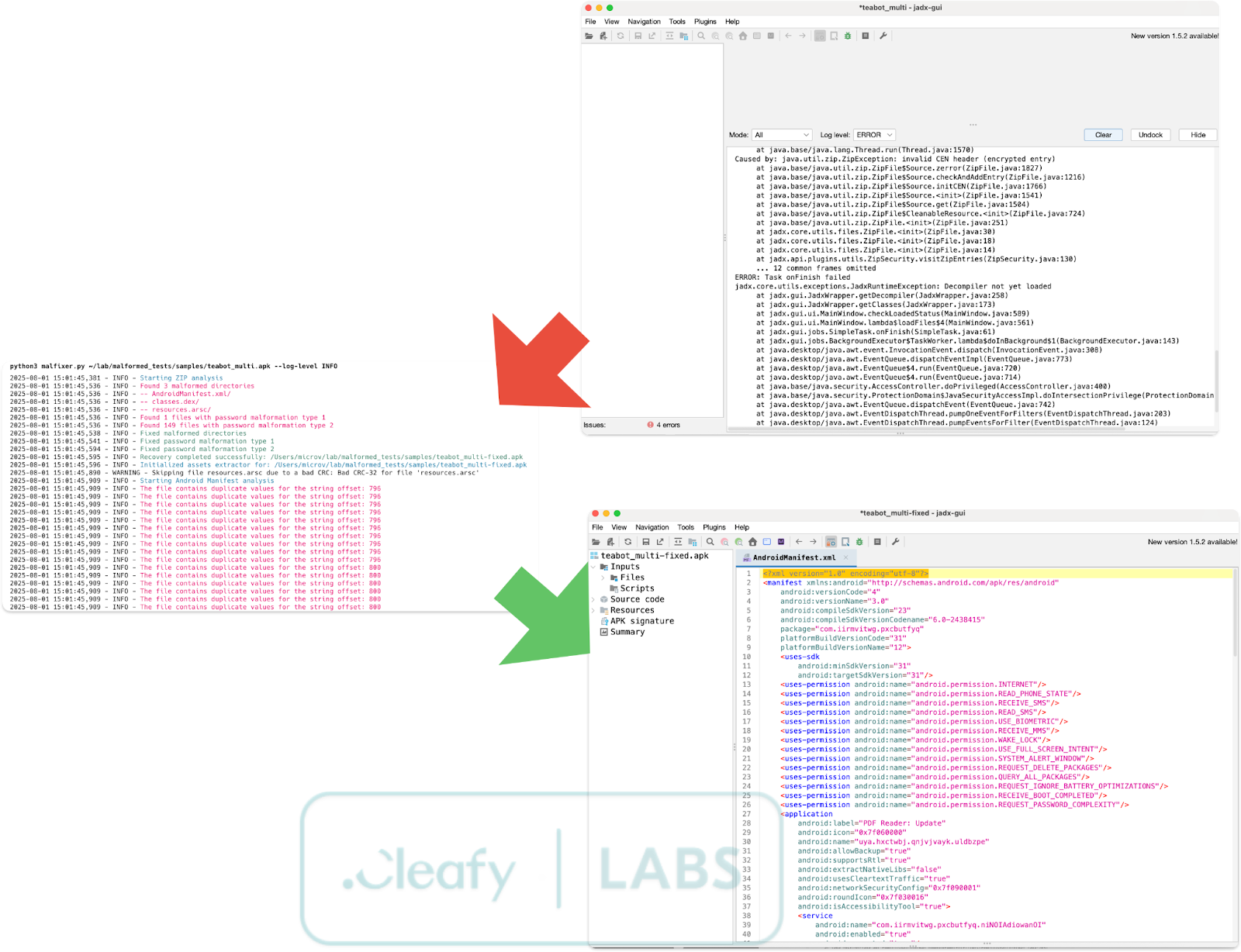
By providing a reliable method for reconstructing tampered APKs,this tool enables more effective malware analysis and response in the face of evolving Android malware campaigns. Its open-source nature on GitHub also encourages community contributions, fostering collaborative efforts in combating new malformation techniques as they emerge.
Conclusions
Malformation is a powerful anti-analysis strategy that is becoming increasingly popular in Android malware campaigns. As defenders, we must evolve our tools and techniques to counter these evasive tactics. With Malfixer, we hope to equip analysts with a reliable method of reconstructing tampered APKs and shedding light on otherwise hidden threats.
We encourage the community to contribute to the project and share new samples or malformation techniques they encounter in the wild.

如有侵权请联系:admin#unsafe.sh