
好的,我现在需要帮用户总结一篇文章的内容,控制在100字以内,并且不需要特定的开头。首先,我得仔细阅读文章,理解主要内容。 文章主要讲的是微软针对利用RDP文件进行钓鱼攻击的新保护措施。RDP文件常用于企业环境中连接远程系统,但威胁分子滥用这一点,通过钓鱼邮件发送恶意RDP文件,导致用户设备连接到攻击者控制的服务器,并共享本地资源,从而窃取文件和凭证。 微软在Windows 10和11的更新中添加了警告提示,并默认禁用共享资源。用户首次打开RDP文件时会看到教育提示,之后每次打开都会显示安全对话框,显示发布者信息和资源重定向情况。这些保护措施不适用于通过Remote Desktop客户端发起的连接。 总结的时候要抓住关键点:微软推出新保护措施、针对恶意RDP文件、钓鱼攻击、新增警告和默认禁用共享资源。确保内容简洁明了,不超过100字。 </think> 微软推出新功能保护Windows用户免受利用RDP文件的钓鱼攻击,新增警告提示并默认禁用共享资源。 2026-4-14 22:31:38 Author: www.bleepingcomputer.com(查看原文) 阅读量:22 收藏
Microsoft has introduced new Windows protections to defend against phishing attacks that abuse Remote Desktop connection (.rdp) files, adding warnings and disabling risky shared resources by default.
RDP files are commonly used in enterprise environments to connect to remote systems because admins can preconfigure them to automatically redirect local resources to the remote host.
Threat actors have increasingly abused this functionality in phishing campaigns. The Russian state-sponsored APT29 hacking group has previously used rogue RDP files to remotely steal data and credentials from victims.

When opened, these files can connect to attacker-controlled systems and redirect local drives to the connected device, allowing the attacker-controlled device to steal files and credentials stored on disk.
They can also capture clipboard data, such as passwords or sensitive text, or redirect authentication mechanisms like smart cards or Windows Hello to impersonate users
New RDP protections roll out
As part of the April 2026 cumulative updates for Windows 10 (KB5082200) and Windows 11 (KB5083769 and KB5082052), Microsoft has now released new protections to prevent malicious RDP connection files from being used on devices.
"Malicious actors misuse this capability by sending RDP files through phishing emails," warns Microsoft.
"When a victim opens the file, their device silently connects to a server controlled by the attacker and shares local resources, giving the attacker access to files, credentials, and more."
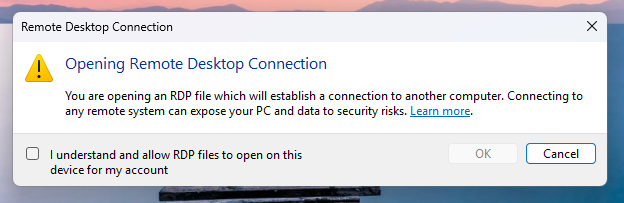
After installing this update, when users open an RDP file for the first time, a one-time educational prompt is shown that explains what RDP files are and warns about their risks. Windows users will then be prompted to acknowledge that they understand the risks and press OK, which will prevent the alert from being shown again.
Source: Microsoft
Future attempts to open RDP files will now display a security dialog before any connection is made.
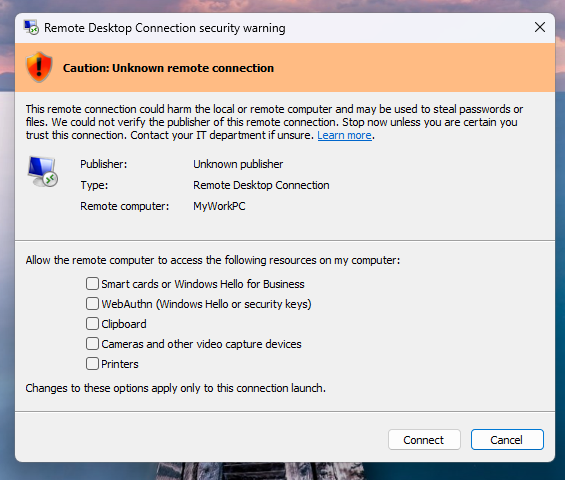
This dialog shows whether the RDP file is signed by a verified publisher, the remote system's address, and lists all local resource redirections, such as drives, clipboard, or devices, with every option disabled by default.
If a file is not digitally signed, Windows displays a "Caution: Unknown remote connection" warning and labels the publisher as unknown, indicating there is no way to verify who created the file.
Source: Microsoft
If the RDP file is digitally signed, Windows will display the publisher, but still warn you to verify their legitimacy before connecting.
It should be noted that these new protections apply only to connections initiated by opening RDP files, not to those made through the Windows Remote Desktop client.
Microsoft says that Administrators can temporarily disable these protections by going to the HKLM\Software\Policies\Microsoft\Windows NT\Terminal Services\Client Registry key and modifying the RedirectionWarningDialogVersion value so it is set to 1.
However, as RDP files have historically been abused in attacks, it is strongly recommended to keep these protections enabled.

Automated Pentesting Covers Only 1 of 6 Surfaces.
Automated pentesting proves the path exists. BAS proves whether your controls stop it. Most teams run one without the other.
This whitepaper maps six validation surfaces, shows where coverage ends, and provides practitioners with three diagnostic questions for any tool evaluation.
如有侵权请联系:admin#unsafe.sh