好的,我现在需要帮用户总结这篇文章的内容,控制在100字以内。首先,我得通读整篇文章,抓住主要信息。 文章开头提到微软发布了Windows 11的累积更新KB5083769和KB5082052,修复了安全漏洞和错误,并添加了新功能。接着说明这些更新是强制性的,包含4月的安全补丁。然后介绍了如何安装更新,包括自动下载和手动下载的方法。 接下来是更新的具体内容,包括构建号的变化、Smart App Control的新功能、Narrator的改进以及其他各项功能的提升。最后提到微软正在开发一个大的质量更新,计划改进任务栏和性能,并限制Copilot集成等。 我需要把这些信息浓缩到100字以内,突出主要点:更新版本、修复内容、新增功能、安装方式以及未来的计划。确保语言简洁明了,不使用复杂的结构。 </think> 微软发布Windows 11累积更新KB5083769和KB5082052,修复安全漏洞和错误,并新增功能。更新为强制性,包含4月安全补丁。用户可通过Windows Update或手动下载安装。新增功能包括Smart App Control开关、Narrator改进及File Explorer优化等。 2026-4-14 18:1:4 Author: www.bleepingcomputer.com(查看原文) 阅读量:10 收藏
Microsoft has released Windows 11 KB5083769 and KB5082052 cumulative updates for versions 25H2/24H2 and 23H2 to fix security vulnerabilities, bugs, and add new features.
Today's updates are mandatory as they contain the April 2026 Patch Tuesday security patches for vulnerabilities discovered in previous months.
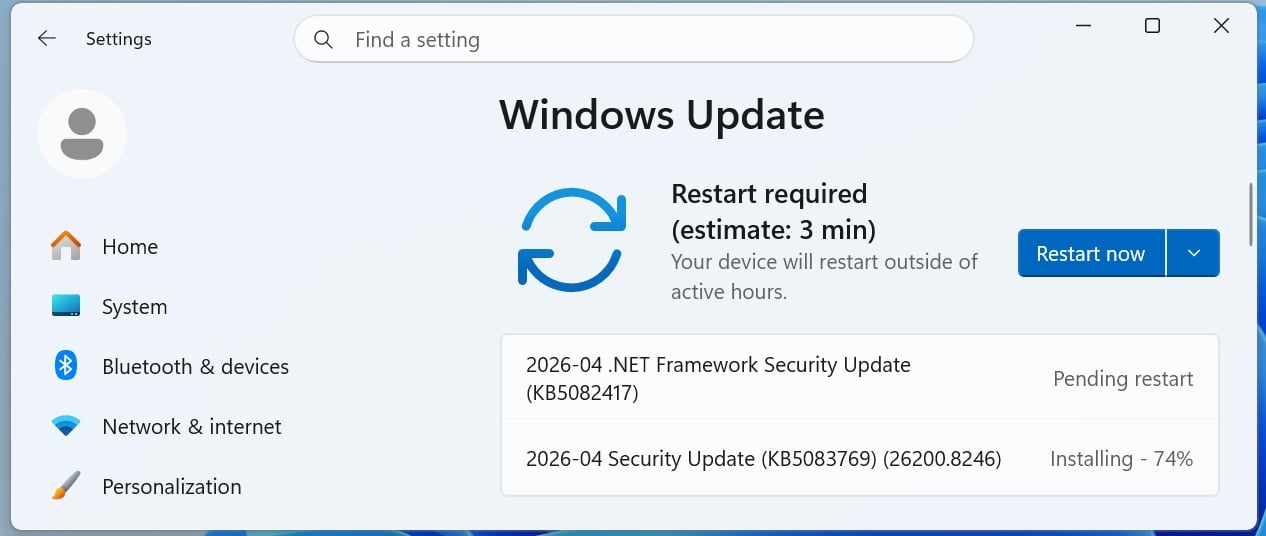
You can install today's update by going to Start > Settings > Windows Update and clicking on 'Check for Updates.'

You can also manually download and install the update from the Microsoft Update Catalog.
This is the fourth 'Patch Tuesday' release in 2026, and it's based on 24H2, which means 25H2 gets the same update. There are no exclusive or special changes. You'll get the same fixes across the two versions of Windows 11.
What's new in the April 2026 Patch Tuesday update
After installing today's security updates, Windows 11 25H2 (KB5083769) will have its build number changed to 26200.8246 25H2 and 26100.8246 (24H2), and 23H2 (KB5082052) will be changed to 22631.6936.
After the update, Smart App Control can now be modified without installing a fresh copy of Windows 11.
In addition, Microsoft has patched issues with sfc /scannow where it fails to correctly report the error message.
Here's the full list of fixes and improvements:
-
[Narrator] New! 1 Narrator provides rich image descriptions on Copilot+ PCs and now works with Copilot on all Windows 11 devices. Press Narrator key + Ctrl + D to describe the focused image or Narrator key + Ctrl + S to describe the full screen. Copilot opens with the image ready, allowing you to enter a prompt for a customized description. The image is shared only after you choose to describe it. On Copilot+ PCs, Narrator gives instant, on‑device descriptions, and you can select Ask Copilot for more detail.
-
[Smart App Control] New! You can turn Smart App Control (SAC) on or off without needing a clean install. To make changes, go to Settings > Windows Security > App & Browser Control > Smart App Control settings. When turned on, SAC helps block untrusted or potentially harmful apps. To learn more, see App & Browser Control in the Windows Security App. This feature was previously disclosed in January 2026 (KB5074105) and is now beginning to roll out.
-
[Account Settings]
-
New! Microsoft 365 Family subscribers can upgrade to a different Microsoft 365 plan from Settings > Accounts. To remove the upgrade option, turn off Suggested content in Settings.
-
New! This update improves the design of the dialog boxes in Settings > Accounts > Other users to match the modern Windows look and support dark mode. The visibility of the dialog box option depends on whether the device has a domain joined work or school account.
-
-
[Input] New! The Pen settings page includes refinements to the pen tail button options. The new “Same as Copilot key” option enables the pen tail button to open the same app as the Copilot key.
-
[Settings]
-
New! The Settings About page (Settings > About) has been improved to provide a more structured and intuitive experience, offering clearer device specifications and easier navigation to related device components, including quick access to Storage settings.
-
New! 2 The device information card on the Settings Home page simplifies key device specifications and improves consistency across the end-to-end flow from the Home Card to the Settings > System > About page, making information easier to scan and understand.
-
This update improves the reliability and performance of opening the Home in Settings.
-
This update improves the reliability of downloading required updates when you’re prompted in Settings > System > Advanced.
-
-
[File Explorer] This update improves the File Explorer experience.
-
You can more reliability unblock files downloaded from the internet in order to preview them in File Explorer.
-
You can use Voice Typing (Windows logo key + H) when renaming a file in File Explorer.
-
You can now sort the permissions entries in the Advanced Security Settings window for a folder in File Explorer by Principal.
-
-
[Display] This update includes Display reliability improvements.
-
Monitors can now report refresh rates higher than 1000 Hz.
-
When you use a native USB4 monitor connection, the USB controller can now enter its lowest power level while the PC is sleeping, which helps save battery life.
-
Auto rotation reliability has improved after resuming from sleep.
-
HDR reliability has improved for displays with non-compliant DisplayID 2.0 blocks.
-
Monitors with DisplayID now report a more accurate size when the WMI monitor APIs are used.
-
-
[Printing] Updated downlevel baseline support for printer connections to be Windows 10, version 1607 and Windows Server 2016 (Build 14393).
-
[Safe mode] This update improves the reliability of loading taskbar components in safe mode.
-
[Voice Access] This update improves how numbers are detected and written when using Voice Access in English.
-
[Start menu] This update improves the reliability of applying the Start menu layout through Group Policy when desktopAppLink is present in the JSON.
-
[Remote Desktop] The Set-RDSessionCollectionConfiguration PowerShell command now recognizes DisableSeamlessLanguageBar.
-
[Audio] This update improves how short MIDI messages are handled in cases where an application is initialized without providing long message buffers.
-
[System File Checker] This update removes an extraneous error message you might unexpectedly see when running sfc /scannow.
Microsoft is not aware of any new issues with this month's Patch Tuesday, and it's largely because it's not a massive release as compared to previous patch releases.
At the same time, it's possible that the update does not have known issues because Microsoft has committed to a stable and reliable Windows experience.
Microsoft has confirmed it's working on a big Windows 11 2026 quality update that restores the movable taskbar and will significantly improve the performance of modern interfaces, including the right-click menu.
Microsoft also has plans to limit Copilot integration in Windows 11, reduce ads, and make the out-of-the-box experience faster with skippable Windows Updates.

Automated Pentesting Covers Only 1 of 6 Surfaces.
Automated pentesting proves the path exists. BAS proves whether your controls stop it. Most teams run one without the other.
This whitepaper maps six validation surfaces, shows where coverage ends, and provides practitioners with three diagnostic questions for any tool evaluation.
如有侵权请联系:admin#unsafe.sh