
嗯,用户让我用中文帮他总结一下这篇文章的内容,控制在一百个字以内。他不需要开头像“文章内容总结”这样的,直接写描述就行。首先,我需要快速浏览文章,抓住关键点。 文章主要讲的是Mirax这个新的MaaS恶意软件,针对安卓设备,特别是在欧洲地区。它通过地下论坛传播,并且已经通过Meta广告影响了超过20万的账户。功能方面,它有远程控制、动态HTML覆盖、住宅代理、键盘记录和锁屏信息窃取等。 接下来,我需要把这些要点浓缩到100字以内。可能的结构是:Mirax是什么、它的目标、传播方式、主要功能和影响。 比如:“Mirax是一种针对安卓设备的新型MaaS恶意软件,通过地下论坛传播并利用Meta广告影响超过20万用户。它具备远程控制、动态HTML覆盖、住宅代理功能以及键盘记录和锁屏信息窃取能力。” 这样刚好在100字左右,并且涵盖了主要信息。 再检查一下是否有遗漏的重要点,比如 Residential Proxy 的功能是否突出?是的,这也是Mirax的一个创新点,应该包括进去。 最后确保语言简洁明了,没有复杂的术语,适合快速理解。 </think> Mirax是一种针对安卓设备的新型MaaS恶意软件,通过地下论坛传播并利用Meta广告影响超过20万用户。它具备远程控制、动态HTML覆盖、住宅代理功能以及键盘记录和锁屏信息窃取能力。 2026-4-10 14:12:16 Author: www.cleafy.com(查看原文) 阅读量:5 收藏
Key Points
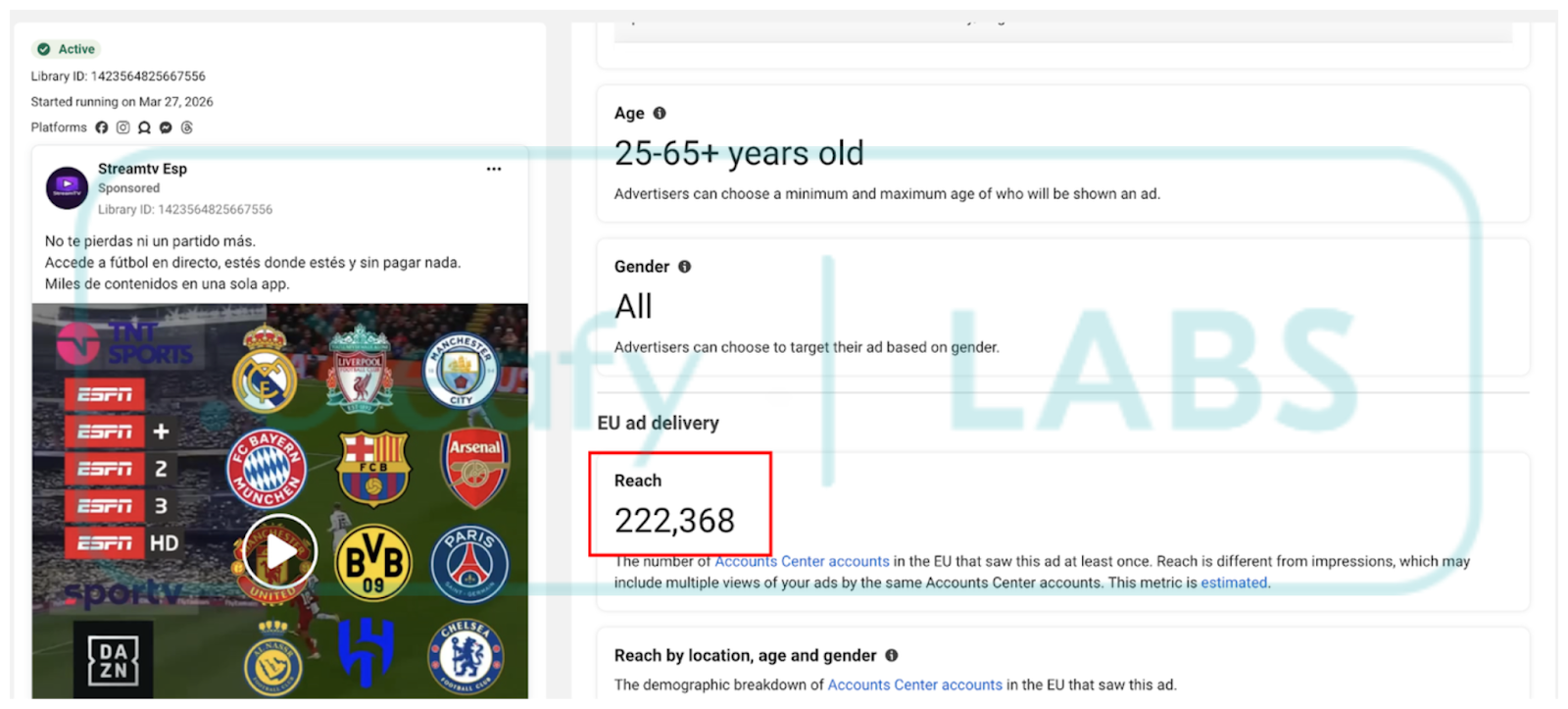
- New Maas spreading: Mirax has emerged as a sophisticated Malware-as-a-Service (MaaS) offering, specifically targeting Android devices across Europe. It is actively marketed and distributed through underground malware forums. At the time of writing, Cleafy Threat Intelligence Team has seen multiple campaigns targeting Spanish-speaking countries and reaching over 200.000 accounts through Meta advertisements.
- Remote Access functionalities & Dynamic HTML Overlays: Mirax integrates advanced Remote Access Trojan (RAT) capabilities, allowing threat actors to fully interact with compromised devices in real time. This includes executing commands, navigating the user interface, and monitoring activity. A key feature is its use of dynamically fetched HTML overlays from its command-and-control (C2) infrastructure, which are rendered over legitimate applications.
- Expanding RAT with Residential Proxy: Beyond traditional RAT behavior, Mirax enhances its operational value by turning infected devices into residential proxy nodes. Leveraging SOCKS5 protocol support and Yamux multiplexing, it establishes persistent proxy channels that allow attackers to route their traffic through the victim’s real IP address. This capability enables operators to bypass geolocation-based restrictions, evade fraud detection systems, and conduct malicious activities (such as account takeovers or transaction fraud) with increased anonymity and legitimacy.
- Keylogging & Keyguard exfiltration: Mirax incorporates comprehensive surveillance features, including continuous keylogging to capture all user input across applications. In addition, it gathers detailed information about the device’s keyguard (lock screen), including PIN length, pattern structure, and biometric usage.
Executive Summary
Mirax is a newly identified Android Remote Access Trojan (RAT) and banking malware that has rapidly gained traction within the cybercriminal ecosystem. Publicly promoted on underground forums since December 19, 2025, it has been actively monitored by the Cleafy Threat Intelligence team since March 2026, when multiple campaigns targeting primarily Spanish-speaking regions were observed. Unlike typical MaaS offerings, Mirax is distributed through a highly controlled and exclusive model, limited to a small number of affiliates. Access appears to be prioritized for Russian-speaking actors with established reputations in underground communities, indicating a deliberate effort to maintain operational security and campaign effectiveness.
From a capability standpoint, Mirax represents a significant evolution beyond traditional Android banking trojans. While retaining core RAT functionalities, it introduces a more structured, commercially driven “business model” featuring tiered subscription plans and ongoing feature development. One of its most notable innovations is the integration of SOCKS-based residential proxy functionality directly into the malware. This allows infected devices to be repurposed as proxy nodes, enabling threat actors to route malicious traffic through legitimate residential IP addresses and thereby evade geolocation restrictions and fraud detection mechanisms.
This convergence of RAT and proxy capabilities reflects a broader shift in the threat landscape. While residential proxy abuse has historically been associated with compromised IoT devices and low-cost Android hardware such as smart TVs, Mirax marks a new phase by embedding this functionality within a full-featured banking trojan. This approach not only increases the monetization potential of each infection but also expands the operational scope of attackers, who can now leverage compromised devices for both direct financial fraud and as infrastructure for wider cybercriminal activities.
How Mirax is Distributed
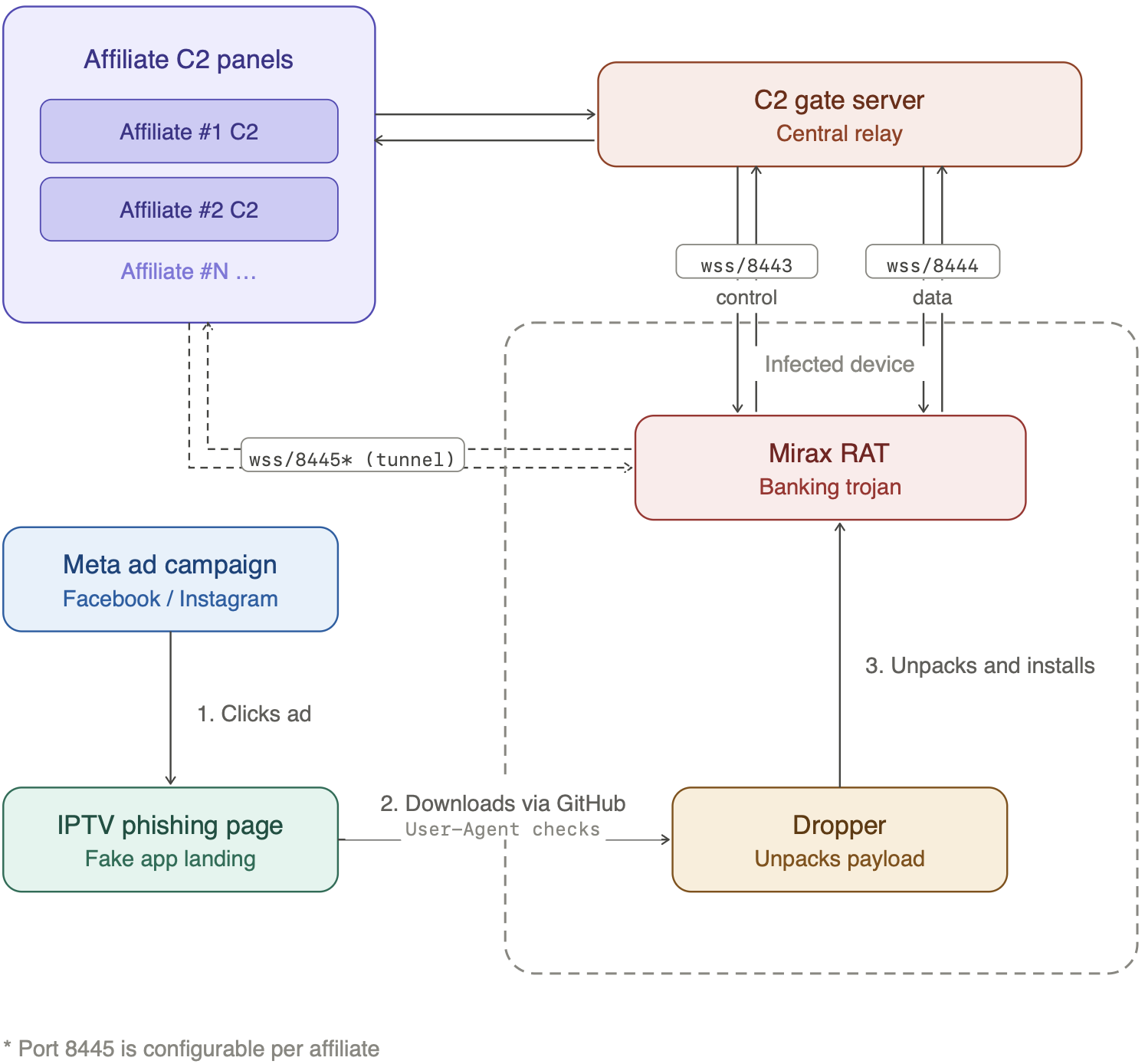
Mirax distribution consists of multiple stages that reveal an interesting trend followed by other affiliates and threat actors. The dropper pages are promoted through Meta Advertisement. The victims are lured to click ads appearing on their social media applications (Facebook, Instagram, Messenger, Threads, …) and to download the malicious dropper. All the URLs implement multiple checks to verify that they are accessed from mobile devices, to prevent automated scans from revealing their nature. The droppers are hosted using GitHub releases, with different backup links and daily package updates. Upon successful installation, the dropper unpacks itself and installs the malicious payload. It leverages commercial-grade obfuscation via Golden Encryption (aka GoldCrypt) and starts operating via WebSockets.
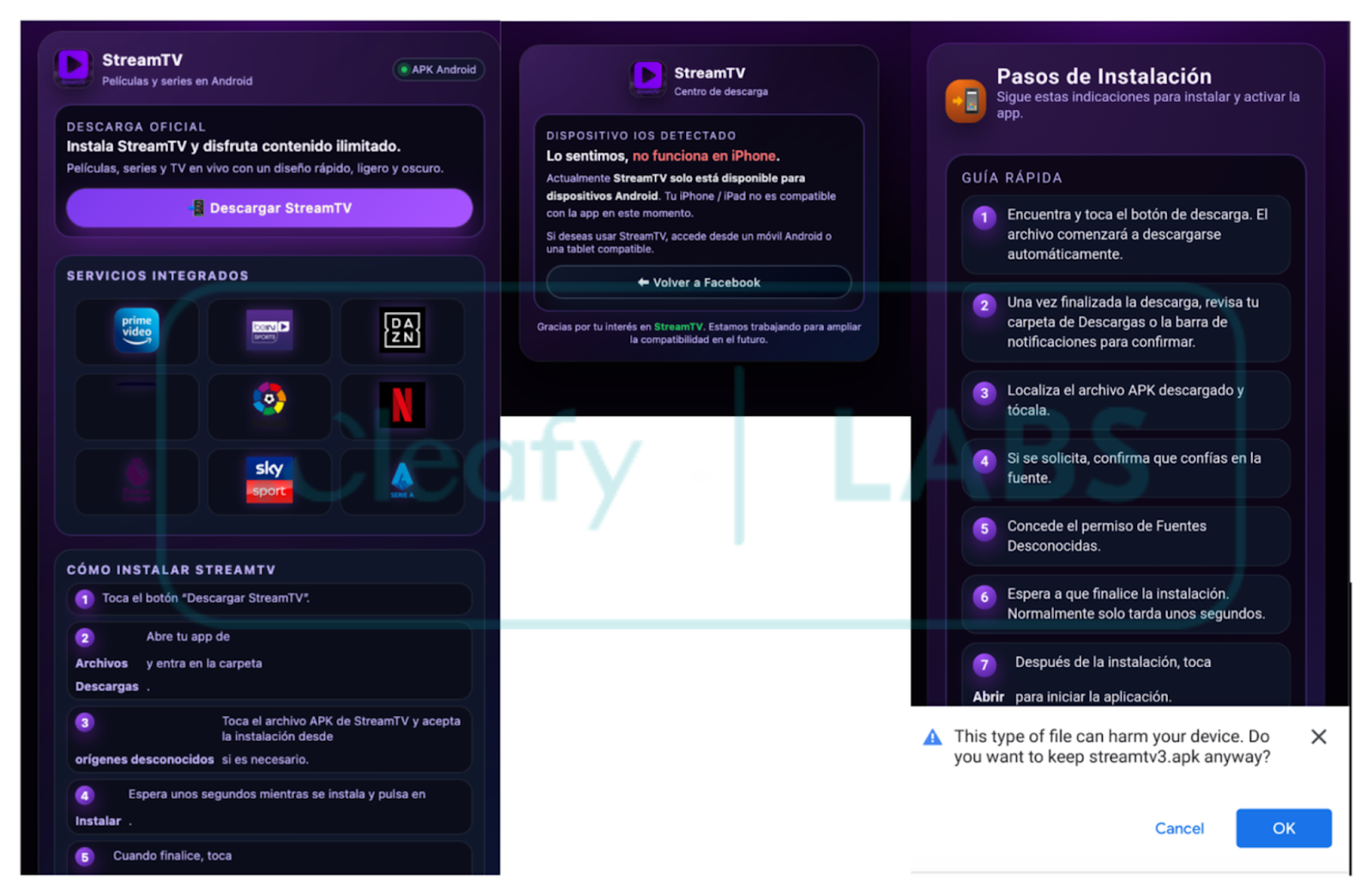
The delivery websites are promoted through Meta Ads (Facebook and Instagram). This distribution vector has become a common choice for Android banking trojans, enabling threat actors to reach a large audience quickly and with less effort. Furthermore, the choice of decoy, an illegal sports streaming application, reveals a clear understanding of the target demographic: since these apps are not available on the Google Play Store, users are already conditioned to sideload APKs from unknown sources, which makes social engineering much easier.
The dropper is distributed via phishing websites claiming to offer IPTV application services. Downloads are restricted to mobile devices, enforced by checking specific HTTP headers and parameters.
The analysis showed that the ADs had collectively reached more than 200,000 accounts, as reported in the next Figure:
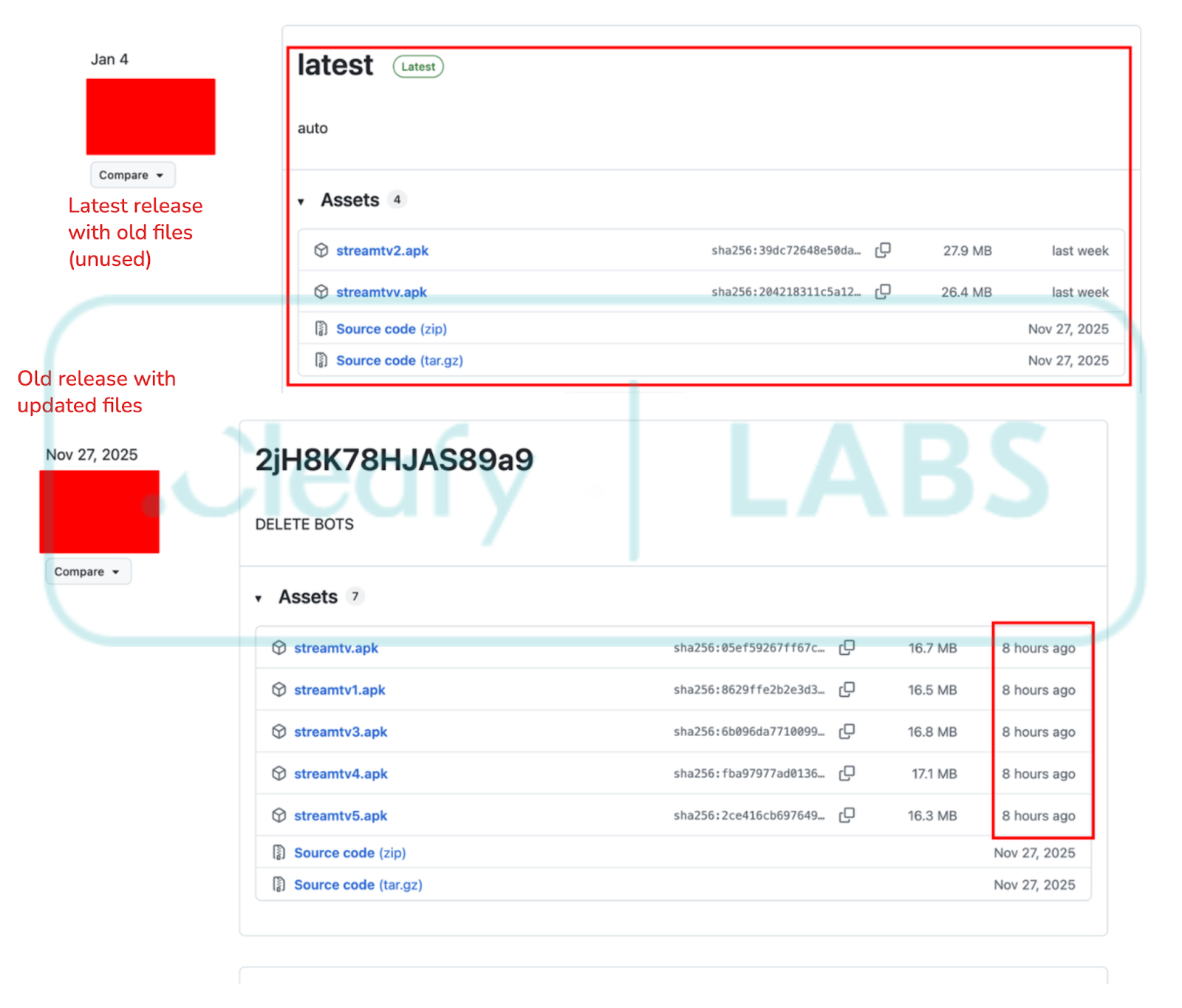
One interesting aspect of this delivery campaign is the abuse of GitHub for hosting the dropper applications. The affiliates leverage the Releases page to distribute and update their applications. Notably, new updates are pushed to pre-existing releases rather than creating new ones, likely as an evasion technique to hinder automated crawlers from easily retrieving fresh samples. The analysis revealed that while the samples' hashes changed daily, the application content remained unchanged, suggesting automated repacking or signature rotation to evade hash-based detection. Over the observed period, the Releases page contained multiple applications, starting with five and growing to over ten as the campaign matured.
Additional campaigns were observed leveraging different decoy themes, including IoT utilities and NSFW applications. However, the sports streaming campaign analyzed in this report provided the most comprehensive set of indicators and operational insights.
Technical Analysis
Builder Configuration
Mirax's installation procedure is quite common in modern Android malware: it follows a two-stage process and uses a dropper to hide the actual malware and its aggressive permissions requests. Thanks to the documentation released by the malware developers, it was possible to confirm the infection chain. In the malware documentation, they provided multiple screenshots that describe the builder's features, specify the different options for the dropper, and show the final implant. Please note that some of the following screenshots are taken directly from the malware documentation page.
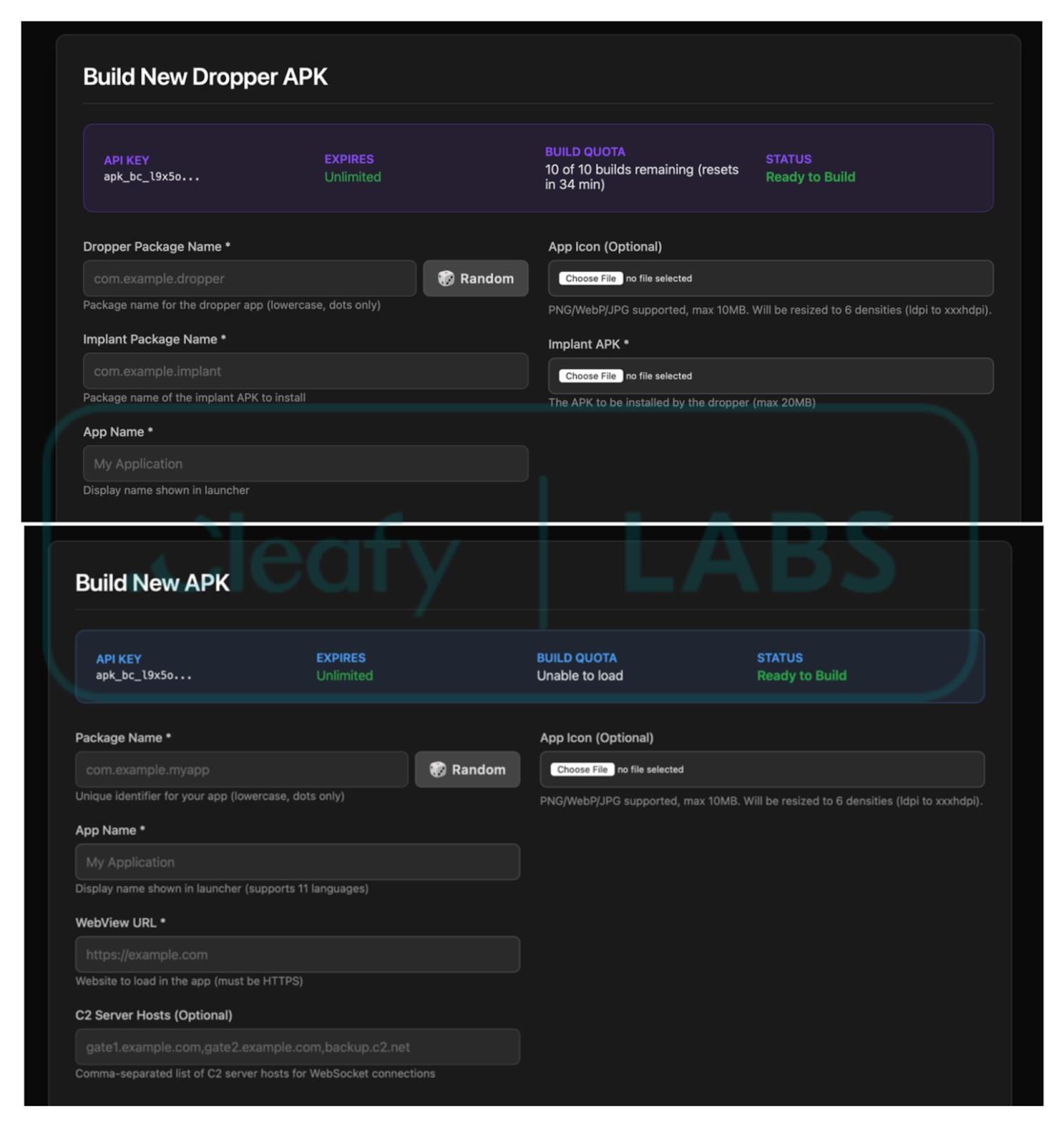
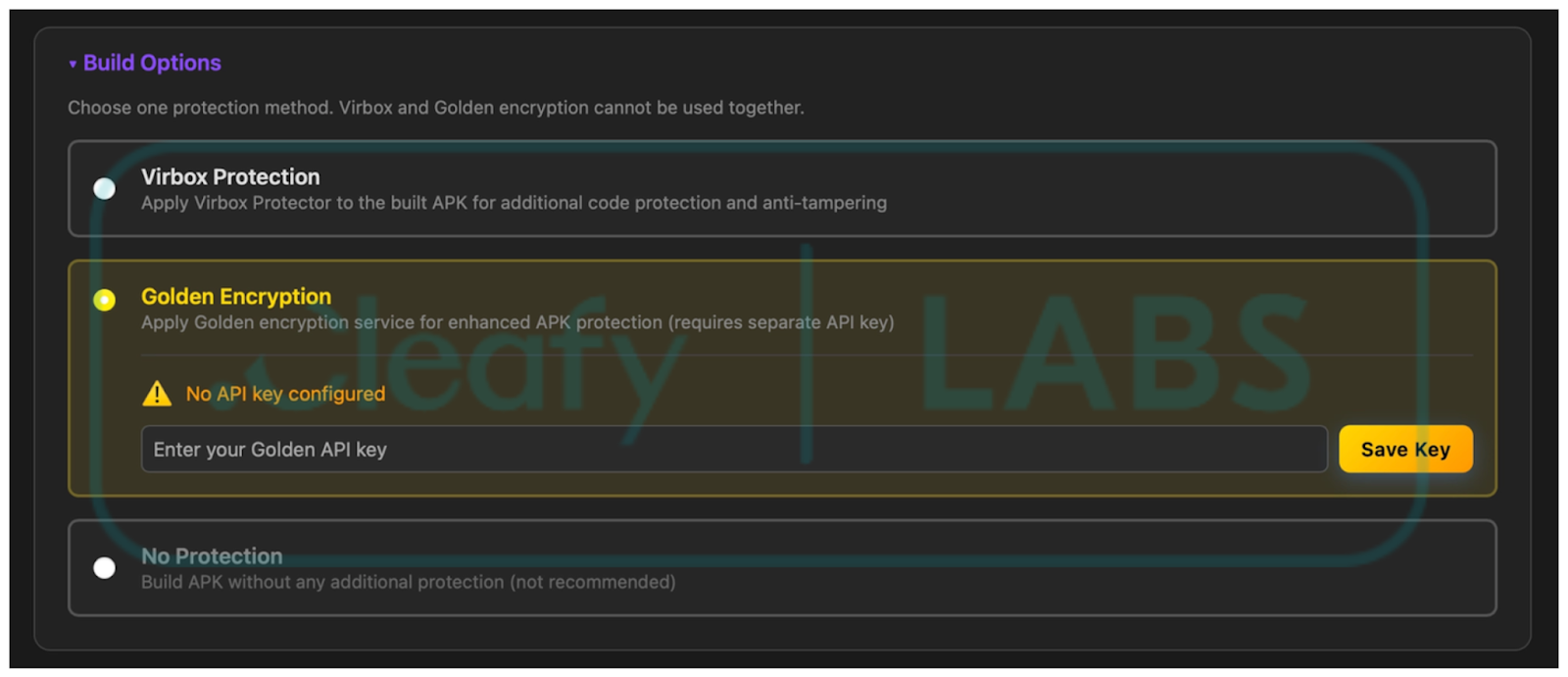
One interesting section of the documentation explains the different packer options that the builder offers: Virbox and Golden Encryption. While the former is easy to detect thanks to multiple indicators in the code, Golden Encryption (also known as Golden Crypt) is not well documented but is widely used and promoted on underground malware forums. This packer was also used in Albiriox, and the Cleafy team noted that the samples analyzed in this campaign follow the same unpacking patterns. Although this information could not be confirmed with full certainty, it can be reasonably assumed that the packer detailed below is Golden Crypt. The analysis will contain a description of this packer and its indicators.
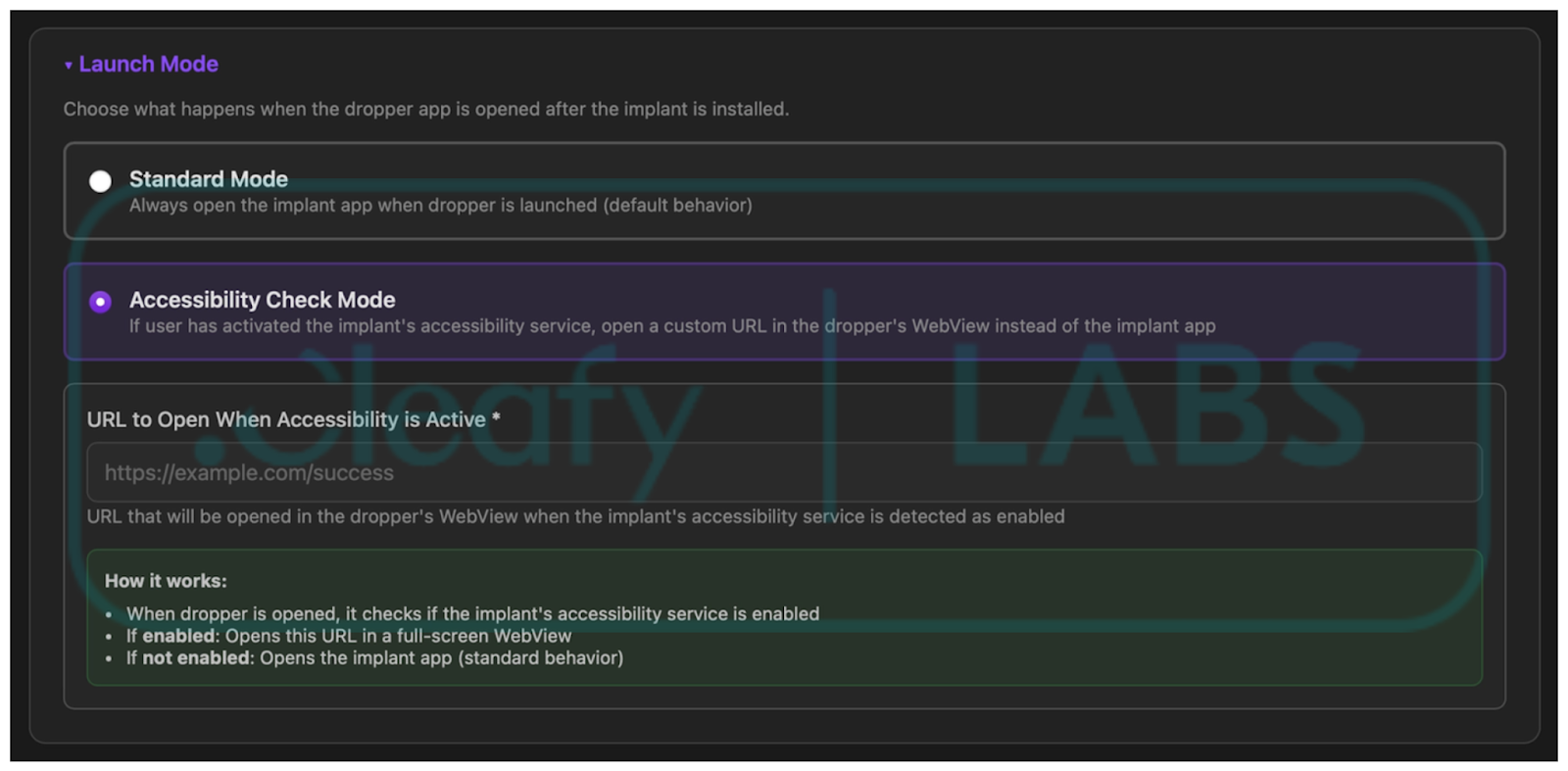
Moreover, the image below shows a section of the builder, confirming that the malware loads a WebView with a custom HTML page when Accessibility Services have been granted, as observed during analysis.
Code Analysis
Mirax implements a multi-step unpacking flow that attempts to hide malicious code via .dex dynamic loading and obfuscation. The packer used in the samples analyzed can be attributed to GoldCrypt, based on information provided by the malware developers and on similarities with other families that use the same techniques.
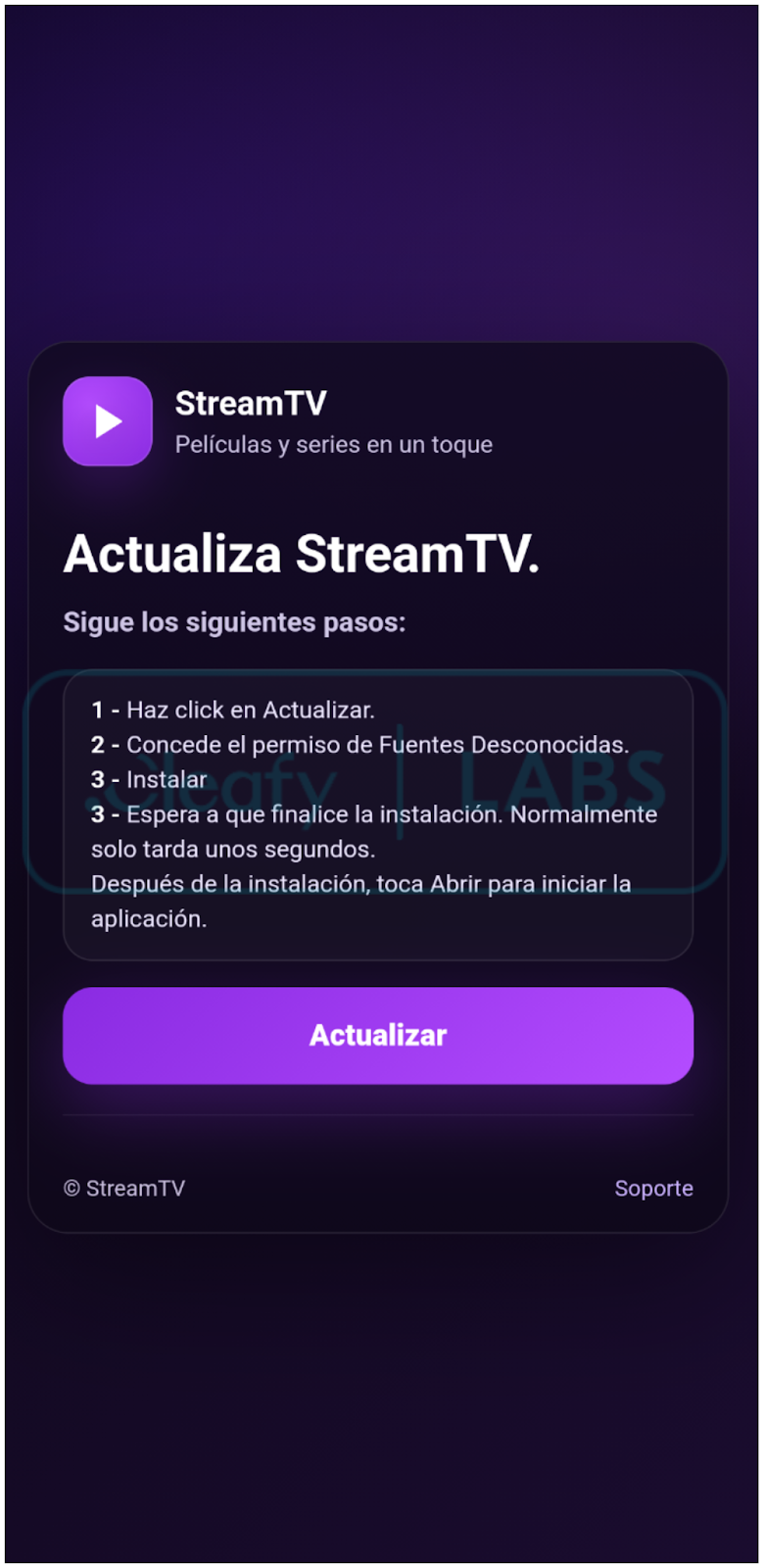
The dropper disguises itself as an IPTV application. The application requires the user to enable installation from Unknown Sources to install the final implant. This page is loaded in a WebView, as reported in the following Figure.
The extraction of the final malware payload is a sophisticated, multi-stage operation engineered specifically to bypass conventional security analysis and automated sandboxing tools.
The dropper Android Package (APK) does not contain the malicious code in the code section. Instead, it holds an encrypted Dalvik Executable (.dex) file. The payload is hidden inside a file with a valid asset extension, loaded, and decrypted using RC4 and a hardcoded key.
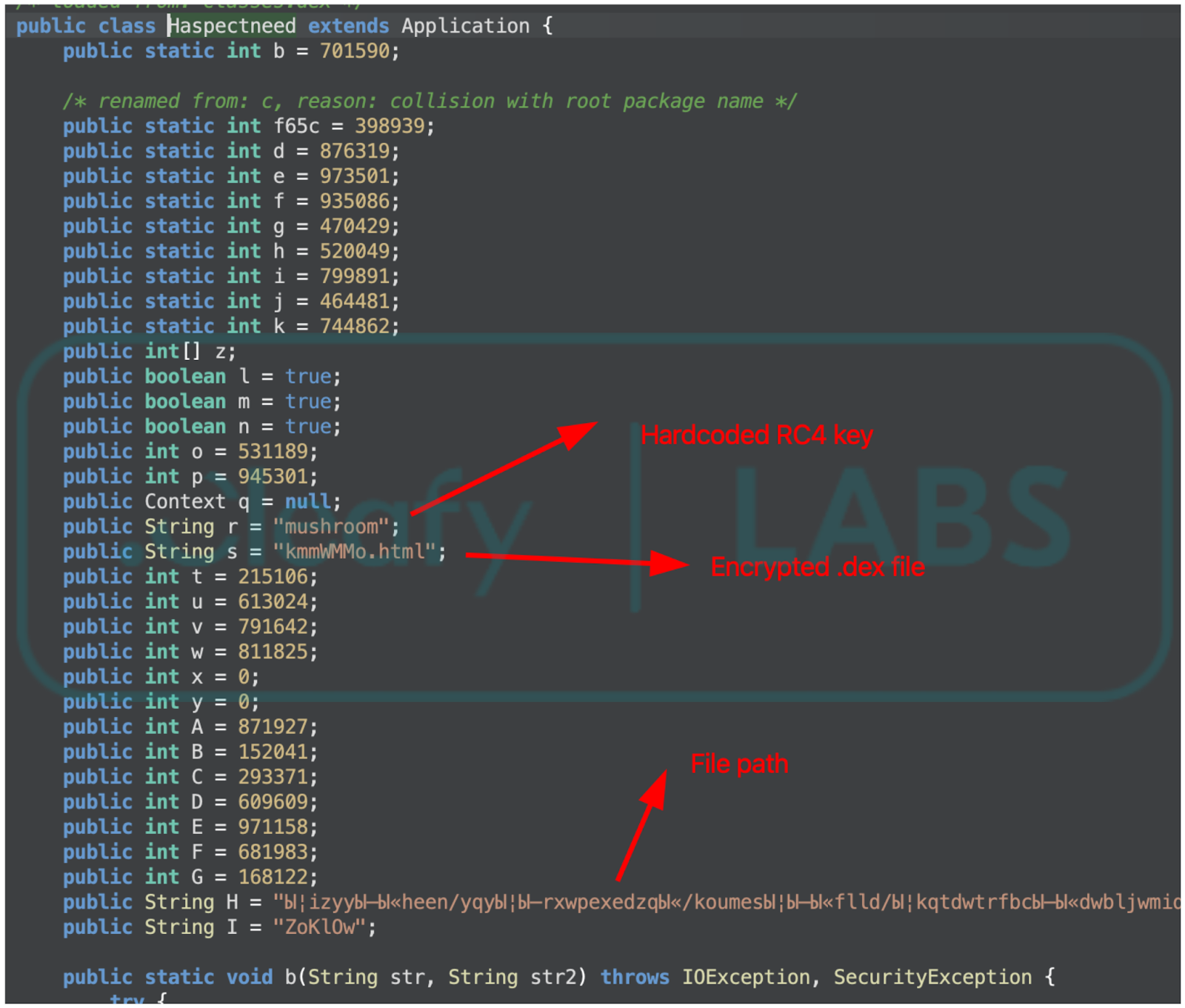
This encapsulated file is strategically buried deep within the APK's directory structure. A key component of the evasion technique is the use of an obfuscated, deeply nested folder path whose names contain uncommon characters. This specific technique aims to confound static analysis tools, making the encrypted payload difficult to locate and extract.
The extraction process is initiated upon the application's execution. The dropper application component is programmed to locate the encrypted .dex file from its hidden location within the obscure folder structure. Once located, the file is extracted from the APK container and prepared for decryption.
The core decryption mechanism uses the RC4 stream cipher. The cryptographic key is embedded directly within the application's class. The extracted and encrypted .dex file is fed through the RC4 routine using this embedded key, resulting in the plain-text, fully functional final .dex payload.
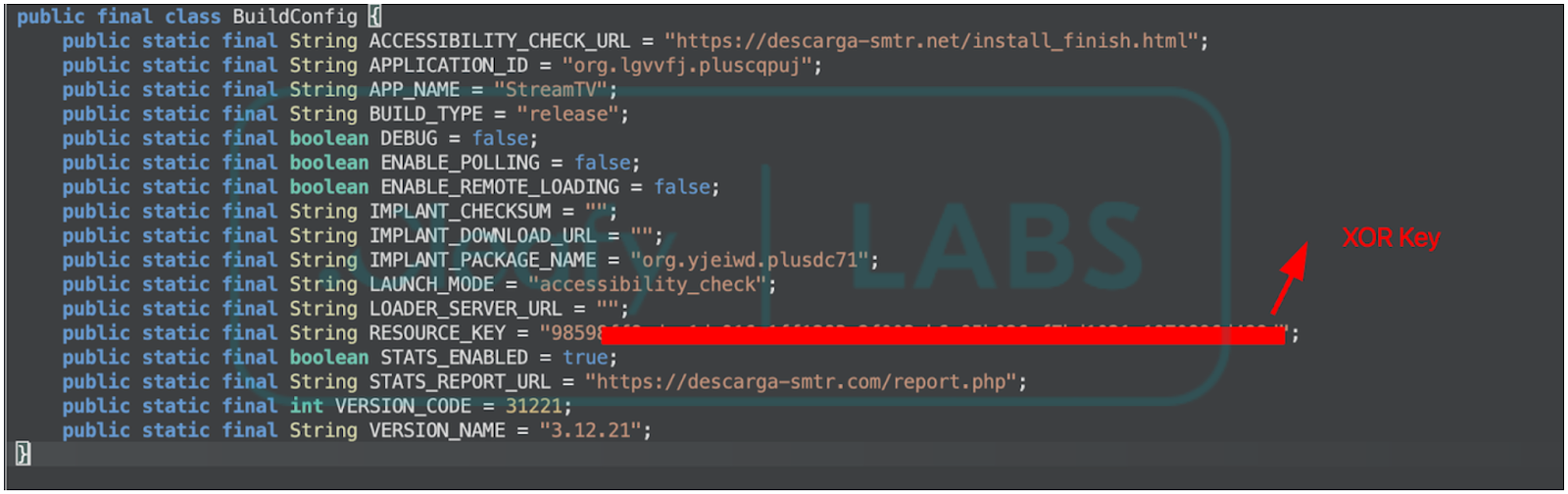
After successful decryption, the malicious .dex file contains the complete set of instructions to extract and install the final .apk file, contained in the res/raw/ folder. This file is encrypted using XOR with a hardcoded key in BuildConfig; the dropper decrypts the payload and proceeds with the installation. The malware developers claim that the final APK (the implant) may also be delivered from a remote server. This is also confirmed by the application's code: the configuration file contains a variable called IMPLANT_DOWNLOAD_URL that may contain this information. In the campaigns analyzed, this functionality was not active, and the implant was embedded inside the dropper application.
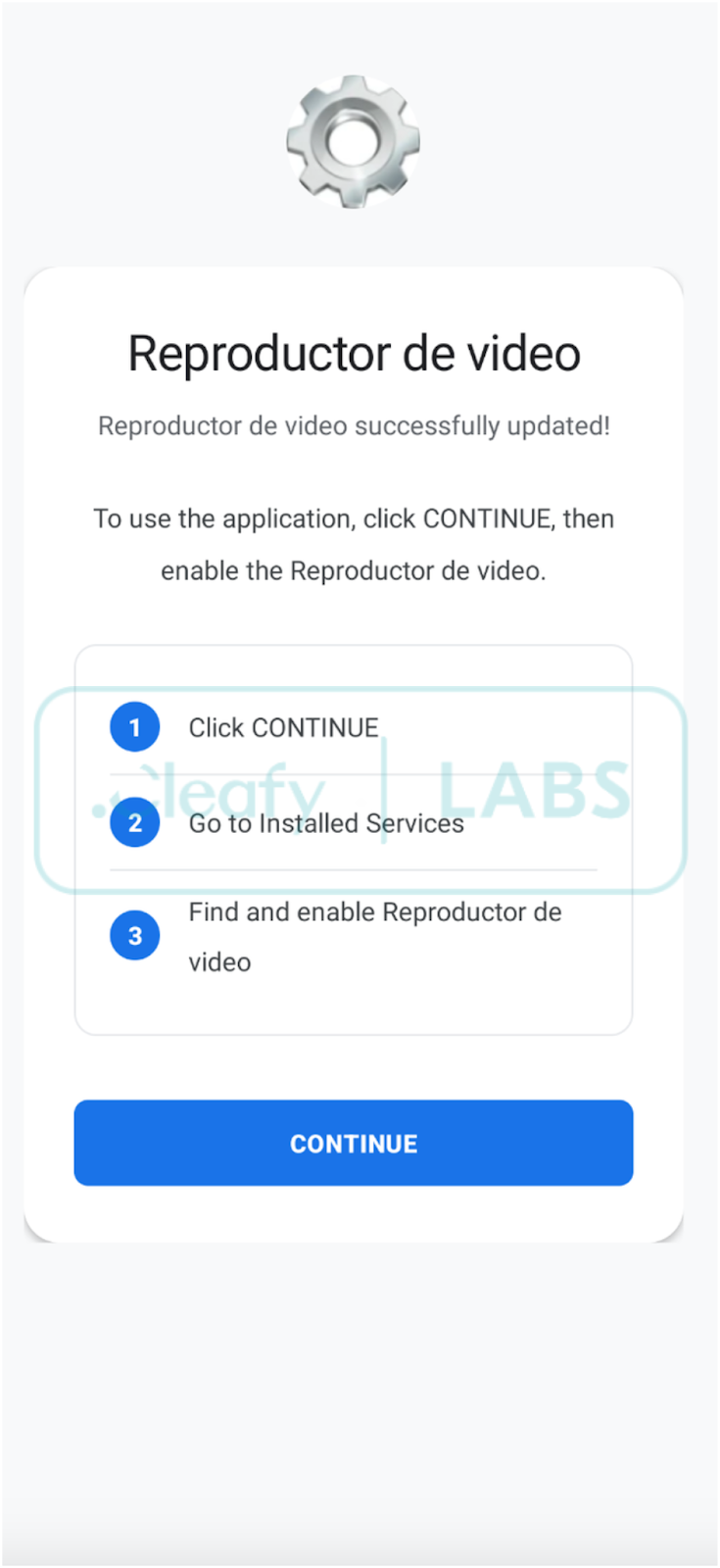
When the malware is installed, it masquerades as a video playback utility and prompts the user to enable Accessibility Settings.
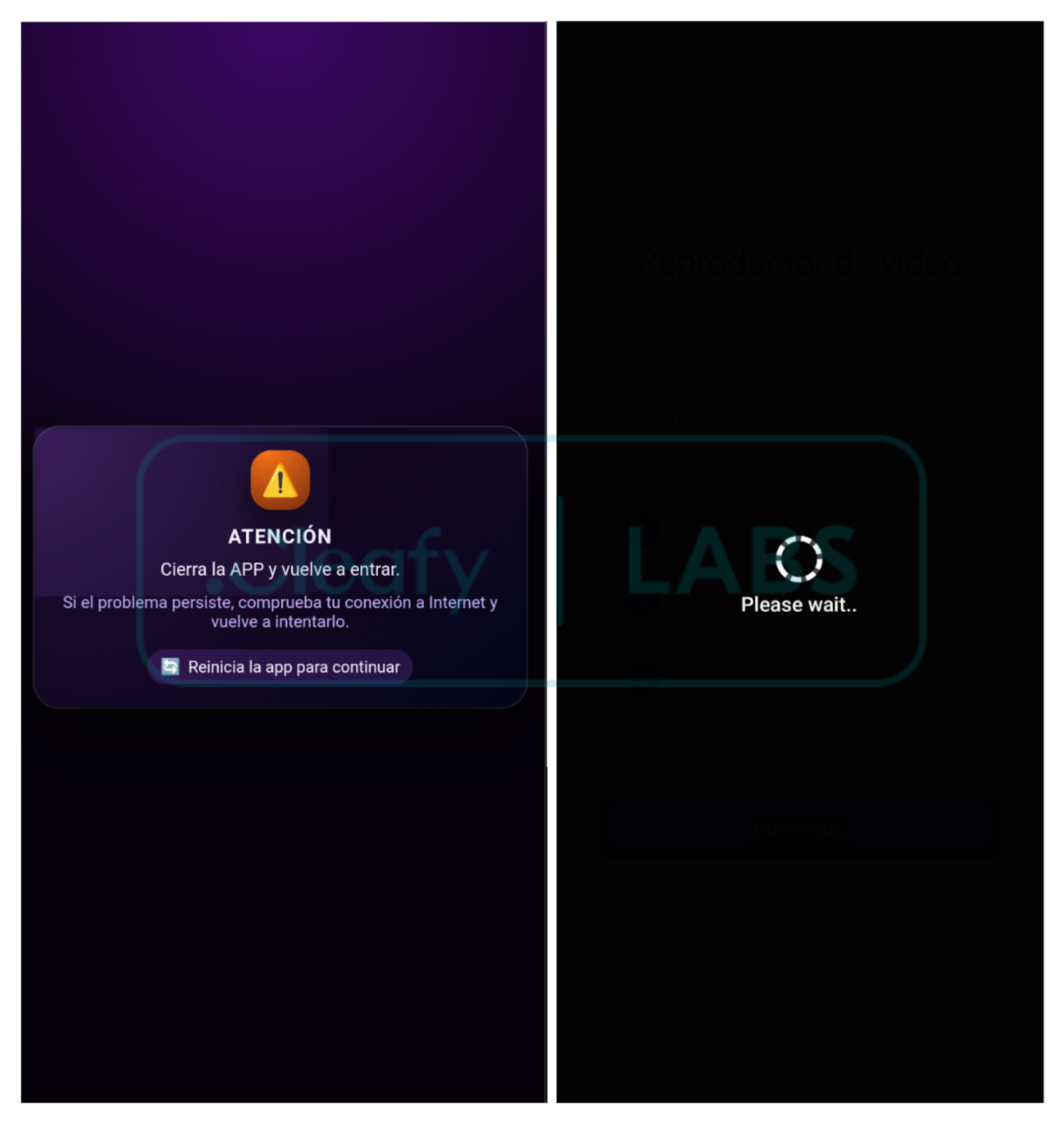
The malware extraction uses the same packing technique as the dropper (.dex extraction and decryption). When Accessibility services are enabled, the malware starts running in the background and displays a custom HTML page to the user, indicating that installation was not successful. Moreover, it leverages black overlays to disable security features and establish persistence.
Mirax RAT Functionalities
By analyzing the malware's source code and available documentation, it is possible to identify a list of commands used to remotely control the device, exfiltrate data, and spy on victims. An overview of the main features is listed below.
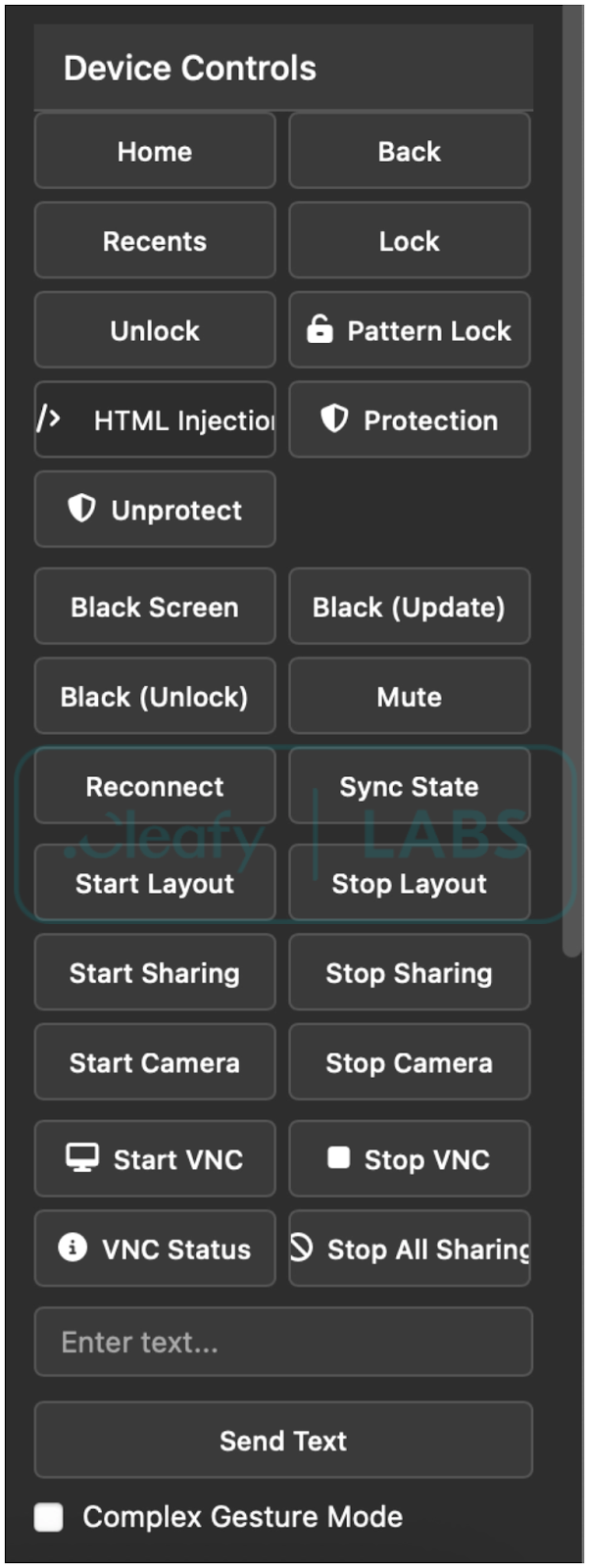
- HTML Overlay Injection / Black Screen Overlay / Notification: One of the malware's core features is the ability to inject malicious HTML/JS overlays over legitimate applications to steal credentials and other sensitive data from users. The malware also allows showing notifications coming from specific app packages.
- Screen Capture & VNC: These commands allow the attacker to view the screen in real-time and control the device remotely.
- System Navigation & UI Control: These commands leverage Accessibility Services to perform navigation actions on the device.
- App Management: The malware manages the device's applications, uninstalling those that may detect it or prevent its uninstallation.
- Spyware & Data Exfiltration: The malware's capabilities include spyware modules that attempt to exfiltrate text data and camera images from the victim's device.
- SOCKS5 Proxy: The malware also allows the operator to start a SOCKS5 proxy connection from the infected device and transform it into a residential proxy node.
C2 Communication
The malware uses two (or three, if a residential proxy is enabled) distinct WebSocket connections to manage remote activities and data exfiltration. More specifically:
- WebSocket on port 8443, endpoint /control, is used to manage remote access and execute remote commands.
- WebSocket on port 8444 endpoint /data, is used to manage remote streaming and data exfiltration.
- WebSocket on port 8445 (or custom) endpoint /tunnel (or custom), is used to set up the residential proxy using SOCKS5. This connection is made directly to a specific relay server owned by the operators.
The malware's documentation explicitly states that it uses a C2 Gate server, acting as a proxy between infected devices and the affiliates' true C2 servers. As a result, all the analyzed samples from the campaign contact the same domain, and the gate server can then redirect traffic accordingly.
C2 communication via websockets is bidirectional: the target phone periodically sends information about the device's status and the installed malware. The server, on the other hand, can push various commands to activate functionalities, retrieve specific information, or load different configurations. For example, the server can push new HTML templates based on the installed applications and start collecting passwords and app PINs. This behavior makes it difficult to retrieve the complete list of all the target applications. Nevertheless, based on the server response, the total number of targeted applications is 182 (and growing over time). It was possible to retrieve HTML overlays for multiple Spanish banking applications and Crypto applications. The list is included in the Appendix.
{
"type":"installed_apps_response",
"commandId":"getInstalledApps_1773840323864_y2smk1x64",
"timestamp":1773840331121,
"success":true,
"total_apps_count":182,
"launcher_apps_detected":21,
"returned_apps_count":21,
"user_apps_count":5,
"system_apps_count":16,
"filtered_apps_count":0,
"apps":[{"app_name":
...
],
...
}
The malware supports multiple languages, but the developers explicitly state that this Trojan is incompatible with CIS countries due to app restrictions that prevent it from functioning correctly. The campaign analyzed in this article targets Spanish-speaking individuals. By analyzing the reach of the Meta ads, the sole target country appears to be Spain, but this RAT is rapidly expanding, and future campaigns may target other countries. The list of available languages is shown in the Appendix.
Residential Proxy Capabilities within a RAT
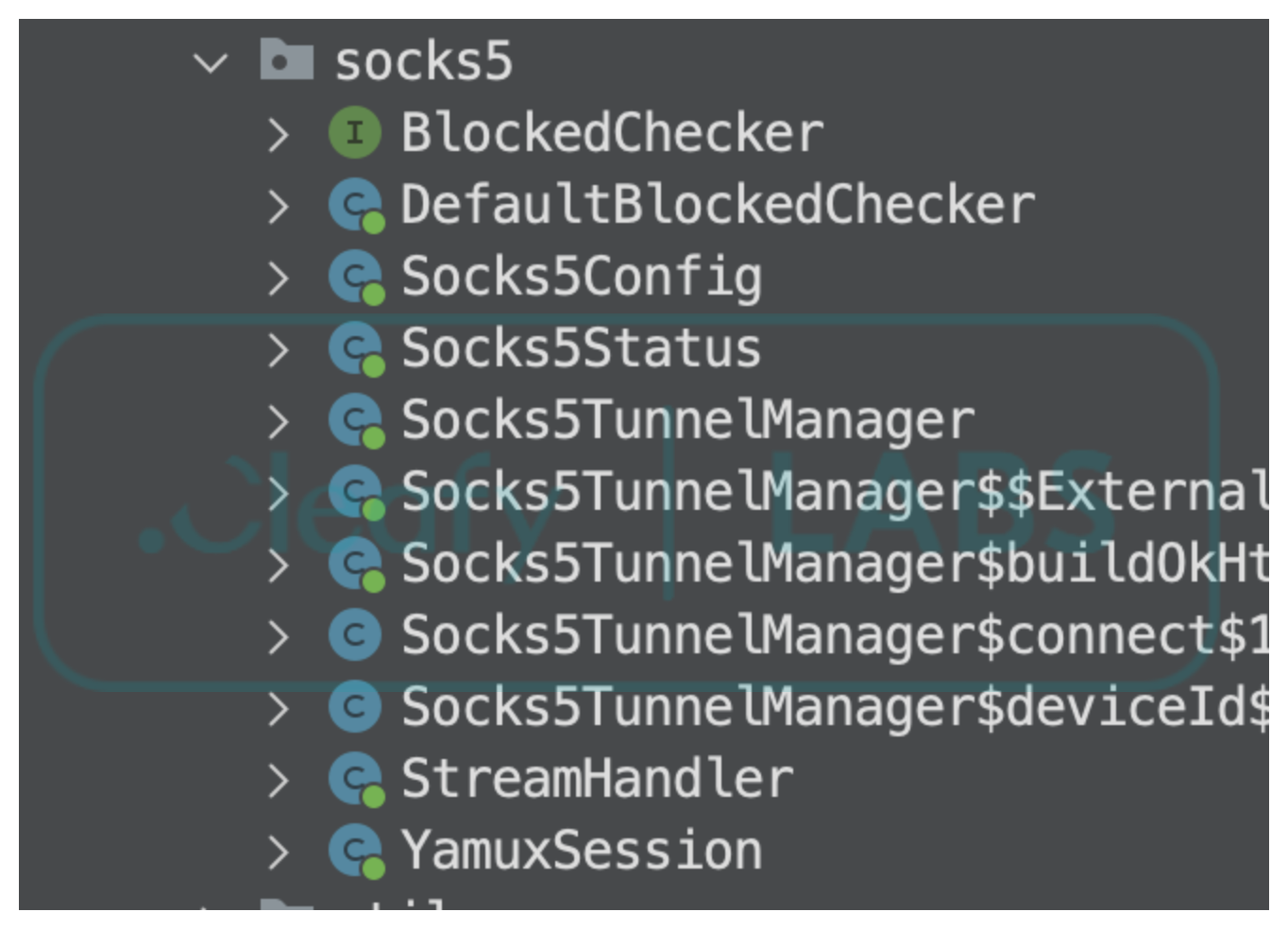
During the analysis of the malware, the developers’ communication channel (Telegram channel) guided the investigation and provided useful information regarding the updates and improvements made to Mirax. An update to the software introduced new capabilities, accompanied by a revised pricing structure. Notably, one of the most peculiar new features allows the creation of a SOCKS5 proxy that routes traffic from the compromised device to a designated server. Moreover, they used a custom implementation of Yamux multiplexing over the WebSocket-based channel, allowing multiple connections through a single channel. As a result, the malware operator would have been able to establish a residential proxy connection between the phone and their server, and use it to spoof their IP addresses, masking their malicious activities and expanding the attack surface to targets beyond the mobile device.
The phenomenon of residential proxies has gotten more attention recently (Google, Trendmicro, Nokia), thanks to the number of IoT devices connected to the internet that could consume network bandwidth and be transformed into botnets. The Android ecosystem is particularly susceptible to this type of exploitation due to the large number of low-cost IoT devices, such as inexpensive Android TVs, that are often sold with lax security protocols. These devices are ideal targets for use as residential proxy nodes. Residential proxies can also be embedded via third-party SDKs embedded in pirated software of free VPN applications. An attacker can pay to gain access to these nodes and use the bandwidth to access the internet from a reputable IP address or, in some cases, exploit the ability to access the local network to discover vulnerable devices connected to it, perform lateral movement, and expand their attack surface.
Beyond the rise of residential proxy in the context of IoT devices, the introduction of this functionality into a malware RAT like Mirax is a novelty that warrants attention. While the analysis did not reveal any use of this functionality, it is still valuable to consider the motivations behind adding it to a RAT and the implications for highly targeted sectors like banks and similar institutions. An attacker who obtains access to the mobile device via a RAT infection could leverage its persistence beyond its well-known functionalities and use it as an exit node to access the internet via a reputable IP address, which could lead to multiple attacks, such as password spraying and DDoS. Another interesting case is when the victim refuses to use Accessibility services but keeps the app installed. In this case, the app still needs to function in the background, but obtaining this permission is easier. In this scenario, the attack would not be completely successful, but the operators may still gain some value from it.
Conclusions
The analysis of the Mirax Remote Access Trojan (RAT) highlights several interesting points concerning the evolution of modern Android malware. The promotion on underground forums shifted from a broad Maas to a “private MaaS” model, restricting the distribution to trusted parties. As a result, the malware could remain undercover for a longer period without risking any unwanted leaks.
The campaign analyzed in this article revealed that threat actors are effectively abusing legitimate platforms to promote, host, and distribute malware, reaching hundreds of thousands of accounts in a short period of time. Moreover, these platforms allow malware distributors to continuously push new advertisements without risk of being caught, thanks to multiple header checks that prevent automated services from reaching the true delivery pages and to cycling through multiple samples to bypass hash-based checks.
The introduction of SOCKS5 and residential proxy functionality into an Android RAT is groundbreaking for several reasons. Firstly, malware developers recognize the profitability of residential proxies, as they can obscure the origin IP address, making it appear to originate from legitimate subnets. Furthermore, a residential proxy application needs fewer permissions than a Remote Access Trojan (RAT). This reduced requirement allows the threat actor to deploy it even if the full infection process is incomplete. Consequently, the actor avoids losing these devices entirely and can maintain their inclusion in the botnet.
Appendix - IOCs
APKs
| SHA 256 | Name | Package | Description |
|---|---|---|---|
| 53de68ebec281e7233bffc52199b22ec2dba 463eec3b29d4c399838e18daecbf |
StreamTV | org.lgvvfj.pluscqpuj | Dropper |
| 88e6e4a5478a3ee7bfdfc5e7614ae6f3f121 e0d470741a9cc84a111fe9b266db |
Reproductor de video | org.yjeiwd.plusdc71 | Malware |
| 759eed82699b86b6a792a63ccc76c2fa5ed 71720b89132abdead9753f5d7bd11 |
StreamTV | org.dawme.secure5ny | Dropper |
| 29577570d18409d93fa2517198354716740 b19699eb5392bfaa265f2f6b91896 |
Reproductor de video | org.azgaw.managergst1d | Malware |
Network
| IoC | Type | Description |
|---|---|---|
| descarga-smtr[.]net | Domain | Delivery Page |
| ilovepng[.]info | Domain | C2 |
| wss://ilovepng[.]info:8443/control | URL | C2 real-time commands |
| wss://ilovepng[.]info:8444/data | URL | C2 exfiltration |
C2 Commands
| Command | Description |
|---|---|
| addExternalHtmlTemplate | Adds an external HTML overlay template. |
| addHtmlInjectionConfig | Binds a target package to an HTML overlay. |
| back | Simulates pressing the Back button to navigate to the previous screen. |
| blackScreen | Toggles a "black screen overlay" to hide malicious activity from the user. |
| blackScreen_unlock | Removes the black screen overlay and restores normal view. |
| blackScreen_updating | Displays a fake updating message on the black overlay. |
| blockApp | Blocks the user from opening a specific application. |
| camera_status | Gets the status of the camera. |
| checkExternalTemplateExists | Checks if a template exists locally. |
| collectSmsNow | Triggers an immediate upload of all stored SMS messages. |
| disableHtmlInjection | Disables the phishing overlay system. |
| disableNeverSleep | Restores normal screen timeout behavior. |
| disableUninstallProtection | Disables the anti-uninstallation protection. |
| enableHtmlInjection | Enables the overlay system for phishing/credential theft. |
| enableNeverSleep | Forces the device screen to stay on indefinitely. |
| enableUninstallProtection | Prevents the user from uninstalling the malware. |
| forceReconnect | Forces the malware to reconnect to its Command & Control server. |
| getBlockedApps | Gets the list of blocked applications. |
| getAvailableCameras | Gets the list of available cameras. |
| getCameraStatus | Reports whether the camera service is currently active. |
| getClipboard | Retrieves the current content of the system clipboard. |
| getDeviceState | Collects system metadata (battery, network, OS version). |
| getExternalTemplatesList | Gets the list of templates stored in the external memory. |
| getExternalTemplatesPath | Gets the path of the templates stored in the external memory. |
| getHtmlInjectionStatus | Gets the status of HTML injection engine. |
| getHtmlTemplates | Lists available phishing templates stored locally. |
| getInstalledApps | Retrieves a list of all applications installed on the device. |
| getKeyguardInfo | Reports the current lock screen configuration (PIN, Pattern). |
| getLockStatus | Gets the type and status of the device lock screen. |
| getPermissions | Reports the status of various Android permissions. |
| getSmsPermissions | Gets the status of SMS permissions. |
| getSmsStatus | Gets the status of the SMS collection engine. |
| getVncScreenSharingStatus | Gets the status of the VNC screen sharing engine. |
| home | Simulates pressing the physical Home button to return to the home screen. |
| layout_updates_restart | Restarts screen update monitoring. |
| layout_updates_start | Starts sending details of the screen data as JSON to the C2. |
| layout_updates_stop | Stops sending screen data updates. |
| listCameras | Lists all camera sensors available on the device. |
| lockDevice | Immediately locks the device screen. |
| mute | Toggles the device audio to mute to hide notification sounds. |
| openApp | Launches a specific application by its package name. |
| ping | Heartbeat mechanism. |
| recents | Simulates pressing the Recent Apps button to show the app switcher. |
| removeExternalHtmlTemplate | Removes an HTML template stored in the external memory. |
| removeHtmlInjectionConfig | Removes a phishing target configuration. |
| requestPermission | Triggers a system dialog to request a specific permission. |
| rescanHtmlTemplates | Rescans storage for new or manually updated phishing templates. |
| resetHtmlInjectionCounters | Resets the counter of the overlays stored. |
| resetLockCaptured | Restarts the lock screen capturing engine. |
| setClipboard | Sets the system clipboard with provided text. |
| setLockType | Sets the type of fake lock screen to show to the victim. |
| showNotification | Shows a notification. |
| socks5_enable | Starts/Stops the residential proxy connection. |
| socks5_status_request | Gets the status of the residential proxy. |
| startCamera | Activates the background camera to capture photos or video. |
| startScreenSharing | Starts capturing and streaming the device screen to the C2 server. |
| startSmsCollection | Starts the service that intercepts and uploads SMS messages. |
| startVncScreenSharing | Starts a VNC-based interactive screen sharing session. |
| stopAllScreenSharing | Stops all screen sharing (standard and VNC). |
| stopCamera | Deactivates the background camera service. |
| stopScreenSharing | Stops the active screen sharing session. |
| stopSmsCollection | Stops the SMS interception service. |
| stopVncScreenSharing | Stops the VNC screen sharing session. |
| swipe | Performs a remote "swipe" gesture between two points. |
| switchClient | |
| tap | Performs a remote "tap" gesture at specific (x, y) coordinates. |
| testHtmlInjection | Manually triggers a phishing overlay for a specific app. |
| unblockApp | Unblocks a previously restricted application. |
| uninstallPackage | Attempts to uninstall a specific app. |
| unlockDevice | Attempts to unlock the device screen using stored or captured credentials. |
| updateExternalHtmlTemplate | Updates an existing HTML overlay stored in the external memory. |
| wakeDevice | Wakes up the device screen and brings it out of sleep mode. |
Target Countries (Languages)
| Language |
|---|
| Chinese |
| Italian |
| German |
| Israeli |
| Hungarian |
| Japanese |
| Polish |
| Portuguese |
| Spanish |
| Slovenian |
| French |
如有侵权请联系:admin#unsafe.sh