好的,我现在需要帮用户总结一篇文章的内容,控制在100个字以内,而且不需要用“文章内容总结”或者“这篇文章”这样的开头。直接写描述即可。 首先,我仔细阅读了用户提供的文章。文章主要讲的是在macOS Tahoe系统上检测安装的基于Intel的应用程序。苹果正在逐步过渡到Apple Silicon,所以Rosetta 2的支持虽然还在,但未来可能会有变化。 文章提到,当在Apple Silicon Mac上运行Intel应用时,系统会显示提示信息。用户可以通过系统信息应用查看哪些应用是Intel的。此外,还提供了一个脚本,可以自动检测这些应用,并将结果记录到日志文件中。 接下来,我需要提取关键信息:macOS Tahoe、检测Intel应用、Rosetta 2支持、系统提示、脚本工具、日志记录。这些都是主要内容点。 然后,我要把这些点浓缩成一句话,不超过100字。要确保涵盖主要功能和工具的使用。 最后,检查一下是否符合要求:没有使用特定的开头语句,直接描述内容,并且控制在字数限制内。 </think> 文章介绍了一种检测macOS Tahoe系统上安装的基于Intel的应用程序的方法,并提供了一个脚本工具用于自动化识别和记录这些应用的路径。 2026-4-10 13:53:51 Author: derflounder.wordpress.com(查看原文) 阅读量:85 收藏
Home > Mac administration, macOS, Rosetta 2, Scripting > Detecting installed Intel-based applications on macOS Tahoe
Detecting installed Intel-based applications on macOS Tahoe
On macOS Tahoe 26.4.x and later, launching an Intel-based app on an Apple Silicon Mac will periodically result in a message similar to the following being displayed by the OS.

This message is part of Apple’s transition strategy for Intel-based apps over the course of macOS 26 and macOS 27. The Rosetta 2 support used to run Intel-based apps will continue in its current form on both macOS 26 and macOS 27, but there will be as-yet unspecified changes occurring beyond macOS 27. For more information on this transition, please see the Apple KBase article linked below:
Using Intel-based apps on a Mac with Apple silicon
https://support.apple.com/102527
To help identify if and where Intel-based applications have been installed on Apple Silicon Macs, you can use System Information.app‘s list of installed software to identify which installed applications show up with the following status:
- Kind: Intel

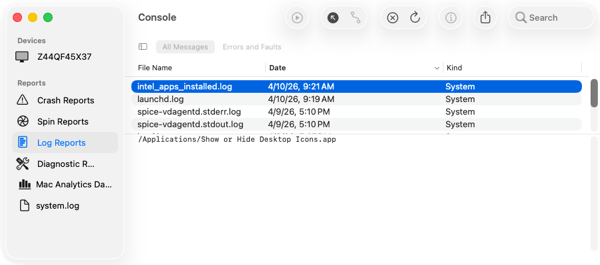
To assist with automating this task, a script is available which uses the /usr/sbin/system_profiler command line tool to detect all Intel-based apps installed in /Applications, /Library or /usr/local and output the list to a logfile named intel_apps_installed.log which is stored in the /var/log directory. For more details, please see below the jump.
The script does the following:
1. Checks to see if the script is being run as root.
2. Checks to see if the designated log file is present and creates it if it isn’t.
3. Uses the /usr/sbin/system_profiler command line tool to pull the complete list of installed applications
4. Filters all applications that are not Intel-based applications.
5. Excludes all Intel-based applications that are not stored in one of the following locations or their included directories:
- /Applications
- /Library
- /usr/local
6. Outputs the following output to the log:
If any Intel-based applications are found in /Applications, /Library or /usr/local, the path to the delected Intel-based application or applications are listed in the log:
/path/to/Intel_based_application_name_here.app

If no Intel-based applications are found in /Applications, /Library or /usr/local, the following is output to the log:
No Intel-based applications found in /Applications, /Library or /usr/local.

The script is available below and also on GitHub at the following address:
This file contains hidden or bidirectional Unicode text that may be interpreted or compiled differently than what appears below. To review, open the file in an editor that reveals hidden Unicode characters.
Learn more about bidirectional Unicode characters
| #!/bin/bash | |
| # Detect all Intel apps installed in /Applications, /Library | |
| # or /usr/local and output list to logfile stored in /var/log. | |
| intel_app_logfile="/var/log/intel_apps_installed.log" | |
| ERROR=0 | |
| # this script must be run with root privileges | |
| if [[ "$(/usr/bin/id -u)" -eq 0 ]]; then | |
| # Create log file if not present | |
| if [[ -f "$intel_app_logfile" ]]; then | |
| echo "$intel_app_logfile found. Proceeding…" | |
| else | |
| echo "Creating $intel_app_logfile log. Proceeding…" | |
| touch "$intel_app_logfile" | |
| fi | |
| # Get a list of all installed applications | |
| intel_app_list=$(/usr/sbin/system_profiler SPApplicationsDataType) | |
| if [[ -n "$intel_app_list" ]]; then | |
| # get all non-64 Bit applications from the initial list | |
| intel_app_list=$(echo "$intel_app_list" | /usr/bin/grep -A3 "Intel") | |
| # filter out all applications in /Applications, /Library and /usr/local | |
| intel_app_list=$(echo "$intel_app_list" | /usr/bin/grep -E "Location:[^/]*/(Applications|Library|usr/local)/") | |
| # remove everything except the path | |
| intel_app_list=$(echo "$intel_app_list" | /usr/bin/sed -n 's/.*Location:[[:space:]]*\(.*\)/\1/p') | |
| if [[ -n "$intel_app_list" ]]; then | |
| echo "$intel_app_list" > "$intel_app_logfile" | |
| echo "List of detected Intel-based applications available in $intel_app_logfile" | |
| else | |
| echo "No Intel-based applications found in /Applications, /Library or /usr/local." > "$intel_app_logfile" | |
| fi | |
| fi | |
| else | |
| log "ERROR! You must be root in order to run this script!" | |
| ERROR=1 | |
| fi | |
| exit $ERROR |
如有侵权请联系:admin#unsafe.sh