好的,我现在需要帮用户总结一篇文章,控制在100字以内,而且不需要特定的开头。首先,我得仔细阅读文章内容,理解主要观点。 文章主要讲的是键盘记录器(keyloggers),分为软件和物理两种。软件的可以通过EDR检测,但物理的更隐蔽,不容易被发现。作者测试了AirDrive Forensic这样的物理键盘记录器,它通过USB连接,甚至可以无线传输数据。EDR系统无法检测到这种硬件设备,因为它不依赖操作系统运行。 接下来,文章讨论了如何检测和防御这种威胁。提到可以通过监控USB电流变化或检测异常WiFi网络来发现。但这些方法都有局限性,比如电流变化难以大规模监测,WiFiSSID可以被修改。因此,建议加强物理访问控制、资产管理、教育用户以及部署持续的WiFi监控。 总结下来,文章强调了物理键盘记录器的隐蔽性及其对现代安全机制的挑战,并提出了多方面的防御措施。 现在需要将这些内容浓缩到100字以内。要抓住重点:物理键盘记录器的隐蔽性、检测困难以及防御措施。 可能的结构是:介绍物理键盘记录器的特点、检测难题、提出的解决方案。 最后确保语言简洁明了,不使用复杂术语。 </think> 文章探讨了物理键盘记录器作为网络安全威胁的隐蔽性和检测难度。这类设备通过伪装成合法外设或USB扩展线缆,在操作系统层面不留痕迹地捕获用户输入数据。由于其硬件特性,传统安全工具难以检测到此类威胁。文章还分析了通过USB电流变化和异常Wi-Fi网络进行潜在检测的方法,并提出了加强物理访问控制、资产管理、用户教育及部署持续Wi-Fi监控等防御措施。 2026-4-10 11:49:59 Author: blog.nviso.eu(查看原文) 阅读量:32 收藏
Keyloggers: A Persistent Threat
Nowadays, virtually all digital services rely on logins and authentication, from email inboxes to help desks. These involve login credentials to prove identity, typically at least a username and a password. Initially, this information is confidential from a potential attacker. While a username can be relatively easy to guess in a world of SSO and email addresses as usernames, an attacker has to reach deeper into their bag of tricks to uncover a password.
One way to do this is through keyloggers. Keyloggers are tools that covertly record all keystrokes and transmit them to an attacker. Broadly, there are two types: software-based keyloggers and physical keyloggers. Malware keyloggers are often a secondary feature of so‑called stealer malware, which actively collects stored browser passwords, session cookies, tokens, and other secrets from the infected system and sends them to the attacker. Live keystroke recording is mostly an add‑on to modern stealer malware. However, kernel‑mode or user‑mode native keyloggers are much rarer but still exist as standalone malware in targeted attacks. Physical keyloggers, on the other hand, are hardware components—usually a cable or an inline device—physically connected to the system or a peripheral like the keyboard. However, there are also variants that are built directly into a keyboard, making them even less conspicuous. The captured data is then either stored on the device for later physical retrieval or accessed by the attacker wirelessly.
While stealer malware can theoretically be detected by an EDR system through anomaly detection, this isn’t possible with physical keyloggers. Stealer malware always leaves traces—processes, API calls, and data exfiltration from the system. Even though modern stealer malware can hide well using various evasion and obfuscation techniques, these traces still offer detection opportunities, especially when there are implementation flaws. Also, some EDRs can flag low‑level keyboard hook abuse (SetWindowsHookEx, GetAsyncKeyState patterns) despite obfuscation. The physical keylogger used for the following testing, by contrast, doesn’t spawn processes, change settings, or exfiltrate data via the system itself. It leaves no traces in the operating system since it is a USB HID (Human Interface Device) passthrough device and isn’t part of the system. Instead, it sits between the keyboard and the victim system, presenting itself to the OS as the legitimate peripheral. HIDs (Human Interface Devices) are peripherals like keyboards, mice, and game controllers that communicate user input to a computer using standardized protocols for plug‑and‑play operation. From the OS perspective, there’s no sign of an unusual driver, file, or memory artifact. Also, keystrokes appear exactly like legitimate user input. However, it should be noted that there are keyloggers in the wild that identify as a peripheral or mass storage device with their own VID/PID.
While EDRs may have USB control policies or monitor for new USB devices being attached, they analyze traditional artifacts (primarily processes, memory, APIs, registry, as well as file and network activity) for detection. Thus, once installed, the physical keylogger remains invisible. Without any interaction at the OS level, the EDR sees no suspicious activity. In effect, a physical keylogger operates like an external observer looking over the user’s shoulder and recording every keystroke. With this mode of operation, a physical keylogger undermines the principles that modern security mechanisms rely on—namely OS interactions, logging, and software artifacts for anomaly detection. The question isn’t which malicious process was started or when a network connection was made, but rather who had physical access to the devices to install a piece of hardware. Instead of searching through logs and software artifacts, the focus suddenly shifts to access control records, camera footage, and hardware replacement cycles—data points that, in standard incidents, play a secondary role at best.
The investigation of a physical keylogger therefore pursues several objectives: understanding how it works, identifying potential detection approaches, and—where possible—deriving practical defense and prevention measures.
AirDrive Forensic: One Cable to Uncover All Your Secrets
To take a closer look at a device, we selected the AirDrive Forensic Keylogger Cable Pro from the vendor Keelog1 as we encountered it during an DFIR engagement. Since every keylogger can potentially work differently, the following statements apply exclusively to this model. Keelog describes the keylogger as an “ultra-compact USB keylogger hidden inside a USB extension cable. Externally, the USB cable is indistinguishable from standard cables and does not attract attention.”
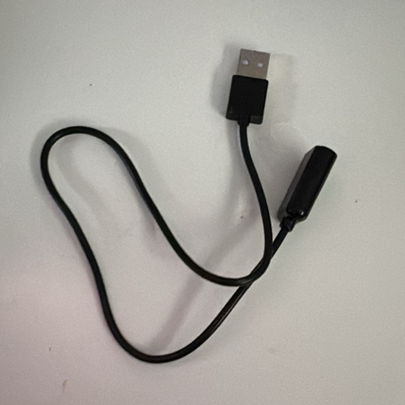
In the Pro version, the AirDrive not only records keystrokes but also supports accessing the log data via Wi‑Fi. To do this, the device creates its own network with the default SSID AIR_XXYYZZ. In our tests, the AirDrive operated exclusively as a Soft AP (access point) on 2.4 GHz, broadcasting its own SSID and serving a local admin page at 192.168.4.1. After connecting to the Wi‑Fi hotspot broadcasted by the keylogger and navigating to the IP address 192.168.4.1, you can view and download the recorded data (as can be seen in the screenshot below). It also offers a range of configuration options—from keyboard layout to network settings—where you can define a custom SSID and password.
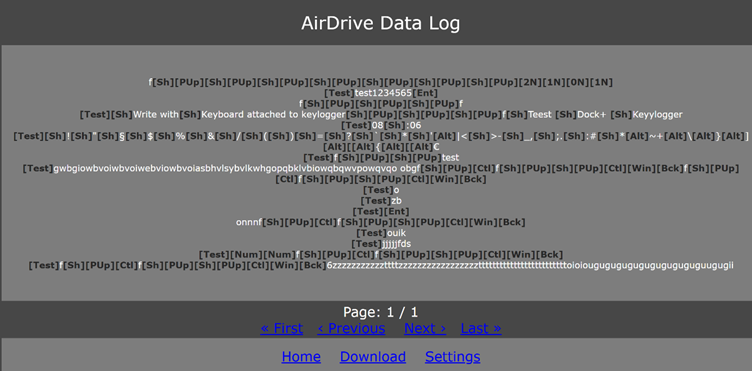
While we did observe the keylogger´s capability to connect to a WiFi hotspot itself and send out emails in the settings, this was not tested.
But what would a potential attack look like? Consider the following scenario:
An attacker gains physical access to office space during a legitimate visit and discreetly installs a physical keylogger at a workstation. The affected user then works as usual, and logins, passwords, and other security-relevant inputs are captured without any anomalies appearing in the operating system. The attacker’s later access to online services uses valid credentials and looks technically clean in the logs, but may stand out due to unusual times or locations. While both the attack itself and its detection fall outside standard patterns, the objectives of keylogger attacks do not. Keyloggers primarily collect private information. With enough patience, the potential impact ranges from the disclosure of intellectual property, such as source code or research results, to the theft of credentials used for further compromise. The insidious part is that until the hardware is discovered, the source cannot be identified because there are no signs of exfiltration over the company’s network. Using the stolen credentials, an attacker can move through the network and access cloud resources without raising suspicion, since there are no usual noisy indicators such as phishing emails or failed logins that an EDR or SOC could flag
Jumping into the Unknown: The Experiments
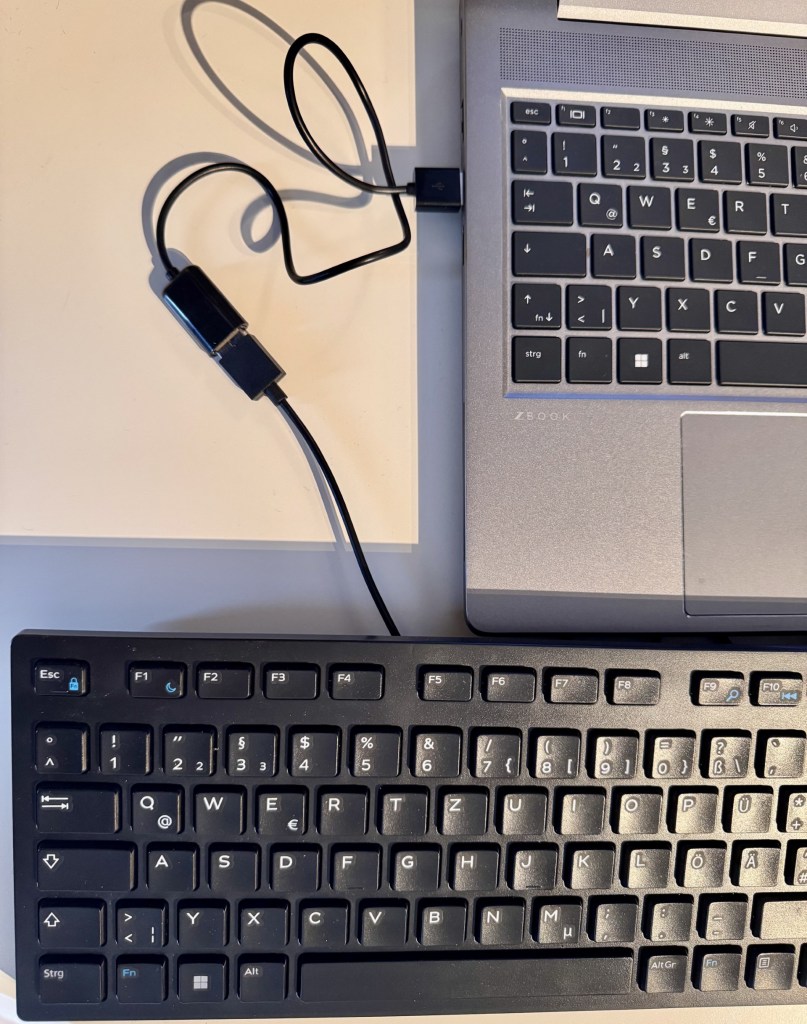
Now that we’ve covered the basics and theory, we naturally wanted to test the device. The setup is very simple: connect the cable to the system and plug the keyboard into it. After a short wait, the device creates the Wi‑Fi network, and you can follow the victim’s keystrokes with minimal delay—in theory. In the first test, however, the keylogger didn’t record anything. Only after switching the keyboard from a Roccat ISKU (gaming keyboard) to an Ivy IKE‑1000 (office keyboard) did entries actually appear. A second gaming keyboard also didn’t work with the keylogger. One assumption is that the additional features of gaming keyboards interfere with the keylogger’s functionality. However, this theory was not validated during testing. To investigate the keylogger further, the next step was to place a USB meter between the keylogger and the test laptop (Windows 10). An USB meter is a small diagnostic device that sits inline between a USB power source and a USB-powered device to measure electrical parameters. It displays real-time voltage and current, calculates power, and often tracks accumulated energy.
In the following experiments, we used the laptop’s USB‑A port. To avoid interference, we also added a regular USB extension cable. The test setup was therefore as follows:
Keyboard -> Keylogger -> USB meter -> legitimate extension cable -> Laptop
Electrical measurements were taken with a USB inline power meter (FNB48S/FNIRSI). The meter’s readings were averaged spot readings as well as captured as a time series. Due to the relatively low sampling rate of many inline meters, brief transients can be aliased or missed entirely, and reported peaks may underrepresent true instantaneous currents.
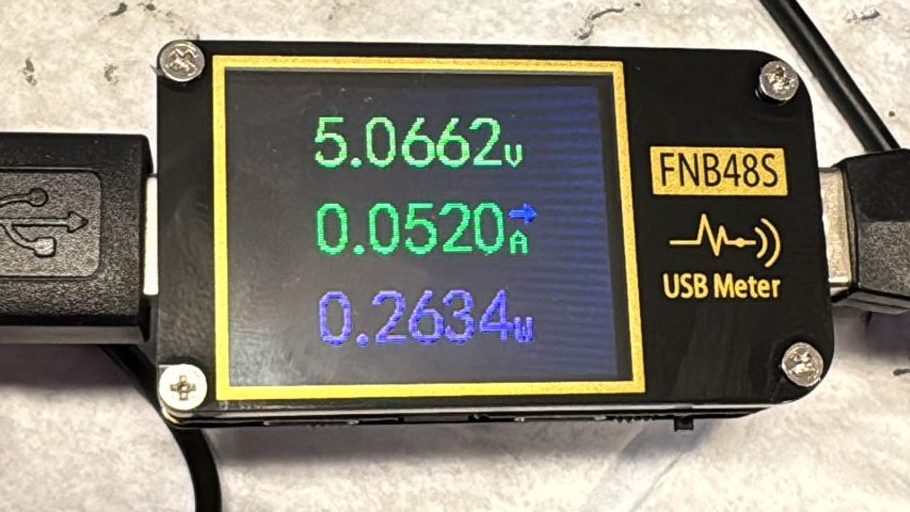
To establish a baseline, the keylogger was removed first. This yielded 0.007 A and 0.03 W. With the keylogger in between, the values rose to 0.087 A and 0.43 W. As expected, the voltage is around 5 volts. Therefore, the keylogger causes a clear and measurable change. However, the tests also showed that such a change can be caused by switching an LED on or off (for example, the Num Lock key). A pure load change on the USB port is therefore an indicator of a keylogger, but using it in a detection rule would produce a lot of false positives. It’s also important to note that these are very small changes, so identifying a keylogger based solely on the difference in values is, at best, difficult. There must be other indicators. Next, we looked at how current and voltage values evolve over time. Without a connected keylogger, these values remain constant. The subsequent tests were carried out with the office keyboard described above.
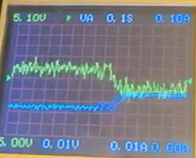
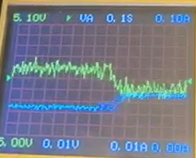
The image above shows two additional situations: on the left, a legitimate keypress combined with an LED turning on, which produces a consistent voltage drop and a rise in current. When the keylogger is connected, the USB meter shows isolated current spikes over time with simultaneous voltage dips (right). These spikes appear only when the keylogger is attached. This suggests they are caused by the device, possibly, for example, by its periodic Wi‑Fi transmissions. However, since only changes in current flow are measured here, we can’t say for certain. It’s also worth noting that the voltage dip, in particular, depends on power stability. With a more stable power source (e.g., a USB‑C port) that can supply higher current, you would likely still see a pronounced current spike, but little to no voltage drop. The aforementioned spikes can also be seen if the keyboard is not used but in idle mode.
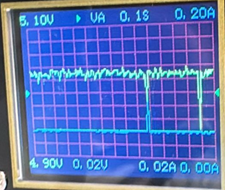
Because of the USB meter’s characteristics, such as low sampling rate, the current ‘spikes’ we show should be interpreted as indicative rather than definitive transient profiles. For high‑confidence characterization of short‑duration events (e.g., WiFi beacon/transmit bursts), an oscilloscope with an in-line shunt or a high‑bandwidth current probe is preferred.
As mentioned, the office keyboard was used in both scenarios above. Although the keylogger cannot record keystrokes from the gaming keyboard, the corresponding spikes can still be observed. Since, in this test setup, the device also creates the Wi‑Fi network, these observations support the assumption that the spikes are caused by the keylogger.
A Closer Look: Detecting the Undetectable
After the experiments, the question remains: how can companies protect themselves against this type of attack—or, put differently, how can a keylogger be detected within the infrastructure. There are two approaches to this:
As described above, the keylogger produces very distinctive, noticeable spikes in the electrical measurements. In theory, these could be used for detection by continuously measuring current at the systems’ USB ports. The data could then be monitored by a script for short, periodic spikes. If a hit is detected, a physical inspection of the system and all connected peripherals would follow. In practice, however, data availability is the problem. While the experiments could easily track these values live using a USB meter, there’s no way to read them in standard software without additional hardware. Some motherboards do report current at USB ports, but these values are only estimates and not provided in real time. Moreover, the keylogger-induced changes are very small, requiring precise measurement to make the spikes visible at all. Installing a USB meter on every system is unrealistic and not feasible in an enterprise context.
Another detection avenue is the Wi‑Fi network created by the keylogger. The default SSID for this device is AIR_XXYYZZ, and the BSSID observed on the test device was 0a:3a:f2:c8:3f:69, which is a locally administered address. If any system connects to a network with this name, it’s suspicious and should be investigated. However, since the SSID can be renamed in the settings, the broader approach is to search for rogue Wi‑Fis in general. Technically, this is done by continuously scanning nearby Wi‑Fi networks—for example, using IDS/IPS sensors or the monitoring features of enterprise access points. By analyzing standard management frames that every Wi‑Fi periodically broadcasts, various details can be gathered about each network. These include the SSID, BSSID (i.e., the MAC address), encryption type, channel, signal strength, and in some cases vendor information. This data is then compared against the organization’s approved Wi‑Fis and their known SSIDs, vendors, and locations. If a new SSID appears, a known SSID shows up with an unknown BSSID, or an access point appears in a physically impossible location, a detection alert is raised for further analysis. This method can uncover not only Wi‑Fis created by potential keyloggers but also other malicious networks. A prominent example is the “evil twin,” where a rogue Wi‑Fi deliberately mimics the name—and sometimes the security parameters—of the legitimate corporate network. Detection in such cases relies not on the SSID but on discrepancies in BSSID, certificates (for WPA‑Enterprise), channel behavior, or signal strength patterns. For instance, if a “known” network name suddenly appears from multiple previously unseen MAC addresses, that’s a strong indicator of a rogue access point.
However, given the nature of physical keyloggers and their huge variety, even rogue WiFi monitoring and physical hardening may not be sufficient to detect a physical keylogger, especially if they operate in storage-only mode. This gap can be addressed by introducing routine physical inspections in high-risk areas. While this would add another layer of security, it also comes with additional costs.
Conclusion
Physical keyloggers exploit a blind spot in modern defense stacks. While stealer malware can be hunted through processes, API calls, and network traces, a hardware keylogger sits outside the operating system, impersonates a legitimate peripheral, and leaves no software artifacts. Our tests with the AirDrive Forensic Keylogger Cable Pro show that detection via host telemetry alone is unrealistic. Even though the device can introduce measurable electrical changes on USB ports and generates distinctive current spikes over time, these signals are subtle, hardware-dependent, and not practically collectible at scale without dedicated instrumentation. Likewise, changes in USB load can be mimicked by benign peripherals, making rule-based detection noisy.
That said, the device’s Wi‑Fi functionality provides a viable angle. Rogue WLAN monitoring (via enterprise APs or dedicated sensors) can surface suspicious SSIDs, BSSIDs, locations, and behavior patterns, including default or cloned identifiers. This approach won’t catch every variant, but it broadens coverage to hardware-assisted threats like “evil twins” and keylogger access points. However, especially keyloggers that are meant to record data and then are physically collected, remain undetected.
Mitigation of this threat therefore shifts from endpoint internals to physical and radio domains:
- Enforce strict physical access controls for office areas and hot desks; log and review visitor access.
- Strict asset management with serial numbers to detect tampered peripherals like keyboards with built-in keyloggers.
- Harden peripherals and cabling practices (e.g., fixed cabling, secured ports, tamper‑evident seals, periodic visual inspections) in high-security areas.
- Introduce phishing-resistant, passwordless MFA (FIDO2/WebAuthn) for all users and access paths, enforced with conditional access (device posture, location, risk) to minimize typed secrets and block credential replay. However, be aware that a keylogger might not only expose credentials but also recovery codes or master passwords (e.g. for password vaults).
- Educate users to spot unusual inline devices and to report anomalies.
- Deploy continuous rogue Wi‑Fi detection and correlate with known SSIDs/BSSIDs, site maps, and signal patterns. For suspicious findings, perform on-site sweep.
- Investigate anomalies with hands‑on inspections of endpoints and their peripherals when alerts arise. For forensic soundness, consider the following process: photograph the setup before touching, inspect under‑desk cable runs, check for inline dongles behind docks and monitors, verify keyboard model/serial vs asset records, and quarantine suspicious cables for lab analysis.
Ultimately, defending against physical keyloggers requires aligning security operations with real‑world constraints: accept that pure EDR telemetry won’t expose them, augment with environmental monitoring (mostly physical), and build processes for timely verification on the ground. This combination reduces dwell time, limits credential theft, and narrows opportunities for silent lateral movement using valid credentials.

Carina Schwabe
Carina Schwabe is a GCFA-certified Incident Response and Digital Forensics Analyst within NVISO’s CSIRT.
如有侵权请联系:admin#unsafe.sh