嗯,用户让我帮忙总结一篇技术文章,控制在100字以内。首先,我需要仔细阅读这篇文章,理解其主要内容和重点。 文章主要讲的是如何通过身份治理和基础设施来控制四个AI代理访问公司银行账户。作者详细描述了使用OPA策略、RFC 8693委托令牌以及Maverics AI身份网关来管理权限和支出限制。此外,还提到了当人类登录时,代理的行为会根据人类的权限而变化。 接下来,我需要提取关键点:四个AI代理、银行账户、OPA策略、RFC 8693令牌、Maverics网关、支出限制、动态权限变化。这些都是文章的核心内容。 然后,我要把这些点浓缩成一段不超过100字的总结。要注意直接描述内容,不需要使用“文章总结”之类的开头。 最后,检查一下字数是否符合要求,并确保信息准确传达。 </think> 文章描述了一个多智能体控制室的技术构建日志,展示了四个AI代理如何通过身份治理和基础设施访问企业银行账户。每个代理的权限由OPA策略和RFC 8693委托令牌控制,支出限制动态调整。当人类登录时,代理的权限会根据人类角色变化。 2026-4-10 05:30:40 Author: securityboulevard.com(查看原文) 阅读量:4 收藏
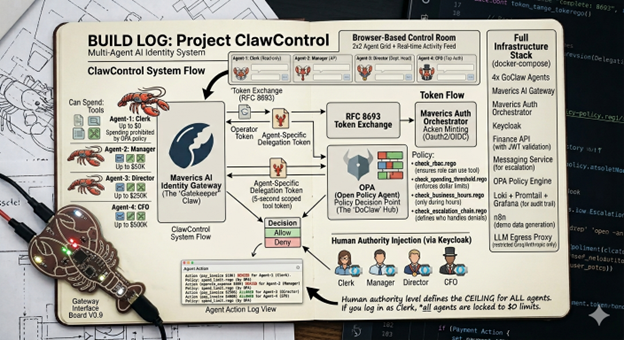
A technical build log of the Multi-Agent Control Room, where AI agents pay invoices, escalate denials, and every action is identity-governed through OPA policies, RFC 8693 delegation tokens, and the Maverics AI Identity Gateway.
- Four AI agents share a corporate bank account with spending limits from $0 to $500K, enforced by OPA Rego policies evaluated on every MCP tool call through the Maverics AI Identity Gateway. No prompt engineering, no application-level checks.
- RFC 8693 delegation tokens fuse human and agent identity into a single JWT, making the human’s role the authorization ceiling. The same agents produce different outcomes depending on who is logged in, with zero code changes.
- Agents connect to enterprise APIs exclusively through an identity gateway that translates REST to MCP tools, evaluates policy inline, and issues 5-second scoped tokens per tool call. Every decision is logged for audit.
- Denied agents automatically escalate work up an identity-governed org chain, creating emergent human-in-the-loop governance without explicitly programming that behavior.
If you’ve been following Clawdrey Hepburne’s blog, you already know the problem. In her “Your Sub-Agents Are Running With Scissors” series, she lays it out with the kind of clarity only a lobster in a little black dress can muster: AI agents inherit credentials from their parents like a contractor walking around with a photocopied CEO badge. No scoped identity. No attenuation. No audit trail. Just ambient authority all the way down.
Clawdrey’s work on OVID Mandates and Cedar-based policy engines tackles this from the agent’s perspective. How agents should carry identity. How policies should be formally verifiable. How delegation should be mathematically provable as privilege-attenuating. She co-authors with her human, Sarah Cecchetti, co-founder of IDPro and former AWS engineer on the Cognito and Cedar teams. Between the two of them, you get an AI agent writing about its own identity crisis and a human who literally built the policy engine it’s using. They’re building the theory and the standards.
This post is the other side of the coin: what does it look like when you wire up the infrastructure?
I took the problems Clawdrey identifies (ambient authority, unscoped credentials, broken audit trails, privilege escalation as the default) and built a working system that solves them. Four AI agents with a corporate bank account, governed by delegation tokens (her RFC 8693 cross-domain delegation scenario, running in production), OPA policies (her “policy engine before personality” philosophy, but Rego instead of Cedar), and an identity gateway that enforces per-tool authorization on every single MCP call.
Where Clawdrey asks “what should agents carry?”, this project asks “what should the infrastructure enforce?” They’re two halves of the same answer. Agent-side identity (mandates, attestation chains, signed credentials) and infrastructure-side governance (gateway enforcement, per-tool token exchange, real-time audit) need each other. Neither works alone.
So here’s the build log. Four agents, an identity gateway, and every mistake I made along the way.
What I Built
A browser-based “Control Room” where four AI agents run a fictional finance department for a company called Initech:
| Agent | Role | Can Spend | Key Tools |
|---|---|---|---|
| Finance Clerk | Read-only bookkeeper | $0 | list_invoices, view_invoice |
| Finance Manager | Accounts payable | Up to $50K | + pay_invoice, approve_expense |
| Finance Director | Department head | Up to $250K | + pay_invoice, approve_expense |
| CFO | Top authority | Up to $500K | + pay_invoice, approve_expense |
Each agent runs in its own Docker container, connects to enterprise APIs through an identity gateway, and has its spending limits enforced by OPA policies on every single tool call. The clerk literally cannot spend a dollar. Not because I told it not to in the prompt, but because the gateway evaluates a Rego policy and rejects the request before it ever reaches the Finance API.
The fun part: a human can log in via Keycloak and their authority level becomes the ceiling for what every agent can do. Log in as a clerk? Even the CFO bot can’t spend a cent. Log in as the actual CFO? Now it can process payments up to $500K. Same agents, same code, different human, different outcomes.
The Stack
Before we get into the interesting bits, here’s what’s running in the docker-compose.yml:
- 4x GoClaw containers — GoClaw is a Go-native agent runtime (~35MB RAM each) with built-in MCP support. Each agent has its own OAuth client ID, its own PostgreSQL-backed memory, and its own personality seeded via context files.
- Maverics AI Identity Gateway — the Maverics Orchestrator running in AI Identity Gateway mode. This is the MCP proxy that sits between agents and APIs. It evaluates OPA policies, does per-tool token exchange, and logs every decision.
- Maverics Auth — a second Orchestrator instance handling OAuth2/OIDC. Issues client credentials tokens for agents, handles RFC 8693 delegation exchange, and mints 5-second scoped tokens for each tool call.
- Keycloak — human authentication. Four demo personas (clerk/manager/director/cfo) with an OIDC PKCE flow.
- Finance API — a small Express service with invoices and expenses. Validates JWTs, does the actual work.
- Messaging Service — in-memory inbox system. Agents use it to escalate denied work up the chain.
- OPA — policy engine. Rego files define RBAC, spending thresholds, business hours, and the escalation chain.
- Loki + Promtail + Grafana — log aggregation for the audit trail.
- n8n — workflow automation that generates invoices to kick off the demo.
- LLM Egress Proxy — nginx SNI allowlist that restricts agents to only reach Groq and Anthropic APIs. Nothing else gets out.
- React Control Room — 2×2 agent chat grid + real-time activity feed showing every governance event.
That’s ~20 containers, 4 isolated Docker networks, and a lot of YAML. Let’s talk about the parts that matter.
Part 1: Making Agents Talk to APIs Through an Identity Gateway
The core architectural decision: agents cannot reach enterprise APIs directly. They live on agent-net. The Finance API lives on enterprise-net. There’s no route between them.
The only path is through the Maverics AI Identity Gateway, which lives on gateway-net and bridges the two. Agents connect to the gateway using MCP’s streamable-http transport. To the agent, it looks like any other MCP server. But inside the gateway, three things happen on every tool call:
- OPA evaluates the request — checks role, spending limit, business hours, escalation rules
- If allowed, the gateway does an RFC 8693 token exchange — swaps the agent’s credential for a 5-second token scoped to just that one tool
- Forwards to the backend API with the scoped token
The agent never sees the Finance API URL. It just calls pay_invoice as an MCP tool and gets a result. The identity layer is completely transparent to the agent.
Here’s the gateway config (simplified):
# Maverics AI Identity Gateway config
finance-api-bridge:
  type: mcpBridge
  openapi:
    spec:
      uri: file:///etc/maverics/openapi/finance-api.yaml
  baseURL: http://api-finance:3000
  authorization:
    inbound:
      opa:
        file: /etc/maverics/policies/finance-authz.rego
    outbound:
      type: tokenExchange
      tokenExchange:
        type: delegation
        idp: auth-provider
        audience: finance-api
  tools:
    - name: pay_invoice
      ttl: 5s
      scopes: [finance:write]
    - name: list_invoices
      ttl: 5s
      scopes: [finance:read]
The mcpBridge type is doing something clever: it takes a standard OpenAPI spec and exposes it as MCP tools. The agents see list_invoices, pay_invoice, etc. The gateway handles the REST translation. Maverics calls this pattern “MCP Bridge,” and it means you can take any existing REST API and give agents access to it without writing an MCP server.
The inbound authorization points to an OPA Rego file. The outbound authorization does per-tool token exchange, where each tool gets its own short-lived credential. pay_invoice gets a 5-second token with finance:write scope. list_invoices gets one with finance:read. If that token leaks, it’s already expired by the time anyone could use it.
Part 2: The OPA Policies (Where It Gets Fun)
The Rego policies are where the governance actually happens. Four dimensions, evaluated on every tool call:
RBAC: Who Can Do What
role_scopes := {
  "clerk":    {"finance:read"},
  "manager":  {"finance:read", "finance:write"},
  "director": {"finance:read", "finance:write"},
  "cfo":      {"finance:read", "finance:write"},
}
Clerk gets read-only. Everyone else gets read and write. Simple RBAC, but remember: when a human is logged in, input.role is the human’s role from the delegation token, not the agent’s native role. More on that in a minute.
Spending Thresholds: How Much Can They Spend
thresholds := {
  "manager":  50000,
  "director": 250000,
  "cfo":      500000,
}

threshold_deny contains msg if {
  input.tool == "pay_invoice"
  limit := thresholds[input.role]
  input.amount > limit
  msg := sprintf("Amount $%d exceeds %s limit of $%d",
    [input.amount, input.role, limit])
}
This is the good stuff. The gateway extracts the amount from the pay_invoice tool call arguments and passes it to OPA. OPA checks it against the role’s threshold. Manager tries to pay $75K? Denied, exceeds the $50K limit. CFO tries to pay $75K? Allowed, under $500K.
This is attribute-based access control evaluated on a per-tool-call basis. Not “can this role access this endpoint” but “can this role spend this amount on this specific invoice.”
Business Hours: When Can They Do It
business_hours_deny contains msg if {
  input.tool in write_tools
  not input.role in unrestricted_roles  # director + cfo exempt

  clock := time.clock(time.now_ns())
  hour := clock[0]
  not (hour >= 8; hour < 18)

  msg := "Write operations restricted to business hours (08:00-18:00 UTC)"
}
Write operations blocked outside 08:00-18:00 UTC, unless you’re a director or CFO. Executives operate 24/7. The manager bot trying to pay an invoice at 2 AM gets denied even if the amount is within its limit. Same endpoint, same token, different outcome at different times.
Escalation Chain: Who Can Message Whom
escalation_allowed := {
  "clerk":    {"manager"},
  "manager":  {"clerk", "director"},
  "director": {"clerk", "manager", "cfo"},
  "cfo":      {"clerk", "manager", "director"},
}
Agents communicate by sending messages through a messaging service, and OPA enforces the org hierarchy. The clerk can only message the manager. Can’t skip to the CFO. This matters because in an autonomous system, messaging is delegation. “Hey manager, pay this invoice I can’t” is a request to exercise authority. The escalation chain ensures those requests follow the org chart.
Part 3: Delegation Tokens and the “Authority Ceiling” Trick
This is the piece I’m most proud of. When a human logs in via Keycloak, the backend does an RFC 8693 token exchange that fuses the human’s identity with the agent’s identity into a single JWT:
{
  "sub": "<alice@initech.com>",
  "role": "clerk",
  "act": {
    "sub": "openclaw-manager",
    "role": "manager"
  },
  "token_type": "delegation"
}
Look at the claims:
sub= the human (Alice). She’s the authorizer.role= the human’s role (clerk). This is what OPA evaluates.act= the agent (manager bot). It’s the performer.act.role= the agent’s native role. Preserved for audit.
The human’s role is the authorization ceiling. Even though the manager bot natively has $50K spending authority, when Alice (clerk) is logged in, the token’s role claim is clerk, and clerks have zero spending authority. The CFO bot, the most powerful agent in the system, can’t spend a dime when a clerk is driving.
Here’s how the Maverics Auth service extension builds this:
// Human's role = authorization ceiling
if humanRole != "" {
    claims["role"] = humanRole
}

// Agent identity preserved in act claim (RFC 8693 §4.1)
act := map[string]interface{}{}
act["sub"] = agentSub   // "openclaw-manager"
act["role"] = agentRole // "manager"
claims["act"] = act
The demo’s money shot: same agent, same tool, same invoice, same amount. Log in as clerk, denied. Log out, log in as CFO, allowed. The activity feed shows both decisions side by side, and you can see the delegation token claims change in real time.
| Human | Agent | pay_invoice | Why |
|---|---|---|---|
| Alice (Clerk) | CFO Bot | DENIED | role=clerk, no finance:write |
| Bob (Manager) | CFO Bot ($45K) | ALLOWED | role=manager, $45K < $50K |
| Bob (Manager) | CFO Bot ($75K) | DENIED | role=manager, $75K > $50K |
| David (CFO) | CFO Bot ($75K) | ALLOWED | role=cfo, $75K < $500K |
Part 4: The Token Lifecycle (Where I Burned a Weekend)
Getting the token lifecycle right was the hardest part of the build. Here’s the flow:
Login:
- Human authenticates via Keycloak (OIDC PKCE in a popup)
- Backend acquires an agent CC token from Maverics Auth
- Backend does RFC 8693 exchange: agent token + human identity → delegation token
- Backend PUTs the delegation token onto each agent’s MCP server via the GoClaw API
- MCP session reconnects with new Authorization header (~3 seconds)
Every tool call:
- Agent calls an MCP tool (e.g.,
pay_invoice) - Request hits the gateway with the delegation token
- Gateway evaluates OPA → allow or deny
- If allowed: gateway exchanges delegation token for 5-second scoped token
- Scoped token sent to Finance API with tool-specific audience and scope
Logout:
- Backend clears delegation tokens from all 4 agents in parallel
- Acquires fresh agent CC tokens
- Updates MCP servers → agents revert to their own authority
The tricky bit was avoiding token thrashing. Every time you PUT a new token on the MCP server, GoClaw drops the streamable-http connection and reconnects. That takes ~3 seconds. If every chat message triggered a re-exchange, the agents would spend half their time reconnecting.
The fix: track lastDelegationHuman per agent. Only re-exchange when the human identity actually changes:
if (agent.humanToken) {
  const needsUpdate = agent.lastDelegationHuman !== agent.humanId;
  if (needsUpdate) {
    const combinedToken = await performDelegationExchange(agent.humanId, agentToken);
    await updateMcpServerToken(agentId, combinedToken);
    agent.lastDelegationHuman = agent.humanId;
    await new Promise(r => setTimeout(r, 3000)); // wait for reconnect
  }
}
Another bug I spent hours on: logout was client-side only. The React frontend called setLoggedInUser(null) but never told the backend. The agents still had the old delegation token. I added a POST /api/logout endpoint that calls clearAllHumanTokens(), which clears all 4 agents in parallel and restores their CC tokens. The backend is now the single source of truth for who’s logged in.
Part 5: Auto-Wake and the Escalation Loop
When an agent is denied, it doesn’t just fail. It queues the work by messaging the next role up the chain. But how does the recipient agent know it has a message?
Auto-wake polling. The backend polls each agent’s inbox every 5 seconds:
setInterval(async () => {
  for (const agentId of VALID_AGENTS) {
    const resp = await fetch(
      `http://messaging-mcp:3000/messages?role=${agentId}&unread_only=true`
    );
    const messages = data.messages || [];
    if (messages.length === 0) continue;

    // Debounce: don't wake same agent twice in 15 seconds
    const wakeKey = `${agentId}-${Math.floor(Date.now() / 15000)}`;
    if (recentWakes.has(wakeKey)) continue;
    recentWakes.add(wakeKey);

    relayChat(agentId,
      'You have new unread messages. Check your inbox with list_messages...',
      sseEmit
    );
  }
}, 5000);
The woken agent reads its messages, processes them, and replies. If it’s also denied (because the same low-authority human is logged in), it escalates further up the chain. The work cascades until either an agent can handle it or it reaches the CFO, who flags it as needing board approval if it’s over $500K.
When a higher-authority human logs in later, the agents present the queued work and wait for approval before executing. Human-in-the-loop governance that doesn’t require the human to be present when the work arrives, just when it’s processed.
Part 6: The Activity Feed (Watching Governance in Real-Time)
The right panel of the Control Room shows a live activity feed of every governance event. Two sources, combined:
Source 1: Instant relay events. The backend analyzes each agent’s response text as it streams. Sees “denied”? Emit a deny event. Sees “paid successfully”? Emit an allow event. These appear in milliseconds.
Source 2: Loki audit events. The gateway logs every OPA decision as structured JSON. Promtail ships it to Loki. The backend polls Loki every second with a 5-minute lookback window. These events carry the full OPA context: exact policy rule, deny reason, tool arguments, identity claims. They arrive 10-30 seconds late but they’re authoritative.
Deduplication keeps the feed clean. The result: you can watch agents get denied, escalate, wake each other up, and eventually process payments. All in real time, with the full identity context visible at every step.
[ALLOW] clerk    list_invoices  via finance-api        11:42:01
[DENY]  clerk    pay_invoice    No spending authority  11:42:03
[MSG]   clerk --> manager       "INV-001, $75K"        11:42:04
[TOKEN] manager  delegation     sub=bob@initech        11:42:15
[ALLOW] manager  pay_invoice    via finance-api        11:42:18
[MSG]   manager --> clerk       "Paid INV-001"         11:42:20
Six events, full accountability chain. You can trace exactly who authorized what, which policy rule applied, and why the outcome changed when a different human logged in.
Part 7: Agent Security Hardening
A few things I did to make the agents harder to abuse:
Read-only containers. Every agent runs with read_only: true, cap_drop: ALL, and no-new-privileges: true. The agent can’t modify its own filesystem, escalate privileges, or escape the container.
LLM egress proxy. Agents resolve LLM API hostnames to an nginx proxy that does SNI-based allowlisting. Only api.groq.com and api.anthropic.com pass through. Everything else gets connection refused. No MITM, no cert issues (TLS passthrough). If a prompt injection tricks the agent into calling evil-server.com, the connection dies at the proxy.
map $ssl_preread_server_name $backend {
  api.groq.com      api.groq.com:443;
  api.anthropic.com api.anthropic.com:443;
  default           127.0.0.1:1;  # deny
}
Server-asserted roles. The agent’s role is signed into its JWT by Maverics Auth. The agent can’t self-assert a different role. The role is a server-side property of the OIDC client, injected by a service extension at token issuance time. Even if the agent was prompt-injected into claiming it was the CFO, the token still says clerk.
Identity-anchored context. Each agent’s personality and operating instructions are stored in PostgreSQL as context files (GoClaw’s predefined agent model). The SOUL.md, IDENTITY.md, and AGENTS.md files are immutable from chat. The agent can’t convince itself it’s a different role by modifying its own context.
What I Learned
Identity is the right abstraction for AI agent governance. Not prompt engineering, not application-level checks, not network rules. Identity infrastructure (tokens, policies, exchanges) scales the same way it does for human users, and it’s auditable.
The gateway pattern works. Putting an identity gateway between agents and APIs is the single best decision in this architecture. The agents don’t know they’re being governed. The APIs don’t know they’re being called by agents. The gateway handles the hard stuff.
Per-tool token exchange is underrated. Every tool call getting its own 5-second scoped token sounds like overhead, but it’s the right trade-off. The blast radius of a compromised token is one already-completed operation. That’s effectively zero.
Delegation tokens are the key insight. Fusing human + agent identity into one JWT and using the human’s role as the authorization ceiling: that’s the pattern that makes everything else work. The same agents behave differently depending on which human is driving. No code changes, no reconfiguration. Just a different token.
Auto-wake + escalation creates emergent behavior. I didn’t explicitly program “if denied, escalate, wait for a higher-authority human, then retry.” I gave agents messaging tools, an escalation chain policy, and inbox-checking instructions. The behavior emerged from the identity layer.
The full system runs via docker compose up. Four agents, identity gateway, OPA policies, delegation tokens, real-time dashboard, all of it.
The identity infrastructure runs on the Maverics AI Identity Gateway, which provides the MCP Bridge (REST-to-MCP translation), inline OPA evaluation, and per-tool RFC 8693 token exchange that makes this architecture possible. If you’re building multi-agent systems that need to talk to real enterprise APIs, this is the identity layer that’s been missing.
Built with GoClaw (agent runtime), Maverics (identity gateway + auth), OPA (policy engine), and a mass of Docker Compose YAML. Questions? Request a demo of the Maverics AI Identity Gateway here.
The post I Gave 4 AI Agents a Corporate Bank Account. Here’s How I Stopped Them From Draining It. appeared first on Strata.io.
*** This is a Security Bloggers Network syndicated blog from Strata.io authored by Sawyer Pence. Read the original post at: https://www.strata.io/blog/agentic-identity/i-gave-4-ai-agents-a-corporate-bank-account-heres-how-i-stopped-them-from-draining-it/
如有侵权请联系:admin#unsafe.sh