嗯,用户让我总结一篇关于AI代理和企业工具身份层的文章,控制在100字以内。首先,我需要通读整篇文章,抓住主要观点。 文章主要讨论了AI代理访问企业工具时的身份和安全问题。没有身份层的话,数据泄露、审计失败和横向移动攻击的风险很高。作者建议部署一个基于OPA策略和OAuth 2.0令牌交换的身份网关,来解决这些问题。 接下来,我需要提取关键点:身份网关的作用、OPA策略、OAuth 2.0、令牌交换的好处,比如作用域限制、审计链和策略管理。此外,文章还提到了具体的实现步骤和示例项目。 现在,我需要将这些要点浓缩到100字以内,确保涵盖所有重要信息。可能的结构是先说明问题,然后提出解决方案,最后提到实现方法。 检查一下是否遗漏了什么:身份层的重要性、令牌的作用域、五秒TTL、审计链、策略作为代码管理。这些都是关键点。 最后,确保语言简洁明了,避免专业术语过多,让读者容易理解。 </think> 文章讨论了AI代理访问企业工具时的身份安全问题,并提出通过部署基于OPA策略和OAuth 2.0的 identity gateway 解决数据泄露、审计失败及横向移动攻击风险。该方案实现工具级作用域令牌、五秒TTL及可追溯的授权链,并将策略管理为代码存储在git中。 2026-4-9 06:56:32 Author: securityboulevard.com(查看原文) 阅读量:18 收藏
TL;DR — Without an identity layer, AI agents accessing enterprise tools create real exposure: data exfiltration through unscoped access, audit failures when no one can trace which user authorized which tool call, and lateral movement when a compromised agent inherits a service account’s permissions. This post shows how to deploy an identity gateway with OPA policy and OAuth 2.0 token exchange (RFC 8693) between Claude and your MCP servers — and walks through connecting Claude to it. The result: per-tool scoped tokens with five-second TTLs, delegation chains that trace every action back to the authorizing human, and authorization policy managed as code in git. Clone the example project, run make up, connect Claude, and see it work.
You connected Claude to an MCP server last week. Took about three minutes. claude mcp add, point it at a URL, maybe paste an API key into an environment variable. Tools appeared. Claude started calling them. You shipped a demo and moved on.
Here is the question nobody in that room asked: who authorized that tool call?
Not “who clicked Approve in the chat window.” I mean: what system verified the identity of the user behind the agent, checked their permissions against a policy, minted a scoped token for just that operation, and logged the entire chain of custody so you could reconstruct it six months from now when compliance asks?
If the answer is “nobody,” you have a problem. And it is a bigger problem than you think, because the MCP specification changed.
As of the 2025-03-26 spec revision, MCP servers are formally OAuth 2.0 Resource Servers. The spec references RFC 9728 (Protected Resource Metadata) directly. Your MCP server is supposed to publish a /.well-known/oauth-protected-resource document, validate bearer tokens, and enforce audience restrictions. The protocol told us what MCP servers are. Most of the ecosystem has not caught up.
Clutch Security found that 43% of MCP servers they tested have OAuth implementation flaws. OWASP released a practical guide for secure MCP server development. CoSAI published an extensive security taxonomy for MCP. The gap between what the spec says and what developers actually deploy is wide enough to drive a breach through.
I wrote about why this matters in The Agentic Virus. If an agent can be the attack vector — and it can, through prompt injection, tool poisoning, and lateral movement across MCP connections — then the identity layer between agents and tools is not optional.
So let’s build one. We will deploy an identity gateway between Claude and a set of MCP servers, connect Claude to it, and walk the config that makes it work — from the OAuth topology to the OPA policies to the token exchange flow. Everything runs in Docker. Everything is code in a git repo.
What “Resource Server” Actually Means
If you have built or consumed a REST API in the last decade, you already know this pattern. You just might not have mapped it onto MCP yet.
A Resource Server, in OAuth 2.0 terms, is a server that hosts protected resources and validates access tokens to authorize requests. Your backend API sitting behind an API gateway is a resource server. It receives a JWT in the Authorization header, validates the signature against the authorization server’s JWKS, checks the aud claim to make sure the token was issued for this specific API, reads the scope claim to determine what operations the caller is allowed to perform, and either serves the request or returns a 403.
RFC 9728 adds a discovery mechanism: the resource server publishes a /.well-known/oauth-protected-resource document that tells clients which authorization server(s) to use, what scopes are available, and how tokens should be obtained. This is the same pattern as OpenID Connect Discovery, but for resource servers instead of identity providers.
The MCP spec adopted this directly. An MCP server that supports authorization is expected to publish Protected Resource Metadata at its well-known endpoint. Clients like Claude can discover it, find the authorization server, obtain tokens through standard OAuth 2.0 flows, and present those tokens on every MCP request.
Now look at how most MCP servers are deployed today:
- No delegation chain. The user’s identity is not propagated to downstream services. The MCP server calls backends with its own service account, or worse, with a static API key.
- No per-tool scoping. Every authenticated user can call every tool. There is no mechanism to say “this user can list accounts but cannot read PII.”
- No audience restrictions. Tokens are accepted without checking who they were issued for.
- No audit trail. There is no record of which user, through which agent, called which tool, with what authorization, at what time.
Think about this from the perspective of the data owner. Your backend database has row-level security. Your API has per-endpoint authorization. You spent years building those layers. Then someone connects an AI agent to an MCP server that sits in front of those same systems, and the MCP server has… nothing. The agent has the same access as the service account the MCP server uses, which is often full admin because that was the easiest thing to configure during development.
If your backend API would not accept a static API key with god-mode access, why does your MCP server?
The Architecture That Follows
If your MCP server is a resource server, the architecture writes itself. You need three things:
- An Authorization Server. Something that issues OAuth 2.0 tokens, performs token exchange (RFC 8693), and publishes discovery metadata. This is the system that knows about your users, your clients, and your scopes.
- An Identity Gateway. This sits in front of your MCP servers. It validates inbound tokens from agents, evaluates fine-grained policies to determine if the specific tool call is allowed, and then mints delegation tokens via RFC 8693 token exchange to pass downstream. The delegation token carries the user’s identity, the gateway’s identity as the acting party, and a scope restricted to exactly the operation being performed.
- A Policy Engine. OPA (Open Policy Agent) is the natural choice here. You write Rego policies that inspect the inbound token’s claims and the tool being called, and the policy engine returns allow or deny with a reason. These policies live in files. Files live in git repos. Git repos have pull requests and code review.
This is the same pattern enterprises have used for REST APIs for years. API gateways validate tokens, evaluate policies, and proxy to backends with scoped credentials. The only thing that changed is the protocol behind the gateway: instead of HTTP REST, it is MCP. The identity layer is identical.
What makes this work in practice: tool-scoped delegation tokens with short TTLs. When Claude calls listAccounts through the gateway, the gateway does not forward Claude’s original access token to the backend. It exchanges that token for a new one — a delegation token scoped to ledger:ListAccounts, audience-restricted to the enterprise ledger service, with a five-second TTL. If that token leaks, the blast radius is one operation on one service for five seconds.
This is also how you solve the confused deputy problem. Without delegation tokens, the MCP server makes requests to backends using its own identity. The backend cannot distinguish between a request the MCP server is making on behalf of an authorized user and a request it is making on behalf of an attacker who exploited a prompt injection. With delegation tokens, the backend sees the end user’s identity, the acting party’s identity, and the exact scope of the operation. The authorization decision is distributed across the chain, not concentrated at a single point of trust.
The Stack
I put together an example project that implements this architecture end-to-end. It is what you would build if you followed the Strata AI Identity Gateway documentation and wired up the pieces yourself. Everything runs in Docker containers. No SaaS dashboards. No admin consoles. The YAML is the deployment.

The stack:
Keycloak — The identity provider. Holds test users with passwords. Issues tokens to the authorization server when users authenticate. This is a stand-in for whatever IdP you already use (Okta, Entra ID, Ping, Auth0 — the architecture does not care).
OIDC Provider (Maverics Orchestrator) — The OAuth 2.0 authorization server. This is a Maverics Orchestrator instance configured as an OIDC Provider. It registers OAuth clients (one for Claude, one for the gateway), issues access tokens, and performs RFC 8693 token exchange. It federates authentication to Keycloak via an OIDC connector.
AI Identity Gateway (Maverics Orchestrator) — The MCP gateway. A second Maverics Orchestrator instance running an mcpProvider with full OAuth enforcement. It hosts two types of apps that illustrate the two ways the gateway connects to upstream services:
- mcpProxy → upstream is an MCP server. The gateway proxies MCP traffic, adding identity and policy. Think MCP-to-MCP.
- mcpBridge → upstream is a plain REST API. The gateway reads an OpenAPI spec and auto-generates MCP tools from it. Think REST-to-MCP — no code changes to the API required.
Enterprise Ledger (via mcpProxy) — A Go MCP server with tiered data: accounts, transactions, customer PII, and audit logs. The PII and audit tools are the sensitive ones we will gate with policy.
Employee Directory (via mcpBridge) — A Go REST API with JWT authentication and an OpenAPI spec. The gateway reads the spec and generates MCP tools automatically.
Envoy — TLS termination and hostname-but asz Ca ased routing (gateway.orchestrator.lab, auth.orchestrator.lab).
Redis — Session and token cache for the OIDC Provider.
Vault — Secret storage (dev mode). Secrets are referenced in YAML configs with a <path.key> syntax that Maverics resolves at startup from Vault. No secrets in config files.
Why two separate Maverics instances? The authorization server issues tokens; the gateway validates and exchanges them. Splitting them means a compromise of the gateway does not give you the signing keys. Same reason you would not run your API gateway and OAuth server in the same process in production.
Get the Example
git clone
https://github.com/nickgamb-strata/connect-claude-to-maverics.git
Install Prerequisites
- Docker Desktop (or Docker Engine + Compose v2)
- mkcert — local TLS certificate generation
brew install mkcert
- Node.js — required for mcp-remote (Claude Desktop connection)
brew install node
- Maverics Orchestrator image from Strata (loaded via
docker load)
Get the Maverics Orchestrator Image
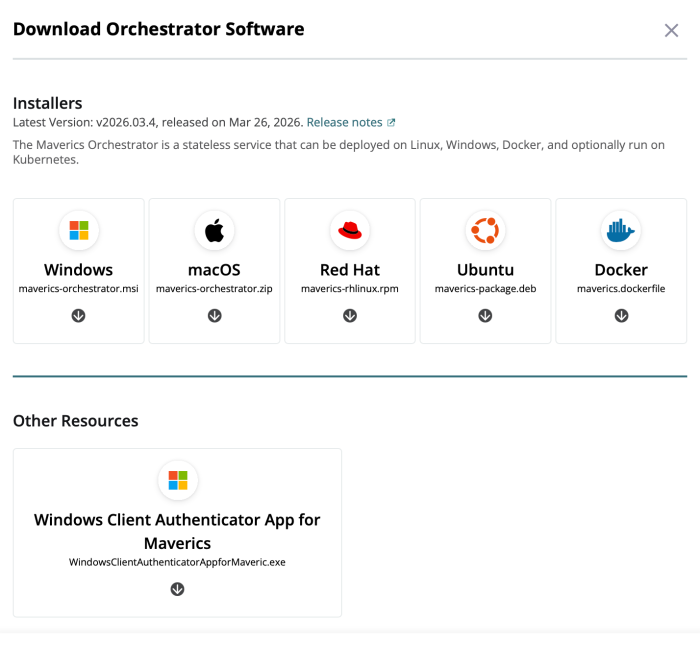
The Maverics Orchestrator image is not on Docker Hub — you download it from the Strata portal and load it into Docker locally. Here is the process:
- Log in to the Strata portal at maverics.strata.io.
- Navigate to Downloads. In the portal, click Deployments, select or create a Deployment, find the Downloads button under the Orchestrator Software section and choose Docker.
- Load the image into Docker:
docker load -i maverics-orchestrator.tar.gz - Note the image tag from the output — it will look something like
maverics_base:v2026.03.2. - Configure the example project:
cp .env.example .envEdit
.envand setMAVERICS_IMAGEto the tag from step 4:MAVERICS_IMAGE=maverics_base:v2026.03.2
Start the Stack
make init   # Generate TLS certs, OIDC signing keys, configure local DNS
make up     # Docker Compose up — builds and starts all containers
make init requires mkcert for local TLS certificates and will prompt for sudo to configure DNS resolution for *.orchestrator.lab. You only need to run it once.
Once the containers are up, verify everything is healthy:
make smoke-testIf you want to build this from scratch rather than clone the example, the Strata docs walk you through each component:
Walk the Config
This is the part that matters. The architecture diagrams and component descriptions above are useful for orientation, but the config files are where you actually see how the system works. Four files define the entire identity layer.
Keycloak: The Identity Provider
The Keycloak realm ships with two test users:
- john.mcclane — password:
yippiekayay - sarah.connor — password:
judgmentday
Both are regular users in the blueprints realm. Keycloak also has an OAuth client (ai-identity-gateway-oidc) that the OIDC Provider uses to federate authentication. When a user logs in through the OIDC Provider, the OIDC Provider redirects to Keycloak, Keycloak authenticates the user, and Keycloak returns an ID token and access token to the OIDC Provider. The OIDC Provider then uses those claims to populate its own tokens.
Nothing exotic here. If you have configured OIDC federation before, this is the same pattern.
OIDC Provider: The Authorization Server
The OIDC Provider’s maverics.yaml is where the OAuth topology gets defined. Two sections matter: the connector to Keycloak, and the registered clients.
The connector tells the OIDC Provider how to federate to Keycloak:
connectors:
  - name: keycloak
    type: oidc
    oidcWellKnownURL: https://keycloak.orchestrator.lab:8443/realms/blueprints/.well-known/openid-configuration
    oauthClientID: ai-identity-gateway-oidc
    oauthClientSecret: <ai_identity_gateway.keycloak_client_secret>
The <ai_identity_gateway.keycloak_client_secret> syntax is a Vault reference. At startup, Maverics resolves it from Vault. No secrets in the config file, no secrets in environment variables.
Now, the clients. There are two that matter for the MCP flow:
apps:
  # Public client for Claude Code
  - name: mcp-client-cli
    type: oidc
    clientID: mcp-client-cli
    public: true
    redirectURLs:
      - http://localhost:19876/callback
      - http://127.0.0.1:19876/callback
    authentication:
      idps:
        - keycloak
    accessToken:
      type: jwt
    allowedAudiences:
      - https://gateway.orchestrator.lab/
    customScopes:
      scopes:
        - name: pii:read
        - name: audit:read
    claimsMapping:
      email: keycloak.email
      name: keycloak.email
This is the client that Claude Code uses. It is a public client (no client secret — appropriate for a CLI tool that cannot securely store secrets). The redirectURLs point to localhost because Claude’s built-in OAuth flow starts a local HTTP server to receive the callback.
allowedAudiences restricts where tokens issued to this client are valid. Tokens will carry aud: https://gateway.orchestrator.lab/, which means they are only valid at the gateway. The gateway checks this.
customScopes defines what scopes this client is allowed to request. By default, Claude will not request pii:read or audit:read — those are optional scopes the user would request explicitly when they need elevated access. Without them, the OPA policy will deny PII and audit log access.
claimsMapping is how identity flows through the system. When Keycloak authenticates the user, the OIDC Provider maps Keycloak’s claims into the access token it issues. The mapping is explicit — if you swap Keycloak for Okta next quarter, you change the mapping in this file and the downstream services never know the difference.
authentication.idps tells the OIDC Provider which connector to use for this client’s auth flow. It points to keycloak here, but it could point to any configured connector — Okta, Auth0, Entra ID, or a SAML provider.
The second client is the gateway itself:
  # AI Identity Gateway client for token exchange
  - name: ai-identity-gateway
    type: oidc
    clientID: ai-identity-gateway
    credentials:
      secrets:
        - <ai_identity_gateway.oidc_client_secret>
    grantTypes:
      - client_credentials
      - urn:ietf:params:oauth:grant-type:token-exchange
    accessToken:
      type: jwt
    allowedAudiences:
      - https://employee-directory.orchestrator.lab/
      - https://enterprise-ledger.orchestrator.lab/
    customScopes:
      scopes:
        - name: ledger:ListAccounts
        - name: ledger:GetAccount
        - name: ledger:ListTransactions
        - name: ledger:UpdateAccount
        - name: ledger:ReadPII
        - name: ledger:ReadAudit
        - name: employee:List
        - name: employee:Get
        # ... additional tool-level scopes
This is a confidential client (it has a client secret). It supports the urn:ietf:params:oauth:grant-type:token-exchange grant type — RFC 8693 token exchange. When the gateway needs to call a downstream service on behalf of a user, it sends the user’s access token to the OIDC Provider and receives back a delegation token scoped to exactly the tool being called.
The allowedAudiences here are the downstream services. The gateway can request tokens for the enterprise ledger and the employee directory, but not for any other service. The customScopes list is the full set of tool-level scopes the gateway can request. Each tool call maps to one scope.
Gateway: The MCP Provider
The gateway’s maverics.yaml is where all three layers — token validation, policy evaluation, and token exchange — come together.
First, the MCP provider configuration:
mcpProvider:
  enabled: true
  transports:
    stream:
      enabled: true
      path: "/mcp"
      session:
        enabled: true
        headerName: "Mcp-Session-Id"
        timeout: 1h
  authorization:
    oauth:
      enabled: true
      metadataPath: /.well-known/oauth-protected-resource
      servers:
        - wellKnownEndpoint: https://auth.orchestrator.lab/.well-known/oauth-authorization-server
          tokenValidation:
            expectedAudiences:
              - https://gateway.orchestrator.lab/
            method: jwt
This tells the gateway to serve MCP over the Streamable HTTP transport at /mcp, with OAuth authorization enabled. The metadataPath publishes the Protected Resource Metadata document at /.well-known/oauth-protected-resource — this is the RFC 9728 endpoint that clients like Claude use to discover the authorization server. The expectedAudiences check ensures only tokens issued for this gateway are accepted.
Next, the Enterprise Ledger proxy:
  - name: enterprise-ledger-proxy
    type: mcpProxy
    toolNamespace:
      disabled: false
      name: enterprise_ledger_
    upstream:
      transport: stream
      stream:
        url: http://enterprise-ledger:8080/mcp
    authorization:
      inbound:
        opa:
          name: enterprise-ledger-inbound-authz
          file: /etc/maverics/policies/enterprise-ledger-inbound-authz.rego
      outbound:
        type: tokenExchange
        tokenExchange:
          type: delegation
          idp: oidc-provider
          audience: https://enterprise-ledger.orchestrator.lab/
          tools:
            - name: listAccounts
              ttl: 5s
              scopes:
                - name: ledger:ListAccounts
There is a lot happening here. The toolNamespace prefixes all tools from this upstream with enterprise_ledger_ so they do not collide with tools from other services. The upstream points to the Enterprise Ledger MCP server running in its own container.
The authorization.inbound section points to an OPA policy file. Every tool call goes through this policy before anything else happens. The policy can inspect the user’s token, the tool being called, and return allow or deny with a message.
The authorization.outbound section configures token exchange. For each tool, the gateway specifies the scope to request and the TTL. When listAccounts is called, the gateway exchanges the user’s token for a delegation token with scope: ledger:ListAccounts, aud: https://enterprise-ledger.orchestrator.lab/, and a five-second TTL. That delegation token is what the Enterprise Ledger receives — not the user’s original token, not the gateway’s service credentials.
The Employee Directory uses the same pattern, but with the mcpBridge type:
  - name: employee-directory-bridge
    type: mcpBridge
    mode: openapi
    toolNamespace:
      disabled: false
      name: employee_directory_
    openapi:
      spec:
        uri: file:///etc/maverics/apps/employee-directory/openapi.yaml
      baseURL: https://employee-directory.orchestrator.lab:8443/api/v1
The bridge reads the Employee Directory’s OpenAPI spec and auto-generates MCP tools from it. Every endpoint in the spec becomes a tool. The authorization block is identical in structure — OPA for inbound, token exchange for outbound. You do not need to write any MCP adapter code for your REST APIs. You give the bridge an OpenAPI spec, and it handles the translation.
OPA Policy: Per-Tool Authorization
The OPA policy for the Enterprise Ledger is short enough to show in full:
package orchestrator

default result["allowed"] := true

jwt_payload := payload if {
    auth_header := input.request.http.headers.Authorization
    startswith(auth_header, "Bearer ")
    token := substring(auth_header, 7, -1)
    [_, payload, _] := io.jwt.decode(token)
}

result["allowed"] := false if {
    input.request.mcp.tool.params.name == "getCustomerPII"
    not contains(jwt_payload.scope, "pii:read")
}

result["external_message"] := "Access denied: PII access requires pii:read scope." if {
    input.request.mcp.tool.params.name == "getCustomerPII"
    not contains(jwt_payload.scope, "pii:read")
}

result["allowed"] := false if {
    input.request.mcp.tool.params.name == "getAuditLog"
    not contains(jwt_payload.scope, "audit:read")
}

result["external_message"] := "Insufficient privileges: audit log access requires audit:read scope." if {
    input.request.mcp.tool.params.name == "getAuditLog"
    not contains(jwt_payload.scope, "audit:read")
}
Read this top to bottom. By default, everything is allowed — default result[“allowed”] := true. This means listAccounts, getAccount, getTransactions, and updateAccountStatus are all accessible to any authenticated user.
The first override: if the tool being called is getCustomerPII and the user’s token does not contain the pii:read scope, deny with a message. The second override: if the tool is getAuditLog and the token lacks audit:read, deny.
That is the entire authorization policy. Three tiers of access in thirty lines of Rego. Changing who can access what means changing this file. That change shows up as a git diff in a pull request.
Notice what this policy does not do: it does not hardcode user identities. It does not check sub == “[email protected]”. It checks scopes — capabilities that are issued by the authorization server based on what the user requested and what the client is allowed to request. If you want to grant PII access to a new role, you configure the authorization server to issue pii:read to users in that role. The policy does not change. This is the principle of least privilege implemented through token scoping, not through access control lists embedded in application logic.
Connecting Claude
With the stack running, connecting Claude is one command. The official Strata docs cover this in detail, but here is the essential flow.
claude mcp add --transport http \
  --client-id mcp-client-cli \
  --callback-port 19876 \
  ai-identity-gateway \
  https://gateway.orchestrator.lab/mcp
This tells Claude Code to register an MCP server named ai-identity-gateway at the given URL, using the mcp-client-cli OAuth client ID, with the OAuth callback on port 19876.
If you use Claude Desktop, add the MCP gateway using mcp-remote. First, open your config file:
macOS:   ~/Library/Application Support/Claude/claude_desktop_config.json
Windows: %APPDATA%\Claude\claude_desktop_config.json
Then add the following to the mcpServers object:
{
  "mcpServers": {
    "ai-identity-gateway": {
      "command": "/opt/homebrew/bin/npx",
      "args": [
        "mcp-remote",
        "https://gateway.orchestrator.lab/mcp",
        "3334",
        "--transport", "http-only",
        "--static-oauth-client-info",
        "{\"client_id\":\"mcp-client-cli\"}"
      ],
      "env": {
        "NODE_EXTRA_CA_CERTS": "/path/to/connect-claude-to-maverics/certs/rootCA.pem"
      }
    }
  }
}
When Claude connects, a specific sequence of events unfolds:
Step 1: Protected Resource Metadata discovery. Claude hits https://gateway.orchestrator.lab/.well-known/oauth-protected-resource and gets back a JSON document listing the authorization server URL and available scopes.
Step 2: Authorization Server discovery. Claude follows the link to https://auth.orchestrator.lab/.well-known/oauth-authorization-server and discovers the authorization, token, and JWKS endpoints.
Step 3: OAuth flow. Claude opens your browser to the OIDC Provider’s authorization endpoint. The OIDC Provider redirects to Keycloak. You see a login form.
Step 4: Authentication. You log in as john.mcclane with password yippiekayay. Keycloak authenticates you and redirects back to the OIDC Provider.
Step 5: Token issuance. The OIDC Provider issues an access token — sub: [email protected], aud: https://gateway.orchestrator.lab/ — which flows back to Claude’s local callback server on port 19876. Claude now has a valid access token.
Back in the terminal, Claude discovers the available tools. They appear with namespace prefixes:
enterprise_ledger_listAccounts
enterprise_ledger_getAccount
enterprise_ledger_getTransactions
enterprise_ledger_updateAccountStatus
enterprise_ledger_getCustomerPII
enterprise_ledger_getAuditLog
employee_directory_listEmployees
employee_directory_getEmployee
employee_directory_listDepartments
employee_directory_createEmployee
...
Now ask Claude to list accounts:
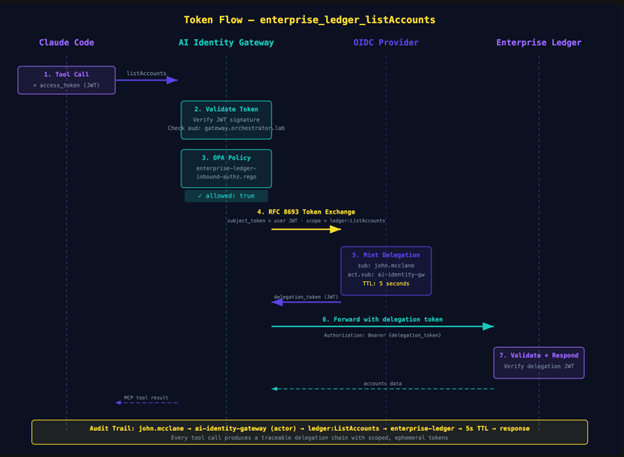
> List all accounts in the enterprise ledger.Claude calls enterprise_ledger_listAccounts. The gateway validates the token, OPA evaluates the inbound policy (allowed — not a restricted tool), the gateway exchanges the token for a delegation token scoped to ledger:ListAccounts with a five-second TTL, and the Enterprise Ledger receives the request. You get back a list of accounts.
Now try the sensitive operation:
> Show me the PII for customer ACC-001.Claude calls enterprise_ledger_getCustomerPII. The gateway validates the token, OPA evaluates the inbound policy — and this time, the policy checks for pii:read in the token’s scope. It is not there (we did not request it). OPA returns:
Access denied: PII access requires pii:read scope.Claude gets the denial message and relays it to you. The tool call was blocked at the gateway. The Enterprise Ledger never saw the request. No data left the perimeter.
The MCP server (Enterprise Ledger) did not have to implement authorization logic. It does not know about scopes. It does not know about OPA. It validates the delegation token it receives (signature, audience, expiry) and serves the request. The authorization decision happened at the gateway, in a policy file that your team wrote, reviewed, and committed. The MCP server stays simple. The gateway handles complexity.
Notice what happened from Claude’s perspective: it received a clear error message explaining what went wrong and what would be needed. The denial is informative, not opaque — Claude can relay the reason and suggest next steps instead of guessing at a generic 403.
For additional connection methods — Claude Desktop via mcp-remote, or claude.ai web connectors for Enterprise plans — see the official docs.
The Audit Trail
Every tool call through this stack produces an auditable delegation chain. Let’s trace exactly what happened when Claude called enterprise_ledger_listAccounts.

1. User’s access token arrives at the gateway. The token’s sub claim is [email protected]. The aud is https://gateway.orchestrator.lab/. The token was issued by https://auth.orchestrator.lab. The gateway validates the signature, checks the audience, and confirms the token has not expired.
2. OPA inbound policy evaluates. The gateway passes the request context — including the token and the tool name — to the OPA policy engine. The policy returns allowed: true because listAccounts has no special scope requirements.
3. RFC 8693 token exchange. The gateway sends a token exchange request to the OIDC Provider: “I have this user’s token, I need a delegation token for https://enterprise-ledger.orchestrator.lab/ with scope ledger:ListAccounts.” The OIDC Provider validates the request, confirms the gateway client is allowed to exchange for that audience and scope, and issues a delegation token.
4. Delegation token contents. The new token carries:
sub: [email protected]— the original useract.sub: ai-identity-gateway— the gateway, as the acting partyscope: ledger:ListAccounts— just this one operationaud: https://enterprise-ledger.orchestrator.lab/— just this one service- TTL: 5 seconds
5. Enterprise Ledger validates and responds. The Enterprise Ledger receives the delegation token, validates the signature against the OIDC Provider’s JWKS, confirms the audience matches its own URL, checks the scope, and serves the response.
The chain of custody exists because we treated the MCP server as a resource server. You can answer the question “who accessed what, when, through which agent, with what authorization” because every step produced a verifiable artifact. The five-second TTL means even if a delegation token leaks — through a log, through a crash dump, through whatever vector you are worried about — the exposure window is measured in seconds, not hours.
Pay attention to the act claim. RFC 8693 Section 4.4 defines it as the acting party — the entity using the token on behalf of the subject. Here, act.sub: ai-identity-gateway tells the Enterprise Ledger the request is coming from the gateway on behalf of [email protected]. If you have multiple gateways or agents going through different proxies, each shows up as a distinct actor. You can reconstruct the full delegation chain from the token alone.
Now consider the compliance conversation. When your CISO asks “can you prove that user X only accessed the data they were authorized to access through the AI agent?” — you can point to the token exchange logs. Every delegation token minted is a record of exactly who accessed what, scoped to what operation, for how long. The identity layer produced the evidence as a side effect of doing its job.
Managing It as Code
So what does a policy change actually look like?
Say you want to restrict getTransactions so it requires a new ledger:ViewTransactions scope instead of being available to all authenticated users. Two files change.
The Rego policy gets a new rule:
+ result["allowed"] := false if {
+     input.request.mcp.tool.params.name == "getTransactions"
+     not contains(jwt_payload.scope, "ledger:ViewTransactions")
+ }
+
+ result["external_message"] := "Access denied: viewing transactions requires ledger:ViewTransactions scope." if {
+     input.request.mcp.tool.params.name == "getTransactions"
+     not contains(jwt_payload.scope, "ledger:ViewTransactions")
+ }
The OIDC Provider’s maverics.yaml adds the new scope to the mcp-client-cli app:
  customScopes:
    scopes:
      - name: pii:read
      - name: audit:read
+     - name: ledger:ViewTransactions
That is the diff. Two files. You commit it, open a PR, your team reviews it, it gets merged, the orchestrator detects the update and automatically redeploys. The authorization change went through the same code review process as any application change.
Want to add a new MCP server behind the gateway? Three files:
1. Add an mcpProxy or mcpBridge block to the gateway’s maverics.yaml. Point it at the new upstream, define the tool namespace, and configure token exchange with per-tool scopes.
2. Add the new service’s scopes to the OIDC Provider’s ai-identity-gateway app so the gateway client can request delegation tokens for the new audience.
3. Write a Rego policy file for inbound authorization on the new service.
Three files, one git commit. The new service is behind the gateway, with per-tool scoping, OPA policy evaluation, and delegation tokens.
The entire identity layer for your AI agents — who can authenticate, what scopes are available, which tools require elevated access, how delegation tokens are minted — lives in version-controlled YAML and Rego files. It deploys the same way your application code does. It goes through the same review process. You can git revert it when something breaks at 2 AM.
Because policies are files, you can also test them: spin up the stack in CI, authenticate as a test user, call a sensitive tool, and assert the denial. When something goes wrong in production, debugging is three lookups — check the OPA policy, look at the OIDC Provider config, look at the token. The answer is in the config, not in a support ticket.
The config files in this example are a starting point. Fork them, change them, break them. That is the point of infrastructure-as-code — you can see exactly what the system does, and you can change it with a commit.
What’s Next
The example project covers the fundamentals: OAuth token validation, OPA policy evaluation, RFC 8693 delegation tokens, and per-tool scoping. The Maverics platform extends this with patterns you will need in production:
Identity Continuity — Automatic IdP failover with zero agent downtime. If your primary IdP goes down, the gateway fails over to a secondary and the agent session continues without re-authentication. Another YAML block, another git diff. The Strata docs walk through the full configuration.
Step-Up Authentication — Passwordless biometric verification for sensitive tool calls. When PII access is denied, the system can trigger a FIDO2 challenge on the user’s device. The user approves, a new token is issued with elevated scopes, and the next tool call succeeds — without leaving the agent conversation.
Observability — Real-time topology visualization of your MCP connections, traffic flows, and audit logs across the identity layer.
For the full documentation on connecting Claude (and other AI clients) to the AI Identity Gateway:
→ Strata Docs: Connect Claude to the AI Identity Gateway
The MCP spec told us what our servers are. Resource servers. The ecosystem is catching up — OWASP guides, CoSAI taxonomies, and enterprise identity gateways are all converging on the same conclusion: if your AI agent touches enterprise data, the identity layer is not optional.
Further Reading
Strata Docs
Strata Blog
- Securing MCP Servers at Scale: How to Govern AI Agents with an Enterprise Identity Fabric
- A New Identity Playbook for AI Agents
- Why AI Agents Deserve First-Class Identity Management
- 8 Strategies for AI Agent Security
Maverics.ai Blog
Industry References
- MCP Security Best Practices — Model Context Protocol
- OWASP: A Practical Guide for Secure MCP Server Development
- CoSAI MCP Security Taxonomy — OASIS Open
- Stack Overflow: Authentication and Authorization in MCP
Video Demo
The post Your MCP Server Is a Resource Server Now. Act Like It. appeared first on Strata.io.
*** This is a Security Bloggers Network syndicated blog from Strata.io authored by Parambir E4C5. Read the original post at: https://www.strata.io/blog/agentic-identity/your-mcp-server-is-a-resource-server-now-act-like-it/
如有侵权请联系:admin#unsafe.sh