好的,我现在需要帮助用户总结一篇文章的内容,控制在100字以内,并且不需要特定的开头。首先,我得仔细阅读文章,理解其主要观点和数据。 文章主要讨论了DShield蜜罐收集的数据,特别是Cowrie telnet和SSH会话。作者分析了大约三年的数据,来自六个蜜罐,总共有超过120万次会话。重点在于会话持续时间、每会话运行的命令数量以及最后运行的命令。 文章提到大多数会话运行约20个命令,持续约20秒。然而,有些会话运行了超过25,000个命令。通过分析这些数据,作者试图识别自动化脚本和蜜罐指纹识别的迹象。此外,文章还比较了真实系统和蜜罐在执行某些命令时的输出差异,并讨论了未来改进蜜罐配置的方向。 总结时,我需要抓住这些关键点:数据来源、分析结果、异常情况以及对自动化脚本和蜜罐识别的影响。同时,要确保语言简洁明了,控制在100字以内。 </think> 文章分析了DShield蜜罐三年间收集的120万次Cowrie telnet/SSH会话数据,发现大多数会话运行约20个命令并持续约20秒。然而,部分会话运行超过25,000个命令或持续数分钟。通过统计分析和案例研究,探讨了自动化攻击、蜜罐指纹识别及异常行为模式,并提出改进蜜罐配置以提升检测能力的方向。 2026-3-30 00:2:25 Author: isc.sans.edu(查看原文) 阅读量:35 收藏
A lot of the information seen on DShield honeypots [1] is repeated bot traffic, especially when looking at the Cowrie [2] telnet and SSH sessions. However, how long a session lasts, how many commands are run per session and what the last commands run before a session disconnects can vary. Some of this information could help indicate whether a session is automated and if a honeypot was fingerprinted. This information can also be used to find more interesting honeypot sessions.
To get an idea of what that variety looks like, I reviewed about 3 years of data from 6 honeypots. Some of the honeypots have been running for different periods of time, but it should give a good overview of different attacks seen on telnet/SSH honeypots. Since I already made a python script [3] that summarizes some of this data for me, it made the process a bit easier. Before going into the details, some of the basic information:
Data Timeframe: 4/13/2022 - 3/21/2026
Number of Sessions: 1,206,566
| Min | Max | Median | Mean | Range (Max-Min) | |
|---|---|---|---|---|---|
| Number of Commands Per Session | 0 | 27742 | 17.49 | 20.0 | 27742 |
| Duration of Sessions (Seconds) | 0.041 | 1563.38 | 17.42 | 22.80 | 1563.38 |
Figure 1: Basic statistics for Cowrie session durations and number of commands run per session.
In most sessions, we see about 20 commands and a session lasts for about 20 seconds.
Number of Commands Per Session
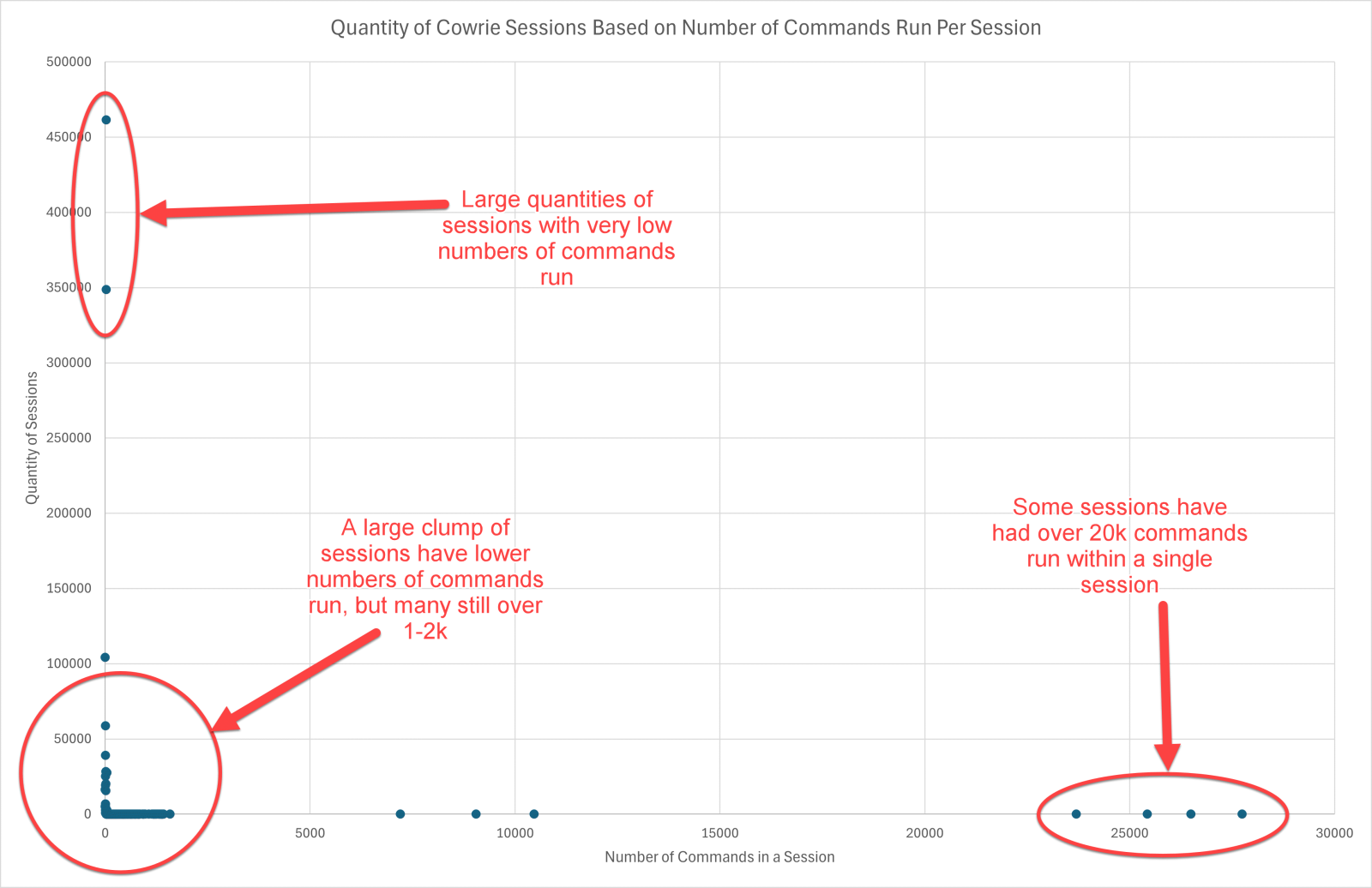
When a Cowrie session is allowed through, the client connection has the option of running commands. They client may decide to disconnect, run an automated script or run commands manually. Most of the time, there are usually under 30 commands run per session, but there are some sessions that have had over 25,000 commands run in a single session.
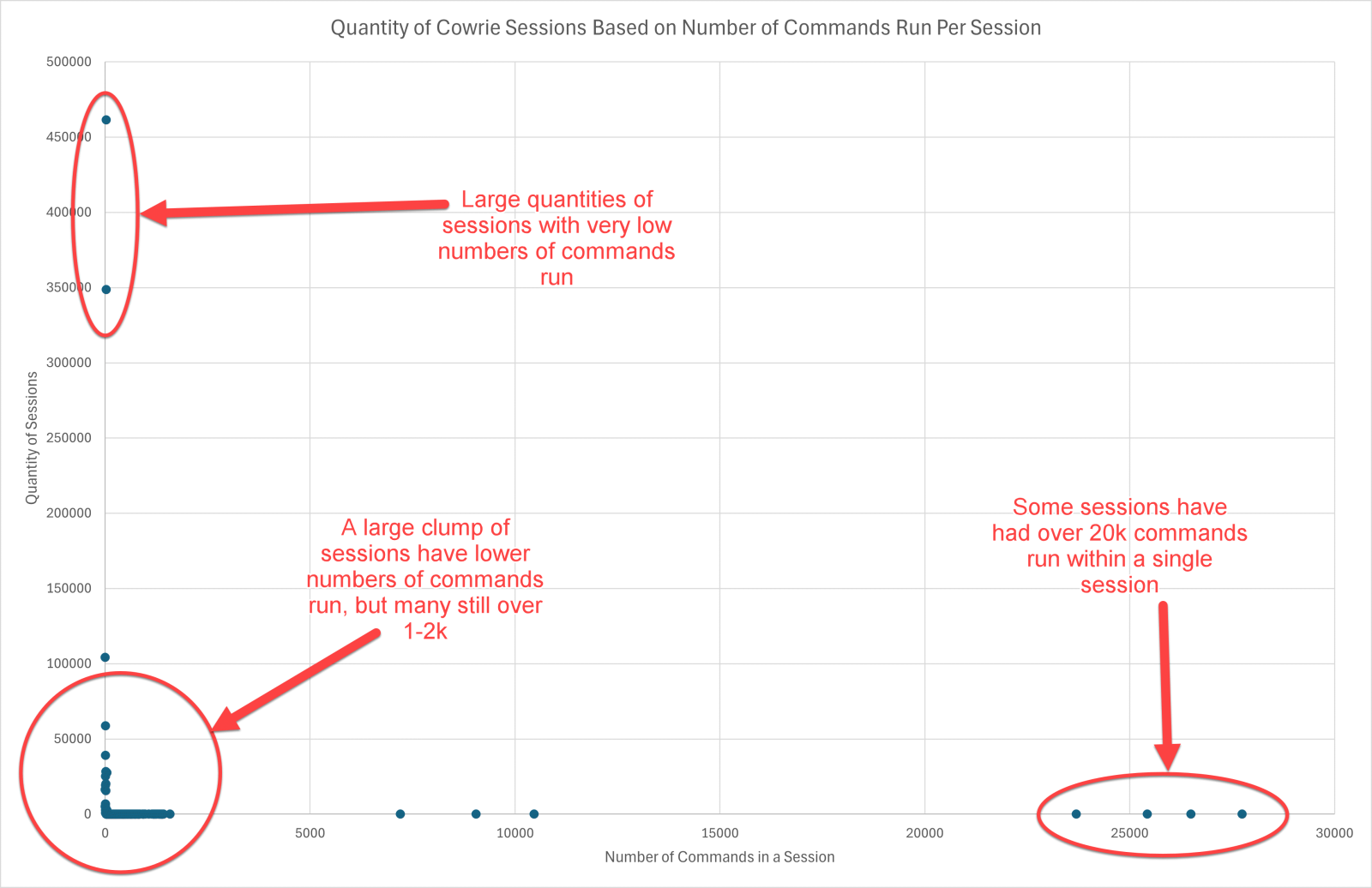
Figure 2: There are many telnet/SSH sessions interacting with DShield honeypots that run over 25,000 commands in a single session, but most are much lower.
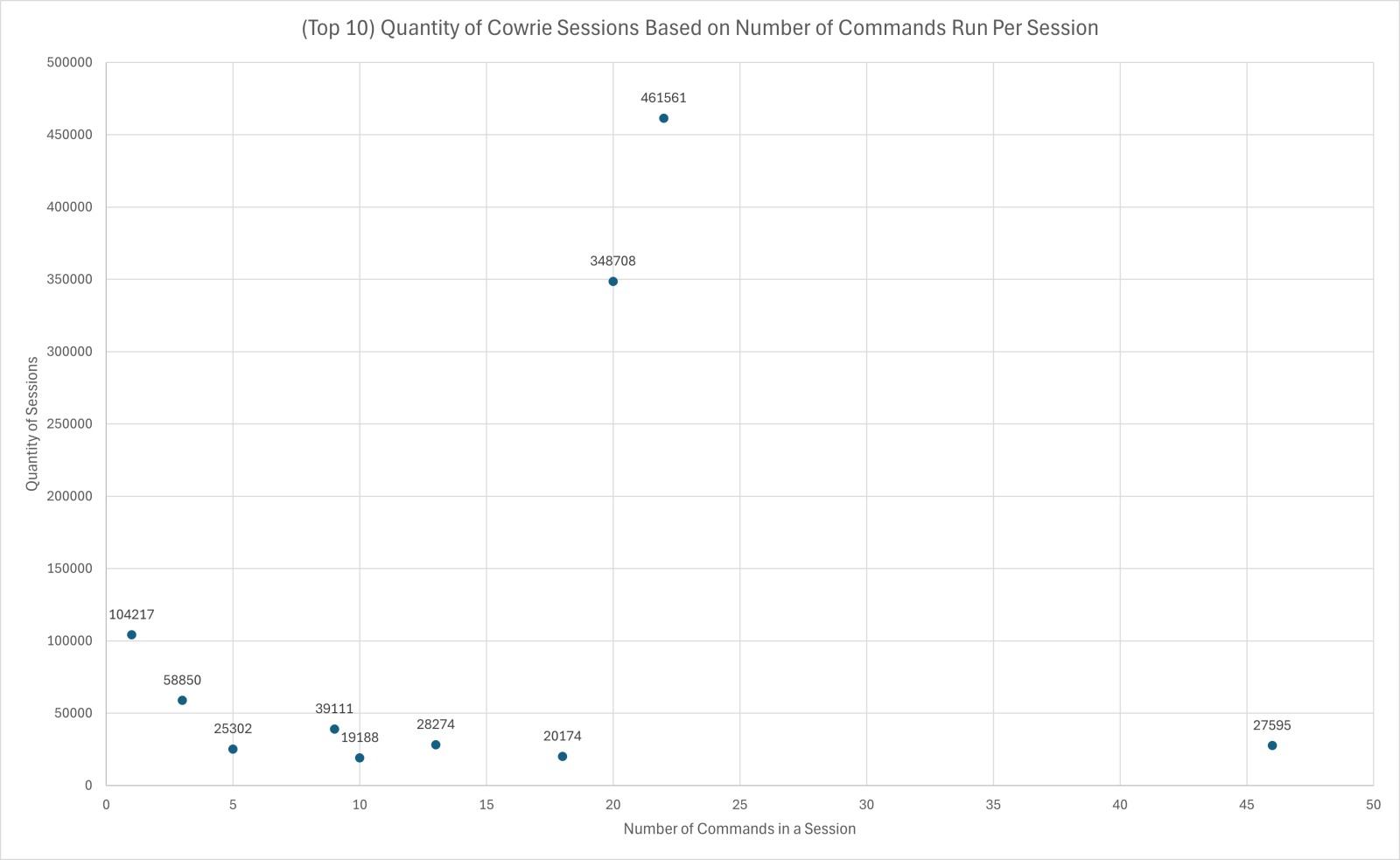
Figure 3: Looking at most frequenty occuring number of commands run per telnet/SSH session, the majority are under 50 commads with the most frequent being 22 commands in a session.
| Commands in session | Sessions found | Percentage | Running total |
|---|---|---|---|
| 22 | 461,561 | 38.26% | 38.26% |
| 20 | 348,708 | 28.91% | 67.17% |
| 1 | 104,217 | 8.64% | 75.81% |
| 3 | 58,850 | 4.88% | 80.69% |
| 9 | 39,111 | 3.24% | 83.93% |
| 13 | 28,274 | 2.34% | 86.27% |
| 46 | 27,595 | 2.29% | 88.56% |
| 5 | 25,302 | 2.10% | 90.66% |
| 18 | 20,174 | 1.67% | 92.33% |
| 10 | 19,188 | 1.59% | 93.92% |
Figure 4: The top 10 most commonly seen number of commands run in a session accounts for about 94% of the telnet/SSH sessions.
Are the sessions with 22 commands similar? To help commands for differnet sessions the commands per session were concatenated and then hashed to arrive at a value that could be compared across sessions. This value would be the same if the same commands were run in the same order. This seemed like a great idea until I found a very small number of similar hashes when looking at sessions with 22 commands. Rather than seeing tens or hundreds of thousands of similar hashes, there were only 4. Looking more closely at the data demonstrated what was missed.
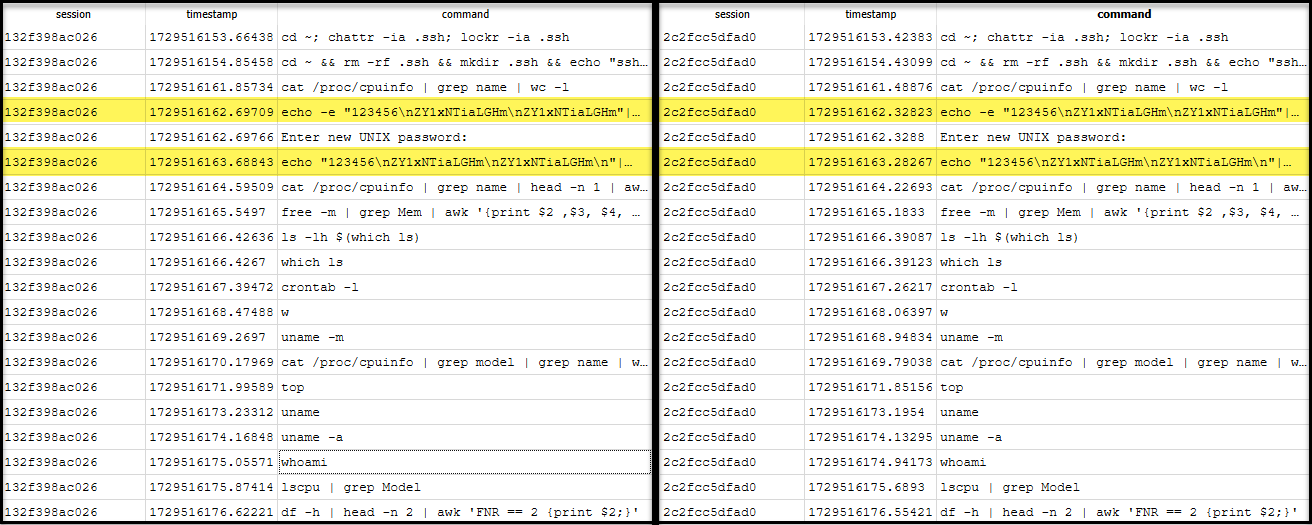
Figure 5: Cowrie sessions with matching command hashes, but with data that changed based on script inputs, in this case, passwords.
Many attacks will often try to change passwords, but these comamnds will often change since differnet passwords may be successful on a honeypot and new password used could also be different. Trying to simplify the search and ignoring command by command details, 99.95% of sessions with a total command count of 22 may be similar (461,344 out of 461,561).
select count(sessions.session) from sessions, commands where sessions.total_commands="22" and sessions.session=commands.session and commands.command LIKE "%Enter new UNIX password:%";The total number of commands run may be a good indicator of bot scripts being run. Even though many sessions may run the same commands in the same order, the duration of the sessions has a wide range.
SELECT
    printf('%.10f', min(cast(session_duration as real))),
    printf('%.10f', max(cast(session_duration as real)))
FROM sessions, commands
WHERE sessions.total_commands = "22"
  AND sessions.session = commands.session
  AND commands.command LIKE "%Enter new UNIX password:%"
  AND cast(session_duration as real) != 0;
Minimum Duration: 1.63 seconds
Maximum Duration: 233.05 seconds (a little under 4 minutes)
While a shorter session time may indicate automation, a longer session duration doesn't neccessarily mean that there is a person behind the keyboard.
Session Durations
Session durations had much more variety than expected. They can range from about a second to upwards of 26 minutes. Taking into account only those command counts where we had at least two sessions:
| Commands in Session | Sessions Found | Min Duration (s) | Max Duration (s) | Duration Range (s) | Mean Duration (s) | Mean Commands/s |
|---|---|---|---|---|---|---|
| 22 | 461561 | 1.63 | 233.05 | 231.42 | 19.44 | 1.13 |
| 20 | 348708 | 3.13 | 298.86 | 295.72 | 19.53 | 1.02 |
| 1 | 104217 | 0.05 | 1099.30 | 1099.25 | 8.48 | 0.12 |
| 3 | 58850 | 0.04 | 371.12 | 371.08 | 12.32 | 0.24 |
| 9 | 39111 | 0.16 | 1074.53 | 1074.36 | 23.39 | 0.38 |
| 13 | 28274 | 0.35 | 234.83 | 234.47 | 8.37 | 1.55 |
| 46 | 27595 | 3.38 | 217.07 | 213.69 | 113.72 | 0.40 |
| 5 | 25302 | 0.10 | 908.05 | 907.94 | 6.78 | 0.74 |
| 18 | 20174 | 0.63 | 397.26 | 396.63 | 22.19 | 0.81 |
| 10 | 19188 | 0.55 | 582.49 | 581.94 | 59.71 | 0.17 |
| 0 | 16281 | 0.04 | 1563.38 | 1563.34 | 83.30 | 0.00 |
| 15 | 15617 | 0.73 | 211.46 | 210.73 | 20.74 | 0.72 |
| 11 | 6753 | 0.69 | 795.15 | 794.46 | 56.99 | 0.19 |
| 7 | 6742 | 0.09 | 729.69 | 729.60 | 50.52 | 0.14 |
| 4 | 5375 | 0.11 | 990.44 | 990.33 | 42.32 | 0.09 |
| 2 | 5136 | 0.09 | 993.03 | 992.94 | 50.70 | 0.04 |
| 19 | 3310 | 1.29 | 207.76 | 206.47 | 43.97 | 0.43 |
| 6 | 2833 | 0.47 | 992.60 | 992.14 | 43.38 | 0.14 |
| 45 | 2614 | 1.95 | 225.16 | 223.21 | 84.67 | 0.53 |
| 21 | 1538 | 0.42 | 201.84 | 201.42 | 59.18 | 0.35 |
| 17 | 1311 | 0.43 | 197.86 | 197.42 | 53.24 | 0.32 |
| 14 | 1158 | 2.59 | 212.90 | 210.31 | 69.58 | 0.20 |
| 16 | 792 | 6.19 | 197.18 | 190.99 | 68.01 | 0.24 |
| 12 | 778 | 1.05 | 212.98 | 211.93 | 67.56 | 0.18 |
| 8 | 775 | 0.29 | 728.80 | 728.51 | 67.80 | 0.12 |
| 27 | 643 | 0.87 | 220.30 | 219.42 | 132.93 | 0.20 |
| 29 | 289 | 3.62 | 190.15 | 186.54 | 125.45 | 0.23 |
| 30 | 234 | 0.83 | 211.35 | 210.52 | 103.22 | 0.29 |
| 33 | 205 | 0.96 | 207.39 | 206.43 | 136.79 | 0.24 |
| 31 | 103 | 2.36 | 195.15 | 192.78 | 60.91 | 0.51 |
| 25 | 77 | 1.54 | 235.10 | 233.56 | 49.69 | 0.50 |
| 44 | 75 | 69.90 | 78.91 | 9.01 | 73.54 | 0.60 |
| 48 | 61 | 27.76 | 57.52 | 29.75 | 34.34 | 1.40 |
| 28 | 49 | 1.00 | 189.89 | 188.89 | 47.23 | 0.59 |
| 24 | 34 | 1.52 | 226.81 | 225.28 | 68.83 | 0.35 |
| 26 | 32 | 1.35 | 181.03 | 179.68 | 39.25 | 0.66 |
| 23 | 28 | 0.22 | 139.07 | 138.85 | 59.32 | 0.39 |
| 57 | 23 | 23.72 | 106.73 | 83.01 | 80.62 | 0.71 |
| 32 | 16 | 29.53 | 101.30 | 71.77 | 55.89 | 0.57 |
| 34 | 16 | 2.77 | 188.89 | 186.11 | 67.76 | 0.50 |
| 37 | 16 | 2.02 | 182.75 | 180.72 | 67.63 | 0.55 |
| 47 | 16 | 23.18 | 188.09 | 164.92 | 119.36 | 0.39 |
| 177 | 13 | 180.56 | 202.43 | 21.87 | 185.73 | 0.95 |
| 39 | 12 | 1.49 | 4.93 | 3.44 | 3.96 | 9.85 |
| 95 | 12 | 133.53 | 181.83 | 48.30 | 177.13 | 0.54 |
| 40 | 11 | 2.69 | 181.40 | 178.71 | 66.94 | 0.60 |
| 41 | 11 | 41.73 | 193.47 | 151.74 | 72.61 | 0.56 |
| 35 | 10 | 24.28 | 181.30 | 157.02 | 78.69 | 0.44 |
| 42 | 9 | 42.21 | 78.63 | 36.42 | 58.45 | 0.72 |
| 175 | 8 | 180.73 | 183.23 | 2.49 | 182.19 | 0.96 |
| 38 | 7 | 41.88 | 87.17 | 45.29 | 69.20 | 0.55 |
| 125 | 6 | 31.29 | 78.38 | 47.10 | 49.21 | 2.54 |
| 78 | 6 | 111.30 | 174.92 | 63.62 | 125.12 | 0.62 |
| 172 | 5 | 181.24 | 325.32 | 144.08 | 267.44 | 0.64 |
| 117 | 4 | 49.05 | 50.66 | 1.62 | 49.85 | 2.35 |
| 176 | 4 | 180.91 | 183.87 | 2.96 | 182.78 | 0.96 |
| 179 | 4 | 181.69 | 325.78 | 144.09 | 219.17 | 0.82 |
| 36 | 4 | 40.89 | 181.54 | 140.65 | 146.30 | 0.25 |
| 62 | 4 | 67.24 | 81.67 | 14.43 | 74.51 | 0.83 |
| 124 | 3 | 31.25 | 79.62 | 48.37 | 63.08 | 1.97 |
| 168 | 3 | 109.26 | 182.33 | 73.08 | 137.21 | 1.22 |
| 213 | 3 | 181.80 | 185.54 | 3.74 | 183.80 | 1.16 |
| 836 | 3 | 180.92 | 181.53 | 0.61 | 181.15 | 4.61 |
| 128 | 2 | 53.00 | 79.62 | 26.62 | 66.31 | 1.93 |
| 1344 | 2 | 180.93 | 180.98 | 0.05 | 180.96 | 7.43 |
| 1361 | 2 | 180.91 | 180.94 | 0.03 | 180.93 | 7.52 |
| 1375 | 2 | 180.92 | 180.97 | 0.05 | 180.94 | 7.60 |
| 138 | 2 | 45.79 | 51.62 | 5.84 | 48.71 | 2.83 |
| 140 | 2 | 1435.33 | 1435.33 | 0.00 | 1435.33 | 0.10 |
| 154 | 2 | 182.05 | 182.40 | 0.36 | 182.23 | 0.85 |
| 158 | 2 | 182.28 | 1428.41 | 1246.13 | 805.34 | 0.20 |
| 178 | 2 | 180.74 | 181.69 | 0.95 | 181.21 | 0.98 |
| 184 | 2 | 325.64 | 325.69 | 0.05 | 325.66 | 0.56 |
| 214 | 2 | 181.73 | 182.95 | 1.22 | 182.34 | 1.17 |
| 248 | 2 | 181.17 | 181.55 | 0.38 | 181.36 | 1.37 |
| 270 | 2 | 47.66 | 48.63 | 0.97 | 48.15 | 5.61 |
| 312 | 2 | 180.71 | 180.95 | 0.24 | 180.83 | 1.72 |
| 346 | 2 | 68.62 | 69.07 | 0.44 | 68.84 | 5.02 |
| 404 | 2 | 184.94 | 186.00 | 1.07 | 185.47 | 2.18 |
| 437 | 2 | 177.62 | 182.26 | 4.64 | 179.94 | 2.43 |
| 440 | 2 | 34.02 | 34.73 | 0.71 | 34.37 | 12.80 |
| 444 | 2 | 181.53 | 183.21 | 1.68 | 182.37 | 2.43 |
| 451 | 2 | 83.74 | 182.24 | 98.50 | 132.99 | 3.39 |
| 484 | 2 | 181.76 | 181.84 | 0.08 | 181.80 | 2.66 |
| 50 | 2 | 3.91 | 25.21 | 21.30 | 14.56 | 3.43 |
| 53 | 2 | 37.27 | 59.70 | 22.43 | 48.48 | 1.09 |
| 556 | 2 | 136.02 | 137.87 | 1.85 | 136.95 | 4.06 |
| 573 | 2 | 4.16 | 185.50 | 181.34 | 94.83 | 6.04 |
| 618 | 2 | 187.52 | 201.55 | 14.03 | 194.53 | 3.18 |
| 619 | 2 | 185.00 | 195.52 | 10.52 | 190.26 | 3.25 |
| 633 | 2 | 181.05 | 182.58 | 1.53 | 181.81 | 3.48 |
| 66 | 2 | 102.33 | 186.28 | 83.95 | 144.31 | 0.46 |
| 665 | 2 | 182.14 | 182.27 | 0.13 | 182.21 | 3.65 |
| 68 | 2 | 127.56 | 181.32 | 53.77 | 154.44 | 0.44 |
| 749 | 2 | 181.04 | 181.61 | 0.58 | 181.32 | 4.13 |
| 75 | 2 | 128.19 | 161.05 | 32.85 | 144.62 | 0.52 |
| 835 | 2 | 181.40 | 181.49 | 0.09 | 181.44 | 4.60 |
Figure 6: Breakdown of session durations grouped by the number of commands run per session.
Looking at one of the sessions with a higher frequency of command run shows an ELF executable being constructed byte by byte (command count 440, 12.80 commands per second).
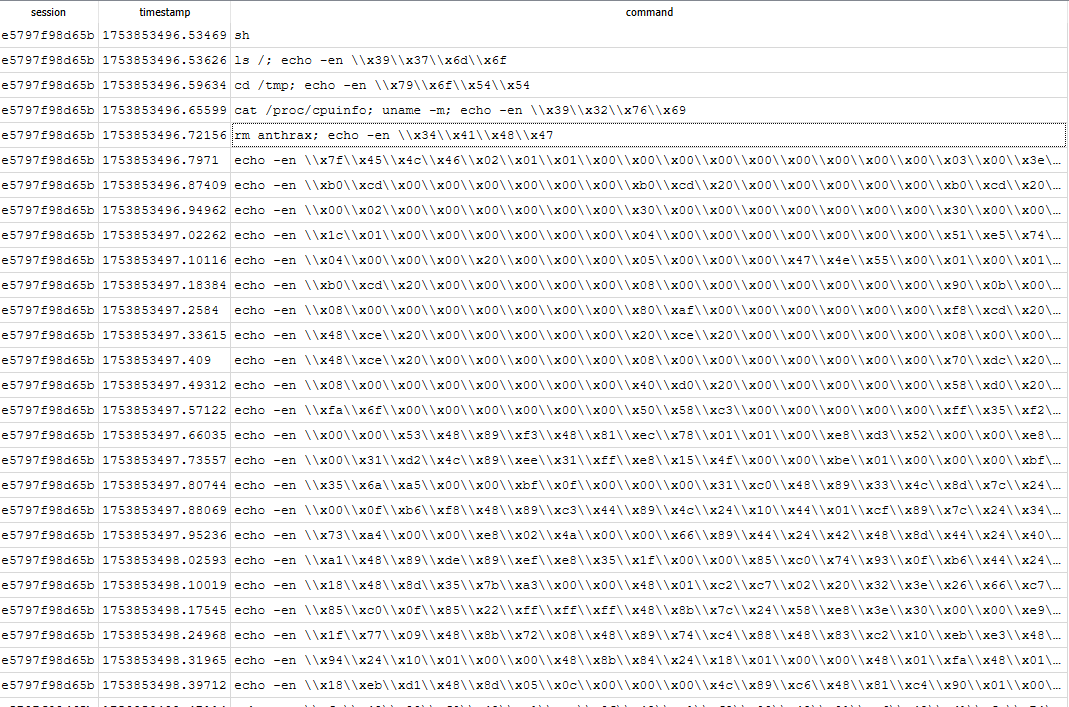
Figure 7: ELF exeutable being constructed byte by byte (file name "anthrax") [4].
The file being constructed is shown as benign on VirusTotal, but similar sessions with the file "/tmp/anthrax" has also been noted as being a Mirai variant [5] and affiliated with other benign files [6].
Last Command Before Session Disconnect
Commands run usually have a purpose. Maybe it's to create an executable, gain persistence or even fingerprint a honeypot. Looking at the last command run on a honeypot may help indicate why a session disconnection happened. If the attacker things they have run into a honeypot, there may be no value into performing other actions.
| Last Command | Session Count | Percent of Sessions | Running Percentage |
|---|---|---|---|
df -h | head -n 2 | awk 'FNR == 2 {print $2;}' |
813959 | 68.69% | 68.69% |
cd ~ && rm -rf .ssh && mkdir .ssh && echo "ssh-rsa AAAAB3NzaC1yc2EAAAABJQAAAQEArDp4cun2lhr4 |
83972 | 7.09% | 75.78% |
uname -s -v -n -r -m |
52070 | 4.39% | 80.17% |
/bin/busybox cat /proc/self/exe || cat /bin/echo |
32189 | 2.72% | 82.89% |
kill %1 |
27802 | 2.35% | 85.23% |
rm .s; exit |
27433 | 2.32% | 87.55% |
cat /proc/uptime 2 > /dev/null | cut -d. -f1 |
21446 | 1.81% | 89.36% |
uname -s -m |
15696 | 1.32% | 90.68% |
/bin/busybox cat /proc/self/exe || cat /proc/self/exe |
14119 | 1.19% | 91.87% |
uname -a |
8213 | 0.69% | 92.57% |
Figure 8: The 10 most frequently run "last command" before a Cowrie session ends, which accounts for almost 93% of sessions.
Since I wanted to see, from these examples, what the output looked like for a honeypot in comparison to a real system, I set up a Ubuntu VM for testing. This may not fit an IoT scenario, but it's just a starting point. I also wanted to see output from Cowrie, so I set it up using a docker container on the same system. Some troubleshooting was needed to get the configuration to function based on the Cowrie download for the DShield honeypot, but I've been able to repeat the setup multiple times with success.
#install docker
sudo apt update
sudo apt install ca-certificates curl -y
sudo install -m 0755 -d /etc/apt/keyrings
sudo curl -fsSL https://download.docker.com/linux/ubuntu/gpg -o /etc/apt/keyrings/docker.asc
sudo chmod a+r /etc/apt/keyrings/docker.asc

echo \
  "deb [arch=$(dpkg --print-architecture) signed-by=/etc/apt/keyrings/docker.asc] https://download.docker.com/linux/ubuntu \
  $(. /etc/os-release && echo "$VERSION_CODENAME") stable" | \
  sudo tee /etc/apt/sources.list.d/docker.list > /dev/null

sudo apt update
sudo apt install docker-ce docker-ce-cli containerd.io docker-buildx-plugin docker-compose-plugin -y

#download DShield Cowrie
curl https://www.dshield.org/cowrie.zip > cowrie.zip
unzip cowrie.zip

#copy and configure settings for honeypot
cd cowrie/docker
sed -i 's/context: context/context: ./' docker-compose.yml
sed -i 's/- cowrie-etc:\/cowrie\/cowrie-git\/etc/- .\/etc:\/cowrie\/cowrie-git\/etc/' docker-compose.yml
sed -i 's/- cowrie-var:\/cowrie\/cowrie-git\/var/- .\/var:\/cowrie\/cowrie-git\/var/' docker-compose.yml
sed -i 's|- ./var:/cowrie/cowrie-git/var|- ./var:/cowrie/cowrie-git/var\n      - ./honeyfs:/cowrie/cowrie-git/honeyfs|' docker-compose.yml
sed -i 's|- ./honeyfs:/cowrie/cowrie-git/honeyfs|- ./honeyfs:/cowrie/cowrie-git/honeyfs\n      - ./share:/cowrie/cowrie-git/share|' docker-compose.yml
cp ../requirements.txt ./requirements-output.txt
cp -r ../src .
cp ../setup.py .
cp ../setup.cfg .
cp ../pyproject.toml .
cp -r ../honeyfs .
cp -r ../etc .
cp -r ../var .
cp -r ../share .

#change settings to all passwords attempted are allowed
cp etc/userdb.example etc/userdb.txt
echo "*:x:*" >> etc/userdb.txt
sudo chown -R 1000:1000 var/log var/lib
sudo chmod -R 777 var/log var/lib

#run Cowrie in docker
sudo docker compose up -d

#connect to cowrie
ssh root@localhost -p 2222
| Last Command | Ubuntu Output | Honeypot Output |
|---|---|---|
df -h | head -n 2 | awk 'FNR == 2 {print $2;}' |
387M |
Size |
|
|
<no output> |
<no output> |
uname -s -v -n -r -m |
Linux sans-isc-default 6.17.0-19-generic #19~24.04.2-Ubuntu SMP PREEMPT_DYNAMIC Fri Mar 6 23:08:46 UTC 2 x86_64 |
Linux svr04 3.2.0-4-amd64 #1 SMP Debian 3.2.68-1+deb7u1 x86_64 |
/bin/busybox cat /proc/self/exe || cat /bin/echo |
<will output contents of file running the process (busybox) or the echo binary> |
cat: /proc/self/exe: No such file or directory ELF>x@@@@8@@@yy .shstrtab.text x@xy |
kill %1 |
bash: kill: %1: no such job |
<no output> |
rm .s; exit |
<will exit terminal> |
<will exit terminal> |
cat /proc/uptime 2 > /dev/null | cut -d. -f1 |
cat: 2: No such file or directory |
-bash: cut: command not found |
uname -s -m |
Linux x86_64 |
Linux x86_64 |
/bin/busybox cat /proc/self/exe || cat /proc/self/exe |
<will output contents of file running the process (busybox) or the cat binary> |
cat: /proc/self/exe: No such file or directory cat: /proc/self/exe: No such file or directory |
uname -a |
Linux sans-isc-default 6.17.0-19-generic #19~24.04.2-Ubuntu SMP PREEMPT_DYNAMIC Fri Mar 6 23:08:46 UTC 2 x86_64 x86_64 x86_64 GNU/Linux |
Linux svr04 3.2.0-4-amd64 #1 SMP Debian 3.2.68-1+deb7u1 x86_64 GNU/Linux |
Figure 9: Comparison of different command outputs for a Cowrie versus Ubuntu VM.
Some of these commands will be different for any system, but the most notable in this comparison were:
df -h | head -n 2 | awk 'FNR == 2 {print $2;}'/bin/busybox cat /proc/self/exe || cat /bin/echokill %1cat /proc/uptime 2 > /dev/null | cut -d. -f1/bin/busybox cat /proc/self/exe || cat /proc/self/exe
This was a limited comparison since they didn't account for any of the preceeding commands, which may change the output. However, it gives a process that can be used for comparison and improving honeypot configurations. Modifying the file system or text outputs could be options to test how differences in returned data impact honeypot interactions [7]. At the very least, some additional data, such as the number of commands run in a session, could help highlight interesting honeypot data.
Some future items to explore for this data:
- Improve identification similar sessions by removing data that may have variable input/output (password changes, URL downloads, etc)
- Modify Cowrie to better replicate responses to some of the examples from real systems
- Look at sessions that are outliers within the session durations and total command counts per session
How are you modifying your honeypots or finding interesting data? Let us know!
[1] https://github.com/DShield-ISC/dshield
[2] https://github.com/cowrie/cowrie
[3] https://github.com/jslagrew/cowrieprocessor
[4] https://www.virustotal.com/gui/file/bb403e1761fed33c966d99393630c16ae138ec887b9b32befe6f1bae5f2bc13d/details
[5] https://www.virustotal.com/gui/file/646af726da8182da9910c4a50aac4f648808de4f9f98bc26058ea190e9bf8e20
[6] https://www.virustotal.com/gui/file/b0d1282989c786cffe85093947f307a26f20601c2f039efc88e3b692d670d076/detection
[7] https://docs.cowrie.org/en/latest/README.html
--
Jesse La Grew
Senior Handler
如有侵权请联系:admin#unsafe.sh