
A fake website impersonating Avast antivirus is tricking people into infecting their own computers.
The site looks legitimate, runs what appears to be a virus scan, and claims your system is full of threats. But the results are fake: when you’re prompted to “fix” the problem, the download you’re given is actually Venom Stealer—a type of malware designed to steal passwords, session cookies, and cryptocurrency wallet data.
This is a classic scare-and-fix scam: create panic, then offer a solution. In this case, the “solution” abuses the trusted Avast brand to deliver the attack.
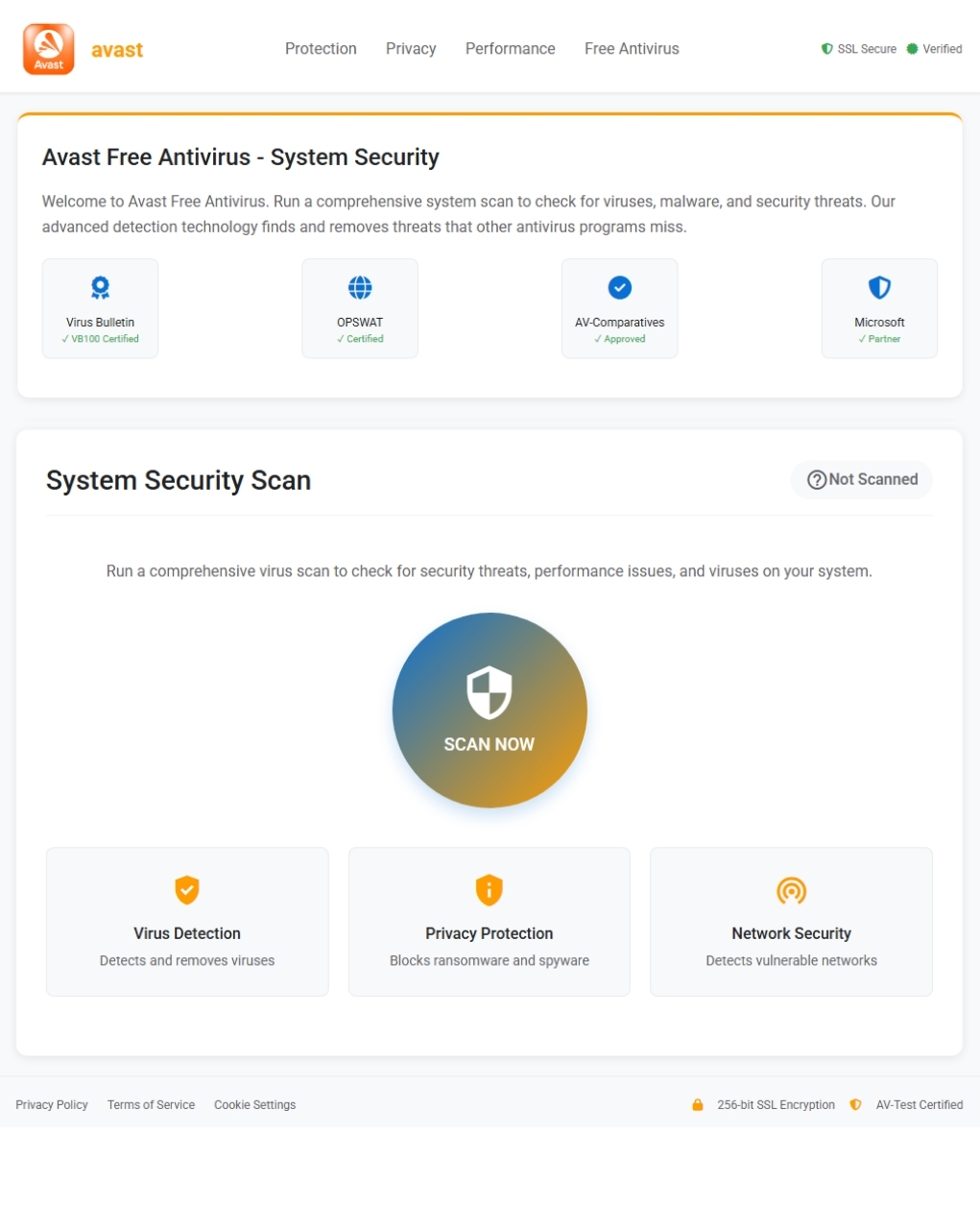
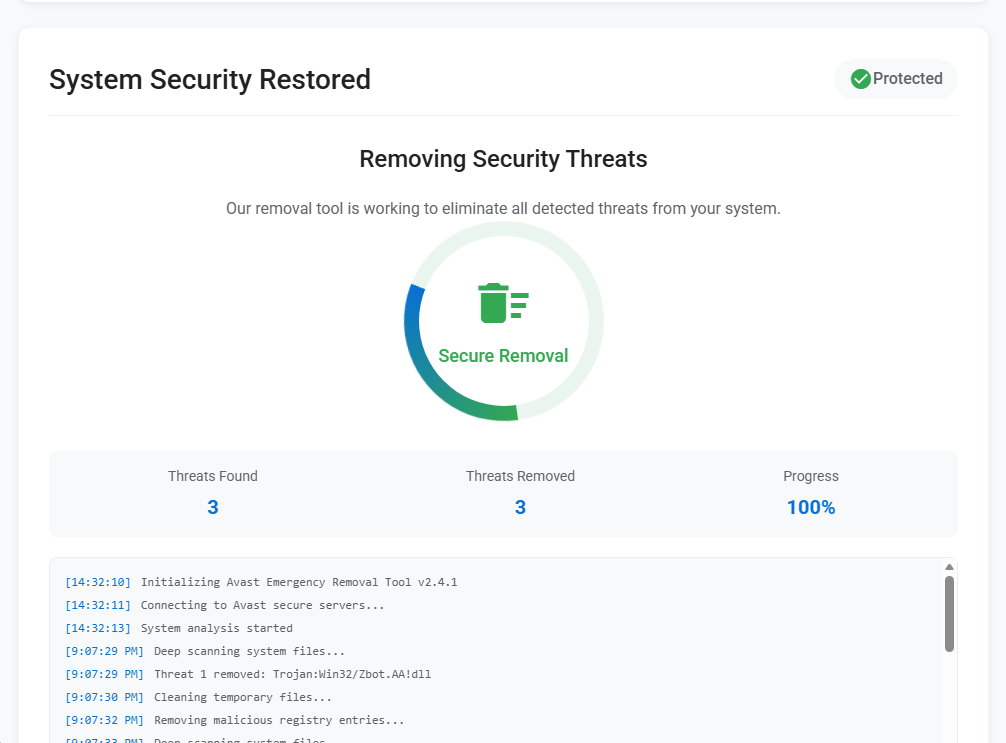
A scan that finds exactly what the attacker wants you to see
The phishing page is a recreation of the Avast brand, complete with navigation bar, logo, and reassuring certification badges. Visitors are invited to run what appears to be a comprehensive virus scan. Once they click, the page stages a brief animation before delivering its predetermined verdict: three threats found, three threats removed, system protected. A scrolling console log names a specific detection—Trojan:Win32/Zbot.AA!dll—to lend the performance an air of specificity. The victim is then prompted to download the cure: a file called Avast_system_cleaner.exe.
This is the payload. And far from cleaning anything, it immediately begins stealing.
A Chrome service that is not Chrome
When the victim launches Avast_system_cleaner.exe, the binary—a 64-bit Windows PE executable roughly 2 MB in size—copies itself into a location designed to blend in with legitimate software: C:\Program Files\Google\Chrome\Application\v20svc.exe. The dropped file is byte-for-byte identical to the parent, sharing the same MD5 hash (0a32d6abea15f3bfe2a74763ba6c4ef5). It then launches the copy with the command-line flag --v20c, a meaningless argument whose sole purpose is to signal to the malware that it is running in its second-stage role.
The disguise is deliberate. A process named v20svc.exe sitting inside Chrome’s application directory looks, at a glance, like a legitimate browser service component. Anyone scanning their task manager would likely scroll past it without a second thought. This is a textbook example of masquerading: naming a malicious binary to match the conventions of trusted software so it escapes casual inspection.
A debug artifact baked into the binary confirms its lineage: the PDB path reads crypter_stub.pdb, indicating the executable was packed using a crypter, which is a tool designed to scramble a payload’s code so antivirus engines cannot recognise it from its signature alone. At the time of analysis, only 27% of engines on VirusTotal flagged the sample, meaning roughly three in four commercial antivirus products missed it entirely.
YARA rules matched the sample to the Venom Stealer malware family, a known descendant of the Quasar RAT framework that has been sold on underground forums since at least 2020. Venom Stealer is purpose-built for data theft: browser credentials, session cookies, cryptocurrency wallets, and credit card details stored in browsers.
Every cookie, every wallet, every saved password
Once running, the malware works through a checklist of high-value targets on the victim’s machine.
It starts with browsers. Behavioral analysis confirms the malware harvests saved credentials and session cookies. In the analysis environment, it was observed directly accessing Firefox’s cookie database at C:\Users\<USER>\AppData\Roaming\Mozilla\Firefox\Profiles\<profile>\cookies.sqlite-shm. Process memory also contained fully-formed JSON structures with stolen cookie data from Microsoft Edge and Google Chrome, including active sessions for Netflix, YouTube, Reddit, Facebook, LinkedIn, AliExpress, Outlook, Adobe, and Google. Stolen session cookies give the attacker the ability to hijack authenticated browser sessions without needing the victim’s password, including sessions protected by two-factor authentication.
The malware also targets cryptocurrency wallets. Behavioral signatures confirm it searches for and attempts to steal locally-stored wallet data, and Venom Stealer is documented as targeting desktop wallet applications. For anyone holding crypto assets on a hot wallet, the implications are immediate.
Beyond credentials, the stealer captures a screenshot of the victim’s desktop, saved temporarily as C:\Users\<USER>\AppData\Local\Temp\screenshot_5sIczFxY95t2IQ5u.jpg, and writes a session tracking file to C:\Users\<USER>\AppData\Roaming\Microsoft\fd1cd7a3\sess. A small marker file is also dropped at C:\Users\Public\NTUSER.dat—a path chosen to mimic a legitimate Windows registry hive file and avoid suspicion.
Disguised as analytics, delivered over plain HTTP
All stolen data is exfiltrated to a single command-and-control domain: app-metrics-cdn[.]com, which resolved to 104.21.14.89 (a Cloudflare address) during analysis. The domain name is crafted to look like a benign analytics or content delivery service, the kind of traffic that might not raise alarm bells in a corporate proxy log.
The exfiltration follows a structured four-step sequence over unencrypted HTTP. First, a multipart form-data POST to /api/upload transmits the collected file—screenshots, wallet data, cookie databases—totalling around 140 KB. A second POST to /api/upload-json sends a structured JSON payload of approximately 29 KB containing parsed credentials and cookies. A confirmation POST to /api/upload-complete signals that the theft is finished. The malware then enters a heartbeat loop, periodically checking in at /api/listener/heartbeat to maintain contact with the operator’s infrastructure.
All of this traffic uses a generic Mozilla/5.0 user-agent string, another attempt to blend in with ordinary web browsing.
Syscalls, sleep loops, and debugger checks
Venom Stealer does not simply steal and leave. It takes significant steps to avoid being caught. The most notable evasion technique is the use of direct and indirect system calls, a method where the malware invokes Windows kernel functions directly rather than routing through the standard ntdll.dll library. Because most endpoint detection tools work by intercepting calls to that library, this technique effectively blinds them. This behaviour was flagged in both the parent and the dropped child process.
The malware also checks whether it is being debugged, queries CPU vendor and model information, reads the volume serial number of the system drive, creates guard pages in memory that can crash debuggers attempting to step through the code, and enumerates running processes. These are common techniques for detecting virtual machines and analysis environments. To frustrate automated analysis further, it incorporates sleep calls exceeding three minutes.
This is not a new trick
Impersonating security software to distribute malware is one of the oldest tricks in the book. A user who believes their system is infected is primed to act urgently, and a page that looks like a trusted antivirus vendor is exactly the kind of authority they will defer to. By staging a fake scan that “finds” threats and then offering a cure, the attacker exploits both fear and trust in a single interaction.
This is not an isolated tactic. In May 2025, DomainTools documented a separate campaign in which attackers built a convincing clone of Bitdefender’s website and used it to distribute Venom RAT alongside the StormKitty stealer. The playbook is nearly identical: impersonate a security brand, manufacture urgency, and deliver a Trojan dressed as protection. It suggests this is a repeatable template, not a one-off experiment.
What to do if you may have been affected
Only download security software from official vendor websites. Avast’s legitimate site is avast.com. Do not trust search engine results, ads, or links in unsolicited emails.
If you interacted with a site like this or downloaded the file, act quickly:
- Check if your system is infected. Look for the file
v20svc.exeinC:\Program Files\Google\Chrome\Application\. If it exists, your system was likely compromised by this malware. - Run a full system scan immediately. Use a trusted, up-to-date anti-malware tool (such as Malwarebytes) to detect and remove the infection. If the scan finds threats, follow the tool’s recommendations to quarantine or delete them.
- Change your password right away. Start with email, banking, and any important accounts. Assume anything saved in your browser has been exposed.
- Sign out of all active sessions. Log out of services like Google, Microsoft, Facebook, and Netflix. Stolen session cookies allow an attacker to bypass two-factor authentication entirely.
- Protect cryptocurrency funds. If you use a desktop cryptocurrency wallet, transfer your funds to a new wallet generated on a clean device as soon as possible.
Indicators of Compromise (IOCs)
File hashes
- SHA-256:
ecbeaa13921dbad8028d29534c3878503f45a82a09cf27857fa4335bd1c9286d
Domains
app-metrics-cdn[.]com
Network indicators
104.21.14.89
C2 URLs
http://app-metrics-cdn[.]com/api/uploadhttp://app-metrics-cdn[.]com/api/upload-jsonhttp://app-metrics-cdn[.]com/api/upload-completehttp://app-metrics-cdn[.]com/api/listener/heartbeat
We don’t just report on threats—we remove them
Cybersecurity risks should never spread beyond a headline. Keep threats off your devices by downloading Malwarebytes today.
