
嗯,用户让我帮忙总结一下这篇文章的内容,控制在100字以内,而且不需要用“文章内容总结”之类的开头。首先,我需要仔细阅读文章,抓住主要信息。 文章主要讲的是微软修复了Outlook经典版用户同步Gmail和Yahoo邮箱的问题。这个错误导致了两个错误代码:0x800CCC0F和0x80070057。问题从2月26日开始,用户无法登录账户进行同步。微软在3月1日修复了这个问题,但部分用户可能因为OAuth令牌未过期而继续遇到问题。他们建议用户可以等待一小时让令牌过期,或者手动删除注册表中的相关条目来解决。 另外,文章还提到了其他几个问题,比如创建组时的连接错误、鼠标指针消失的问题以及Teams插件导致Outlook无法使用的情况。不过这些可能不是重点,用户可能主要关注Gmail和Yahoo的同步问题。 接下来,我需要把这些信息浓缩到100字以内。要确保涵盖修复的问题、影响的邮箱类型、错误代码、解决方法以及可能的后续步骤。同时避免使用复杂的术语,保持简洁明了。 最后检查一下字数是否符合要求,并确保没有遗漏关键点。这样用户就能快速了解文章的主要内容了。 </think> 微软修复了经典版Outlook用户同步Gmail和Yahoo邮箱的问题,该问题导致错误代码并阻止账户登录。修复后部分用户仍可能因OAuth令牌未过期而遇到同步问题,可通过删除注册表条目或等待一小时解决。 2026-3-24 15:30:20 Author: www.bleepingcomputer.com(查看原文) 阅读量:9 收藏
Microsoft has fixed a known issue causing Gmail and Yahoo email synchronization problems for classic Outlook users.
As the company explained earlier this month, the bug triggers 0x800CCC0F and 0x80070057 error codes when synchronizing Gmail and Yahoo accounts.
Microsoft said that this type of email account stopped syncing as of February 26, 2026, and that, in both cases, users were no longer prompted to sign in to their accounts when Outlook syncing stopped working.
In an update to the original support document, Microsoft says that although the issue was fixed in the Microsoft 365 service on Friday, some customers may still experience sync issues until their OAuth token expires.
"After you change your password, it usually takes one hour for the OAuth token to expire," the company explained on Monday. "After the token expires you will get a sign in prompt from Outlook. If you do not want to wait on the hour you can do the workarounds below to force the sign in prompt."
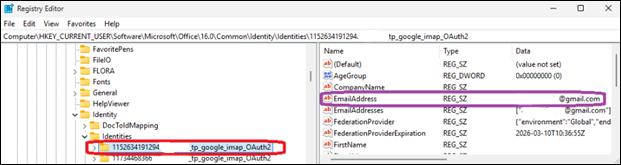
Customers who can't get their Outlook to sync can also use a temporary workaround shared by Microsoft before the fix rolled out, which requires them to delete the registry entries for the affected email address under the Identities key at Computer\HKEY_CURRENT_USER\Software\Microsoft\Office\16.0\Common\Identity\Identities in the Windows Registry Editor.
Microsoft is also investigating a bug that triggers "Can't connect to the server" errors when creating groups in classic Outlook when Exchange Web Services (EWS) is enabled for the tenant.
Another issue, acknowledged almost two months after the first user reports surfaced online, causes the mouse pointer to disappear for some users in classic Outlook, OneNote, and other Microsoft 365 apps.
Microsoft asked affected customers to submit diagnostic log files to assist the Outlook Support Team with analysis by opening a support case through their Microsoft 365 admin.
In January, it addressed another classic Outlook issue caused by the December 2025 updates that prevented Microsoft 365 customers from opening encrypted emails.
Microsoft is also working to address a known issue that will render the classic Outlook email client unusable for users who enable the Microsoft Teams Meeting Add-in.

Red Report 2026: Why Ransomware Encryption Dropped 38%
Malware is getting smarter. The Red Report 2026 reveals how new threats use math to detect sandboxes and hide in plain sight.
Download our analysis of 1.1 million malicious samples to uncover the top 10 techniques and see if your security stack is blinded.
如有侵权请联系:admin#unsafe.sh