好的,我现在需要帮用户总结一篇文章的内容,控制在100字以内。用户给了一篇关于DispatchLogger的文章,看起来挺技术性的。首先,我得快速浏览文章,抓住主要点。 文章主要讲的是COM自动化技术在Windows中的应用,以及Cisco Talos开发的DispatchLogger工具。这个工具用来监控和记录COM对象的交互,特别是针对恶意软件分析的。它通过透明代理拦截COM对象,提供详细的日志信息。 接下来,我需要提炼关键信息:DispatchLogger的作用、它如何工作、覆盖范围以及优势。可能还要提到它支持的恶意软件类型和它的技术特点,比如API钩子、代理实现等。 然后,我要把这些信息浓缩到100字以内,确保简洁明了。同时,不需要使用“文章内容总结”之类的开头语,直接描述即可。 最后,检查一下字数是否符合要求,并确保信息准确无误。 </think> Cisco Talos开发了DispatchLogger工具,用于通过透明代理拦截技术监控和记录COM对象交互,提供恶意软件分析的高可见性。该工具覆盖多种恶意软件类型,并通过API钩子和递归对象包装实现全面日志记录。 2026-3-18 10:3:33 Author: blog.talosintelligence.com(查看原文) 阅读量:42 收藏
- COM automation is a core Windows technology that allows code to access external functionality through well-defined interfaces. It is similar to traditionally loading a DLL, but is class-based rather than function-based. Many advanced Windows capabilities are exposed through COM, such as Windows Management Instrumentation (WMI).
- Scripting and late-bound COM calls operate through the IDispatch interface. This creates a key analysis point that many types of malware leverage when interacting with Windows components.This analysis point is quite complex and hard to safely instrumentate at scale.
- In this article, Cisco Talos presents DispatchLogger, a new open-source tool that closes this gap by delivering high visibility into late-bound IDispatch COM object interactions via transparent proxy interception.
- This blog describes the architecture, implementation challenges, and practical applications of comprehensive COM automation logging for malware analysis. This technique can be utilized on multiple types of malware.
Malware type | Binding type | Est. coverage |
Windows Script Host | Always Late | 100% |
PowerShell COM | Always Late | 100% |
AutoIT | Always Late | 100% |
VBA Macros | Mostly Late | 95% |
VB6 Malware | Mixed | 65% |
.NET COM Interop | Mixed | 60% |
C++ Malware | Rarely Late (WMI) | 10% |
The challenge
Modern script-based malware (e.g., VBScript, JScript, PowerShell) relies heavily on COM automation to perform malicious operations. Traditional dynamic analysis tools capture low-level API calls but miss the semantic meaning of high-level COM interactions. Consider this attack pattern:

Behavioral monitoring will detect process creation, but the analyst often loses critical context such as who launched the process. In this scenario WMI spawns new processes with wmic.exe or wmiprvse.exe as the parent.
Technical approach
Interception strategy
DispatchLogger starts with API hooking at the COM instantiation boundary. Every COM object creation in Windows flows through a small set of API functions. By intercepting these functions and returning transparent proxies deep visibility can be achieved without modifying malware behavior.
The core API hooking targets are:
- CoCreateInstance: Primary COM object instantiation (CreateObject in scripts)
- CoGetClassObject: Class factory retrieval
- GetActiveObject: Attachment to running COM instances
- CoGetObject/MkParseDisplayName: Moniker-based binding (GetObject)
- CLSIDFromProgID: ProgID resolution tracking
Why class factory hooking is essential
Initial implementation attempts hooked only CoCreateInstance, filtering for direct IDispatch requests. However, testing revealed that most VBScript CreateObject calls were not being intercepted.
To diagnose this a minimal ActiveX library was created with a MsgBox in Class_Initialize to freeze the process. The VBScript was launched, and a debugger attached to examine the call stack. The following code flow was revealed:

Disassembly of vbscript.dll!GetObjectFromProgID (see Figure 3) confirmed the pattern. VBScript's internal implementation requests IUnknown first, then queries for IDispatch afterward:

The key line is CreateInstance(NULL, IID_IUnknown, &ppunk). Here, VBScript explicitly requests IUnknown, not IDispatch. This occurs because VBScript needs to perform additional safety checks and interface validation before accessing the IDispatch interface.
If we only wrap objects when IDispatch is directly requested in CoCreateInstance, we miss the majority of script instantiations. The solution is to also hook CoGetClassObject and wrap the returned IClassFactory:

The ClassFactoryProxy intercepts CreateInstance calls and handles both cases:

This ensures coverage regardless of which interface the script engine initially requests.
Architecture
Proxy implementation
The DispatchProxy class implements IDispatch by forwarding all calls to the wrapped object while logging parameters, return values, and method names. If the function call returns another object, we test for IDispatch and automatically wrap it.

The proxy is transparent, meaning it implements the same interface, maintains proper reference counting, and handles QueryInterface correctly. Malware cannot detect the proxy through standard COM mechanisms.
Recursive object wrapping
The key capability is automatic recursive wrapping. Every IDispatch object returned from a method call is automatically wrapped before being returned to the malware. This creates a fully instrumented object graph.

Object relationships are tracked:
GetObject("winmgmts:")triggers hook, returns wrapped WMI service object- Calling
.ExecQuery()goes through proxy, logs call with SQL parameter - Returned query result object is wrapped automatically
- Enumerating with For Each retrieves wrapped IEnumVARIANT
- Each enumerated item is wrapped as it's fetched
- Calling
.Terminate()on items logs through their respective proxies
Enumerator interception
VBScript/JScript For Each constructs use IEnumVARIANT for iteration. We proxy this interface to wrap objects as they're enumerated:

Moniker support
VBScript's GetObject() function uses monikers for binding to objects. We hook CoGetObject and MkParseDisplayName, then wrap returned moniker objects to intercept BindToObject() calls:

This ensures coverage of WMI access and other moniker-based object retrieval.
Implementation details
Interface summary
While standard API hooks can be implemented on a function-by-function basis, COM proxies require implementing all functions of a given interface. The table below details the interfaces and function counts that had to be replicated for this technique to operate.
Interface | Total Methods | Logged | Hooked/Wrapped | Passthrough |
IDispatch | 7 | 4 | 1 | 2 |
IEnumVARIANT | 7 | 1 | 1 | 5 |
IClassFactory | 5 | 2 | 1 | 2 |
IMoniker | 26 | 1 | 1 | 24 |
During execution, a script may create dozens or even hundreds of distinct COM objects. For this reason, interface implementations must be class-based and maintain a one-to-one relationship between each proxy instance and the underlying COM object it represents.
While generating this volume of boilerplate code by hand would be daunting, AI-assisted code generation significantly reduced the effort required to implement the complex interface scaffolding.
The real trick with COM interface hooking is object discovery. The initial static API entry points are only the beginning of the mission. Each additional object encountered must be probed, wrapping them recursively to maintain logging.
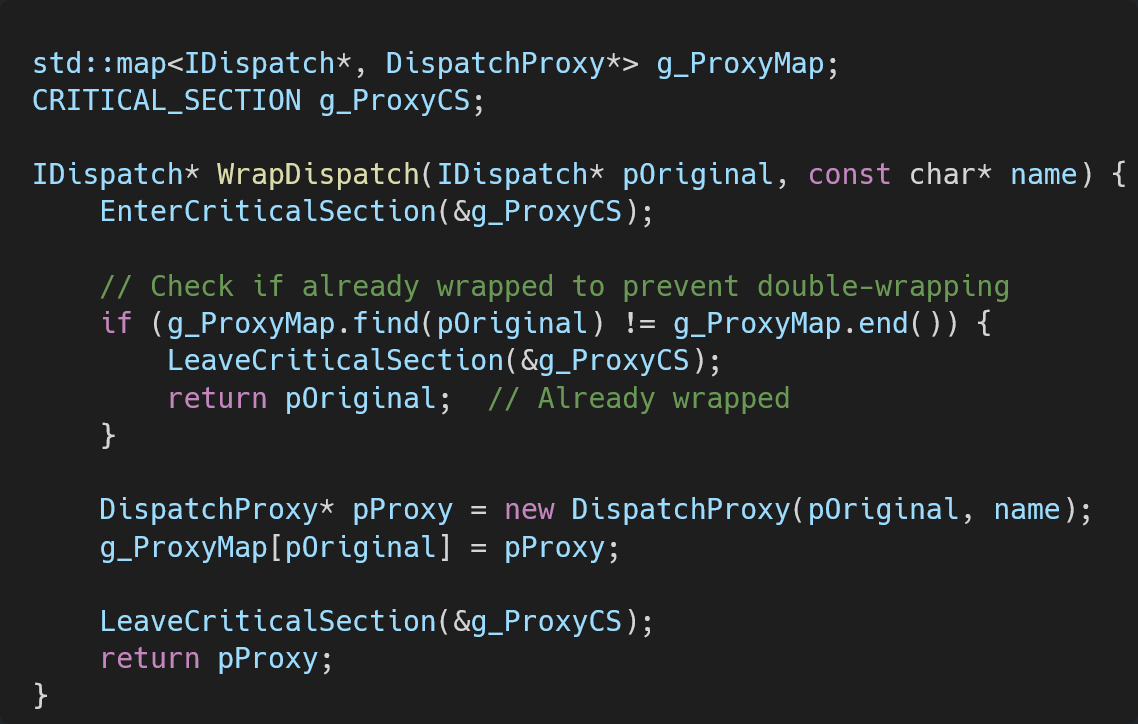
Thread safety
Multiple threads may create COM objects simultaneously. Proxy tracking uses a critical section to serialize access to the global proxy map:

Reference counting
Proper COM lifetime management is critical. The proxy maintains separate reference counts and forwards QueryInterface calls appropriately:

Output analysis
When script code executes with DispatchLogger active, comprehensive logs are generated. Here are excerpts from an actual analysis session:
Object creation and factory interception:
[CLSIDFromProgID] 'Scripting.FileSystemObject' -> {0D43FE01-F093-11CF-8940-00A0C9054228}
[CoGetClassObject] FileSystemObject ({0D43FE01-F093-11CF-8940-00A0C9054228}) Context=0x00000015
[CoGetClassObject] Got IClassFactory for FileSystemObject – WRAPPING!
[FACTORY] Created factory proxy for FileSystemObject
[FACTORY] CreateInstance: FileSystemObject requesting Iunknown
[FACTORY] CreateInstance SUCCESS: Object at 0x03AD42D8
[FACTORY] Object supports IDispatch – WRAPPING!
[PROXY] Created proxy #1 for FileSystemObject (Original: 0x03AD42D8)
[FACTORY] !!! Replaced object with proxy!
Method invocation with recursive object wrapping
[PROXY #1] >>> Invoke: FileSystemObject.GetSpecialFolder (METHOD PROPGET) ArgCount=1
[PROXY #1] Arg[0]: 2
[PROXY #1] <<< Result: IDispatch:0x03AD6C14 (HRESULT=0x00000000)
[PROXY] Created proxy #2 for FileSystemObject.GetSpecialFolder (Original: 0x03AD6C14)
[PROXY #1] !!! Wrapped returned IDispatch as new proxy
[PROXY #2] >>> Invoke: FileSystemObject.GetSpecialFolder.Path (METHOD PROPGET) ArgCount=0
[PROXY #2] <<< Result: "C:\Users\home\AppData\Local\Temp" (HRESULT=0x00000000)
WScript.Shell operations
[CLSIDFromProgID] 'WScript.Shell' -> {72C24DD5-D70A-438B-8A42-98424B88AFB8}
[CoGetClassObject] WScript.Shell ({72C24DD5-D70A-438B-8A42-98424B88AFB8}) Context=0x00000015
[FACTORY] CreateInstance: WScript.Shell requesting IUnknown
[PROXY] Created proxy #3 for WScript.Shell (Original: 0x03AD04B0)
[PROXY #3] >>> Invoke: WScript.Shell.ExpandEnvironmentStrings (METHOD PROPGET) ArgCount=1
[PROXY #3] Arg[0]: "%WINDIR%"
[PROXY #3] <<< Result: "C:\WINDOWS" (HRESULT=0x00000000)
Dictionary operations
[CLSIDFromProgID] 'Scripting.Dictionary' -> {EE09B103-97E0-11CF-978F-00A02463E06F}
[PROXY] Created proxy #4 for Scripting.Dictionary (Original: 0x03AD0570)
[PROXY #4] >>> Invoke: Scripting.Dictionary.Add (METHOD) ArgCount=2
[PROXY #4] Arg[0]: "test"
[PROXY #4] Arg[1]: "value"
[PROXY #4] <<< Result: (void) HRESULT=0x00000000
[PROXY #4] >>> Invoke: Scripting.Dictionary.Item (METHOD PROPGET) ArgCount=1
[PROXY #4] Arg[0]: "test"
[PROXY #4] <<< Result: "value" (HRESULT=0x00000000)
This output provides:
- Complete object instantiation audit trail with CLSIDs
- All method invocations with method names resolved via ITypeInfo
- Full parameter capture including strings, numbers, and object references
- Return value logging including nested objects
- Object relationship tracking showing parent-child relationships
- Log post processing allows for high fidelity command retrieval

Deployment
DispatchLogger is implemented as a dynamic-link library (DLL) that can be injected into target processes.
Once loaded, the DLL:
- Locates debug output window or uses OutputDebugString
- Initializes critical sections for thread safety
- Hooks COM API functions using inline hooking engine
- Begins transparent logging
No modifications to the target script or runtime environment are required.
Advantages over alternative approaches
Approach | Coverage | Semantic visibility | Detection risk |
Static analysis | Encrypted/obfuscated scripts missed | No runtime behavior | N/A |
API monitoring | Low-level calls only | Missing high-level intent | Medium |
Memory forensics | Point-in-time snapshots | No call sequence context | Low |
Debugger tracing | Manual breakpoints required | Analyst-driven, labor-intensive | High |
DispatchLogger | Complete late bound automation layer | Full semantic context | None |
DispatchLogger provides advantages for:
- WMI-based attacks: Complete query visibility, object enumeration, method invocation tracking
- Living-off-the-land (LOTL) techniques: Office automation abuse, scheduled task manipulation, registry operations
- Fileless malware: PowerShell/COM hybrid attacks, script-only payloads
- Persistence mechanisms: COM-based autostart mechanisms, WMI event subscriptions
- Data exfiltration: Filesystem operations, network object usage, database access via ADODB
- Obsfuscation bypass: Working at the COM layer, method names and arguments are already fully resolved
Performance considerations
Proxy overhead is minimal:
- Each Invoke call adds one virtual function dispatch.
- In the demo, logging I/O occurs via IPC.
- Object wrapping is O(1) with hash map lookup.
- There is no performance impact on non-COM operations.
In testing with real malware samples, execution time differences were negligible.
Limitations
Current implementation constraints:
- IDispatchEx: Not currently implemented (not used by most malware)
- IClassFactory2+: Not currently implemented (may impact browser/HTA/WinRT)
- Out-of-process COM: DCOM calls require separate injection into server process
- Multi-threaded race conditions: Rare edge cases in concurrent object creation
- Type library dependencies: Method name resolution requires registered type libraries
- Process following: Sample code does not attempt to inject into child processes
- 64-bit support: 64-bit builds are working but have not been heavily tested
The sample code included with this article is a general purpose tool and proof of concept. It has not been tested at scale and does not attempt to prevent logging escapes.
Operational usage
Typical analysis workflow:
- Prepare isolated analysis VM
- Inject DispatchLogger into target process
- Execute malware sample
- Review comprehensive COM interaction log
- Identify key objects, methods, and parameters
- Extract IOCs and behavioral signatures
The tool has been tested against:
- VBScript & Jscript using Windows Script Host (cscript/wscript)
- PowerShell scripts
- basic tests against .NET and Runtime Callable Wrappers (RCW)
- VB6 executables with late bound calls and Get/CreateObject
Background and prior work
The techniques presented in this article emerged from earlier experimentation with IDispatch while developing a JavaScript engine capable of exposing dynamic JavaScript objects as late-bound COM objects. That work required deep control over name resolution, property creation, and IDispatch::Invoke handling. This framework allowed JavaScript objects to be accessed and modified transparently from COM clients.
The experience gained from that effort directly informed the transparent proxying and recursive object wrapping techniques used in DispatchLogger.
Conclusion
DispatchLogger addresses a significant gap in script-based malware analysis by providing deep, semantic-level visibility into COM automation operations. Through transparent proxy interception at the COM instantiation boundary, recursive object wrapping, and comprehensive logging, analysts gain great insight into malware behavior without modifying samples or introducing detection vectors.
The implementation demonstrates that decades-old COM architecture, when properly instrumented, provides powerful analysis capabilities for modern threats. By understanding COM internals and applying transparent proxying patterns, previously opaque script behavior becomes highly observable.
DispatchLogger is being released open source under the Apache license and can be downloaded from the Cisco Talos GitHub page.
如有侵权请联系:admin#unsafe.sh