好的,我现在需要帮用户总结一篇文章的内容,控制在100字以内,而且不需要用“文章内容总结”这样的开头。首先,我得仔细阅读用户提供的文章内容,了解其主要结构和重点。 文章主要讲的是元数据(Metadata),包括它的定义、类型、收集方式、常见误区、风险以及如何保护隐私。作者还介绍了几个常用的元数据清除工具,比如Exif Cleaner、ExifTool和Exif Eraser。最后,作者给出了保护数字隐私的快速检查表和建议。 接下来,我需要提炼出文章的核心内容。元数据是文件中的隐藏信息,可能泄露个人隐私。文章讨论了不同类型的元数据及其潜在风险,并提供了工具和方法来清除这些数据,保护隐私。 现在,我要将这些信息浓缩到100字以内。首先提到元数据是什么,然后说明它可能带来的隐私风险,接着介绍如何通过工具和习惯来保护隐私。 可能会这样组织语言:“元数据是文件中的隐藏信息,可能泄露个人隐私。文章探讨了其类型、风险及管理方法,并推荐使用工具如Exif Cleaner清除元数据以保护隐私。” 检查一下字数是否在限制内,并确保内容准确传达了原文的核心信息。 </think> 元数据是文件中的隐藏信息,可能泄露个人隐私。文章探讨了其类型、风险及管理方法,并推荐使用工具如Exif Cleaner清除元数据以保护隐私。 2025-10-9 07:15:5 Author: www.hackingarticles.in(查看原文) 阅读量:34 收藏
Metadata is the invisible data within your files — information that describes the file’s details rather than its content. Think of it as a digital tag that tells where, when, and how a file was created.
For example:
- A photo may contain your camera model, location (GPS coordinates), date, and even device settings.
- A document can include the author’s name, software used, and the date it was last edited.
- A video might store information like frame rate, resolution, and recording time.
In simple terms, metadata is “data about data.” It’s what helps your devices, apps, and websites organize, sort, and manage files efficiently — but it can also reveal personal details you never meant to share.
Table of Contents
- Why Metadata Matters for Your Privacy
- Types of Metadata You Should Know
- How Metadata Gets Collected and Shared
- Common Myths About Metadata
- Risks of Ignoring Metadata
- Top Tools to Remove Metadata Safely
- Exif Cleaner
- ExifTool
- Exif Eraser
- A Quick Checklist for Protecting Your Digital Privacy
- Beyond Tools: Building a Privacy-Focused Habit
- Conclusion
Why Metadata Matters for Your Privacy
Metadata might look insignificant at first glance, but it’s one of the biggest unseen threats to personal privacy. Even if you encrypt your messages, your photos, or your files, the details around them can still reveal a lot about you. These details include when you created them, where you created them, and how you created them. Even small bits of information can expose a surprising amount about you. Understanding and managing metadata helps you stay in control of what you unintentionally share online.
Why It Matters:
- Reveals hidden details: Every file or message carries background data, such as timestamps, device model, or GPS location, which can silently share your personal information.
- Creates digital patterns: Metadata helps others map your habits, routines, and communication networks, even without accessing your actual content.
- Used by data trackers: Advertisers and data brokers use metadata to create behavioural profiles that affect what you see and how you’re targeted online.
- Compromises anonymity: Even encrypted messages can expose who you talk to, how often, and from where—reducing your privacy despite secure channels.
- Empowers smarter privacy choices: Learning to clean or anonymize metadata gives you control over your digital footprint, helping you limit unnecessary exposure.
In short, protecting metadata is about protecting context. The invisible layer that can reveal more about you than the content itself. By being aware of it, you strengthen your privacy and take a crucial step toward genuine online freedom.
Types of Metadata You Should Know
Not all metadata is the same. It comes in many forms, each offering different insights into your digital behaviour. When you recognize these categories, you start to understand what kind of data you might be unintentionally sharing. In addition, you learn how others can use this data. As a result, you become more aware of your digital footprint and how to protect it. By learning the key types, you can take practical steps to manage them before they compromise your privacy.
Main Types of Metadata:
- Descriptive Metadata: This defines the identity of a file—its title, author, keywords, and summary. It helps search engines and software organize data, but can also reveal personal details like your name or workplace.
- Technical Metadata: It stores device-specific and format information such as camera model, resolution, or file creation method. While useful for troubleshooting, it can disclose the tools and systems you use.
- Administrative Metadata: This includes data about access rights, ownership, and usage permissions. It often determines who can view or edit a file, and when not properly secured, it may reveal management structures or internal processes.
- Structural Metadata: Found in digital documents and media libraries, this type outlines how components fit together—pages in a PDF, tracks in a playlist, or layers in an image file. It’s crucial for organizing content but can hint at editing history or workflow details.
- Geolocation Metadata: Embedded mainly in photos and videos, it records exact coordinates, allowing anyone to trace the content’s creation time and place.
Each type serves a legitimate purpose, but understanding them helps you decide what to keep and what to erase before sharing. Managing metadata wisely transforms it from a privacy risk into a tool for organized, secure digital living.
How Metadata Gets Collected and Shared
Metadata isn’t just created when you upload or send something. In fact, your devices, apps, and online services constantly generate it. Moreover, every click, connection, and file interaction leaves a trail. Therefore, understanding where this data comes from and how it spreads helps you take smarter control over your privacy and digital behaviour.
How It’s Collected and Shared:
- Through Devices and Cameras: Smartphones, tablets, and cameras automatically embed details like date, time, and location whenever you capture a photo or record a video.
- By Software and Applications: Office tools, browsers, and messaging apps log metadata such as document versions, sender and receiver details, or edit timestamps without direct user input.
- From Internet Connections: When you browse the web or send an email, servers record your IP address, device type, and session duration, building a digital signature linked to your identity.
- Via Cloud Services: Online storage platforms and collaboration tools maintain extensive metadata about file ownership, sharing history, and modification timelines to improve functionality.
- Through Social Media Platforms: Social networks extract and store metadata to enhance user engagement, improve targeting algorithms, and analyse content performance.
- Shared with Third Parties: Many services share metadata with advertisers, analytics firms, or affiliates for optimization, personalization, or compliance reporting.
Metadata collection is often automatic, but awareness gives you an advantage. By choosing privacy-respecting tools, adjusting permissions, and reviewing file properties before sharing, you can limit unnecessary exposure and maintain ownership of your digital footprint.
Common Myths About Metadata
Metadata often misleads many, leading them to underestimate its impact on privacy. Some think it’s harmless or only relevant to tech experts, while others assume deleting files removes all traces of it. In reality, Metadata plays a much deeper role in how information is tracked and identified. Understanding the truth behind these myths helps you make smarter and more confident privacy decisions.
Popular Misconceptions Explained:
- Myth 1: “Metadata is only for professionals.”
In fact, every digital user interacts with metadata daily—from photos on social media to documents shared online. It affects everyone, not just IT experts. - Myth 2: “Deleting a file removes all metadata.”
File deletion doesn’t erase embedded data. Hidden metadata often remains even after a file is removed or transferred to another device. - Myth 3: “Metadata can’t reveal much.”
While it doesn’t expose direct content, metadata can outline patterns—such as communication frequency, location, and device history—enough to build a detailed personal profile. - Myth 4: “It’s too technical to manage.”
Many tools simplify metadata removal with one-click options. No coding or advanced skills are required—just basic awareness and routine checks. - Myth 5: “Encrypted apps automatically protect all metadata.”
Encryption shields message content, but the metadata (like sender, receiver, or time) often remains visible to service providers or third parties.
By separating fact from fiction, users can better appreciate metadata’s hidden power and take simple, proactive steps to protect their privacy without complicating their digital routine.
Risks of Ignoring Metadata
Many people underestimate how much hidden data travels with their files and online activities. Ignoring metadata might seem harmless, but it quietly exposes information that can compromise your privacy, reputation, and digital safety. These overlooked details can paint a surprisingly accurate picture of your behaviour, location, and professional life—sometimes without you realizing it.
Potential Risks to Be Aware Of:
- Revealing Personal Locations: Photos and videos can include geotags that pinpoint where someone took them, unintentionally exposing your home, workplace, or travel routes.
- Traceable Digital Footprints: Shared files may still carry author names, device info, or editing records, allowing others to identify who created or modified them.
- Behavioural Profiling: Companies and data brokers analyse metadata to predict your interests and preferences, shaping the ads, news, and offers you see online.
- Workplace Data Exposure: In professional settings, leaving metadata in documents or presentations can reveal internal decisions, contributors, or draft versions that were meant to stay private.
- Phishing and Scams: Cybercriminals can combine small metadata fragments to design realistic, personalized attacks that appear trustworthy.
- Compromised Online Identity: Repeated patterns in your metadata—like login times or file origins—can gradually uncover your identity, even if you use anonymous accounts.
Protecting yourself from these risks isn’t about fear—it’s about digital responsibility. Removing or masking unnecessary metadata gives you stronger control over your privacy and ensures that your shared files reflect only what you choose to reveal.
Top Tools to Remove Metadata Safely
Cleaning metadata doesn’t have to be complicated. Reliable tools help you erase hidden details from photos, documents, and videos before sharing them. Whether you’re a casual user or a privacy enthusiast, using the right software ensures that your personal data stays yours—without affecting the quality or usability of your files.
Exif Cleaner
Exif Cleaner is a free, open-source tool that removes hidden metadata (like GPS location, camera model, and timestamps) from photos and files to protect your privacy. With a simple drag-and-drop interface, it instantly cleans data without affecting quality—all local processing ensures no files are uploaded. Available for Windows, macOS, and Linux, Exif Cleaner is lightweight, ad-free, and trusted by photographers, journalists, and privacy-conscious users who want full control over what they share online.
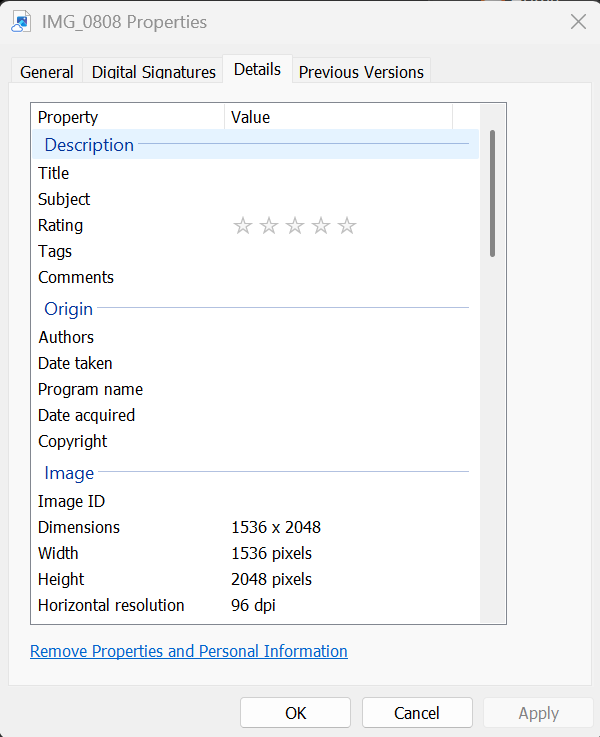
I selected an image and checked its metadata through the properties section.

ExifCleaner removes the image’s EXIF data, reducing 104 metadata entries to 0 and ensuring complete privacy protection.

The metadata of the same image has now been successfully removed.

ExifTool
ExifTool is a free, open-source command-line utility created by Phil Harvey for reading, editing, and removing metadata from almost any file type, including photos, videos, PDFs, and audio. It supports standards like EXIF, IPTC, XMP, and GPS, offering full control over hidden data. Trusted by photographers and digital forensics experts, it allows batch processing, detailed metadata viewing, and complete data cleanup. Available for Windows, macOS, and Linux, ExifTool is lightweight, reliable, and widely used for professional-level privacy and file analysis.
This image displays the metadata of an image extracted using ExifTool. It reveals details like the camera model (iPhone 16 Pro Max), capture date and time (July 3, 2025, 13:40:16), image size (1356 kB), and technical settings such as ISO 125, f/1.8 aperture, and 1/3584 s exposure time. In short, it displays hidden EXIF data that records when, how, and with which device the photo was taken.

With the help of exiftool.exe -all= command, we can remove the metadata of the image.

Exif Eraser
Exif Eraser is a free mobile app that removes hidden EXIF metadata from photos. This helps protect your privacy before sharing images online. It instantly deletes details like GPS location, camera model, and timestamps without affecting image quality. Designed for Android and iOS, Exif Eraser works entirely offline, keeping your photos safe and private on your device. Its simple tap-to-clean interface makes it perfect for users who want fast and reliable on-the-go privacy protection.
You can download the app (Exif Eraser) from the Play Store.
I selected an image and checked its metadata through the properties section.

We can select any of them to remove the metadata.

Click on the ‘Custom Save Path’ button.

You can create a new folder or select an existing folder.

I have created a folder named ‘MetaData’; click on the ‘Use This Folder’ button.

Click on ‘Allow’

I have selected the image whose metadata needs to be removed.

As you can see, the metadata of the selected image has been successfully removed.

A Quick Checklist for Protecting Your Digital Privacy
Keeping your data safe online doesn’t need to be complicated. Follow these practical steps:
- Check Before Sharing – Review files for hidden info like location or device details.
- Remove Hidden Data – Use trusted tools to erase invisible metadata safely.
- Restrict App Access – Only allow permissions essential for app functionality.
- Protect Cloud Files – Choose encrypted, privacy-focused storage services.
- Adjust Device Settings – Disable automatic location tagging and extra metadata features.
- Scan Files Regularly – Routine audits help prevent personal information leaks.
- Use Multiple Security Layers – Combine metadata cleaning with VPNs, encrypted messaging, and strong passwords.
- Keep Everything Updated – Install updates to fix security gaps and stay protected.
Beyond Tools: Building a Privacy-Focused Habit
Digital privacy isn’t just about using apps or software—it’s about adopting a thoughtful approach to how you live online. Developing a privacy-first mindset helps you anticipate risks and make smarter choices in everyday digital interactions.
- Think Like a Privacy-Conscious User
Consider the potential impact of your online actions. Even small posts or shared files can reveal patterns that affect your security. - Prioritize Awareness Over Convenience
Protecting your information sometimes means slowing down and making deliberate choices rather than taking shortcuts. - Adopt Long-Term Habits
True privacy comes from consistency. Regular reflection on your digital behavior is more effective than occasional actions. - Stay Curious and Informed
The online world evolves quickly. Staying aware of emerging risks and new protective strategies reinforces your privacy-first approach. - Internalize Privacy as a Lifestyle
Over time, safeguarding your personal data becomes second nature—an integral part of how you interact online.
By focusing on mindset rather than just tools, you shift from reactive protection to proactive digital self-care. This approach helps you create lasting privacy habits that go beyond any single app or program
Conclusion
Protecting your digital privacy isn’t a one-time task—it’s a continuous journey. Every file you share, every app you install, and every setting you adjust contributes to the safety of your personal information. By combining the right tools with thoughtful habits, you gain control over your data. This helps reduce the risk of unwanted exposure.
Remember, privacy isn’t just about hiding information; it’s about making intentional choices online. Each small action, checking a file before sharing, limiting app permissions, staying updated, adds up to a safer digital life. These habits help you feel more confident and in control online.
Embrace a privacy-first mindset, stay aware, and treat your personal data as the valuable asset it truly is. In doing so, you don’t just protect yourself—you build a habit that keeps you secure in an ever-changing online world.
To learn more on Open-Source Intelligence (OSINT). Follow this Link
Author: Muskan Sen is a Researcher and Technical Writer specializing in Information Security. Follow her – Linkedin
如有侵权请联系:admin#unsafe.sh