好的,我现在需要帮用户总结这篇文章的内容。用户的要求是用中文总结,控制在100字以内,不需要特定的开头,直接写描述。 首先,我快速浏览文章内容。文章主要讲的是Tycoon2FA这个钓鱼工具的崛起、运作方式以及微软的防御建议。它是一个PhaaS平台,利用中间人攻击绕过MFA,影响广泛。 接下来,我需要提取关键点:Tycoon2FA的类型、功能、影响范围、运作机制以及防御措施。然后,把这些点浓缩成简短的句子。 考虑到字数限制,可能需要合并一些信息。例如,将它的运作机制和影响结合起来描述。 最后,确保语言简洁明了,避免使用复杂的术语,让读者一目了然。 </think> Tycoon2FA是一种钓鱼即服务(PhaaS)平台,通过中间人攻击(AiTM)技术绕过多因素认证(MFA),广泛用于针对全球50万组织的大规模钓鱼攻击。该平台模仿可信品牌登录页面,利用动态重定向、自定义CAPTCHA和代码混淆等技术逃避检测,并通过Telegram等渠道传播。微软建议采用密码无屏和分层防御策略应对此类威胁。 2026-3-4 16:4:24 Author: www.microsoft.com(查看原文) 阅读量:44 收藏
Following its emergence in August 2023, Tycoon2FA rapidly became one of the most widespread phishing-as-a-service (PhaaS) platforms, enabling campaigns responsible for tens of millions of phishing messages reaching over 500,000 organizations each month worldwide. The phishing kit—developed, supported, and advertised by the threat actor tracked by Microsoft Threat Intelligence as Storm-1747—provided adversary-in-the-middle (AiTM) capabilities that allowed even less skilled threat actors to bypass multifactor authentication (MFA), significantly lowering the barrier to conducting account compromise at scale.

Tycoon2FA’s platform enabled threat actors to impersonate trusted brands by mimicking sign-in pages for services like Microsoft 365, OneDrive, Outlook, SharePoint, and Gmail. It also allowed threat actors using its service to establish persistence and to access sensitive information even after passwords are reset, unless active sessions and tokens were explicitly revoked. This worked by intercepting session cookies generated during the authentication process, simultaneously capturing user credentials. The MFA codes were subsequently relayed through Tycoon2FA’s proxy servers to the authenticating service.
To evade detection, Tycoon2FA used techniques like anti-bot screening, browser fingerprinting, heavy code obfuscation, self-hosted CAPTCHAs, custom JavaScript, and dynamic decoy pages. Targets are often lured through phishing emails containing attachments like .svg, .pdf, .html, or .docx files, often embedded with QR codes or JavaScript.
This blog provides a comprehensive up-to-date analysis of Tycoon2FA’s progression and scale. We share specific examples of the Tycoon2FA service panel, including a detailed analysis of Tycoon2FA infrastructure. Defending against Tycoon2FA and similar AiTM phishing threats requires a layered approach that blends technical controls with user awareness. This blog also provides Microsoft Defender detection and hunting guidance, as well as resources on how to set up mail flow rules, enforce spoof protections, and configure third-party connectors to prevent spoofed phishing messages from reaching user inboxes.
Operational overview of Tycoon2FA
Tycoon2FA customer panel
Tycoon2FA phishing services were advertised and sold to cybercriminals on applications like Telegram and Signal. Phish kits were observed to start at $120 USD for access to the panel for 10 days and $350 for access to the panel for a month, but these prices could vary.
Tycoon2FA is operated through a web‑based administration panel provided on a per user basis that centrally integrates all functionality provided by the Tycoon2FA PhaaS platform. The panel serves as a single dashboard for configuring, tracking, and refining campaigns. While it does not include built‑in mailer capabilities, the panel provides the core components needed to support phishing campaigns. This includes pre‑built templates, attachment files for common lure formats, domain and hosting configuration, redirect logic, and victim tracking. This design makes the platform accessible to less technically skilled actors while still offering sufficient flexibility for more experienced operators.

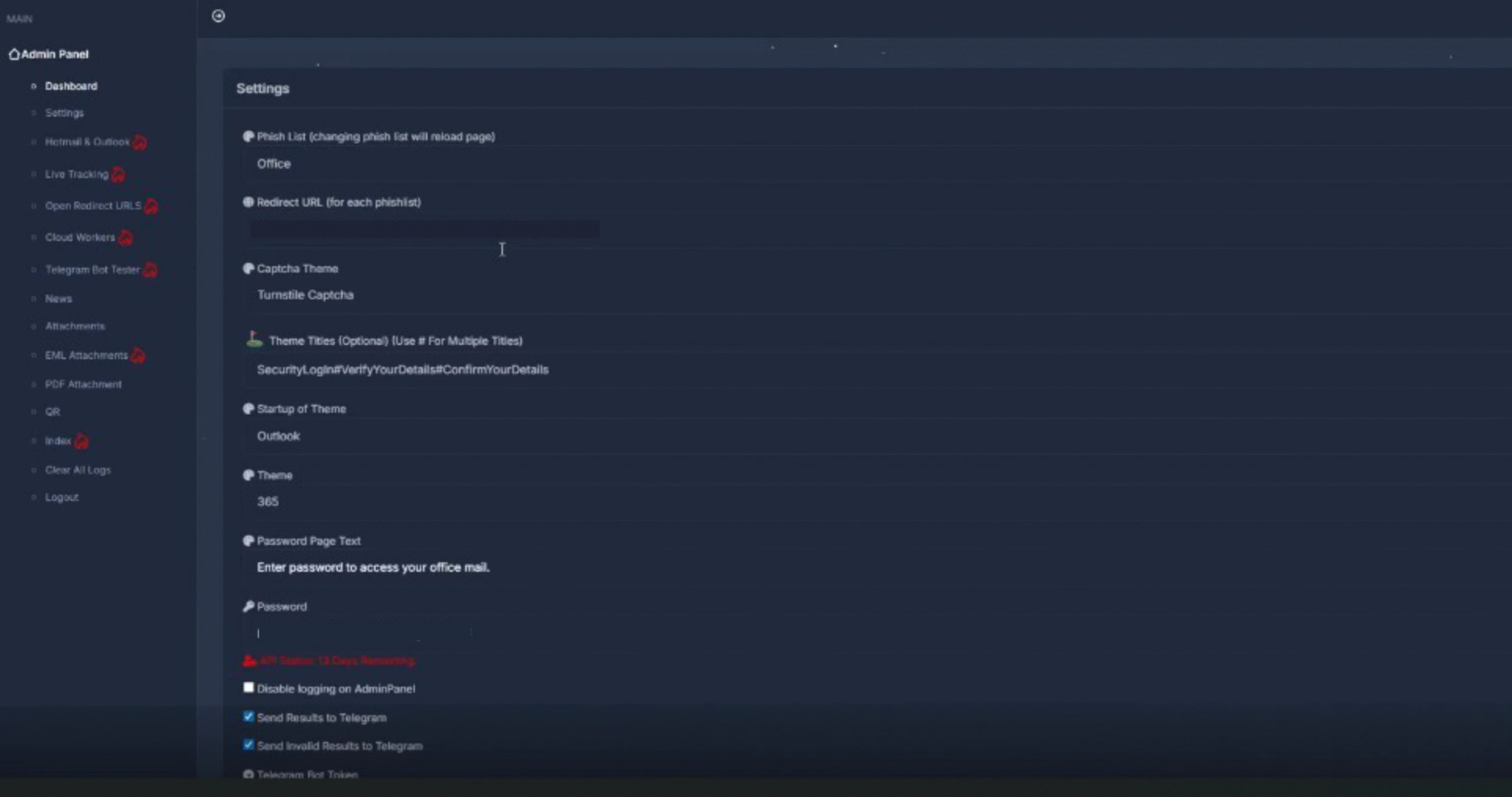
After signing in, Tycoon2FA customers are presented with a dashboard used to configure, monitor, and manage phishing campaigns. Campaign operators can configure a broad set of campaign parameters that control how phishing content is delivered and presented to targets. Key settings include lure template selection and branding customization, redirection routing, MFA interception behavior, CAPTCHA appearance and logic, attachment generation, and exfiltration configuration. Campaign operators can choose from highly configurable landing pages and sign-in themes that impersonate widely trusted services such as Microsoft 365, Outlook, SharePoint, OneDrive, and Google, increasing the perceived legitimacy of attacks.
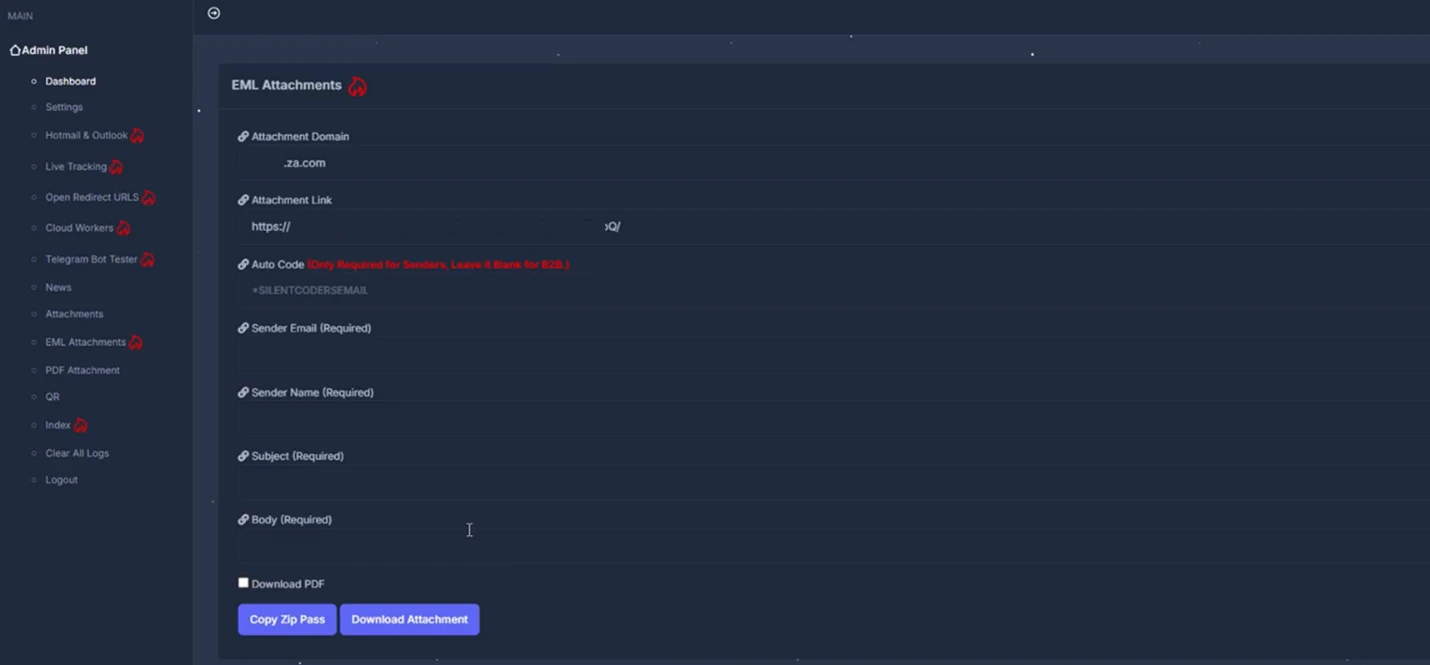
Campaign operators can also configure how the malicious content is delivered through attachments. Options include generating EML files, PDFs, and QR codes, offering multiple ways to package and distribute phishing lures.
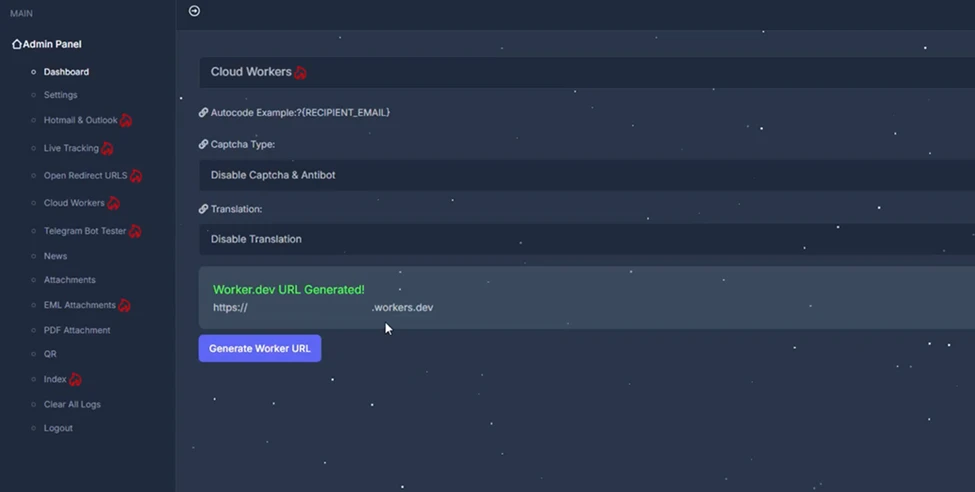
The panel also allows operators to manage redirect chains and routing logic, including the use of intermediate pages and decoy destinations. Support for automated subdomain rotation and intermediary Cloudflare Workers-based URLs enables campaigns to adapt quickly as infrastructure is identified or blocked. The following is a visual example of redirect and routing options, including intermediate pages and decoy destinations used within a phishing campaign.
Once configured, these settings control the appearance and behavior of the phishing pages delivered to targets. The following examples show how selected themes (Microsoft 365 and Outlook) are rendered as legitimate-looking sign-in pages presented to targets.
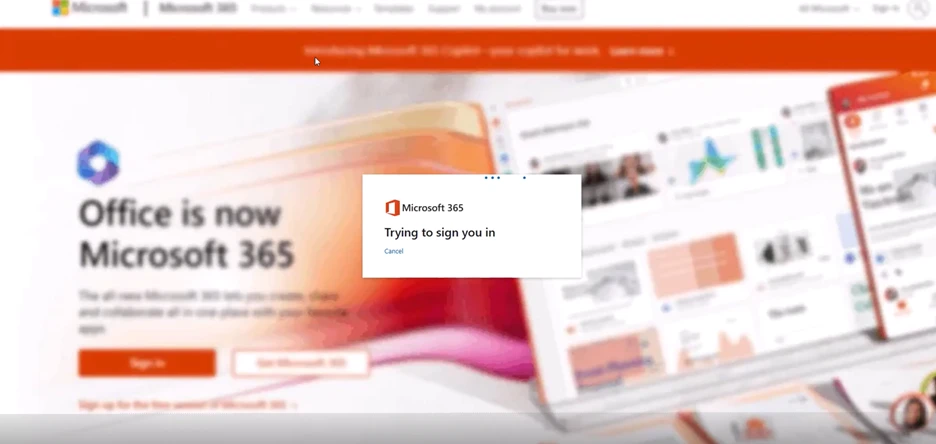
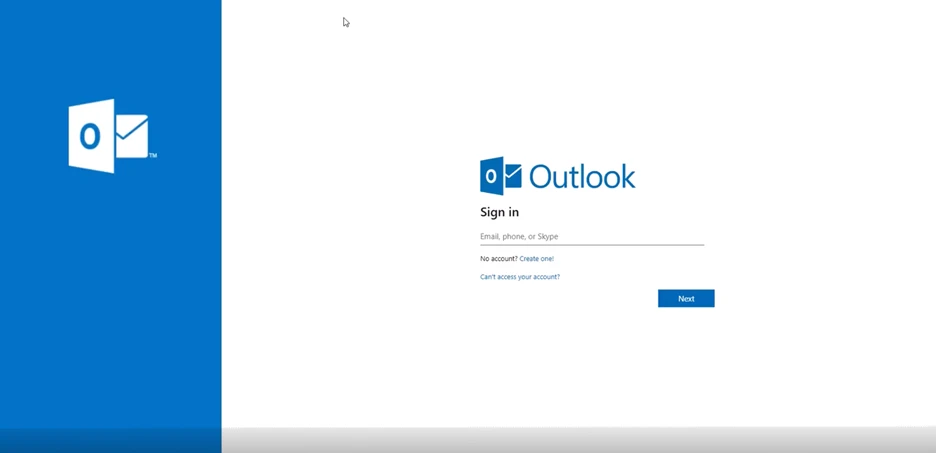
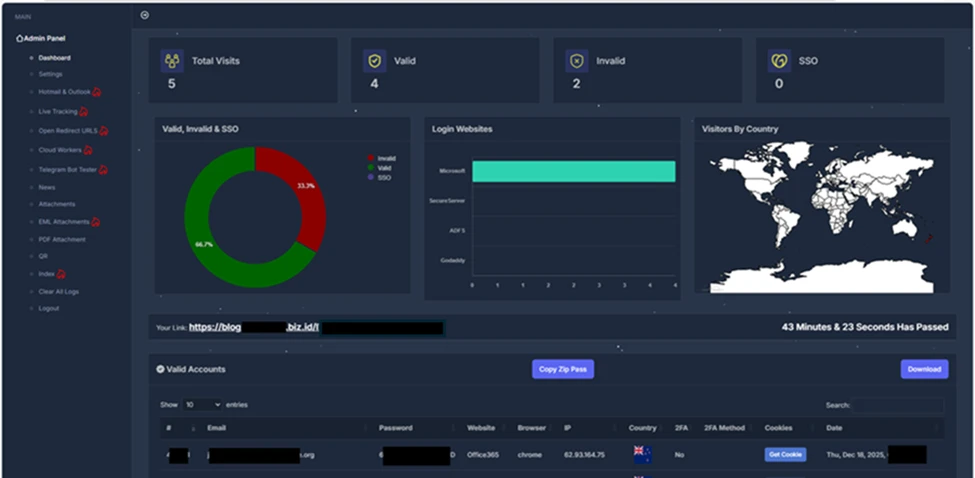
Beyond campaign configuration, the panel provides detailed visibility into victim interaction and authentication outcomes. Operators can track valid and invalid sign-in attempts, MFA usage, and session cookie capture, with victim data organized by attributes such as targeted service, browser, location, and authentication status. Captured credentials and session cookies can be viewed or downloaded directly within the panel and/or forwarded to Telegram for near‑real‑time monitoring. The following image shows a summary view of victim account outcomes for threat actors to review and track.
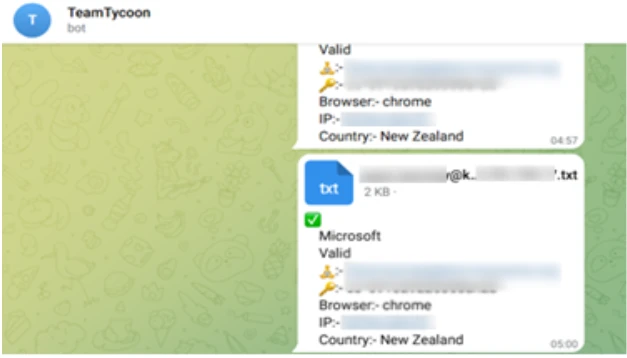
Captured session information including account attributes, browsers and location metadata, and authentication artifacts are exfiltrated through Telegram bot.
In addition to configuration and campaign management features, the panel includes a section for announcements and updates related to the service. These updates reflect regular maintenance and ongoing changes, indicating that the service continues to evolve.
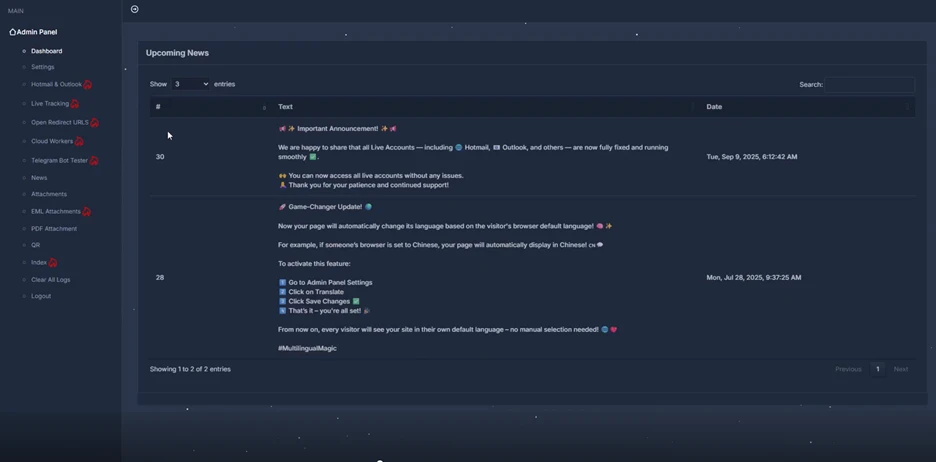
By combining centralized configuration, real-time visibility, and regular platform updates, the service enables scalable AiTM phishing operations that can adapt quickly to defensive measures. This balance of usability, adaptability, and sustained development has contributed to Tycoon2FA’s adoption across a wide range of campaigns.
Tycoon2FA infrastructure
Tycoon2FA’s infrastructure has shifted from static, high-entropy domains to a fast-moving ecosystem with diverse top-level domains (TLDs) and short-lived (often 24-72 hours) fully qualified domain names (FQDNs), with the majority hosted on Cloudflare. A key change is the move toward a broader mix of TLDs. Early tracking showed heavier use of regional TLDs like .es and .ru, but recent campaigns increasingly rotated across inexpensive generic TLDs that require little to no identity verification. Examples include .space, .email, .solutions, .live, .today, and .calendar, as well as second-level domains such as .sa[.]com, .in[.]net, and .com[.]de.
Tycoon2FA generated large numbers of subdomains for individual phishing campaigns, used them briefly, then dropped them and spun up new ones. Parent root domains might remain registered for weeks or months, but nearly all campaign-specific FQDNs were temporary. The rapid turnover complicated detection efforts, such as building reliable blocklists or relying on reputation-based defenses.
Subdomain patterns have also shifted toward more readable formats. Instead of high entropy or algorithmically generated strings, like those used in July 2025, newly observed subdomains used recognizable words tied to common workflows or services, like those observed in December 2025.
July 2025 campaign URL structure examples:
- hxxps://qonnfp.wnrathttb[.]ru/Fe2yiyoKvg3YTfV!/$EMAIL_ADDRESS
- hxxps://piwf.ariitdc[.]es/kv2gVMHLZ@dNeXt/$EMAIL_ADDRESS
- hxxps://q9y3.efwzxgd[.]es/MEaap8nZG5A@c8T/*EMAIL_ADDRESS
- hxxps://kzagniw[.]es/LI6vGlx7@1wPztdy
December 2025 campaign URL structure examples:
- hxxps://immutable.nathacha[.]digital/T@uWhi6jqZQH7/#?EMAIL_ADDRESS
- hxxps://mock.zuyistoo[.]today/pry1r75TisN5S@8yDDQI/$EMAIL_ADDRESS
- hxxps://astro.thorousha[.]ru/vojd4e50fw4o!g/$ENCODED EMAIL_ADDRESS
- hxxps://branch.cricomai[.]sa[.]com/b@GrBOPttIrJA/*EMAIL_ADDRESS
- hxxps://mysql.vecedoo[.]online/JB5ow79@fKst02/#EMAIL_ADDRESS
- hxxps://backend.vmfuiojitnlb[.]es/CGyP9!CbhSU22YT2/
Some subdomains resembled everyday processes or tech terms like cloud, desktop, application, and survey, while others echoed developer or admin vocabulary like python, terminal, xml, and faq. Software as a service (SaaS) brand names have appeared in subdomains as well, such as docker, zendesk, azure, microsoft, sharepoint, onedrive, and nordvpn. This shift was likely used to reduce user suspicion and to evade detection models that rely on entropy or string irregularity.
Tycoon2FA’s success stemmed from closely mimicking legitimate authentication processes while covertly intercepting both user credentials and session tokens, granting attackers full access to targeted accounts. Tycoon2FA operators could bypass nearly all commonly deployed MFA methods, including SMS codes, one-time passcodes, and push notifications. The attack chain was typical yet highly effective and started with phishing the user through email, followed by a multilayer redirect chain, then a spoofed sign-in page with AiTM relay, and authentication relay culminating in token theft.
Tycoon2FA phishing emails
In observed campaigns, threat actors gained initial access through phishing emails that used either embedded links or malicious attachments. Most of Tycoon2FA’s lures fell into four categories:
- PDF or DOC/DOCX attachments with QR codes
- SVG files containing embedded redirect logic
- HTML attachments with short messages
- Redirect links that appear to come from trusted services
Email lures were crafted from ready-made templates that impersonated trusted business applications like Microsoft 365, Azure, Okta, OneDrive, Docusign, and SharePoint. These templates spanned themes from generic notifications (like voicemail and shared document access) to targeted workflows (like human resources (HR) updates, corporate documents, and financial statements). In addition to spoofing trusted brands, phishing emails often leveraged compromised accounts with existing threads to increase legitimacy.
While Tycoon2FA supplied hosting infrastructures, along with various phishing and landing page related templates, email distribution was not provided by the service.
Defense evasion
From a defense standpoint, Tycoon2FA stood out for its continuously updated evasion and attack techniques. A defining feature was the use of constantly changing custom CAPTCHA pages that regenerated frequently and varied across campaigns. As a result, static signatures and narrowly scoped detection logic became less effective over time. Before credentials were entered, targets encounter the custom CAPTCHA challenge, which was designed to block automated scanners and ensure real users reach the phishing content. These challenges often used randomized HTML5 canvas elements, making them hard to bypass with automation. While Cloudflare Turnstile was once the primary CAPTCHA, Tycoon2FA shifted to using a rotating set of custom CAPTCHA challenges. The CAPTCHA acted as a gate in the flow, legitimizing the process and nudging the target to continue.
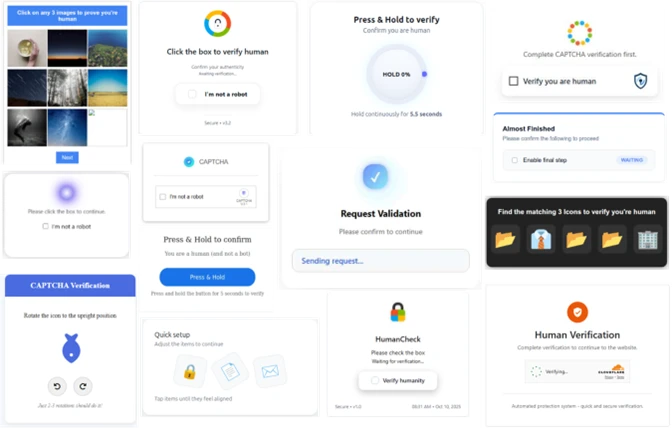
After the CAPTCHA challenge, the user was shown a dynamically generated sign-in portal that mirrored the targeted service’s branding and authentication flow, most often Microsoft or Gmail. The page might even include company branding to enhance legitimacy. When the user submitted credentials, Tycoon2FA immediately relayed them to the real service, triggering the genuine MFA challenge. The phishing page then displayed the same MFA prompt (for example, number matching or code entry). Once the user completed MFA, the attacker captured the session cookie and gained real-time access without needing further authentication, even if the password was changed later. These pages were created with heavily obfuscated and randomized JavaScript and HTML, designed to evade signature-based detection and other security tools.
The phishing kit also disrupted analysis through obfuscation and dynamic code generation, including nonfunctional dead code, to defeat consistent fingerprinting. When the campaign infrastructure encountered an unexpected or invalid server response (for example, a geolocation outside the allowed targeting zone), the kit replaced phishing content with a decoy page or a benign redirect to avoid exposing the live credential phishing site.
Tycoon2FA further complicated investigation by actively checking for analysis of environments or browser automation and adjusting page behavior if detected. These evasive measures included:
- Intercepting user input
- Keystroke monitoring
- Blocking copy/paste and right click functions
- Detecting or blocking automated inspection
- Automation tools (for example, PhantomJS, Burp Suite)
- Disabling common developer tool shortcuts
- Validating and filtering incoming traffic
- Browser fingerprinting
- Datacenter IP filtering
- Geolocation restrictions
- Suspicious user agent profiling
- Increased obfuscation
- Encoded content (Base64, Base91)
- Fragmented or concatenated strings
- Invisible Unicode characters
- Layered URL/URI encoding
- Dead or nonfunctional script
If analysis was suspected at any point, the kit redirected to a legitimate decoy site or threw a 404 error.
Complementing these anti-analysis measures, Tycoon2FA used increasingly complex redirect logic. Instead of sending victims directly to the phishing page, it chained multiple intermediate hosts, such as Azure Blob Storage, Firebase, Wix, TikTok, or Google resources, to lend legitimacy to the redirect path. Recent changes combined these redirect chains with encoded Uniform Resource Identifier (URI) strings that obscured full URL paths and landing points, frustrating both static URL extraction and detonation attempts. Stacked together, these tactics made Tycoon2FA a resilient, fast-moving system that evaded both automated and manual detection efforts.
Credential theft and account access
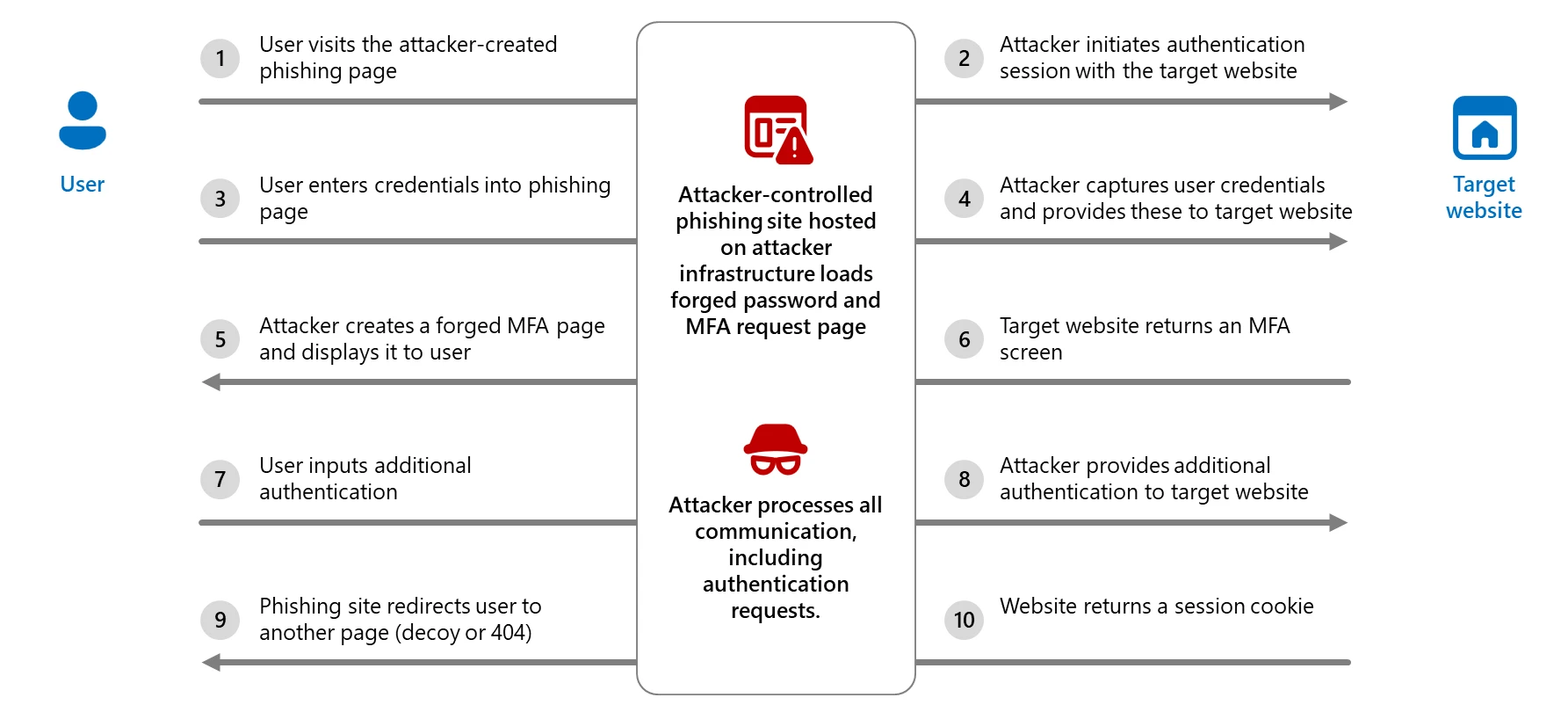
Captured credentials and session tokens were exfiltrated over encrypted channels, often via Telegram bots. Attackers could then access sensitive data and establish persistence by modifying mailbox rules, registering new authenticator apps, or launching follow-on phishing campaigns from compromised accounts. The following diagram breaks down the AiTM process.
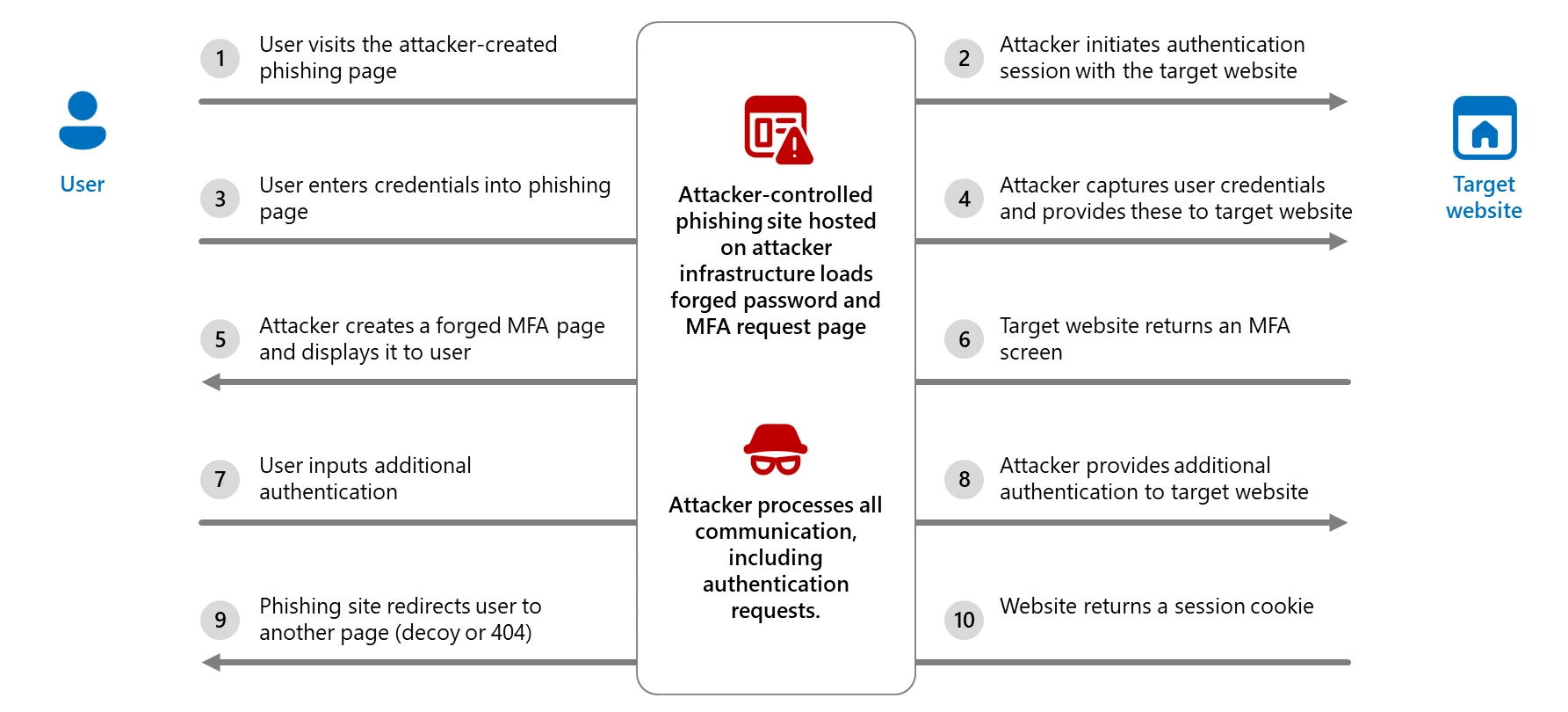
Tycoon2FA illustrated the evolution of phishing kits in response to rising enterprise defenses, adapting its lures, infrastructure, and evasion techniques to stay ahead of detection. As organizations increasingly adopt MFA, attackers are shifting to tools that target the authentication process itself instead of attempting to circumvent it. Coupled with affordability, scalability, and ease of use, Tycoon2FA posed a persistent and significant threat to both consumer and enterprise accounts, especially those that rely on MFA as a primary safeguard.
Mitigation and protection guidance
Mitigating threats from phishing actors begins with securing user identity by eliminating traditional credentials and adopting passwordless, phishing-resistant MFA methods such as FIDO2 security keys, Windows Hello for Business, and Microsoft Authenticator passkeys.
Microsoft Threat Intelligence recommends enforcing phishing-resistant MFA for privileged roles in Microsoft Entra ID to significantly reduce the risk of account compromise. Learn how to require phishing-resistant MFA for admin roles and plan a passwordless deployment.
Passwordless authentication improves security as well as enhances user experience and reduces IT overhead. Explore Microsoft’s overview of passwordless authentication and authentication strength guidance to understand how to align your organization’s policies with best practices. For broader strategies on defending against identity-based attacks, refer to Microsoft’s blog on evolving identity attack techniques.
If Microsoft Defender alerts indicate suspicious activity or confirmed compromised account or a system, it’s essential to act quickly and thoroughly. The following are recommended remediation steps for each affected identity:
- Reset credentials – Immediately reset the account’s password and revoke any active sessions or tokens. This ensures that any stolen credentials can no longer be used.
- Re-register or remove MFA devices – Review users’ MFA devices, specifically those recently added or updated.
- Revert unauthorized payroll or financial changes – If the attacker modified payroll or financial configurations, such as direct deposit details, revert them to their original state and notify the appropriate internal teams.
- Remove malicious inbox rules – Attackers often create inbox rules to hide their activity or forward sensitive data. Review and delete any suspicious or unauthorized rules.
- Verify MFA reconfiguration – Confirm that the user has successfully reconfigured MFA and that the new setup uses secure, phishing-resistant methods.
To defend against the wide range of phishing threats, Microsoft Threat Intelligence recommends the following mitigation steps:
- Review our recommended settings for Exchange Online Protection and Microsoft Defender for Office 365.
- Configure Microsoft Defender for Office 365 to recheck links on click. Safe Links provides URL scanning and rewriting of inbound email messages in mail flow, and time-of-click verification of URLs and links in email messages, other Microsoft 365 applications such as Teams, and other locations such as SharePoint Online. Safe Links scanning occurs in addition to the regular anti-spam and anti-malware protection in inbound email messages in Microsoft Exchange Online Protection (EOP). Safe Links scanning can help protect your organization from malicious links used in phishing and other attacks.
- Turn on Zero-hour auto purge (ZAP) in Defender for Office 365 to quarantine sent mail in response to newly-acquired threat intelligence and retroactively neutralize malicious phishing, spam, or malware messages that have already been delivered to mailboxes.
- Turn on Safe Links and Safe Attachments in Microsoft Defender for Office 365.
- Enable network protection in Microsoft Defender for Endpoint.
- Encourage users to use Microsoft Edge and other web browsers that support Microsoft Defender SmartScreen, which identifies and blocks malicious websites, including phishing sites, scam sites, and sites that host malware.
- Turn on cloud-delivered protection in Microsoft Defender Antivirus or the equivalent for your antivirus product to cover rapidly evolving attack tools and techniques. Cloud-based machine learning protections block a majority of new and unknown variants
- Use the Attack Simulator in Microsoft Defender for Office 365 to run realistic, yet safe, simulated phishing and password attack campaigns. Run spear-phishing (credential harvest) simulations to train end-users against clicking URLs in unsolicited messages and disclosing credentials.
- Configure automatic attack disruption in Microsoft Defender XDR. Automatic attack disruption is designed to contain attacks in progress, limit the impact on an organization’s assets, and provide more time for security teams to remediate the attack fully.
- Configure Microsoft Entra with increased security.
- Pilot and deploy phishing-resistant authentication methods for users.
- Implement Entra ID Conditional Access authentication strength to require phishing-resistant authentication for employees and external users for critical apps.
Microsoft Defender detections
Microsoft Defender customers can refer to the list of applicable detections below. Microsoft Defender coordinates detection, prevention, investigation, and response across endpoints, identities, email, apps to provide integrated protection against attacks like the threat discussed in this blog.
Customers with provisioned access can also use Microsoft Security Copilot in Microsoft Defender to investigate and respond to incidents, hunt for threats, and protect their organization with relevant threat intelligence.
The following alerts might indicate threat activity associated with this threat. These alerts, however, can be triggered by unrelated threat activity and are not monitored in the status cards provided with this report.
| Tactic | Observed activity | Microsoft Defender coverage |
| Initial access | Threat actor gains access to account through phishing | Microsoft Defender for Office 365 – A potentially malicious URL click was detected – Email messages containing malicious file removed after delivery – Email messages containing malicious URL removed after delivery – Email messages from a campaign removed after delivery. – Email messages removed after delivery – Email reported by user as malware or phish – A user clicked through to a potentially malicious URL – Suspicious email sending patterns detected Microsoft Defender XDR |
| Defense evasion | Threat actors create an inbox rule post-compromise | Microsoft Defender for Cloud Apps – Possible BEC-related inbox rule – Suspicious inbox manipulation rule |
| Credential access, Collection | Threat actors use AiTM to support follow-on behaviors | Microsoft Defender for Endpoint – Suspicious activity likely indicative of a connection to an adversary-in-the-middle (AiTM) phishing site |
Additionally, using Microsoft Defender for Cloud Apps connectors, Microsoft Defender XDR raises AiTM-related alerts in multiple scenarios. For Microsoft Entra ID customers using Microsoft Edge, attempts by attackers to replay session cookies to access cloud applications are detected by Microsoft Defender XDR through Defender for Cloud Apps connectors for Microsoft Office 365 and Azure. In such scenarios, Microsoft Defender XDR raises the following alerts:
- Stolen session cookie was used
- User compromised through session cookie hijack
Microsoft Defender XDR raises the following alerts by combining Microsoft Defender for Office 365 URL click and Microsoft Entra ID Protection risky sign-ins signal.
- Possible AiTM phishing attempt
- Risky sign-in attempt after clicking a possible AiTM phishing URL
Microsoft Security Copilot
Microsoft Security Copilot is embedded in Microsoft Defender and provides security teams with AI-powered capabilities to summarize incidents, analyze files and scripts, summarize identities, use guided responses, and generate device summaries, hunting queries, and incident reports.
Customers can also deploy AI agents, including the following Microsoft Security Copilot agents, to perform security tasks efficiently:
- Threat Intelligence Briefing agent
- Phishing Triage agent
- Threat Hunting agent
- Dynamic Threat Detection agent
Security Copilot is also available as a standalone experience where customers can perform specific security-related tasks, such as incident investigation, user analysis, and vulnerability impact assessment. In addition, Security Copilot offers developer scenarios that allow customers to build, test, publish, and integrate AI agents and plugins to meet unique security needs.
Threat intelligence reports
Microsoft Defender XDR customers can use the following threat analytics reports in the Defender portal (requires license for at least one Defender XDR product) to get the most up-to-date information about the threat actor, malicious activity, and techniques discussed in this blog. These reports provide intelligence, protection information, and recommended actions to prevent, mitigate, or respond to associated threats found in customer environments:
- Actor profile: Storm-1747
- Tool profile: Tycoon2FA
- Technique profile: Adversary-in-the-middle credential phishing
Microsoft Security Copilot customers can also use the Microsoft Security Copilot integration in Microsoft Defender Threat Intelligence, either in the Security Copilot standalone portal or in the embedded experience in the Microsoft Defender portal to get more information about this threat actor.
Advanced hunting
Microsoft Defender customers can run the following advanced hunting queries to find activity associated with Tycoon2FA.
Suspicious sign-in attempts
Find identities potentially compromised by AiTM attacks:
AADSignInEventsBeta
| where Timestamp > ago(7d)
| where IsManaged != 1
| where IsCompliant != 1
//Filtering only for medium and high risk sign-in
| where RiskLevelDuringSignIn in (50, 100)
| where ClientAppUsed == "Browser"
| where isempty(DeviceTrustType)
| where isnotempty(State) or isnotempty(Country) or isnotempty(City)
| where isnotempty(IPAddress)
| where isnotempty(AccountObjectId)
| where isempty(DeviceName)
| where isempty(AadDeviceId)
| project Timestamp,IPAddress, AccountObjectId, ApplicationId, SessionId, RiskLevelDuringSignIn, Browser
Suspicious URL clicks from emails
Look for any suspicious URL clicks from emails by a user before their risky sign-in:
UrlClickEvents
| where Timestamp between (start .. end) //Timestamp around time proximity of Risky signin by user
| where AccountUpn has "" and ActionType has "ClickAllowed"
| project Timestamp,Url,NetworkMessageId
References
Learn more
For the latest security research from the Microsoft Threat Intelligence community, check out the Microsoft Threat Intelligence Blog.
To get notified about new publications and to join discussions on social media, follow us on LinkedIn, X (formerly Twitter), and Bluesky.
To hear stories and insights from the Microsoft Threat Intelligence community about the ever-evolving threat landscape, listen to the Microsoft Threat Intelligence podcast.
如有侵权请联系:admin#unsafe.sh