
嗯,用户让我总结这篇文章的内容,控制在一百个字以内,而且不需要用“文章内容总结”之类的开头。好的,首先我得通读整篇文章,抓住主要信息。 文章讲的是BlackByte勒索软件,它是基于RaaS模式的,2021年7月出现的。早期用C#写,后来改用Go语言,还有C++组件。很多人认为它是Conti的分支或者重新包装。它还和Lockbit等其他勒索软件有相似的操作手法,比如避开俄语和东欧语言设置的系统。 BlackByte攻击了全球多个行业的组织,包括美国的关键基础设施部门。FBI和USSS还发布过联合警告。它的攻击手法包括利用ProxyShell漏洞、绕过安全控制、使用蠕虫功能传播。还滥用合法工具来隐藏恶意活动。 2021年10月Trustwave发布了解密器,结果BlackByte加速开发新变种,用了多密钥加密和加强数据泄露基础设施,并警告受害者不要用第三方解密器。 AttackIQ推出了一个模拟BlackByte攻击的图表,帮助用户测试安全控制措施的有效性。 现在我得把这些信息浓缩到100字以内。重点包括:BlackByte是RaaS勒索软件,基于Conti和Lockbit,攻击全球组织,使用多种技术绕过安全措施,并有蠕虫传播能力。 </think> BlackByte是一种基于RaaS模式的勒索软件,源于Conti和Lockbit家族,在全球范围内针对关键行业实施攻击。其通过利用漏洞、绕过安全控制和蠕虫传播进行攻击,并不断更新技术以规避检测和防御。 2026-2-25 18:17:1 Author: securityboulevard.com(查看原文) 阅读量:5 收藏
BlackByte is a ransomware strain operated under the Ransomware-as-a-Service (RaaS) model that emerged in July 2021. Early versions of the ransomware were developed in C#, while later iterations were rewritten in Go, with additional components observed in C++. It is widely believed to be an offshoot or rebranding of the Conti ransomware operation. It also shares operational similarities to other ransomware families such as Lockbit, particularly in its deliberate avoidance of systems configured with Russian and certain Eastern European language settings, including those using Cyrillic alphabets.
Since its emergence, BlackByte has targeted organizations worldwide, including entities within U.S. critical infrastructure sectors such as Government, Financial Services, Manufacturing, and Energy. Its early activity prompted a joint advisory from the Federal Bureau of Investigation (FBI) and the U.S. Secret Service (USSS), highlighting the group’s rapid operational expansion.
Its tradecraft includes exploiting vulnerabilities such as ProxyShell for initial access, leveraging vulnerable drivers to neutralize security controls, and deploying self-propagating ransomware with worm-like capabilities. Operators frequently abuse Living-off-the-Land Binaries (LoLBins) and legitimate commercial tools to blend malicious activity with normal system operations.
In October 2021, Trustwave released a publicly available decrypter for BlackByte. In response, its operators accelerated the development of updated variants, introducing multi-key encryption schemes and enhancing its data leak infrastructure, while warning victims against using third-party decryptors.
AttackIQ has released a new attack graph that emulates the Tactics, Techniques, and Procedures (TTPs) associated with the deployment of BlackByte ransomware to help customers validate their security controls and their ability to defend against this threat.
Validating your security program’s performance against these behaviors is vital in reducing risk. By using this new emulation in the AttackIQ Adversarial Exposure Validation (AEV) Platform, security teams will be able to:
- Evaluate security control performance against baseline behaviors associated with the BlackByte ransomware.
- Assess their security posture against an opportunistic adversary, which does not discriminate when it comes to selecting its targets.
- Continuously validate detection and prevention pipelines against a playbook similar to those of many of the groups currently focused on ransomware activities.
[Malware Emulation] BlackByte Ransomware – 2024-08 – Associated Tactics, Techniques and Procedures (TTPs)
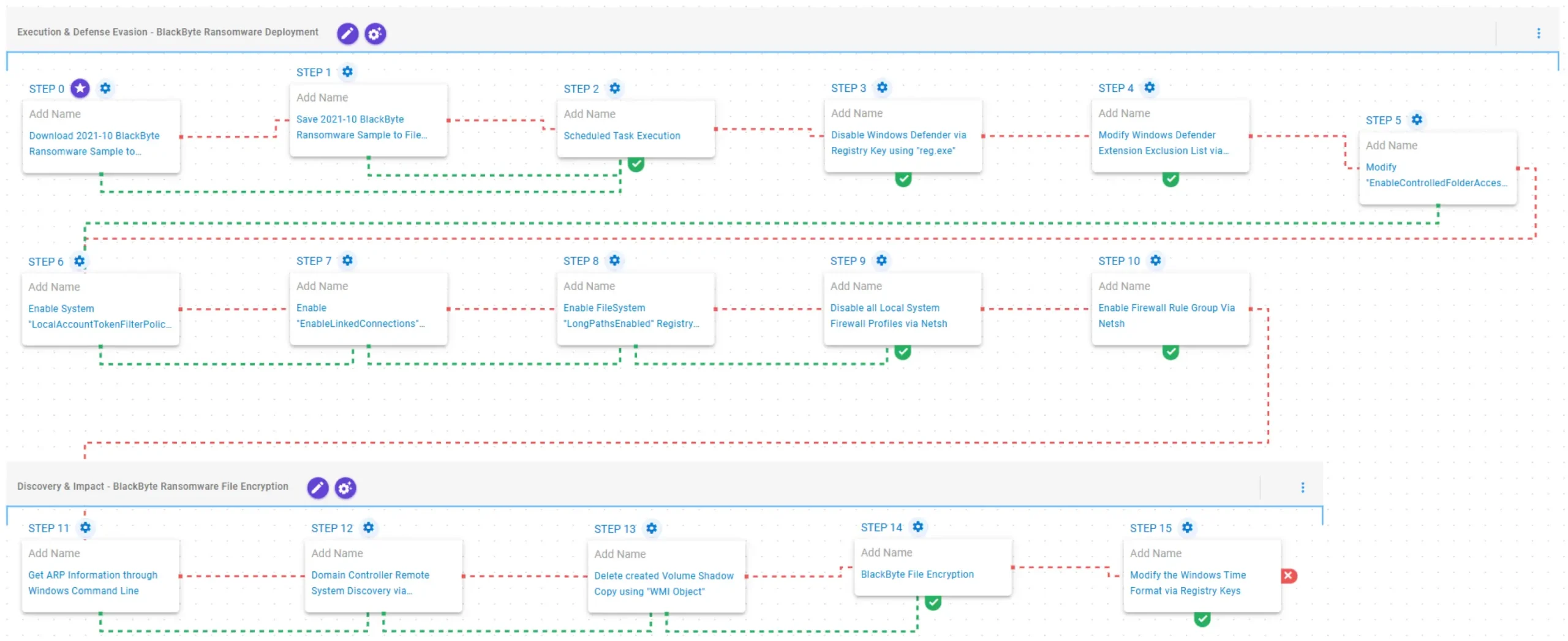
This emulation replicates the sequence of behaviors associated with the deployment of BlackByte ransomware on a compromised system with the intent of providing customers with the opportunity to detect and/or prevent a compromise in progress.
The emulation is based on behaviors reported by Cisco Talos (August 28, 2024), Trend Micro (July 5, 2022), Zscaler (May 3, 2022), Palo Alto Networks (April 21, 2022), and the Internet Crime Complaint Center (IC3) (February 11, 2022).
Execution & Defense Evasion – BlackByte Ransomware Deployment
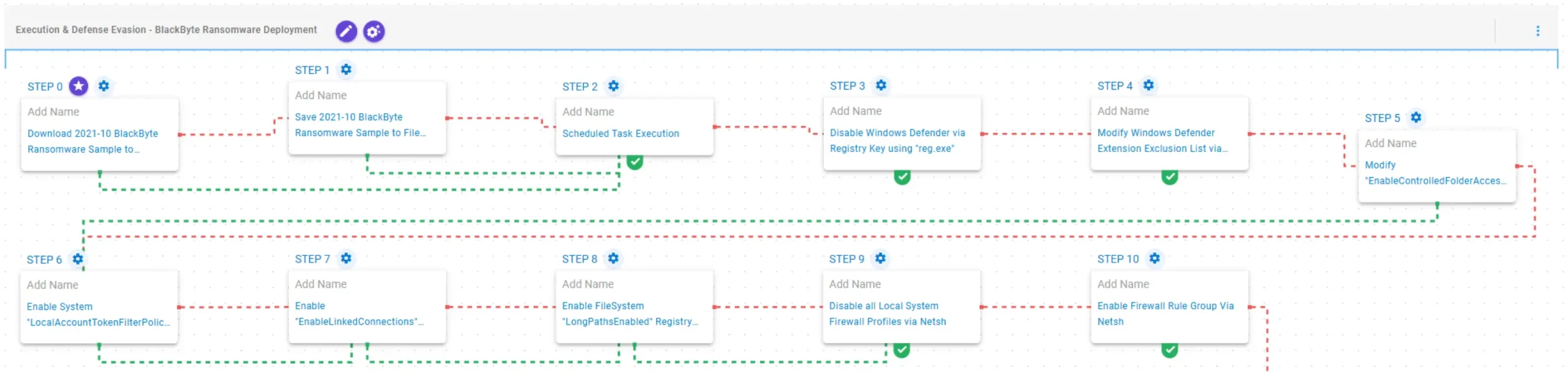
This stage begins with the deployment of the BlackByte ransomware executed through a scheduled task. Once operational, it weakens system protections by disabling Windows Defender through modification of the DisableAntiSpyware registry value. It further alters Windows Defender configuration by modifying the Extensions exclusion list and disabling Controlled Folder Access (CFA) via changes to the EnableControlledFolderAccess preference.
Subsequently, it enables LocalAccountTokenFilterPolicy, allowing remote connections that use local accounts to receive full administrative tokens. It also enables EnableLinkedConnections to ensure mapped drives remain accessible to processes launched with elevated User Account Control (UAC) privileges. Additionally, it sets the LongPathsEnabled registry value to permit file system paths exceeding the default 260-character limit.
Finally, it disables all local system firewall profiles and enables specific firewall rule groups through netsh.
2021-10 BlackByte Ransomware Sample (T1105): The BlackByte Ransomware Sample (SHA256: 8d2581e5cc6e6fdf17558afe025ff84d9023ea636aca74dee39900d8f523e912) is saved to disk in two separate scenarios to test network and endpoint controls and their ability to prevent the delivery of known malicious samples.
Scheduled Task Execution (T1053.005): This scenario validates execution capabilities by creating a scheduled task using the schtasks utility and triggering it for immediate execution.
Disable Windows Defender via Registry Key using “reg.exe” (T1562.001): This scenario modifies the HKLM\SOFTWARE\Policies\Microsoft\Windows Defender\DisableAntiSpyware registry key to 1 to disable Windows Defender from being enabled at the next reboot.
[New!] Modify Windows Defender Extension Exclusion List via “reg.exe” (T1562.001): This scenario modifies the Extensions registry key in HKLM\SOFTWARE\Microsoft\Windows Defender\Exclusions to add the .exe file extension to the exclusion list of Windows Defender.
[New!] Modify “EnableControlledFolderAccess” Windows Defender Preference (T1562.001): This scenario disables the Controlled Folder Access (CFA) feature by modifying the EnableControlledFolderAccess value to Disabled through the PowerShell Set-MpPreference cmdlet.
[New!] Enable System “LocalAccountTokenFilterPolicy” Registry Key using “reg.exe” (T1562.001): This scenario sets the LocalAccountTokenFilterPolicy registry value at HKLM\SOFTWARE\Microsoft\Windows\CurrentVersion\Policies\System to 1, preventing Windows from stripping administrative privileges from local accounts during network authentication.
Enable “EnableLinkedConnections” Registry Key using “reg.exe” (T1112): This scenario modifies the EnableLinkedConnections registry key to ensure mapped drives remain accessible even within User Account Control (UAC)–elevated processes.
[New!] Enable FileSystem “LongPathsEnabled” Registry Key using “reg.exe” (T1562.001): This scenario sets the LongPathsEnabled registry value at HKLM\SYSTEM\CurrentControlSet\Control\FileSystem to 1, enabling Windows to support file paths longer than the default 260-character limit for applications that support the newer long-path APIs.
[New!] Disable all Local System Firewall Profiles via Netsh (T1562.004): This scenario executes the netsh advfirewall set allprofiles state off command to disable all local Windows Firewall profiles on the system.
[New!] Enable Firewall Rule Group Via Netsh (T1562.004): This scenario creates a firewall rule group using the PowerShell New-NetFirewallRule cmdlet and then attempts to enable it via the netsh advfirewall command.
Discovery & Impact – BlackByte Ransomware File Encryption

This stage begins with network reconnaissance by obtaining the system’s Address Resolution Protocol (ARP) table. It then deletes existing Volume Shadow Copies (VSC) via Windows Management Instrumentation (WMI) objects to inhibit system recovery prior to encryption. Finally, BlackByte encrypts the identified files using a combination of AES-128 in CBC mode for file encryption with RSA-1024 for key encryption. Upon completion, it modifies the Windows time format by setting the s1159 and s2359 registry keys in HKCU\Control Panel\International to BLACKBYTE.
Get ARP Information through Windows Command Line (T1016): This scenario executes the arp –a command to obtain the system’s Address Resolution Protocol (ARP) information.
Delete created Volume Shadow Copy using “WMI Object” (T1490): This scenario executes the Get-WMIObject Win32_ShadowCopy PowerShell command to delete a Volume Shadow Copy created by the emulation.
[New!] BlackByte File Encryption (T1486): This scenario performs the file encryption routines used by common ransomware families. Files matching an extension list are identified and encrypted in place using similar encryption algorithms as used by BlackByte ransomware.
[New!] Modify the Windows Time Format via Registry Keys (T1112): This scenario modifies the s1159 and s2359 registry values under HKCU\Control Panel\International, which control the AM and PM clock designators, setting them to BLACKBYTE.
Opportunities to Expand Emulation Capabilities
In addition to the released attack graph, AttackIQ recommends the following scenario to extend the emulation of the capabilities exhibited by BlackByte Ransomware:
Domain Controller Remote System Discovery via Powershell Script: This scenario executes the Get-ADComputer Powershell cmdlet to get the list of Active Directory computers, showing the name, hostname and installed operating system.
Wrap-up
In summary, this emulation will evaluate security and incident response processes and support the improvement of your security control posture against the behaviors exhibited by BlackByte ransomware. With data generated from continuous testing and use of this assessment template, you can focus your teams on achieving key security outcomes, adjust your security controls, and work to elevate your total security program effectiveness against a known and dangerous threat.
AttackIQ is the industry’s leading Continuous Threat Exposure Management (CTEM) platform, enabling organizations to measure true exposure, prioritize risk, and disrupt real-world attack paths. By moving beyond static vulnerability data, AttackIQ operationalizes CTEM by continuously validating exposures against real adversary behavior and defensive controls. The platform connects vulnerabilities, configurations, identities, and detections into adversary-validated attack paths—quantifying the likelihood of attacker movement and impact. This evidence-based approach empowers security leaders to focus on what matters most, optimize defensive investments, and strengthen resilience through threat-informed, AI-driven security operations.
如有侵权请联系:admin#unsafe.sh