
好的,我现在需要帮助用户总结一篇文章的内容,控制在100个字以内。用户已经提供了文章的详细内容,所以我需要先仔细阅读并理解文章的主要内容。 首先,文章主要讨论了Kerberos协议在Windows Active Directory中的应用及其安全性。Kerberos是一个常用的认证协议,用于验证用户或主机的身份。由于其重要性,常常成为攻击者的目标,他们试图窃取或伪造Kerberos票证。 接下来,文章介绍了Kerberos的基本工作原理,包括KDC(Key Distribution Center)、AS(Authentication Service)和TGS(Ticket-Granting Service)的作用。然后,详细讲解了如何通过分析Windows事件日志中的特定事件ID(如4768)来检测可疑的Kerberos票证请求。 文章还深入探讨了如何解码和分析票证选项(TicketOptions),特别是通过十六进制值来识别可疑的标志组合。这些标志组合可能被攻击工具使用,从而帮助检测潜在的安全威胁。 最后,作者提供了一个KQL查询示例,用于在日志中查找包含特定可疑标志的票证请求,并讨论了未来的研究方向和改进措施。 总结一下,文章的重点在于通过分析Kerberos协议中的票证请求和标志组合来检测潜在的安全威胁,并提供了一个实用的查询方法。 </think> 该文章探讨了Kerberos协议的工作原理及其在Windows环境中的重要性,并介绍了如何通过分析事件日志中的特定标志组合来检测潜在的 Kerberos 滥用行为。 2026-2-12 08:48:30 Author: blog.nviso.eu(查看原文) 阅读量:26 收藏
Kerberos is one of the most common protocols in organizations that utilize Windows Active Directory, and an essential part of Windows authentication used to verify the identity of a user or a host [1]. As such, Kerberos is often a target for adversaries trying to either steal or forge Kerberos tickets [2]. In this blog we explore some hunting & detection possibilities, that allow us to pinpoint potential abuse of Kerberos within an environment.
Introduction to Kerberos
Before going deeper into identifying potential Kerberos abuse, we will briefly explain how the Kerberos protocol works. Kerberos is a complex authentication protocol, and properly expanding on it would require a whole separate post; therefore, we will focus on the basics for the sake of clarity.
Kerberos is a client-server authentication protocol that utilizes symmetric cryptography and a Key Distribution Center (KDC), to follow its authentication flow. The KDC is a domain service (located on a domain controller) [3] that takes the responsibility of authenticating the users on a network. The KDC has two main components:
- Authentication Service (AS): the service responsible for issuing ticket-granting tickets (TGTs), required for connecting to the Ticket-Granting Service within a domain;
- Ticket-Granting Service (TGS): this service is responsible for issuing tickets to access a computer in a domain, when the issued TGT by AS is provided;
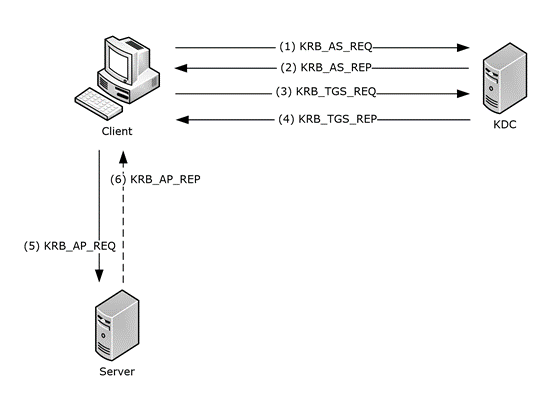
In a nutshell, when the Kerberos protocol is negotiated as the authentication protocol, the client will send an authentication service request to the KDC in order to receive a TGT. If everything is valid, the KDC will respond with the TGT and session key.
The client will then provide the KDC with the issued TGT and Service Principal Name (SPN) of the service that needs to be accessed. If the SPN and decrypted TGT are once again valid, the KDC will answer with the service ticket and a session key. As a final step, the client can present the issued service ticket and request access to the targeted server [4][5].
Inspecting Kerberos Ticket Requests
Various logs can be utilized during our investigation of Kerberos activity. For example, the following Windows Event IDs:
- 4768: A Kerberos authentication ticket (TGT) was requested
- 4769: A Kerberos service ticket (TGS) was requested
- 4771: Kerberos pre-authentication failed
- 4772: A Kerberos authentication ticket request failed
In this blog, we will focus on the Windows Event ID 4768, which is generated on the domain controller every time KDC issues a Kerberos Ticket Granting Ticket (TGT) – one of the first steps during the Kerberos authentication.
Other Event IDs can also be utilized to identify Kerberos abuse, but here we showcase a method for pinpointing suspicious TGT requests based on the combination of ticket flags during the ticket’s request.
The Event ID 4768, when logged, provides us with the following notable information [6]:
- Target username: The name of the account for which the TGT was requested
- User ID: The security identifier (SID) of the account that requested the TGT ticket
- Service name: The name of the service that issues the ticket (typically KRBTGT)
- Service ID: The security identifier (SID) of the service account
- Ticket Encryption Type: The cryptographic method used to encrypt the ticket
- IP Address: The IP address of the computer from which the TGT request was received
- Status: Result code that is usually equal to “0x0” unless issuing the ticket failed
- Ticket Options: The set of different ticket flags in hexadecimal format
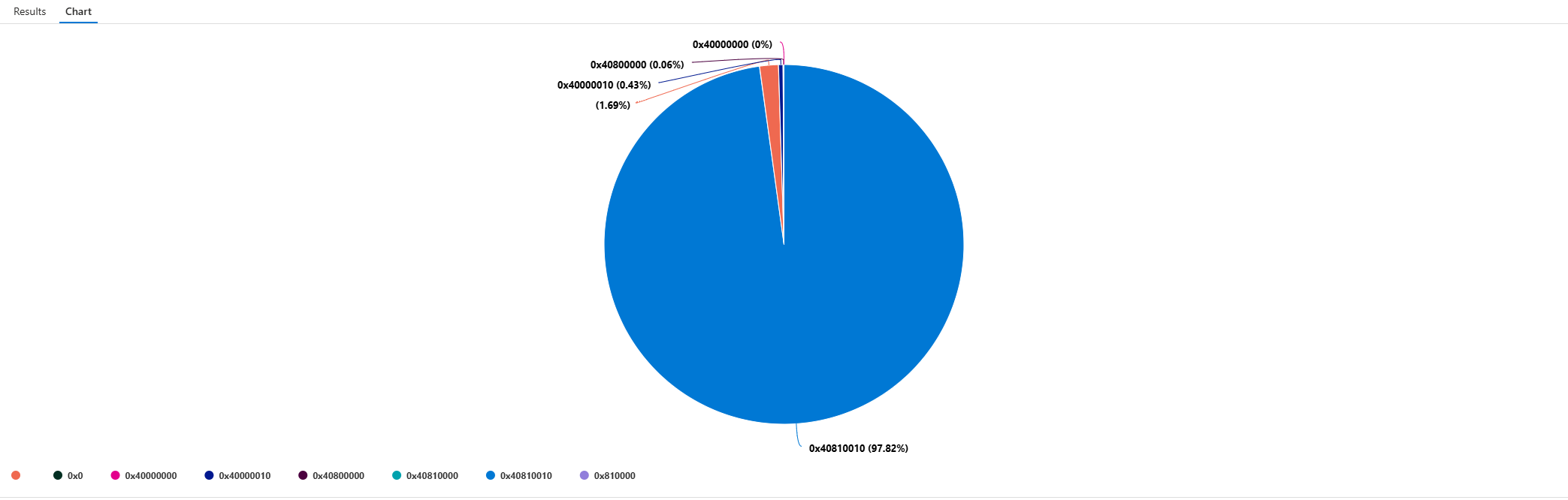
Most of this information is self-explanatory when inspecting the log, but let’s expand on the TicketOptions. What we would typically see in a legitimate TGT request, is the value “0x40810010” (vast majority of TGTs Ticket Options are expected to contain this value – see fig.2). But what does this value mean?
Decoding the Ticket Options
Based on Microsoft’s documentation, ticket options use “MSB 0” (Most Significant Bit) bit numbering convention for their flag bits. The number zero indicates where the most significant bit is indexed (bit 0), and indices increase toward the LSB (Least Significant Bit). For a 32-bit value, the bits are numbered from 0 (MSB) through 31 (LSB), increasing from left to right.
Some examples of the flags we will use are described by Microsoft [6] as follows:
| Bit | Flag Name | Description |
|---|---|---|
| 1 | Forwardable | (TGT only). Tells the ticket-granting service that it can issue a new TGT—based on the presented TGT—with a different network address based on the presented TGT. |
| 3 | Proxiable | (TGT only). Tells the ticket-granting service that it can issue tickets with a network address that differs from the one in the TGT. |
| 8 | Renewable | Used in combination with the End Time and Renew Till fields to cause tickets with long life spans to be renewed at the KDC periodically. |
| 15 | Canonicalize | In order to request referrals the Kerberos client MUST explicitly request the “canonicalize” KDC option for the AS-REQ or TGS-REQ. |
| 27 | Renewable-ok | The RENEWABLE-OK option indicates that a renewable ticket will be acceptable if a ticket with the requested life cannot otherwise be provided, in which case a renewable ticket may be issued with a renew-till equal to the requested end time. The value of the renew-till field may still be limited by local limits, or limits selected by the individual principal or server. |
Going back to the question, what does the value “0x40810010” represent? To answer this question, we will need to convert the hex to binary format.
- Hex format: 0x40810010
- Binary format: 01000000100000010000000000010000
The binary’s length is 32 (MSB 0), hence the 32-bit format (data type of HexInt32). We can now separate the flags (bit 1) from the binary format above.
- 01000000000000000000000000000000, bit 1 represents Forwardable
- 00000000100000000000000000000000, bit 8 represents Renewable
- 00000000000000010000000000000000, bit 15 represents Canonicalize
- 00000000000000000000000000010000, bit 27 represents Renewable-ok
It is now clear that the hex value “0x40810010” represents the flags set in the Kerberos ticket described above (i.e., Forwardable, Renewable, Canonicalize, Renewable-ok). In a similar manner we can reconstruct new combinations by setting the respective flags (value “1”), and by calculating a bitwise OR operation on the binary numbers.
Consider the following example: constructing a ticket with Proxiable & Renewable flags.
- Proxiable (bit number 3): 00010000000000000000000000000000
- Renewable (bit number 8): 00000000100000000000000000000000
- Renewable & Proxiable: 00010000100000000000000000000000
Hence, the ticket options for this example would be “0x10800000” in hex format.
Capture the Suspicious Flags
With the flag calculation explained, we can start hunting for abnormal flag combinations that may indicate potentially suspicious requests. That means hunting for known combinations usually utilized by tools (e.g., Metasploit, Impacket) or abnormal combinations based on their deviation from the baseline.
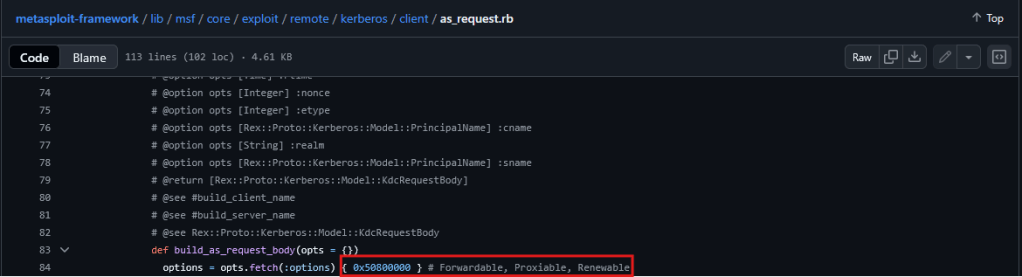
JPCERT showcased that during their investigation for traces left from a variety of offensive tools, the ticket options value “0x50800000” was present in some TGT requests [7]. This value can prove useful since it deviates from the baseline and is observed as a default option in attacker tools.
We were able to find that the value “0x50800000” is set by default in Metasploit’s Msf::Exploit::Remote::Kerberos::Client::AsRequest module (figure 3) [8].
This seems like a good starting point. We can construct a variable that contains these flags (i.e., Forwardable, Proxiable, Renewable) and build a query logic that checks whether any TGT’s TicketOptions contain these flags, instead of statically checking if they are equal to “0x50800000” (MSB 0). That way, we can predict changes when an adversary modifies these flags in their tooling or code (e.g., adding another flag to avoid being detected).
To do that, we will construct our flag variables using KQL’s binary_shift_left() function. For example, if Forwardable is interpreted as the bit indexed at position one (the second bit, since we’re counting starting from 0 – see table above), we would calculate 31 (the highest possible flag value, within range of (0,31], since “0” is reserved), minus the flag’s bit. That would be equal to the number of shifts required.
The next step is to perform a bitwise OR operation on the flag variables and inspect whether our flag combination is included in the event’s TicketOptions. Finally, we perform a bitwise AND operation on the TicketOptions and our flags, and if the result is equal to our flags variable, they are included in the requested TGT ticket.
Picture the following example:
- 01010000100000000000000000000000, the TGT’s ticket options (from the log)
- 00010000100000000000000000000000, our set flags in the query
- 00010000100000000000000000000000, the result of the bitwise AND operation
| x | y | x & y (AND) | x | y (OR) |
|---|---|---|---|
| 0 | 0 | 0 | 0 |
| 0 | 1 | 0 | 1 |
| 1 | 0 | 0 | 1 |
| 1 | 1 | 1 | 1 |
Therefore, the result of the bitwise AND operation will be the same as our set flags in the query if these flags are included in the TicketOptions of the log (EventID 4768).
KQL Suspicious Flag Combination Query:
let forwardable = binary_shift_left(1, 30);
let renewable = binary_shift_left(1, 23);
let proxiable = binary_shift_left(1, 28);
let KerberosFlags = binary_or(proxiable, binary_or(forwardable, binary_or(renewable, 0)));
SecurityEvent
| where TimeGenerated > ago(90d)
| where EventID == 4768
| extend d = parse_xml(EventData)
| extend
    TicketOptions = d.EventData.Data[5],
    Status = d.EventData.Data[6],
    EncryptionType = d.EventData.Data[7]
| extend
    EncryptionType = extract_json("$.#text", tostring(EncryptionType)),
    Status = extract_json("$.#text", tostring(Status)),
    TicketOptions = extract_json("$.#text", tostring(TicketOptions))
| extend IpAddress = case(IpAddress startswith "::ffff:", trim_start("::ffff:", IpAddress), IpAddress)
| where binary_and(toint(TicketOptions), KerberosFlags) == KerberosFlags
| project-reorder
    TimeGenerated,
    EventID,
    Activity,
    TargetAccount,
    TargetSid,
    TicketOptions,
    EncryptionType,
    Status,
    IpAddress,
    ServiceName
Running the query across multiple customers, we managed to detect some security assessments that were running at that time. That being said, the results mainly depend on which combinations are utilized when the query is run.
Moving Forward
In this blog, we have unpacked the TGT requests and discussed what useful information we can extract from the log’s (Windows EventID 4768) TicketOptions. This information can be utilized to search for suspicious or uncommon flag combinations that are included in the event’s set of flags, allowing us to hunt and detect flags that deviate from normal activity.
The provided query allows us to define sets of flag combinations (depending on the tooling or behavior we are hunting for) that are matched as a subset of a log’s (Windows EventID 4768) TicketOptions, rather than searching for specific static values.
Last but not least, next steps would involve identifying more flag combinations that deviate from a normal baseline (e.g., due to known adversary tooling or behavior) to continuously enrich and/or create new queries.
Sources
[1] https://learn.microsoft.com/en-us/windows-server/security/kerberos/kerberos-authentication-overview
[2] https://attack.mitre.org/techniques/T1558/
[3] https://learn.microsoft.com/en-us/windows/win32/secauthn/key-distribution-center
[4] https://techcommunity.microsoft.com/blog/sqlserversupport/kerberos-authentication-flow/4387781
[5] https://learn.microsoft.com/en-us/openspecs/windows_protocols/ms-kile/b4af186e-b2ff-43f9-b18e-eedb366abf13
[8] https://www.exploit-db.com/exploits/35474

Thomas Papaloukas
Thomas works as a Senior Intrusion Analyst team lead at NVISO, focusing on incident response & operations, and enjoys fiddling with detection and reverse engineering. He likes the challenges of identifying and responding to security threats, and finding effective ways to detect & prevent them.
如有侵权请联系:admin#unsafe.sh