好的,我现在需要帮用户总结一篇文章的内容,控制在100字以内。用户要求直接写文章描述,不需要以“文章内容总结”或“这篇文章”开头。 首先,我仔细阅读了用户提供的文章。文章主要介绍如何将Enzoic的实时警报集成到Microsoft Sentinel中,使用Azure Logic Apps作为桥梁。步骤包括设置Sentinel环境、创建Logic App来接收Enzoic的 webhook 警报、解析JSON数据并创建Sentinel事件,最后进行测试和验证。 接下来,我需要将这些关键点浓缩到100字以内。重点应放在集成方法、使用的工具以及带来的好处上。例如,提到Enzoic和Sentinel的集成、Logic Apps的作用、自动创建事件以及统一的安全管理。 然后,我会组织语言,确保简洁明了。例如:“文章介绍了如何通过Azure Logic Apps将Enzoic的实时数据泄露警报集成到Microsoft Sentinel中。步骤包括配置Sentinel环境、创建Logic App接收和解析Enzoic的webhook警报,并自动在Sentinel中创建安全事件。该方法实现了统一的安全监控和快速响应。” 这样既涵盖了主要步骤,又突出了优势。 最后,检查字数是否在限制内,并确保没有使用任何不必要的词汇。这样总结后的内容应该能够准确传达文章的核心信息。 </think> 文章介绍了如何通过Azure Logic Apps将Enzoic的实时数据泄露警报集成到Microsoft Sentinel中。步骤包括配置Sentinel环境、创建Logic App接收和解析Enzoic的webhook警报,并自动在Sentinel中创建安全事件。该方法实现了统一的安全监控和快速响应。 2026-1-20 21:9:21 Author: securityboulevard.com(查看原文) 阅读量:0 收藏
Introduction
Enzoic provides real-time alerts when user credentials are exposed in data breaches, and integrating these alerts into your security operations center (SOC) can greatly enhance your threat response. Microsoft Sentinel is a cloud-native SIEM (Security Information and Event Management) platform in Azure that aggregates and analyzes security data across an organization. (Note: You will need an active Microsoft Sentinel instance, not just a generic Azure subscription, to complete this integration.) By using Azure Logic Apps as the bridge, you can automatically ingest Enzoic’s webhook alerts into Sentinel as new security incidents. This means your Enzoic breach alerts will appear alongside other incidents (from tools like Microsoft Defender for Endpoint and the rest of the Microsoft 365 Defender ecosystem) in one unified console for easy correlation and response. This Sentinel integration works with any Enzoic monitoring service that delivers alerts via webhooks, including Password Breach Monitoring (Breach Monitoring API), Identity Breach Monitoring, and Payment Card BIN Monitoring.In this step-by-step guide, we’ll walk through setting up the integration, from configuring Sentinel to creating a Logic App that turns Enzoic webhooks into Sentinel incidents.
Step 1: Set Up Microsoft Sentinel (Log Analytics Workspace)
Microsoft Sentinel requires a Log Analytics workspace as its foundation. If you haven’t already, start by creating a Log Analytics workspace and enabling Microsoft Sentinel on it:
- Create a Log Analytics Workspace: In the Azure Portal, go to Create a resource and search for Log Analytics Workspace. Choose your Subscription and an existing Resource Group (or create a new one), then enter a Name for the workspace and select a Region. Click Review + Create, then Create to provision the workspace.
- Enable Microsoft Sentinel: Once the workspace is created, navigate to it in the Azure Portal. In the workspace’s menu, select Microsoft Sentinel and click Add. This links Microsoft Sentinel to your workspace, effectively turning it into a Sentinel instance.
At this point, you have a Microsoft Sentinel environment ready to ingest data. All incidents and logs from our integration will be stored in and managed by this Sentinel (via the Log Analytics workspace).
Step 2: Create an Azure Logic App for the Enzoic Webhook
The next step is to set up an Azure Logic App that will receive Enzoic webhook alerts and initiate the incident creation in Sentinel. Logic Apps allow you to automate workflows with a series of actions and triggers:
- Create a Logic App (Consumption): In the Azure Portal, click Create a resource and search for Logic App (Consumption). Provide a Name for the Logic App and use the same Subscription and Resource Group as your Sentinel workspace (for organization). Choose the Region closest to your data center and click Create.
- Add an HTTP Trigger: After deployment, go to the Logic App Designer. Select Blank Logic App as the template. For the first step (trigger), add When an HTTP request is received. This trigger will start the workflow whenever Enzoic sends an HTTP POST to the Logic App’s unique URL.
- Copy the HTTP POST URL: Once you add the HTTP trigger, the designer will show a HTTP POST URL (generated after you save or run the workflow). Copy this URL – this is the endpoint where Enzoic will deliver its JSON webhook payloads for each alert. You’ll need to configure this URL in your Enzoic account’s webhook settings so that Enzoic knows where to send alerts.
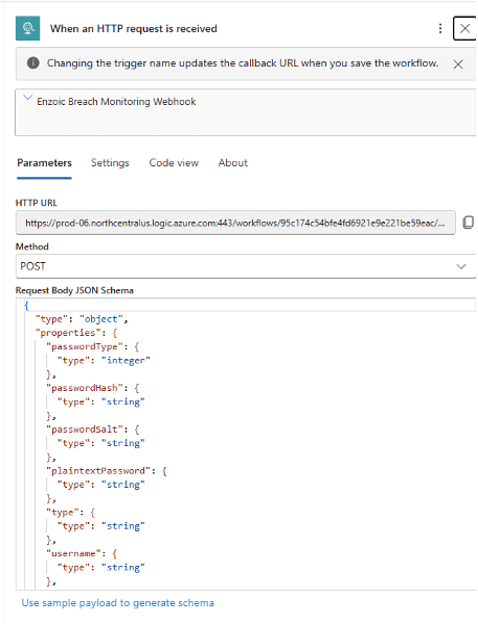
Note: In your Enzoic dashboard or via the Enzoic API, register this Logic App URL as a webhook for breach notifications. This ensures that every new compromised credential alert from Enzoic is sent to your Logic App in real time.
Step 3: Parse the Enzoic Webhook JSON in the Logic App
Enzoic’s webhook will send a JSON payload containing details of the exposed account and breach. In our Logic App, we need to parse this JSON so we can easily use the data in subsequent steps (like creating the incident). Azure Logic Apps provides a Parse JSON action for this purpose:
1. Add Parse JSON Action: In the Logic App Designer, click + New Step below the HTTP trigger. Search for Parse JSON and select it. This action will take the raw JSON from the webhook and break it into fields we can reference.
Configure the Parse JSON Action: For the Content field, insert the trigger body from the previous step. You can do this by using an expression or dynamic content. In this case, use the expression:
@triggerBody()
2. This passes the entire JSON body from the webhook to the Parse JSON action.
3. Provide a JSON Schema: Next, click on Use sample payload to generate schema. Paste a sample Enzoic webhook JSON to let Logic Apps derive the schema automatically. For example, a typical Enzoic alert payload might look like:
{
“passwordType”: 1,
“passwordHash”: “482c811da5d5b4bc6d497ffa98491e38”,
“plaintextPassword”: “password123”,
“type”: “accountAlert”,
“username”: “[email protected]”,
“usernameHash”: “f660ab912ec1…e99b8e44a”,
“date”: “2025-11-11T21:45:24.321Z”,
“exposureID”: “57dc11964d6db21300991b78”,
“customData”: null,
“exposureDetails”: {
“title”: “Example Breach”,
“date”: “2024-02-01T00:00:00Z”,
“entries”: 1024,
“domainsAffected”: 10,
“category”: “Test”,
“sourceURLs”: [],
“source”: “Testing – Ignore”,
“passwordTypes”: [1],
“exposedData”: [“Emails”,”Passwords”],
“dateAdded”: “2024-02-01T00:00:00Z”
}
}
- The above is a sample alert showing an exposed account (username: [email protected]) in a breach titled “Example Breach”. When you provide this sample, Logic Apps will generate a matching JSON schema. This schema tells the Logic App what fields to expect (like username, passwordType, exposureDetails.title, etc.), allowing those fields to be easily selected in later steps.
- Confirm Schema Generation: After inserting the sample and clicking Done, the Parse JSON action will show a schema in its Schema box. Now the Logic App “knows” the structure of Enzoic’s webhook data and can reference each field (such as username, exposureID, breach title, etc.) in subsequent actions.
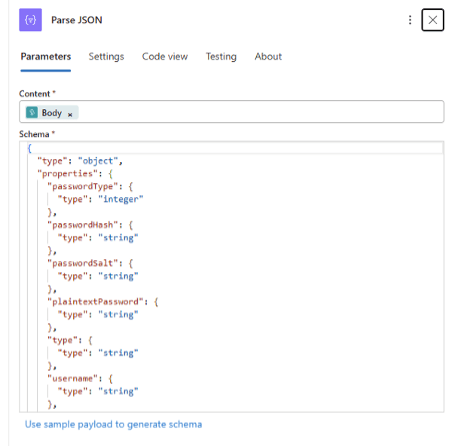
With the Parse JSON step in place, our workflow can now interpret Enzoic’s data. The next step is to use that data to create a security incident in Microsoft Sentinel.
Step 4: Create a Microsoft Sentinel Incident from Enzoic Data
Now for the core of the integration: using the parsed webhook data to create a new incident in Microsoft Sentinel. Azure Logic Apps has a built-in connector for Microsoft Sentinel that provides an action to create incidents. We will map the fields from the Enzoic alert to the incident properties:
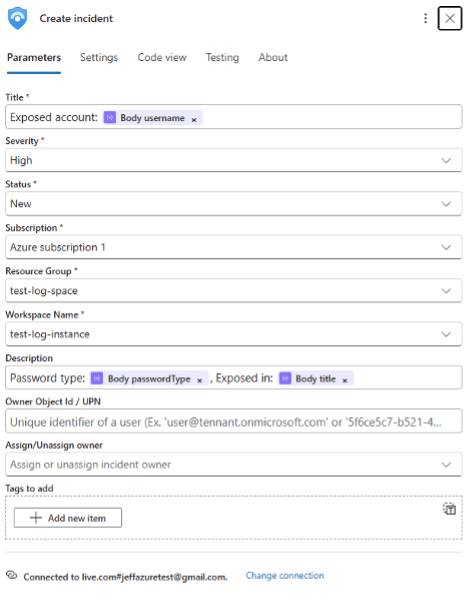
- Add the Create Incident Action: Click + New Step after the Parse JSON step. Search for “Sentinel” or “Azure Sentinel” and choose Create incident (Azure Sentinel). (If prompted, sign in to Azure and select the Subscription/Workspace that corresponds to your Sentinel instance.)
- Map Incident Fields: You’ll be presented with several fields to fill out for the incident, such as Title, Description, Severity, etc. Use the outputs from the Parse JSON step to populate these. For example:
- Title: Use a dynamic value for the exposed account username. For instance:
Exposed account: @{body(‘Parse_JSON’)?[‘username’]}
This will set the incident title to “Exposed account: [email protected]” (with the actual username from the alert). - Description: You can craft a description that includes key details. For example:
Password type: @{body(‘Parse_JSON’)?[‘passwordType’]},
Exposed in:
@{body(‘Parse_JSON’)?[‘exposureDetails’]?[‘title’]}
This might produce a description like: “Password type: 1, Exposed in: Example Breach”, giving insight into the kind of password and which breach it came from. - Severity: Set an appropriate severity for these incidents. You might choose High for any compromised credential alert by default. (Optionally, you could use conditional logic or additional fields to adjust severity – for instance, set higher severity for privileged accounts. But for simplicity, a static High severity is used in this guide.)
- Additional Fields (Labels/Custom Details): You can attach other pieces of the Enzoic data to the incident for reference. For example, add the Exposure ID, Date of the alert, or other context as incident tags or in custom details. In the Logic App action, these might appear as extra fields like Incident Labels or Details. You could map ExposureID
(@{body(‘Parse_JSON’)?[‘exposureID’]}) and the alert Date
(@{body(‘Parse_JSON’)?[‘date’]}) into those fields so that the incident carries the unique ID of the breach and the timestamp of when Enzoic saw this exposure.
- Title: Use a dynamic value for the exposed account username. For instance:
- (Optional) Add Conditions or Filters: If needed, you can add a condition step before creating the incident to filter out certain alerts. For example, you might only create Sentinel incidents for certain types of exposures or ignore those with passwordType indicating a hash (depending on how you classify alerts). This can be done by inserting a Condition step that evaluates a field from the Parse JSON output (like passwordType) and proceeds to incident creation only if criteria are met. For most cases, you can skip this and let all Enzoic alerts generate incidents, but it’s good to know the option exists for fine-tuning.
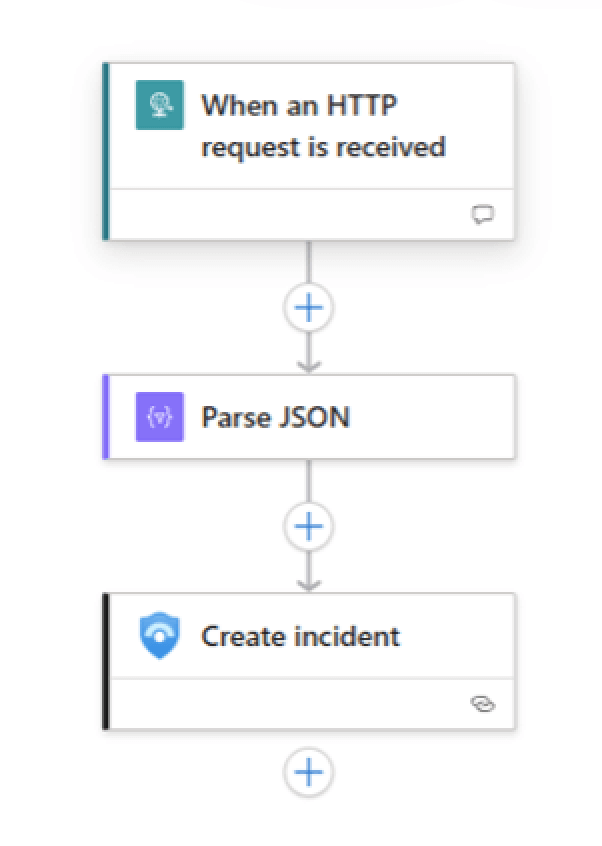
- Save the Logic App: Once you have mapped all desired fields, save your Logic App workflow. The final Logic App should have three main steps in sequence: the HTTP request trigger, the Parse JSON action, and the Create incident action (plus any optional filters you added).
After saving, our automated workflow is complete. Every time Enzoic sends a webhook alert to this Logic App, the Logic App will parse the JSON and create a new incident in Microsoft Sentinel with the relevant details.
Step 5: Testing and Validation
With the Logic App and Sentinel connector set up, it’s important to test the integration to ensure everything works as expected:
- Send a Test Webhook: Use a tool like Postman or curl to POST a sample Enzoic alert JSON to the Logic App’s HTTP endpoint. This will trigger the Logic App workflow.
- Verify the Logic App Run: In the Azure Portal, open your Logic App and check the Run History. You should see a successful run triggered by your test. Drilling into the run, verify that the Parse JSON step successfully extracted the fields (no errors in the run), and that the Create incident step finished without errors.
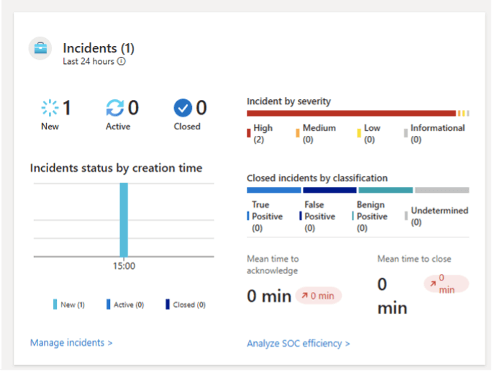
- Check Microsoft Sentinel: Now, head over to your Microsoft Sentinel workspace (in Azure or the Microsoft 365 Defender portal). Go to the Incidents section. You should see a new incident created from the test alert. The title should reflect the format we set (such as “Exposed account: [email protected]”), with the severity set to High (or your chosen value).
If the incident appears, open it to review the details. The description should contain the password type and breach name, and any additional fields (like exposure ID or date) should be attached as well. This confirms that the data mapping worked correctly end-to-end.
Conclusion and Benefits
By integrating Enzoic alerts into Microsoft Sentinel, you’ve added an important layer of credential compromise monitoring to your SOC’s unified incident view. Every time Enzoic detects that one of your users’ credentials has appeared in a breach, an incident will automatically pop up in Sentinel, allowing your security team to respond quickly just as they would to any other high-priority alert. This automation closes the gap between continually updated threat intelligence (Enzoic) and your cloud-native SIEM (Sentinel), ensuring nothing falls through the cracks.
Key benefits of this integration include:
- Centralized Monitoring: Enzoic alerts sit alongside other security alerts (from Azure AD, Microsoft Defender for Endpoint, Office 365, etc.), giving your team a single pane of glass for investigation.
- Faster Response: Automatic incident creation means your analysts can jump on investigating a leaked credential incident immediately, without waiting for manual reports or separate alert consoles.
- Rich Context: The incident in Sentinel carries detailed information about the exposure (which account, what breach, when it was detected, etc.), helping analysts quickly assess the severity and impact.
- Flexible Automation: Using Logic Apps, you can extend or customize this workflow easily (for example, adding notifications, enrichment steps, or conditional logic as your needs evolve)
With Microsoft Sentinel being part of the broader Microsoft 365 Defender ecosystem, this integration also complements your existing defenses. Just as Sentinel can aggregate signals from Microsoft’s own security tools (like Defender for Endpoint alerts for malware or suspicious activities), it can now also ingest Enzoic’s compromised credential alerts. This holistic approach improves your organization’s ability to detect and respond to threats across different domains.
A few simple steps in Azure can significantly strengthen your security posture by automatically raising the alarm when employee credentials are found in breaches. It’s a proactive measure that, combined with strong password policies and endpoint protections, helps keep attackers out of your accounts. By taking advantage of Enzoic’s intelligence within Sentinel, your cloud engineers and security teams can stay one step ahead of credential-based threats through a seamless, automated workflow.
AUTHOR
 Josh Parsons
Josh is the Product Manager at Enzoic, where he leads the development and execution of strategies to bring innovative threat intelligence solutions to market. Outside of work, he can be found at the nearest bookstore or exploring the city’s local coffee scene.
*** This is a Security Bloggers Network syndicated blog from Blog | Enzoic authored by Enzoic. Read the original post at: https://www.enzoic.com/blog/microsoft-sentinel-with-azure-logic-apps/
如有侵权请联系:admin#unsafe.sh