嗯,用户让我总结这篇文章的内容,控制在一百个字以内,而且不需要特定的开头。首先,我需要快速浏览文章,抓住主要观点。 文章主要讲的是VStarcam品牌的摄像头存在严重的安全漏洞。这些漏洞包括密码泄露、未授权访问日志、以及后门机制。作者通过分析固件发现,VStarcam故意削弱了安全保护,导致用户的密码被泄露。 接下来,我需要把这些要点浓缩成一句话。要确保涵盖品牌、漏洞类型以及问题的严重性。同时,保持简洁明了。 可能的结构是:品牌名称 + 漏洞类型 + 问题严重性。比如,“VStarcam摄像头存在多重安全漏洞,包括密码泄露、未授权访问和后门机制,导致用户隐私和数据安全受到严重威胁。” 这样既涵盖了主要内容,又符合字数限制。 </think> VStarcam摄像头存在多重安全漏洞,包括密码泄露、未授权访问和后门机制,导致用户隐私和数据安全受到严重威胁。 2026-1-7 13:16:34 Author: palant.info(查看原文) 阅读量:5 收藏
VStarcam is an important brand of cameras based on the PPPP protocol. Unlike the LookCam cameras I looked into earlier, these are often being positioned as security cameras. And they in fact do a few things better like… well, like having a mostly working authentication mechanism. In order to access the camera one has to know its administrator password.
So much for the theory. When I looked into the firmware of the cameras I discovered a surprising development: over the past years this protection has been systematically undermined. Various mechanisms have been added that leak the access password, and in several cases these cannot be explained as accidents. The overall tendency is clear: for some reason VStarcam really wants to have access to their customer’s passwords.
A reminder: “P2P” functionality based on the PPPP protocol means that these cameras will always communicate with and be accessible from the internet, even when located on a home network behind NAT. Short of installing a custom firmware this can only addressed by configuring the network firewall to deny internet access.
Contents
How to recognize affected cameras
Not every VStarcam camera has “VStarcam” printed on the side. I have seen reports of VStarcam cameras being sold under the brand names Besder, MVPower, AOMG, OUSKI, and there are probably more.
Most cameras should be recognizable by the app used to manage them. Any camera managed by one of these apps should be a VStarcam camera: Eye4, EyeCloud, FEC Smart Home, HOTKam, O-KAM Pro, PnPCam, VeePai, VeeRecon, Veesky, VKAM, VsCam, VStarcam Ultra.
Downloading the firmware
VStarcam cameras have a mechanism to deliver firmware updates (LookCam cameras prove that this shouldn’t be taken for granted). The app managing the camera will request update information from an address like http://api4.eye4.cn:808/firmware/1.2.3.4/EN where 1.2.3.4 is the firmware version. If a firmware update is available the response will contain a download server and a download path. The app sends these to the device which then downloads and installs the updated firmware.
Both requests are performed over plain HTTP and this is already the first issue. If an attacker can produce a manipulated response either on the network that the app or the device are connected to they will be able to install a malicious update on the camera. The former is particularly problematic, as the camera owner may connect to an open WiFi or similarly untrusted networks while being out.
The last part of a firmware version is a build number which is ignored for the update requests. The first part is a vendor ID where only a few options seem relevant (I checked 10, 48 and 66). The rest of the version number can be easily enumerated. Many firmware branches don’t have an active update, and when they do some updates won’t download because the servers in question appear no longer operational. Still, I found 380 updates this way.
I managed to unpack all but one of these updates. Firmware version 10.1.110.2 wasn’t for a camera but rather some device with an HDMI connector and without any P2P functionality – probably a Network Video Recorder (NVR). Firmware version 10.121.160.42 wasn’t using PPPP but something called NHEP2P and an entirely different application-level protocol. Ten updates weren’t updating the camera application but only the base system. This left 367 firmware versions for this investigation.
Caveats of this survey
I do not own any VStarcam hardware, nor would it be feasible to investigate hundreds of different firmware versions with real hardware. The results of this article are based solely on reverse engineering, emulation, and automated analysis via running Ghidra in headless mode. While I can easily emulate a PPPP server, doing the same for the VStarcam cloud infrastructure isn’t possible, I simply don’t know how it behaves. Similarly, the firmware’s interaction with hardware had to be left out of the emulation. While I’m still quite confident in my results, these limitations could introduce errors.
More importantly, there are only so many firmware versions that I checked manually. Most of them were checked automatically, and I typically only looked at a few lines of decompiled code that my scripts extracted. There is potential for false negatives here, I expect that there are more issues with VStarcam firmware than what’s listed here.
VStarcam’s authentication approach
When an app communicates with a camera, it sends commands like GET /check_user.cgi?loginuse=admin&loginpas=888888&user=admin&pwd=888888. Despite the looks of it, these aren’t HTTP requests passed on to a web server. Instead, the firmware handles these in function P2pCgiParamFunction which doesn’t even attempt to parse the request. The processing code looks for substrings like check_user.cgi to identify the command (yes, you better don’t set check_user.cgi as your access password). Parameter extraction works via similar substring matching.
It’s worth noting that these cameras have a very peculiar authentication system which VStarcam calls “dual authentication.” Here is how the Eye4 application describes it:
The dual authentication mechanism is a measure to upgrade the whole system security
- The device will double check the identity of the visitor and does not support the old version of app.
- Considering the security risk of possible leakage, the plaintext password mode of the device was turned off and ciphertext access was used.
- After the device is added for the first time, it will not be allowed to be added for a second time, and it will be shared by the person who has added it.
I’m not saying that this description is utter bullshit but there is a considerable mismatch with the reality that I can observe. The VStarcam firmware cannot accept anything other than plaintext passwords. Newer firmware versions employ obfuscation on the PPPP-level but this hardly deserves the name “ciphertext”.
What I can see is: once a device is enrolled into dual authentication, the authentication is handled by function GetUserPri_doubleVerify rather than GetUserPri. There isn’t a big difference between the two, both will try the credentials from the loginuse/loginpas parameters and fall back to the user/pwd credentials pair. Function GetUserPri_doubleVerify merely checks a different password.
From the applications I get the impression that the dual authentication password is automatically generated and probably not even shared with the user but stored in their cloud account. This is an improvement over the regular password that defaults to 888888 and allowed these cameras to be enrolled into a botnet. But it’s still a plaintext password used for authentication.
There is a second aspect to dual authentication. When dual authentication is used, the app is supposed to make a second authentication call to eye4_authentication.cgi. The loginAccount and loginToken parameters here appear to belong to the user’s cloud account, apparently meant to make sure that only the right user can access a device.
Yet in many firmware versions I’ve seen the eye4_authentication.cgi request always succeeds. The function meant to perform a web request is simply hardcoded to return the success code 200. Other firmware versions actually make a request to https://verification.eye4.cn, yet this server also seems to produce a 200 response regardless of what parameters I try. It seems that VStarcam never made this feature work the way they intended it.
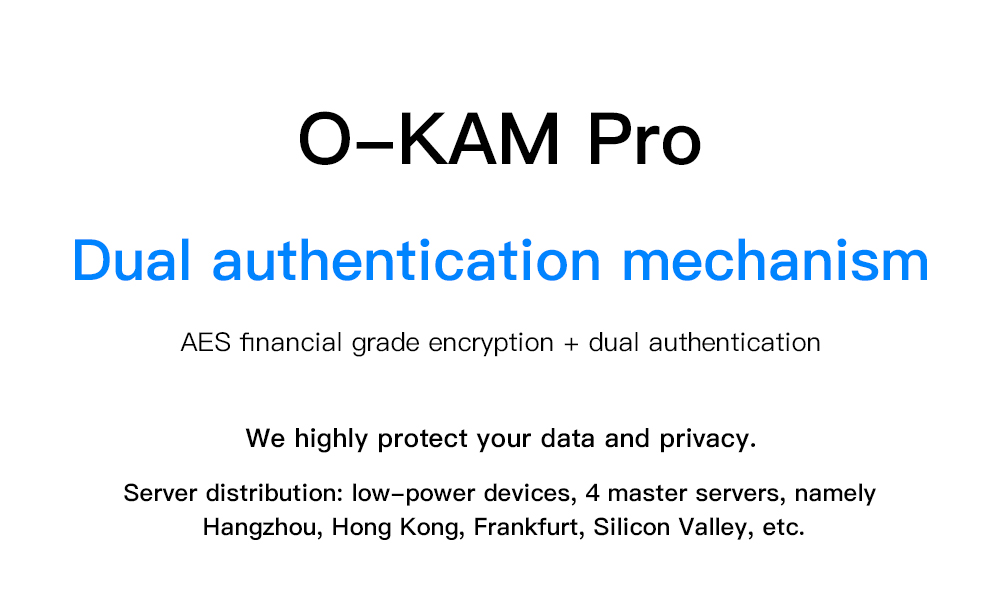
None of this stopped VStarcam from boasting on their website merely a year ago:

You can certainly count on anything saying “financial grade encryption” being bullshit. I have no idea where AES comes into the picture here, I haven’t seen it being used anywhere. Maybe it’s their way of saying “we use TLS when connecting to our cloud infrastructure.”
Endpoint protection
A reasonable approach to authentication is: authentication is required before any requests unrelated to authentication can be made. This is not the approach taken by VStarcam firmware. Instead, some firmware versions decide for each endpoint individually whether authentication is necessary. Other versions put a bunch of endpoints outside of the code enforcing authentication.
The calls explicitly excluded from authentication differ by firmware version but are for example: get_online_log.cgi, show_prodhwfg.cgi, ircut_test.cgi, clear_log.cgi, alexa_ctrl.cgi, server_auth.cgi. For most of these it isn’t obvious why they should be accessible to unauthenticated users. But get_online_log.cgi caught my attention in particular.
Unauthenticated log access
So a request like GET /get_online_log.cgi?enable=1 can be sent to a camera without any authentication. This isn’t a request that any of the VStarcam apps seem to support, what does it do?
Despite the name this isn’t a download request, it rather sets a flag for the current connection. The logic behind this involves many moving parts including a Linux kernel module but the essence is this: whenever the application logs something via LogSystem_WriteLog function, the application won’t merely print that to stderr and write it to the log file on the SD card but also send it to any connection that has this flag set.
What does the application log? Lots and lots of stuff. On average, VStarcam firmware has around 1500 such logging calls. For example, it could log security tokens:
LogSystem_WriteLog("qiniu.c", "upload_qiniu", 497, 0,
                   "upload_qiniu*** filename = %s, fileid = %s, uptoken = %s\n", …);
LogSystem_WriteLog("pushservice.c", "parsePushServerRequest_cjson", 5281, 1,
                   "address=%s token =%s master= %d timestamp = %d", …);
LogSystem_WriteLog("queue.c", "CloudUp_Manage_Pth", 347, 2,
                   "token=%s", …);
It could log cloud server responses:
LogSystem_WriteLog("pushservice.c", "curlPostMqttAuthCb", 4407, 3,
                   "\n\nrspBuf = %s\n", …);
LogSystem_WriteLog("post/postFileToCloud.c", "curl_post_file_cb", 74, 0,
                   "\n\nrspBuf = %s\n", …);
LogSystem_WriteLog("pushserver.c", "curl_Eye4Authentication_write_data_cb", 2822, 0,
                   "rspBuf = %s", …);
And of course it will log the requests coming in via PPPP:
LogSystem_WriteLog("vstcp2pcmd.c", "P2pCgiParamFunction", 633, 0,
                   "sit %d, pcmd: %s", …);
Reminder: these requests contain the authentication password as parameter. So an attacker can connect to a vulnerable device, request logs and wait for the legitimate device owner to connect. Once they do their password will show up in the logs – voila, the attacker has access now.
VStarcam appears to be at least somewhat aware of this issue because some firmware versions contain code “censoring” password parameters prior to logging:
memcpy(pcmd, request, sizeof(pcmd));
char* pos = strstr(pcmd, "loginuse");
if (pos)
  *pos = 0;
LogSystem_WriteLog("vstcp2pcmd.c", "P2pCgiParamFunction", 633, 0,
                   "sit %d, pcmd: %s", sit, pcmd);
But that’s only the beginning of the story of course.
Explicit password leaking via logs
In addition to the logging calls where the password leaks as a (possibly unintended) side-effect, some logging calls are specifically designed to write the device password to the log. For example, the function GetUserPri meant to handle authentication when dual authentication isn’t enabled will often do something like this on a failed login attempt:
LogSystem_WriteLog("sysparamapp.c", "GetUserPri", 177, 0,
                   "loginuse=%s&loginpas=%s&user=admin&pwd=888888&", gUser, gPassword);
These aren’t the parameters of a received login attempt but rather what the parameters should look like for the request to succeed. And if the attacker enabled log access for their connection they will get the device credentials handed on a silver platter – without even having to wait for the device owner to connect.
If dual authentication is enabled, function GetUserPri_doubleVerify often contains a similar call:
LogSystem_WriteLog("web.c", "GetUserPri_doubleVerify", 536, 0,
                   "pri[%d] system OwnerPwd[%s] app Pwd[%s]",
                   pri, gOwnerPassword, gAppPassword);
Log uploading
What got me confused at first were the firmware versions that would log the “correct” password on failed authentication attempts but lacked the capability for unauthenticated log access. When I looked closer I found the function DoSendLogToNodeServer. The firmware receives a “node configuration” from a server which includes a “push IP” and the corresponding port number. It then opens a persistent TCP connection to that address (unencrypted of course), so that DoSendLogToNodeServer can send messages to it.
Despite the name this function doesn’t upload all of the application logs. There are only three to four DoSendLogToNodeServer calls in the firmware versions I looked at, and two are invariably found in function P2pCgiParamFunction, in code running on first failed authentication attempt:
sprintf(buffer,"password error [doublePwd][%s], [PassWd][%s]", gOwnerPassword, gPassword);
DoSendLogToNodeServer(request);
DoSendLogToNodeServer(buffer);
This is sending both the failed authentication request and the correct passwords to a VStarcam server. So while the password isn’t being leaked here to everybody who knows how to ask, it’s still being leaked to VStarcam themselves. And anybody who is eavesdropping on the device’s traffic of course.
A few firmware versions have log upload functionality in a function called startUploadLogToServer, here really all logging output is being uploaded to the server. This one isn’t called unconditionally however but rather enabled by the setLogUploadEnable.cgi endpoint. An endpoint which, you guessed it, can be accessed without authentication. But at least these firmware versions don’t seem to have any explicit password logging, only the “regular” logging of requests.
Password-leaking backdoor
With some considerable effort all of the above could be explained as debugging functionality which was mistakenly shipped to production. VStarcam wouldn’t be the first company to fail realizing that functionality labeled “for debugging purposes only” will still be abused if released with the production build of their software. But I found yet another password leak which can only be described as a backdoor.
At some point VStarcam introduced a second version of their get_online_log.cgi API. When that second version is requested the device will respond with something like:
result=0;
index=12345678;
str=abababababab;
The result=0 part is typical and indicates that authentication (or lack thereof in this case) was successful. The other two values are unusual, and eventually I decided to check what they were about. Turned out, str is a hex-encoded version of the device password after it was XOR’ed with a random byte. And index is an obfuscated representation of that byte.
I can only explain it like this: somebody at VStarcam thought that leaking passwords via log output was too obvious, people might notice. So they decided to expose the device password in a more subtle way, one that only they knew how to decode (unless somebody notices this functionality and spends two minutes studying it in the firmware).
Mind you, even though this is clearly a backdoor I’m still not ruling out incompetence. Maybe VStarcam made a large enough mess with their dual authentication that their customer support needs to recover device access on a regular basis. However, they do have device reset functionality that should normally be used for this scenario.
In the end, for their customers it doesn’t matter what the intention was. The result is a device that cannot be trusted with protecting access. For a security camera this is an unforgivable flaw.
Establishing a timeline
Now we are coming to the tough questions. Why do some firmware versions have this backdoor functionality while others don’t? When was this introduced? In what order? What is the current state of affairs?
You might think that after compiling the data on 367 firmware versions the answers would be obvious. But the data is so inconsistent that any conclusions are really difficult. Thing is, we aren’t dealing with a single evolving codebase here. We aren’t even dealing with two codebases or a dozen of them. 367 firmware versions are 367 different codebases. These codebases are related, they share some code here and there, but they are all being developed independently.
I’ve seen this development model before. What VStarcam appears to be doing is: for every new camera model they take some existing firmware and fork it. They adjust that firmware for the new hardware, they probably add new features as well. None of this work makes it into the original firmware unless it is explicitly backported. And since VStarcam is maintaining hundreds of firmware variants, the older ones are usually only receiving maintenance changes if any at all.
To make this mess complete, VStarcam’s firmware version numbers don’t make any sense at all. And I don’t mean the fact that VStarcam releases the same camera under 30 different model names, so there is no chance of figuring out the model to firmware version mapping. It’s also the firmware version numbers themselves.
As I’ve already mentioned, the last part of the firmware version is the build number, increased with each release. The first part is the vendor ID: firmware versions starting with 48 are VStarcam’s global releases whereas 66 is reserved for their Russian distributor (or rather was I think). Current VStarcam firmware is usually released with vendor ID 10 however, standing for… who knows, VeePai maybe? This leaves the two version parts in between, and I couldn’t find any logic here whatsoever. Like, firmware versions sharing the third part of the version number would sometimes be closely related, but only sometimes. At the same time the second part of the version number is supposed to represent the camera model, but that’s clearly not always correct either.
I ended up extracting all the logging calls from all the firmware versions and using that data to calculate a distance between every firmware version pair. I then fed this data into GraphViz and asked it to arrange the graph for me. It gave me the VStarcam spiral galaxy:

Click the image above to see the larger and slightly interactive version (it shows additional information when the mouse pointer is at a graph node). The green nodes are the ones that don’t allow access to device logs. Yellow are the ones providing unauthenticated log access, always logging incoming requests including their password parameters. The orange ones have additional logging that exposes the correct password on failed authentication attempts – or they call DoSendLogToNodeServer function to send the correct password to a VStarcam server. The red ones have the backdoor in the get_online_log.cgi API leaking passwords. Finally pink are the ones which pretend to improve things by censoring parameters of logged requests – yet all of these without exception leak the password via the backdoor in the get_online_log.cgi API.
Note: Firmware version 10.165.19.37 isn’t present in the graph because it is somehow based on an entirely different codebase with no relation to the others. It would be red in the graph however, as the backdoor has been implemented here as well.
Not only does this graph show the firmware versions as clusters, it’s also possible to approximately identify the direction of time for each cluster. Let’s add cluster names and time arrows to the image:

Of course this isn’t a perfect representation of the original data, and I wasn’t sure whether it could be trusted. Are these clusters real or merely an artifact produced by the graph algorithm? I verified things manually and could confirm that the clusters are in fact distinctly different on the technical level, particularly when considering updates format:
- Clusters A and B represent firmware for ARM processors. I’m unsure what caused the gap between the two clusters but cluster A contains firmware from years 2019 and 2020, cluster B on the other hand is mostly years 2021 and 2022. Development pretty much stopped here, the only exception being the four red firmware versions which are recent. Updates use the “classic” ZIP format here.
- Cluster C covers years 2019 to 2022. Quite remarkably, in these years the firmware from this cluster moved from ARM processors and LiteOS to MIPS processors and Linux. The original updates based on VStarcam Pack System were replaced by the VeePai-branded ZIP format and later by Ingenic updates with LZO compression. All that happened without introducing significant changes to the code but rather via incremental development.
- Cluster D contains firmware for the MIPS processors from years 2022 and 2023. Updates are using the VeePai-branded ZIP format.
- Cluster E formed around 2023, there is still some development being done here. It uses MIPS processors like cluster D, yet the update format is different (what I called VeePai updates in my previous blog post).
- Cluster F has seen continuous development since approximately 2022, this is firmware based on Ingenic’s MIPS hardware and the most active branch of VStarcam development. Originally the VeePai-branded ZIP format was used for updates, this was later transitioned to Ingenic updates with LZO compression and finally to the same format with jzlcma compression.
With the firmware versions ordered like this I could finally make some conclusions about the introduction of the problematic features:
- Unauthenticated logs access via the
get_online_log.cgiAPI was introduced in cluster B around 2022. - Logging the correct password on failed attempts was introduced independently in cluster C. In fact, some firmware versions had this in 2020 already.
- In 2021 cluster C also added the innovation that was
DoSendLogToNodeServerfunction, sending the correct password to a VStarcam server on first failed login attempt. - Unauthenticated logs access and logging the correct password appear to have been combined in cluster D in 2023.
- Cluster E initially also adopted the approach of exposing log access and logging device password on failed attempts, adding the sending of the correct password to a VStarcam server to the mix. However, starting in 2024 firmware versions with the
get_online_log.cgibackdoor start popping up here, and these have all other password leaks removed. These even censor passwords in logged request parameters. Either there were security considerations at play or the other ways to expose the password were considered unnecessary at this point and too obvious. - Cluster F also introduced logging device password on failed attempts around 2023. This cluster appears to be the origin of the
get_online_log.cgibackdoor, it was introduced here around 2024. Unlike with cluster E this backdoor didn’t replace the existing password leaks here but only complemented them. In fact, while cluster F was initially “censoring” parameters so that logged requests wouldn’t leak passwords, this measure appears to have been dropped later in 2024. Current cluster F firmware tends to have all the issues described in this post simultaneously. Whatever security considerations may have driven the changes in cluster E, the people in charge of cluster F clearly disagreed.
The impact
So, how bad is it? Knowing the access password allows access to the camera’s main functionality: audio and video recordings. But these cameras have been known for vulnerabilities allowing execution of arbitrary commands. Also, newer cameras have an API that will start a telnet server with hardcoded and widely known administrator credentials (older cameras had this telnet server start by default). So we have to assume that a compromised camera could become part of a botnet or be used as a starting point for attacks against a network.
But this requires accessing the camera first, and most VStarcam cameras won’t be exposed to the internet directly. They will only be reachable via the PPPP protocol. And for that the attackers would need to know the device ID. How would they get it?
There is a number of ways, most of which I’ve already discussed before. For example, anybody who was briefly connected to your network could have collected device IDs of your cameras. The script to do that won’t currently work with newer VStarcam cameras because these obfuscate the traffic on the PPPP level but the necessary adjustments aren’t exactly complicated.
PPPP networks still support “supernodes,” devices that help route traffic. Back in 2019 Paul Marrapese abused that functionality to register a rogue supernode and collect device IDs en masse. There is no indication that this trick stopped working, and the VStarcam networks are likely susceptible as well.
Users also tend to leak their device IDs themselves. They will post screenshots or videos of the app’s user interface. On the first glance this is less problematic with the O-KAM Pro app because this one will display only a vendor-specific device ID (looks similar to a PPPP device ID but has seven digits and only four letters in the verification code). That is, until you notice that the app uses a public web API to translate vendor-specific device IDs into PPPP device IDs.
Anybody who can intercept some PPPP traffic can extract the device IDs from it. Even when VStarcam networks obfuscate the traffic rather than using plaintext transmission – the static keys are well known, removing the obfuscation isn’t hard.
And finally, simply guessing device IDs is still possible. With only 5 million possible verification codes for each device IDs and servers not implementing rate limiting, bruteforce attacks are quite realistic.
Let’s not forget the elephant in the room however: VStarcam themselves know all the device IDs of course. Not just that, they know which devices are active and where. With a password they can access the cameras of interest to them (or their government) anytime.
Coordinated disclosure attempt
Given the intentional nature of these issues, I was unsure how to deal with this. I mean, what’s the point of reporting vulnerabilities to VStarcam that they are clearly aware of? In the end I decided to give them a chance to address the issues before they become public knowledge.
However, all I found was VStarcam boasting about their ISO 27001:2022 compliance. My understanding is that this requires them to have a dedicated person responsible for vulnerability management, but they are not obliged to list any security contact that can be reached from outside the company – and so they don’t. I ended up emailing all company addresses I could find, asking whether there is any way to report security issues to them.
I haven’t received any response, an experience that in my understanding other people already made with VStarcam. So I went with my initial publication schedule rather than waiting 90 days as I would normally do.
Recommendations
Whatever motives VStarcam had to backdoor their cameras, the consequence for the customers is: these cameras cannot be trusted. Their access protection should be considered compromised. Even with firmware versions shown as green on my map, there is no guarantee that I haven’t missed something or that these will still be green after the next update.
If you want to keep using a VStarcam camera, the only safe way to do it is disconnecting it from the internet. They don’t have to be disconnected physically, internet routers will often have a way to prohibit internet traffic to and from particular devices. My router for example has this feature under parental control.
Of course this will mean that you will only be able to control your camera while connected to the same network. It might be possible to explicitly configure port forwarding for the camera’s RTSP port, allowing you to access at least the video stream from outside. Just make sure that your RTSP password isn’t known to VStarcam.
如有侵权请联系:admin#unsafe.sh