
After an investigation by BleepingComputer, PayPal closed a loophole that allowed scammers to send emails from the legitimate [email protected] email address.
Following reports from people who received emails claiming an automatic payment had been cancelled, BleepingComputer found that cybercriminals were abusing a PayPal feature that allows merchants to pause a customer’s subscription.
The scammers created a PayPal subscription and then paused it, which triggers PayPal’s genuine “Your automatic payment is no longer active” notification to the subscriber. They also set up a fake subscriber account, likely a Google Workspace mailing list, which automatically forwards any email it receives to all other group members.
This allowed the criminals to use a similar method to one we’ve described before, but this time with the legitimate [email protected] address as the sender, bypassing email filters and a first casual check by the recipient.

“Your automatic payment is no longer active
You’ll need to contact Sony U.S.A. for more details or to reactivate your automatic payments. Here are the details:”
BleepingComputer says there are slight variations in formating and phone numbers to call, but in essence they are all based on this method.
To create urgency, the scammers made the emails look as though the target had been charged for some high-end, expensive device. They also added a fake “PayPal Support” phone number, encouraging targets to call in case if they wanted to cancel the payment of had questions
In this type of tech support scam, the target calls the listed number, and the “support agent” on the other end asks to remotely log in to their computer to check for supposed viruses. They might run a short program to open command prompts and folders, just to scare and distract the victim. Then they’ll ask to install another tool to “fix” things, which will search the computer for anything they can turn into money. Others will sell you fake protection software and bill you for their services. Either way, the result is the same: the victim loses money.
PayPal contacted BleepingComputer to let them know they were closing the loophole:
“We are actively mitigating this matter, and encourage people to always be vigilant online and mindful of unexpected messages. If customers suspect they are a target of a scam, we recommend they contact Customer Support directly through the PayPal app or our Contact page for assistance.”
How to stay safe
The best way to stay safe is to stay informed about the tricks scammers use. Learn to spot the red flags that almost always give away scams and phishing emails, and remember:
- Use verified, official ways to contact companies. Don’t call numbers listed in suspicious emails or attachments.
- Beware of someone wanting to connect to your computer remotely. One of the tech support scammer’s biggest weapons is their ability to connect remotely to their victims. If they do this, they essentially have total access to all of your files and folders.
- Report suspicious emails. Send the email to [email protected] to support their investigations.
If you’ve already fallen victim to a tech support scam:
- Paid the scammer? Contact your credit card company or bank and let them know what’s happened. You may also want to file a complaint with the FTC or contact your local law enforcement, depending on your region.
- Shared a password? If you shared your password with a scammer, change it everywhere it’s used. Consider using a password manager and enable 2FA for important accounts.
- Scan your system: If scammers had access to your system, they may have planted a backdoor so they can revisit whenever they feel like it. Malwarebytes can remove these and other software left behind by scammers.
- Watch your accounts: Keep an eye out for unexpected payments or suspicious charges on your credit cards and bank accounts.
- Be wary of suspicious emails. If you’ve fallen for one scam, they may target you again.
Pro tip: Malwarebytes Scam Guard recognized this email as a scam. Upload any suspicious text, emails, attachments and other files to ask for its opinion. It’s really very good at recognizing scams. Here’s what it reported back for this particular scam:
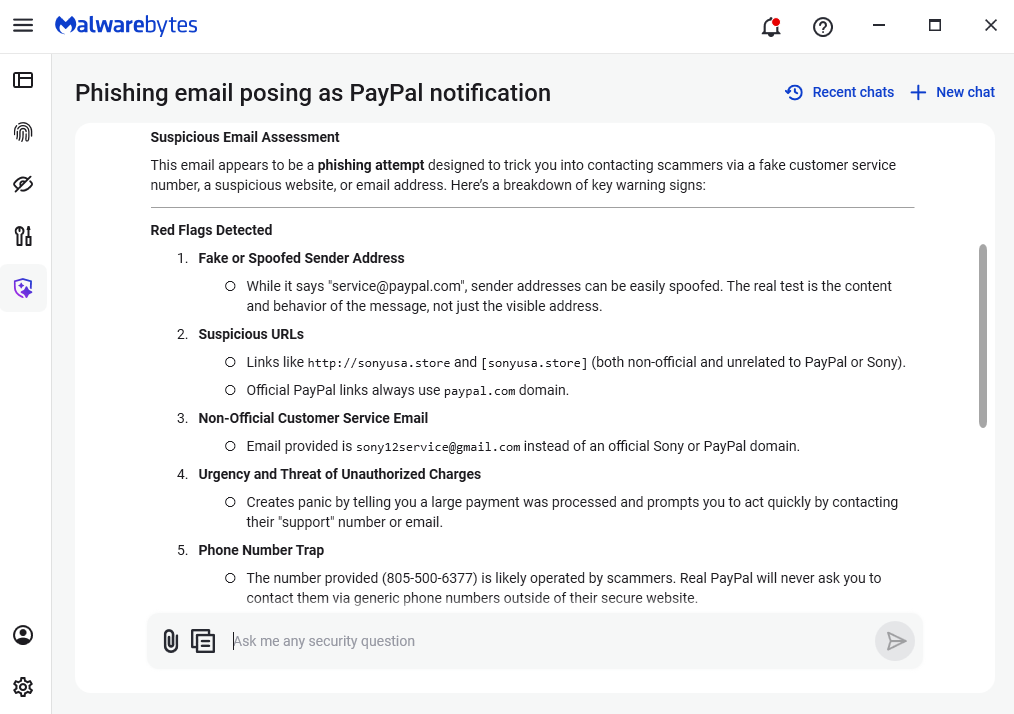
“Suspicious Email Assessment
This email appears to be a phishing attempt designed to trick you into contacting scammers via a fake customer service number, a suspicious website, or email address. Here’s a breakdown of key warning signs:
Red Flags Detected
- Fake or Spoofed Sender Address
- While it says “[email protected]”, sender addresses can be easily spoofed. The real test is the content and behavior of the message, not just the visible address.
- Suspicious URLs
- Links like http://sonyusa.store and [sonyusa.store] (both non-official and unrelated to PayPal or Sony).
- Official PayPal links always use paypal.com domain.
- Non-Official Customer Service Email
- Email provided is [email protected] instead of an official Sony or PayPal domain.
- Urgency and Threat of Unauthorized Charges
- Creates panic by telling you a large payment was processed and prompts you to act quickly by contacting their “support” number or email.
- Phone Number Trap
- The number provided (805-500-6377) is likely operated by scammers. Real PayPal will never ask you to contact them via generic phone numbers outside of their secure website.
- Unusual Formatting and Grammar
- Awkward phrasing and formatting errors are common in scams.”
We don’t just report on scams—we help detect them
Cybersecurity risks should never spread beyond a headline. If something looks dodgy to you, check if it’s a scam using Malwarebytes Scam Guard, a feature of our mobile protection products. Submit a screenshot, paste suspicious content, or share a text or phone number, and we’ll tell you if it’s a scam or legit. Download Malwarebytes Mobile Security for iOS or Android and try it today!